Lesson 1- Microsoft Excel 2010
•Microsoft Excel a software program created by
Microsoft that uses spreadsheets to organize
numbers and data with formulas and functions.
1
Excel Terminologies
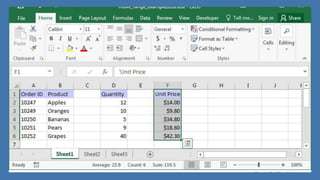
1. Workbook- automatically shows in the workspace when
you open Microsoft Excel 2010. Each workbook contains
three worksheets. Each workbook contains three
worksheets. A worksheet is a grid of cells, consisting of
65,536 rows and 256 columns. Spreadsheets information
such as text, numbers or mathematical formulas are
entered in the different cells.
2
2. Cell is the intersection between a row and a
column in a worksheet. A cell’s location is given by
the letter of the column followed by the number
of the intersecting row.
3. Cell Reference a cell referred to by its unique
address, or cell reference, which is the coordinate
of the intersection of a column and a row. To
identify a cell, specify the column letter first,
followed by the row number.
4
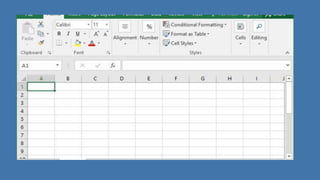
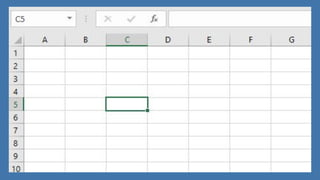
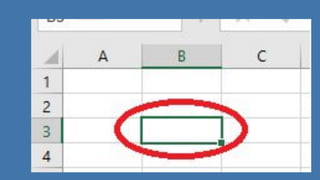
4. Active Cell is the one into which you can enter
data. The active cell is identified in three ways.
a. A heavy border surrounds the cell
b. The active cell reference shows immediately above
column A in the box
c. The column heading A and row heading 1 are
highlighted so it is easy to see which cell is active.
6
5. Range is a series of two or more adjacent cells in a
column or row or a rectangular group of cells.
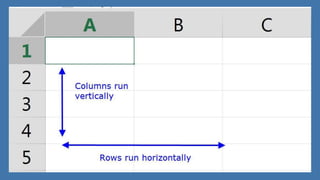
6. Column is a vertical group of cells within a worksheet.
7. Row is a horizontal group of cells within a worksheet.
Worksheet is a single layer or single sheet within the work
book. A worksheet can contain of data, charts, or both.
Instead of compiling all of your information into one
worksheet, you can create several worksheets within one
workbook file.
8
8. Pointer is the indicator that moves on your screen
as you move your mouse. The pointer changes its
shape to reflect the type of task you can perform at
a particular location.
11
Starting Microsoft Excel 2010
•Option 1: On the desktop, double click the Microsoft
Excel Shortcut icon.
•Option 2: On the task bar, Do the following steps:
12
1. Click on Start button.
2. Move your mouse over all Programs commands.
3. Select Microsoft Office.
4. A series of Microsoft Office programs will appear.
Click on the Microsoft Office Excel 2010 command.
13

Lesson 1- Microsoft Excel 2010.pdf

  • 1.
    Lesson 1- MicrosoftExcel 2010 •Microsoft Excel a software program created by Microsoft that uses spreadsheets to organize numbers and data with formulas and functions. 1
  • 2.
    Excel Terminologies 1. Workbook-automatically shows in the workspace when you open Microsoft Excel 2010. Each workbook contains three worksheets. Each workbook contains three worksheets. A worksheet is a grid of cells, consisting of 65,536 rows and 256 columns. Spreadsheets information such as text, numbers or mathematical formulas are entered in the different cells. 2
  • 4.
    2. Cell isthe intersection between a row and a column in a worksheet. A cell’s location is given by the letter of the column followed by the number of the intersecting row. 3. Cell Reference a cell referred to by its unique address, or cell reference, which is the coordinate of the intersection of a column and a row. To identify a cell, specify the column letter first, followed by the row number. 4
  • 6.
    4. Active Cellis the one into which you can enter data. The active cell is identified in three ways. a. A heavy border surrounds the cell b. The active cell reference shows immediately above column A in the box c. The column heading A and row heading 1 are highlighted so it is easy to see which cell is active. 6
  • 8.
    5. Range isa series of two or more adjacent cells in a column or row or a rectangular group of cells. 6. Column is a vertical group of cells within a worksheet. 7. Row is a horizontal group of cells within a worksheet. Worksheet is a single layer or single sheet within the work book. A worksheet can contain of data, charts, or both. Instead of compiling all of your information into one worksheet, you can create several worksheets within one workbook file. 8
  • 11.
    8. Pointer isthe indicator that moves on your screen as you move your mouse. The pointer changes its shape to reflect the type of task you can perform at a particular location. 11
  • 12.
    Starting Microsoft Excel2010 •Option 1: On the desktop, double click the Microsoft Excel Shortcut icon. •Option 2: On the task bar, Do the following steps: 12
  • 13.
    1. Click onStart button. 2. Move your mouse over all Programs commands. 3. Select Microsoft Office. 4. A series of Microsoft Office programs will appear. Click on the Microsoft Office Excel 2010 command. 13