Cell References
A cell reference refers to the value of a different cell or cell range on the current worksheet
or a different worksheet within the workbook.
Cell references come mainly in two styles. But, depending on the use of the dollar sign
symbol, the number of styles can be increased to four.
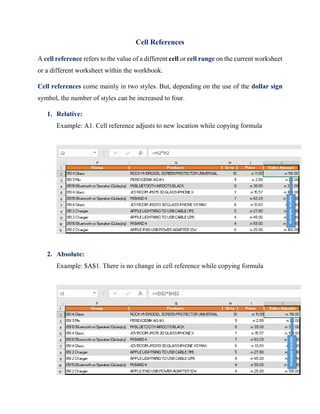
1. Relative:
Example: A1. Cell reference adjusts to new location while copying formula
2. Absolute:
Example: $A$1. There is no change in cell reference while copying formula
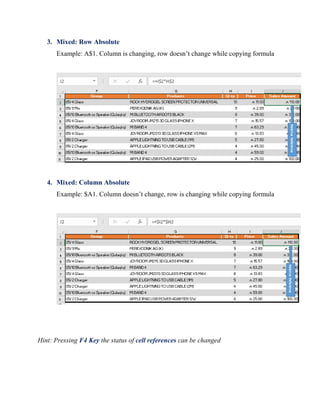
3. Mixed: Row Absolute
Example: A$1. Column is changing, row doesn’t change while copying formula
4. Mixed: Column Absolute
Example: $A1. Column doesn’t change, row is changing while copying formula
Hint: Pressing F4 Key the status of cell references can be changed

Cell references

  • 1.
    Cell References A cellreference refers to the value of a different cell or cell range on the current worksheet or a different worksheet within the workbook. Cell references come mainly in two styles. But, depending on the use of the dollar sign symbol, the number of styles can be increased to four. 1. Relative: Example: A1. Cell reference adjusts to new location while copying formula 2. Absolute: Example: $A$1. There is no change in cell reference while copying formula
  • 2.
    3. Mixed: RowAbsolute Example: A$1. Column is changing, row doesn’t change while copying formula 4. Mixed: Column Absolute Example: $A1. Column doesn’t change, row is changing while copying formula Hint: Pressing F4 Key the status of cell references can be changed