TREE VIEW
TOPIC:
PRESENTED
BY
AMINA BATOOL
DEPARTMENT OF BIOTECHNOLOGY
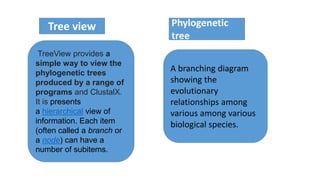
TreeView provides a
simple way to view the
phylogenetic trees
produced by a range of
programs and ClustalX.
It is presents
a hierarchical view of
information. Each item
(often called a branch or
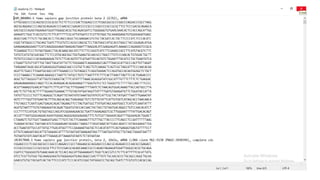
a node) can have a
number of subitems.
A branching diagram
showing the
evolutionary
relationships among
various among various
biological species.
Tree view Phylogenetic
tree
 Early representations
of "branching"
phylogenetic trees is
discover by Edward
Hitchcock (first edition:
1840).
 Charles
Darwin featured a
diagrammatic evolutio
nary "tree" in his 1859
book On the Origin of
Species.
History
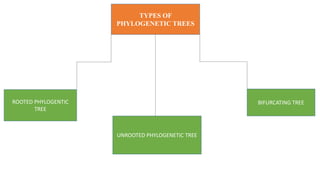
TYPES OF
PHYLOGENETIC TREES
ROOTED PHYLOGENTIC
TREE
BIFURCATING TREE
UNROOTED PHYLOGENETIC TREE
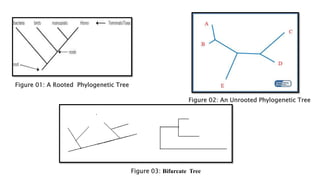
Rooted
Tree
 It shows
the evolutionary history.
 It has a basal node
which is called the root,
representing the
common ancestor of all
the groups of the tree.
 A rooted tree can be used
to study the entire groups
of organisms.
Unrooted
Tree
 It lacks a common
ancestor or a basal
node.
 It does not indicate the
origin of evolution.
 It depicts only the
relationship between
organisms irrespective
of the direction of the
evolutionary time line
Bifurcate
Tree
 A tree that
bifurcates has a
maximum of 2
descendants arising
from each of the
interior nodes.
Figure 01: A Rooted Phylogenetic Tree
Figure 02: An Unrooted Phylogenetic Tree
Figure 03: Bifurcate Tree
APPLICATION
Understanding
human origin
Understanding
biogeography
Understanding the
process of molecular
evaluation
Evolutionary
relationships among
various species
Origin of disease
TreeView
X
Tree view X is an open source program to
display phylogenetic trees on Linux, Unix,
Mac OS X, and Windows platforms.
It can read and display NEXUS and Newick
format tree files (such as those output by
PAUP, ClustalX, TREE-PUZZLE, and other
programs).
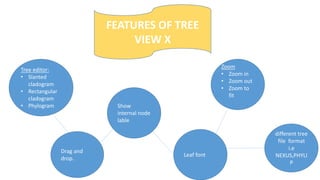
FEATURES OF TREE
VIEW X
Tree editor:
• Slanted
cladogram
• Rectangular
cladogram
• Phylogram
Drag and
drop.
Show
internal node
lable
different tree
file format
i.e
NEXUS,PHYLI
P
Leaf font
Zoom
• Zoom in
• Zoom out
• Zoom to
fit
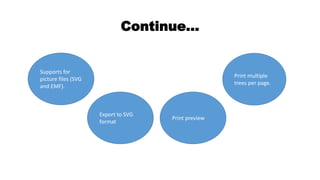
Supports for
picture files (SVG
and EMF).
Print multiple
trees per page.
Print preview
Export to SVG
format
Continue…
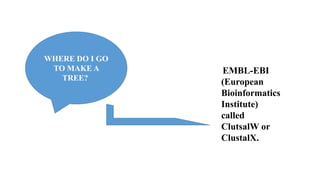
WHERE DO I GO
TO MAKE A
TREE?
EMBL-EBI
(European
Bioinformatics
Institute)
called
ClutsalW or
ClustalX.
Steps to follow:
• First of all go to NCBI and
retrieved the sequence of
any gene in fasta format.
• Then open BLAST
• Select the nucleotide blast
• Then paste the fasta sequence that is
retrived from NCBI.
• Remove all the spaces of sequence.
• Click blast.
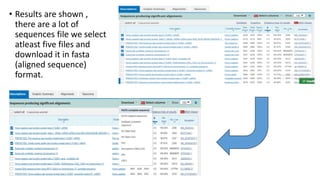
• Results are shown ,
there are a lot of
sequences file we select
atleast five files and
download it in fasta
(aligned sequence)
format.
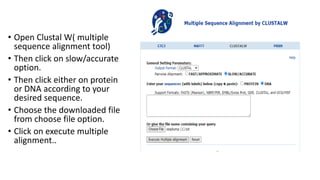
• Open Clustal W( multiple
sequence alignment tool)
• Then click on slow/accurate
option.
• Then click either on protein
or DNA according to your
desired sequence.
• Choose the downloaded file
from choose file option.
• Click on execute multiple
alignment..
• Results are shown of five sequences.
• It shows the relationship and
resemblance of one specie with other
specie that how closely related to each
other.
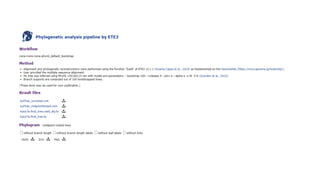
• Then select menu click on PhyML
bootstrap and press Execute.
• Results are shown that either the tree is rooted or unrooted.
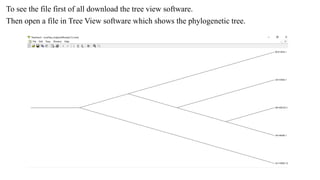
To see the file first of all download the tree view software.
Then open a file in Tree View software which shows the phylogenetic tree.
Tree View X software ppt.pptx

Tree View X software ppt.pptx

  • 1.
  • 2.
  • 3.
    TreeView provides a simpleway to view the phylogenetic trees produced by a range of programs and ClustalX. It is presents a hierarchical view of information. Each item (often called a branch or a node) can have a number of subitems. A branching diagram showing the evolutionary relationships among various among various biological species. Tree view Phylogenetic tree
  • 4.
     Early representations of"branching" phylogenetic trees is discover by Edward Hitchcock (first edition: 1840).  Charles Darwin featured a diagrammatic evolutio nary "tree" in his 1859 book On the Origin of Species. History
  • 5.
    TYPES OF PHYLOGENETIC TREES ROOTEDPHYLOGENTIC TREE BIFURCATING TREE UNROOTED PHYLOGENETIC TREE
  • 6.
    Rooted Tree  It shows theevolutionary history.  It has a basal node which is called the root, representing the common ancestor of all the groups of the tree.  A rooted tree can be used to study the entire groups of organisms. Unrooted Tree  It lacks a common ancestor or a basal node.  It does not indicate the origin of evolution.  It depicts only the relationship between organisms irrespective of the direction of the evolutionary time line Bifurcate Tree  A tree that bifurcates has a maximum of 2 descendants arising from each of the interior nodes.
  • 7.
    Figure 01: ARooted Phylogenetic Tree Figure 02: An Unrooted Phylogenetic Tree Figure 03: Bifurcate Tree
  • 8.
    APPLICATION Understanding human origin Understanding biogeography Understanding the processof molecular evaluation Evolutionary relationships among various species Origin of disease
  • 9.
    TreeView X Tree view Xis an open source program to display phylogenetic trees on Linux, Unix, Mac OS X, and Windows platforms. It can read and display NEXUS and Newick format tree files (such as those output by PAUP, ClustalX, TREE-PUZZLE, and other programs).
  • 10.
    FEATURES OF TREE VIEWX Tree editor: • Slanted cladogram • Rectangular cladogram • Phylogram Drag and drop. Show internal node lable different tree file format i.e NEXUS,PHYLI P Leaf font Zoom • Zoom in • Zoom out • Zoom to fit
  • 11.
    Supports for picture files(SVG and EMF). Print multiple trees per page. Print preview Export to SVG format Continue…
  • 12.
    WHERE DO IGO TO MAKE A TREE? EMBL-EBI (European Bioinformatics Institute) called ClutsalW or ClustalX.
  • 13.
    Steps to follow: •First of all go to NCBI and retrieved the sequence of any gene in fasta format.
  • 14.
    • Then openBLAST • Select the nucleotide blast • Then paste the fasta sequence that is retrived from NCBI. • Remove all the spaces of sequence. • Click blast.
  • 15.
    • Results areshown , there are a lot of sequences file we select atleast five files and download it in fasta (aligned sequence) format.
  • 17.
    • Open ClustalW( multiple sequence alignment tool) • Then click on slow/accurate option. • Then click either on protein or DNA according to your desired sequence. • Choose the downloaded file from choose file option. • Click on execute multiple alignment..
  • 18.
    • Results areshown of five sequences. • It shows the relationship and resemblance of one specie with other specie that how closely related to each other. • Then select menu click on PhyML bootstrap and press Execute.
  • 19.
    • Results areshown that either the tree is rooted or unrooted.
  • 21.
    To see thefile first of all download the tree view software. Then open a file in Tree View software which shows the phylogenetic tree.