Touch Screen Sensor Quanling zheng
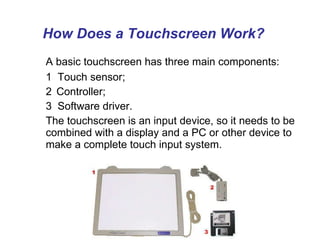
How Does a Touchscreen Work?     A basic touchscreen has three main components: 1  Touch sensor; 2 Controller;  3  Software driver. The touchscreen is an input device, so it needs to be combined with a display and a PC or other device to make a complete touch input system.
Touch Sensor A touch screen sensor is a clear glass panel with a touch responsive surface. The touch sensor/panel is placed over a display screen so that the responsive area of the panel covers the viewable area of the video screen. There are several different touch sensor technologies on the market today, each using a different method to detect touch input. The sensor generally has an electrical current or signal going through it and touching the screen can cause a voltage or signal change. This change is used to determine the location of the touch to the screen.
Controller The controller connects between the touch sensor and the PC. It takes information from the touch sensor and translates it into information that PC can understand. The controller determines what type of interface/connection you will need on the PC. Controllers are available that can connect to a Serial/COM port (PC) or to a USB port. Specialized controllers are also available that work with DVD players and other devices.
Software Driver The driver allows the touchscreen and computer to work together. It tells the computer's operating system how to interpret the touch event information that is sent from the controller. Most touch screen drivers today are a mouse-emulation type driver. This makes touching the screen as same as clicking your mouse at the same location on the screen. This allows the touchscreen to work with existing software and allows new applications to be developed without the need for touchscreen specific programming.
Touchscreen Technology   Resistive touchscreen Capacitive touchscreen Infrared  touchscreen Surface acoustic wave (SAW) touchscreen Strain gauge touchscreen Optical imaging touchscreen Dispersive signal technology touchscreen
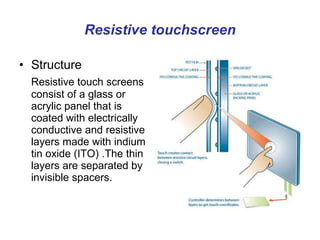
Resistive touchscreen Structure Resistive touch screens consist of a glass or acrylic panel that is coated with electrically conductive and resistive layers made with indium tin oxide (ITO) .The thin layers are separated by invisible spacers.
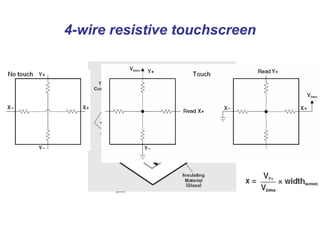
4-wire resistive touchscreen
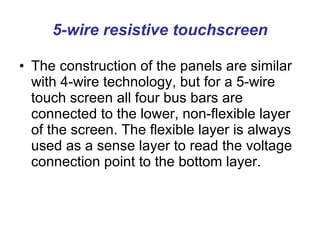
5-wire resistive touchscreen The construction of the panels are similar with 4-wire technology, but for a 5-wire touch screen all four bus bars are connected to the lower, non-flexible layer of the screen. The flexible layer is always used as a sense layer to read the voltage connection point to the bottom layer.
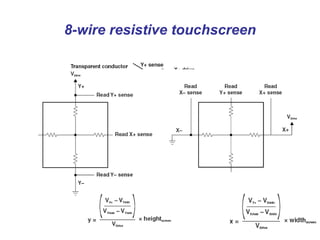
8-wire resistive touchscreen
Resistive touchscreen Characters: Cost effective solutions  Activated by a stylus, a finger or gloved hand  Not affected by dirt, dust, water, or light   75%~85% clarify resistive layers can be damaged by a very sharp object
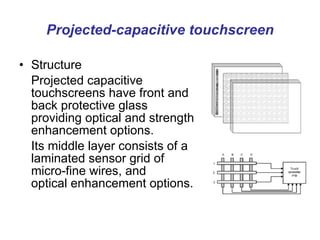
Projected-capacitive touchscreen Structure Projected capacitive touchscreens have front and back protective glass providing optical and strength enhancement options. Its middle layer consists of a laminated sensor grid of micro-fine wires, and optical enhancement options.
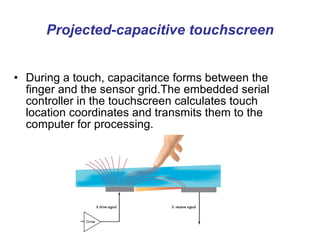
Projected-capacitive touchscreen During a touch, capacitance forms between the finger and the sensor grid.The embedded serial controller in the touchscreen calculates touch location coordinates and transmits them to the computer for processing.
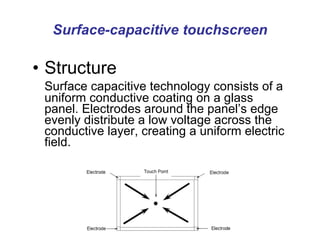
Surface-capacitive touchscreen Structure Surface capacitive technology consists of a uniform conductive coating on a glass panel. Electrodes around the panel’s edge evenly distribute a low voltage across the conductive layer, creating a uniform electric field.
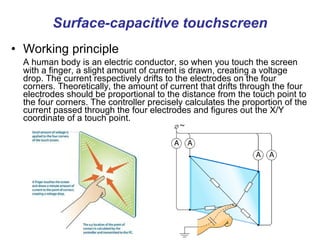
Surface-capacitive touchscreen Working principle A human body is an electric conductor, so when you touch the screen with a finger, a slight amount of current is drawn, creating a voltage drop. The current respectively drifts to the electrodes on the four corners. Theoretically, the amount of current that drifts through the four electrodes should be proportional to the distance from the touch point to the four corners. The controller precisely calculates the proportion of the current passed through the four electrodes and figures out the X/Y coordinate of a touch point.
Capacitive touchscreen Characters: Durable and resistant to scratches for demanding applications  Faster and more responsive  Immune to surface contaminants  Superior optical clarity, brighter display and less surface reflection  Must be touched by finger, will not work with any non-conductive input
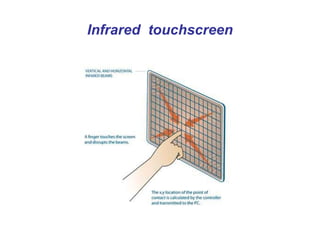
Infrared  touchscreen Infrared (IR) technology relies on the interruption of an IR light grid in front of the display screen. The touch frame contains a row of IR-light emitting diode (LEDs) and photo transistors, each mounted on two opposite sides to create a grid of invisible infrared light.  The IR controller sequentially pulses the LEDs to create a grid of IR light beams. When a stylus, such as a finger, enters the grid, it obstructs the beams. One or more photo transistors from each axis detect the absence of light and transmit signals that identifies the x and y coordinates.
Infrared  touchscreen
Infrared  touchscreen Characters: Clear as glass, improves reading ability Most durable surface
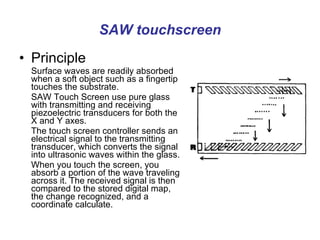
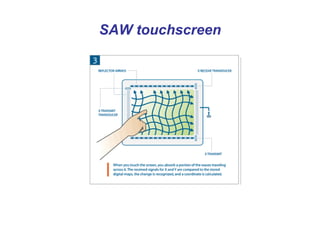
SAW touchscreen Principle Surface waves are readily absorbed when a soft object such as a fingertip touches the substrate. SAW Touch Screen   use pure glass with transmitting and receiving piezoelectric transducers for both the X and Y axes.  The touch screen controller sends an electrical signal to the transmitting transducer, which converts the signal into ultrasonic waves within the glass. When you touch the screen, you absorb a portion of the wave traveling across it. The received signal is then compared to the stored digital map, the change recognized, and a coordinate calculate.
SAW touchscreen
SAW touchscreen Characters: Durable glass construction  High optical clarity  Activated by a finger, gloved hand or soft tip  Not completely sealable, can be affected by large amounts of dirt, dust, and / or water in the environment
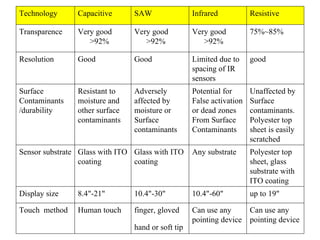
Can use any  pointing device Can use any  pointing device finger, gloved hand or soft tip   Human touch Touch  method up to 19" 10.4"-60" 10.4"-30" 8.4"-21" Display size Polyester top  sheet, glass substrate with ITO coating Any substrate Glass with ITO  coating Glass with ITO  coating Sensor substrate Unaffected by  Surface contaminants. Polyester top sheet is easily scratched Potential for False activation or dead zones From Surface Contaminants Adversely  affected by moisture or Surface contaminants Resistant to moisture and other surface contaminants Surface Contaminants /durability good Limited due to spacing of IR sensors Good Good Resolution 75%~85% Very good >92% Very good >92% Very good >92% Transparence Resistive Infrared SAW Capacitive Technology
Multi-touch technology Multi-touch  denotes a set of interaction techniques which allow computer users to control graphical applications with several fingers.  Products: Apple iPhone, iPod touch, MacBook Air, and MacBook Pro  Microsoft Surface  ……

Touch screen sensor

  • 1.
    Touch Screen SensorQuanling zheng
  • 2.
    How Does aTouchscreen Work?   A basic touchscreen has three main components: 1 Touch sensor; 2 Controller; 3 Software driver. The touchscreen is an input device, so it needs to be combined with a display and a PC or other device to make a complete touch input system.
  • 3.
    Touch Sensor Atouch screen sensor is a clear glass panel with a touch responsive surface. The touch sensor/panel is placed over a display screen so that the responsive area of the panel covers the viewable area of the video screen. There are several different touch sensor technologies on the market today, each using a different method to detect touch input. The sensor generally has an electrical current or signal going through it and touching the screen can cause a voltage or signal change. This change is used to determine the location of the touch to the screen.
  • 4.
    Controller The controllerconnects between the touch sensor and the PC. It takes information from the touch sensor and translates it into information that PC can understand. The controller determines what type of interface/connection you will need on the PC. Controllers are available that can connect to a Serial/COM port (PC) or to a USB port. Specialized controllers are also available that work with DVD players and other devices.
  • 5.
    Software Driver Thedriver allows the touchscreen and computer to work together. It tells the computer's operating system how to interpret the touch event information that is sent from the controller. Most touch screen drivers today are a mouse-emulation type driver. This makes touching the screen as same as clicking your mouse at the same location on the screen. This allows the touchscreen to work with existing software and allows new applications to be developed without the need for touchscreen specific programming.
  • 6.
    Touchscreen Technology Resistive touchscreen Capacitive touchscreen Infrared touchscreen Surface acoustic wave (SAW) touchscreen Strain gauge touchscreen Optical imaging touchscreen Dispersive signal technology touchscreen
  • 7.
    Resistive touchscreen StructureResistive touch screens consist of a glass or acrylic panel that is coated with electrically conductive and resistive layers made with indium tin oxide (ITO) .The thin layers are separated by invisible spacers.
  • 8.
  • 9.
    5-wire resistive touchscreenThe construction of the panels are similar with 4-wire technology, but for a 5-wire touch screen all four bus bars are connected to the lower, non-flexible layer of the screen. The flexible layer is always used as a sense layer to read the voltage connection point to the bottom layer.
  • 10.
  • 11.
    Resistive touchscreen Characters:Cost effective solutions Activated by a stylus, a finger or gloved hand Not affected by dirt, dust, water, or light 75%~85% clarify resistive layers can be damaged by a very sharp object
  • 12.
    Projected-capacitive touchscreen StructureProjected capacitive touchscreens have front and back protective glass providing optical and strength enhancement options. Its middle layer consists of a laminated sensor grid of micro-fine wires, and optical enhancement options.
  • 13.
    Projected-capacitive touchscreen Duringa touch, capacitance forms between the finger and the sensor grid.The embedded serial controller in the touchscreen calculates touch location coordinates and transmits them to the computer for processing.
  • 14.
    Surface-capacitive touchscreen StructureSurface capacitive technology consists of a uniform conductive coating on a glass panel. Electrodes around the panel’s edge evenly distribute a low voltage across the conductive layer, creating a uniform electric field.
  • 15.
    Surface-capacitive touchscreen Workingprinciple A human body is an electric conductor, so when you touch the screen with a finger, a slight amount of current is drawn, creating a voltage drop. The current respectively drifts to the electrodes on the four corners. Theoretically, the amount of current that drifts through the four electrodes should be proportional to the distance from the touch point to the four corners. The controller precisely calculates the proportion of the current passed through the four electrodes and figures out the X/Y coordinate of a touch point.
  • 16.
    Capacitive touchscreen Characters:Durable and resistant to scratches for demanding applications Faster and more responsive Immune to surface contaminants Superior optical clarity, brighter display and less surface reflection Must be touched by finger, will not work with any non-conductive input
  • 17.
    Infrared touchscreenInfrared (IR) technology relies on the interruption of an IR light grid in front of the display screen. The touch frame contains a row of IR-light emitting diode (LEDs) and photo transistors, each mounted on two opposite sides to create a grid of invisible infrared light. The IR controller sequentially pulses the LEDs to create a grid of IR light beams. When a stylus, such as a finger, enters the grid, it obstructs the beams. One or more photo transistors from each axis detect the absence of light and transmit signals that identifies the x and y coordinates.
  • 18.
  • 19.
    Infrared touchscreenCharacters: Clear as glass, improves reading ability Most durable surface
  • 20.
    SAW touchscreen PrincipleSurface waves are readily absorbed when a soft object such as a fingertip touches the substrate. SAW Touch Screen use pure glass with transmitting and receiving piezoelectric transducers for both the X and Y axes. The touch screen controller sends an electrical signal to the transmitting transducer, which converts the signal into ultrasonic waves within the glass. When you touch the screen, you absorb a portion of the wave traveling across it. The received signal is then compared to the stored digital map, the change recognized, and a coordinate calculate.
  • 21.
  • 22.
    SAW touchscreen Characters:Durable glass construction High optical clarity Activated by a finger, gloved hand or soft tip Not completely sealable, can be affected by large amounts of dirt, dust, and / or water in the environment
  • 23.
    Can use any pointing device Can use any pointing device finger, gloved hand or soft tip Human touch Touch method up to 19" 10.4"-60" 10.4"-30" 8.4"-21" Display size Polyester top sheet, glass substrate with ITO coating Any substrate Glass with ITO coating Glass with ITO coating Sensor substrate Unaffected by Surface contaminants. Polyester top sheet is easily scratched Potential for False activation or dead zones From Surface Contaminants Adversely affected by moisture or Surface contaminants Resistant to moisture and other surface contaminants Surface Contaminants /durability good Limited due to spacing of IR sensors Good Good Resolution 75%~85% Very good >92% Very good >92% Very good >92% Transparence Resistive Infrared SAW Capacitive Technology
  • 24.
    Multi-touch technology Multi-touch denotes a set of interaction techniques which allow computer users to control graphical applications with several fingers. Products: Apple iPhone, iPod touch, MacBook Air, and MacBook Pro Microsoft Surface ……