Learning Benchmarking Forum   Facilitator: Bryan Chapman Chief Learning Strategist Chapman Alliance [email_address] 24x7 Learning presents
Agenda Benchmarking Learning Infrastructure Alignment with Business and Instructional Needs Benchmarking Learning Content Development (Rapid and Simulation-Based) Benchmarking the use of Web 2.0 learning technologies and informal learning Benchmarking Blended Learning Benchmarking Talent and Performance Management Practices
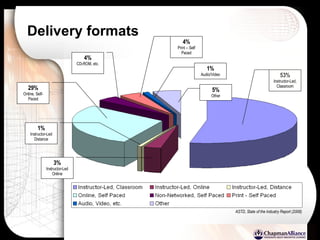
Delivery formats 53% Instructor-Led, Classroom ASTD, State of the Industry Report (2006) 29% Online, Self-Paced 1% Instructor-Led Distance 3% Instructor-Led Online 4% CD-ROM, etc. 4% Print – Self Paced 1% Audio/Video 5% Other
Benchmark: Learning Infrastructure and Alignment
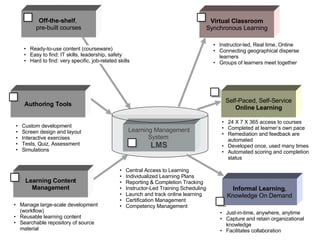
Virtual Classroom Synchronous Learning Self-Paced, Self-Service  Online Learning Informal Learning , Knowledge On Demand Off-the-shelf ,  pre-built courses Authoring Tools Learning Content Management Ready-to-use content (courseware) Easy to find: IT skills, leadership, safety Hard to find: very specific, job-related skills Custom development Screen design and layout Interactive exercises Tests, Quiz, Assessment Simulations Manage large-scale development (workflow) Reusable learning content Searchable repository of source material Central Access to Learning Individualized Learning Plans Reporting & Completion Tracking Instructor-Led Training Scheduling Launch and track online learning Certification Management Competency Management Instructor-led, Real time, Online Connecting geographical disperse learners Groups of learners meet together 24 X 7 X 365 access to courses Completed at learner’s own pace Remediation and feedback are automated Developed once, used many times Automated scoring and completion status Just-in-time, anywhere, anytime Capture and retain organizational knowledge Facilitates collaboration Learning Management System   LMS
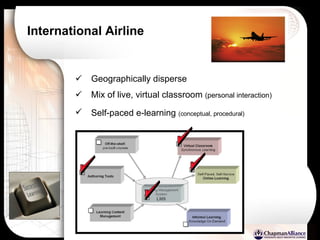
International Airline Geographically disperse Mix of live, virtual classroom  (personal interaction) Self-paced e-learning  (conceptual, procedural)
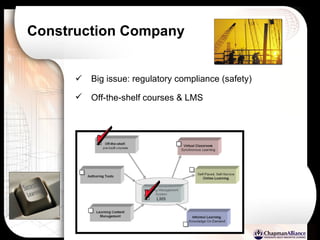
Construction Company Big issue: regulatory compliance (safety) Off-the-shelf courses & LMS
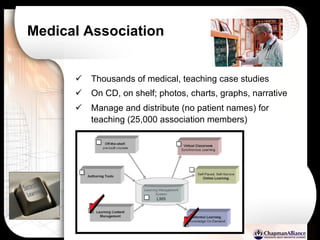
Medical Association Thousands of medical, teaching case studies On CD, on shelf; photos, charts, graphs, narrative Manage and distribute (no patient names) for teaching (25,000 association members)
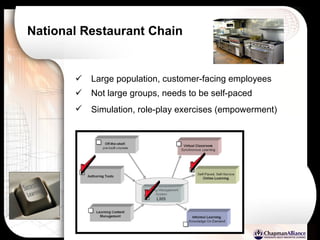
National Restaurant Chain Large population, customer-facing employees Not large groups, needs to be self-paced Simulation, role-play exercises (empowerment)
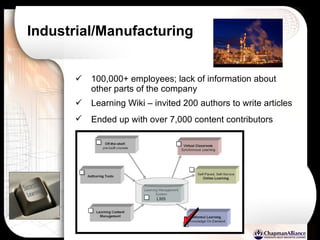
Industrial/Manufacturing 100,000+ employees; lack of information about other parts of the company Learning Wiki – invited 200 authors to write articles Ended up with over 7,000 content contributors
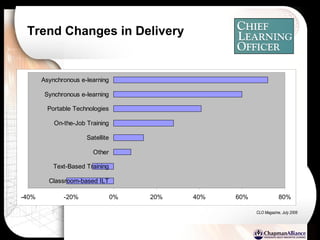
Trend Changes in Delivery CLO Magazine, July 2006
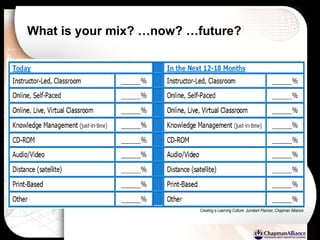
What is your mix? …now? …future? Creating a Learning Culture: Jumstart Planner, Chapman Alliance
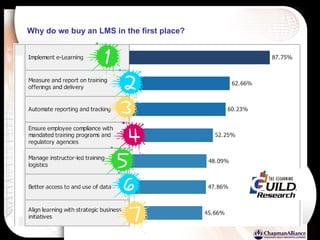
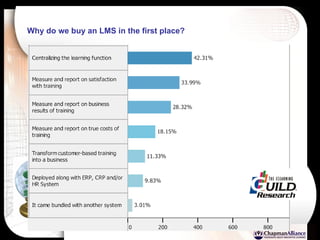
Why do we buy an LMS in the first place?
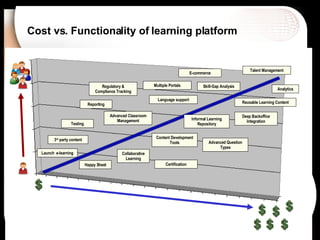
Cost vs. Functionality of learning platform Skill-Gap Analysis Launch  e-learning Advanced Classroom Management Content Development Tools Reusable Learning Content Happy Sheet Talent Management Analytics Language support 3 rd  party content Deep Backoffice Integration Certification Testing Advanced Question Types Reporting Collaborative Learning E-commerce Informal Learning Repository Regulatory & Compliance Tracking Multiple Portals
How long…? How long does it take to create 1 hour of  Classroom  Instruction (ILT)?
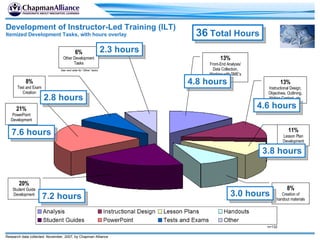
20% Student Guide Development 21% PowerPoint Development 13% Front-End Analysis/ Data Collection, Working with SME’s 8% Test and Exam Creation 13% Instructional Design, Objectives, Outlining, Writing Content, etc. 6% Other Development Tasks 11% Lesson Plan Development 8% Creation of handout materials n=132 See next slide for “Other” tasks Development of Instructor-Led Training (ILT) Itemized Development Tasks, with hours overlay Research data collected: November, 2007, by Chapman Alliance 36  Total Hours 4.8 hours 4.6 hours 3.8 hours 3.0 hours 7.2 hours 7.6 hours 2.8 hours 2.3 hours
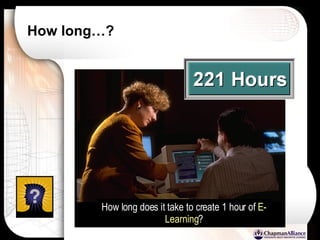
How long…? How long does it take to create 1 hour of  E-Learning ?
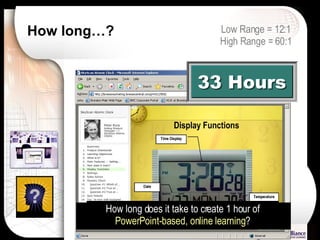
How long…? How long does it take to create 1 hour of  PowerPoint-based, online learning ? Low Range = 12:1 High Range = 60:1
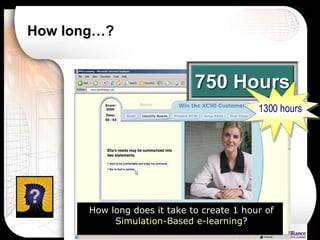
How long…? How long does it take to create 1 hour of  Simulation-Based e-learning ? 1300 hours
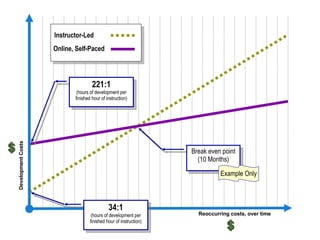
Development Costs Reoccurring costs, over time Instructor-Led Online, Self-Paced Break even point (10 Months) 221:1 (hours of development per finished hour of instruction) 34:1 (hours of development per finished hour of instruction) Example Only
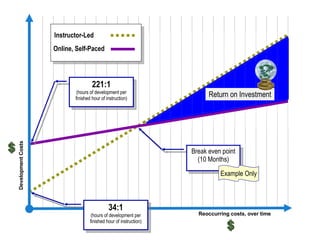
Development Costs Reoccurring costs, over time Instructor-Led Online, Self-Paced Break even point (10 Months) 221:1 (hours of development per finished hour of instruction) 34:1 (hours of development per finished hour of instruction) Return on Investment Example Only
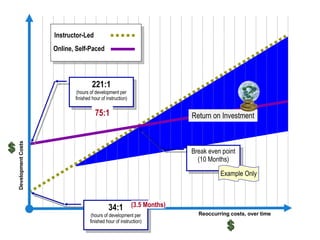
Development Costs Reoccurring costs, over time Instructor-Led Online, Self-Paced 221:1 (hours of development per finished hour of instruction) 34:1 (hours of development per finished hour of instruction) 75:1 Break even point (10 Months) Example Only (3.5 Months) Return on Investment
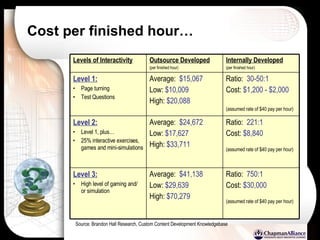
ROI factors Infrastructure Cost (LMS, LCMS, etc.) Internal Development costs 75:1 (for quick and dirty) 220:1 (for Level 2) 750:1 (highly interactive, simulation) Outsourcing Custom Development Cost of 3 rd  party courseware # of learners Required travel (geographic distribution) {less tangible} Opportunity costs
Additional ROI Benefits Shorter Overall Training Times Increased Increased Consistency  Keeping up with Rapidly Changing Information Open enrollment Building Customer/Brand Loyalty Capturing and Maintaining Corporate Knowledge
Rapid Development, without sacrificing Interactivity
 
PCWeek Shoot Out Several teams invited to compete Convert a 54-hour instructor-led course to online learning 2 days of development 1 person at the computer at any time Storyboard…. actually a lesson plan Present course to 20 judges and 150 members of media gallery Watched the other teams in action Wide variety of approaches
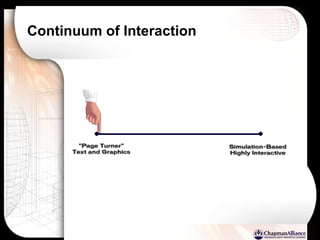
Continuum of Interaction
Cost per finished hour… Source: Brandon Hall Research, Custom Content Development Knowledgebase Ratio:  750:1 Cost:  $30,000 (assumed rate of $40 pay per hour) Average:  $41,138 Low:  $29,639 High:  $70,279 Level 3: High level of gaming and/ or simulation Ratio:  221:1 Cost:  $8,840 (assumed rate of $40 pay per hour) Average:  $24,672 Low:  $17,627 High:  $33,711 Level 2: Level 1, plus… 25% interactive exercises, games and mini-simulations Ratio:  30-50:1 Cost:  $1,200 - $2,000 (assumed rate of $40 pay per hour)   Average:  $15,067 Low:  $10,009 High:  $20,088 Level 1: Page turning Test Questions Internally Developed (per finished hour) Outsource Developed (per finished hour) Levels of Interactivity
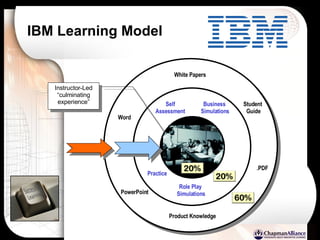
IBM Learning Model White Papers Product Knowledge PowerPoint Word .PDF Student  Guide Role Play  Simulations Business  Simulations Self Assessment Instructor-Led “ culminating experience” Practice
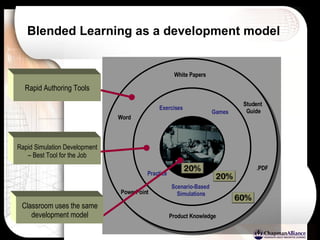
Blended Learning as a development model White Papers Product Knowledge PowerPoint Word .PDF Student  Guide Games Exercises Practice Scenario-Based  Simulations Classroom uses the same development model Rapid Simulation Development – Best Tool for the Job Rapid Authoring Tools
“ Remember” – “Do”
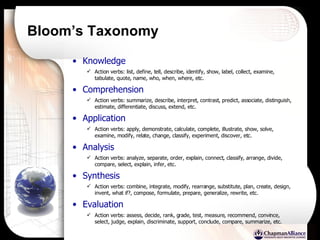
Bloom’s Taxonomy Knowledge Action verbs: list, define, tell, describe, identify, show, label, collect, examine, tabulate, quote, name, who, when, where, etc.   Comprehension  Action verbs: summarize, describe, interpret, contrast, predict, associate, distinguish, estimate, differentiate, discuss, extend, etc.   Application  Action verbs: apply, demonstrate, calculate, complete, illustrate, show, solve, examine, modify, relate, change, classify, experiment, discover, etc.  Analysis  Action verbs: analyze, separate, order, explain, connect, classify, arrange, divide, compare, select, explain, infer, etc.   Synthesis  Action verbs: combine, integrate, modify, rearrange, substitute, plan, create, design, invent, what if?, compose, formulate, prepare, generalize, rewrite, etc.   Evaluation  Action verbs: assess, decide, rank, grade, test, measure, recommend, convince, select, judge, explain, discriminate, support, conclude, compare, summarize, etc.
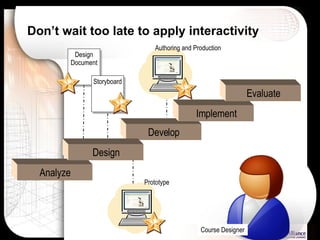
Don’t wait too late to apply interactivity Course Designer Analyze Develop Implement Evaluate Design Document Storyboard Design Prototype Authoring and Production
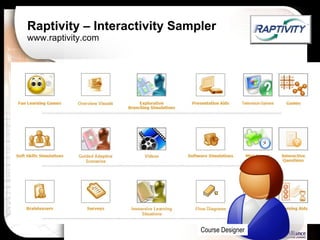
Raptivity – Interactivity Sampler www.raptivity.com Course Designer
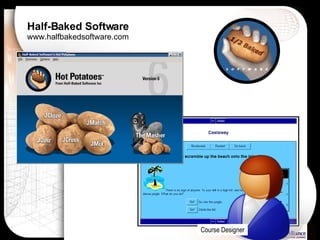
Half-Baked Software www.halfbakedsoftware.com Course Designer
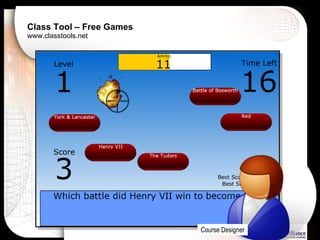
Class Tool – Free Games www.classtools.net Course Designer
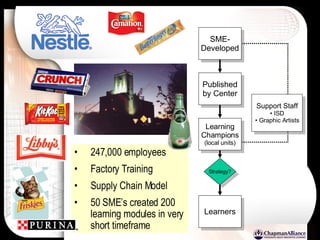
247,000 employees Factory Training Supply Chain Model 50 SME’s created 200 learning modules in very short timeframe SME- Developed Published by Center Learning Champions (local units) Support Staff ISD Graphic Artists Strategy? Learners
Interactivity to meet instructional goals Course Designer Interactivity Menu… Discovery Exercise Progressive Disclosure Branching Scenario  (troubleshooting) Software Application Simulation Labeling Exercise Role-play simulation Discrimination Exercise  (classification) Game show  (i.e. Jeopardy, Millionaire) Simple Games  (Tic-Tac-Toe) Crossword puzzle  (reinforce terminology) Sequencing Exercise Interactive Glossary Flash Cards  (recall) Branching Questions Matching Video Interaction Animated Diagram
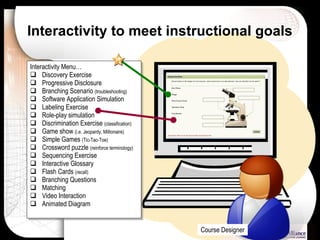
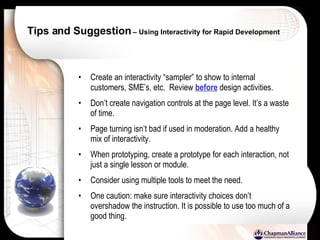
Tips and Suggestion  – Using Interactivity for Rapid Development Create an interactivity “sampler” to show to internal customers, SME’s, etc.  Review  before  design activities. Don’t create navigation controls at the page level. It’s a waste of time. Page turning isn’t bad if used in moderation. Add a healthy mix of interactivity. When prototyping, create a prototype for each interaction, not just a single lesson or module. Consider using multiple tools to meet the need. One caution: make sure interactivity choices don’t overshadow the instruction. It is possible to use too much of a good thing.
Benchmarking the Use of Web 2.0 Learning Technologies and Informal Learning
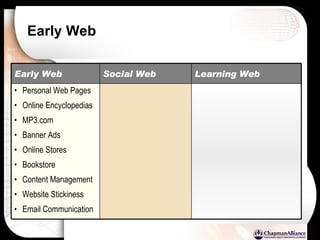
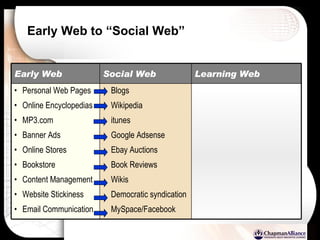
Early Web Social Web Personal Web Pages Online Encyclopedias MP3.com Banner Ads Online Stores Bookstore Content Management Website Stickiness Email Communication Learning Web Early Web
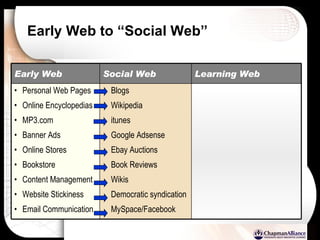
Early Web to “Social Web” Blogs Wikipedia itunes Google Adsense Ebay Auctions  Book Reviews Wikis Democratic syndication MySpace/Facebook Social Web Personal Web Pages Online Encyclopedias MP3.com Banner Ads Online Stores Bookstore Content Management Website Stickiness Email Communication Learning Web Early Web
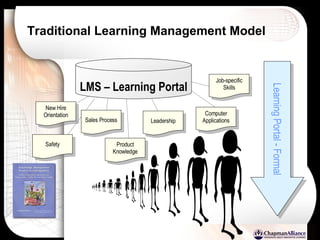
Traditional Learning Management Model New Hire Orientation Learning Portal - Formal LMS – Learning Portal Sales Process Leadership Computer Applications Safety Product Knowledge Job-specific Skills
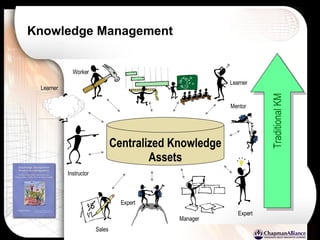
Knowledge Management Traditional KM Centralized Knowledge Assets Expert Learner Instructor Worker Manager Mentor Expert Learner Sales
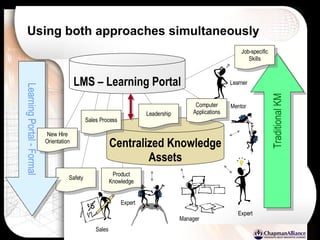
Using both approaches simultaneously Traditional KM Centralized Knowledge Assets Expert Learner Manager Mentor Expert Sales LMS – Learning Portal Sales Process Leadership Computer Applications Safety Product Knowledge Job-specific Skills Learning Portal - Formal New Hire Orientation
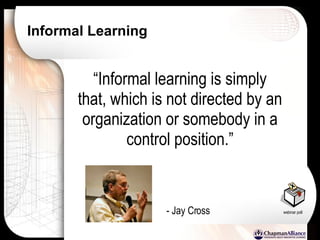
Informal Learning “ Informal learning is simply that, which is not directed by an organization or somebody in a control position.” - Jay Cross webinar poll
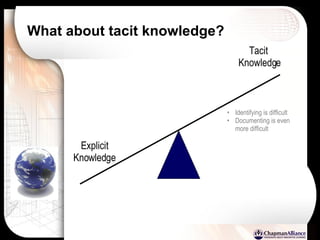
What about tacit knowledge? Explicit Knowledge Tacit  Knowledge Identifying is difficult Documenting is even more difficult
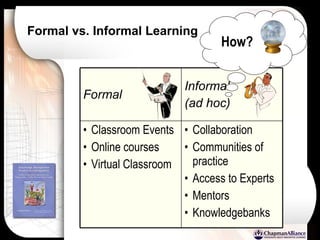
Formal vs. Informal Learning Collaboration Communities of practice Access to Experts Mentors Knowledgebanks Classroom Events Online courses Virtual Classroom Informal (ad hoc) Formal How?
Delivery formats
Definition of Wiki Wiki:   A website created by a group; rather than by an individual. In Hawaiian, Wiki means “quick” W hat  I   K now  I s…  (descriptive of the process of collaborative content development.
Ideas for using Wikis in Learning Ad hoc, Knowledge Management Repository Centralized location for documenting and organizing procedural information Group-based learning assignments (work as a team)  Soliciting information from Subject Matter Experts; allowing a group of experts to contribute and edit content. Creating content with varying points of view (Groupthink) Learning content delivery for content that changes rapidly (bio-technology). Learn by teaching (Wiki authors)
Tips to successfully using Wikis for Learning Work on the initial taxonomy as a group, then turn them loose The more specific the topic focus, the better the content. Designated time period (when used as part of a structured course) Allow the Wiki to develop organically without enforcing too much workflow Allow learners to correct each other; rather than jumping in to correct problems (constructivist approach) Hold informal training sessions to teach Wiki syntax especially to Subject Matter Expert Lead by example – post excellent content
Title here….
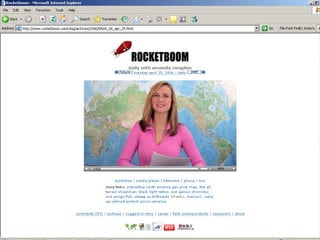
Title here…. ...most popular videoblogs on the Web 200,000 viewers
Low-cost production
RocketBoom compared to TV Program Consumer-brand, video camera; laptop; two lights & a map Almost zero overhead costs  Very minimal distribution costs (web-delivered) Global distribution (world wide demand) Large potential audience $0 spent on promotion – 100% word of mouth Engage audience in topical discussions Audience can submit stories (including their own video content)
Vlogs  (thinking outside the box)
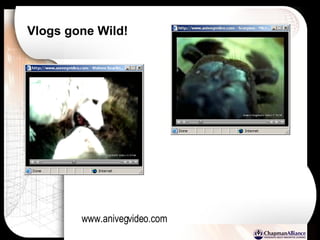
Vlogs gone Wild! www.anivegvideo.com
www.anivegvideo.com
“ podcast”
University Lectures via podcasts Pilot tests (By Apple) at universities such as Stanford, University of Washington, Missouri, etc. Students who can’t attend class have the option to download courses. Take classes while exercising or traveling.
Title here….
Title here….
Early Web to “Social Web” Blogs Wikipedia itunes Google Adsense Ebay Auctions  Book Reviews Wikis Democratic syndication MySpace/Facebook Social Web Personal Web Pages Online Encyclopedias MP3.com Banner Ads Online Stores Bookstore Content Management Website Stickiness Email Communication Learning Web Early Web
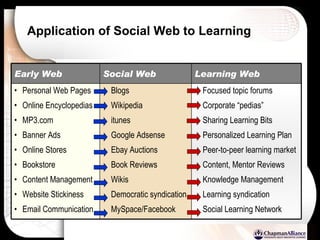
Application of Social Web to Learning Blogs Wikipedia itunes Google Adsense Ebay Auctions  Book Reviews Wikis Democratic syndication MySpace/Facebook Social Web Focused topic forums Corporate “pedias” Sharing Learning Bits Personalized Learning Plan Peer-to-peer learning market Content, Mentor Reviews Knowledge Management Learning syndication Social Learning Network Personal Web Pages Online Encyclopedias MP3.com Banner Ads Online Stores Bookstore Content Management Website Stickiness Email Communication Learning Web Early Web
Questions about Informal Learning After this discussion…. Is informal learning part of my job as a Training/Learning Professional? If not, whose job is it? Should I just set up the technical infrastructure for informal learning, or do I need to be a primary content contributor? How much “control” of informal learning is right for my organization? Should informal learning ever be tracked? If so, what is the best way to track it? What can I do to make sure that informal learning doesn’t become just another “content silo”? How do I set up a loop to make sure that critical issues raised in informal learning exchanges get on the company’s radar screen as possible formal training opportunities?
http://edutechwiki.unige.ch
Learning Blog Recommendations:   www.internettime.com  www.willatworklearning.com www. learningcircuits.blogspot.com www.elearningpost.com
Blog Creation Tools:   www.blogger.com (#14 in Global, Top 100) www.wikibooks.com www.bblog.com www.blogcms.com www.sixapart.com/movabletype www.nucleuscms.org www.pivotlog.net www.s9y.org www.spip.net www.textpattern.com www.wordpress.org
Podcast – Tools and Services www.odeo.com (free podcast posting through a telephone) www.audioblog.com (monthly service fee) http://audacity.sourceforge.net/ (free, open-source sound editing software) www.audioblogger.com (free, puts audio inside your blog on blogger.com) www.industrialaudiosoftware.com www.mixcastlive.com … .just about any audio recording software capable of creating .mp3 files
Wiki Sites:   www.wikispaces.com  ($5 a month for private Wikis) www.socialtext.com www.jot.com www.atlassian.com www.twiki.org www.zwiki.org www.pbwiki.com www.snipsnap.org www.openwiki.com www.mediawiki.org www.wikibooks.org  (same engine used for wikipedia)
Benchmarking Blended Learning
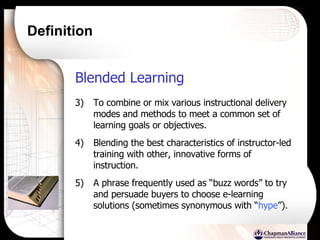
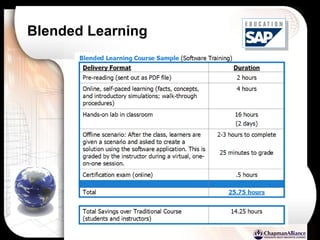
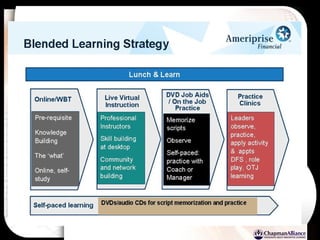
Definition Blended Learning   To combine or mix various instructional delivery modes and methods to meet a common set of learning goals or objectives. Blending the best characteristics of instructor-led training with other, innovative forms of instruction.  A phrase frequently used as “buzz words” to try and persuade buyers to choose e-learning solutions (sometimes synonymous with “ hype ”).
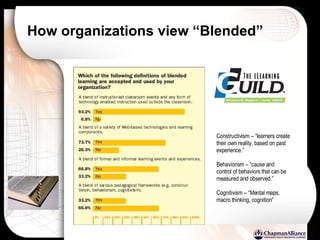
How organizations view “Blended” Constructivism – “learners create their own reality, based on past experience.” Behaviorism – “cause and control of behaviors that can be measured and observed.” Cognitivism – “Mental maps, macro thinking, cognition”
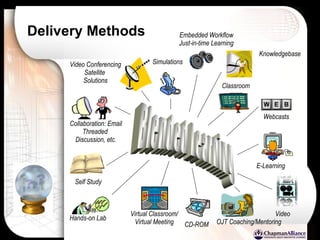
Delivery Methods Blended Learning Classroom Hands-on Lab Video Self Study CD-ROM E-Learning Virtual Classroom/ Virtual Meeting Collaboration: Email Threaded  Discussion, etc. Video Conferencing Satellite  Solutions Webcasts Simulations Embedded Workflow Just-in-time Learning Knowledgebase OJT Coaching/Mentoring
Blended Learning
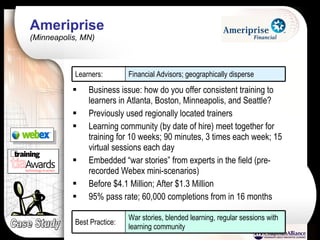
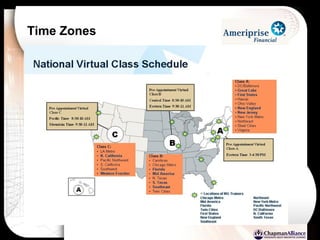
Ameriprise  (Minneapolis, MN) Business issue: how do you offer consistent training to learners in Atlanta, Boston, Minneapolis, and Seattle?  Previously used regionally located trainers Learning community (by date of hire) meet together for training for 10 weeks; 90 minutes, 3 times each week; 15 virtual sessions each day Embedded “war stories” from experts in the field (pre-recorded Webex mini-scenarios) Before $4.1 Million; After $1.3 Million 95% pass rate; 60,000 completions from in 16 months Case Study Financial Advisors; geographically disperse Learners: War stories, blended learning, regular sessions with learning community Best Practice:
Time Zones
 
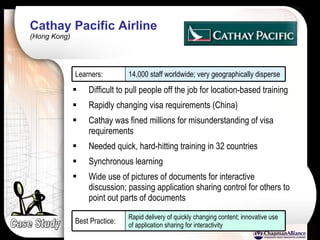
Cathay Pacific Airline  (Hong Kong) Case Study Difficult to pull people off the job for location-based training Rapidly changing visa requirements (China) Cathay was fined millions for misunderstanding of visa requirements Needed quick, hard-hitting training in 32 countries Synchronous learning Wide use of pictures of documents for interactive discussion; passing application sharing control for others to point out parts of documents 14,000 staff worldwide; very geographically disperse Learners: Rapid delivery of quickly changing content; innovative use of application sharing for interactivity Best Practice:
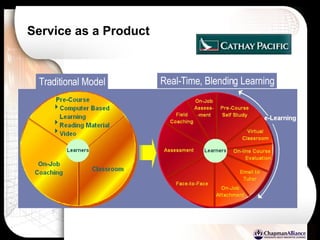
Service as a Product Traditional Model Real-Time, Blending Learning
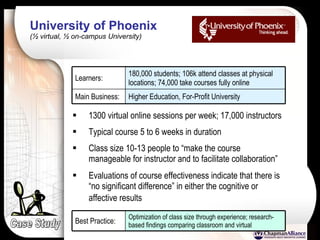
University of Phoenix  (½ virtual, ½ on-campus University) 1300 virtual online sessions per week; 17,000 instructors Typical course 5 to 6 weeks in duration Class size 10-13 people to “make the course manageable for instructor and to facilitate collaboration” Evaluations of course effectiveness indicate that there is “no significant difference” in either the cognitive or affective results   Case Study Higher Education, For-Profit University Main Business: 180,000 students; 106k attend classes at physical locations; 74,000 take courses fully online Learners: Optimization of class size through experience; research-based findings comparing classroom and virtual Best Practice:
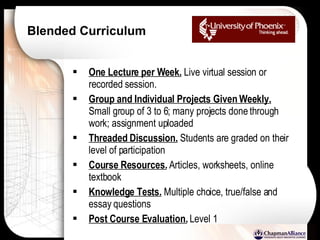
Blended Curriculum One Lecture per Week.  Live virtual session or recorded session. Group and Individual Projects Given Weekly.  Small group of 3 to 6; many projects done through work; assignment uploaded Threaded Discussion.  Students are graded on their level of participation Course Resources.  Articles, worksheets, online textbook Knowledge Tests.  Multiple choice, true/false and essay questions Post Course Evaluation.  Level 1
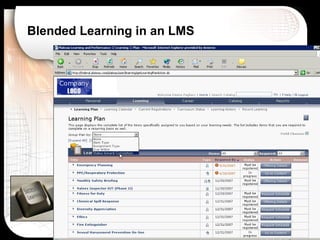
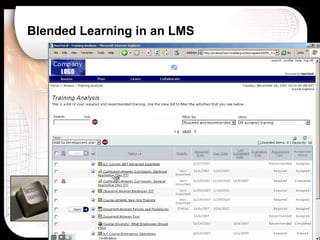
Blended Learning in an LMS
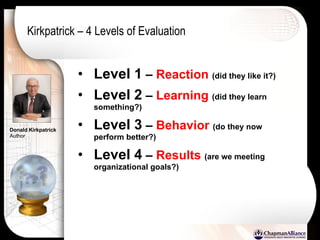
Kirkpatrick – 4 Levels of Evaluation Level 1  –  Reaction   (did they like it?) Level 2  –  Learning   (did they learn something?) Level 3  –  Behavior   (do they now perform better?) Level 4  –  Results   (are we meeting organizational goals?) Donald Kirkpatrick Author
Benchmarking Talent and Performance Management Training HR LINE OF BIZ
Who owns performance Management in your organization? ASTD
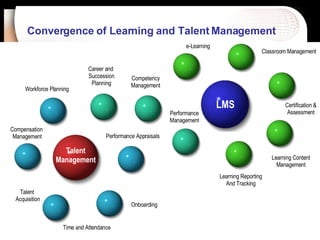
Convergence of Learning and Talent Management   LMS Talent Management Compensation  Management Talent  Acquisition Time and Attendance Performance Appraisals Competency Management Career and  Succession Planning Workforce Planning Classroom Management Onboarding e-Learning Performance Management Certification & Assessment Learning Content Management Learning Reporting And Tracking
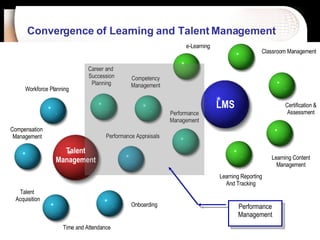
Convergence of Learning and Talent Management   LMS Talent Management Compensation  Management Talent  Acquisition Time and Attendance Performance Appraisals Competency Management Career and  Succession Planning Workforce Planning Classroom Management Onboarding e-Learning Performance Management Certification & Assessment Learning Content Management Learning Reporting And Tracking Performance Management
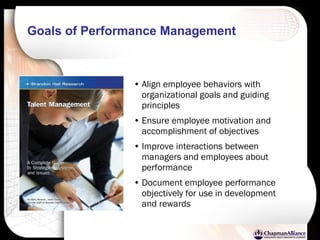
Goals of Performance Management   Align employee behaviors with organizational goals and guiding principles Ensure employee motivation and accomplishment of objectives Improve interactions between managers and employees about performance Document employee performance objectively for use in development and rewards
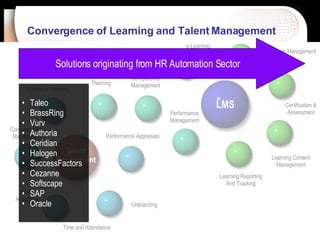
Convergence of Learning and Talent Management   LMS Talent Management Compensation  Management Talent  Acquisition Time and Attendance Performance Appraisals Competency Management Career and  Succession Planning Workforce Planning Classroom Management Onboarding e-Learning Performance Management Certification & Assessment Learning Content Management Learning Reporting And Tracking Solutions originating from HR Automation Sector Taleo BrassRing Vurv Authoria Ceridian Halogen SuccessFactors Cezanne Softscape SAP Oracle
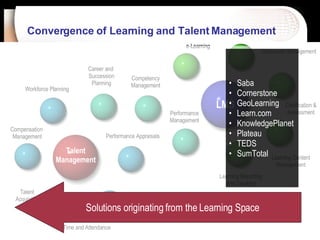
Convergence of Learning and Talent Management   LMS Talent Management Compensation  Management Talent  Acquisition Time and Attendance Performance Appraisals Competency Management Career and  Succession Planning Workforce Planning Classroom Management Onboarding e-Learning Performance Management Certification & Assessment Learning Content Management Learning Reporting And Tracking Solutions originating from the Learning Space Saba Cornerstone  GeoLearning Learn.com KnowledgePlanet Plateau TEDS SumTotal
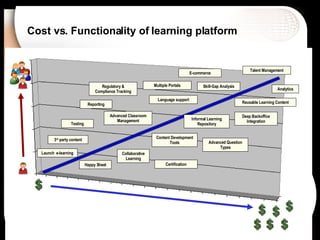
Cost vs. Functionality of learning platform Skill-Gap Analysis Launch  e-learning Advanced Classroom Management Content Development Tools Reusable Learning Content Happy Sheet Talent Management Analytics Language support 3 rd  party content Deep Backoffice Integration Certification Testing Advanced Question Types Reporting Collaborative Learning E-commerce Informal Learning Repository Regulatory & Compliance Tracking Multiple Portals
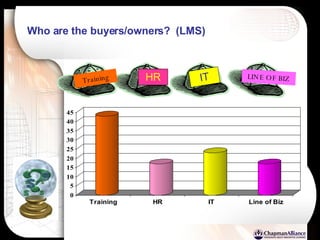
Who are the buyers/owners?  (LMS) Training HR IT LINE OF BIZ
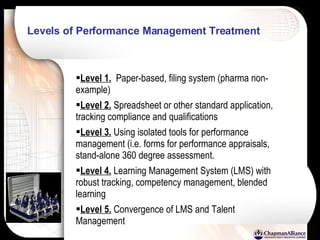
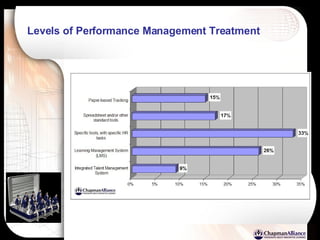
Levels of Performance Management Treatment Level 1.   Paper-based, filing system (pharma non-example) Level 2.  Spreadsheet or other standard application, tracking compliance and qualifications Level 3.  Using isolated tools for performance management (i.e. forms for performance appraisals, stand-alone 360 degree assessment. Level 4.  Learning Management System (LMS) with robust tracking, competency management, blended learning Level 5.  Convergence of LMS and Talent Management
Levels of Performance Management Treatment
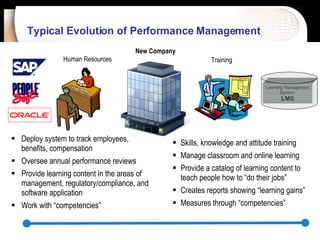
Typical Evolution of Performance Management   New Company Human Resources Training Deploy system to track employees, benefits, compensation Oversee annual performance reviews Provide learning content in the areas of management, regulatory/compliance, and software application Work with “competencies” Skills, knowledge and attitude training Manage classroom and online learning Provide a catalog of learning content to teach people how to “do their jobs” Creates reports showing “learning gains” Measures through “competencies” Learning Management System   LMS
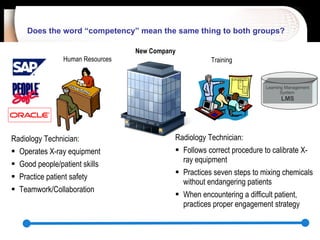
Does the word “competency” mean the same thing to both groups?  New Company Human Resources Radiology Technician: Operates X-ray equipment Good people/patient skills Practice patient safety Teamwork/Collaboration Radiology Technician: Follows correct procedure to calibrate X-ray equipment Practices seven steps to mixing chemicals without endangering patients When encountering a difficult patient, practices proper engagement strategy Training Learning Management System   LMS
Is “Performance Management” a product or a practice/process?  Consider the practice of  “Knowledge Management” Name the top 3, Knowledge Management solutions. Define the term “knowledge management” Knowledge management in an organization is controlled by which group?
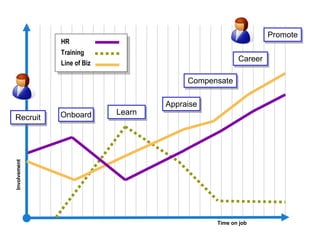
Involvement Time on job HR Training Recruit Onboard Line of Biz Learn Appraise Career Compensate Promote
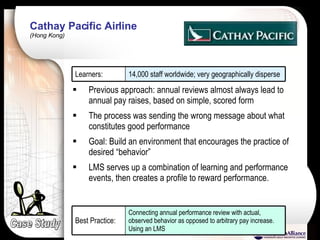
Cathay Pacific Airline  (Hong Kong) Case Study Previous approach: annual reviews almost always lead to annual pay raises, based on simple, scored form The process was sending the wrong message about what constitutes good performance Goal: Build an environment that encourages the practice of desired “behavior” LMS serves up a combination of learning and performance events, then creates a profile to reward performance. 14,000 staff worldwide; very geographically disperse Learners: Connecting annual performance review with actual, observed behavior as opposed to arbitrary pay increase. Using an LMS Best Practice:
Tips for optimizing performance management using an LMS Open communication between HR and Training; find a way to work together on competencies If you already have some form of competency management in place, link it; rather than replace Blended learning is more about on-the-job training, than it is about mixing classroom and online. Don’t be afraid to have your learners “perform.” It is the key to performance management. Take advantage of the testing capabilities of your LMS to measure knowledge. Pass this information along during performance reviews
Tips for optimizing performance management using an LMS   (cont) Use Analytics to measure Kirkpatrick levels 3 and 4. It will take some thought, but you can do it. Try taking on “onboarding” as a task for you LMS. You can mix forms and learning into a single environment. Great proof-of-concept for what is possible. The most important thing you can do is to create a unified, learning delivery system to bridge the content from HR, training and other content providers into a unified, individualized learning plan.
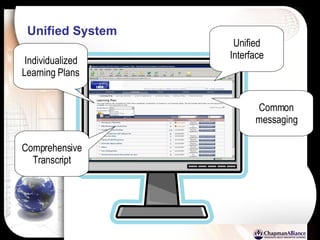
Unified System Unified Interface Individualized Learning Plans Common messaging Comprehensive Transcript
Questions???   Facilitator: Bryan Chapman Chief Learning Strategist Chapman Alliance [email_address] Hosted by
Learning Governance: Aligning People, Processes and Technology (Bonus Slides)
High-Level Governance IBM Learning Investment Council .   Representatives from each learning organization comprise the IBM Learning Investment Council. The role of this team is to decide which projects are the most critical enterprise learning priorities. An endorsement by this team provides official enterprise sanction and funding. In addition, the group monitors spending by project. Learning Management Council.   Representatives from lines of business form this council that are responsible for (1) setting rules on how we manage all learning at IBM, (2) defining principles of operation, (3) defining standards for learning design, (4) defining vision and strategy for learning systems, and (5) sharing best practices.
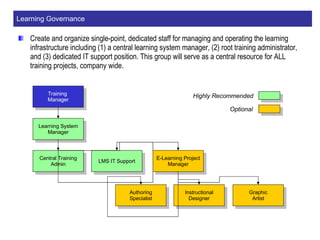
Learning Governance Create and organize single-point, dedicated staff for managing and operating the learning infrastructure including (1) a central learning system manager, (2) root training administrator, and (3) dedicated IT support position. This group will serve as a central resource for ALL training projects, company wide. Training  Manager Learning System Manager Central Training Admin LMS IT Support Optional Highly Recommended E-Learning Project Manager Authoring Specialist Instructional Designer Graphic Artist
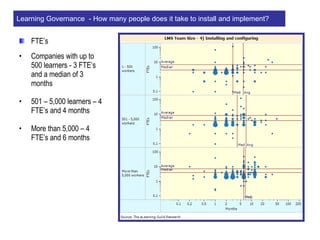
FTE’s Companies with up to 500 learners - 3 FTE’s and a median of 3 months 501 – 5,000 learners – 4 FTE’s and 4 months More than 5,000 – 4 FTE’s and 6 months Learning Governance  - How many people does it take to install and implement?
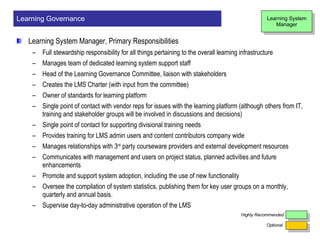
Learning System Manager, Primary Responsibilities  Full stewardship responsibility for all things pertaining to  the overall learning infrastructure Manages team of dedicated learning system support staff Head of the Learning Governance Committee, liaison with stakeholders Creates the LMS Charter (with input from the committee) Owner of standards for learning platform Single point of contact with vendor reps for issues with the learning platform (although others from IT,  training and stakeholder groups will be involved in discussions and decisions) Single point of contact for supporting divisional training needs Provides training for LMS admin users and content contributors company wide Manages relationships with 3 rd  party courseware providers and external development resources Communicates with management and users on project status, planned activities and future enhancements Promote and support system adoption, including the use of new functionality Oversee the compilation of system statistics, publishing them for key user groups on a monthly, quarterly and annual basis. Supervise day-to-day administrative operation of the LMS Learning Governance Optional Highly Recommended Learning System Manager
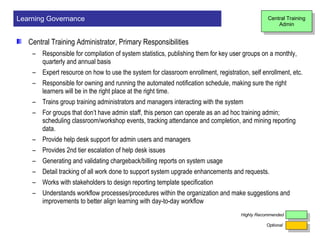
Central Training Administrator, Primary Responsibilities   Responsible for compilation of system statistics, publishing them for key user groups on a monthly, quarterly and annual basis Expert resource on how to use the system for classroom enrollment, registration, self enrollment, etc. Responsible for owning and running the automated notification schedule, making sure the right learners will be in the right place at the right time.  Trains group training administrators and managers interacting with the system For groups that don’t have admin staff, this person can operate as an ad hoc training admin; scheduling classroom/workshop events, tracking attendance and completion, and mining reporting data. Provide help desk support for admin users and managers Provides 2nd tier escalation of help desk issues Generating and validating chargeback/billing reports on system usage Detail tracking of all work done to support system upgrade enhancements and requests. Works with stakeholders to design reporting template specification Understands workflow processes/procedures within the organization and make suggestions and improvements to better align learning with day-to-day workflow Learning Governance Central Training Admin Optional Highly Recommended
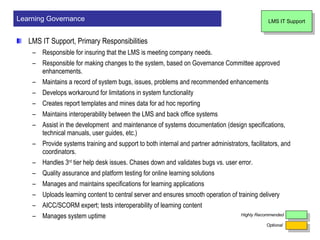
LMS IT Support, Primary Responsibilities  Responsible for insuring that the LMS is meeting company needs.  Responsible for making changes to the system, based on Governance Committee approved enhancements. Maintains a record of system bugs, issues, problems and recommended enhancements Develops workaround for limitations in system functionality Creates report templates and mines data for ad hoc reporting Maintains interoperability between the LMS and back office systems Assist in the development  and maintenance of systems documentation (design specifications, technical manuals, user guides, etc.) Provide systems training and support to both internal and partner administrators, facilitators, and coordinators. Handles 3 rd  tier help desk issues. Chases down and validates bugs vs. user error. Quality assurance and platform testing for online learning solutions Manages and maintains specifications for learning applications Uploads learning content to central server and ensures smooth operation of training delivery AICC/SCORM expert; tests interoperability of learning content Manages system uptime Learning Governance Optional Highly Recommended LMS IT Support
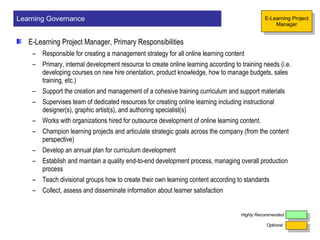
E-Learning Project Manager, Primary Responsibilities   Responsible for creating a management strategy for all online learning content Primary, internal development resource to create online learning according to training needs (i.e. developing courses on new hire orientation, product knowledge, how to manage budgets, sales training, etc.) Support the creation and management of a cohesive training curriculum and support materials Supervises team of dedicated resources for creating online learning including instructional designer(s), graphic artist(s), and authoring specialist(s) Works with organizations hired for outsource development of online learning content. Champion learning projects and articulate strategic goals across the company (from the content perspective) Develop an annual plan for curriculum development Establish and maintain a quality end-to-end development process, managing overall production process Teach divisional groups how to create their own learning content according to standards Collect, assess and disseminate information about learner satisfaction Learning Governance Optional Highly Recommended E-Learning Project Manager
Authoring Specialist, Primary Responsibilities   Author, edit  and maintain online courseware using tools such as Flash, Dreamweaver, etc. Become an expert on LMS authoring modules and assess use for specific content Ensure interoperability between online courses and the LMS Assist in testing courseware compatibility with hardware and network specifications Meeting project deadlines for timely delivery of critical online learning course materials Developing software simulations  Works closely with subject matter experts to ensure content integrity and fidelity Learning Governance Optional Highly Recommended Authoring Specialist
Instructional Designer, Primary Responsibilities  Designs and produces quality training materials based on adult learning theories using interactive technologies Works directly with subject matter experts to collect developmental information and for script-storyboard approval Writes performance-based learning objectives Write test items to ensure learning transfer Creates design documents to communicate design plans to others Generates scripts-storyboards (specifications for the authoring specialist)  Conducts learning-project needs analysis  and front-end assessment Validates training results, ensuring that the courses are meeting their objectives for both internally and externally created learning content. Creates and manages training project timelines to ensure ontime delivery of learning projects. Learning Governance Optional Highly Recommended Instructional Designer
Graphic Artist, Primary Responsibilities  Work closely with instructional development team to design and layout instructional media including art, photos, animations and video Maintains library of media assets used for learning and training purposes (both for online and classroom-based learning) Meeting with subject matter experts to collect information about instructional media requirements Creates media for computer-based, web-based, and print-based learning. Learning Governance Optional Highly Recommended Graphic Artist

01 Handout Version

  • 1.
    Learning Benchmarking Forum Facilitator: Bryan Chapman Chief Learning Strategist Chapman Alliance [email_address] 24x7 Learning presents
  • 2.
    Agenda Benchmarking LearningInfrastructure Alignment with Business and Instructional Needs Benchmarking Learning Content Development (Rapid and Simulation-Based) Benchmarking the use of Web 2.0 learning technologies and informal learning Benchmarking Blended Learning Benchmarking Talent and Performance Management Practices
  • 3.
    Delivery formats 53%Instructor-Led, Classroom ASTD, State of the Industry Report (2006) 29% Online, Self-Paced 1% Instructor-Led Distance 3% Instructor-Led Online 4% CD-ROM, etc. 4% Print – Self Paced 1% Audio/Video 5% Other
  • 4.
  • 5.
    Virtual Classroom SynchronousLearning Self-Paced, Self-Service Online Learning Informal Learning , Knowledge On Demand Off-the-shelf , pre-built courses Authoring Tools Learning Content Management Ready-to-use content (courseware) Easy to find: IT skills, leadership, safety Hard to find: very specific, job-related skills Custom development Screen design and layout Interactive exercises Tests, Quiz, Assessment Simulations Manage large-scale development (workflow) Reusable learning content Searchable repository of source material Central Access to Learning Individualized Learning Plans Reporting & Completion Tracking Instructor-Led Training Scheduling Launch and track online learning Certification Management Competency Management Instructor-led, Real time, Online Connecting geographical disperse learners Groups of learners meet together 24 X 7 X 365 access to courses Completed at learner’s own pace Remediation and feedback are automated Developed once, used many times Automated scoring and completion status Just-in-time, anywhere, anytime Capture and retain organizational knowledge Facilitates collaboration Learning Management System LMS
  • 6.
    International Airline Geographicallydisperse Mix of live, virtual classroom (personal interaction) Self-paced e-learning (conceptual, procedural)
  • 7.
    Construction Company Bigissue: regulatory compliance (safety) Off-the-shelf courses & LMS
  • 8.
    Medical Association Thousandsof medical, teaching case studies On CD, on shelf; photos, charts, graphs, narrative Manage and distribute (no patient names) for teaching (25,000 association members)
  • 9.
    National Restaurant ChainLarge population, customer-facing employees Not large groups, needs to be self-paced Simulation, role-play exercises (empowerment)
  • 10.
    Industrial/Manufacturing 100,000+ employees;lack of information about other parts of the company Learning Wiki – invited 200 authors to write articles Ended up with over 7,000 content contributors
  • 11.
    Trend Changes inDelivery CLO Magazine, July 2006
  • 12.
    What is yourmix? …now? …future? Creating a Learning Culture: Jumstart Planner, Chapman Alliance
  • 13.
    Why do webuy an LMS in the first place?
  • 14.
    Why do webuy an LMS in the first place?
  • 15.
    Cost vs. Functionalityof learning platform Skill-Gap Analysis Launch e-learning Advanced Classroom Management Content Development Tools Reusable Learning Content Happy Sheet Talent Management Analytics Language support 3 rd party content Deep Backoffice Integration Certification Testing Advanced Question Types Reporting Collaborative Learning E-commerce Informal Learning Repository Regulatory & Compliance Tracking Multiple Portals
  • 16.
    How long…? Howlong does it take to create 1 hour of Classroom Instruction (ILT)?
  • 17.
    20% Student GuideDevelopment 21% PowerPoint Development 13% Front-End Analysis/ Data Collection, Working with SME’s 8% Test and Exam Creation 13% Instructional Design, Objectives, Outlining, Writing Content, etc. 6% Other Development Tasks 11% Lesson Plan Development 8% Creation of handout materials n=132 See next slide for “Other” tasks Development of Instructor-Led Training (ILT) Itemized Development Tasks, with hours overlay Research data collected: November, 2007, by Chapman Alliance 36 Total Hours 4.8 hours 4.6 hours 3.8 hours 3.0 hours 7.2 hours 7.6 hours 2.8 hours 2.3 hours
  • 18.
    How long…? Howlong does it take to create 1 hour of E-Learning ?
  • 19.
    How long…? Howlong does it take to create 1 hour of PowerPoint-based, online learning ? Low Range = 12:1 High Range = 60:1
  • 20.
    How long…? Howlong does it take to create 1 hour of Simulation-Based e-learning ? 1300 hours
  • 21.
    Development Costs Reoccurringcosts, over time Instructor-Led Online, Self-Paced Break even point (10 Months) 221:1 (hours of development per finished hour of instruction) 34:1 (hours of development per finished hour of instruction) Example Only
  • 22.
    Development Costs Reoccurringcosts, over time Instructor-Led Online, Self-Paced Break even point (10 Months) 221:1 (hours of development per finished hour of instruction) 34:1 (hours of development per finished hour of instruction) Return on Investment Example Only
  • 23.
    Development Costs Reoccurringcosts, over time Instructor-Led Online, Self-Paced 221:1 (hours of development per finished hour of instruction) 34:1 (hours of development per finished hour of instruction) 75:1 Break even point (10 Months) Example Only (3.5 Months) Return on Investment
  • 24.
    ROI factors InfrastructureCost (LMS, LCMS, etc.) Internal Development costs 75:1 (for quick and dirty) 220:1 (for Level 2) 750:1 (highly interactive, simulation) Outsourcing Custom Development Cost of 3 rd party courseware # of learners Required travel (geographic distribution) {less tangible} Opportunity costs
  • 25.
    Additional ROI BenefitsShorter Overall Training Times Increased Increased Consistency Keeping up with Rapidly Changing Information Open enrollment Building Customer/Brand Loyalty Capturing and Maintaining Corporate Knowledge
  • 26.
    Rapid Development, withoutsacrificing Interactivity
  • 27.
  • 28.
    PCWeek Shoot OutSeveral teams invited to compete Convert a 54-hour instructor-led course to online learning 2 days of development 1 person at the computer at any time Storyboard…. actually a lesson plan Present course to 20 judges and 150 members of media gallery Watched the other teams in action Wide variety of approaches
  • 29.
  • 30.
    Cost per finishedhour… Source: Brandon Hall Research, Custom Content Development Knowledgebase Ratio: 750:1 Cost: $30,000 (assumed rate of $40 pay per hour) Average: $41,138 Low: $29,639 High: $70,279 Level 3: High level of gaming and/ or simulation Ratio: 221:1 Cost: $8,840 (assumed rate of $40 pay per hour) Average: $24,672 Low: $17,627 High: $33,711 Level 2: Level 1, plus… 25% interactive exercises, games and mini-simulations Ratio: 30-50:1 Cost: $1,200 - $2,000 (assumed rate of $40 pay per hour) Average: $15,067 Low: $10,009 High: $20,088 Level 1: Page turning Test Questions Internally Developed (per finished hour) Outsource Developed (per finished hour) Levels of Interactivity
  • 31.
    IBM Learning ModelWhite Papers Product Knowledge PowerPoint Word .PDF Student Guide Role Play Simulations Business Simulations Self Assessment Instructor-Led “ culminating experience” Practice
  • 32.
    Blended Learning asa development model White Papers Product Knowledge PowerPoint Word .PDF Student Guide Games Exercises Practice Scenario-Based Simulations Classroom uses the same development model Rapid Simulation Development – Best Tool for the Job Rapid Authoring Tools
  • 33.
  • 34.
    Bloom’s Taxonomy KnowledgeAction verbs: list, define, tell, describe, identify, show, label, collect, examine, tabulate, quote, name, who, when, where, etc. Comprehension Action verbs: summarize, describe, interpret, contrast, predict, associate, distinguish, estimate, differentiate, discuss, extend, etc. Application Action verbs: apply, demonstrate, calculate, complete, illustrate, show, solve, examine, modify, relate, change, classify, experiment, discover, etc. Analysis Action verbs: analyze, separate, order, explain, connect, classify, arrange, divide, compare, select, explain, infer, etc. Synthesis Action verbs: combine, integrate, modify, rearrange, substitute, plan, create, design, invent, what if?, compose, formulate, prepare, generalize, rewrite, etc. Evaluation Action verbs: assess, decide, rank, grade, test, measure, recommend, convince, select, judge, explain, discriminate, support, conclude, compare, summarize, etc.
  • 35.
    Don’t wait toolate to apply interactivity Course Designer Analyze Develop Implement Evaluate Design Document Storyboard Design Prototype Authoring and Production
  • 36.
    Raptivity – InteractivitySampler www.raptivity.com Course Designer
  • 37.
  • 38.
    Class Tool –Free Games www.classtools.net Course Designer
  • 39.
    247,000 employees FactoryTraining Supply Chain Model 50 SME’s created 200 learning modules in very short timeframe SME- Developed Published by Center Learning Champions (local units) Support Staff ISD Graphic Artists Strategy? Learners
  • 40.
    Interactivity to meetinstructional goals Course Designer Interactivity Menu… Discovery Exercise Progressive Disclosure Branching Scenario (troubleshooting) Software Application Simulation Labeling Exercise Role-play simulation Discrimination Exercise (classification) Game show (i.e. Jeopardy, Millionaire) Simple Games (Tic-Tac-Toe) Crossword puzzle (reinforce terminology) Sequencing Exercise Interactive Glossary Flash Cards (recall) Branching Questions Matching Video Interaction Animated Diagram
  • 41.
    Tips and Suggestion – Using Interactivity for Rapid Development Create an interactivity “sampler” to show to internal customers, SME’s, etc. Review before design activities. Don’t create navigation controls at the page level. It’s a waste of time. Page turning isn’t bad if used in moderation. Add a healthy mix of interactivity. When prototyping, create a prototype for each interaction, not just a single lesson or module. Consider using multiple tools to meet the need. One caution: make sure interactivity choices don’t overshadow the instruction. It is possible to use too much of a good thing.
  • 42.
    Benchmarking the Useof Web 2.0 Learning Technologies and Informal Learning
  • 43.
    Early Web SocialWeb Personal Web Pages Online Encyclopedias MP3.com Banner Ads Online Stores Bookstore Content Management Website Stickiness Email Communication Learning Web Early Web
  • 44.
    Early Web to“Social Web” Blogs Wikipedia itunes Google Adsense Ebay Auctions Book Reviews Wikis Democratic syndication MySpace/Facebook Social Web Personal Web Pages Online Encyclopedias MP3.com Banner Ads Online Stores Bookstore Content Management Website Stickiness Email Communication Learning Web Early Web
  • 45.
    Traditional Learning ManagementModel New Hire Orientation Learning Portal - Formal LMS – Learning Portal Sales Process Leadership Computer Applications Safety Product Knowledge Job-specific Skills
  • 46.
    Knowledge Management TraditionalKM Centralized Knowledge Assets Expert Learner Instructor Worker Manager Mentor Expert Learner Sales
  • 47.
    Using both approachessimultaneously Traditional KM Centralized Knowledge Assets Expert Learner Manager Mentor Expert Sales LMS – Learning Portal Sales Process Leadership Computer Applications Safety Product Knowledge Job-specific Skills Learning Portal - Formal New Hire Orientation
  • 48.
    Informal Learning “Informal learning is simply that, which is not directed by an organization or somebody in a control position.” - Jay Cross webinar poll
  • 49.
    What about tacitknowledge? Explicit Knowledge Tacit Knowledge Identifying is difficult Documenting is even more difficult
  • 50.
    Formal vs. InformalLearning Collaboration Communities of practice Access to Experts Mentors Knowledgebanks Classroom Events Online courses Virtual Classroom Informal (ad hoc) Formal How?
  • 51.
  • 52.
    Definition of WikiWiki: A website created by a group; rather than by an individual. In Hawaiian, Wiki means “quick” W hat I K now I s… (descriptive of the process of collaborative content development.
  • 53.
    Ideas for usingWikis in Learning Ad hoc, Knowledge Management Repository Centralized location for documenting and organizing procedural information Group-based learning assignments (work as a team) Soliciting information from Subject Matter Experts; allowing a group of experts to contribute and edit content. Creating content with varying points of view (Groupthink) Learning content delivery for content that changes rapidly (bio-technology). Learn by teaching (Wiki authors)
  • 54.
    Tips to successfullyusing Wikis for Learning Work on the initial taxonomy as a group, then turn them loose The more specific the topic focus, the better the content. Designated time period (when used as part of a structured course) Allow the Wiki to develop organically without enforcing too much workflow Allow learners to correct each other; rather than jumping in to correct problems (constructivist approach) Hold informal training sessions to teach Wiki syntax especially to Subject Matter Expert Lead by example – post excellent content
  • 55.
  • 56.
    Title here…. ...mostpopular videoblogs on the Web 200,000 viewers
  • 57.
  • 58.
    RocketBoom compared toTV Program Consumer-brand, video camera; laptop; two lights & a map Almost zero overhead costs Very minimal distribution costs (web-delivered) Global distribution (world wide demand) Large potential audience $0 spent on promotion – 100% word of mouth Engage audience in topical discussions Audience can submit stories (including their own video content)
  • 59.
    Vlogs (thinkingoutside the box)
  • 60.
    Vlogs gone Wild!www.anivegvideo.com
  • 61.
  • 62.
  • 63.
    University Lectures viapodcasts Pilot tests (By Apple) at universities such as Stanford, University of Washington, Missouri, etc. Students who can’t attend class have the option to download courses. Take classes while exercising or traveling.
  • 64.
  • 65.
  • 66.
    Early Web to“Social Web” Blogs Wikipedia itunes Google Adsense Ebay Auctions Book Reviews Wikis Democratic syndication MySpace/Facebook Social Web Personal Web Pages Online Encyclopedias MP3.com Banner Ads Online Stores Bookstore Content Management Website Stickiness Email Communication Learning Web Early Web
  • 67.
    Application of SocialWeb to Learning Blogs Wikipedia itunes Google Adsense Ebay Auctions Book Reviews Wikis Democratic syndication MySpace/Facebook Social Web Focused topic forums Corporate “pedias” Sharing Learning Bits Personalized Learning Plan Peer-to-peer learning market Content, Mentor Reviews Knowledge Management Learning syndication Social Learning Network Personal Web Pages Online Encyclopedias MP3.com Banner Ads Online Stores Bookstore Content Management Website Stickiness Email Communication Learning Web Early Web
  • 68.
    Questions about InformalLearning After this discussion…. Is informal learning part of my job as a Training/Learning Professional? If not, whose job is it? Should I just set up the technical infrastructure for informal learning, or do I need to be a primary content contributor? How much “control” of informal learning is right for my organization? Should informal learning ever be tracked? If so, what is the best way to track it? What can I do to make sure that informal learning doesn’t become just another “content silo”? How do I set up a loop to make sure that critical issues raised in informal learning exchanges get on the company’s radar screen as possible formal training opportunities?
  • 69.
  • 70.
    Learning Blog Recommendations: www.internettime.com www.willatworklearning.com www. learningcircuits.blogspot.com www.elearningpost.com
  • 71.
    Blog Creation Tools: www.blogger.com (#14 in Global, Top 100) www.wikibooks.com www.bblog.com www.blogcms.com www.sixapart.com/movabletype www.nucleuscms.org www.pivotlog.net www.s9y.org www.spip.net www.textpattern.com www.wordpress.org
  • 72.
    Podcast – Toolsand Services www.odeo.com (free podcast posting through a telephone) www.audioblog.com (monthly service fee) http://audacity.sourceforge.net/ (free, open-source sound editing software) www.audioblogger.com (free, puts audio inside your blog on blogger.com) www.industrialaudiosoftware.com www.mixcastlive.com … .just about any audio recording software capable of creating .mp3 files
  • 73.
    Wiki Sites: www.wikispaces.com ($5 a month for private Wikis) www.socialtext.com www.jot.com www.atlassian.com www.twiki.org www.zwiki.org www.pbwiki.com www.snipsnap.org www.openwiki.com www.mediawiki.org www.wikibooks.org (same engine used for wikipedia)
  • 74.
  • 75.
    Definition Blended Learning To combine or mix various instructional delivery modes and methods to meet a common set of learning goals or objectives. Blending the best characteristics of instructor-led training with other, innovative forms of instruction. A phrase frequently used as “buzz words” to try and persuade buyers to choose e-learning solutions (sometimes synonymous with “ hype ”).
  • 76.
    How organizations view“Blended” Constructivism – “learners create their own reality, based on past experience.” Behaviorism – “cause and control of behaviors that can be measured and observed.” Cognitivism – “Mental maps, macro thinking, cognition”
  • 77.
    Delivery Methods BlendedLearning Classroom Hands-on Lab Video Self Study CD-ROM E-Learning Virtual Classroom/ Virtual Meeting Collaboration: Email Threaded Discussion, etc. Video Conferencing Satellite Solutions Webcasts Simulations Embedded Workflow Just-in-time Learning Knowledgebase OJT Coaching/Mentoring
  • 78.
  • 79.
    Ameriprise (Minneapolis,MN) Business issue: how do you offer consistent training to learners in Atlanta, Boston, Minneapolis, and Seattle? Previously used regionally located trainers Learning community (by date of hire) meet together for training for 10 weeks; 90 minutes, 3 times each week; 15 virtual sessions each day Embedded “war stories” from experts in the field (pre-recorded Webex mini-scenarios) Before $4.1 Million; After $1.3 Million 95% pass rate; 60,000 completions from in 16 months Case Study Financial Advisors; geographically disperse Learners: War stories, blended learning, regular sessions with learning community Best Practice:
  • 80.
  • 81.
  • 82.
    Cathay Pacific Airline (Hong Kong) Case Study Difficult to pull people off the job for location-based training Rapidly changing visa requirements (China) Cathay was fined millions for misunderstanding of visa requirements Needed quick, hard-hitting training in 32 countries Synchronous learning Wide use of pictures of documents for interactive discussion; passing application sharing control for others to point out parts of documents 14,000 staff worldwide; very geographically disperse Learners: Rapid delivery of quickly changing content; innovative use of application sharing for interactivity Best Practice:
  • 83.
    Service as aProduct Traditional Model Real-Time, Blending Learning
  • 84.
    University of Phoenix (½ virtual, ½ on-campus University) 1300 virtual online sessions per week; 17,000 instructors Typical course 5 to 6 weeks in duration Class size 10-13 people to “make the course manageable for instructor and to facilitate collaboration” Evaluations of course effectiveness indicate that there is “no significant difference” in either the cognitive or affective results Case Study Higher Education, For-Profit University Main Business: 180,000 students; 106k attend classes at physical locations; 74,000 take courses fully online Learners: Optimization of class size through experience; research-based findings comparing classroom and virtual Best Practice:
  • 85.
    Blended Curriculum OneLecture per Week. Live virtual session or recorded session. Group and Individual Projects Given Weekly. Small group of 3 to 6; many projects done through work; assignment uploaded Threaded Discussion. Students are graded on their level of participation Course Resources. Articles, worksheets, online textbook Knowledge Tests. Multiple choice, true/false and essay questions Post Course Evaluation. Level 1
  • 86.
  • 87.
  • 88.
    Kirkpatrick – 4Levels of Evaluation Level 1 – Reaction (did they like it?) Level 2 – Learning (did they learn something?) Level 3 – Behavior (do they now perform better?) Level 4 – Results (are we meeting organizational goals?) Donald Kirkpatrick Author
  • 89.
    Benchmarking Talent andPerformance Management Training HR LINE OF BIZ
  • 90.
    Who owns performanceManagement in your organization? ASTD
  • 91.
    Convergence of Learningand Talent Management LMS Talent Management Compensation Management Talent Acquisition Time and Attendance Performance Appraisals Competency Management Career and Succession Planning Workforce Planning Classroom Management Onboarding e-Learning Performance Management Certification & Assessment Learning Content Management Learning Reporting And Tracking
  • 92.
    Convergence of Learningand Talent Management LMS Talent Management Compensation Management Talent Acquisition Time and Attendance Performance Appraisals Competency Management Career and Succession Planning Workforce Planning Classroom Management Onboarding e-Learning Performance Management Certification & Assessment Learning Content Management Learning Reporting And Tracking Performance Management
  • 93.
    Goals of PerformanceManagement Align employee behaviors with organizational goals and guiding principles Ensure employee motivation and accomplishment of objectives Improve interactions between managers and employees about performance Document employee performance objectively for use in development and rewards
  • 94.
    Convergence of Learningand Talent Management LMS Talent Management Compensation Management Talent Acquisition Time and Attendance Performance Appraisals Competency Management Career and Succession Planning Workforce Planning Classroom Management Onboarding e-Learning Performance Management Certification & Assessment Learning Content Management Learning Reporting And Tracking Solutions originating from HR Automation Sector Taleo BrassRing Vurv Authoria Ceridian Halogen SuccessFactors Cezanne Softscape SAP Oracle
  • 95.
    Convergence of Learningand Talent Management LMS Talent Management Compensation Management Talent Acquisition Time and Attendance Performance Appraisals Competency Management Career and Succession Planning Workforce Planning Classroom Management Onboarding e-Learning Performance Management Certification & Assessment Learning Content Management Learning Reporting And Tracking Solutions originating from the Learning Space Saba Cornerstone GeoLearning Learn.com KnowledgePlanet Plateau TEDS SumTotal
  • 96.
    Cost vs. Functionalityof learning platform Skill-Gap Analysis Launch e-learning Advanced Classroom Management Content Development Tools Reusable Learning Content Happy Sheet Talent Management Analytics Language support 3 rd party content Deep Backoffice Integration Certification Testing Advanced Question Types Reporting Collaborative Learning E-commerce Informal Learning Repository Regulatory & Compliance Tracking Multiple Portals
  • 97.
    Who are thebuyers/owners? (LMS) Training HR IT LINE OF BIZ
  • 98.
    Levels of PerformanceManagement Treatment Level 1. Paper-based, filing system (pharma non-example) Level 2. Spreadsheet or other standard application, tracking compliance and qualifications Level 3. Using isolated tools for performance management (i.e. forms for performance appraisals, stand-alone 360 degree assessment. Level 4. Learning Management System (LMS) with robust tracking, competency management, blended learning Level 5. Convergence of LMS and Talent Management
  • 99.
    Levels of PerformanceManagement Treatment
  • 100.
    Typical Evolution ofPerformance Management New Company Human Resources Training Deploy system to track employees, benefits, compensation Oversee annual performance reviews Provide learning content in the areas of management, regulatory/compliance, and software application Work with “competencies” Skills, knowledge and attitude training Manage classroom and online learning Provide a catalog of learning content to teach people how to “do their jobs” Creates reports showing “learning gains” Measures through “competencies” Learning Management System LMS
  • 101.
    Does the word“competency” mean the same thing to both groups? New Company Human Resources Radiology Technician: Operates X-ray equipment Good people/patient skills Practice patient safety Teamwork/Collaboration Radiology Technician: Follows correct procedure to calibrate X-ray equipment Practices seven steps to mixing chemicals without endangering patients When encountering a difficult patient, practices proper engagement strategy Training Learning Management System LMS
  • 102.
    Is “Performance Management”a product or a practice/process? Consider the practice of “Knowledge Management” Name the top 3, Knowledge Management solutions. Define the term “knowledge management” Knowledge management in an organization is controlled by which group?
  • 103.
    Involvement Time onjob HR Training Recruit Onboard Line of Biz Learn Appraise Career Compensate Promote
  • 104.
    Cathay Pacific Airline (Hong Kong) Case Study Previous approach: annual reviews almost always lead to annual pay raises, based on simple, scored form The process was sending the wrong message about what constitutes good performance Goal: Build an environment that encourages the practice of desired “behavior” LMS serves up a combination of learning and performance events, then creates a profile to reward performance. 14,000 staff worldwide; very geographically disperse Learners: Connecting annual performance review with actual, observed behavior as opposed to arbitrary pay increase. Using an LMS Best Practice:
  • 105.
    Tips for optimizingperformance management using an LMS Open communication between HR and Training; find a way to work together on competencies If you already have some form of competency management in place, link it; rather than replace Blended learning is more about on-the-job training, than it is about mixing classroom and online. Don’t be afraid to have your learners “perform.” It is the key to performance management. Take advantage of the testing capabilities of your LMS to measure knowledge. Pass this information along during performance reviews
  • 106.
    Tips for optimizingperformance management using an LMS (cont) Use Analytics to measure Kirkpatrick levels 3 and 4. It will take some thought, but you can do it. Try taking on “onboarding” as a task for you LMS. You can mix forms and learning into a single environment. Great proof-of-concept for what is possible. The most important thing you can do is to create a unified, learning delivery system to bridge the content from HR, training and other content providers into a unified, individualized learning plan.
  • 107.
    Unified System UnifiedInterface Individualized Learning Plans Common messaging Comprehensive Transcript
  • 108.
    Questions??? Facilitator: Bryan Chapman Chief Learning Strategist Chapman Alliance [email_address] Hosted by
  • 109.
    Learning Governance: AligningPeople, Processes and Technology (Bonus Slides)
  • 110.
    High-Level Governance IBMLearning Investment Council . Representatives from each learning organization comprise the IBM Learning Investment Council. The role of this team is to decide which projects are the most critical enterprise learning priorities. An endorsement by this team provides official enterprise sanction and funding. In addition, the group monitors spending by project. Learning Management Council. Representatives from lines of business form this council that are responsible for (1) setting rules on how we manage all learning at IBM, (2) defining principles of operation, (3) defining standards for learning design, (4) defining vision and strategy for learning systems, and (5) sharing best practices.
  • 111.
    Learning Governance Createand organize single-point, dedicated staff for managing and operating the learning infrastructure including (1) a central learning system manager, (2) root training administrator, and (3) dedicated IT support position. This group will serve as a central resource for ALL training projects, company wide. Training Manager Learning System Manager Central Training Admin LMS IT Support Optional Highly Recommended E-Learning Project Manager Authoring Specialist Instructional Designer Graphic Artist
  • 112.
    FTE’s Companies withup to 500 learners - 3 FTE’s and a median of 3 months 501 – 5,000 learners – 4 FTE’s and 4 months More than 5,000 – 4 FTE’s and 6 months Learning Governance - How many people does it take to install and implement?
  • 113.
    Learning System Manager,Primary Responsibilities Full stewardship responsibility for all things pertaining to the overall learning infrastructure Manages team of dedicated learning system support staff Head of the Learning Governance Committee, liaison with stakeholders Creates the LMS Charter (with input from the committee) Owner of standards for learning platform Single point of contact with vendor reps for issues with the learning platform (although others from IT, training and stakeholder groups will be involved in discussions and decisions) Single point of contact for supporting divisional training needs Provides training for LMS admin users and content contributors company wide Manages relationships with 3 rd party courseware providers and external development resources Communicates with management and users on project status, planned activities and future enhancements Promote and support system adoption, including the use of new functionality Oversee the compilation of system statistics, publishing them for key user groups on a monthly, quarterly and annual basis. Supervise day-to-day administrative operation of the LMS Learning Governance Optional Highly Recommended Learning System Manager
  • 114.
    Central Training Administrator,Primary Responsibilities Responsible for compilation of system statistics, publishing them for key user groups on a monthly, quarterly and annual basis Expert resource on how to use the system for classroom enrollment, registration, self enrollment, etc. Responsible for owning and running the automated notification schedule, making sure the right learners will be in the right place at the right time. Trains group training administrators and managers interacting with the system For groups that don’t have admin staff, this person can operate as an ad hoc training admin; scheduling classroom/workshop events, tracking attendance and completion, and mining reporting data. Provide help desk support for admin users and managers Provides 2nd tier escalation of help desk issues Generating and validating chargeback/billing reports on system usage Detail tracking of all work done to support system upgrade enhancements and requests. Works with stakeholders to design reporting template specification Understands workflow processes/procedures within the organization and make suggestions and improvements to better align learning with day-to-day workflow Learning Governance Central Training Admin Optional Highly Recommended
  • 115.
    LMS IT Support,Primary Responsibilities Responsible for insuring that the LMS is meeting company needs. Responsible for making changes to the system, based on Governance Committee approved enhancements. Maintains a record of system bugs, issues, problems and recommended enhancements Develops workaround for limitations in system functionality Creates report templates and mines data for ad hoc reporting Maintains interoperability between the LMS and back office systems Assist in the development and maintenance of systems documentation (design specifications, technical manuals, user guides, etc.) Provide systems training and support to both internal and partner administrators, facilitators, and coordinators. Handles 3 rd tier help desk issues. Chases down and validates bugs vs. user error. Quality assurance and platform testing for online learning solutions Manages and maintains specifications for learning applications Uploads learning content to central server and ensures smooth operation of training delivery AICC/SCORM expert; tests interoperability of learning content Manages system uptime Learning Governance Optional Highly Recommended LMS IT Support
  • 116.
    E-Learning Project Manager,Primary Responsibilities Responsible for creating a management strategy for all online learning content Primary, internal development resource to create online learning according to training needs (i.e. developing courses on new hire orientation, product knowledge, how to manage budgets, sales training, etc.) Support the creation and management of a cohesive training curriculum and support materials Supervises team of dedicated resources for creating online learning including instructional designer(s), graphic artist(s), and authoring specialist(s) Works with organizations hired for outsource development of online learning content. Champion learning projects and articulate strategic goals across the company (from the content perspective) Develop an annual plan for curriculum development Establish and maintain a quality end-to-end development process, managing overall production process Teach divisional groups how to create their own learning content according to standards Collect, assess and disseminate information about learner satisfaction Learning Governance Optional Highly Recommended E-Learning Project Manager
  • 117.
    Authoring Specialist, PrimaryResponsibilities Author, edit and maintain online courseware using tools such as Flash, Dreamweaver, etc. Become an expert on LMS authoring modules and assess use for specific content Ensure interoperability between online courses and the LMS Assist in testing courseware compatibility with hardware and network specifications Meeting project deadlines for timely delivery of critical online learning course materials Developing software simulations Works closely with subject matter experts to ensure content integrity and fidelity Learning Governance Optional Highly Recommended Authoring Specialist
  • 118.
    Instructional Designer, PrimaryResponsibilities Designs and produces quality training materials based on adult learning theories using interactive technologies Works directly with subject matter experts to collect developmental information and for script-storyboard approval Writes performance-based learning objectives Write test items to ensure learning transfer Creates design documents to communicate design plans to others Generates scripts-storyboards (specifications for the authoring specialist) Conducts learning-project needs analysis and front-end assessment Validates training results, ensuring that the courses are meeting their objectives for both internally and externally created learning content. Creates and manages training project timelines to ensure ontime delivery of learning projects. Learning Governance Optional Highly Recommended Instructional Designer
  • 119.
    Graphic Artist, PrimaryResponsibilities Work closely with instructional development team to design and layout instructional media including art, photos, animations and video Maintains library of media assets used for learning and training purposes (both for online and classroom-based learning) Meeting with subject matter experts to collect information about instructional media requirements Creates media for computer-based, web-based, and print-based learning. Learning Governance Optional Highly Recommended Graphic Artist