Malware Analysis Made Simple SecureWorld Expo Detroit Wednesday, November 5, 2008 Paul Melson
Security Incident Response
Why Not Focus On Prevention? You Should!  But… Nothing is 100% secure, blah blah When (not “if”) an incident occurs, a responsible team with a plan will: Respond quickly Be thorough Keep costs down
You’re Probably Required To An Incident Response Plan is a requirement of: FISMA HIPAA ISO/IEC 27002 PCI-DSS
Why Do Malware Analysis In-House?
Malware is Number 1!  Yay! Client-side attacks that install malware are the #1 external threat. It’s not slowing down any time soon: “ Symantec observed an average of 61,940 active bot-infected computers per day, a 17% increase from the previous period.” “ In the second half of 2007, 499,811 new malicious code threats were reported, a 136% increase over the first half of 2007.” (Source: Symantec Internet Threat Report, April 2008)
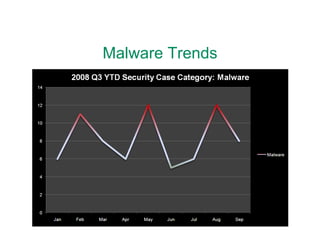
Malware Trends
Firewalls & Antivirus Have Lost Client-side attacks, web browsing and e-mail, go right through most firewall policies. Antivirus detection rates for current malware files are averaging 30-50%. If you’re not adapting some other way, you’ve lost.
Malware is Adapting Quickly Take away Local Admin? Malware that persists in non-admin accounts via HKLU Registry hive Whitelist apps with Windows Firewall? Malware that hooks into browser plugin APIs Block IRC at the firewall? Malware that uses encrypted HTTP/HTTPS back-channels
“ But it’s just spyware, right?” Our security analysts found samples in the past 18 months that: Send spam or launch DDoS attacks Give full desktop remote control Search “Documents and Settings” for SSNs, credit cards, and saved IE passwords Record all screen text and input and report it in near-real time to servers in Russia
Detection
Anatomy of a Drive-By Download Dropper Malware Servers More Malware JScript Exploit
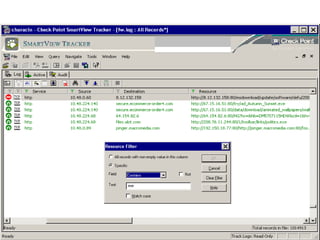
Log Files Firewall Logs Outbound SMTP from workstations (lots!) Outbound IRC connections Peer-to-peer file sharing traffic, esp. Winny Sustained high-volume traffic from workstations Proxy / Web Filter Logs Monitor URL’s ending in “.exe”
 
IDS/IPS Alerts Most products attempt to detect post-infection traffic, such as IRC or Winny C&C channels EmergingThreats.net for Snort, huge list of trojan/malware signatures, all free If your IDS can, write some custom rules: Look for “.exe” downloads on ports where web filters won’t Win32 PE headers in HTTP traffic (renamed files) JavaScript obfuscation techniques
Snort Rules alert tcp $HOME_NET any -> $EXTERNAL_NET !80 (msg: "LOCAL .exe file download on port other than 80"; flow:established; content: "GET"; depth:4; content:".exe"; nocase; classtype:misc-activity; sid:9000160; rev:1;) alert tcp $EXTERNAL_NET $HTTP_PORTS -> $HOME_NET any (msg:"LOCAL Obfuscated JavaScript document.write"; flow:from_server,established; content:"document.write“; nocase; pcre:"/document\.write\(\"\\[0-9][0-9]/i"; classtype:trojan-activity; sid:9000110; rev:1;) alert tcp $EXTERNAL_NET $HTTP_PORTS -> $HOME_NET any (msg:"LOCAL Obfuscated JavaScript unescape"; flow:from_server,established; content:"script>"; nocase; content:"unescape("; nocase; classtype:trojan-activity; sid:9000111; rev:2;) alert tcp $EXTERNAL_NET $HTTP_PORTS -> $HOME_NET any (msg:"LOCAL Obfuscated JavaScript eval"; flow:from_server,established; content:"script>"; nocase; content:"eval("; nocase; classtype:trojan-activity; sid:9000112; rev:2;)
Antivirus?! Yes, Antivirus! Many droppers will install multiple pieces of malware.  Your antivirus might detect 1 or 2 of them. When you see AV alerts from a workstation, check proxy logs for what else was downloaded.
Analysis
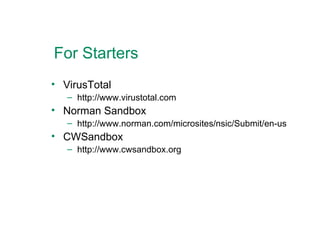
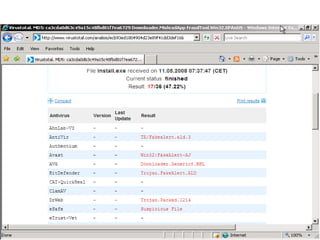
For Starters VirusTotal http://www.virustotal.com Norman Sandbox http://www.norman.com/microsites/nsic/Submit/en-us CWSandbox http://www.cwsandbox.org
 
Detecting Packed Files Packers are used to obfuscate malware executables from antivirus scanners. PEiD http://www.peid.info/ pefile http://code.google.com/p/pefile/ Jim Clausing’s packerid.py http://handlers.dshield.org/jclausing/
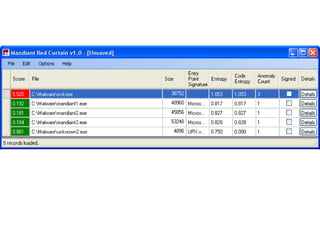
Analyzing Binary Files Utilities perform deeper scans of executables to determine the likelihood that they are suspicious/malicious Mandiant Red Curtain http://www.mandiant.com/mrc Resource Hacker http://angusj.com/resourcehacker/
 
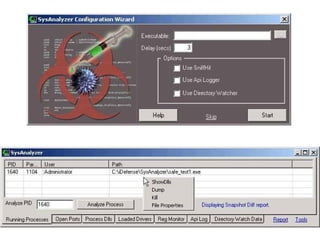
Behavioral Analysis Utilities analyze system activity while malware is running to identify suspicious or malicious behavior SysAnalyzer http://labs.idefense.com/software/malcode.php AMIR http://www.malwareinfo.org/Utilities/
 
Network Analysis Analyzing network traffic can identify the presence of malware based on the connections the machine is generating. SniffHit http://labs.idefense.com/software/malcode.php WireShark http://www.wireshark.org TCPView http://technet.microsoft.com/en-us/sysinternals/
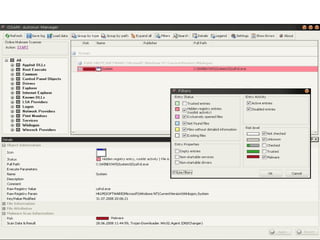
Analyzing System Hooks Analyzing system startup/execution hooks can determine if malware/rootkits are present. OSAM Autorun Manager http://www.online-solutions.ru/en/osam_autorun_manager.php StartupCPL http://www.mlin.net/StartupCPL.shtml HiJackThis! And StartupList http://www.merijn.org/programs.php
 
Building Toolkits
Response Toolkit: CD You could use a thumb drive, but read-only media is helpful here. Trusted Shell Copy of Windows CMD.EXE on CD Behavioral Analysis: AMIR Network Analysis: TCPView Startup Analysis: OSAM, HiJackThis!
Analysis Toolkit: VM Use a VM tool that supports snapshots “ Thwarting VM Detection” by Ed Skoudis Packer Analysis: PEiD, packerid.py Behavioral Analysis: SysAnalyzer Network Analysis: Wireshark on HOST Binary Analysis: Mandiant Red Curtain
Prevention & Recovery
Prevention – Whack-a-Mole Add malicious web sites and file names to your web content filter rules. Block malicious web site addresses with your firewall. If your AV/HIPS supports it, blacklist malicious file names and hashes as you find them.
Prevention: Local Admin? Restricting local admin access used to work well to prevent malware from persisting on a machine.  Some won’t run at all. More and more malware can persist in user space via HKLU Registry and StartUp group. But recovery is still easier! Develop & test a procedure for renaming local user profiles in Windows to enable quick recovery from infection for non-admins. Save downtime costs by not re-imaging.
Parting Shot: Best Practices Active monitoring by security staff. Develop response procedures for malware incidents.  Focus on response times. Contain potential incidents first, then analyze to determine impact.
Q & A Session

Malware Analysis Made Simple

  • 1.
    Malware Analysis MadeSimple SecureWorld Expo Detroit Wednesday, November 5, 2008 Paul Melson
  • 2.
  • 3.
    Why Not FocusOn Prevention? You Should! But… Nothing is 100% secure, blah blah When (not “if”) an incident occurs, a responsible team with a plan will: Respond quickly Be thorough Keep costs down
  • 4.
    You’re Probably RequiredTo An Incident Response Plan is a requirement of: FISMA HIPAA ISO/IEC 27002 PCI-DSS
  • 5.
    Why Do MalwareAnalysis In-House?
  • 6.
    Malware is Number1! Yay! Client-side attacks that install malware are the #1 external threat. It’s not slowing down any time soon: “ Symantec observed an average of 61,940 active bot-infected computers per day, a 17% increase from the previous period.” “ In the second half of 2007, 499,811 new malicious code threats were reported, a 136% increase over the first half of 2007.” (Source: Symantec Internet Threat Report, April 2008)
  • 7.
  • 8.
    Firewalls & AntivirusHave Lost Client-side attacks, web browsing and e-mail, go right through most firewall policies. Antivirus detection rates for current malware files are averaging 30-50%. If you’re not adapting some other way, you’ve lost.
  • 9.
    Malware is AdaptingQuickly Take away Local Admin? Malware that persists in non-admin accounts via HKLU Registry hive Whitelist apps with Windows Firewall? Malware that hooks into browser plugin APIs Block IRC at the firewall? Malware that uses encrypted HTTP/HTTPS back-channels
  • 10.
    “ But it’sjust spyware, right?” Our security analysts found samples in the past 18 months that: Send spam or launch DDoS attacks Give full desktop remote control Search “Documents and Settings” for SSNs, credit cards, and saved IE passwords Record all screen text and input and report it in near-real time to servers in Russia
  • 11.
  • 12.
    Anatomy of aDrive-By Download Dropper Malware Servers More Malware JScript Exploit
  • 13.
    Log Files FirewallLogs Outbound SMTP from workstations (lots!) Outbound IRC connections Peer-to-peer file sharing traffic, esp. Winny Sustained high-volume traffic from workstations Proxy / Web Filter Logs Monitor URL’s ending in “.exe”
  • 14.
  • 15.
    IDS/IPS Alerts Mostproducts attempt to detect post-infection traffic, such as IRC or Winny C&C channels EmergingThreats.net for Snort, huge list of trojan/malware signatures, all free If your IDS can, write some custom rules: Look for “.exe” downloads on ports where web filters won’t Win32 PE headers in HTTP traffic (renamed files) JavaScript obfuscation techniques
  • 16.
    Snort Rules alerttcp $HOME_NET any -> $EXTERNAL_NET !80 (msg: "LOCAL .exe file download on port other than 80"; flow:established; content: "GET"; depth:4; content:".exe"; nocase; classtype:misc-activity; sid:9000160; rev:1;) alert tcp $EXTERNAL_NET $HTTP_PORTS -> $HOME_NET any (msg:"LOCAL Obfuscated JavaScript document.write"; flow:from_server,established; content:"document.write“; nocase; pcre:"/document\.write\(\"\\[0-9][0-9]/i"; classtype:trojan-activity; sid:9000110; rev:1;) alert tcp $EXTERNAL_NET $HTTP_PORTS -> $HOME_NET any (msg:"LOCAL Obfuscated JavaScript unescape"; flow:from_server,established; content:"script>"; nocase; content:"unescape("; nocase; classtype:trojan-activity; sid:9000111; rev:2;) alert tcp $EXTERNAL_NET $HTTP_PORTS -> $HOME_NET any (msg:"LOCAL Obfuscated JavaScript eval"; flow:from_server,established; content:"script>"; nocase; content:"eval("; nocase; classtype:trojan-activity; sid:9000112; rev:2;)
  • 17.
    Antivirus?! Yes, Antivirus!Many droppers will install multiple pieces of malware. Your antivirus might detect 1 or 2 of them. When you see AV alerts from a workstation, check proxy logs for what else was downloaded.
  • 18.
  • 19.
    For Starters VirusTotalhttp://www.virustotal.com Norman Sandbox http://www.norman.com/microsites/nsic/Submit/en-us CWSandbox http://www.cwsandbox.org
  • 20.
  • 21.
    Detecting Packed FilesPackers are used to obfuscate malware executables from antivirus scanners. PEiD http://www.peid.info/ pefile http://code.google.com/p/pefile/ Jim Clausing’s packerid.py http://handlers.dshield.org/jclausing/
  • 22.
    Analyzing Binary FilesUtilities perform deeper scans of executables to determine the likelihood that they are suspicious/malicious Mandiant Red Curtain http://www.mandiant.com/mrc Resource Hacker http://angusj.com/resourcehacker/
  • 23.
  • 24.
    Behavioral Analysis Utilitiesanalyze system activity while malware is running to identify suspicious or malicious behavior SysAnalyzer http://labs.idefense.com/software/malcode.php AMIR http://www.malwareinfo.org/Utilities/
  • 25.
  • 26.
    Network Analysis Analyzingnetwork traffic can identify the presence of malware based on the connections the machine is generating. SniffHit http://labs.idefense.com/software/malcode.php WireShark http://www.wireshark.org TCPView http://technet.microsoft.com/en-us/sysinternals/
  • 27.
    Analyzing System HooksAnalyzing system startup/execution hooks can determine if malware/rootkits are present. OSAM Autorun Manager http://www.online-solutions.ru/en/osam_autorun_manager.php StartupCPL http://www.mlin.net/StartupCPL.shtml HiJackThis! And StartupList http://www.merijn.org/programs.php
  • 28.
  • 29.
  • 30.
    Response Toolkit: CDYou could use a thumb drive, but read-only media is helpful here. Trusted Shell Copy of Windows CMD.EXE on CD Behavioral Analysis: AMIR Network Analysis: TCPView Startup Analysis: OSAM, HiJackThis!
  • 31.
    Analysis Toolkit: VMUse a VM tool that supports snapshots “ Thwarting VM Detection” by Ed Skoudis Packer Analysis: PEiD, packerid.py Behavioral Analysis: SysAnalyzer Network Analysis: Wireshark on HOST Binary Analysis: Mandiant Red Curtain
  • 32.
  • 33.
    Prevention – Whack-a-MoleAdd malicious web sites and file names to your web content filter rules. Block malicious web site addresses with your firewall. If your AV/HIPS supports it, blacklist malicious file names and hashes as you find them.
  • 34.
    Prevention: Local Admin?Restricting local admin access used to work well to prevent malware from persisting on a machine. Some won’t run at all. More and more malware can persist in user space via HKLU Registry and StartUp group. But recovery is still easier! Develop & test a procedure for renaming local user profiles in Windows to enable quick recovery from infection for non-admins. Save downtime costs by not re-imaging.
  • 35.
    Parting Shot: BestPractices Active monitoring by security staff. Develop response procedures for malware incidents. Focus on response times. Contain potential incidents first, then analyze to determine impact.
  • 36.
    Q & ASession