Electrical Engineering Division YOONG HOR MENG . yhm2@np.edu.sg . 6460 6717
Version 3.0.1 03/03/2017

–
–

–

–

–
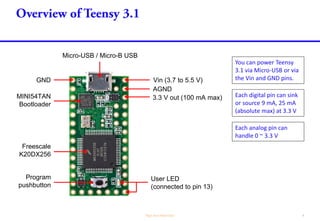
MINI54TAN
Bootloader
Freescale
K20DX256
Program
pushbutton
GND
User LED
(connected to pin 13)
Micro-USB / Micro-B USB
Vin (3.7 to 5.5 V)
AGND
3.3 V out (100 mA max)
You can power Teensy
3.1 via Micro-USB or via
the Vin and GND pins.
Each digital pin can sink
or source 9 mA, 25 mA
(absolute max) at 3.3 V
Each analog pin can
handle 0 ~ 3.3 V
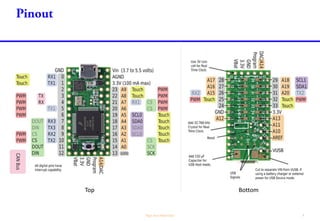
Top Bottom
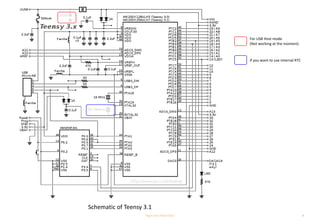
For USB Host mode
(Not working at the moment)
If you want to use internal RTC
Schematic of Teensy 3.1

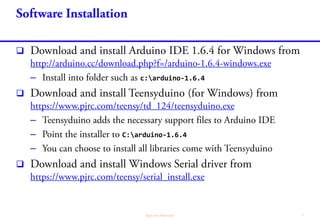
– c:arduino-1.6.4

–
– C:arduino-1.6.4
–


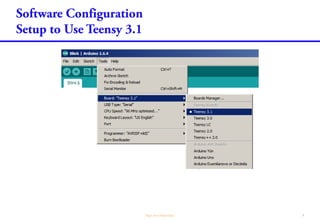
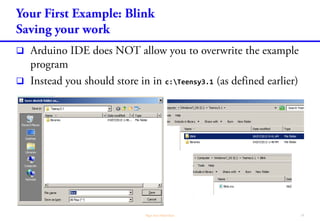
c:Teensy3.1
 File->Preferences
c:Teensy3.1 Sketchbook
location


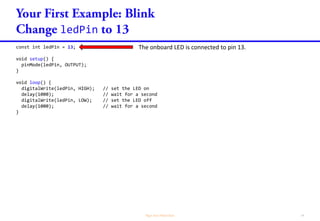
ledPin
const int ledPin = 13;
void setup() {
pinMode(ledPin, OUTPUT);
}
void loop() {
digitalWrite(ledPin, HIGH); // set the LED on
delay(1000); // wait for a second
digitalWrite(ledPin, LOW); // set the LED off
delay(1000); // wait for a second
}
The onboard LED is connected to pin 13.


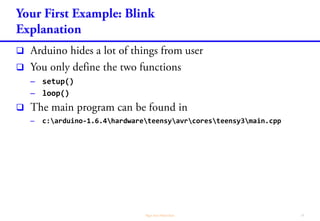
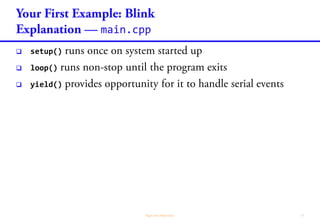
– setup()
– loop()

– c:arduino-1.6.4hardwareteensyavrcoresteensy3main.cpp
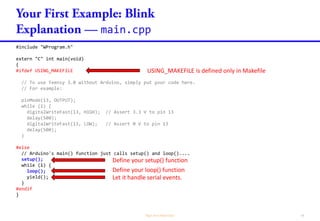
main.cpp
#include "WProgram.h"
extern "C" int main(void)
{
#ifdef USING_MAKEFILE
// To use Teensy 3.0 without Arduino, simply put your code here.
// For example:
pinMode(13, OUTPUT);
while (1) {
digitalWriteFast(13, HIGH); // Assert 3.3 V to pin 13
delay(500);
digitalWriteFast(13, LOW); // Assert 0 V to pin 13
delay(500);
}
#else
// Arduino's main() function just calls setup() and loop()....
setup();
while (1) {
loop();
yield();
}
#endif
}
USING_MAKEFILE is defined only in Makefile
Define your loop() function
Define your setup() function
Let it handle serial events.
main.cpp
 setup()
 loop()
 yield()





 c:Teensy3.1
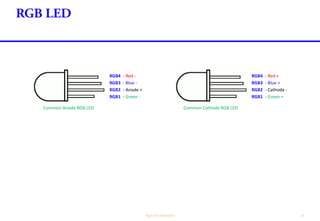
Common Cathode RGB LED
RGB1 - Green +
RGB2 - Cathode -
RGB3 - Blue +
RGB4 - Red +
Common Anode RGB LED
RGB1 - Green -
RGB2 - Anode +
RGB3 - Blue -
RGB4 - Red -
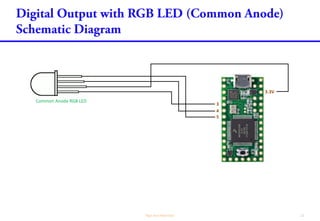
3
4
5
3.3V
Common Anode RGB LED
Normally, we need to put resistors in each of the R,
G and B pins of the LEDs, to limit the current to the
LED. However since Teensy can only supply 9 mA, I
omit the resistor. In practice, you need be aware of
that.
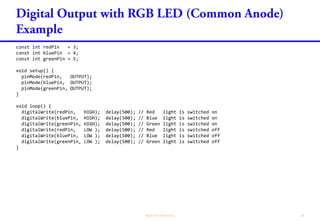
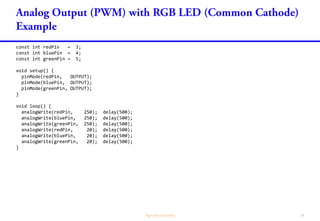
const int redPin = 3;
const int bluePin = 4;
const int greenPin = 5;
void setup() {
pinMode(redPin, OUTPUT);
pinMode(bluePin, OUTPUT);
pinMode(greenPin, OUTPUT);
}
void loop() {
digitalWrite(redPin, HIGH); delay(500); // Red light is switched on
digitalWrite(bluePin, HIGH); delay(500); // Blue light is switched on
digitalWrite(greenPin, HIGH); delay(500); // Green light is switched on
digitalWrite(redPin, LOW ); delay(500); // Red light is switched off
digitalWrite(bluePin, LOW ); delay(500); // Blue light is switched off
digitalWrite(greenPin, LOW ); delay(500); // Green light is switched off
}
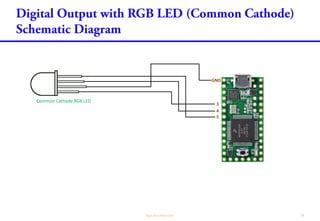
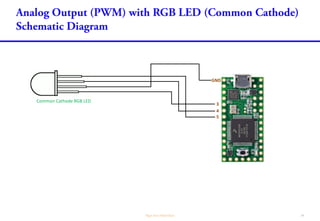
3
4
5
GND
Common Cathode RGB LED
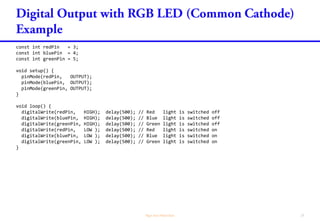
const int redPin = 3;
const int bluePin = 4;
const int greenPin = 5;
void setup() {
pinMode(redPin, OUTPUT);
pinMode(bluePin, OUTPUT);
pinMode(greenPin, OUTPUT);
}
void loop() {
digitalWrite(redPin, HIGH); delay(500); // Red light is switched off
digitalWrite(bluePin, HIGH); delay(500); // Blue light is switched off
digitalWrite(greenPin, HIGH); delay(500); // Green light is switched off
digitalWrite(redPin, LOW ); delay(500); // Red light is switched on
digitalWrite(bluePin, LOW ); delay(500); // Blue light is switched on
digitalWrite(greenPin, LOW ); delay(500); // Green light is switched on
}


–
–
–
–
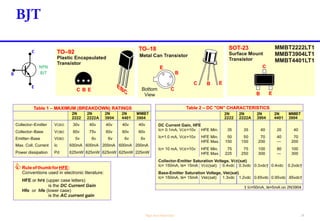
B
NPN
BJT
C
E
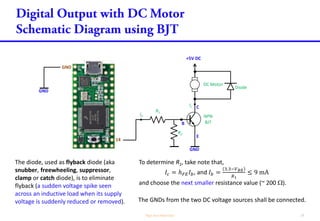
The diode, used as flyback diode (aka
snubber, freewheeling, suppressor,
clamp or catch diode), is to eliminate
flyback (a sudden voltage spike seen
across an inductive load when its supply
voltage is suddenly reduced or removed).
To determine R1, take note that,
𝐼𝑐 = ℎ 𝐹𝐸 𝐼 𝑏, and 𝐼 𝑏 =
3.3−𝑉 𝐵𝐸
𝑅1
≤ 9 mA
and choose the next smaller resistance value (~ 200 ).
The GNDs from the two DC voltage sources shall be connected.
GND
B
+5V DC
DC Motor
NPN
BJT
R1
C
E
Diode
14
GND
GND
Ib
Ic
R2
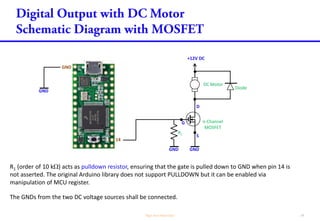
R1 (order of 100 k) acts as pulldown resistor, ensuring that the gate is pulled down to GND when pin 14
is not asserted. The original Arduino library does not support PULLDOWN but it can be enabled via
manipulation of MCU register.
G n-Channel
MOSFET
D
S
14
GND
GND
The GNDs from the two DC voltage sources shall be connected.
+12V DC
DC Motor
Diode
GNDGND
R1
R2
R2 (order of 100 ) acts as damping resistor, to dampen signal oscillation due to capacitance/inductance
between pin 14 to the gate of the MOSFET.
C
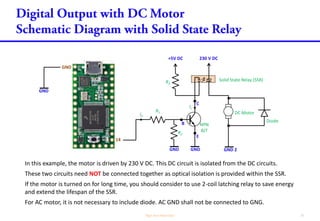
In this example, the motor is driven by 230 V DC. This DC circuit is isolated from the DC circuits.
These two circuits need NOT be connected together as optical isolation is provided within the SSR.
If the motor is turned on for long time, you should consider to use 2-coil latching relay to save energy
and extend the lifespan of the SSR.
For AC motor, it is not necessary to include diode. AC GND shall not be connected to GNG.
GND
B
+5V DC
NPN
BJT
R1
E
14
GND
GND
Ib
R2
230 V DC
DC Motor
R3
Ic
GND 2
Diode
Solid State Relay (SSR)
GND
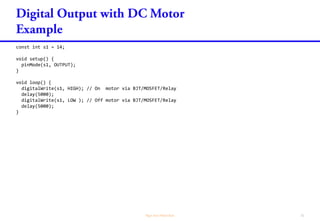
const int s1 = 14;
void setup() {
pinMode(s1, OUTPUT);
}
void loop() {
digitalWrite(s1, HIGH); // On motor via BJT/MOSFET/Relay
delay(5000);
digitalWrite(s1, LOW ); // Off motor via BJT/MOSFET/Relay
delay(5000);
}
3
4
5
GND
Common Cathode RGB LED
const int redPin = 3;
const int bluePin = 4;
const int greenPin = 5;
void setup() {
pinMode(redPin, OUTPUT);
pinMode(bluePin, OUTPUT);
pinMode(greenPin, OUTPUT);
}
void loop() {
analogWrite(redPin, 250); delay(500);
analogWrite(bluePin, 250); delay(500);
analogWrite(greenPin, 250); delay(500);
analogWrite(redPin, 20); delay(500);
analogWrite(bluePin, 20); delay(500);
analogWrite(greenPin, 20); delay(500);
}
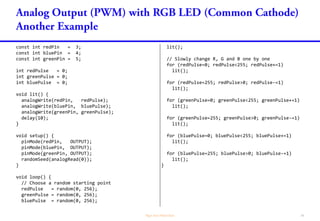
const int redPin = 3;
const int bluePin = 4;
const int greenPin = 5;
int redPulse = 0;
int greenPulse = 0;
int bluePulse = 0;
void lit() {
analogWrite(redPin, redPulse);
analogWrite(bluePin, bluePulse);
analogWrite(greenPin, greenPulse);
delay(10);
}
void setup() {
pinMode(redPin, OUTPUT);
pinMode(bluePin, OUTPUT);
pinMode(greenPin, OUTPUT);
randomSeed(analogRead(0));
}
void loop() {
// Choose a random starting point
redPulse = random(0, 256);
greenPulse = random(0, 256);
bluePulse = random(0, 256);
lit();
// Slowly change R, G and B one by one
for (redPulse=0; redPulse<255; redPulse+=1)
lit();
for (redPulse=255; redPulse>0; redPulse-=1)
lit();
for (greenPulse=0; greenPulse<255; greenPulse+=1)
lit();
for (greenPulse=255; greenPulse>0; greenPulse-=1)
lit();
for (bluePulse=0; bluePulse<255; bluePulse+=1)
lit();
for (bluePulse=255; bluePulse>0; bluePulse-=1)
lit();
}
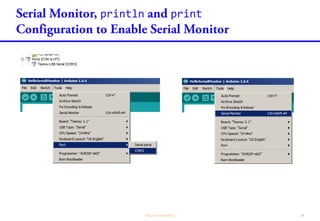
println print
println print
println print
long count = 0;
char buff[80];
void increase() {
count++;
}
void setup() {
Serial.begin(38400);
}
void loop()
{
snprintf(buff, 80, "Hello World - %ld", count);
increase();
Serial.println(buff);
delay(1000);
}
print() does not print NEWLINE.
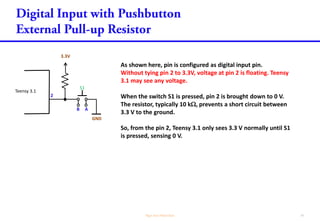
As shown here, pin is configured as digital input pin.
Without tying pin 2 to 3.3V, voltage at pin 2 is floating. Teensy
3.1 may see any voltage.
When the switch S1 is pressed, pin 2 is brought down to 0 V.
The resistor, typically 10 k, prevents a short circuit between
3.3 V to the ground.
So, from the pin 2, Teensy 3.1 only sees 3.3 V normally until S1
is pressed, sensing 0 V.
Teensy 3.1
2
3.3V
GND
S1
B A
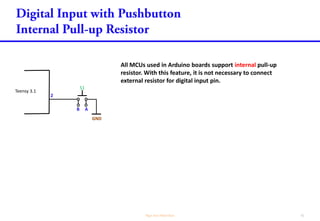
All MCUs used in Arduino boards support internal pull-up
resistor. With this feature, it is not necessary to connect
external resistor for digital input pin.
Teensy 3.1
2
GND
S1
B A
11
S1
A B
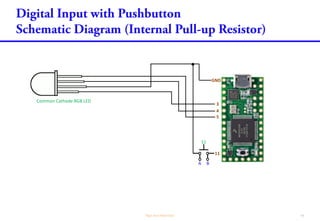
3
4
5
GND
Common Cathode RGB LED
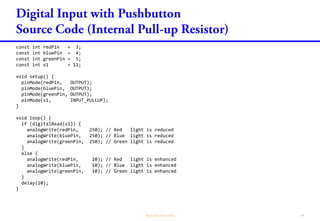
const int redPin = 3;
const int bluePin = 4;
const int greenPin = 5;
const int s1 = 11;
void setup() {
pinMode(redPin, OUTPUT);
pinMode(bluePin, OUTPUT);
pinMode(greenPin, OUTPUT);
pinMode(s1, INPUT_PULLUP);
}
void loop() {
if (digitalRead(s1)) {
analogWrite(redPin, 250); // Red light is reduced
analogWrite(bluePin, 250); // Blue light is reduced
analogWrite(greenPin, 250); // Green light is reduced
}
else {
analogWrite(redPin, 10); // Red light is enhanced
analogWrite(bluePin, 10); // Blue light is enhanced
analogWrite(greenPin, 10); // Green light is enhanced
}
delay(10);
}
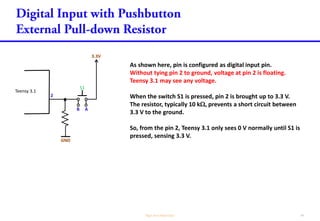
As shown here, pin is configured as digital input pin.
Without tying pin 2 to ground, voltage at pin 2 is floating.
Teensy 3.1 may see any voltage.
When the switch S1 is pressed, pin 2 is brought up to 3.3 V.
The resistor, typically 10 k, prevents a short circuit between
3.3 V to the ground.
So, from the pin 2, Teensy 3.1 only sees 0 V normally until S1 is
pressed, sensing 3.3 V.
Teensy 3.1
2
3.3V
GND
S1
B A
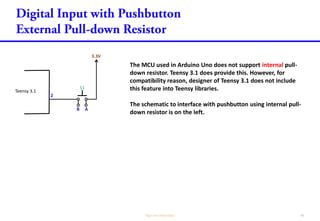
The MCU used in Arduino Uno does not support internal pull-
down resistor. Teensy 3.1 does provide this. However, for
compatibility reason, designer of Teensy 3.1 does not include
this feature into Teensy libraries.
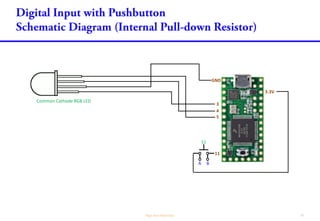
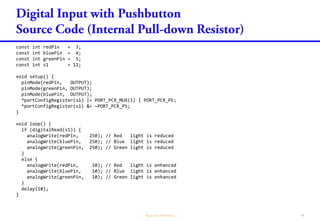
The schematic to interface with pushbutton using internal pull-
down resistor is on the left.
Teensy 3.1
2
3.3V
S1
B A
11
S1
A B
3
4
5
GND
Common Cathode RGB LED
3.3V
const int redPin = 3;
const int bluePin = 4;
const int greenPin = 5;
const int s1 = 11;
void setup() {
pinMode(redPin, OUTPUT);
pinMode(greenPin, OUTPUT);
pinMode(bluePin, OUTPUT);
pinMode(s1, INPUT_PULLDOWN);
}
void loop() {
if (digitalRead(s1)) {
analogWrite(redPin, 250); // Red light is reduced
analogWrite(bluePin, 250); // Blue light is reduced
analogWrite(greenPin, 250); // Green light is reduced
}
else {
analogWrite(redPin, 10); // Red light is enhanced
analogWrite(bluePin, 10); // Blue light is enhanced
analogWrite(greenPin, 10); // Green light is enhanced
}
delay(10);
}



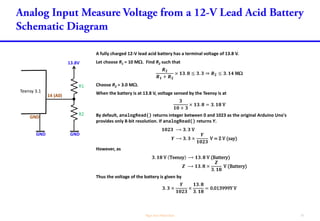
A fully charged 12-V lead acid battery has a terminal voltage of 13.8 V.
Let choose R1 = 10 M. Find R2 such that
𝑹 𝟐
𝑹 𝟏 + 𝑹 𝟐
× 𝟏𝟑. 𝟖 ≤ 𝟑. 𝟑 ⇒ 𝑹 𝟐 ≤ 𝟑. 𝟏𝟒 M
Choose R2 = 3.0 M.
When the battery is at 13.8 V, voltage sensed by the Teensy is at
𝟑
𝟏𝟎 + 𝟑
× 𝟏𝟑. 𝟖 = 𝟑. 𝟏𝟖 V
By default, analogRead() returns integer between 0 and 1023 as the original Arduino Uno's
provides only 8-bit resolution. If analogRead() returns Y.
𝟏𝟎𝟐𝟑 ⟶ 𝟑. 𝟑 V
𝒀 ⟶ 𝟑. 𝟑 ×
𝒀
𝟏𝟎𝟐𝟑
V = Z V (say)
However, as
𝟑. 𝟏𝟖 V Teensy ⟶ 𝟏𝟑. 𝟖 V (Battery)
𝒁 ⟶ 𝟏𝟑. 𝟖 ×
𝒁
𝟑. 𝟏𝟖
V (Battery)
Thus the voltage of the battery is given by
𝟑. 𝟑 ×
𝒀
𝟏𝟎𝟐𝟑
×
𝟏𝟑. 𝟖
𝟑. 𝟏𝟖
= 0.013999Y V
13.8V
Teensy 3.1
14 (A0)
R1
R2
GNDGND
GND
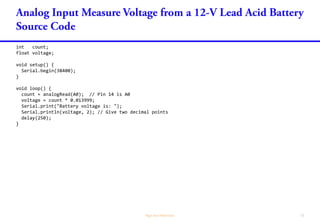
int count;
float voltage;
void setup() {
Serial.begin(38400);
}
void loop() {
count = analogRead(A0); // Pin 14 is A0
voltage = count * 0.013999;
Serial.print("Battery voltage is: ");
Serial.println(voltage, 2); // Give two decimal points
delay(250);
}


Serial Port Rx
(Input to Teensy)
Tx
(Output from Teensy)
RTS
(Output from Teensy)
CTS
(Input to Teensy)
Serial1 Pin 0 Pin 1 Any GPIO pin Pin 18 or Pin 20
Serial2 Pin 9 Pin 10 Any GPIO pin Pin 23
Serial3 Pin 7 Pin 8 Any GPIO pin Pin 14
Serial4 Pin 31 Pin 32 Any GPIO pin NA
Serial5 Pin 34 Pin 35 Any GPIO pin Pin 24
Serial6 Pin 47 Pin 48 Any GPIO pin Pin 56
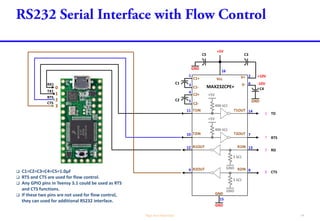
 C1=C2=C3=C4=C5=1.0µF
 RTS and CTS are used for flow control.
 Any GPIO pins in Teensy 3.x could be used as RTS.
 CTS: Serial1 supports pins 18 and 20, Serial2 supports pin 23, Serial3 supports pin 14.
See http://www.pjrc.com/teensy/td_uart.html
18
V+
+5V
16
2
C3
C1+
C1-
1
3C1
C2+
C2-
4
5C2
GND
+10V
Vcc
-10V
T1OUTT1IN11 14
T2OUTT2IN10 7
R1OUT R1IN 1312
R2OUT R2IN 89
GND
GND
15
C5
V-
GND
6
C4
+5V
400 k
GND
5 k
GND
5 k
2
3
+5V
400 k
7
8
1
0
2
RX1
TX1
Tx
Rx
RTS
CTS
RTS
CTS
MAX232CPE+
DB9: View looking into male connector DB9: View looking into female connector
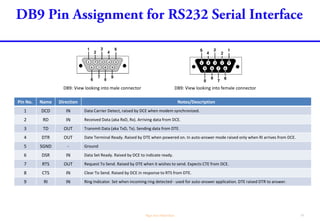
Pin No. Name Direction Notes/Description
1 DCD IN Data Carrier Detect, raised by DCE when modem synchronized.
2 Rx IN Received Data (aka RD, RxD). Arriving data from DCE.
3 Tx OUT Transmit Data (aka TD, TxD). Sending data from DTE.
4 DTR OUT Date Terminal Ready. Raised by DTE when powered on. In auto-answer mode raised only when RI arrives from DCE.
5 SGND - Ground
6 DSR IN Data Set Ready. Raised by DCE to indicate ready.
7 RTS OUT Request To Send. Raised by DTE when it wishes to send. Expects CTE from DCE.
8 CTS IN Clear To Send. Raised by DCE in response to RTS from DTE.
9 RI IN Ring Indicator. Set when incoming ring detected - used for auto-answer application. DTE raised DTR to answer.
GND
18
V+
+5V
16
2
C3
C1+
C1-
1
3C1
C2+
C2-
4
5C2
GND
+10V
Vcc
-10V
T1OUTT1IN11 14
T2OUTT2IN10 7
R1OUT R1IN 1312
R2OUT R2IN 89
GND
15
C5
V-
GND
6
C4
+5V
400 k
GND
5 k
GND
5 k
2
3
+5V
400 k
7
8
1
0
2
RX1
TX1
Tx
Rx
RTS
CTS
RTS
CTS
MAX232CPE+
GSM
Modem
DB9
Connection
void setup() {
Serial1.begin(9600);
}
void loop() {
Serial1.println("AT+CMGF=1"); // Set the GSM modem to Text Mode
delay(1000); // Delay 1 second
Serial1.println("AT+CMGS="+65xxxxxxxx"r“); // Replace x with destination mobile number
delay(1000);
Serial1.println("Hello world from myself"); // The text to be sent
delay(100);
Serial1.println((char)26); // ASCII character for Ctrl+Z
delay(5000);
}
"
"
RO
RE
DE
DI
VCC
B
A
GND
1
2
3
4
8
7
6
5
2
GND
0
1
+5V
GND
GND
1µF
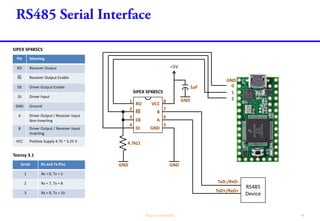
Pin Meaning
RO Receiver Output
RE Receiver Output Enable
DE Driver Output Enable
DI Driver Input
GND Ground
A Driver Output / Receiver Input
Non-Inverting
B Driver Output / Receiver Input
Inverting
VCC Positive Supply 4.75 ~ 5.25 V
TxD-/RxD-
TxD+/RxD+
RS485
Device
GND
4.7k
SIPEX SP485CS
SIPEX SP485CS
Serial Rx and Tx Pins
1 Rx = 0, Tx = 1
2 Rx = 7, Tx = 8
3 Rx = 9, Tx = 10
Teensy 3.1
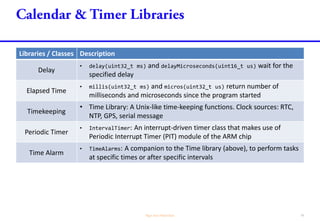
Libraries / Classes Description
Delay
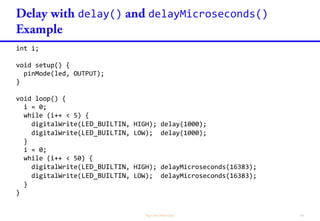
• delay(uint32_t ms) and delayMicroseconds(uint16_t us) wait for the
specified delay
Elapsed Time
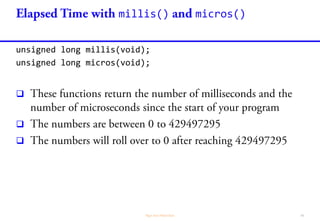
• millis(uint32_t ms) and micros(uint32_t us) return number of
milliseconds and microseconds since the program started
Timekeeping
• Time Library: A Unix-like time-keeping functions. Clock sources: RTC,
NTP, GPS, serial message
Periodic Timer
• IntervalTimer: An interrupt-driven timer class that makes use of
Periodic Interrupt Timer (PIT) module of the ARM chip
Time Alarm
• TimeAlarms: A companion to the Time library (above), to perform tasks
at specific times or after specific intervals
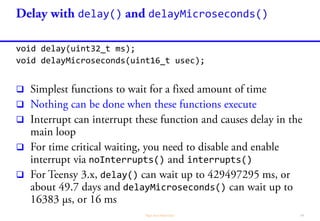
delay() delayMicroseconds()
void delay(uint32_t ms);
void delayMicroseconds(uint16_t usec);




noInterrupts() interrupts()
 delay()
delayMicroseconds()
delay() delayMicroseconds()
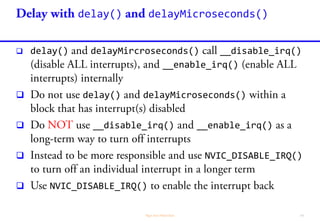
 delay() delayMircroseconds() __disable_irq()
__enable_irq()
 delay() delayMicroseconds()
 __disable_irq() __enable_irq()
 NVIC_DISABLE_IRQ()
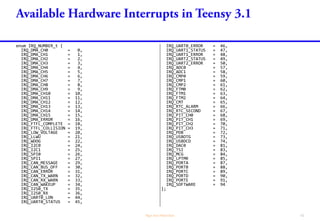
enum IRQ_NUMBER_t {
IRQ_DMA_CH0 = 0,
IRQ_DMA_CH1 = 1,
IRQ_DMA_CH2 = 2,
IRQ_DMA_CH3 = 3,
IRQ_DMA_CH4 = 4,
IRQ_DMA_CH5 = 5,
IRQ_DMA_CH6 = 6,
IRQ_DMA_CH7 = 7,
IRQ_DMA_CH8 = 8,
IRQ_DMA_CH9 = 9,
IRQ_DMA_CH10 = 10,
IRQ_DMA_CH11 = 11,
IRQ_DMA_CH12 = 12,
IRQ_DMA_CH13 = 13,
IRQ_DMA_CH14 = 14,
IRQ_DMA_CH15 = 15,
IRQ_DMA_ERROR = 16,
IRQ_FTFL_COMPLETE = 18,
IRQ_FTFL_COLLISION = 19,
IRQ_LOW_VOLTAGE = 20,
IRQ_LLWU = 21,
IRQ_WDOG = 22,
IRQ_I2C0 = 24,
IRQ_I2C1 = 25,
IRQ_SPI0 = 26,
IRQ_SPI1 = 27,
IRQ_CAN_MESSAGE = 29,
IRQ_CAN_BUS_OFF = 30,
IRQ_CAN_ERROR = 31,
IRQ_CAN_TX_WARN = 32,
IRQ_CAN_RX_WARN = 33,
IRQ_CAN_WAKEUP = 34,
IRQ_I2S0_TX = 35,
IRQ_I2S0_RX = 36,
IRQ_UART0_LON = 44,
IRQ_UART0_STATUS = 45,
IRQ_UART0_ERROR = 46,
IRQ_UART1_STATUS = 47,
IRQ_UART1_ERROR = 48,
IRQ_UART2_STATUS = 49,
IRQ_UART2_ERROR = 50,
IRQ_ADC0 = 57,
IRQ_ADC1 = 58,
IRQ_CMP0 = 59,
IRQ_CMP1 = 60,
IRQ_CMP2 = 61,
IRQ_FTM0 = 62,
IRQ_FTM1 = 63,
IRQ_FTM2 = 64,
IRQ_CMT = 65,
IRQ_RTC_ALARM = 66,
IRQ_RTC_SECOND = 67,
IRQ_PIT_CH0 = 68,
IRQ_PIT_CH1 = 69,
IRQ_PIT_CH2 = 70,
IRQ_PIT_CH3 = 71,
IRQ_PDB = 72,
IRQ_USBOTG = 73,
IRQ_USBDCD = 74,
IRQ_DAC0 = 81,
IRQ_TSI = 83,
IRQ_MCG = 84,
IRQ_LPTMR = 85,
IRQ_PORTA = 87,
IRQ_PORTB = 88,
IRQ_PORTC = 89,
IRQ_PORTD = 90,
IRQ_PORTE = 91,
IRQ_SOFTWARE = 94
};
delay() delayMicroseconds()
int i;
void setup() {
pinMode(led, OUTPUT);
}
void loop() {
i = 0;
while (i++ < 5) {
digitalWrite(LED_BUILTIN, HIGH); delay(1000);
digitalWrite(LED_BUILTIN, LOW); delay(1000);
}
i = 0;
while (i++ < 50) {
digitalWrite(LED_BUILTIN, HIGH); delayMicroseconds(16383);
digitalWrite(LED_BUILTIN, LOW); delayMicroseconds(16383);
}
}
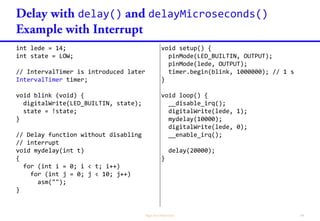
delay() delayMicroseconds()
int lede = 14;
int state = LOW;
// IntervalTimer is introduced later
IntervalTimer timer;
void blink (void) {
digitalWrite(LED_BUILTIN, state);
state = !state;
}
// Delay function without disabling
// interrupt
void mydelay(int t)
{
for (int i = 0; i < t; i++)
for (int j = 0; j < 10; j++)
asm("");
}
void setup() {
pinMode(LED_BUILTIN, OUTPUT);
pinMode(lede, OUTPUT);
timer.begin(blink, 1000000); // 1 s
}
void loop() {
__disable_irq();
digitalWrite(lede, 1);
mydelay(10000);
digitalWrite(lede, 0);
__enable_irq();
delay(20000);
}
millis() micros()
millis() micros()
unsigned long millis(void);
unsigned long micros(void);



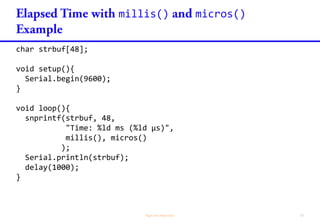
millis() micros()
char strbuf[48];
void setup(){
Serial.begin(9600);
}
void loop(){
snprintf(strbuf, 48,
"Time: %ld ms (%ld µs)",
millis(), micros()
);
Serial.println(strbuf);
delay(1000);
}
Time
Time
 Time

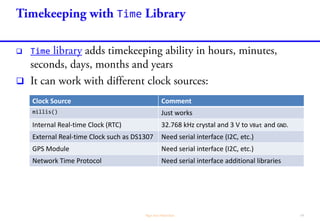
Clock Source Comment
millis() Just works
Internal Real-time Clock (RTC) 32.768 kHz crystal and 3 V to VBat and GND.
External Real-time Clock such as DS1307 Need serial interface (I2C, etc.)
GPS Module Need serial interface (I2C, etc.)
Network Time Protocol Need serial interface additional libraries
Time


setTime()
Time
Time.h
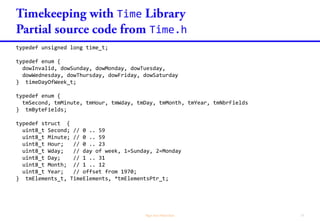
typedef unsigned long time_t;
typedef enum {
dowInvalid, dowSunday, dowMonday, dowTuesday,
dowWednesday, dowThursday, dowFriday, dowSaturday
} timeDayOfWeek_t;
typedef enum {
tmSecond, tmMinute, tmHour, tmWday, tmDay, tmMonth, tmYear, tmNbrFields
} tmByteFields;
typedef struct {
uint8_t Second; // 0 .. 59
uint8_t Minute; // 0 .. 59
uint8_t Hour; // 0 .. 23
uint8_t Wday; // day of week, 1=Sunday, 2=Monday
uint8_t Day; // 1 .. 31
uint8_t Month; // 1 .. 12
uint8_t Year; // offset from 1970;
} tmElements_t, TimeElements, *tmElementsPtr_t;
Time
Time.h
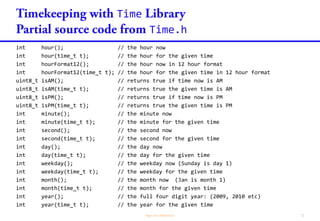
int hour(); // the hour now
int hour(time_t t); // the hour for the given time
int hourFormat12(); // the hour now in 12 hour format
int hourFormat12(time_t t); // the hour for the given time in 12 hour format
uint8_t isAM(); // returns true if time now is AM
uint8_t isAM(time_t t); // returns true the given time is AM
uint8_t isPM(); // returns true if time now is PM
uint8_t isPM(time_t t); // returns true the given time is PM
int minute(); // the minute now
int minute(time_t t); // the minute for the given time
int second(); // the second now
int second(time_t t); // the second for the given time
int day(); // the day now
int day(time_t t); // the day for the given time
int weekday(); // the weekday now (Sunday is day 1)
int weekday(time_t t); // the weekday for the given time
int month(); // the month now (Jan is month 1)
int month(time_t t); // the month for the given time
int year(); // the full four digit year: (2009, 2010 etc)
int year(time_t t); // the year for the given time
Time
Time.h
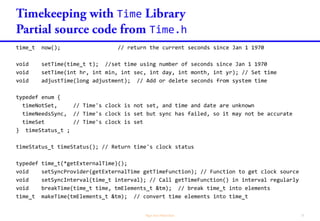
time_t now(); // return the current seconds since Jan 1 1970
void setTime(time_t t); //set time using number of seconds since Jan 1 1970
void setTime(int hr, int min, int sec, int day, int month, int yr); // Set time
void adjustTime(long adjustment); // Add or delete seconds from system time
typedef enum {
timeNotSet, // Time's clock is not set, and time and date are unknown
timeNeedsSync, // Time's clock is set but sync has failed, so it may not be accurate
timeSet // Time's clock is set
} timeStatus_t ;
timeStatus_t timeStatus(); // Return time's clock status
typedef time_t(*getExternalTime)();
void setSyncProvider(getExternalTime getTimeFunction); // Function to get clock source
void setSyncInterval(time_t interval); // Call getTimeFunction() in interval regularly
void breakTime(time_t time, tmElements_t &tm); // break time_t into elements
time_t makeTime(tmElements_t &tm); // convert time elements into time_t
Time
millis()
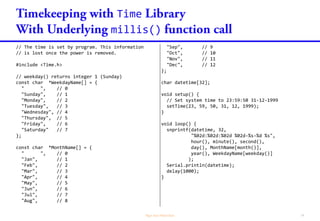
// The time is set by program. This information
// is lost once the power is removed.
#include <TimeLib.h>
// weekday() returns integer: 1 = Sunday
const char *WeekdayName[] = {
" " , // 0
"Sunday" , // 1
"Monday" , // 2
"Tuesday" , // 3
"Wednesday", // 4
"Thursday" , // 5
"Friday" , // 6
"Saturday" // 7
};
// month() returns integer: 1 = January
const char *MonthName[] = {
" ", // 0
"Jan", // 1
"Feb", // 2
"Mar", // 3
"Apr", // 4
"May", // 5
"Jun", // 6
"Jul", // 7
"Aug", // 8
"Sep", // 9
"Oct", // 10
"Nov", // 11
"Dec" // 12
};
char datetime[32];
void setup() {
// Set system time to 23:59:50 31-12-1999
setTime(23, 59, 50, 31, 12, 1999);
}
void loop() {
snprintf(datetime, 32,
"%02d:%02d:%02d %02d-%s-%d %s",
hour(), minute(), second(),
day(), MonthName[month()],
year(), WeekdayName[weekday()]
);
Serial.println(datetime);
delay(1000);
}
Time

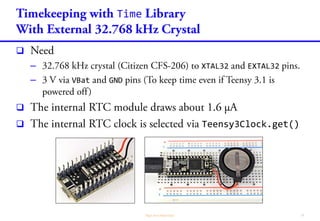
– XTAL32 EXTAL32
– VBat GND

 Teensy3Clock.get()
Time
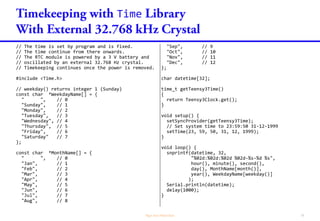
// The time is set by program and is fixed.
// The time continue from there onwards.
// The RTC module is powered by a 3 V battery and
// oscillated by an external 32.768 Hz crystal.
// Timekeeping continues once the power is removed.
#include <TimeLib.h>
// weekday() returns integer 1 (Sunday)
const char *WeekdayName[] = {
" ", // 0
"Sunday", // 1
"Monday", // 2
"Tuesday", // 3
"Wednesday", // 4
"Thursday", // 5
"Friday", // 6
"Saturday" // 7
};
// month() returns integer: 1 = January
const char *MonthName[] = {
" ", // 0
"Jan", // 1
"Feb", // 2
"Mar", // 3
"Apr", // 4
"May", // 5
"Jun", // 6
"Jul", // 7
"Aug", // 8
"Sep", // 9
"Oct", // 10
"Nov", // 11
"Dec" // 12
};
char datetime[32];
time_t getTeensy3Time()
{
return Teensy3Clock.get();
}
void setup() {
setSyncProvider(getTeensy3Time);
// Set system time to 23:59:50 31-12-1999
setTime(23, 59, 50, 31, 12, 1999);
}
void loop() {
snprintf(datetime, 32,
"%02d:%02d:%02d %02d-%s-%d %s",
hour(), minute(), second(),
day(), MonthName[month()],
year(), WeekdayName[weekday()]
);
Serial.println(datetime);
delay(1000);
}
Time

Clock Source Example
Manually enter data via PC serial interface TimeSerial
DS1307 and manually via PC serial interface TimeRTCSet
GPS via Serial interface TimeGPS
NTP via Ethernet or WiFi over Serial interface TimeNTP
IntervalTimer
IntervalTimer
IntervalTimer::IntervalTimer();
bool IntervalTimer::begin(ISR function, uint64_t microseconds);
void IntervalTimer::end();
void IntervalTimer::priority(uint8_t priority); //0(high)..255

 IntervalTimer


noInterrupts() interrupts()
IntervalTimer
 IntervalTimer



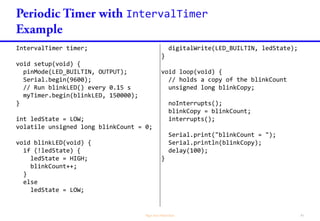
IntervalTimer
IntervalTimer timer;
void setup(void) {
pinMode(LED_BUILTIN, OUTPUT);
Serial.begin(9600);
// Run blinkLED() every 0.15 s
myTimer.begin(blinkLED, 150000);
}
int ledState = LOW;
volatile unsigned long blinkCount = 0;
void blinkLED(void) {
if (!ledState) {
ledState = HIGH;
blinkCount++;
}
else
ledState = LOW;
digitalWrite(LED_BUILTIN, ledState);
}
void loop(void) {
// holds a copy of the blinkCount
unsigned long blinkCopy;
noInterrupts();
blinkCopy = blinkCount;
interrupts();
Serial.print("blinkCount = ");
Serial.println(blinkCopy);
delay(100);
}
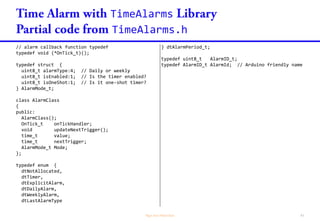
TimeAlarms
TimeAlarms
TimeAlarms.h
// alarm callback function typedef
typedef void (*OnTick_t)();
typedef struct {
uint8_t alarmType:4; // Daily or weekly
uint8_t isEnabled:1; // Is the timer enabled?
uint8_t isOneShot:1; // Is it one-shot timer?
} AlarmMode_t;
class AlarmClass
{
public:
AlarmClass();
OnTick_t onTickHandler;
void updateNextTrigger();
time_t value;
time_t nextTrigger;
AlarmMode_t Mode;
};
typedef enum {
dtNotAllocated,
dtTimer,
dtExplicitAlarm,
dtDailyAlarm,
dtWeeklyAlarm,
dtLastAlarmType
} dtAlarmPeriod_t;
typedef uint8_t AlarmID_t;
typedef AlarmID_t AlarmId; // Arduino friendly name
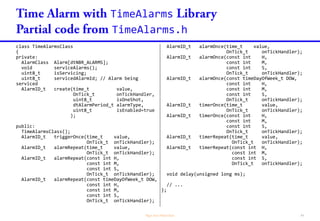
TimeAlarms
TimeAlarms.h
class TimeAlarmsClass
{
private:
AlarmClass Alarm[dtNBR_ALARMS];
void serviceAlarms();
uint8_t isServicing;
uint8_t servicedAlarmId; // Alarm being
serviced
AlarmID_t create(time_t value,
OnTick_t onTickHandler,
uint8_t isOneShot,
dtAlarmPeriod_t alarmType,
uint8_t isEnabled=true
);
public:
TimeAlarmsClass();
AlarmID_t triggerOnce(time_t value,
OnTick_t onTickHandler);
AlarmID_t alarmRepeat(time_t value,
OnTick_t onTickHandler);
AlarmID_t alarmRepeat(const int H,
const int M,
const int S,
OnTick_t onTickHandler);
AlarmID_t alarmRepeat(const timeDayOfWeek_t DOW,
const int H,
const int M,
const int S,
OnTick_t onTickHandler);
AlarmID_t alarmOnce(time_t value,
OnTick_t onTickHandler);
AlarmID_t alarmOnce(const int H,
const int M,
const int S,
OnTick_t onTickHandler);
AlarmID_t alarmOnce(const timeDayOfWeek_t DOW,
const int H,
const int M,
const int S,
OnTick_t onTickHandler);
AlarmID_t timerOnce(time_t value,
OnTick_t onTickHandler);
AlarmID_t timerOnce(const int H,
const int M,
const int S,
OnTick_t onTickHandler);
AlarmID_t timerRepeat(time_t value,
OnTick_t onTickHandler);
AlarmID_t timerRepeat(const int H,
const int M,
const int S,
OnTick_t onTickHandler);
void delay(unsigned long ms);
// ...
};
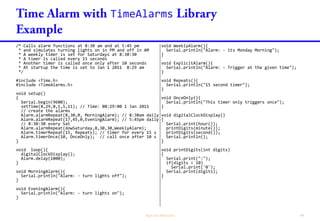
TimeAlarms
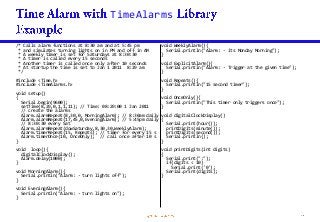
/* Calls alarm functions at 8:30 am and at 5:45 pm
* and simulates turning lights on in PM and off in AM
* A weekly timer is set for Saturdays at 8:30:30
* A timer is called every 15 seconds
* Another timer is called once only after 10 seconds
* At startup the time is set to Jan 1 2011 8:29 am
*/
#include <Time.h>
#include <TimeAlarms.h>
void setup()
{
Serial.begin(9600);
setTime(8,29,0,1,1,11); // Time: 08:29:00 1 Jan 2011
// create the alarms
Alarm.alarmRepeat(8,30,0, MorningAlarm); // 8:30am daily
Alarm.alarmRepeat(17,45,0,EveningAlarm); // 5:45pm daily
// 8:30:30 every Sat
Alarm.alarmRepeat(dowSaturday,8,30,30,WeeklyAlarm);
Alarm.timerRepeat(15, Repeats); // timer for every 15 s
Alarm.timerOnce(10, OnceOnly); // call once after 10 s
}
void loop(){
digitalClockDisplay();
Alarm.delay(1000);
}
void MorningAlarm(){
Serial.println("Alarm: - turn lights off");
}
void EveningAlarm(){
Serial.println("Alarm: - turn lights on");
}
void WeeklyAlarm(){
Serial.println("Alarm: - its Monday Morning");
}
void ExplicitAlarm(){
Serial.println("Alarm: - Trigger at the given time");
}
void Repeats(){
Serial.println("15 second timer");
}
void OnceOnly(){
Serial.println("This timer only triggers once");
}
void digitalClockDisplay()
{
Serial.print(hour());
printDigits(minute());
printDigits(second());
Serial.println();
}
void printDigits(int digits)
{
Serial.print(":");
if(digits < 10)
Serial.print('0');
Serial.print(digits);
}
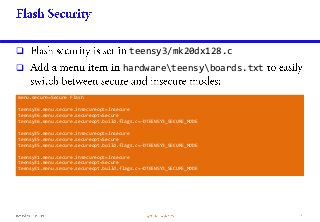
 teensy3/mk20dx128.c
 hardwareteensyboards.txt
menu.secure=Secure Flash
teensy36.menu.secure.insecureopt=Insecure
teensy36.menu.secure.secureopt=Secure
teensy36.menu.secure.secureopt.build.flags.c=-DTEENSY3_SECURE_MODE
teensy35.menu.secure.insecureopt=Insecure
teensy35.menu.secure.secureopt=Secure
teensy35.menu.secure.secureopt.build.flags.c=-DTEENSY3_SECURE_MODE
teensy31.menu.secure.insecureopt=Insecure
teensy31.menu.secure.secureopt=Secure
teensy31.menu.secure.secureopt.build.flags.c=-DTEENSY3_SECURE_MODE

Up and running with Teensy 3.1

  • 1.
    Electrical Engineering DivisionYOONG HOR MENG . yhm2@np.edu.sg . 6460 6717 Version 3.0.1 03/03/2017
  • 3.
  • 4.
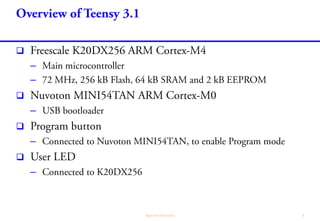
    MINI54TAN Bootloader Freescale K20DX256 Program pushbutton GND User LED (connected topin 13) Micro-USB / Micro-B USB Vin (3.7 to 5.5 V) AGND 3.3 V out (100 mA max) You can power Teensy 3.1 via Micro-USB or via the Vin and GND pins. Each digital pin can sink or source 9 mA, 25 mA (absolute max) at 3.3 V Each analog pin can handle 0 ~ 3.3 V
  • 5.
  • 6.
    For USB Hostmode (Not working at the moment) If you want to use internal RTC Schematic of Teensy 3.1
  • 7.
  • 8.
  • 10.
  • 11.
  • 14.
    ledPin const int ledPin= 13; void setup() { pinMode(ledPin, OUTPUT); } void loop() { digitalWrite(ledPin, HIGH); // set the LED on delay(1000); // wait for a second digitalWrite(ledPin, LOW); // set the LED off delay(1000); // wait for a second } The onboard LED is connected to pin 13.
  • 15.
      – setup() – loop()  –c:arduino-1.6.4hardwareteensyavrcoresteensy3main.cpp
  • 16.
    main.cpp #include "WProgram.h" extern "C"int main(void) { #ifdef USING_MAKEFILE // To use Teensy 3.0 without Arduino, simply put your code here. // For example: pinMode(13, OUTPUT); while (1) { digitalWriteFast(13, HIGH); // Assert 3.3 V to pin 13 delay(500); digitalWriteFast(13, LOW); // Assert 0 V to pin 13 delay(500); } #else // Arduino's main() function just calls setup() and loop().... setup(); while (1) { loop(); yield(); } #endif } USING_MAKEFILE is defined only in Makefile Define your loop() function Define your setup() function Let it handle serial events.
  • 17.
  • 18.
  • 19.
  • 21.
    Common Cathode RGBLED RGB1 - Green + RGB2 - Cathode - RGB3 - Blue + RGB4 - Red + Common Anode RGB LED RGB1 - Green - RGB2 - Anode + RGB3 - Blue - RGB4 - Red -
  • 22.
    3 4 5 3.3V Common Anode RGBLED Normally, we need to put resistors in each of the R, G and B pins of the LEDs, to limit the current to the LED. However since Teensy can only supply 9 mA, I omit the resistor. In practice, you need be aware of that.
  • 23.
    const int redPin= 3; const int bluePin = 4; const int greenPin = 5; void setup() { pinMode(redPin, OUTPUT); pinMode(bluePin, OUTPUT); pinMode(greenPin, OUTPUT); } void loop() { digitalWrite(redPin, HIGH); delay(500); // Red light is switched on digitalWrite(bluePin, HIGH); delay(500); // Blue light is switched on digitalWrite(greenPin, HIGH); delay(500); // Green light is switched on digitalWrite(redPin, LOW ); delay(500); // Red light is switched off digitalWrite(bluePin, LOW ); delay(500); // Blue light is switched off digitalWrite(greenPin, LOW ); delay(500); // Green light is switched off }
  • 24.
  • 25.
    const int redPin= 3; const int bluePin = 4; const int greenPin = 5; void setup() { pinMode(redPin, OUTPUT); pinMode(bluePin, OUTPUT); pinMode(greenPin, OUTPUT); } void loop() { digitalWrite(redPin, HIGH); delay(500); // Red light is switched off digitalWrite(bluePin, HIGH); delay(500); // Blue light is switched off digitalWrite(greenPin, HIGH); delay(500); // Green light is switched off digitalWrite(redPin, LOW ); delay(500); // Red light is switched on digitalWrite(bluePin, LOW ); delay(500); // Blue light is switched on digitalWrite(greenPin, LOW ); delay(500); // Green light is switched on }
  • 27.
  • 28.
  • 29.
    The diode, usedas flyback diode (aka snubber, freewheeling, suppressor, clamp or catch diode), is to eliminate flyback (a sudden voltage spike seen across an inductive load when its supply voltage is suddenly reduced or removed). To determine R1, take note that, 𝐼𝑐 = ℎ 𝐹𝐸 𝐼 𝑏, and 𝐼 𝑏 = 3.3−𝑉 𝐵𝐸 𝑅1 ≤ 9 mA and choose the next smaller resistance value (~ 200 ). The GNDs from the two DC voltage sources shall be connected. GND B +5V DC DC Motor NPN BJT R1 C E Diode 14 GND GND Ib Ic R2
  • 30.
    R1 (order of100 k) acts as pulldown resistor, ensuring that the gate is pulled down to GND when pin 14 is not asserted. The original Arduino library does not support PULLDOWN but it can be enabled via manipulation of MCU register. G n-Channel MOSFET D S 14 GND GND The GNDs from the two DC voltage sources shall be connected. +12V DC DC Motor Diode GNDGND R1 R2 R2 (order of 100 ) acts as damping resistor, to dampen signal oscillation due to capacitance/inductance between pin 14 to the gate of the MOSFET.
  • 31.
    C In this example,the motor is driven by 230 V DC. This DC circuit is isolated from the DC circuits. These two circuits need NOT be connected together as optical isolation is provided within the SSR. If the motor is turned on for long time, you should consider to use 2-coil latching relay to save energy and extend the lifespan of the SSR. For AC motor, it is not necessary to include diode. AC GND shall not be connected to GNG. GND B +5V DC NPN BJT R1 E 14 GND GND Ib R2 230 V DC DC Motor R3 Ic GND 2 Diode Solid State Relay (SSR) GND
  • 32.
    const int s1= 14; void setup() { pinMode(s1, OUTPUT); } void loop() { digitalWrite(s1, HIGH); // On motor via BJT/MOSFET/Relay delay(5000); digitalWrite(s1, LOW ); // Off motor via BJT/MOSFET/Relay delay(5000); }
  • 34.
  • 35.
    const int redPin= 3; const int bluePin = 4; const int greenPin = 5; void setup() { pinMode(redPin, OUTPUT); pinMode(bluePin, OUTPUT); pinMode(greenPin, OUTPUT); } void loop() { analogWrite(redPin, 250); delay(500); analogWrite(bluePin, 250); delay(500); analogWrite(greenPin, 250); delay(500); analogWrite(redPin, 20); delay(500); analogWrite(bluePin, 20); delay(500); analogWrite(greenPin, 20); delay(500); }
  • 36.
    const int redPin= 3; const int bluePin = 4; const int greenPin = 5; int redPulse = 0; int greenPulse = 0; int bluePulse = 0; void lit() { analogWrite(redPin, redPulse); analogWrite(bluePin, bluePulse); analogWrite(greenPin, greenPulse); delay(10); } void setup() { pinMode(redPin, OUTPUT); pinMode(bluePin, OUTPUT); pinMode(greenPin, OUTPUT); randomSeed(analogRead(0)); } void loop() { // Choose a random starting point redPulse = random(0, 256); greenPulse = random(0, 256); bluePulse = random(0, 256); lit(); // Slowly change R, G and B one by one for (redPulse=0; redPulse<255; redPulse+=1) lit(); for (redPulse=255; redPulse>0; redPulse-=1) lit(); for (greenPulse=0; greenPulse<255; greenPulse+=1) lit(); for (greenPulse=255; greenPulse>0; greenPulse-=1) lit(); for (bluePulse=0; bluePulse<255; bluePulse+=1) lit(); for (bluePulse=255; bluePulse>0; bluePulse-=1) lit(); }
  • 37.
  • 38.
  • 39.
    println print long count= 0; char buff[80]; void increase() { count++; } void setup() { Serial.begin(38400); } void loop() { snprintf(buff, 80, "Hello World - %ld", count); increase(); Serial.println(buff); delay(1000); } print() does not print NEWLINE.
  • 41.
    As shown here,pin is configured as digital input pin. Without tying pin 2 to 3.3V, voltage at pin 2 is floating. Teensy 3.1 may see any voltage. When the switch S1 is pressed, pin 2 is brought down to 0 V. The resistor, typically 10 k, prevents a short circuit between 3.3 V to the ground. So, from the pin 2, Teensy 3.1 only sees 3.3 V normally until S1 is pressed, sensing 0 V. Teensy 3.1 2 3.3V GND S1 B A
  • 42.
    All MCUs usedin Arduino boards support internal pull-up resistor. With this feature, it is not necessary to connect external resistor for digital input pin. Teensy 3.1 2 GND S1 B A
  • 43.
  • 44.
    const int redPin= 3; const int bluePin = 4; const int greenPin = 5; const int s1 = 11; void setup() { pinMode(redPin, OUTPUT); pinMode(bluePin, OUTPUT); pinMode(greenPin, OUTPUT); pinMode(s1, INPUT_PULLUP); } void loop() { if (digitalRead(s1)) { analogWrite(redPin, 250); // Red light is reduced analogWrite(bluePin, 250); // Blue light is reduced analogWrite(greenPin, 250); // Green light is reduced } else { analogWrite(redPin, 10); // Red light is enhanced analogWrite(bluePin, 10); // Blue light is enhanced analogWrite(greenPin, 10); // Green light is enhanced } delay(10); }
  • 45.
    As shown here,pin is configured as digital input pin. Without tying pin 2 to ground, voltage at pin 2 is floating. Teensy 3.1 may see any voltage. When the switch S1 is pressed, pin 2 is brought up to 3.3 V. The resistor, typically 10 k, prevents a short circuit between 3.3 V to the ground. So, from the pin 2, Teensy 3.1 only sees 0 V normally until S1 is pressed, sensing 3.3 V. Teensy 3.1 2 3.3V GND S1 B A
  • 46.
    The MCU usedin Arduino Uno does not support internal pull- down resistor. Teensy 3.1 does provide this. However, for compatibility reason, designer of Teensy 3.1 does not include this feature into Teensy libraries. The schematic to interface with pushbutton using internal pull- down resistor is on the left. Teensy 3.1 2 3.3V S1 B A
  • 47.
  • 48.
    const int redPin= 3; const int bluePin = 4; const int greenPin = 5; const int s1 = 11; void setup() { pinMode(redPin, OUTPUT); pinMode(greenPin, OUTPUT); pinMode(bluePin, OUTPUT); pinMode(s1, INPUT_PULLDOWN); } void loop() { if (digitalRead(s1)) { analogWrite(redPin, 250); // Red light is reduced analogWrite(bluePin, 250); // Blue light is reduced analogWrite(greenPin, 250); // Green light is reduced } else { analogWrite(redPin, 10); // Red light is enhanced analogWrite(bluePin, 10); // Blue light is enhanced analogWrite(greenPin, 10); // Green light is enhanced } delay(10); }
  • 50.
  • 51.
    A fully charged12-V lead acid battery has a terminal voltage of 13.8 V. Let choose R1 = 10 M. Find R2 such that 𝑹 𝟐 𝑹 𝟏 + 𝑹 𝟐 × 𝟏𝟑. 𝟖 ≤ 𝟑. 𝟑 ⇒ 𝑹 𝟐 ≤ 𝟑. 𝟏𝟒 M Choose R2 = 3.0 M. When the battery is at 13.8 V, voltage sensed by the Teensy is at 𝟑 𝟏𝟎 + 𝟑 × 𝟏𝟑. 𝟖 = 𝟑. 𝟏𝟖 V By default, analogRead() returns integer between 0 and 1023 as the original Arduino Uno's provides only 8-bit resolution. If analogRead() returns Y. 𝟏𝟎𝟐𝟑 ⟶ 𝟑. 𝟑 V 𝒀 ⟶ 𝟑. 𝟑 × 𝒀 𝟏𝟎𝟐𝟑 V = Z V (say) However, as 𝟑. 𝟏𝟖 V Teensy ⟶ 𝟏𝟑. 𝟖 V (Battery) 𝒁 ⟶ 𝟏𝟑. 𝟖 × 𝒁 𝟑. 𝟏𝟖 V (Battery) Thus the voltage of the battery is given by 𝟑. 𝟑 × 𝒀 𝟏𝟎𝟐𝟑 × 𝟏𝟑. 𝟖 𝟑. 𝟏𝟖 = 0.013999Y V 13.8V Teensy 3.1 14 (A0) R1 R2 GNDGND GND
  • 52.
    int count; float voltage; voidsetup() { Serial.begin(38400); } void loop() { count = analogRead(A0); // Pin 14 is A0 voltage = count * 0.013999; Serial.print("Battery voltage is: "); Serial.println(voltage, 2); // Give two decimal points delay(250); }
  • 54.
      Serial Port Rx (Inputto Teensy) Tx (Output from Teensy) RTS (Output from Teensy) CTS (Input to Teensy) Serial1 Pin 0 Pin 1 Any GPIO pin Pin 18 or Pin 20 Serial2 Pin 9 Pin 10 Any GPIO pin Pin 23 Serial3 Pin 7 Pin 8 Any GPIO pin Pin 14 Serial4 Pin 31 Pin 32 Any GPIO pin NA Serial5 Pin 34 Pin 35 Any GPIO pin Pin 24 Serial6 Pin 47 Pin 48 Any GPIO pin Pin 56
  • 55.
     C1=C2=C3=C4=C5=1.0µF  RTSand CTS are used for flow control.  Any GPIO pins in Teensy 3.x could be used as RTS.  CTS: Serial1 supports pins 18 and 20, Serial2 supports pin 23, Serial3 supports pin 14. See http://www.pjrc.com/teensy/td_uart.html 18 V+ +5V 16 2 C3 C1+ C1- 1 3C1 C2+ C2- 4 5C2 GND +10V Vcc -10V T1OUTT1IN11 14 T2OUTT2IN10 7 R1OUT R1IN 1312 R2OUT R2IN 89 GND GND 15 C5 V- GND 6 C4 +5V 400 k GND 5 k GND 5 k 2 3 +5V 400 k 7 8 1 0 2 RX1 TX1 Tx Rx RTS CTS RTS CTS MAX232CPE+
  • 56.
    DB9: View lookinginto male connector DB9: View looking into female connector Pin No. Name Direction Notes/Description 1 DCD IN Data Carrier Detect, raised by DCE when modem synchronized. 2 Rx IN Received Data (aka RD, RxD). Arriving data from DCE. 3 Tx OUT Transmit Data (aka TD, TxD). Sending data from DTE. 4 DTR OUT Date Terminal Ready. Raised by DTE when powered on. In auto-answer mode raised only when RI arrives from DCE. 5 SGND - Ground 6 DSR IN Data Set Ready. Raised by DCE to indicate ready. 7 RTS OUT Request To Send. Raised by DTE when it wishes to send. Expects CTE from DCE. 8 CTS IN Clear To Send. Raised by DCE in response to RTS from DTE. 9 RI IN Ring Indicator. Set when incoming ring detected - used for auto-answer application. DTE raised DTR to answer.
  • 57.
    GND 18 V+ +5V 16 2 C3 C1+ C1- 1 3C1 C2+ C2- 4 5C2 GND +10V Vcc -10V T1OUTT1IN11 14 T2OUTT2IN10 7 R1OUTR1IN 1312 R2OUT R2IN 89 GND 15 C5 V- GND 6 C4 +5V 400 k GND 5 k GND 5 k 2 3 +5V 400 k 7 8 1 0 2 RX1 TX1 Tx Rx RTS CTS RTS CTS MAX232CPE+ GSM Modem DB9 Connection
  • 58.
    void setup() { Serial1.begin(9600); } voidloop() { Serial1.println("AT+CMGF=1"); // Set the GSM modem to Text Mode delay(1000); // Delay 1 second Serial1.println("AT+CMGS="+65xxxxxxxx"r“); // Replace x with destination mobile number delay(1000); Serial1.println("Hello world from myself"); // The text to be sent delay(100); Serial1.println((char)26); // ASCII character for Ctrl+Z delay(5000); } " "
  • 59.
    RO RE DE DI VCC B A GND 1 2 3 4 8 7 6 5 2 GND 0 1 +5V GND GND 1µF Pin Meaning RO ReceiverOutput RE Receiver Output Enable DE Driver Output Enable DI Driver Input GND Ground A Driver Output / Receiver Input Non-Inverting B Driver Output / Receiver Input Inverting VCC Positive Supply 4.75 ~ 5.25 V TxD-/RxD- TxD+/RxD+ RS485 Device GND 4.7k SIPEX SP485CS SIPEX SP485CS Serial Rx and Tx Pins 1 Rx = 0, Tx = 1 2 Rx = 7, Tx = 8 3 Rx = 9, Tx = 10 Teensy 3.1
  • 61.
    Libraries / ClassesDescription Delay • delay(uint32_t ms) and delayMicroseconds(uint16_t us) wait for the specified delay Elapsed Time • millis(uint32_t ms) and micros(uint32_t us) return number of milliseconds and microseconds since the program started Timekeeping • Time Library: A Unix-like time-keeping functions. Clock sources: RTC, NTP, GPS, serial message Periodic Timer • IntervalTimer: An interrupt-driven timer class that makes use of Periodic Interrupt Timer (PIT) module of the ARM chip Time Alarm • TimeAlarms: A companion to the Time library (above), to perform tasks at specific times or after specific intervals
  • 62.
  • 63.
    delay() delayMicroseconds() void delay(uint32_tms); void delayMicroseconds(uint16_t usec);     noInterrupts() interrupts()  delay() delayMicroseconds()
  • 64.
    delay() delayMicroseconds()  delay()delayMircroseconds() __disable_irq() __enable_irq()  delay() delayMicroseconds()  __disable_irq() __enable_irq()  NVIC_DISABLE_IRQ()  NVIC_DISABLE_IRQ()
  • 65.
    enum IRQ_NUMBER_t { IRQ_DMA_CH0= 0, IRQ_DMA_CH1 = 1, IRQ_DMA_CH2 = 2, IRQ_DMA_CH3 = 3, IRQ_DMA_CH4 = 4, IRQ_DMA_CH5 = 5, IRQ_DMA_CH6 = 6, IRQ_DMA_CH7 = 7, IRQ_DMA_CH8 = 8, IRQ_DMA_CH9 = 9, IRQ_DMA_CH10 = 10, IRQ_DMA_CH11 = 11, IRQ_DMA_CH12 = 12, IRQ_DMA_CH13 = 13, IRQ_DMA_CH14 = 14, IRQ_DMA_CH15 = 15, IRQ_DMA_ERROR = 16, IRQ_FTFL_COMPLETE = 18, IRQ_FTFL_COLLISION = 19, IRQ_LOW_VOLTAGE = 20, IRQ_LLWU = 21, IRQ_WDOG = 22, IRQ_I2C0 = 24, IRQ_I2C1 = 25, IRQ_SPI0 = 26, IRQ_SPI1 = 27, IRQ_CAN_MESSAGE = 29, IRQ_CAN_BUS_OFF = 30, IRQ_CAN_ERROR = 31, IRQ_CAN_TX_WARN = 32, IRQ_CAN_RX_WARN = 33, IRQ_CAN_WAKEUP = 34, IRQ_I2S0_TX = 35, IRQ_I2S0_RX = 36, IRQ_UART0_LON = 44, IRQ_UART0_STATUS = 45, IRQ_UART0_ERROR = 46, IRQ_UART1_STATUS = 47, IRQ_UART1_ERROR = 48, IRQ_UART2_STATUS = 49, IRQ_UART2_ERROR = 50, IRQ_ADC0 = 57, IRQ_ADC1 = 58, IRQ_CMP0 = 59, IRQ_CMP1 = 60, IRQ_CMP2 = 61, IRQ_FTM0 = 62, IRQ_FTM1 = 63, IRQ_FTM2 = 64, IRQ_CMT = 65, IRQ_RTC_ALARM = 66, IRQ_RTC_SECOND = 67, IRQ_PIT_CH0 = 68, IRQ_PIT_CH1 = 69, IRQ_PIT_CH2 = 70, IRQ_PIT_CH3 = 71, IRQ_PDB = 72, IRQ_USBOTG = 73, IRQ_USBDCD = 74, IRQ_DAC0 = 81, IRQ_TSI = 83, IRQ_MCG = 84, IRQ_LPTMR = 85, IRQ_PORTA = 87, IRQ_PORTB = 88, IRQ_PORTC = 89, IRQ_PORTD = 90, IRQ_PORTE = 91, IRQ_SOFTWARE = 94 };
  • 66.
    delay() delayMicroseconds() int i; voidsetup() { pinMode(led, OUTPUT); } void loop() { i = 0; while (i++ < 5) { digitalWrite(LED_BUILTIN, HIGH); delay(1000); digitalWrite(LED_BUILTIN, LOW); delay(1000); } i = 0; while (i++ < 50) { digitalWrite(LED_BUILTIN, HIGH); delayMicroseconds(16383); digitalWrite(LED_BUILTIN, LOW); delayMicroseconds(16383); } }
  • 67.
    delay() delayMicroseconds() int lede= 14; int state = LOW; // IntervalTimer is introduced later IntervalTimer timer; void blink (void) { digitalWrite(LED_BUILTIN, state); state = !state; } // Delay function without disabling // interrupt void mydelay(int t) { for (int i = 0; i < t; i++) for (int j = 0; j < 10; j++) asm(""); } void setup() { pinMode(LED_BUILTIN, OUTPUT); pinMode(lede, OUTPUT); timer.begin(blink, 1000000); // 1 s } void loop() { __disable_irq(); digitalWrite(lede, 1); mydelay(10000); digitalWrite(lede, 0); __enable_irq(); delay(20000); }
  • 68.
  • 69.
    millis() micros() unsigned longmillis(void); unsigned long micros(void);   
  • 70.
    millis() micros() char strbuf[48]; voidsetup(){ Serial.begin(9600); } void loop(){ snprintf(strbuf, 48, "Time: %ld ms (%ld µs)", millis(), micros() ); Serial.println(strbuf); delay(1000); }
  • 71.
  • 72.
    Time  Time  Clock SourceComment millis() Just works Internal Real-time Clock (RTC) 32.768 kHz crystal and 3 V to VBat and GND. External Real-time Clock such as DS1307 Need serial interface (I2C, etc.) GPS Module Need serial interface (I2C, etc.) Network Time Protocol Need serial interface additional libraries
  • 73.
  • 74.
    Time Time.h typedef unsigned longtime_t; typedef enum { dowInvalid, dowSunday, dowMonday, dowTuesday, dowWednesday, dowThursday, dowFriday, dowSaturday } timeDayOfWeek_t; typedef enum { tmSecond, tmMinute, tmHour, tmWday, tmDay, tmMonth, tmYear, tmNbrFields } tmByteFields; typedef struct { uint8_t Second; // 0 .. 59 uint8_t Minute; // 0 .. 59 uint8_t Hour; // 0 .. 23 uint8_t Wday; // day of week, 1=Sunday, 2=Monday uint8_t Day; // 1 .. 31 uint8_t Month; // 1 .. 12 uint8_t Year; // offset from 1970; } tmElements_t, TimeElements, *tmElementsPtr_t;
  • 75.
    Time Time.h int hour(); //the hour now int hour(time_t t); // the hour for the given time int hourFormat12(); // the hour now in 12 hour format int hourFormat12(time_t t); // the hour for the given time in 12 hour format uint8_t isAM(); // returns true if time now is AM uint8_t isAM(time_t t); // returns true the given time is AM uint8_t isPM(); // returns true if time now is PM uint8_t isPM(time_t t); // returns true the given time is PM int minute(); // the minute now int minute(time_t t); // the minute for the given time int second(); // the second now int second(time_t t); // the second for the given time int day(); // the day now int day(time_t t); // the day for the given time int weekday(); // the weekday now (Sunday is day 1) int weekday(time_t t); // the weekday for the given time int month(); // the month now (Jan is month 1) int month(time_t t); // the month for the given time int year(); // the full four digit year: (2009, 2010 etc) int year(time_t t); // the year for the given time
  • 76.
    Time Time.h time_t now(); //return the current seconds since Jan 1 1970 void setTime(time_t t); //set time using number of seconds since Jan 1 1970 void setTime(int hr, int min, int sec, int day, int month, int yr); // Set time void adjustTime(long adjustment); // Add or delete seconds from system time typedef enum { timeNotSet, // Time's clock is not set, and time and date are unknown timeNeedsSync, // Time's clock is set but sync has failed, so it may not be accurate timeSet // Time's clock is set } timeStatus_t ; timeStatus_t timeStatus(); // Return time's clock status typedef time_t(*getExternalTime)(); void setSyncProvider(getExternalTime getTimeFunction); // Function to get clock source void setSyncInterval(time_t interval); // Call getTimeFunction() in interval regularly void breakTime(time_t time, tmElements_t &tm); // break time_t into elements time_t makeTime(tmElements_t &tm); // convert time elements into time_t
  • 77.
    Time millis() // The timeis set by program. This information // is lost once the power is removed. #include <TimeLib.h> // weekday() returns integer: 1 = Sunday const char *WeekdayName[] = { " " , // 0 "Sunday" , // 1 "Monday" , // 2 "Tuesday" , // 3 "Wednesday", // 4 "Thursday" , // 5 "Friday" , // 6 "Saturday" // 7 }; // month() returns integer: 1 = January const char *MonthName[] = { " ", // 0 "Jan", // 1 "Feb", // 2 "Mar", // 3 "Apr", // 4 "May", // 5 "Jun", // 6 "Jul", // 7 "Aug", // 8 "Sep", // 9 "Oct", // 10 "Nov", // 11 "Dec" // 12 }; char datetime[32]; void setup() { // Set system time to 23:59:50 31-12-1999 setTime(23, 59, 50, 31, 12, 1999); } void loop() { snprintf(datetime, 32, "%02d:%02d:%02d %02d-%s-%d %s", hour(), minute(), second(), day(), MonthName[month()], year(), WeekdayName[weekday()] ); Serial.println(datetime); delay(1000); }
  • 78.
    Time  – XTAL32 EXTAL32 –VBat GND   Teensy3Clock.get()
  • 79.
    Time // The timeis set by program and is fixed. // The time continue from there onwards. // The RTC module is powered by a 3 V battery and // oscillated by an external 32.768 Hz crystal. // Timekeeping continues once the power is removed. #include <TimeLib.h> // weekday() returns integer 1 (Sunday) const char *WeekdayName[] = { " ", // 0 "Sunday", // 1 "Monday", // 2 "Tuesday", // 3 "Wednesday", // 4 "Thursday", // 5 "Friday", // 6 "Saturday" // 7 }; // month() returns integer: 1 = January const char *MonthName[] = { " ", // 0 "Jan", // 1 "Feb", // 2 "Mar", // 3 "Apr", // 4 "May", // 5 "Jun", // 6 "Jul", // 7 "Aug", // 8 "Sep", // 9 "Oct", // 10 "Nov", // 11 "Dec" // 12 }; char datetime[32]; time_t getTeensy3Time() { return Teensy3Clock.get(); } void setup() { setSyncProvider(getTeensy3Time); // Set system time to 23:59:50 31-12-1999 setTime(23, 59, 50, 31, 12, 1999); } void loop() { snprintf(datetime, 32, "%02d:%02d:%02d %02d-%s-%d %s", hour(), minute(), second(), day(), MonthName[month()], year(), WeekdayName[weekday()] ); Serial.println(datetime); delay(1000); }
  • 80.
    Time  Clock Source Example Manuallyenter data via PC serial interface TimeSerial DS1307 and manually via PC serial interface TimeRTCSet GPS via Serial interface TimeGPS NTP via Ethernet or WiFi over Serial interface TimeNTP
  • 81.
  • 82.
    IntervalTimer IntervalTimer::IntervalTimer(); bool IntervalTimer::begin(ISR function,uint64_t microseconds); void IntervalTimer::end(); void IntervalTimer::priority(uint8_t priority); //0(high)..255   IntervalTimer   noInterrupts() interrupts()
  • 83.
  • 84.
    IntervalTimer IntervalTimer timer; void setup(void){ pinMode(LED_BUILTIN, OUTPUT); Serial.begin(9600); // Run blinkLED() every 0.15 s myTimer.begin(blinkLED, 150000); } int ledState = LOW; volatile unsigned long blinkCount = 0; void blinkLED(void) { if (!ledState) { ledState = HIGH; blinkCount++; } else ledState = LOW; digitalWrite(LED_BUILTIN, ledState); } void loop(void) { // holds a copy of the blinkCount unsigned long blinkCopy; noInterrupts(); blinkCopy = blinkCount; interrupts(); Serial.print("blinkCount = "); Serial.println(blinkCopy); delay(100); }
  • 85.
  • 86.
    TimeAlarms TimeAlarms.h // alarm callbackfunction typedef typedef void (*OnTick_t)(); typedef struct { uint8_t alarmType:4; // Daily or weekly uint8_t isEnabled:1; // Is the timer enabled? uint8_t isOneShot:1; // Is it one-shot timer? } AlarmMode_t; class AlarmClass { public: AlarmClass(); OnTick_t onTickHandler; void updateNextTrigger(); time_t value; time_t nextTrigger; AlarmMode_t Mode; }; typedef enum { dtNotAllocated, dtTimer, dtExplicitAlarm, dtDailyAlarm, dtWeeklyAlarm, dtLastAlarmType } dtAlarmPeriod_t; typedef uint8_t AlarmID_t; typedef AlarmID_t AlarmId; // Arduino friendly name
  • 87.
    TimeAlarms TimeAlarms.h class TimeAlarmsClass { private: AlarmClass Alarm[dtNBR_ALARMS]; voidserviceAlarms(); uint8_t isServicing; uint8_t servicedAlarmId; // Alarm being serviced AlarmID_t create(time_t value, OnTick_t onTickHandler, uint8_t isOneShot, dtAlarmPeriod_t alarmType, uint8_t isEnabled=true ); public: TimeAlarmsClass(); AlarmID_t triggerOnce(time_t value, OnTick_t onTickHandler); AlarmID_t alarmRepeat(time_t value, OnTick_t onTickHandler); AlarmID_t alarmRepeat(const int H, const int M, const int S, OnTick_t onTickHandler); AlarmID_t alarmRepeat(const timeDayOfWeek_t DOW, const int H, const int M, const int S, OnTick_t onTickHandler); AlarmID_t alarmOnce(time_t value, OnTick_t onTickHandler); AlarmID_t alarmOnce(const int H, const int M, const int S, OnTick_t onTickHandler); AlarmID_t alarmOnce(const timeDayOfWeek_t DOW, const int H, const int M, const int S, OnTick_t onTickHandler); AlarmID_t timerOnce(time_t value, OnTick_t onTickHandler); AlarmID_t timerOnce(const int H, const int M, const int S, OnTick_t onTickHandler); AlarmID_t timerRepeat(time_t value, OnTick_t onTickHandler); AlarmID_t timerRepeat(const int H, const int M, const int S, OnTick_t onTickHandler); void delay(unsigned long ms); // ... };
  • 88.
    TimeAlarms /* Calls alarmfunctions at 8:30 am and at 5:45 pm * and simulates turning lights on in PM and off in AM * A weekly timer is set for Saturdays at 8:30:30 * A timer is called every 15 seconds * Another timer is called once only after 10 seconds * At startup the time is set to Jan 1 2011 8:29 am */ #include <Time.h> #include <TimeAlarms.h> void setup() { Serial.begin(9600); setTime(8,29,0,1,1,11); // Time: 08:29:00 1 Jan 2011 // create the alarms Alarm.alarmRepeat(8,30,0, MorningAlarm); // 8:30am daily Alarm.alarmRepeat(17,45,0,EveningAlarm); // 5:45pm daily // 8:30:30 every Sat Alarm.alarmRepeat(dowSaturday,8,30,30,WeeklyAlarm); Alarm.timerRepeat(15, Repeats); // timer for every 15 s Alarm.timerOnce(10, OnceOnly); // call once after 10 s } void loop(){ digitalClockDisplay(); Alarm.delay(1000); } void MorningAlarm(){ Serial.println("Alarm: - turn lights off"); } void EveningAlarm(){ Serial.println("Alarm: - turn lights on"); } void WeeklyAlarm(){ Serial.println("Alarm: - its Monday Morning"); } void ExplicitAlarm(){ Serial.println("Alarm: - Trigger at the given time"); } void Repeats(){ Serial.println("15 second timer"); } void OnceOnly(){ Serial.println("This timer only triggers once"); } void digitalClockDisplay() { Serial.print(hour()); printDigits(minute()); printDigits(second()); Serial.println(); } void printDigits(int digits) { Serial.print(":"); if(digits < 10) Serial.print('0'); Serial.print(digits); }
  • 89.
     teensy3/mk20dx128.c  hardwareteensyboards.txt menu.secure=SecureFlash teensy36.menu.secure.insecureopt=Insecure teensy36.menu.secure.secureopt=Secure teensy36.menu.secure.secureopt.build.flags.c=-DTEENSY3_SECURE_MODE teensy35.menu.secure.insecureopt=Insecure teensy35.menu.secure.secureopt=Secure teensy35.menu.secure.secureopt.build.flags.c=-DTEENSY3_SECURE_MODE teensy31.menu.secure.insecureopt=Insecure teensy31.menu.secure.secureopt=Secure teensy31.menu.secure.secureopt.build.flags.c=-DTEENSY3_SECURE_MODE