
Introduction to mbed Device Connector
Joseph
1 June 2017
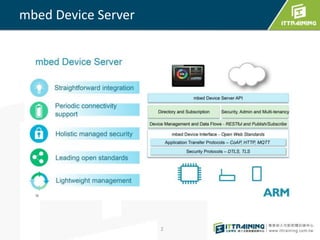
mbed Device Server
2
Benefits of using mbed Device Connector
Fully compatible with mbed OS and the LWM2M protocol (using the mbed
Client library)
Provides access to the ARM mbed IoT Device Ecosystem.
Provides an example web application, accelerating proof of concept
projects.
Uses CoAP/HTTP, TLS/TCP, DTLS/UDP and OMALWM2M, enabling energy
efficient data communication and device management.
3
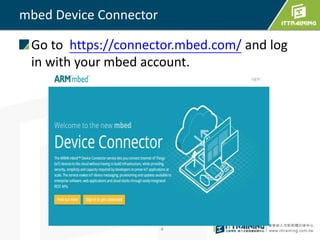
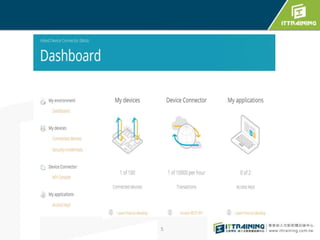
mbed Device Connector
Go to https://connector.mbed.com/ and log
in with your mbed account.
4
5
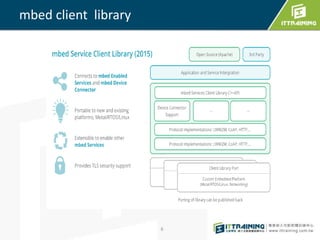
mbed client library
6
mbed Client
mbed Client implements a subset of mbed
OS functionality and is optimized for
constrained networks and devices;
it uses the Constrained Application Protocol
(CoAP) to provide energy-efficient
communication and supports security
measures tailored for low-memory devices.
7
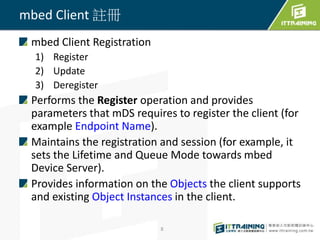
mbed Client 註冊
mbed Client Registration
1) Register
2) Update
3) Deregister
Performs the Register operation and provides
parameters that mDS requires to register the client (for
example Endpoint Name).
Maintains the registration and session (for example, it
sets the Lifetime and Queue Mode towards mbed
Device Server).
Provides information on the Objects the client supports
and existing Object Instances in the client.
8
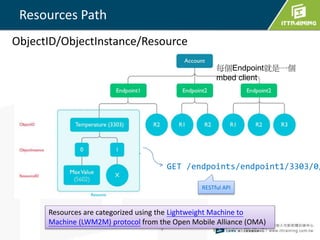
Resources Path
9
GET /endpoints/endpoint1/3303/0/
Resources are categorized using the Lightweight Machine to
Machine (LWM2M) protocol from the Open Mobile Alliance (OMA)
每個Endpoint就是一個
mbed client
ObjectID/ObjectInstance/Resource
RESTful API
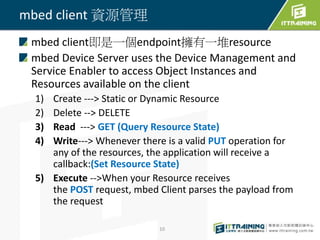
mbed client 資源管理
mbed client即是一個endpoint擁有一堆resource
mbed Device Server uses the Device Management and
Service Enabler to access Object Instances and
Resources available on the client
1) Create ---> Static or Dynamic Resource
2) Delete --> DELETE
3) Read ---> GET (Query Resource State)
4) Write---> Whenever there is a valid PUT operation for
any of the resources, the application will receive a
callback:(Set Resource State)
5) Execute -->When your Resource receives
the POST request, mbed Client parses the payload from
the request
10
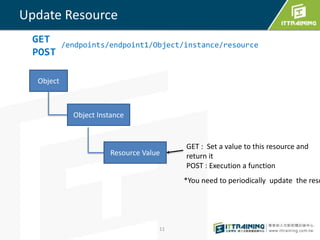
Update Resource
11
Object
Object Instance
Resource Value
GET : Set a value to this resource and
return it
POST : Execution a function
GET
POST
/endpoints/endpoint1/Object/instance/resource
*You need to periodically update the reso
mbed Client data types
mbed Client is based on CoAP client. The
Resource values are represented as text/plain
format.
Different data type values have to be converted
into corresponding text/plain format.
For example, an integer value 100 is passed in a
text buffer format of 100 and it appears on the
web service side as 100 in text format.
The service must interpret this data to an
appropriate format.
12
HTTP 都是字串 text
13
int value = 1;
M2MResource* instance = objinst->create_dynamic_resource(“D",
“IntegerType“,M2MResourceInstance::INTEGER, true);
char buffer[20];
int size = sprintf(buffer,"%d",value);
instance->set_value((const uint8_t*)buffer, size);
float value = 1.023; --> FLOAT
bool value = true; --> BOOLEAN
char *str; --->STRING
build mbed client using yotta
mbed OS applications as yotta executables
yotta - to build the example programs. To
learn how to build mbed OS applications with
yotta.
yotta is written in python, and distributed
using pip, the python package manager
Yotta tutorial
• http://yottadocs.mbed.com/tutorial/tutorial.ht
ml
14
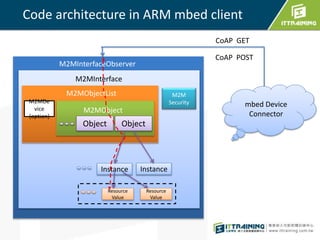
Code architecture in ARM mbed client
M2MInterfaceObserver
Instance
Resource
Value
Instance
Resource
Value
M2MDe
vice
(option)
M2M
Security
Object Object
CoAP GET
CoAP POST
M2MObjectList
mbed Device
Connector
M2MInterface
M2MObject
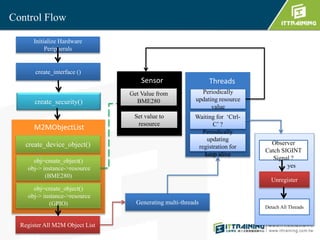
Control Flow
Initialize Hardware
Peripherals
create_interface ()
create_security()
create_device_object()
obj=create_object()
obj-> instance->resource
(BME280)
Register All M2M Object List
Generating multi-threads
Get Value from
BME280
Set value to
resource
Sensor
Observer
Catch SIGINT
Signal ?
yes
Unregister
Detach All Threads
Periodically
updating resource
value
Waiting for ‘Ctrl-
C’ ?
Threads
Periodically
updating
registration for
keep alive
M2MObjectList
obj=create_object()
obj-> instance->resource
(GPIO)
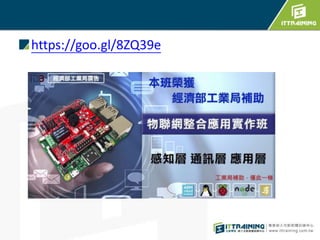
https://goo.gl/8ZQ39e
編譯 mbed client
課程Sample Code
Install yotta tools
安裝說明 : http://blog.ittraining.com.tw/2016/06/raspberry-
pi-mbed-client.html
編譯mbed client
1) cd iot_demo/mbed-client-pi/mbed-linux/
2) change source/security.h
 須登入 https://connector.mbed.com/ 產生security.h
[Security credentials]
3) yotta build
4) 執行程式:
build/arm-linux-native/source/mbed-client-
linux-example
18
mbed Client API
https://docs.mbed.com/docs/mbed-client-
guide/en
19
https://goo.gl/McM4sy

Deploy mbed IoT cloud

  • 1.
    Introduction to mbedDevice Connector Joseph 1 June 2017
  • 2.
  • 3.
    Benefits of usingmbed Device Connector Fully compatible with mbed OS and the LWM2M protocol (using the mbed Client library) Provides access to the ARM mbed IoT Device Ecosystem. Provides an example web application, accelerating proof of concept projects. Uses CoAP/HTTP, TLS/TCP, DTLS/UDP and OMALWM2M, enabling energy efficient data communication and device management. 3
  • 4.
    mbed Device Connector Goto https://connector.mbed.com/ and log in with your mbed account. 4
  • 5.
  • 6.
  • 7.
    mbed Client mbed Clientimplements a subset of mbed OS functionality and is optimized for constrained networks and devices; it uses the Constrained Application Protocol (CoAP) to provide energy-efficient communication and supports security measures tailored for low-memory devices. 7
  • 8.
    mbed Client 註冊 mbedClient Registration 1) Register 2) Update 3) Deregister Performs the Register operation and provides parameters that mDS requires to register the client (for example Endpoint Name). Maintains the registration and session (for example, it sets the Lifetime and Queue Mode towards mbed Device Server). Provides information on the Objects the client supports and existing Object Instances in the client. 8
  • 9.
    Resources Path 9 GET /endpoints/endpoint1/3303/0/ Resourcesare categorized using the Lightweight Machine to Machine (LWM2M) protocol from the Open Mobile Alliance (OMA) 每個Endpoint就是一個 mbed client ObjectID/ObjectInstance/Resource RESTful API
  • 10.
    mbed client 資源管理 mbedclient即是一個endpoint擁有一堆resource mbed Device Server uses the Device Management and Service Enabler to access Object Instances and Resources available on the client 1) Create ---> Static or Dynamic Resource 2) Delete --> DELETE 3) Read ---> GET (Query Resource State) 4) Write---> Whenever there is a valid PUT operation for any of the resources, the application will receive a callback:(Set Resource State) 5) Execute -->When your Resource receives the POST request, mbed Client parses the payload from the request 10
  • 11.
    Update Resource 11 Object Object Instance ResourceValue GET : Set a value to this resource and return it POST : Execution a function GET POST /endpoints/endpoint1/Object/instance/resource *You need to periodically update the reso
  • 12.
    mbed Client datatypes mbed Client is based on CoAP client. The Resource values are represented as text/plain format. Different data type values have to be converted into corresponding text/plain format. For example, an integer value 100 is passed in a text buffer format of 100 and it appears on the web service side as 100 in text format. The service must interpret this data to an appropriate format. 12
  • 13.
    HTTP 都是字串 text 13 intvalue = 1; M2MResource* instance = objinst->create_dynamic_resource(“D", “IntegerType“,M2MResourceInstance::INTEGER, true); char buffer[20]; int size = sprintf(buffer,"%d",value); instance->set_value((const uint8_t*)buffer, size); float value = 1.023; --> FLOAT bool value = true; --> BOOLEAN char *str; --->STRING
  • 14.
    build mbed clientusing yotta mbed OS applications as yotta executables yotta - to build the example programs. To learn how to build mbed OS applications with yotta. yotta is written in python, and distributed using pip, the python package manager Yotta tutorial • http://yottadocs.mbed.com/tutorial/tutorial.ht ml 14
  • 15.
    Code architecture inARM mbed client M2MInterfaceObserver Instance Resource Value Instance Resource Value M2MDe vice (option) M2M Security Object Object CoAP GET CoAP POST M2MObjectList mbed Device Connector M2MInterface M2MObject
  • 16.
    Control Flow Initialize Hardware Peripherals create_interface() create_security() create_device_object() obj=create_object() obj-> instance->resource (BME280) Register All M2M Object List Generating multi-threads Get Value from BME280 Set value to resource Sensor Observer Catch SIGINT Signal ? yes Unregister Detach All Threads Periodically updating resource value Waiting for ‘Ctrl- C’ ? Threads Periodically updating registration for keep alive M2MObjectList obj=create_object() obj-> instance->resource (GPIO)
  • 17.
  • 18.
    編譯 mbed client 課程SampleCode Install yotta tools 安裝說明 : http://blog.ittraining.com.tw/2016/06/raspberry- pi-mbed-client.html 編譯mbed client 1) cd iot_demo/mbed-client-pi/mbed-linux/ 2) change source/security.h  須登入 https://connector.mbed.com/ 產生security.h [Security credentials] 3) yotta build 4) 執行程式: build/arm-linux-native/source/mbed-client- linux-example 18
  • 19.
  • 20.