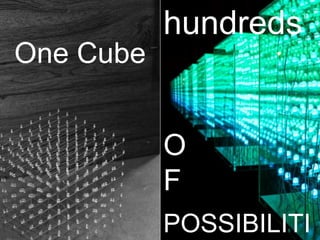
hundreds
One Cube


           O
           F
           POSSIBILITI
Making of


          VIDEO

FOR MORE VIDEOS: VISIT WWW.INSTRUCTABLES.COM
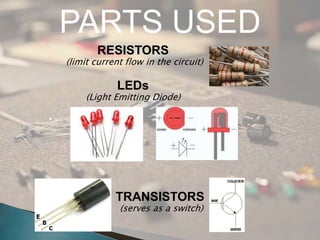
PARTS USED
        RESISTORS
(limit current flow in the circuit)

             LEDs
     (Light Emitting Diode)


            TRANSISTORS
             (serves as a switch)
0V                                   5V


                          220                                  220

                      +                                       +
                                LED                                  ( LED light up)
                                OFF
                      -                                       -
                 C                                        C
      22 K                                     22 K
             B             OFF                        B        Transistor
 0V                                     5V
                                                                   ON
                 E                                        E
                           transistor


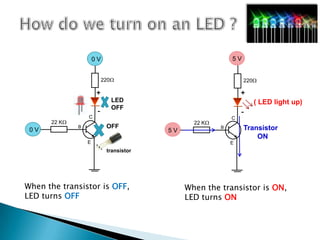
When the transistor is OFF,                  When the transistor is ON,
LED turns OFF                                LED turns ON
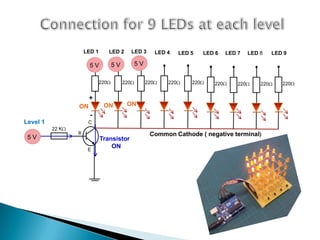
LED 1         LED 2      LED 3      LED 4     LED 5     LED 6    LED 7     LED 8     LED 9

                       5V          5V         5V

                             220        220        220       220       220      220       220       220      220


                      +
                 ON           ON           ON
                       -
Level 1               C
          22 K
                 B                                    Common Cathode ( negative terminal)
 5V                          Transistor
                      E
                                 ON
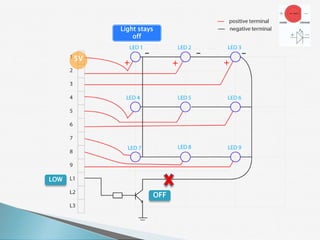
Light stays
               off


      5V
            +              +   +


LOW

                     OFF
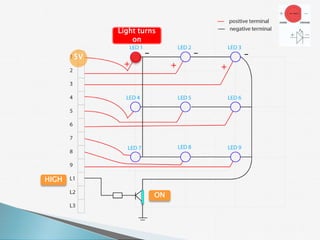
Light turns
                on

       5V
             +             +   +


HIGH

                      ON
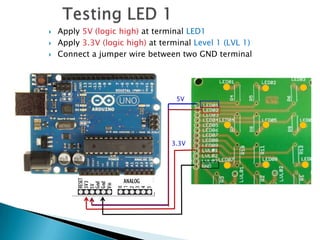
   Apply 5V (logic high) at terminal LED1
   Apply 3.3V (logic high) at terminal Level 1 (LVL 1)
   Connect a jumper wire between two GND terminal


                                   5V


                                 3.3V
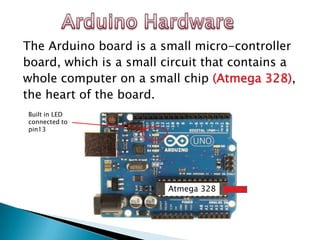
The Arduino board is a small micro-controller
board, which is a small circuit that contains a
whole computer on a small chip (Atmega 328),
the heart of the board.
Built in LED
connected to
pin13


                         Atmega 328
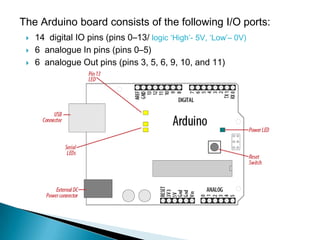
The Arduino board consists of the following I/O ports:
    14 digital IO pins (pins 0–13/ logic ‘High’- 5V, ‘Low’– 0V)
    6 analogue In pins (pins 0–5)
    6 analogue Out pins (pins 3, 5, 6, 9, 10, and 11)
   Arduino software is free, Open source
    programming plateform.

   Source code for Arduino is called a sketch.
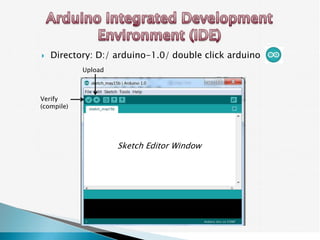
   Directory: D:/ arduino-1.0/ double click arduino
            Upload


Verify
(compile)


                     Sketch Editor Window
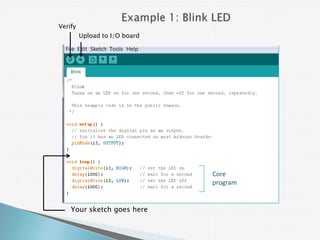
Verify
         Upload to I/O board


                               Core
                               program


    Your sketch goes here
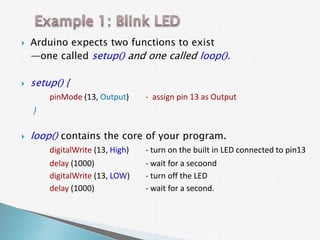
   Arduino expects two functions to exist
    —one called setup() and one called loop().

   setup() {
        pinMode (13, Output)      - assign pin 13 as Output
    }

   loop() contains the core of your program.
        digitalWrite (13, High)   - turn on the built in LED connected to pin13
        delay (1000)              - wait for a secoond
        digitalWrite (13, LOW)    - turn off the LED
        delay (1000)              - wait for a second.
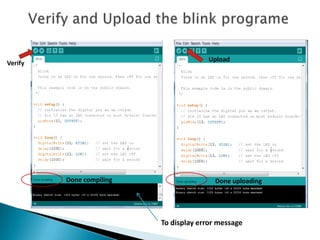
Upload
Verify


         Done compiling                  Done uploading


                          To display error message
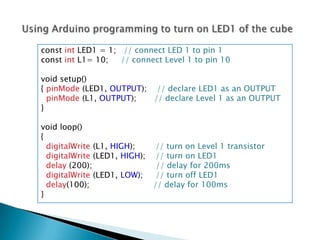
const int LED1 = 1; // connect LED 1 to pin 1
const int L1= 10;   // connect Level 1 to pin 10

void setup()
{ pinMode (LED1, OUTPUT); // declare LED1 as an OUTPUT
  pinMode (L1, OUTPUT);   // declare Level 1 as an OUTPUT
}

void loop()
{
  digitalWrite (L1, HIGH);    // turn on Level 1 transistor
  digitalWrite (LED1, HIGH); // turn on LED1
  delay (200);                // delay for 200ms
  digitalWrite (LED1, LOW);   // turn off LED1
  delay(100);                // delay for 100ms
}
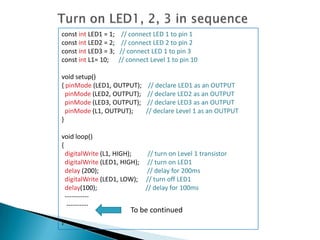
const int LED1 = 1;    // connect LED 1 to pin 1
const int LED2 = 2;    // connect LED 2 to pin 2
const int LED3 = 3;   // connect LED 1 to pin 3
const int L1= 10;     // connect Level 1 to pin 10

void setup()
{ pinMode (LED1, OUTPUT);       // declare LED1 as an OUTPUT
  pinMode (LED2, OUTPUT);       // declare LED2 as an OUTPUT
  pinMode (LED3, OUTPUT);       // declare LED3 as an OUTPUT
  pinMode (L1, OUTPUT);        // declare Level 1 as an OUTPUT
}

void loop()
{
  digitalWrite (L1, HIGH);    // turn on Level 1 transistor
  digitalWrite (LED1, HIGH); // turn on LED1
  delay (200);                // delay for 200ms
  digitalWrite (LED1, LOW); // turn off LED1
  delay(100);                // delay for 100ms
  -----------
   ----------
                          To be continued
}
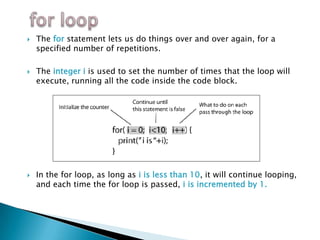
   The for statement lets us do things over and over again, for a
    specified number of repetitions.

   The integer i is used to set the number of times that the loop will
    execute, running all the code inside the code block.


   In the for loop, as long as i is less than 10, it will continue looping,
    and each time the for loop is passed, i is incremented by 1.
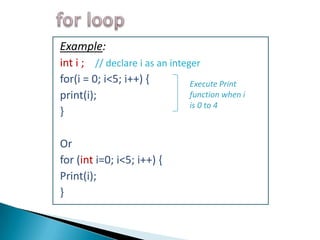
Example:
int i ; // declare i as an integer
for(i = 0; i<5; i++) {          Execute Print
print(i);                       function when i
                                is 0 to 4
}

Or
for (int i=0; i<5; i++) {
Print(i);
}
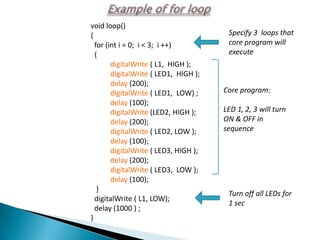
void loop()
{                                       Specify 3 loops that
  for (int i = 0; i < 3; i ++)          core program will
  {                                     execute
        digitalWrite ( L1, HIGH );
        digitalWrite ( LED1, HIGH );
        delay (200);
        digitalWrite ( LED1, LOW) ;    Core program:
        delay (100);
        digitalWrite (LED2, HIGH );    LED 1, 2, 3 will turn
        delay (200);                   ON & OFF in
        digitalWrite ( LED2, LOW );    sequence
        delay (100);
        digitalWrite ( LED3, HIGH );
        delay (200);
        digitalWrite ( LED3, LOW );
        delay (100);
   }
                                        Turn off all LEDs for
  digitalWrite ( L1, LOW);
                                        1 sec
  delay (1000 ) ;
}
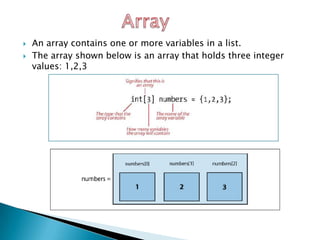
   An array contains one or more variables in a list.
   The array shown below is an array that holds three integer
    values: 1,2,3
Number of
                                variables

                int LevelPin [3] = { 10, 11, 12 };
Type of array
                    Name of                 List of variables
content
                    the array


                  i.e      LevelPin [0] = 10
                           LevelPin [1] = 11
                           LevelPin [2] = 12
Another great use of the for loop is to go through an array
and look at each item in the array:

for ( int level=0; level <3; level++)
     { pinMode (LevelPin[level], OUTPUT ); }

Each time the loop executes, level will be incremented using
the next integer in the Array[ ]
            pinMode (LevelPin[0], OUTPUT );

            pinMode (LevelPin[1], OUTPUT );

            pinMode (LevelPin[2], OUTPUT );
for (level=0; level< 3; level++)
 {
 digitalWrite ( LevelPin[level], HIGH );
 digitalWrite ( LED1, HIGH );
 digitalWrite ( LED2, HIGH );
                  :
                  :

 digitalWrite ( LED9, HIGH );
 delay (100);

 digitalWrite ( LED1, LOW );
 digitalWrite ( LED2, LOW );
                  :
                  :
 digitalWrite ( LED9, LOW );
 digitalWrite ( LevelPin[level], LOW );
 delay(50);
 }
LED Cube Presentation Slides

LED Cube Presentation Slides

  • 2.
    hundreds One Cube O F POSSIBILITI
  • 3.
    Making of VIDEO FOR MORE VIDEOS: VISIT WWW.INSTRUCTABLES.COM
  • 4.
    PARTS USED RESISTORS (limit current flow in the circuit) LEDs (Light Emitting Diode) TRANSISTORS (serves as a switch)
  • 5.
    0V 5V 220 220 + + LED ( LED light up) OFF - - C C 22 K 22 K B OFF B Transistor 0V 5V ON E E transistor When the transistor is OFF, When the transistor is ON, LED turns OFF LED turns ON
  • 6.
    LED 1 LED 2 LED 3 LED 4 LED 5 LED 6 LED 7 LED 8 LED 9 5V 5V 5V 220 220 220 220 220 220 220 220 220 + ON ON ON - Level 1 C 22 K B Common Cathode ( negative terminal) 5V Transistor E ON
  • 7.
    Light stays off 5V + + + LOW OFF
  • 8.
    Light turns on 5V + + + HIGH ON
  • 9.
    Apply 5V (logic high) at terminal LED1  Apply 3.3V (logic high) at terminal Level 1 (LVL 1)  Connect a jumper wire between two GND terminal 5V 3.3V
  • 10.
    The Arduino boardis a small micro-controller board, which is a small circuit that contains a whole computer on a small chip (Atmega 328), the heart of the board. Built in LED connected to pin13 Atmega 328
  • 11.
    The Arduino boardconsists of the following I/O ports:  14 digital IO pins (pins 0–13/ logic ‘High’- 5V, ‘Low’– 0V)  6 analogue In pins (pins 0–5)  6 analogue Out pins (pins 3, 5, 6, 9, 10, and 11)
  • 12.
    Arduino software is free, Open source programming plateform.  Source code for Arduino is called a sketch.
  • 13.
    Directory: D:/ arduino-1.0/ double click arduino Upload Verify (compile) Sketch Editor Window
  • 15.
    Verify Upload to I/O board Core program Your sketch goes here
  • 16.
    Arduino expects two functions to exist —one called setup() and one called loop().  setup() { pinMode (13, Output) - assign pin 13 as Output }  loop() contains the core of your program. digitalWrite (13, High) - turn on the built in LED connected to pin13 delay (1000) - wait for a secoond digitalWrite (13, LOW) - turn off the LED delay (1000) - wait for a second.
  • 17.
    Upload Verify Done compiling Done uploading To display error message
  • 18.
    const int LED1= 1; // connect LED 1 to pin 1 const int L1= 10; // connect Level 1 to pin 10 void setup() { pinMode (LED1, OUTPUT); // declare LED1 as an OUTPUT pinMode (L1, OUTPUT); // declare Level 1 as an OUTPUT } void loop() { digitalWrite (L1, HIGH); // turn on Level 1 transistor digitalWrite (LED1, HIGH); // turn on LED1 delay (200); // delay for 200ms digitalWrite (LED1, LOW); // turn off LED1 delay(100); // delay for 100ms }
  • 19.
    const int LED1= 1; // connect LED 1 to pin 1 const int LED2 = 2; // connect LED 2 to pin 2 const int LED3 = 3; // connect LED 1 to pin 3 const int L1= 10; // connect Level 1 to pin 10 void setup() { pinMode (LED1, OUTPUT); // declare LED1 as an OUTPUT pinMode (LED2, OUTPUT); // declare LED2 as an OUTPUT pinMode (LED3, OUTPUT); // declare LED3 as an OUTPUT pinMode (L1, OUTPUT); // declare Level 1 as an OUTPUT } void loop() { digitalWrite (L1, HIGH); // turn on Level 1 transistor digitalWrite (LED1, HIGH); // turn on LED1 delay (200); // delay for 200ms digitalWrite (LED1, LOW); // turn off LED1 delay(100); // delay for 100ms ----------- ---------- To be continued }
  • 20.
    The for statement lets us do things over and over again, for a specified number of repetitions.  The integer i is used to set the number of times that the loop will execute, running all the code inside the code block.  In the for loop, as long as i is less than 10, it will continue looping, and each time the for loop is passed, i is incremented by 1.
  • 21.
    Example: int i ;// declare i as an integer for(i = 0; i<5; i++) { Execute Print print(i); function when i is 0 to 4 } Or for (int i=0; i<5; i++) { Print(i); }
  • 22.
    void loop() { Specify 3 loops that for (int i = 0; i < 3; i ++) core program will { execute digitalWrite ( L1, HIGH ); digitalWrite ( LED1, HIGH ); delay (200); digitalWrite ( LED1, LOW) ; Core program: delay (100); digitalWrite (LED2, HIGH ); LED 1, 2, 3 will turn delay (200); ON & OFF in digitalWrite ( LED2, LOW ); sequence delay (100); digitalWrite ( LED3, HIGH ); delay (200); digitalWrite ( LED3, LOW ); delay (100); } Turn off all LEDs for digitalWrite ( L1, LOW); 1 sec delay (1000 ) ; }
  • 23.
    An array contains one or more variables in a list.  The array shown below is an array that holds three integer values: 1,2,3
  • 24.
    Number of variables int LevelPin [3] = { 10, 11, 12 }; Type of array Name of List of variables content the array i.e LevelPin [0] = 10 LevelPin [1] = 11 LevelPin [2] = 12
  • 25.
    Another great useof the for loop is to go through an array and look at each item in the array: for ( int level=0; level <3; level++) { pinMode (LevelPin[level], OUTPUT ); } Each time the loop executes, level will be incremented using the next integer in the Array[ ] pinMode (LevelPin[0], OUTPUT ); pinMode (LevelPin[1], OUTPUT ); pinMode (LevelPin[2], OUTPUT );
  • 26.
    for (level=0; level<3; level++) { digitalWrite ( LevelPin[level], HIGH ); digitalWrite ( LED1, HIGH ); digitalWrite ( LED2, HIGH ); : : digitalWrite ( LED9, HIGH ); delay (100); digitalWrite ( LED1, LOW ); digitalWrite ( LED2, LOW ); : : digitalWrite ( LED9, LOW ); digitalWrite ( LevelPin[level], LOW ); delay(50); }

Editor's Notes

  • #10 Next, how do we turn on LED 2 ? And how to turn on LED at level 2 ?
  • #12 It contains everything needed to support the microcontroller ; simply connect it to a computer via USB cable or external supply ( 7– 12V). Digital input pins sense the presence and absence of voltage on a pin( High – 5V, LOW - 0V). Analog input pins measure a range of voltages on a pin.
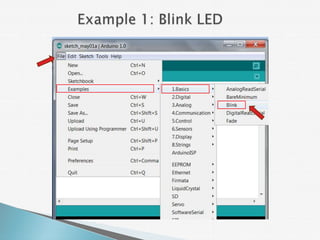
  • #18 Change delay time from 1000 ms to 100 ms, observe the difference.
  • #19 Next, learn to turn on LED1, 2, 3 in sequence.