Security
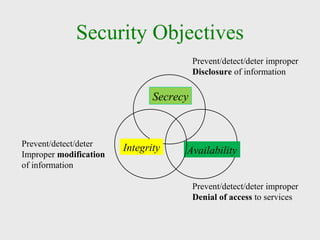
Security Objectives
Secrecy
Prevent/detect/deter improper
Disclosure of information
Availability
Prevent/detect/deter improper
Denial of access to services
IntegrityPrevent/detect/deter
Improper modification
of information
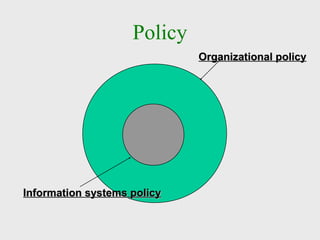
Policy
Organizational policyOrganizational policy
Information systems policyInformation systems policy
Security Overview
Many fears to overcome
Intercepted e-mail messages
Unauthorized access to digital intelligence
Credit card information falling into the wrong
hands
Two types of computer security
Physical - protection of tangible objects
Logical - protection of non-physical objects
What is security?
Dictionary Definition: protection or defense
against attack, interference, espionage, etc
System correctness
Good input ⇒ Good output
Security
Bad input ⇒ Bad output
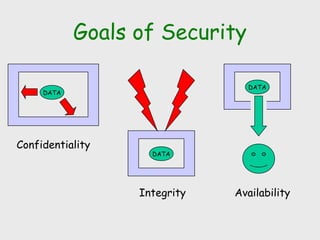
Goals of Security
DATA
Integrity
DATA
Availability
DATA
Confidentiality
Aspects of Security
consider 3 aspects of information security:
security attack
security mechanism (control)
security service
note terms
threat – a potential for violation of security
vulnerability – a way by which loss can happen
attack – an assault on system security, a
deliberate attempt to evade security services
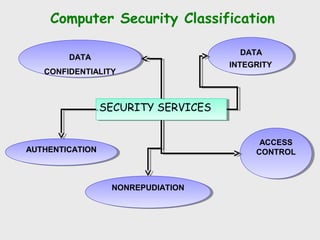
Computer Security Classification
SECURITY SERVICESSECURITY SERVICES
DATA
CONFIDENTIALITY
DATA
CONFIDENTIALITY
DATA
INTEGRITY
DATA
INTEGRITY
AUTHENTICATIONAUTHENTICATION
NONREPUDIATIONNONREPUDIATION
ACCESS
CONTROL
ACCESS
CONTROL
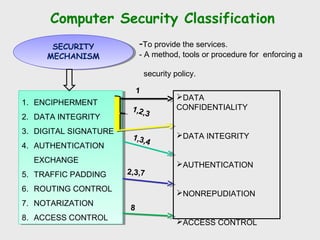
Computer Security Classification
1. ENCIPHERMENT
2. DATA INTEGRITY
3. DIGITAL SIGNATURE
4. AUTHENTICATION
EXCHANGE
5. TRAFFIC PADDING
6. ROUTING CONTROL
7. NOTARIZATION
8. ACCESS CONTROL
1. ENCIPHERMENT
2. DATA INTEGRITY
3. DIGITAL SIGNATURE
4. AUTHENTICATION
EXCHANGE
5. TRAFFIC PADDING
6. ROUTING CONTROL
7. NOTARIZATION
8. ACCESS CONTROL
SECURITY
MECHANISM
SECURITY
MECHANISM
-To provide the services.
- A method, tools or procedure for enforcing a
security policy.
DATA
CONFIDENTIALITY
DATA INTEGRITY
AUTHENTICATION
NONREPUDIATION
ACCESS CONTROL
1,3,4
2,3,7
1,2,3
8
1
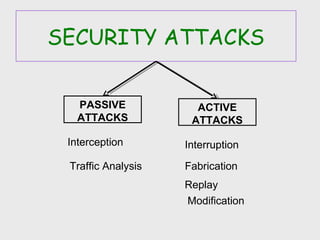
SECURITY ATTACKS
PASSIVE
ATTACKS
ACTIVE
ATTACKS
Interception
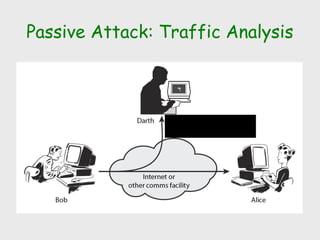
Traffic Analysis
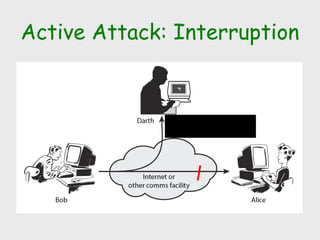
Interruption
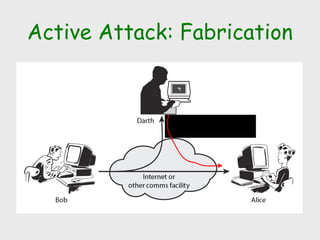
Fabrication
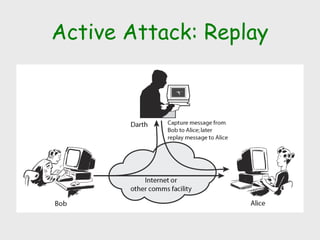
Replay
Modification
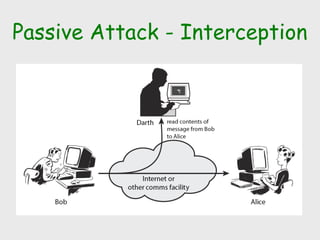
Passive Attack - Interception
Passive Attack: Traffic Analysis
Observe traffic pattern
Active Attack: Interruption
Block delivery of message
Active Attack: Fabrication
Fabricate message
Active Attack: Replay
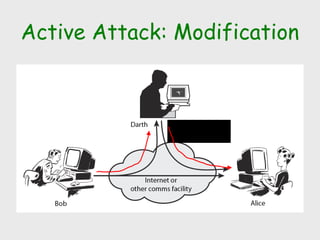
Active Attack: Modification
Modify message
Handling Attacks
Passive attacks – focus on Prevention
Easy to stop
Hard to detect
Active attacks – focus on Detection and
Recovery
Hard to stop
Easy to detect
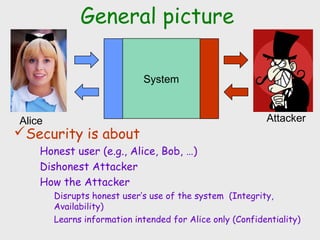
System
AttackerAlice
General picture
Security is about
Honest user (e.g., Alice, Bob, …)
Dishonest Attacker
How the Attacker
Disrupts honest user’s use of the system (Integrity,
Availability)
Learns information intended for Alice only (Confidentiality)
Databases
and
data security
It’s your data – are you
sure it’s safe?
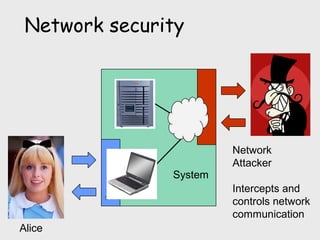
Network
Attacker
Intercepts and
controls network
communication
Alice
System
Network security
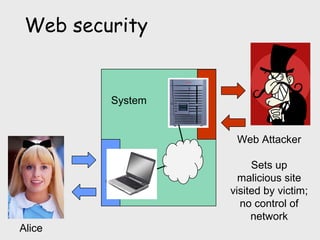
Web Attacker
Sets up
malicious site
visited by victim;
no control of
network
Alice
System
Web security
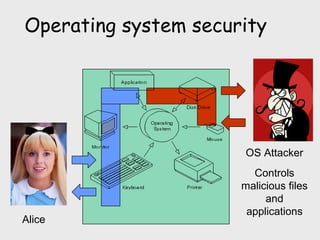
OS Attacker
Controls
malicious files
and
applications
Alice
Operating system security
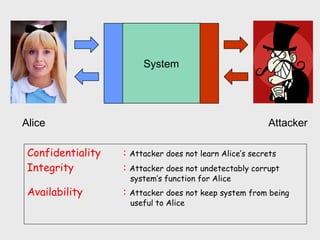
System
AttackerAlice
Confidentiality : Attacker does not learn Alice’s secrets
Integrity : Attacker does not undetectably corrupt
system’s function for Alice
Availability : Attacker does not keep system from being
useful to Alice
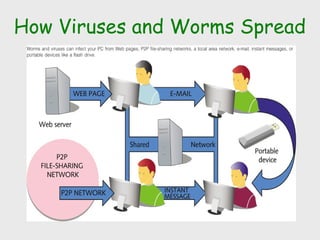
How Viruses and Worms Spread
25
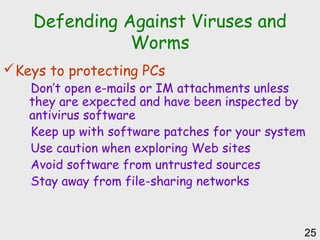
Defending Against Viruses and
Worms
Keys to protecting PCs
Don’t open e-mails or IM attachments unless
they are expected and have been inspected by
antivirus software
Keep up with software patches for your system
Use caution when exploring Web sites
Avoid software from untrusted sources
Stay away from file-sharing networks
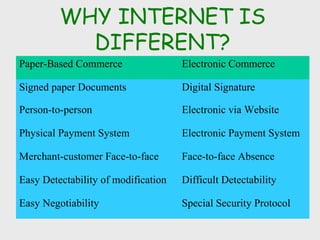
WHY INTERNET IS
DIFFERENT?
Paper-Based Commerce Electronic Commerce
Signed paper Documents Digital Signature
Person-to-person Electronic via Website
Physical Payment System Electronic Payment System
Merchant-customer Face-to-face Face-to-face Absence
Easy Detectability of modification Difficult Detectability
Easy Negotiability Special Security Protocol
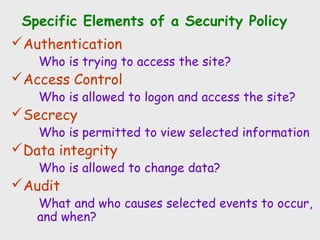
Specific Elements of a Security Policy
Authentication
Who is trying to access the site?
Access Control
Who is allowed to logon and access the site?
Secrecy
Who is permitted to view selected information
Data integrity
Who is allowed to change data?
Audit
What and who causes selected events to occur,
and when?
Three components to security
Three perspectives
User’s point of view
Server’s point of view
Both parties
Three parts
Client-side security
Server-side security
Document confidentiality
Client-side security
Measures to protect the user’s privacy and
the integrity of his computer
Example technological solutions
Protection from computer viruses and other
malicious software
Limit the amount of personal information that
browser’s can transmit without the user’s
consent
Any others?
Server-side security
Measures to protect the server and the
machine it runs from break-ins, site
vandalism, and denial-of-service attacks.
Solutions range
installing firewall systems
tightening operating systems security measures
Document confidentiality
Measures to protect private information
from being disclosed to third parties.
Example risks:
Solutions range
Password to identify users
Cryptography
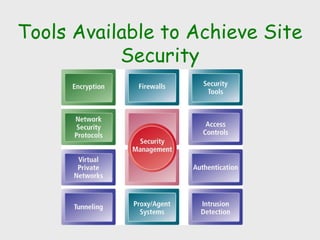
Tools Available to Achieve Site
Security
Encryption
 Transforms plain text or data into cipher
text that cannot be read by anyone outside
of the sender and the receiver. Purpose:
 to secure stored information
 to secure information transmission.
 Cipher text
 text that has been encrypted and thus cannot be
read by anyone besides the sender and the
receiver
 Symmetric Key Encryption
 DES standard most widely used
Encryption
 Public key cryptography
uses two mathematically related digital keys: a
public key and a private key.
 The private key is kept secret by the owner,
and the public key is widely disseminated.
 Both keys can be used to encrypt and
decrypt a message.
 A key used to encrypt a message, cannot be
used to unencrypt the message
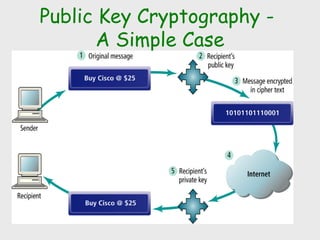
Public Key Cryptography -
A Simple Case
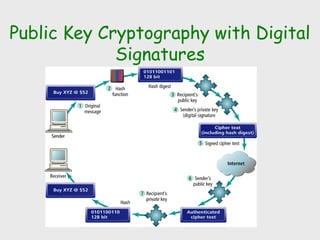
Public Key Cryptography with Digital
Signatures
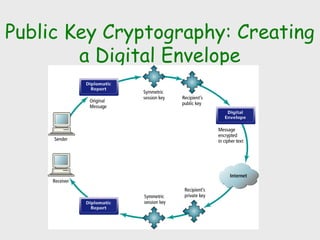
Public Key Cryptography: Creating
a Digital Envelope
Securing Channels of Communications
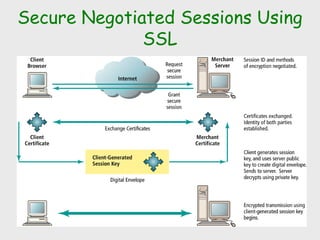
 Secure Sockets Layer (SSL) is the most
common form of securing channels
 Secure negotiated session
client-server session where the requested
document URL, contents, forms, and cookies are
encrypted.
 Session key is a unique symmetric encryption
key chosen for a single secure session
Securing Channels of
Communications
 Secure Hypertext Transfer Protocol
(S-HTTP)
secure message-oriented communications
protocol for use with HTTP.
 Virtual Private Networks (VPN)
remote users can securely access internal
networks via Point-to-Point Tunneling Protocol
(PPTP)
Secure Negotiated Sessions Using
SSL
Protecting Networks
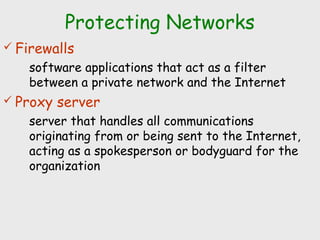
 Firewalls
software applications that act as a filter
between a private network and the Internet
 Proxy server
server that handles all communications
originating from or being sent to the Internet,
acting as a spokesperson or bodyguard for the
organization
Tension Between Security and Other
Values
Ease of use
 Often security slows down processors and adds
significantly to data storage demands. Too much
security can harm profitability; not enough can
mean going out of business.
 Public Safety & Criminal Use
 claims of individuals to act anonymously vs. needs
of public officials to maintain public safety in
light of criminals or terrorists.
Why Care?
 Online banking, trading, purchasing may be insecure
Credit card and identity theft
 Personal files could be corrupted
All school work, music, videos, etc. may be lost
 Computer may become too slow to run
If you aren't part of the solution you are part of the problem
 Pwn2Own contest - 2008
Mac (Leopard) fell first via Safari, Vista took time but was hacked
via Flash Player, Ubuntu stood ground.
 Upon discovery, vulnerabilities can be used against many
computers connected to the internet.
43

Technical seminar on Security

  • 1.
  • 2.
    Security Objectives Secrecy Prevent/detect/deter improper Disclosureof information Availability Prevent/detect/deter improper Denial of access to services IntegrityPrevent/detect/deter Improper modification of information
  • 3.
    Policy Organizational policyOrganizational policy Informationsystems policyInformation systems policy
  • 4.
    Security Overview Many fearsto overcome Intercepted e-mail messages Unauthorized access to digital intelligence Credit card information falling into the wrong hands Two types of computer security Physical - protection of tangible objects Logical - protection of non-physical objects
  • 5.
    What is security? DictionaryDefinition: protection or defense against attack, interference, espionage, etc System correctness Good input ⇒ Good output Security Bad input ⇒ Bad output
  • 6.
  • 7.
    Aspects of Security consider3 aspects of information security: security attack security mechanism (control) security service note terms threat – a potential for violation of security vulnerability – a way by which loss can happen attack – an assault on system security, a deliberate attempt to evade security services
  • 8.
    Computer Security Classification SECURITYSERVICESSECURITY SERVICES DATA CONFIDENTIALITY DATA CONFIDENTIALITY DATA INTEGRITY DATA INTEGRITY AUTHENTICATIONAUTHENTICATION NONREPUDIATIONNONREPUDIATION ACCESS CONTROL ACCESS CONTROL
  • 9.
    Computer Security Classification 1.ENCIPHERMENT 2. DATA INTEGRITY 3. DIGITAL SIGNATURE 4. AUTHENTICATION EXCHANGE 5. TRAFFIC PADDING 6. ROUTING CONTROL 7. NOTARIZATION 8. ACCESS CONTROL 1. ENCIPHERMENT 2. DATA INTEGRITY 3. DIGITAL SIGNATURE 4. AUTHENTICATION EXCHANGE 5. TRAFFIC PADDING 6. ROUTING CONTROL 7. NOTARIZATION 8. ACCESS CONTROL SECURITY MECHANISM SECURITY MECHANISM -To provide the services. - A method, tools or procedure for enforcing a security policy. DATA CONFIDENTIALITY DATA INTEGRITY AUTHENTICATION NONREPUDIATION ACCESS CONTROL 1,3,4 2,3,7 1,2,3 8 1
  • 10.
  • 11.
    Passive Attack -Interception
  • 12.
    Passive Attack: TrafficAnalysis Observe traffic pattern
  • 13.
  • 14.
  • 15.
  • 16.
  • 17.
    Handling Attacks Passive attacks– focus on Prevention Easy to stop Hard to detect Active attacks – focus on Detection and Recovery Hard to stop Easy to detect
  • 18.
    System AttackerAlice General picture Security isabout Honest user (e.g., Alice, Bob, …) Dishonest Attacker How the Attacker Disrupts honest user’s use of the system (Integrity, Availability) Learns information intended for Alice only (Confidentiality)
  • 19.
    Databases and data security It’s yourdata – are you sure it’s safe?
  • 20.
  • 21.
    Web Attacker Sets up malicioussite visited by victim; no control of network Alice System Web security
  • 22.
  • 23.
    System AttackerAlice Confidentiality : Attackerdoes not learn Alice’s secrets Integrity : Attacker does not undetectably corrupt system’s function for Alice Availability : Attacker does not keep system from being useful to Alice
  • 24.
    How Viruses andWorms Spread
  • 25.
    25 Defending Against Virusesand Worms Keys to protecting PCs Don’t open e-mails or IM attachments unless they are expected and have been inspected by antivirus software Keep up with software patches for your system Use caution when exploring Web sites Avoid software from untrusted sources Stay away from file-sharing networks
  • 26.
    WHY INTERNET IS DIFFERENT? Paper-BasedCommerce Electronic Commerce Signed paper Documents Digital Signature Person-to-person Electronic via Website Physical Payment System Electronic Payment System Merchant-customer Face-to-face Face-to-face Absence Easy Detectability of modification Difficult Detectability Easy Negotiability Special Security Protocol
  • 27.
    Specific Elements ofa Security Policy Authentication Who is trying to access the site? Access Control Who is allowed to logon and access the site? Secrecy Who is permitted to view selected information Data integrity Who is allowed to change data? Audit What and who causes selected events to occur, and when?
  • 28.
    Three components tosecurity Three perspectives User’s point of view Server’s point of view Both parties Three parts Client-side security Server-side security Document confidentiality
  • 29.
    Client-side security Measures toprotect the user’s privacy and the integrity of his computer Example technological solutions Protection from computer viruses and other malicious software Limit the amount of personal information that browser’s can transmit without the user’s consent Any others?
  • 30.
    Server-side security Measures toprotect the server and the machine it runs from break-ins, site vandalism, and denial-of-service attacks. Solutions range installing firewall systems tightening operating systems security measures
  • 31.
    Document confidentiality Measures toprotect private information from being disclosed to third parties. Example risks: Solutions range Password to identify users Cryptography
  • 32.
    Tools Available toAchieve Site Security
  • 33.
    Encryption  Transforms plaintext or data into cipher text that cannot be read by anyone outside of the sender and the receiver. Purpose:  to secure stored information  to secure information transmission.  Cipher text  text that has been encrypted and thus cannot be read by anyone besides the sender and the receiver  Symmetric Key Encryption  DES standard most widely used
  • 34.
    Encryption  Public keycryptography uses two mathematically related digital keys: a public key and a private key.  The private key is kept secret by the owner, and the public key is widely disseminated.  Both keys can be used to encrypt and decrypt a message.  A key used to encrypt a message, cannot be used to unencrypt the message
  • 35.
    Public Key Cryptography- A Simple Case
  • 36.
    Public Key Cryptographywith Digital Signatures
  • 37.
    Public Key Cryptography:Creating a Digital Envelope
  • 38.
    Securing Channels ofCommunications  Secure Sockets Layer (SSL) is the most common form of securing channels  Secure negotiated session client-server session where the requested document URL, contents, forms, and cookies are encrypted.  Session key is a unique symmetric encryption key chosen for a single secure session
  • 39.
    Securing Channels of Communications Secure Hypertext Transfer Protocol (S-HTTP) secure message-oriented communications protocol for use with HTTP.  Virtual Private Networks (VPN) remote users can securely access internal networks via Point-to-Point Tunneling Protocol (PPTP)
  • 40.
  • 41.
    Protecting Networks  Firewalls softwareapplications that act as a filter between a private network and the Internet  Proxy server server that handles all communications originating from or being sent to the Internet, acting as a spokesperson or bodyguard for the organization
  • 42.
    Tension Between Securityand Other Values Ease of use  Often security slows down processors and adds significantly to data storage demands. Too much security can harm profitability; not enough can mean going out of business.  Public Safety & Criminal Use  claims of individuals to act anonymously vs. needs of public officials to maintain public safety in light of criminals or terrorists.
  • 43.
    Why Care?  Onlinebanking, trading, purchasing may be insecure Credit card and identity theft  Personal files could be corrupted All school work, music, videos, etc. may be lost  Computer may become too slow to run If you aren't part of the solution you are part of the problem  Pwn2Own contest - 2008 Mac (Leopard) fell first via Safari, Vista took time but was hacked via Flash Player, Ubuntu stood ground.  Upon discovery, vulnerabilities can be used against many computers connected to the internet. 43

Editor's Notes

  • #8 The OSI security architecture focuses on security attacks, mechanisms, and services. These can be defined briefly as follows: • Security attack: Any action that compromises the security of information owned by an organization. • Security mechanism: A process (or a device incorporating such a process) that is designed to detect, prevent, or recover from a security attack. • Security service: A processing or communication service that enhances the security of the data processing systems and the information transfers of an organization. The services are intended to counter security attacks, and they make use of one or more security mechanisms to provide the service. In the literature, the terms threat and attack are commonly used to mean more or less the same thing. Table 1.1 provides definitions taken from RFC 2828, Internet Security Glossary. Threat - A potential for violation of security, which exists when there is a circumstance, capability, action, or event that could breach security and cause harm. That is, a threat is a possible danger that might exploit a vulnerability. Attack - An assault on system security that derives from an intelligent threat; that is, an intelligent act that is a deliberate attempt (especially in the sense of a method or technique) to evade security services and violate the security policy of a system.
  • #12 A useful means of classifying security attacks, used both in X.800 and RFC 2828, is in terms of passive attacks and active attacks. A passive attack attempts to learn or make use of information from the system but does not affect system resources. Passive attacks are in the nature of eavesdropping on, or monitoring of, transmissions. The goal of the opponent is to obtain information that is being transmitted. Two types of passive attacks are: + release of message contents - as shown above in Stallings Figure 1.2a here + traffic analysis - monitor traffic flow to determine location and identity of communicating hosts and could observe the frequency and length of messages being exchanged These attacks are difficult to detect because they do not involve any alteration of the data.
  • #13 A useful means of classifying security attacks, used both in X.800 and RFC 2828, is in terms of passive attacks and active attacks. A passive attack attempts to learn or make use of information from the system but does not affect system resources. Passive attacks are in the nature of eavesdropping on, or monitoring of, transmissions. The goal of the opponent is to obtain information that is being transmitted. Two types of passive attacks are: + release of message contents - as shown above in Stallings Figure 1.2a here + traffic analysis - monitor traffic flow to determine location and identity of communicating hosts and could observe the frequency and length of messages being exchanged These attacks are difficult to detect because they do not involve any alteration of the data.
  • #14 A useful means of classifying security attacks, used both in X.800 and RFC 2828, is in terms of passive attacks and active attacks. A passive attack attempts to learn or make use of information from the system but does not affect system resources. Passive attacks are in the nature of eavesdropping on, or monitoring of, transmissions. The goal of the opponent is to obtain information that is being transmitted. Two types of passive attacks are: + release of message contents - as shown above in Stallings Figure 1.2a here + traffic analysis - monitor traffic flow to determine location and identity of communicating hosts and could observe the frequency and length of messages being exchanged These attacks are difficult to detect because they do not involve any alteration of the data.
  • #15 A useful means of classifying security attacks, used both in X.800 and RFC 2828, is in terms of passive attacks and active attacks. A passive attack attempts to learn or make use of information from the system but does not affect system resources. Passive attacks are in the nature of eavesdropping on, or monitoring of, transmissions. The goal of the opponent is to obtain information that is being transmitted. Two types of passive attacks are: + release of message contents - as shown above in Stallings Figure 1.2a here + traffic analysis - monitor traffic flow to determine location and identity of communicating hosts and could observe the frequency and length of messages being exchanged These attacks are difficult to detect because they do not involve any alteration of the data.
  • #16 Active attacks involve some modification of the data stream or the creation of a false stream and can be subdivided into four categories: masquerade, replay, modification of messages, and denial of service: masquerade of one entity as some other replay previous messages (as shown above in Stallings Figure 1.3b) modify/alter (part of) messages in transit to produce an unauthorized effect denial of service - prevents or inhibits the normal use or management of communications facilities Active attacks present the opposite characteristics of passive attacks. Whereas passive attacks are difficult to detect, measures are available to prevent their success. On the other hand, it is quite difficult to prevent active attacks absolutely, because of the wide variety of potential physical, software, and network vulnerabilities. Instead, the goal is to detect active attacks and to recover from any disruption or delays caused by them.
  • #17 Active attacks involve some modification of the data stream or the creation of a false stream and can be subdivided into four categories: masquerade, replay, modification of messages, and denial of service: masquerade of one entity as some other replay previous messages (as shown above in Stallings Figure 1.3b) modify/alter (part of) messages in transit to produce an unauthorized effect denial of service - prevents or inhibits the normal use or management of communications facilities Active attacks present the opposite characteristics of passive attacks. Whereas passive attacks are difficult to detect, measures are available to prevent their success. On the other hand, it is quite difficult to prevent active attacks absolutely, because of the wide variety of potential physical, software, and network vulnerabilities. Instead, the goal is to detect active attacks and to recover from any disruption or delays caused by them.
  • #18 Consider the role of a security service, and what may be required. Note both similarities and differences with traditional paper documents, which for example: have signatures & dates; need protection from disclosure, tampering, or destruction; may be notarized or witnessed; may be recorded or licensed