Security Basics
CONTENT
1. INTRODUCTION
2. SECURITY
3. ELEMENTS OF INFORMATION SECURITY
4. SECURITY POLICY
5. SECURITY TECHNIQUES
6. STEPS FOR BETTER SECURITY
7. CATEGORY OF COMPUTER SECURITY
8. THE OPERATIONAL MODEL OF N/W SECURITY
9. SECURITY SERVICES
10. BASIC N/W SECURITY TERMINOLOGY
11. SECURITY ATTACKS
How safe is your information?
•Recent events show that commercial, personal and sensitive
information is very hard to keep secure, and some estimates point
to 2007 as being the worst year on record for data loss.
•As breaches in information security continue to make headline
news, it is becoming increasingly clear that technological solutions
are not the only answer.
•Research conducted in 2007 suggests that at least 80% of data
leakages are caused by staff rather than IT systems (source:
Financial Times/Forrester Research, Nov-07).
•It is clear therefore that Information Security should be viewed as a
management function rather than one of IT alone.
•Here, the syllabus outline the main management principles
designed to help you secure your data, and raise awareness of the
issues involved.
1.1 SECURITY
 Challenges in Security?
1.Use of computer with internet
2. Software tools are available freely
3. Importance of information
4.Lack of awareness/ignorance/hesitation
 PROTECTION
1.Unahorized Access by intentionally or unintentionally.
To protect the operation of any
organization
1.Physical Security:- Access control to physical device
E.g:- Pen drive, Hard drive, CD/DVD, Computer,
2. Private Security :- Individual or group
3. Project Security :- Design , Code operation security
Introduction
 Information:- Computers, Networks, Internet, Mobile.
 Security:-trying to understand how to protect.
 The various dangers & pitfalls when we use technology.
 The consequences of not setting up the right
Security Policies
Security Framework
Security Technology
Why is Security Required?
 Business & different types of transactions r being
conducted to a large extent over Internet.
 Inadequate or improper security mechanism can bring
whole business down or play havoc with people’s lives!
 Since Electronic Documents & Messages r now
becoming equivalent to proper documents in terms of
their legal validity & binding.
Why Study Information Security
 Businesses collect mass amounts of data about their
customers, employees, and competitors.
 Most of this data is stored on computers and
transmitted across networks.
 If this information should fall into the hands of a
competitor, the result could be loss of business,
lawsuits and bankruptcy.
 Protecting corporate data is no longer an option, it is a
requirement.
Information Security
 Protecting information and information systems
from unauthorized access, use, disclosure,
disruption, modification, or destruction.
Background
 Throughout history, confidentiality of information
has always played a key role in military conflict.
 In Past No or little security.
The Need for Security(Current Scenario)
 Now a days Importance of data was truly realized.
Financial & Personal data
 Therefore various areas in security began to gain
prominence.
 Typical Examples of Basic Security Mechanism:
Authenticate a User->id, pw
Encode->DB->Not Visible to user who do not have the
right permission.
 Organization employed their own mechanism.
The Need for Security In Modern
Life
 Internet took the world by storm.
 Technology Improved
 Communication Infrastructure became extremely
mature.
 Newer & newer applications begins to developed for
various user demands & need.
 Soon peoples realized that basic security measures
were not quite enough.
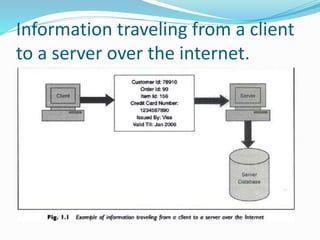
Information traveling from a client
to a server over the internet.
Some real time attacks
 Russian Attacker Maxim actually manage to intruder
into a merchant Internet site & obtained 300,000
credit card numbers from its DB.
 He then attempted extortion by demanding protection
money($100,000) from the merchant.
 The merchant refused to oblige.
 Following this, the attacker published about
25,000 of the credit card numbers on the internet!
 Some banks reissued all the credit cards at a cost
of $20 per card & others forewarned their
customers about unusual entries in their
statements.
Consequences of Attack
 Great Losses-both in terms of finance & goodwill.
 Cost of attack $20*300000=$6M
 Another Example:-
 1999 Swedish hacker broke into Microsoft’s Hotmail
Website & created a mirror site.
 This allowed anyone to enter any Hotmail user’s email
id & read their emails.
 2005 survey about the losses that occur due to
successful attacks on security. $455,848,000
 Next year this figure reduced to $201,757340!
Modern Nature Of Attack
1. Automating Attacks:-
Traditional Attack: Produce Coins using machinery &
Bring them into circulation.
Modern Attack: Steal half a dollar from million
accounts in a few minutes time digitally.
2. Privacy Concern:-Every Company are collecting &
processing lots of information about us. Without we
realizing when & how it is going to be used.
3. Distance does not matter:- Attack Can be launched
from the distance.
E.g:- In 1995, a Russian hacker broke into Citibank’s
computer remotely, stealing $12M.
Although the attacker was traced, it was very
difficult to get extradited him for the court case.
1.2 ELEMENTS OF INFORMATION
SECURITY
 This will Help us understand the attacks better & also
help us in thinking about the possible solution to
tackle it.
 Information Security provide services to user.
Principle/Goals Of Security
 These r the 4 chief principles of security.
1. Confidentiality:- Is msg seen by someone else?
2. Authentication:- Do u trust the sender of msg?
3. Integrity:- Is the meg changed during transmit?
4. Non-repudiation:- Can sender refute the msg?
 Above principles r related to a particular message.
 There r 2 more linked to overall system as a whole.
5. Access Control:- Who can Access what? [ACL]
6. Availability:- Information should be available timely.
 1. Confidentiality It covers two related concepts to ensure:
Data confidentiality: Assures that private or confidential
information is not made available or disclosed to unauthorized
individuals.
Privacy: Assures that individuals control or influence what
information related to them may be collected and stored and by
whom and to whom that information may be disclosed.
Confidentiality or Secrecy requires that the information in a
computer system only be accessible for reading by authorized
parties. This type of access includes: · Printing · Displaying ·
Other forms of disclosure, including simply revealing the
existing of an object We need to protect our information from
malicious actions that threat confidentiality of its information.
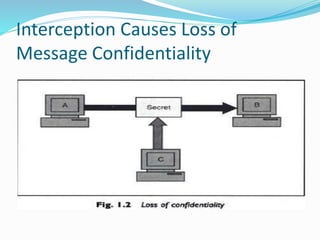
The principle of confidentiality specifies that only the sender
and the intended receiver should be able to access the message.
Confidentiality gets compromised if an unauthorized person is
able to access the message.
integrity
 Integrity Information has integrity when it is timely,
accurate, complete, and consistent. However, computers
are unable to provide or protect all of these qualities. The
term Integrity covers two related concepts:
 (i) Data integrity is a requirement that information and
programs are changed only in a specified and authorized
manner.
 (ii) System integrity is a requirement that a system
“performs its intended function in an unimpaired manner,
free from deliberate or inadvertent unauthorized
manipulation of the system.”
Confidentiality
 Confidentiality is the process of preventing
disclosure of information to unauthorized
individuals or systems.
Examples: Credit card
 Confidentiality is necessary, but not sufficient to
maintain privacy
Interception Causes Loss of
Message Confidentiality
Authenticity
 In computing, e-Business and information security it is
necessary to ensure that the data , transactions,
communications or documents (electronic or physical)
are genuine (i.e. they have not been forged or fabricated.)
Examples: Passport, Credit card Accounts, academic
transcripts
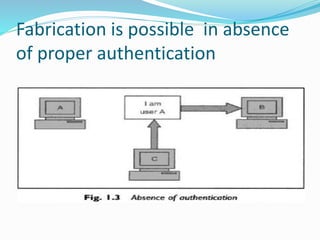
Fabrication is possible in absence
of proper authentication
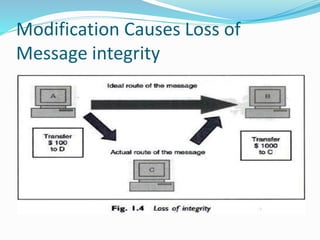
Integrity
 Integrity means that data cannot be
modified/change without Authorization
Examples: Manual deletion or alteration or creation
of important data files, Virus infection, Employee
altering their own salary , website vandalism,
polling fraud.
Modification Causes Loss of
Message integrity
Non-Repudiation
 It is a complex term used to describe the lack of deniability
of ownership of a message, piece of data, or Transaction.
Examples: Proof of an ATM transaction, a stock trade, or an
email
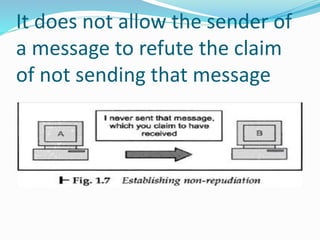
It does not allow the sender of
a message to refute the claim
of not sending that message
Access Control
 Role Management->User Side->Which user can do
what.
 Rule Management->Resource Side->Which resources r
accessible and under what circumstances.
 Access Control List is subset of Access Control Matrix.
Availability
 For any information/system to serve its purpose,
 The information must be accessible & usable when
it is needed.
 Computing systems used to store and process the
information, the security controls used to protect
it, and the communication channels used to access
it must be functioning correctly.
Examples: Power outages, Hardware failures,
System upgrades and Preventing denial-of-service
attacks
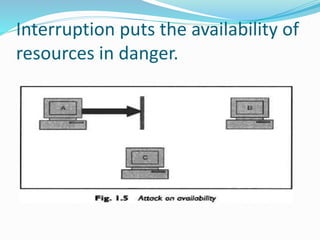
Interruption puts the availability of
resources in danger.
1.3 SECURITY POLICY
 Risk ->Secure->Action
 To control the threats
 Providing techniques & measures(e.g Audit)
 Developing a secure computing platform to restrict the
users to perform the only particular actions that is
permitted.
 At the same time restrict this user too misuse their
rights to use the system.
1. External Approach:- for external attacker
2. Internal Approach:- for inside environmental attack
1.4 SECURITY TECHNIQUES
 Cryptographic Techniques:- Confidentiality & integrity of
data
 Authentication Techniques:- to guarantee that
communication end-points.
E.g:- who they say the are.
 Chain of trust techniques- authentic software
 Access Control- privilege & authorization
 Capability to detect un-patched known flaws
 Back up of data
 Anti-virus software
 Firewall
 IDS/IPS- related to access & misuse
 Information Security Awareness- social engineering
1.5 Steps for better Security
Security is the most important aspect of computer world
Following r the steps one should follow:-
 Assets:- Decide, Identify, Protect
 Risks:- identify threats, attacks, vulnerabilities,
exploits, theft
 Protection:- find out the solutions
 Tools & Technique:- select
 Priorities:- decide the order of point 4
1.6 CATEGORY OF COMPUTER SECURITY
1. Cryptography:- Mathematical “scrambling’’ of
data.
2. Data Security:- Protective measures, keep safe
from un- authorized access, privacy, prevent
breaches , etc.
3. Computer Security Model:-
It Depends on computer architecture,
specification, security issues, protection
mechanism.
Act as a framework for information system
security policy.
Continue…
4. Network Security:-
Protection during transmission,
Policies & provision by Admin,
Authorization & Access Control,
5. Computer Security Procedure:-
strategies, guideline, policies, standards,
specification, regulations & laws.
6. Security Exploits:-
Vulnerabilities,
Unintended & un-patched flaws in s/w,
Virus, worms & Trojan horses, malwares
Different types of attacks,
Continue…
7. Authentication:- person, computer, program
8. Identity management:- user, device, services
9. Internet policy:- whatsapp, FB, ect..
10. Security Software
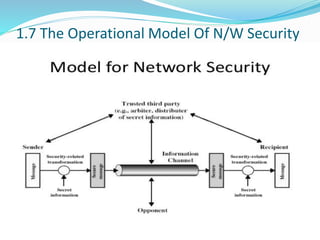
1.7 The Operational Model Of N/W Security
1.8 Basic N/W Security Terminology
 NOTE:- Covered through out the syllabus
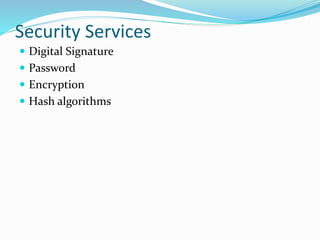
Security Services
 Digital Signature
 Password
 Encryption
 Hash algorithms
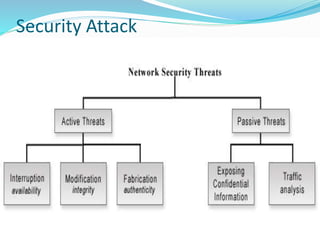
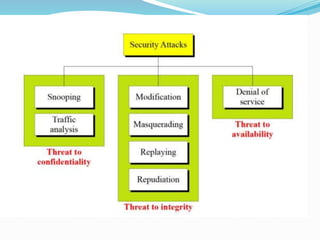
Security Attack
Types of Attack
 Attacks: A Technical View
1. Theoretical Concepts behind this attack.
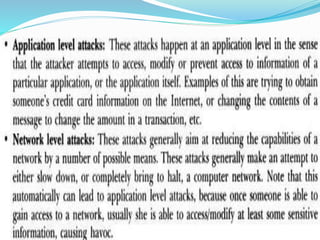
 Inception:- Copying of data & program & listening to
N/W Traffic.
 Fabrication:-Attacker may add fake records to a
database. Creation of illegal objects on the computer
system.
 Modification:-Attacker modifies Value of DB
 Interruption:- Resources became unavailable, lost or
unusable. Causing problems to a H/W device,
erasing program, Data or OS components.
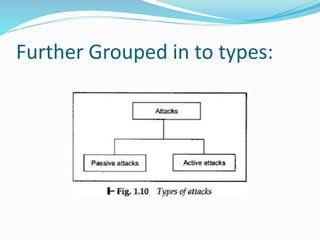
Further Grouped in to types:
Passive Attack
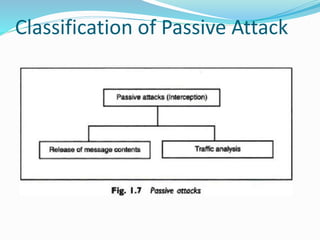
 Attacker eavesdropping or monitoring of data
transmission.
 Tries too learn something out of it & make use of it.
 Aims to obtain information that is in transmit.
 No Modification
 Detection harder.
1. For plain text Message
 Solution prevention :- encryption
2. For Encoded Message
 Similarity -> Pattern -> Clue
Classification of Passive Attack
Active Attack
 Modification
 Creation of False Msg
 No prevention
 Solution Detection & Recovery
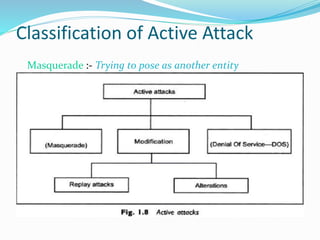
Classification of Active Attack
Masquerade :- Trying to pose as another entity
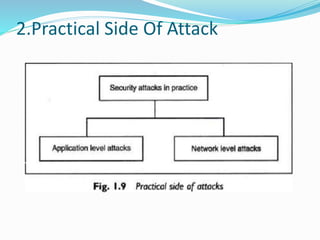
2.Practical Side Of Attack
References:
 Dr. V.K. Pachghare, Cryptography and Information
Security, PHI,ISBN 978-81-303-5082-3
 Atul Kahate, Cryptography and Network Security, Tata
McGraw Hill,ISBN 978-0-07-064823-4
 Further Reading use ppt’s after this slide
Program That Attacks
 Virus
 Worms
 Trojan Horse
 Applets & ActiveX Controls
 Cookies
 Java Script VB Script Jscript
 Etc.
Program That Attacks to cause some damage or to
create confusion.
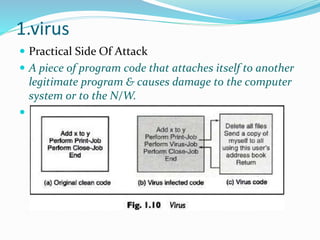
1.virus
 Practical Side Of Attack
 A piece of program code that attaches itself to another
legitimate program & causes damage to the computer
system or to the N/W.

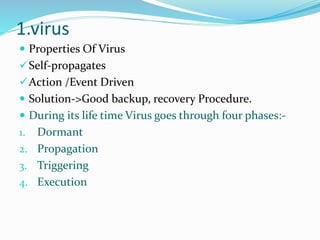
1.virus
 Properties Of Virus
Self-propagates
Action /Event Driven
 Solution->Good backup, recovery Procedure.
 During its life time Virus goes through four phases:-
1. Dormant
2. Propagation
3. Triggering
4. Execution
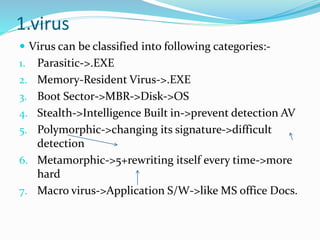
1.virus
 Virus can be classified into following categories:-
1. Parasitic->.EXE
2. Memory-Resident Virus->.EXE
3. Boot Sector->MBR->Disk->OS
4. Stealth->Intelligence Built in->prevent detection AV
5. Polymorphic->changing its signature->difficult
detection
6. Metamorphic->5+rewriting itself every time->more
hard
7. Macro virus->Application S/W->like MS office Docs.

unit-1-is1.pptx

  • 1.
  • 2.
    CONTENT 1. INTRODUCTION 2. SECURITY 3.ELEMENTS OF INFORMATION SECURITY 4. SECURITY POLICY 5. SECURITY TECHNIQUES 6. STEPS FOR BETTER SECURITY 7. CATEGORY OF COMPUTER SECURITY 8. THE OPERATIONAL MODEL OF N/W SECURITY 9. SECURITY SERVICES 10. BASIC N/W SECURITY TERMINOLOGY 11. SECURITY ATTACKS
  • 3.
    How safe isyour information? •Recent events show that commercial, personal and sensitive information is very hard to keep secure, and some estimates point to 2007 as being the worst year on record for data loss. •As breaches in information security continue to make headline news, it is becoming increasingly clear that technological solutions are not the only answer. •Research conducted in 2007 suggests that at least 80% of data leakages are caused by staff rather than IT systems (source: Financial Times/Forrester Research, Nov-07). •It is clear therefore that Information Security should be viewed as a management function rather than one of IT alone. •Here, the syllabus outline the main management principles designed to help you secure your data, and raise awareness of the issues involved.
  • 4.
    1.1 SECURITY  Challengesin Security? 1.Use of computer with internet 2. Software tools are available freely 3. Importance of information 4.Lack of awareness/ignorance/hesitation  PROTECTION 1.Unahorized Access by intentionally or unintentionally.
  • 5.
    To protect theoperation of any organization 1.Physical Security:- Access control to physical device E.g:- Pen drive, Hard drive, CD/DVD, Computer, 2. Private Security :- Individual or group 3. Project Security :- Design , Code operation security
  • 6.
    Introduction  Information:- Computers,Networks, Internet, Mobile.  Security:-trying to understand how to protect.  The various dangers & pitfalls when we use technology.  The consequences of not setting up the right Security Policies Security Framework Security Technology
  • 7.
    Why is SecurityRequired?  Business & different types of transactions r being conducted to a large extent over Internet.  Inadequate or improper security mechanism can bring whole business down or play havoc with people’s lives!  Since Electronic Documents & Messages r now becoming equivalent to proper documents in terms of their legal validity & binding.
  • 8.
    Why Study InformationSecurity  Businesses collect mass amounts of data about their customers, employees, and competitors.  Most of this data is stored on computers and transmitted across networks.  If this information should fall into the hands of a competitor, the result could be loss of business, lawsuits and bankruptcy.  Protecting corporate data is no longer an option, it is a requirement.
  • 9.
    Information Security  Protectinginformation and information systems from unauthorized access, use, disclosure, disruption, modification, or destruction. Background  Throughout history, confidentiality of information has always played a key role in military conflict.  In Past No or little security.
  • 10.
    The Need forSecurity(Current Scenario)  Now a days Importance of data was truly realized. Financial & Personal data  Therefore various areas in security began to gain prominence.  Typical Examples of Basic Security Mechanism: Authenticate a User->id, pw Encode->DB->Not Visible to user who do not have the right permission.  Organization employed their own mechanism.
  • 11.
    The Need forSecurity In Modern Life  Internet took the world by storm.  Technology Improved  Communication Infrastructure became extremely mature.  Newer & newer applications begins to developed for various user demands & need.  Soon peoples realized that basic security measures were not quite enough.
  • 12.
    Information traveling froma client to a server over the internet.
  • 13.
    Some real timeattacks  Russian Attacker Maxim actually manage to intruder into a merchant Internet site & obtained 300,000 credit card numbers from its DB.  He then attempted extortion by demanding protection money($100,000) from the merchant.  The merchant refused to oblige.  Following this, the attacker published about 25,000 of the credit card numbers on the internet!  Some banks reissued all the credit cards at a cost of $20 per card & others forewarned their customers about unusual entries in their statements.
  • 14.
    Consequences of Attack Great Losses-both in terms of finance & goodwill.  Cost of attack $20*300000=$6M  Another Example:-  1999 Swedish hacker broke into Microsoft’s Hotmail Website & created a mirror site.  This allowed anyone to enter any Hotmail user’s email id & read their emails.  2005 survey about the losses that occur due to successful attacks on security. $455,848,000  Next year this figure reduced to $201,757340!
  • 15.
    Modern Nature OfAttack 1. Automating Attacks:- Traditional Attack: Produce Coins using machinery & Bring them into circulation. Modern Attack: Steal half a dollar from million accounts in a few minutes time digitally. 2. Privacy Concern:-Every Company are collecting & processing lots of information about us. Without we realizing when & how it is going to be used. 3. Distance does not matter:- Attack Can be launched from the distance. E.g:- In 1995, a Russian hacker broke into Citibank’s computer remotely, stealing $12M. Although the attacker was traced, it was very difficult to get extradited him for the court case.
  • 16.
    1.2 ELEMENTS OFINFORMATION SECURITY  This will Help us understand the attacks better & also help us in thinking about the possible solution to tackle it.  Information Security provide services to user.
  • 17.
    Principle/Goals Of Security These r the 4 chief principles of security. 1. Confidentiality:- Is msg seen by someone else? 2. Authentication:- Do u trust the sender of msg? 3. Integrity:- Is the meg changed during transmit? 4. Non-repudiation:- Can sender refute the msg?  Above principles r related to a particular message.  There r 2 more linked to overall system as a whole. 5. Access Control:- Who can Access what? [ACL] 6. Availability:- Information should be available timely.
  • 18.
     1. ConfidentialityIt covers two related concepts to ensure: Data confidentiality: Assures that private or confidential information is not made available or disclosed to unauthorized individuals. Privacy: Assures that individuals control or influence what information related to them may be collected and stored and by whom and to whom that information may be disclosed. Confidentiality or Secrecy requires that the information in a computer system only be accessible for reading by authorized parties. This type of access includes: · Printing · Displaying · Other forms of disclosure, including simply revealing the existing of an object We need to protect our information from malicious actions that threat confidentiality of its information. The principle of confidentiality specifies that only the sender and the intended receiver should be able to access the message. Confidentiality gets compromised if an unauthorized person is able to access the message.
  • 19.
    integrity  Integrity Informationhas integrity when it is timely, accurate, complete, and consistent. However, computers are unable to provide or protect all of these qualities. The term Integrity covers two related concepts:  (i) Data integrity is a requirement that information and programs are changed only in a specified and authorized manner.  (ii) System integrity is a requirement that a system “performs its intended function in an unimpaired manner, free from deliberate or inadvertent unauthorized manipulation of the system.”
  • 20.
    Confidentiality  Confidentiality isthe process of preventing disclosure of information to unauthorized individuals or systems. Examples: Credit card  Confidentiality is necessary, but not sufficient to maintain privacy
  • 21.
    Interception Causes Lossof Message Confidentiality
  • 22.
    Authenticity  In computing,e-Business and information security it is necessary to ensure that the data , transactions, communications or documents (electronic or physical) are genuine (i.e. they have not been forged or fabricated.) Examples: Passport, Credit card Accounts, academic transcripts
  • 23.
    Fabrication is possiblein absence of proper authentication
  • 24.
    Integrity  Integrity meansthat data cannot be modified/change without Authorization Examples: Manual deletion or alteration or creation of important data files, Virus infection, Employee altering their own salary , website vandalism, polling fraud.
  • 25.
    Modification Causes Lossof Message integrity
  • 26.
    Non-Repudiation  It isa complex term used to describe the lack of deniability of ownership of a message, piece of data, or Transaction. Examples: Proof of an ATM transaction, a stock trade, or an email
  • 27.
    It does notallow the sender of a message to refute the claim of not sending that message
  • 28.
    Access Control  RoleManagement->User Side->Which user can do what.  Rule Management->Resource Side->Which resources r accessible and under what circumstances.  Access Control List is subset of Access Control Matrix.
  • 29.
    Availability  For anyinformation/system to serve its purpose,  The information must be accessible & usable when it is needed.  Computing systems used to store and process the information, the security controls used to protect it, and the communication channels used to access it must be functioning correctly. Examples: Power outages, Hardware failures, System upgrades and Preventing denial-of-service attacks
  • 30.
    Interruption puts theavailability of resources in danger.
  • 31.
    1.3 SECURITY POLICY Risk ->Secure->Action  To control the threats  Providing techniques & measures(e.g Audit)  Developing a secure computing platform to restrict the users to perform the only particular actions that is permitted.  At the same time restrict this user too misuse their rights to use the system. 1. External Approach:- for external attacker 2. Internal Approach:- for inside environmental attack
  • 32.
    1.4 SECURITY TECHNIQUES Cryptographic Techniques:- Confidentiality & integrity of data  Authentication Techniques:- to guarantee that communication end-points. E.g:- who they say the are.  Chain of trust techniques- authentic software  Access Control- privilege & authorization  Capability to detect un-patched known flaws  Back up of data  Anti-virus software  Firewall  IDS/IPS- related to access & misuse  Information Security Awareness- social engineering
  • 33.
    1.5 Steps forbetter Security Security is the most important aspect of computer world Following r the steps one should follow:-  Assets:- Decide, Identify, Protect  Risks:- identify threats, attacks, vulnerabilities, exploits, theft  Protection:- find out the solutions  Tools & Technique:- select  Priorities:- decide the order of point 4
  • 34.
    1.6 CATEGORY OFCOMPUTER SECURITY 1. Cryptography:- Mathematical “scrambling’’ of data. 2. Data Security:- Protective measures, keep safe from un- authorized access, privacy, prevent breaches , etc. 3. Computer Security Model:- It Depends on computer architecture, specification, security issues, protection mechanism. Act as a framework for information system security policy.
  • 35.
    Continue… 4. Network Security:- Protectionduring transmission, Policies & provision by Admin, Authorization & Access Control, 5. Computer Security Procedure:- strategies, guideline, policies, standards, specification, regulations & laws. 6. Security Exploits:- Vulnerabilities, Unintended & un-patched flaws in s/w, Virus, worms & Trojan horses, malwares Different types of attacks,
  • 36.
    Continue… 7. Authentication:- person,computer, program 8. Identity management:- user, device, services 9. Internet policy:- whatsapp, FB, ect.. 10. Security Software
  • 37.
    1.7 The OperationalModel Of N/W Security
  • 38.
    1.8 Basic N/WSecurity Terminology  NOTE:- Covered through out the syllabus
  • 39.
    Security Services  DigitalSignature  Password  Encryption  Hash algorithms
  • 40.
  • 41.
    Types of Attack Attacks: A Technical View 1. Theoretical Concepts behind this attack.  Inception:- Copying of data & program & listening to N/W Traffic.  Fabrication:-Attacker may add fake records to a database. Creation of illegal objects on the computer system.  Modification:-Attacker modifies Value of DB  Interruption:- Resources became unavailable, lost or unusable. Causing problems to a H/W device, erasing program, Data or OS components.
  • 42.
  • 44.
    Passive Attack  Attackereavesdropping or monitoring of data transmission.  Tries too learn something out of it & make use of it.  Aims to obtain information that is in transmit.  No Modification  Detection harder. 1. For plain text Message  Solution prevention :- encryption 2. For Encoded Message  Similarity -> Pattern -> Clue
  • 45.
  • 46.
    Active Attack  Modification Creation of False Msg  No prevention  Solution Detection & Recovery
  • 47.
    Classification of ActiveAttack Masquerade :- Trying to pose as another entity
  • 48.
  • 50.
    References:  Dr. V.K.Pachghare, Cryptography and Information Security, PHI,ISBN 978-81-303-5082-3  Atul Kahate, Cryptography and Network Security, Tata McGraw Hill,ISBN 978-0-07-064823-4  Further Reading use ppt’s after this slide
  • 51.
    Program That Attacks Virus  Worms  Trojan Horse  Applets & ActiveX Controls  Cookies  Java Script VB Script Jscript  Etc. Program That Attacks to cause some damage or to create confusion.
  • 52.
    1.virus  Practical SideOf Attack  A piece of program code that attaches itself to another legitimate program & causes damage to the computer system or to the N/W. 
  • 53.
    1.virus  Properties OfVirus Self-propagates Action /Event Driven  Solution->Good backup, recovery Procedure.  During its life time Virus goes through four phases:- 1. Dormant 2. Propagation 3. Triggering 4. Execution
  • 54.
    1.virus  Virus canbe classified into following categories:- 1. Parasitic->.EXE 2. Memory-Resident Virus->.EXE 3. Boot Sector->MBR->Disk->OS 4. Stealth->Intelligence Built in->prevent detection AV 5. Polymorphic->changing its signature->difficult detection 6. Metamorphic->5+rewriting itself every time->more hard 7. Macro virus->Application S/W->like MS office Docs.

Editor's Notes