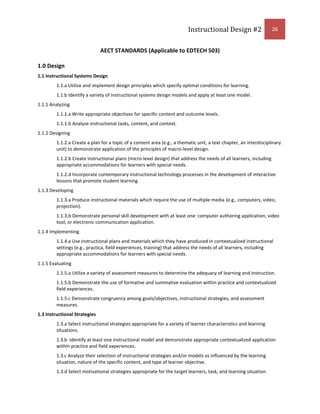
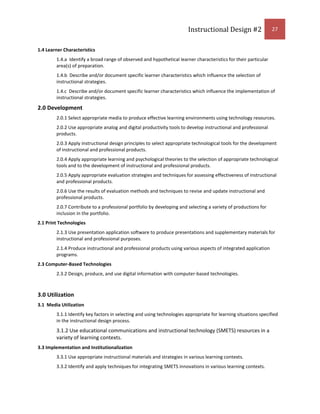
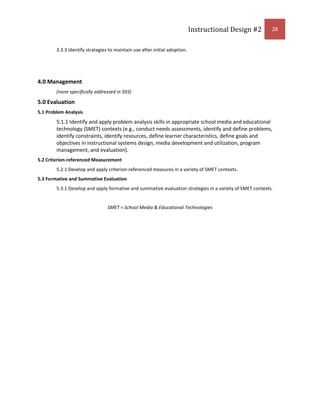
Picasa for Seniors2009Instructional Design #2Lora EvanouskiDr Ross Perkins, Boise State UniversityFall semester Boise State University<br />Contents TOC \o \"
1-3\"
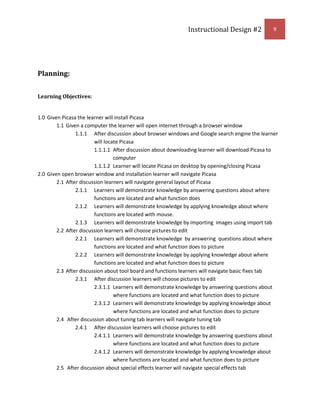
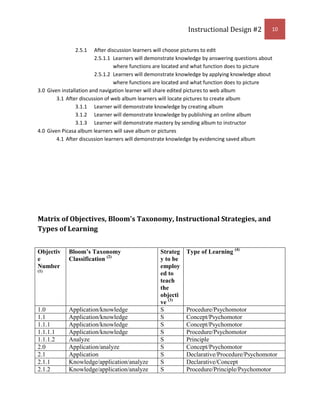
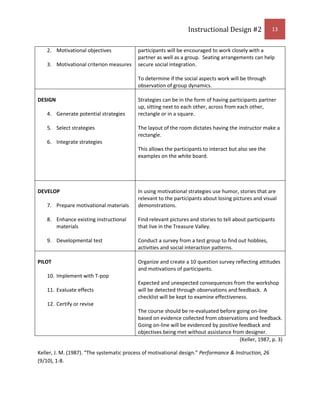
 \h \z \u Synthesis Reflection PAGEREF _Toc247370970 \h 4Topic PAGEREF _Toc247370971 \h 6Learning Goal: PAGEREF _Toc247370972 \h 6Audience: PAGEREF _Toc247370973 \h 6Rationale: PAGEREF _Toc247370974 \h 6Learning Context: PAGEREF _Toc247370975 \h 7Description of Learners: PAGEREF _Toc247370976 \h 8Planning: PAGEREF _Toc247370977 \h 9Learning Objectives: PAGEREF _Toc247370978 \h 9Matrix of Objectives, Bloom's Taxonomy, Instructional Strategies, and Types of Learning PAGEREF _Toc247370979 \h 10Instructor Guide: PAGEREF _Toc247370980 \h 14Introduction PAGEREF _Toc247370981 \h 14Body PAGEREF _Toc247370982 \h 14Conclusion PAGEREF _Toc247370983 \h 16Learning Content PAGEREF _Toc247370984 \h 17Learning Materials PAGEREF _Toc247370985 \h 17Formative/Summative Assessment PAGEREF _Toc247370986 \h 17Formative Evaluation Plan PAGEREF _Toc247370987 \h 18Expert Review PAGEREF _Toc247370988 \h 18One-to-One PAGEREF _Toc247370989 \h 18Small Group Evaluation PAGEREF _Toc247370990 \h 19Field Trial PAGEREF _Toc247370991 \h 20Formative Evaluation Report PAGEREF _Toc247370992 \h 21Report from the SME PAGEREF _Toc247370993 \h 21Comments on Change PAGEREF _Toc247370994 \h 22AECT Standards Grid PAGEREF _Toc247370995 \h 23Appendix A PAGEREF _Toc247370996 \h 29Appendix B PAGEREF _Toc247370997 \h 30Appendix C PAGEREF _Toc247370998 \h 31Appendix D PAGEREF _Toc247370999 \h 32Appendix E PAGEREF _Toc247371000 \h 33Appendix F PAGEREF _Toc247371001 \h 34Appendix G PAGEREF _Toc247371002 \h 35Bibliography PAGEREF _Toc247371003 \h 36<br />Synthesis Reflection<br />What is Instructional Design?  As defined by Smith and Ragan, instructional design refers to the systematic and reflective process of translating principles of learning and instruction into plans for instructional materials, activities, information resources, and evaluation  CITATION Smi05 \l 1033 (Smith & Ragan, 2005).   As I entered into this class I had never given much thought into what happens in “making” a class module, course unit or even a section of instruction!  I, as you could say, came in blind not knowing what to expect from taking such a course.  If you break down the words, instruction means to give direction to some material or action. The word design means to make or build something.  These words have a new meaning to me based on my experiences from being enrolled in this class. <br />Instructional design is like gardening to me.  Most of us can do a little gardening.  We all have a little green thumb in us with just minimal effort.  But by cultivating and appending the soil, you can grow some really fabulous vegetables.  You must know the quality of the soil, the type of plants that can be sustained in the region, where and when to plant them.  Instructional design is built on knowing which tools to use, how and when to use them (hoes, picks, shovels, etc. and planting the plants).  You must also account for your audience (soil).  Year after year the same instruction (crops) needs to be modified or rotated due to learning changes in entry level skills as well as learning context (depletion of vitamins in the soil).  Sometimes a subject matter expert is needed (farmer) to instruct to the finer points of raising a great crop.  In gardening as well as instructional design, creating a great product in the end should be first and foremost while using formative evaluation along the way to change and modify as needed.<br />As I look back on this semester in Ed Tech 503, I have learned from not only the process of reading the text book and projects completed but also from my peers.  The reflective strategies used in the weeks and months have been enlightening.  The first entry to my forum was in deciding which was to be considered first the technology tool or design instruction.  Coming from a background of several large corporations that used the tools to accomplish the job of learning, I had a slightly skewed look at the process.  I was the only participant to choose the tool first in my forum, it was intimidating.  As I learned through collaborating with my peers, I was not alone.  Many times we find a great new gadget or tool and think, how I can use this in my lesson?  It is incumbent on a designer to choose the learner first then find the most stimulating and rewarding way to encourage and utilize authentic learning to take place.  Instructional design should be a process to which the designer needs to employ the sound practices of learning theory, such as ADDIE or Gagne’s 9 steps CITATION Smi05 \l 1033  (Smith & Ragan, 2005).  These practices should and must be applied.  In ID #1, I chose to use the Gagne’s model because of the sound principals it is based upon.  Without basing instructional design on a sound theory and model, the designer would be throwing up the seeds in his garden and hoping for the best.  This is neither the process nor action I intend to achieve through my learning of instructional design.  <br />As I discussed with Dr. Perkins, I received formal training as an elementary education teacher back in the early 80’s. I did not have the benefits of learning instructional design in any of my past curriculum.  Upon taking this class, I can see the benefits it would be to any and all education majors.  For example, I felt when I started my teaching career that I was just sent out into the teaching realm to figure out lesson plans and strategies to teach on my own. No real sound grounding in learning theory or models to fall back upon.  I see now what I missed then!  Implementing such a course would benefit all teachers.  I also learned in ID #2 the process is just that a process.  It is meant to be an investigation; lots of integral parts designed to fit together to make a whole, like a puzzle.  If one piece is missing you may get the idea but the more pieces you are missing, the worse the understanding is.  In addition, I also learned the instructional design process cannot be hurried or rushed and you must anticipate problems and setbacks.  The instructional design process can be complicated or it can be simple and that is also the beauty of instructional design.  The process of making a puzzle whole is the same as making a worthy instructional design.  Try and fit the best pieces into place and if that doesn’t work try another strategy.<br />Instructional design and educational technology go hand in hand; they are dependent upon each other.  They are both systematic approaches to learning.  Instructional design is involved in the materials and instruction to be learned where as educational technology is the tools themselves to accomplish the process of learning.  These two interdependent processes are a way to find solutions to educational/training problems.  As I march towards my MET, I will consider the experiences in using instructional design as my first approach to a logical process in building a foundation for which I can now lean upon. <br />Topic<br />Learning Goal:  Given Picasa editing software the learner will create an online image album.<br />Audience:  The target audience will be senior citizens (above 55 years old) of the Treasure Valley in Idaho.<br />Rationale:  <br />The reason for choosing this topic is to address the needs of senior citizens who will use the internet for social discourse as well as in business relationships.  It also allows me to explore the opposite end of the spectrum because when you hear the word teaching most assume that it will be for young people.  As I approached teaching my mother a senior citizen how to use the software, I realized how many senior citizens do not know how to use this product.  The senior community is one of the fastest growing populations in the country.  The baby boomers are coming of age.  This population has also been one of the forgotten communities when it comes to developing instructional materials.  As instructional designers we need to be cognizant of this fact.  Even though the aging population has limitations, it is our job to enrich the experiences by designing with this population in mind.  It is my intent to develop instructional materials for the aging population.  <br />The workshop focuses on the effectiveness of using editing software for not only social interactions and connections but also for business applications.  The main foci of the workshop will be to allow seniors to interact with editing software then apply it to different contexts.  The specific knowledge gained from the workshop will better prepare the seniors to address the emerging technologies and associated comfort levels in using technologies in real world contexts.  <br />The strategy to be used in this project will be primarily supplantive.  Supplantive strategies work very well with procedural learning.  Supplantive strategies have high levels of scaffolding for a well defined task and limited amount of time.  It is useful for learners with limited levels of prior knowledge.  This is a step by step process of leading the audience through the use of Picasa.  Procedure learning can be simple to complex, and the aging population has many inherent factors to take into account.  As we age we naturally lose certain abilities, vision, motor or dexterity, hearing and sometimes brain function. This leads to a subcategory of psychomotor.  Because of the limitations of the aging population, psychomotor strategies need to be considered.  Because of common ailments within the aging community, for example poor vision acuity, screens can be made to zoom so items appear larger and therefore easier to see.  When using a procedural strategy the items to be learned can be chunked into groups.  This needs to be taken into account for the attention levels in older populations tend to shrink as well as anxiety levels and tension levels that rise because of frustration.  Generative strategies will be used in choosing which images will be used to import and edit.<br />Procedure strategies contain repetition.  You gain the attention, preview the lesson, recall prior knowledge, focus attention, employ learning strategies, practice, evaluate feedback, summarize and review, remotivate and finally assess CITATION Smi05 \l 1033  (Smith & Ragan, 2005).  The instructor will have them learn a chunk of information then immediately practice the step.  Once the step is mastered the instructor will have them learn another step.  Once that next step is learned the instructor will then combine the two steps, and achieve mastery in order to move on to the next step.  This process of combing the previous step to the next step allows the learner to master through repetition.  Because of the amount of practice that is contained within a procedural strategy, psychomotor skills should be considered when practice and repetition happen.  Psychomotor skills involve both the physical movement coupled with cognitive abilities  CITATION Smi05 \l 1033 (Smith & Ragan, 2005).  With this in mind and because of arthritis, repetition can be quite painful.  It affects not only the joints but also the mind.  Consideration needs to be paid in how keyboard functions will be handled.  Functions that can be made with a single keystroke should be a consideration.  Tremors and poor eye/hand coordination also need to be factored into the instruction.<br />Learning Context:<br />The learners will be at the local library (Meridian, ID).  The library has a conference room with six 6ft tables and approximately 48 chairs.  It has wall/floor outlets and a pull down screen to project any slideshows or demonstrations.  Wireless internet access is available.  The library is open to everyone and is a willing participant in facilitating learning.  Water and restrooms are available to the public.  The learning sessions will be during school hours as to keep traffic to a minimum throughout the library.  The learning session will be a 90 minute session.  The entry level skills demand that each participant has a computer and have basic knowledge of the internet.  The participants also have a working knowledge of computer terms such as mouse, keyboard, and hard drive. The instructor will have their own laptop plus the ability to project on the screen to provide examples.  <br />The learners will be able to transfer this learning to several different situations.  In learning about editing pictures, the learner will be able to edit, save, organize and showcase their vast memories on the digital format.  If the learner does not live in the immediate area of family or any loved ones this will be a way to connect and stay connected.  Being able to successfully upload a perfect picture to a web album to share with family can be quite pleasing to all parties involved.  For example, if the learner has not been able to communicate regularly with a loved one or has lost touch and learns how to establish a web album; communication can be renewed with visuals.  <br />The learner can also apply this editing, organizing, saving efforts to business applications.  Because the learners are still in the workforce (depending on age and mobility) these applications can be used in other computer applications.  For example, the learner has an email account and needs to display a project for their employee; using Picasa can enhance the photo quality as well as tell a story through visuals.  Another application is to enhance the learned technical skills of using technology.  By using technology and achieving success the learner gains confidence and may be more accepting of and trying other free technology to enhance their social lives and/or business relationships.<br />Description of Learners: <br />The learners that are included in this workshop will be learners over 55.  They will have a basic understanding of computers i.e.  basic entry level skills in how to turn a computer on, downloading  software,  understanding of how to use a mouse and keyboard, knowledge of basic computer terms, and basic navigation of the internet.  The learners will be derived from the Treasure Valley.  It has been ascertained that of the 30 participants 26 of them have used windows where 4 have used the Mac system.  The participants have all reported having used computers for personal use and 20 of the 30 have used them for some type of business related function.  In addition, the survey revealed all participants would like to work in groups and/or collaborate.  The participants have some or little knowledge of using editing software.  The academic motivation is based on wanting to learn new technology based on sample survey’s collected.  All have reported some level of frustration when using a new technology or software.  All learners have reported having at least a high school education, with 12 having some college experience and 6 holding higher education degrees.  This is a volunteer workshop designed to enhance and create a social outlet for the senior citizens of the Treasure Valley.<br />Planning:<br />Learning Objectives:<br />Given Picasa the learner will install Picasa
Given a computer the learner will open internet through a browser window
After discussion about browser windows and Google search engine the learner will locate Picasa
After discussion about downloading learner will download Picasa to computer
Learner will locate Picasa on desktop by opening/closing Picasa
Given open browser window and installation learner will navigate Picasa
After discussion learners will navigate general layout of Picasa
Learners will demonstrate knowledge by answering questions about where functions are located and what function does
Learners will demonstrate knowledge by applying knowledge about where   functions are located with mouse.
Learners will demonstrate knowledge by importing  images using import tab
After discussion learners will choose pictures to edit
Learners will demonstrate knowledge  by answering  questions about where functions are located and what function does to picture
Learners will demonstrate knowledge by applying knowledge about where functions are located and what function does to picture
After discussion about tool board and functions learners will navigate basic fixes tab
After discussion learners will choose pictures to edit
Learners will demonstrate knowledge by answering questions about where functions are located and what function does to picture
Learners will demonstrate knowledge by applying knowledge about where functions are located and what function does to picture
 After discussion about tuning tab learners will navigate tuning tab
After discussion learners will choose pictures to edit
Learners will demonstrate knowledge by answering questions about where functions are located and what function does to picture
Learners will demonstrate knowledge by applying knowledge about where functions are located and what function does to picture
 After discussion about special effects learner will navigate special effects tab
After discussion learners will choose pictures to edit
Learners will demonstrate knowledge by answering questions about where functions are located and what function does to picture
Learners will demonstrate knowledge by applying knowledge about where functions are located and what function does to picture
Given installation and navigation learner will share edited pictures to web album
After discussion of web album learners will locate pictures to create album
Learner will demonstrate knowledge by creating album
Learner will demonstrate knowledge by publishing an online album
Learner will demonstrate mastery by sending album to instructor
Given Picasa album learners will save album or pictures
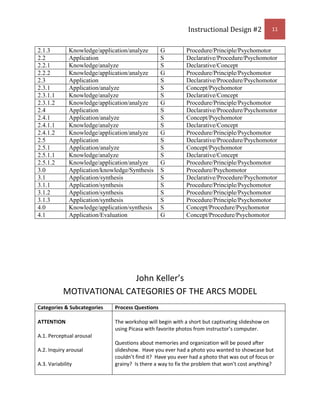
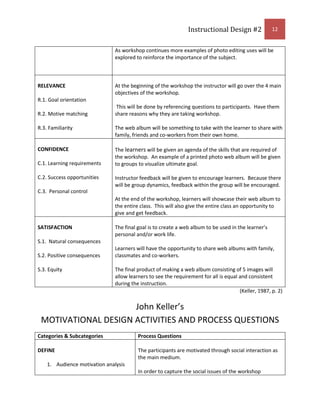
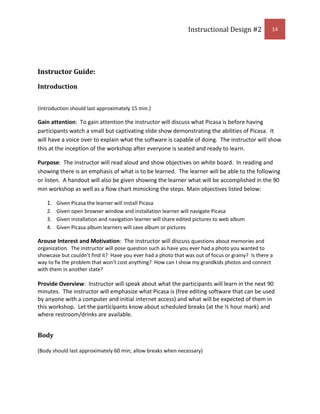
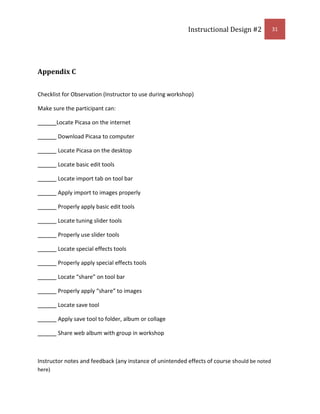
After discussion learners will demonstrate knowledge by evidencing saved albumMatrix of Objectives, Bloom's Taxonomy, Instructional Strategies, and Types of Learning<br />Objective Number (1)Bloom’s Taxonomy Classification (2)Strategy to be employed to teach the objective (3)Type of Learning (4)1.0Application/knowledgeSProcedure/Psychomotor1.1Application/knowledgeSConcept/Psychomotor1.1.1Application/knowledgeSConcept/Psychomotor1.1.1.1Application/knowledgeSProcedure/Psychomotor1.1.1.2AnalyzeSPrinciple2.0Application/analyzeSConcept/Psychomotor2.1ApplicationSDeclarative/Procedure/Psychomotor2.1.1Knowledge/application/analyzeSDeclarative/Concept2.1.2Knowledge/application/analyzeSProcedure/Principle/Psychomotor2.1.3Knowledge/application/analyzeGProcedure/Principle/Psychomotor2.2ApplicationSDeclarative/Procedure/Psychomotor2.2.1Knowledge/analyzeSDeclarative/Concept2.2.2Knowledge/application/analyzeGProcedure/Principle/Psychomotor2.3ApplicationSDeclarative/Procedure/Psychomotor2.3.1Application/analyzeSConcept/Psychomotor2.3.1.1Knowledge/analyzeSDeclarative/Concept2.3.1.2Knowledge/application/analyzeGProcedure/Principle/Psychomotor2.4ApplicationSDeclarative/Procedure/Psychomotor2.4.1Application/analyzeSConcept/Psychomotor2.4.1.1Knowledge/analyzeSDeclarative/Concept2.4.1.2Knowledge/application/analyzeGProcedure/Principle/Psychomotor2.5ApplicationSDeclarative/Procedure/Psychomotor2.5.1Application/analyzeSConcept/Psychomotor2.5.1.1Knowledge/analyzeSDeclarative/Concept2.5.1.2Knowledge/application/analyzeGProcedure/Principle/Psychomotor3.0Application/knowledge/SynthesisSProcedure/Psychomotor3.1Application/synthesisSDeclarative/Procedure/Psychomotor3.1.1Application/synthesisSProcedure/Principle/Psychomotor3.1.2Application/synthesisSProcedure/Principle/Psychomotor3.1.3Application/synthesisSProcedure/Principle/Psychomotor4.0Knowledge/application/synthesisSConcept/Procedure/Psychomotor4.1Application/EvaluationGConcept/Procedure/Psychomotor<br />John Keller’s MOTIVATIONAL CATEGORIES OF THE ARCS MODEL<br />Categories & SubcategoriesProcess QuestionsATTENTIONA.1. Perceptual arousalA.2. Inquiry arousalA.3. VariabilityThe workshop will begin with a short but captivating slideshow on using Picasa with favorite photos from instructor’s computer.  Questions about memories and organization will be posed after slideshow.  Have you ever had a photo you wanted to showcase but couldn’t find it?  Have you ever had a photo that was out of focus or grainy?  Is there a way to fix the problem that won’t cost anything? As workshop continues more examples of photo editing uses will be explored to reinforce the importance of the subject.RELEVANCER.1. Goal orientationR.2. Motive matchingR.3. FamiliarityAt the beginning of the workshop the instructor will go over the 4 main objectives of the workshop. This will be done by referencing questions to participants.  Have them share reasons why they are taking workshop.The web album will be something to take with the learner to share with family, friends and co-workers from their own home.CONFIDENCEC.1. Learning requirementsC.2. Success opportunitiesC.3.  Personal controlThe learners will be given an agenda of the skills that are required of the workshop.  An example of a printed photo web album will be given to groups to visualize ultimate goal.Instructor feedback will be given to encourage learners.  Because there will be group dynamics, feedback within the group will be encouraged.At the end of the workshop, learners will showcase their web album to the entire class.  This will also give the entire class an opportunity to give and get feedback.SATISFACTIONS.1.  Natural consequencesS.2. Positive consequencesS.3. EquityThe final goal is to create a web album to be used in the learner’s personal and/or work life.Learners will have the opportunity to share web albums with family, classmates and co-workers.The final product of making a web album consisting of 5 images will allow learners to see the requirement for all is equal and consistent during the instruction.(Keller, 1987, p. 2)<br />John Keller’s MOTIVATIONAL DESIGN ACTIVITIES AND PROCESS QUESTIONS<br />Categories & SubcategoriesProcess QuestionsDEFINEAudience motivation analysisMotivational objectivesMotivational criterion measuresThe participants are motivated through social interaction as the main medium.In order to capture the social issues of the workshop participants will be encouraged to work closely with a partner as well as a group.  Seating arrangements can help secure social integration. To determine if the social aspects work will be through observation of group dynamics.DESIGNGenerate potential strategiesSelect strategiesIntegrate strategiesStrategies can be in the form of having participants partner up, sitting next to each other, across from each other, rectangle or in a square.The layout of the room dictates having the instructor make a rectangle.  This allows the participants to interact but also see the examples on the white board.DEVELOPPrepare motivational materialsEnhance existing instructional materialsDevelopmental testIn using motivational strategies use humor, stories that are relevant to the participants about losing pictures and visual demonstrations.Find relevant pictures and stories to tell about participants that live in the Treasure Valley.Conduct a survey from a test group to find out hobbies, activities and social interaction patterns.PILOTImplement with T-popEvaluate effectsCertify or reviseOrganize and create a 10 question survey reflecting attitudes and motivations of participants.Expected and unexpected consequences from the workshop will be detected through observations and feedback.  A checklist will be kept to examine effectiveness.The course should be re-evaluated before going on-line based on evidence collected from observations and feedback.  Going on-line will be evidenced by positive feedback and objectives being met without assistance from designer.<br />(Keller, 1987, p. 3)<br />Keller, J. M. (1987). “The systematic process of motivational design.” Performance & Instruction, 26 (9/10), 1-8.<br />Instructor Guide:<br />Introduction<br /> <br />(Introduction should last approximately 15 min.)<br />Gain attention:  To gain attention the instructor will discuss what Picasa is before having participants watch a small but captivating slide show demonstrating the abilities of Picasa.  It will have a voice over to explain what the software is capable of doing.  The instructor will show this at the inception of the workshop after everyone is seated and ready to learn.<br />Purpose:  The instructor will read aloud and show objectives on white board.  In reading and showing there is an emphasis of what is to be learned.  The learner will be able to the following or listen.  A handout will also be given showing the learner what will be accomplished in the 90 min workshop as well as a flow chart mimicking the steps. Main objectives listed below:<br />Given Picasa the learner will install Picasa
Given open browser window and installation learner will navigate Picasa
Given installation and navigation learner will share edited pictures to web album
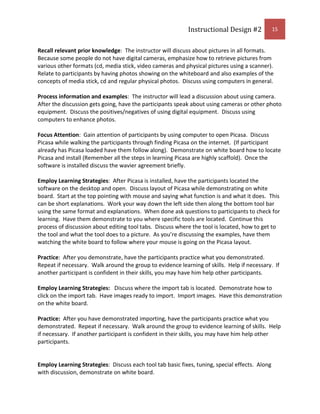
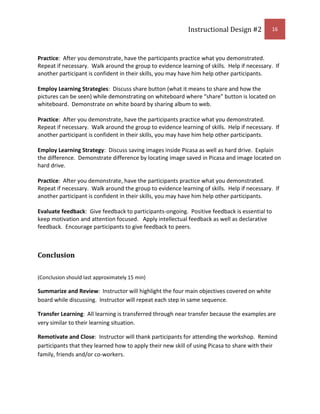
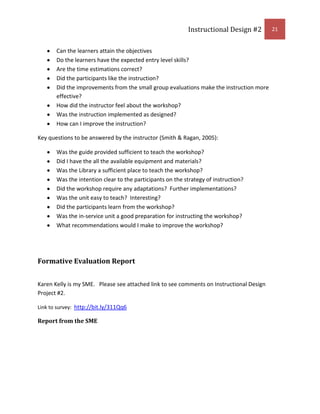
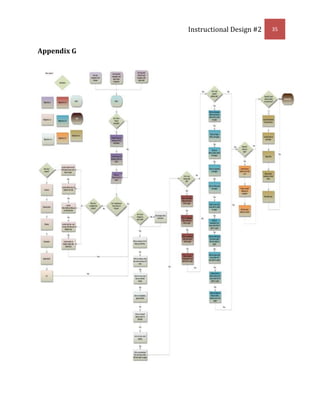
Given Picasa album learners will save album or picturesArouse Interest and Motivation:  The instructor will discuss questions about memories and organization.  The instructor will pose question such as have you ever had a photo you wanted to showcase but couldn’t find it?  Have you ever had a photo that was out of focus or grainy?  Is there a way to fix the problem that won’t cost anything?  How can I show my grandkids photos and connect with them in another state?<br />Provide Overview:  Instructor will speak about what the participants will learn in the next 90 minutes.  The instructor will emphasize what Picasa is (free editing software that can be used by anyone with a computer and initial internet access) and what will be expected of them in this workshop.  Let the participants know about scheduled breaks (at the ½ hour mark) and where restroom/drinks are available.<br />Body<br />(Body should last approximately 60 min; allow breaks when necessary)<br />Recall relevant prior knowledge:  The instructor will discuss about pictures in all formats.  Because some people do not have digital cameras, emphasize how to retrieve pictures from various other formats (cd, media stick, video cameras and physical pictures using a scanner).  Relate to participants by having photos showing on the whiteboard and also examples of the concepts of media stick, cd and regular physical photos.  Discuss using computers in general.<br />Process information and examples:  The instructor will lead a discussion about using camera.  After the discussion gets going, have the participants speak about using cameras or other photo equipment.  Discuss the positives/negatives of using digital equipment.  Discuss using computers to enhance photos.<br />Focus Attention:  Gain attention of participants by using computer to open Picasa.  Discuss Picasa while walking the participants through finding Picasa on the internet.  (If participant already has Picasa loaded have them follow along).  Demonstrate on white board how to locate Picasa and install (Remember all the steps in learning Picasa are highly scaffold).  Once the software is installed discuss the wavier agreement briefly.  <br />Employ Learning Strategies:  After Picasa is installed, have the participants located the software on the desktop and open.  Discuss layout of Picasa while demonstrating on white board.  Start at the top pointing with mouse and saying what function is and what it does.  This can be short explanations.  Work your way down the left side then along the bottom tool bar using the same format and explanations.  When done ask questions to participants to check for learning.  Have them demonstrate to you where specific tools are located.  Continue this process of discussion about editing tool tabs.  Discuss where the tool is located, how to get to the tool and what the tool does to a picture.  As you’re discussing the examples, have them watching the white board to follow where your mouse is going on the Picasa layout.  <br />Practice:  After you demonstrate, have the participants practice what you demonstrated.  Repeat if necessary.  Walk around the group to evidence learning of skills.  Help if necessary.  If another participant is confident in their skills, you may have him help other participants. <br />Employ Learning Strategies:   Discuss where the import tab is located.  Demonstrate how to click on the import tab.  Have images ready to import.  Import images.  Have this demonstration on the white board.<br />Practice:  After you have demonstrated importing, have the participants practice what you demonstrated.  Repeat if necessary.  Walk around the group to evidence learning of skills.  Help if necessary.  If another participant is confident in their skills, you may have him help other participants.<br /> <br />Employ Learning Strategies:  Discuss each tool tab basic fixes, tuning, special effects.  Along with discussion, demonstrate on white board.<br />Practice:  After you demonstrate, have the participants practice what you demonstrated.  Repeat if necessary.  Walk around the group to evidence learning of skills.  Help if necessary.  If another participant is confident in their skills, you may have him help other participants.  <br />Employ Learning Strategies:  Discuss share button (what it means to share and how the pictures can be seen) while demonstrating on whiteboard where “share” button is located on whiteboard.  Demonstrate on white board by sharing album to web. <br />Practice:  After you demonstrate, have the participants practice what you demonstrated.  Repeat if necessary.  Walk around the group to evidence learning of skills.  Help if necessary.  If another participant is confident in their skills, you may have him help other participants.<br />Employ Learning Strategy:  Discuss saving images inside Picasa as well as hard drive.  Explain the difference.  Demonstrate difference by locating image saved in Picasa and image located on hard drive.<br />Practice:  After you demonstrate, have the participants practice what you demonstrated.  Repeat if necessary.  Walk around the group to evidence learning of skills.  Help if necessary.  If another participant is confident in their skills, you may have him help other participants.<br />Evaluate feedback:  Give feedback to participants-ongoing.  Positive feedback is essential to keep motivation and attention focused.   Apply intellectual feedback as well as declarative feedback.  Encourage participants to give feedback to peers.<br />Conclusion<br />(Conclusion should last approximately 15 min)<br />Summarize and Review:  Instructor will highlight the four main objectives covered on white board while discussing.  Instructor will repeat each step in same sequence.<br />Transfer Learning:  All learning is transferred through near transfer because the examples are very similar to their learning situation.  <br />Remotivate and Close:  Instructor will thank participants for attending the workshop.  Remind participants that they learned how to apply their new skill of using Picasa to share with their family, friends and/or co-workers.<br />Assess Learning:  Have participants fill out 10 survey questions that have been emailed to them.  Ask that they do this before leaving; it will only take 5 minutes of their time.  If necessary have them fill out survey with paper and pencil.  Thank them for their time.<br />Evaluate Feedback and Seek Remediation:  Feedback from instructors to participants will be a response posting to web album.  It should contain positive feedback.  Because this is a workshop no grades will be given.  Besides the flowchart handout given at the inception of the workshop, the instructor will also send an email with a link to a tutorial on using Picasa in case remediation activity is needed.<br />Learning Content<br />Learning Materials<br />The participants will start by watching a slideshow on the white board.  Here is a link provided to see slideshow  http://www.screencast.com/t/NWUyYmZiZjYt<br />After the slideshow the participants will be handed a flow chart to show the process of the workshop.  This handout will be their alternative guide for learning.  See appendix G for hard copy.<br />The workshop will be using Picasa software from Google.  A tutorial will be sent to all participants via email (appendix F).  Additional learning tutorials links, derived from Picasa, will be provided via email after the workshop (appendix F).<br />The participants will be given pictures if needed.  They are also required to bring a laptop.  Picasa can either be pre-loaded or downloaded in the workshop.  If the participants do not have an email account one will be set up at the workshop (i.e. Gmail or yahoo).<br />Formative/Summative Assessment<br />The formative assessment will be in the form of observations.  (See observer checklist in appendix C). The instructor will be walking around the work area looking at the work in progress as the participant’s practice what has been shown.  This process will be done in both the small group evaluation and field trial evaluation.  Positive and corrective feedback will be given.  In addition, by correctly answering questions in class discussion this will evidence objectives being met.  Summative will be evidenced by demonstrating the creation of a web album by using 5 pictures.  <br />Technology Tool<br />The purpose of this instruction is to teach participants how to effectively use Picasa in their personal lives as well as business functions on the computer.  In order to use Picasa, the participant must have a computer and access to the internet to download Picasa.  A mouse is optional although easier to use.  The participant will have to enter the Picasa site in order to take advantage of the free software to download.  They must also have access to email.  (If they are not set up with email, a quick set up at the beginning of the workshop using Gmail or yahoo will be implemented by the instructor and participant.)  If the participant does not want an email account, “sharing” cannot occur but they can still learn how to use Picasa.  Photos, cd’s, media sticks, camera and thumb drives are sources for images.  If no images are available to participant images will be provided.  Scanner will be used for any hard copy images to import directly into Picasa.  Finally, if participants have no photos instructor can “share” a web album with participants directly.  <br />Formative Evaluation Plan<br />Expert Review<br />Karen Kelly is my SME.  Karen has also done a project on Picasa and is well versed on using Picasa.  I plan to submit my Instructional design Project #2 on Dec 1, 2009.<br />Link to survey http://bit.ly/311Qq6 <br />One-to-One<br />I would select 3 senior citizens from the Treasure Valley area.  The participants will be ranging in computer capabilities of beginner with little basic skills, average basic skills and above average basic skills.  This sampling should prove the entry level skill continuum to be considered valid.  I would meet with one participant at a time in a quiet predetermined location (Meridian Public Library) to properly administer instruction.  This should be completed in one sitting for each participant.  The approximate time should be 2-3 hours.  The designer and participant will work through the instruction in proposed order until finished.  The participant should bring in their personal laptop, if none available I will have one extra on hand.  I would have a laptop and projector with screen (screen available at Library).  As the participant arrives it will be explained that this is not a test.  The reason for the “dry run” is to work out any bugs or bad information.  I would provide water or soft drinks to ease the anxiety level of the participant.  Any clarifications that need to be made on instructions, words, phrases or visuals should be noted by the instructor.  After each step of the instruction, I would take notes to keep track of any bad information or verbal feedback from participant.  By comparing all three participants, I can determine which steps need to be modified.  If any glaring problems exist within the stated objectives, the objective can be modified and reevaluated.  Thank participants for their time.<br />Key questions to be answered by the designer are  CITATION Smi05 \l 1033 (Smith & Ragan, 2005):<br />Do the learners understand the instruction?


Do the learners know what to do during the practice?

ID Project #2

  • 1.
    Picasa for Seniors2009InstructionalDesign #2Lora EvanouskiDr Ross Perkins, Boise State UniversityFall semester Boise State University<br />Contents TOC \o \" 1-3\" \h \z \u Synthesis Reflection PAGEREF _Toc247370970 \h 4Topic PAGEREF _Toc247370971 \h 6Learning Goal: PAGEREF _Toc247370972 \h 6Audience: PAGEREF _Toc247370973 \h 6Rationale: PAGEREF _Toc247370974 \h 6Learning Context: PAGEREF _Toc247370975 \h 7Description of Learners: PAGEREF _Toc247370976 \h 8Planning: PAGEREF _Toc247370977 \h 9Learning Objectives: PAGEREF _Toc247370978 \h 9Matrix of Objectives, Bloom's Taxonomy, Instructional Strategies, and Types of Learning PAGEREF _Toc247370979 \h 10Instructor Guide: PAGEREF _Toc247370980 \h 14Introduction PAGEREF _Toc247370981 \h 14Body PAGEREF _Toc247370982 \h 14Conclusion PAGEREF _Toc247370983 \h 16Learning Content PAGEREF _Toc247370984 \h 17Learning Materials PAGEREF _Toc247370985 \h 17Formative/Summative Assessment PAGEREF _Toc247370986 \h 17Formative Evaluation Plan PAGEREF _Toc247370987 \h 18Expert Review PAGEREF _Toc247370988 \h 18One-to-One PAGEREF _Toc247370989 \h 18Small Group Evaluation PAGEREF _Toc247370990 \h 19Field Trial PAGEREF _Toc247370991 \h 20Formative Evaluation Report PAGEREF _Toc247370992 \h 21Report from the SME PAGEREF _Toc247370993 \h 21Comments on Change PAGEREF _Toc247370994 \h 22AECT Standards Grid PAGEREF _Toc247370995 \h 23Appendix A PAGEREF _Toc247370996 \h 29Appendix B PAGEREF _Toc247370997 \h 30Appendix C PAGEREF _Toc247370998 \h 31Appendix D PAGEREF _Toc247370999 \h 32Appendix E PAGEREF _Toc247371000 \h 33Appendix F PAGEREF _Toc247371001 \h 34Appendix G PAGEREF _Toc247371002 \h 35Bibliography PAGEREF _Toc247371003 \h 36<br />Synthesis Reflection<br />What is Instructional Design? As defined by Smith and Ragan, instructional design refers to the systematic and reflective process of translating principles of learning and instruction into plans for instructional materials, activities, information resources, and evaluation CITATION Smi05 \l 1033 (Smith & Ragan, 2005). As I entered into this class I had never given much thought into what happens in “making” a class module, course unit or even a section of instruction! I, as you could say, came in blind not knowing what to expect from taking such a course. If you break down the words, instruction means to give direction to some material or action. The word design means to make or build something. These words have a new meaning to me based on my experiences from being enrolled in this class. <br />Instructional design is like gardening to me. Most of us can do a little gardening. We all have a little green thumb in us with just minimal effort. But by cultivating and appending the soil, you can grow some really fabulous vegetables. You must know the quality of the soil, the type of plants that can be sustained in the region, where and when to plant them. Instructional design is built on knowing which tools to use, how and when to use them (hoes, picks, shovels, etc. and planting the plants). You must also account for your audience (soil). Year after year the same instruction (crops) needs to be modified or rotated due to learning changes in entry level skills as well as learning context (depletion of vitamins in the soil). Sometimes a subject matter expert is needed (farmer) to instruct to the finer points of raising a great crop. In gardening as well as instructional design, creating a great product in the end should be first and foremost while using formative evaluation along the way to change and modify as needed.<br />As I look back on this semester in Ed Tech 503, I have learned from not only the process of reading the text book and projects completed but also from my peers. The reflective strategies used in the weeks and months have been enlightening. The first entry to my forum was in deciding which was to be considered first the technology tool or design instruction. Coming from a background of several large corporations that used the tools to accomplish the job of learning, I had a slightly skewed look at the process. I was the only participant to choose the tool first in my forum, it was intimidating. As I learned through collaborating with my peers, I was not alone. Many times we find a great new gadget or tool and think, how I can use this in my lesson? It is incumbent on a designer to choose the learner first then find the most stimulating and rewarding way to encourage and utilize authentic learning to take place. Instructional design should be a process to which the designer needs to employ the sound practices of learning theory, such as ADDIE or Gagne’s 9 steps CITATION Smi05 \l 1033 (Smith & Ragan, 2005). These practices should and must be applied. In ID #1, I chose to use the Gagne’s model because of the sound principals it is based upon. Without basing instructional design on a sound theory and model, the designer would be throwing up the seeds in his garden and hoping for the best. This is neither the process nor action I intend to achieve through my learning of instructional design. <br />As I discussed with Dr. Perkins, I received formal training as an elementary education teacher back in the early 80’s. I did not have the benefits of learning instructional design in any of my past curriculum. Upon taking this class, I can see the benefits it would be to any and all education majors. For example, I felt when I started my teaching career that I was just sent out into the teaching realm to figure out lesson plans and strategies to teach on my own. No real sound grounding in learning theory or models to fall back upon. I see now what I missed then! Implementing such a course would benefit all teachers. I also learned in ID #2 the process is just that a process. It is meant to be an investigation; lots of integral parts designed to fit together to make a whole, like a puzzle. If one piece is missing you may get the idea but the more pieces you are missing, the worse the understanding is. In addition, I also learned the instructional design process cannot be hurried or rushed and you must anticipate problems and setbacks. The instructional design process can be complicated or it can be simple and that is also the beauty of instructional design. The process of making a puzzle whole is the same as making a worthy instructional design. Try and fit the best pieces into place and if that doesn’t work try another strategy.<br />Instructional design and educational technology go hand in hand; they are dependent upon each other. They are both systematic approaches to learning. Instructional design is involved in the materials and instruction to be learned where as educational technology is the tools themselves to accomplish the process of learning. These two interdependent processes are a way to find solutions to educational/training problems. As I march towards my MET, I will consider the experiences in using instructional design as my first approach to a logical process in building a foundation for which I can now lean upon. <br />Topic<br />Learning Goal: Given Picasa editing software the learner will create an online image album.<br />Audience: The target audience will be senior citizens (above 55 years old) of the Treasure Valley in Idaho.<br />Rationale: <br />The reason for choosing this topic is to address the needs of senior citizens who will use the internet for social discourse as well as in business relationships. It also allows me to explore the opposite end of the spectrum because when you hear the word teaching most assume that it will be for young people. As I approached teaching my mother a senior citizen how to use the software, I realized how many senior citizens do not know how to use this product. The senior community is one of the fastest growing populations in the country. The baby boomers are coming of age. This population has also been one of the forgotten communities when it comes to developing instructional materials. As instructional designers we need to be cognizant of this fact. Even though the aging population has limitations, it is our job to enrich the experiences by designing with this population in mind. It is my intent to develop instructional materials for the aging population. <br />The workshop focuses on the effectiveness of using editing software for not only social interactions and connections but also for business applications. The main foci of the workshop will be to allow seniors to interact with editing software then apply it to different contexts. The specific knowledge gained from the workshop will better prepare the seniors to address the emerging technologies and associated comfort levels in using technologies in real world contexts. <br />The strategy to be used in this project will be primarily supplantive. Supplantive strategies work very well with procedural learning. Supplantive strategies have high levels of scaffolding for a well defined task and limited amount of time. It is useful for learners with limited levels of prior knowledge. This is a step by step process of leading the audience through the use of Picasa. Procedure learning can be simple to complex, and the aging population has many inherent factors to take into account. As we age we naturally lose certain abilities, vision, motor or dexterity, hearing and sometimes brain function. This leads to a subcategory of psychomotor. Because of the limitations of the aging population, psychomotor strategies need to be considered. Because of common ailments within the aging community, for example poor vision acuity, screens can be made to zoom so items appear larger and therefore easier to see. When using a procedural strategy the items to be learned can be chunked into groups. This needs to be taken into account for the attention levels in older populations tend to shrink as well as anxiety levels and tension levels that rise because of frustration. Generative strategies will be used in choosing which images will be used to import and edit.<br />Procedure strategies contain repetition. You gain the attention, preview the lesson, recall prior knowledge, focus attention, employ learning strategies, practice, evaluate feedback, summarize and review, remotivate and finally assess CITATION Smi05 \l 1033 (Smith & Ragan, 2005). The instructor will have them learn a chunk of information then immediately practice the step. Once the step is mastered the instructor will have them learn another step. Once that next step is learned the instructor will then combine the two steps, and achieve mastery in order to move on to the next step. This process of combing the previous step to the next step allows the learner to master through repetition. Because of the amount of practice that is contained within a procedural strategy, psychomotor skills should be considered when practice and repetition happen. Psychomotor skills involve both the physical movement coupled with cognitive abilities CITATION Smi05 \l 1033 (Smith & Ragan, 2005). With this in mind and because of arthritis, repetition can be quite painful. It affects not only the joints but also the mind. Consideration needs to be paid in how keyboard functions will be handled. Functions that can be made with a single keystroke should be a consideration. Tremors and poor eye/hand coordination also need to be factored into the instruction.<br />Learning Context:<br />The learners will be at the local library (Meridian, ID). The library has a conference room with six 6ft tables and approximately 48 chairs. It has wall/floor outlets and a pull down screen to project any slideshows or demonstrations. Wireless internet access is available. The library is open to everyone and is a willing participant in facilitating learning. Water and restrooms are available to the public. The learning sessions will be during school hours as to keep traffic to a minimum throughout the library. The learning session will be a 90 minute session. The entry level skills demand that each participant has a computer and have basic knowledge of the internet. The participants also have a working knowledge of computer terms such as mouse, keyboard, and hard drive. The instructor will have their own laptop plus the ability to project on the screen to provide examples. <br />The learners will be able to transfer this learning to several different situations. In learning about editing pictures, the learner will be able to edit, save, organize and showcase their vast memories on the digital format. If the learner does not live in the immediate area of family or any loved ones this will be a way to connect and stay connected. Being able to successfully upload a perfect picture to a web album to share with family can be quite pleasing to all parties involved. For example, if the learner has not been able to communicate regularly with a loved one or has lost touch and learns how to establish a web album; communication can be renewed with visuals. <br />The learner can also apply this editing, organizing, saving efforts to business applications. Because the learners are still in the workforce (depending on age and mobility) these applications can be used in other computer applications. For example, the learner has an email account and needs to display a project for their employee; using Picasa can enhance the photo quality as well as tell a story through visuals. Another application is to enhance the learned technical skills of using technology. By using technology and achieving success the learner gains confidence and may be more accepting of and trying other free technology to enhance their social lives and/or business relationships.<br />Description of Learners: <br />The learners that are included in this workshop will be learners over 55. They will have a basic understanding of computers i.e. basic entry level skills in how to turn a computer on, downloading software, understanding of how to use a mouse and keyboard, knowledge of basic computer terms, and basic navigation of the internet. The learners will be derived from the Treasure Valley. It has been ascertained that of the 30 participants 26 of them have used windows where 4 have used the Mac system. The participants have all reported having used computers for personal use and 20 of the 30 have used them for some type of business related function. In addition, the survey revealed all participants would like to work in groups and/or collaborate. The participants have some or little knowledge of using editing software. The academic motivation is based on wanting to learn new technology based on sample survey’s collected. All have reported some level of frustration when using a new technology or software. All learners have reported having at least a high school education, with 12 having some college experience and 6 holding higher education degrees. This is a volunteer workshop designed to enhance and create a social outlet for the senior citizens of the Treasure Valley.<br />Planning:<br />Learning Objectives:<br />Given Picasa the learner will install Picasa
  • 2.
    Given a computerthe learner will open internet through a browser window
  • 3.
    After discussion aboutbrowser windows and Google search engine the learner will locate Picasa
  • 4.
    After discussion aboutdownloading learner will download Picasa to computer
  • 5.
    Learner will locatePicasa on desktop by opening/closing Picasa
  • 6.
    Given open browserwindow and installation learner will navigate Picasa
  • 7.
    After discussion learnerswill navigate general layout of Picasa
  • 8.
    Learners will demonstrateknowledge by answering questions about where functions are located and what function does
  • 9.
    Learners will demonstrateknowledge by applying knowledge about where functions are located with mouse.
  • 10.
    Learners will demonstrateknowledge by importing images using import tab
  • 11.
    After discussion learnerswill choose pictures to edit
  • 12.
    Learners will demonstrateknowledge by answering questions about where functions are located and what function does to picture
  • 13.
    Learners will demonstrateknowledge by applying knowledge about where functions are located and what function does to picture
  • 14.
    After discussion abouttool board and functions learners will navigate basic fixes tab
  • 15.
    After discussion learnerswill choose pictures to edit
  • 16.
    Learners will demonstrateknowledge by answering questions about where functions are located and what function does to picture
  • 17.
    Learners will demonstrateknowledge by applying knowledge about where functions are located and what function does to picture
  • 18.
    After discussionabout tuning tab learners will navigate tuning tab
  • 19.
    After discussion learnerswill choose pictures to edit
  • 20.
    Learners will demonstrateknowledge by answering questions about where functions are located and what function does to picture
  • 21.
    Learners will demonstrateknowledge by applying knowledge about where functions are located and what function does to picture
  • 22.
    After discussionabout special effects learner will navigate special effects tab
  • 23.
    After discussion learnerswill choose pictures to edit
  • 24.
    Learners will demonstrateknowledge by answering questions about where functions are located and what function does to picture
  • 25.
    Learners will demonstrateknowledge by applying knowledge about where functions are located and what function does to picture
  • 26.
    Given installation andnavigation learner will share edited pictures to web album
  • 27.
    After discussion ofweb album learners will locate pictures to create album
  • 28.
    Learner will demonstrateknowledge by creating album
  • 29.
    Learner will demonstrateknowledge by publishing an online album
  • 30.
    Learner will demonstratemastery by sending album to instructor
  • 31.
    Given Picasa albumlearners will save album or pictures
  • 32.
    After discussion learnerswill demonstrate knowledge by evidencing saved albumMatrix of Objectives, Bloom's Taxonomy, Instructional Strategies, and Types of Learning<br />Objective Number (1)Bloom’s Taxonomy Classification (2)Strategy to be employed to teach the objective (3)Type of Learning (4)1.0Application/knowledgeSProcedure/Psychomotor1.1Application/knowledgeSConcept/Psychomotor1.1.1Application/knowledgeSConcept/Psychomotor1.1.1.1Application/knowledgeSProcedure/Psychomotor1.1.1.2AnalyzeSPrinciple2.0Application/analyzeSConcept/Psychomotor2.1ApplicationSDeclarative/Procedure/Psychomotor2.1.1Knowledge/application/analyzeSDeclarative/Concept2.1.2Knowledge/application/analyzeSProcedure/Principle/Psychomotor2.1.3Knowledge/application/analyzeGProcedure/Principle/Psychomotor2.2ApplicationSDeclarative/Procedure/Psychomotor2.2.1Knowledge/analyzeSDeclarative/Concept2.2.2Knowledge/application/analyzeGProcedure/Principle/Psychomotor2.3ApplicationSDeclarative/Procedure/Psychomotor2.3.1Application/analyzeSConcept/Psychomotor2.3.1.1Knowledge/analyzeSDeclarative/Concept2.3.1.2Knowledge/application/analyzeGProcedure/Principle/Psychomotor2.4ApplicationSDeclarative/Procedure/Psychomotor2.4.1Application/analyzeSConcept/Psychomotor2.4.1.1Knowledge/analyzeSDeclarative/Concept2.4.1.2Knowledge/application/analyzeGProcedure/Principle/Psychomotor2.5ApplicationSDeclarative/Procedure/Psychomotor2.5.1Application/analyzeSConcept/Psychomotor2.5.1.1Knowledge/analyzeSDeclarative/Concept2.5.1.2Knowledge/application/analyzeGProcedure/Principle/Psychomotor3.0Application/knowledge/SynthesisSProcedure/Psychomotor3.1Application/synthesisSDeclarative/Procedure/Psychomotor3.1.1Application/synthesisSProcedure/Principle/Psychomotor3.1.2Application/synthesisSProcedure/Principle/Psychomotor3.1.3Application/synthesisSProcedure/Principle/Psychomotor4.0Knowledge/application/synthesisSConcept/Procedure/Psychomotor4.1Application/EvaluationGConcept/Procedure/Psychomotor<br />John Keller’s MOTIVATIONAL CATEGORIES OF THE ARCS MODEL<br />Categories & SubcategoriesProcess QuestionsATTENTIONA.1. Perceptual arousalA.2. Inquiry arousalA.3. VariabilityThe workshop will begin with a short but captivating slideshow on using Picasa with favorite photos from instructor’s computer. Questions about memories and organization will be posed after slideshow. Have you ever had a photo you wanted to showcase but couldn’t find it? Have you ever had a photo that was out of focus or grainy? Is there a way to fix the problem that won’t cost anything? As workshop continues more examples of photo editing uses will be explored to reinforce the importance of the subject.RELEVANCER.1. Goal orientationR.2. Motive matchingR.3. FamiliarityAt the beginning of the workshop the instructor will go over the 4 main objectives of the workshop. This will be done by referencing questions to participants. Have them share reasons why they are taking workshop.The web album will be something to take with the learner to share with family, friends and co-workers from their own home.CONFIDENCEC.1. Learning requirementsC.2. Success opportunitiesC.3. Personal controlThe learners will be given an agenda of the skills that are required of the workshop. An example of a printed photo web album will be given to groups to visualize ultimate goal.Instructor feedback will be given to encourage learners. Because there will be group dynamics, feedback within the group will be encouraged.At the end of the workshop, learners will showcase their web album to the entire class. This will also give the entire class an opportunity to give and get feedback.SATISFACTIONS.1. Natural consequencesS.2. Positive consequencesS.3. EquityThe final goal is to create a web album to be used in the learner’s personal and/or work life.Learners will have the opportunity to share web albums with family, classmates and co-workers.The final product of making a web album consisting of 5 images will allow learners to see the requirement for all is equal and consistent during the instruction.(Keller, 1987, p. 2)<br />John Keller’s MOTIVATIONAL DESIGN ACTIVITIES AND PROCESS QUESTIONS<br />Categories & SubcategoriesProcess QuestionsDEFINEAudience motivation analysisMotivational objectivesMotivational criterion measuresThe participants are motivated through social interaction as the main medium.In order to capture the social issues of the workshop participants will be encouraged to work closely with a partner as well as a group. Seating arrangements can help secure social integration. To determine if the social aspects work will be through observation of group dynamics.DESIGNGenerate potential strategiesSelect strategiesIntegrate strategiesStrategies can be in the form of having participants partner up, sitting next to each other, across from each other, rectangle or in a square.The layout of the room dictates having the instructor make a rectangle. This allows the participants to interact but also see the examples on the white board.DEVELOPPrepare motivational materialsEnhance existing instructional materialsDevelopmental testIn using motivational strategies use humor, stories that are relevant to the participants about losing pictures and visual demonstrations.Find relevant pictures and stories to tell about participants that live in the Treasure Valley.Conduct a survey from a test group to find out hobbies, activities and social interaction patterns.PILOTImplement with T-popEvaluate effectsCertify or reviseOrganize and create a 10 question survey reflecting attitudes and motivations of participants.Expected and unexpected consequences from the workshop will be detected through observations and feedback. A checklist will be kept to examine effectiveness.The course should be re-evaluated before going on-line based on evidence collected from observations and feedback. Going on-line will be evidenced by positive feedback and objectives being met without assistance from designer.<br />(Keller, 1987, p. 3)<br />Keller, J. M. (1987). “The systematic process of motivational design.” Performance & Instruction, 26 (9/10), 1-8.<br />Instructor Guide:<br />Introduction<br /> <br />(Introduction should last approximately 15 min.)<br />Gain attention: To gain attention the instructor will discuss what Picasa is before having participants watch a small but captivating slide show demonstrating the abilities of Picasa. It will have a voice over to explain what the software is capable of doing. The instructor will show this at the inception of the workshop after everyone is seated and ready to learn.<br />Purpose: The instructor will read aloud and show objectives on white board. In reading and showing there is an emphasis of what is to be learned. The learner will be able to the following or listen. A handout will also be given showing the learner what will be accomplished in the 90 min workshop as well as a flow chart mimicking the steps. Main objectives listed below:<br />Given Picasa the learner will install Picasa
  • 33.
    Given open browserwindow and installation learner will navigate Picasa
  • 34.
    Given installation andnavigation learner will share edited pictures to web album
  • 35.
    Given Picasa albumlearners will save album or picturesArouse Interest and Motivation: The instructor will discuss questions about memories and organization. The instructor will pose question such as have you ever had a photo you wanted to showcase but couldn’t find it? Have you ever had a photo that was out of focus or grainy? Is there a way to fix the problem that won’t cost anything? How can I show my grandkids photos and connect with them in another state?<br />Provide Overview: Instructor will speak about what the participants will learn in the next 90 minutes. The instructor will emphasize what Picasa is (free editing software that can be used by anyone with a computer and initial internet access) and what will be expected of them in this workshop. Let the participants know about scheduled breaks (at the ½ hour mark) and where restroom/drinks are available.<br />Body<br />(Body should last approximately 60 min; allow breaks when necessary)<br />Recall relevant prior knowledge: The instructor will discuss about pictures in all formats. Because some people do not have digital cameras, emphasize how to retrieve pictures from various other formats (cd, media stick, video cameras and physical pictures using a scanner). Relate to participants by having photos showing on the whiteboard and also examples of the concepts of media stick, cd and regular physical photos. Discuss using computers in general.<br />Process information and examples: The instructor will lead a discussion about using camera. After the discussion gets going, have the participants speak about using cameras or other photo equipment. Discuss the positives/negatives of using digital equipment. Discuss using computers to enhance photos.<br />Focus Attention: Gain attention of participants by using computer to open Picasa. Discuss Picasa while walking the participants through finding Picasa on the internet. (If participant already has Picasa loaded have them follow along). Demonstrate on white board how to locate Picasa and install (Remember all the steps in learning Picasa are highly scaffold). Once the software is installed discuss the wavier agreement briefly. <br />Employ Learning Strategies: After Picasa is installed, have the participants located the software on the desktop and open. Discuss layout of Picasa while demonstrating on white board. Start at the top pointing with mouse and saying what function is and what it does. This can be short explanations. Work your way down the left side then along the bottom tool bar using the same format and explanations. When done ask questions to participants to check for learning. Have them demonstrate to you where specific tools are located. Continue this process of discussion about editing tool tabs. Discuss where the tool is located, how to get to the tool and what the tool does to a picture. As you’re discussing the examples, have them watching the white board to follow where your mouse is going on the Picasa layout. <br />Practice: After you demonstrate, have the participants practice what you demonstrated. Repeat if necessary. Walk around the group to evidence learning of skills. Help if necessary. If another participant is confident in their skills, you may have him help other participants. <br />Employ Learning Strategies: Discuss where the import tab is located. Demonstrate how to click on the import tab. Have images ready to import. Import images. Have this demonstration on the white board.<br />Practice: After you have demonstrated importing, have the participants practice what you demonstrated. Repeat if necessary. Walk around the group to evidence learning of skills. Help if necessary. If another participant is confident in their skills, you may have him help other participants.<br /> <br />Employ Learning Strategies: Discuss each tool tab basic fixes, tuning, special effects. Along with discussion, demonstrate on white board.<br />Practice: After you demonstrate, have the participants practice what you demonstrated. Repeat if necessary. Walk around the group to evidence learning of skills. Help if necessary. If another participant is confident in their skills, you may have him help other participants. <br />Employ Learning Strategies: Discuss share button (what it means to share and how the pictures can be seen) while demonstrating on whiteboard where “share” button is located on whiteboard. Demonstrate on white board by sharing album to web. <br />Practice: After you demonstrate, have the participants practice what you demonstrated. Repeat if necessary. Walk around the group to evidence learning of skills. Help if necessary. If another participant is confident in their skills, you may have him help other participants.<br />Employ Learning Strategy: Discuss saving images inside Picasa as well as hard drive. Explain the difference. Demonstrate difference by locating image saved in Picasa and image located on hard drive.<br />Practice: After you demonstrate, have the participants practice what you demonstrated. Repeat if necessary. Walk around the group to evidence learning of skills. Help if necessary. If another participant is confident in their skills, you may have him help other participants.<br />Evaluate feedback: Give feedback to participants-ongoing. Positive feedback is essential to keep motivation and attention focused. Apply intellectual feedback as well as declarative feedback. Encourage participants to give feedback to peers.<br />Conclusion<br />(Conclusion should last approximately 15 min)<br />Summarize and Review: Instructor will highlight the four main objectives covered on white board while discussing. Instructor will repeat each step in same sequence.<br />Transfer Learning: All learning is transferred through near transfer because the examples are very similar to their learning situation. <br />Remotivate and Close: Instructor will thank participants for attending the workshop. Remind participants that they learned how to apply their new skill of using Picasa to share with their family, friends and/or co-workers.<br />Assess Learning: Have participants fill out 10 survey questions that have been emailed to them. Ask that they do this before leaving; it will only take 5 minutes of their time. If necessary have them fill out survey with paper and pencil. Thank them for their time.<br />Evaluate Feedback and Seek Remediation: Feedback from instructors to participants will be a response posting to web album. It should contain positive feedback. Because this is a workshop no grades will be given. Besides the flowchart handout given at the inception of the workshop, the instructor will also send an email with a link to a tutorial on using Picasa in case remediation activity is needed.<br />Learning Content<br />Learning Materials<br />The participants will start by watching a slideshow on the white board. Here is a link provided to see slideshow http://www.screencast.com/t/NWUyYmZiZjYt<br />After the slideshow the participants will be handed a flow chart to show the process of the workshop. This handout will be their alternative guide for learning. See appendix G for hard copy.<br />The workshop will be using Picasa software from Google. A tutorial will be sent to all participants via email (appendix F). Additional learning tutorials links, derived from Picasa, will be provided via email after the workshop (appendix F).<br />The participants will be given pictures if needed. They are also required to bring a laptop. Picasa can either be pre-loaded or downloaded in the workshop. If the participants do not have an email account one will be set up at the workshop (i.e. Gmail or yahoo).<br />Formative/Summative Assessment<br />The formative assessment will be in the form of observations. (See observer checklist in appendix C). The instructor will be walking around the work area looking at the work in progress as the participant’s practice what has been shown. This process will be done in both the small group evaluation and field trial evaluation. Positive and corrective feedback will be given. In addition, by correctly answering questions in class discussion this will evidence objectives being met. Summative will be evidenced by demonstrating the creation of a web album by using 5 pictures. <br />Technology Tool<br />The purpose of this instruction is to teach participants how to effectively use Picasa in their personal lives as well as business functions on the computer. In order to use Picasa, the participant must have a computer and access to the internet to download Picasa. A mouse is optional although easier to use. The participant will have to enter the Picasa site in order to take advantage of the free software to download. They must also have access to email. (If they are not set up with email, a quick set up at the beginning of the workshop using Gmail or yahoo will be implemented by the instructor and participant.) If the participant does not want an email account, “sharing” cannot occur but they can still learn how to use Picasa. Photos, cd’s, media sticks, camera and thumb drives are sources for images. If no images are available to participant images will be provided. Scanner will be used for any hard copy images to import directly into Picasa. Finally, if participants have no photos instructor can “share” a web album with participants directly. <br />Formative Evaluation Plan<br />Expert Review<br />Karen Kelly is my SME. Karen has also done a project on Picasa and is well versed on using Picasa. I plan to submit my Instructional design Project #2 on Dec 1, 2009.<br />Link to survey http://bit.ly/311Qq6 <br />One-to-One<br />I would select 3 senior citizens from the Treasure Valley area. The participants will be ranging in computer capabilities of beginner with little basic skills, average basic skills and above average basic skills. This sampling should prove the entry level skill continuum to be considered valid. I would meet with one participant at a time in a quiet predetermined location (Meridian Public Library) to properly administer instruction. This should be completed in one sitting for each participant. The approximate time should be 2-3 hours. The designer and participant will work through the instruction in proposed order until finished. The participant should bring in their personal laptop, if none available I will have one extra on hand. I would have a laptop and projector with screen (screen available at Library). As the participant arrives it will be explained that this is not a test. The reason for the “dry run” is to work out any bugs or bad information. I would provide water or soft drinks to ease the anxiety level of the participant. Any clarifications that need to be made on instructions, words, phrases or visuals should be noted by the instructor. After each step of the instruction, I would take notes to keep track of any bad information or verbal feedback from participant. By comparing all three participants, I can determine which steps need to be modified. If any glaring problems exist within the stated objectives, the objective can be modified and reevaluated. Thank participants for their time.<br />Key questions to be answered by the designer are CITATION Smi05 \l 1033 (Smith & Ragan, 2005):<br />Do the learners understand the instruction?

  • 36.
    Do the learnersknow what to do during the practice?