The role of technology in education Technology integration strategies The TIP model in operation
Presentation Outline Problem being addressed Technology-based strategy employed TIP model phases Learning materials demo  Conclusion References
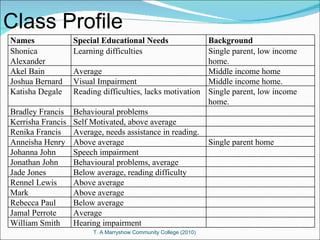
Class Profile Names  Special Educational Needs Background Shonica Alexander Learning difficulties Single parent, low income home. Akel Bain Average  Middle income home  Joshua Bernard Visual Impairment Middle income home. Katisha Degale  Reading difficulties, lacks motivation Single parent, low income home. Bradley Francis Behavioural problems Kerrisha Francis Self Motivated, above average Renika Francis Average, needs assistance in reading. Anneisha Henry  Above average Single parent home Johanna John Speech impairment Jonathan John Behavioural problems, average  Jade Jones Below average, reading difficulty  Rennel Lewis Above average Mark Above average Rebecca Paul Below average Jamal Perrote Average  William Smith Hearing impairment
Learning Problem Not yet abstract thinkers. Behavioural problems. Lack group cooperation Multiple intelligence group. Varying learning styles.
Technology-based strategy used Inquiry-Based Integration Strategy Constructivist Foster group cooperation Multiple distributed intelligences Build mental models/schema Increase knowledge transfer
Phase 1: Why use Technology? Find mutual point of agreement Experience real life disputes & how to solve Solve real problems in real time Abstract ideas virtualized Training to become e-professionals
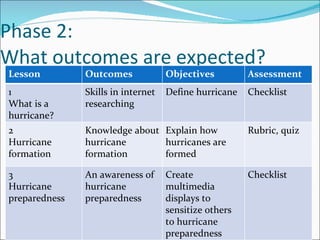
Phase 2: What outcomes are expected? Lesson  Outcomes Objectives Assessment 1 What is a hurricane? Skills in internet researching Define hurricane  Checklist 2 Hurricane formation Knowledge about hurricane formation Explain how hurricanes are formed Rubric, quiz 3 Hurricane preparedness An awareness of hurricane preparedness Create multimedia displays to sensitize others to hurricane preparedness Checklist
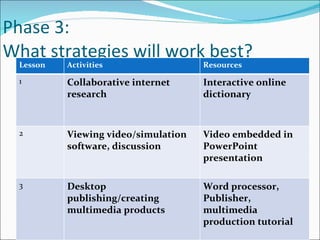
Phase 3: What strategies will work best?  Lesson  Activities Resources 1 Collaborative internet research   Interactive online dictionary 2 Viewing video/simulation software, discussion Video embedded in PowerPoint presentation 3 Desktop publishing/creating multimedia products Word processor, Publisher, multimedia production tutorial
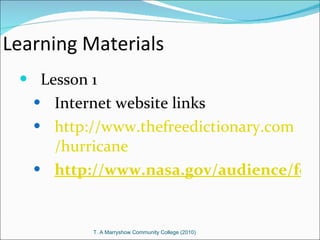
Learning Materials  Lesson 1 Internet website links http:// www.thefreedictionary.com /hurricane http://www.nasa.gov/audience/forstudents/k-4/stories/what-are-hurricanes-k4.html
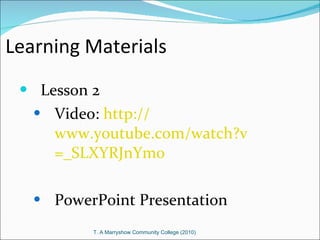
Learning Materials  Lesson 2 Video:  http:// www.youtube.com/watch?v =_SLXYRJnYm0 PowerPoint Presentation
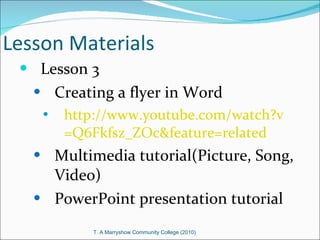
Lesson Materials Lesson 3  Creating a flyer in Word http:// www.youtube.com/watch?v =Q6Fkfsz_ZOc&feature=related Multimedia tutorial(Picture, Song, Video) PowerPoint presentation tutorial
Phase4:  What do I need? Lesson 1 Computer workstation groups Internet connection Checklist Bookmark websites
Phase 4: cont’d Lesson 2 overhead projector PowerPoint presentation {document} Horse shoe sitting arrangement
Phase 4:  cont’d Lesson 3 Computer workstation groups Tape recorders Printer Public address system Camcorder
Phase 5: What worked? What could be improved? Student  evaluation Interview What about the lesson did you like? How can the lesson be improve? Teacher evaluation Evaluation and revision checklist
Conclusion Technology is essential in all aspects of our lives. Teachers utilizing technology makes learning dynamic. Technological skills can be transferred to the workplace.
References Roblyer, M. D.  Integrating Educational Technology into Teaching  4 th  Ed,  Pearson- New Jersey  Wikipedia.com Youtube.com
Presenters Jackeline Bartholomew Keshia James Bernicia Lyons Leslieann Pascal Rachelle Stiell

Using TIP model

  • 1.
    The role oftechnology in education Technology integration strategies The TIP model in operation
  • 2.
    Presentation Outline Problembeing addressed Technology-based strategy employed TIP model phases Learning materials demo Conclusion References
  • 3.
    Class Profile Names Special Educational Needs Background Shonica Alexander Learning difficulties Single parent, low income home. Akel Bain Average Middle income home Joshua Bernard Visual Impairment Middle income home. Katisha Degale Reading difficulties, lacks motivation Single parent, low income home. Bradley Francis Behavioural problems Kerrisha Francis Self Motivated, above average Renika Francis Average, needs assistance in reading. Anneisha Henry Above average Single parent home Johanna John Speech impairment Jonathan John Behavioural problems, average Jade Jones Below average, reading difficulty Rennel Lewis Above average Mark Above average Rebecca Paul Below average Jamal Perrote Average William Smith Hearing impairment
  • 4.
    Learning Problem Notyet abstract thinkers. Behavioural problems. Lack group cooperation Multiple intelligence group. Varying learning styles.
  • 5.
    Technology-based strategy usedInquiry-Based Integration Strategy Constructivist Foster group cooperation Multiple distributed intelligences Build mental models/schema Increase knowledge transfer
  • 6.
    Phase 1: Whyuse Technology? Find mutual point of agreement Experience real life disputes & how to solve Solve real problems in real time Abstract ideas virtualized Training to become e-professionals
  • 7.
    Phase 2: Whatoutcomes are expected? Lesson Outcomes Objectives Assessment 1 What is a hurricane? Skills in internet researching Define hurricane Checklist 2 Hurricane formation Knowledge about hurricane formation Explain how hurricanes are formed Rubric, quiz 3 Hurricane preparedness An awareness of hurricane preparedness Create multimedia displays to sensitize others to hurricane preparedness Checklist
  • 8.
    Phase 3: Whatstrategies will work best? Lesson Activities Resources 1 Collaborative internet research   Interactive online dictionary 2 Viewing video/simulation software, discussion Video embedded in PowerPoint presentation 3 Desktop publishing/creating multimedia products Word processor, Publisher, multimedia production tutorial
  • 9.
    Learning Materials Lesson 1 Internet website links http:// www.thefreedictionary.com /hurricane http://www.nasa.gov/audience/forstudents/k-4/stories/what-are-hurricanes-k4.html
  • 10.
    Learning Materials Lesson 2 Video: http:// www.youtube.com/watch?v =_SLXYRJnYm0 PowerPoint Presentation
  • 11.
    Lesson Materials Lesson3 Creating a flyer in Word http:// www.youtube.com/watch?v =Q6Fkfsz_ZOc&feature=related Multimedia tutorial(Picture, Song, Video) PowerPoint presentation tutorial
  • 12.
    Phase4: Whatdo I need? Lesson 1 Computer workstation groups Internet connection Checklist Bookmark websites
  • 13.
    Phase 4: cont’dLesson 2 overhead projector PowerPoint presentation {document} Horse shoe sitting arrangement
  • 14.
    Phase 4: cont’d Lesson 3 Computer workstation groups Tape recorders Printer Public address system Camcorder
  • 15.
    Phase 5: Whatworked? What could be improved? Student evaluation Interview What about the lesson did you like? How can the lesson be improve? Teacher evaluation Evaluation and revision checklist
  • 16.
    Conclusion Technology isessential in all aspects of our lives. Teachers utilizing technology makes learning dynamic. Technological skills can be transferred to the workplace.
  • 17.
    References Roblyer, M.D. Integrating Educational Technology into Teaching 4 th Ed, Pearson- New Jersey Wikipedia.com Youtube.com
  • 18.
    Presenters Jackeline BartholomewKeshia James Bernicia Lyons Leslieann Pascal Rachelle Stiell