Synapseindia Reviews on 
MySQL Databases with PHP
Objectives 
 Connect to MySQL from PHP 
 Learn how to handle MySQL errors 
 Execute SQL statements with PHP 
 Use PHP to work with MySQL databases and 
tables 
 Use PHP to manipulate database records 
PHP and mySQL 2
PHP Overview 
 PHP has the ability to access and manipulate 
any database that is ODBC compliant 
 PHP includes functionality that allows you to 
work directly with different types of 
databases, without going through ODBC 
 PHP supports SQLite, database abstraction 
layer functions, and PEAR DB 
PHP and mySQL 3
Enabling MySQL Support in PHP 
 On UNIX/Linux systems: 
 Configure PHP to use the mysqli extension by 
specifying the --with-mysqli parameter when 
you run the configure command during 
installation 
 On Windows: 
 Copy the files libmysql.dll and 
php_mysqli.dll to the installation directory 
 Edit the php.ini configuration file and enable 
the extension=php_mysqli.dll directive 
PHP and mySQL 4
Opening and Closing a MySQL 
Connection 
 Open a connection to a MySQL database 
server with the mysqli_connect() function 
 The mysqli_connect() function returns a 
positive integer if it connects to the database 
successfully or false if it does not 
 Assign the return value from the 
mysqli_connect() function to a variable 
that you can use to access the database in 
your script 
PHP and mySQL 5
Opening and Closing a MySQL 
Connection (continued) 
 The syntax for the mysqli_connect() 
function is: 
$connection = mysqli_connect("host"[, "user ", "password", 
"database"]) 
 The host argument specifies the host name 
where your MySQL database server is 
installed 
 The user and password arguments specify a 
MySQL account name and password 
 The database argument selects a database 
with which to work 
PHP and mySQL 6
Opening and Closing a MySQL 
Connection (continued) 
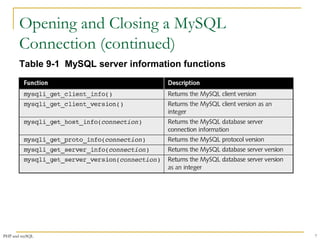
Table 9-1 MySQL server information functions 
PHP and mySQL 7
Opening and Closing a MySQL 
Connection (continued) 
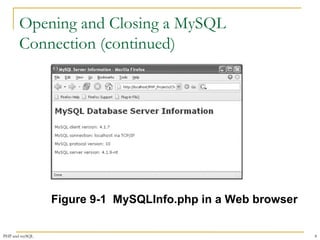
Figure 9-1 MySQLInfo.php in a Web browser 
PHP and mySQL 8
Selecting a Database 
 Select a database with the use database 
statement when you log on to the MySQL 
Monitor 
 The syntax for the mysqli_select_db() 
function is: 
mysqli_select_db(connection, database) 
 The function returns a value of true if it 
successfully selects a database or false if it 
does not 
PHP and mySQL 9
Handling MySQL Errors 
 Reasons for not connecting to a database 
server include: 
 The database server is not running 
 Insufficient privileges to access the data source 
 Invalid username and/or password 
PHP and mySQL 10
Handling MySQL Errors (continued) 
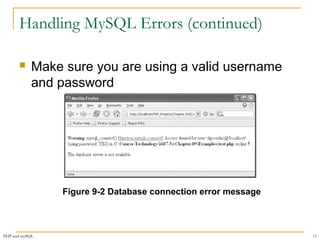
 Make sure you are using a valid username 
and password 
Figure 9-2 Database connection error message 
PHP and mySQL 11
Suppressing Errors with the Error Control 
Operator 
 Writing code that anticipates and handles 
potential problems is often called 
bulletproofing 
 Bulletproofing techniques include: 
 Validating submitted form data 
 Using the error control operator (@) to suppress 
error messages 
PHP and mySQL 12
Terminating Script Execution 
 The die() and exit() functions terminate 
script execution 
 The die() version is usually used when 
attempting to access a data source 
 Both functions accept a single string 
argument 
 Call the die() and exit() functions as 
separate statements or by appending either 
function to an expression with the Or 
operator 
PHP and mySQL 13
Terminating Script Execution (continued) 
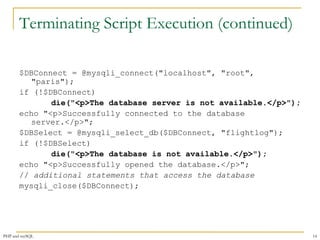
$DBConnect = @mysqli_connect("localhost", "root", 
"paris"); 
if (!$DBConnect) 
die("<p>The database server is not available.</p>"); 
echo "<p>Successfully connected to the database 
server.</p>"; 
$DBSelect = @mysqli_select_db($DBConnect, "flightlog"); 
if (!$DBSelect) 
die("<p>The database is not available.</p>"); 
echo "<p>Successfully opened the database.</p>"; 
// additional statements that access the database 
mysqli_close($DBConnect); 
PHP and mySQL 14
Terminating Script Execution (continued) 
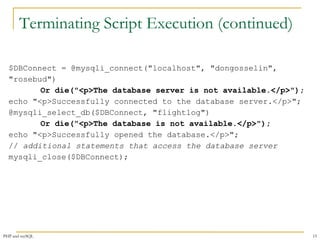
$DBConnect = @mysqli_connect("localhost", "dongosselin", 
"rosebud") 
Or die("<p>The database server is not available.</p>"); 
echo "<p>Successfully connected to the database server.</p>"; 
@mysqli_select_db($DBConnect, "flightlog") 
Or die("<p>The database is not available.</p>"); 
echo "<p>Successfully opened the database.</p>"; 
// additional statements that access the database server 
mysqli_close($DBConnect); 
PHP and mySQL 15
Reporting MySQL Errors 
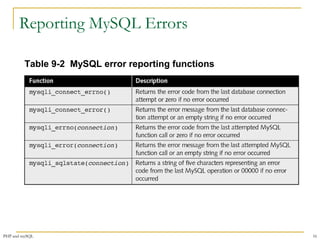
Table 9-2 MySQL error reporting functions 
PHP and mySQL 16
Reporting MySQL Errors 
$User = $_GET['username']; 
$Password = $_GET['password']; 
$DBConnect = @mysqli_connect("localhost", $User, $Password) 
Or die("<p>Unable to connect to the database 
server.</p>“ . "<p>Error code " . mysqli_connect_errno() 
. ": " . mysqli_connect_error()) . "</p>"; 
echo "<p>Successfully connected to the database server.</p>"; 
@mysqli_select_db($DBConnect, "flightlog") 
Or die("<p>The database is not available.</p>"); 
echo "<p>Successfully opened the database.</p>"; 
// additional statements that access the database 
mysqli_close($DBConnect); 
PHP and mySQL 17
Reporting MySQL Errors (continued) 
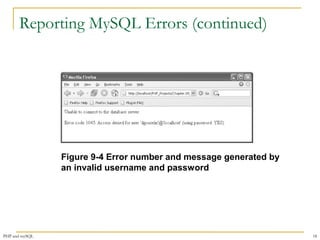
Figure 9-4 Error number and message generated by 
an invalid username and password 
PHP and mySQL 18
Reporting MySQL Errors 
$User = $_GET['username']; 
$Password = $_GET['password']; 
$DBConnect = @mysqli_connect("localhost", $User, $Password) 
Or die("<p>Unable to connect to the database 
server.</p>" 
. "<p>Error code " . mysqli_connect_errno() 
. ": " . mysqli_connect_error()) . "</p>"; 
echo "<p>Successfully connected to the database 
server.</p>"; 
@mysqli_select_db($DBConnect, "flightplan") 
Or die("<p>Unable to select the database.</p>" 
. "<p>Error code " . mysqli_errno($DBConnect) 
. ": " . mysqli_error($DBConnect)) . "</p>"; 
echo "<p>Successfully opened the database.</p>"; 
// additional statements that access the database 
mysqli_close($DBConnect); 
PHP and mySQL 19
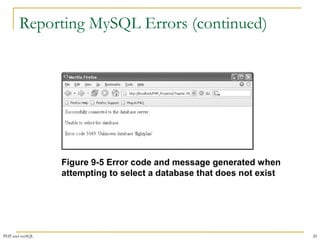
Reporting MySQL Errors (continued) 
Figure 9-5 Error code and message generated when 
attempting to select a database that does not exist 
PHP and mySQL 20
Executing SQL Statements 
 Use the mysqli_query() function to send 
SQL statements to MySQL 
 The syntax for the mysqli_query() 
function is: 
mysqli_query(connection, query) 
 The mysqli_query() function returns one 
of three values: 
1. For SQL statements that do not return results 
(CREATE DATABASE and CREATE TABLE 
statements) it returns a value of true if the 
statement executes successfully 
PHP and mySQL 21
Executing SQL Statements (continued) 
1. For SQL statements that return results (SELECT 
and SHOW statements) the mysqli_query() 
function returns a result pointer that represents 
the query results 
a) A result pointer is a special type of variable that refers 
to the currently selected row in a resultset 
2. The mysqli_query() function returns a value 
of false for any SQL statements that fail, 
regardless of whether they return results 
PHP and mySQL 22
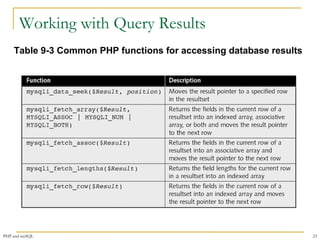
Working with Query Results 
Table 9-3 Common PHP functions for accessing database results 
PHP and mySQL 23
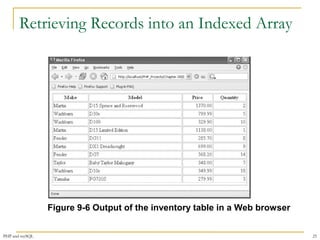
Retrieving Records into an 
Indexed Array 
 The mysqli_fetch_row() function returns 
the fields in the current row of a resultset into 
an indexed array and moves the result 
pointer to the next row 
echo "<table width='100%‘ border='1'>"; 
echo "<tr><th>Make</th><th>Model</th> 
<th>Price</th><th>Quantity</th></tr>"; 
$Row = mysqli_fetch_row($QueryResult); 
do { 
echo "<tr><td>{$Row[0]}</td>"; 
echo "<td>{$Row[1]}</td>"; 
echo "<td align='right'>{$Row[2]}</td>"; 
echo "<td align='right'>{$Row[3]}</td></tr>"; 
$Row = mysqli_fetch_row($QueryResult); 
} while ($Row); 
PHP and mySQL 24
Retrieving Records into an Indexed Array 
Figure 9-6 Output of the inventory table in a Web browser 
PHP and mySQL 25
Retrieving Records into an Associative Array 
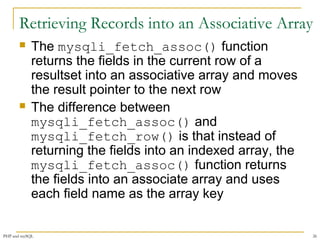
 The mysqli_fetch_assoc() function 
returns the fields in the current row of a 
resultset into an associative array and moves 
the result pointer to the next row 
 The difference between 
mysqli_fetch_assoc() and 
mysqli_fetch_row() is that instead of 
returning the fields into an indexed array, the 
mysqli_fetch_assoc() function returns 
the fields into an associate array and uses 
each field name as the array key 
PHP and mySQL 26
Accessing Query Result Information 
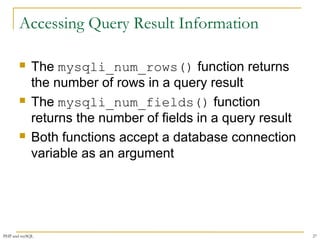
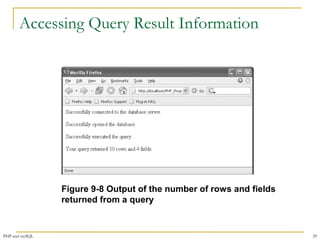
 The mysqli_num_rows() function returns 
the number of rows in a query result 
 The mysqli_num_fields() function 
returns the number of fields in a query result 
 Both functions accept a database connection 
variable as an argument 
PHP and mySQL 27
Accessing Query Result Information 
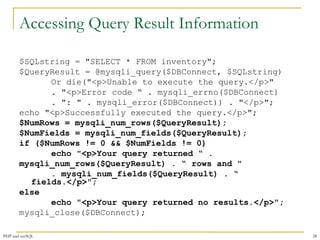
$SQLstring = "SELECT * FROM inventory"; 
$QueryResult = @mysqli_query($DBConnect, $SQLstring) 
Or die("<p>Unable to execute the query.</p>" 
. "<p>Error code “ . mysqli_errno($DBConnect) 
. ": " . mysqli_error($DBConnect)) . "</p>"; 
echo "<p>Successfully executed the query.</p>"; 
$NumRows = mysqli_num_rows($QueryResult); 
$NumFields = mysqli_num_fields($QueryResult); 
if ($NumRows != 0 && $NumFields != 0) 
echo "<p>Your query returned “ . 
mysqli_num_rows($QueryResult) . “ rows and " 
. mysqli_num_fields($QueryResult) . “ 
fields.</p>"; 
else 
echo "<p>Your query returned no results.</p>"; 
mysqli_close($DBConnect); 
PHP and mySQL 28
Accessing Query Result Information 
Figure 9-8 Output of the number of rows and fields 
returned from a query 
PHP and mySQL 29
Closing Query Results 
 When you are finished working with query 
results retrieved with the mysqli_query() 
function, use the mysqli_free_result() 
function to close the resultset 
 To close the resultset, pass to the 
mysqli_free_result() function the 
variable containing the result pointer from the 
mysqli_query() function 
PHP and mySQL 30
Creating and Deleting Databases 
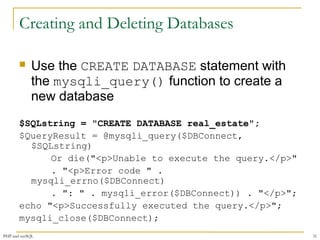
 Use the CREATE DATABASE statement with 
the mysqli_query() function to create a 
new database 
$SQLstring = "CREATE DATABASE real_estate"; 
$QueryResult = @mysqli_query($DBConnect, 
$SQLstring) 
Or die("<p>Unable to execute the query.</p>" 
. "<p>Error code " . 
mysqli_errno($DBConnect) 
. ": " . mysqli_error($DBConnect)) . "</p>"; 
echo "<p>Successfully executed the query.</p>"; 
mysqli_close($DBConnect); 
PHP and mySQL 31
Creating and Deleting Databases 
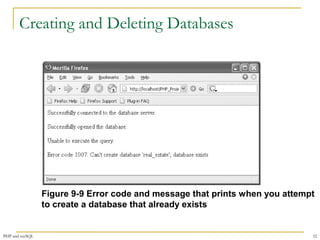
Figure 9-9 Error code and message that prints when you attempt 
to create a database that already exists 
PHP and mySQL 32
Creating and Deleting Databases 
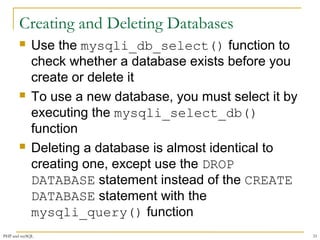
 Use the mysqli_db_select() function to 
check whether a database exists before you 
create or delete it 
 To use a new database, you must select it by 
executing the mysqli_select_db() 
function 
 Deleting a database is almost identical to 
creating one, except use the DROP 
DATABASE statement instead of the CREATE 
DATABASE statement with the 
mysqli_query() function 
PHP and mySQL 33
Creating and Deleting Databases 
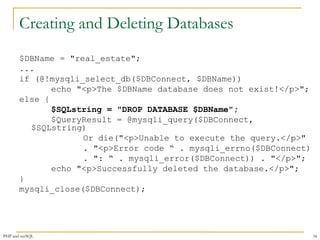
$DBName = "real_estate"; 
... 
if (@!mysqli_select_db($DBConnect, $DBName)) 
echo "<p>The $DBName database does not exist!</p>"; 
else { 
$SQLstring = "DROP DATABASE $DBName"; 
$QueryResult = @mysqli_query($DBConnect, 
$SQLstring) 
Or die("<p>Unable to execute the query.</p>" 
. "<p>Error code “ . mysqli_errno($DBConnect) 
. ": “ . mysqli_error($DBConnect)) . "</p>"; 
echo "<p>Successfully deleted the database.</p>"; 
} 
mysqli_close($DBConnect); 
PHP and mySQL 34
Creating and Deleting Tables 
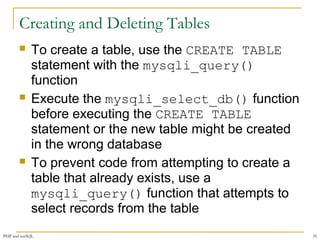
 To create a table, use the CREATE TABLE 
statement with the mysqli_query() 
function 
 Execute the mysqli_select_db() function 
before executing the CREATE TABLE 
statement or the new table might be created 
in the wrong database 
 To prevent code from attempting to create a 
table that already exists, use a 
mysqli_query() function that attempts to 
select records from the table 
PHP and mySQL 35
Creating and Deleting Tables 
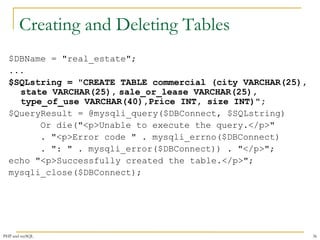
$DBName = "real_estate"; 
... 
$SQLstring = "CREATE TABLE commercial (city VARCHAR(25), 
state VARCHAR(25), sale_or_lease VARCHAR(25), 
type_of_use VARCHAR(40),Price INT, size INT)"; 
$QueryResult = @mysqli_query($DBConnect, $SQLstring) 
Or die("<p>Unable to execute the query.</p>" 
. "<p>Error code " . mysqli_errno($DBConnect) 
. ": " . mysqli_error($DBConnect)) . "</p>"; 
echo "<p>Successfully created the table.</p>"; 
mysqli_close($DBConnect); 
PHP and mySQL 36
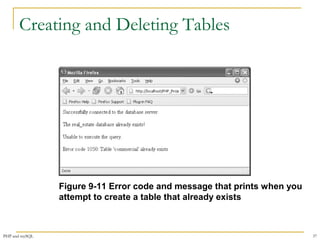
Creating and Deleting Tables 
Figure 9-11 Error code and message that prints when you 
attempt to create a table that already exists 
PHP and mySQL 37
Adding, Deleting, and Updating Records 
 To add records to a table, use the INSERT 
and VALUES keywords with the 
mysqli_query() function 
 The values entered in the VALUES list must 
be in the same order in which you defined the 
table fields 
 You must specify NULL in any fields for which 
you do not have a value 
PHP and mySQL 38
Adding, Deleting, and Updating Records 
 To add multiple records to a database, use 
the LOAD DATA statement and the 
mysqli_query() function with a local text 
file containing the records you want to add 
 To update records in a table, use the 
UPDATE, SET, and WHERE keywords with the 
mysqli_query() function 
PHP and mySQL 39
Adding, Deleting, and Updating Records 
 The UPDATE keyword specifies the name of 
the table to update 
 The SET keyword specifies the value to 
assign to the fields in the records that match 
the condition in the WHERE keyword 
 To delete records in a table, use the DELETE 
and WHERE keywords with the 
mysqli_query() function 
 The WHERE keyword determines which 
records to delete in the table 
PHP and mySQL 40
Using the mysqli_affected_rows() Function 
 With queries that return results (SELECT 
queries), use the mysqli_num_rows() 
function to find the number of records 
returned from the query 
 With queries that modify tables but do not 
return results (INSERT, UPDATE, and 
DELETE queries), use the 
mysqli_affected_rows() function to 
determine the number of affected rows 
PHP and mySQL 41
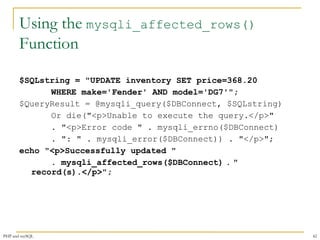
Using the mysqli_affected_rows() 
Function 
$SQLstring = "UPDATE inventory SET price=368.20 
WHERE make='Fender' AND model='DG7'"; 
$QueryResult = @mysqli_query($DBConnect, $SQLstring) 
Or die("<p>Unable to execute the query.</p>" 
. "<p>Error code " . mysqli_errno($DBConnect) 
. ": " . mysqli_error($DBConnect)) . "</p>"; 
echo "<p>Successfully updated " 
. mysqli_affected_rows($DBConnect) . " 
record(s).</p>"; 
PHP and mySQL 42
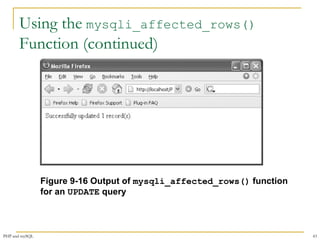
Using the mysqli_affected_rows() 
Function (continued) 
Figure 9-16 Output of mysqli_affected_rows() function 
for an UPDATE query 
PHP and mySQL 43
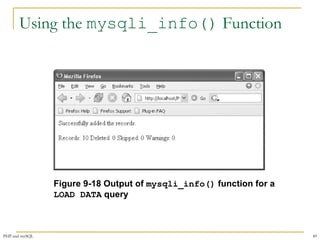
Using the mysqli_info() Function 
 For queries that add or update records, or alter 
table’s structure, use the mysqli_info() 
function to return information about the query 
 The mysqli_info() function returns the 
number of operations for various types of 
actions, depending on the type of query 
 The mysqli_info() function returns 
information about the last query that was 
executed on the database connection 
PHP and mySQL 44
Using the mysqli_info() Function 
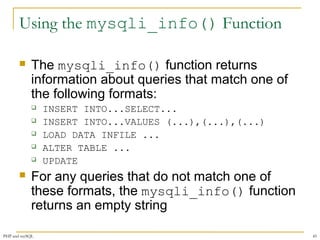
 The mysqli_info() function returns 
information about queries that match one of 
the following formats: 
 INSERT INTO...SELECT... 
 INSERT INTO...VALUES (...),(...),(...) 
 LOAD DATA INFILE ... 
 ALTER TABLE ... 
 UPDATE 
 For any queries that do not match one of 
these formats, the mysqli_info() function 
returns an empty string 
PHP and mySQL 45
Using the mysqli_info() Function 
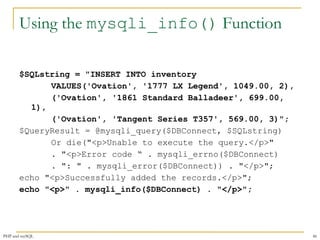
$SQLstring = "INSERT INTO inventory 
VALUES('Ovation', '1777 LX Legend', 1049.00, 2), 
('Ovation', '1861 Standard Balladeer', 699.00, 
1), 
('Ovation', 'Tangent Series T357', 569.00, 3)"; 
$QueryResult = @mysqli_query($DBConnect, $SQLstring) 
Or die("<p>Unable to execute the query.</p>" 
. "<p>Error code “ . mysqli_errno($DBConnect) 
. ": " . mysqli_error($DBConnect)) . "</p>"; 
echo "<p>Successfully added the records.</p>"; 
echo "<p>" . mysqli_info($DBConnect) . "</p>"; 
PHP and mySQL 46
Using the mysqli_info() Function 
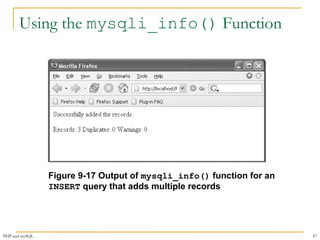
Figure 9-17 Output of mysqli_info() function for an 
INSERT query that adds multiple records 
PHP and mySQL 47
Using the mysqli_info() Function 
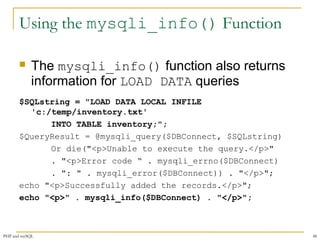
 The mysqli_info() function also returns 
information for LOAD DATA queries 
$SQLstring = "LOAD DATA LOCAL INFILE 
'c:/temp/inventory.txt' 
INTO TABLE inventory;"; 
$QueryResult = @mysqli_query($DBConnect, $SQLstring) 
Or die("<p>Unable to execute the query.</p>" 
. "<p>Error code “ . mysqli_errno($DBConnect) 
. ": " . mysqli_error($DBConnect)) . "</p>"; 
echo "<p>Successfully added the records.</p>"; 
echo "<p>" . mysqli_info($DBConnect) . "</p>"; 
PHP and mySQL 48
Using the mysqli_info() Function 
Figure 9-18 Output of mysqli_info() function for a 
LOAD DATA query 
PHP and mySQL 49
Summary 
 PHP includes functionality that allows you to 
work directly with different types of 
databases, without going through ODBC 
 Writing code that anticipates and handles 
potential problems is often called 
bulletproofing 
 The error control operator (@) suppresses 
error messages 
 A result pointer is a special type of variable 
that refers to the currently selected row in a 
resultset 
PHP and mySQL 50
Summary (continued) 
 Use the mysqli_query() function to send 
SQL statements to MySQL 
 To identify a field as a primary key in MySQL, 
include the PRIMARY KEY keywords when 
you first define a field with the CREATE 
TABLE statement 
 The AUTO_INCREMENT keyword is often 
used with a primary key to generate a unique 
ID for each new row in a table 
PHP and mySQL 51
Summary (continued) 
 You use the LOAD DATA statement and the 
mysqli_query() function with a local text 
file to add multiple records to a database 
 With queries that return results, such as 
SELECT queries, you can use the mysqli_ 
num_rows() function to find the number of 
records returned from the query 
 The mysqli_info() function returns the 
number of operations for various types of 
actions, depending on the type of query 
PHP and mySQL 52

Synapse india reviews on php and sql

  • 1.
    Synapseindia Reviews on MySQL Databases with PHP
  • 2.
    Objectives  Connectto MySQL from PHP  Learn how to handle MySQL errors  Execute SQL statements with PHP  Use PHP to work with MySQL databases and tables  Use PHP to manipulate database records PHP and mySQL 2
  • 3.
    PHP Overview PHP has the ability to access and manipulate any database that is ODBC compliant  PHP includes functionality that allows you to work directly with different types of databases, without going through ODBC  PHP supports SQLite, database abstraction layer functions, and PEAR DB PHP and mySQL 3
  • 4.
    Enabling MySQL Supportin PHP  On UNIX/Linux systems:  Configure PHP to use the mysqli extension by specifying the --with-mysqli parameter when you run the configure command during installation  On Windows:  Copy the files libmysql.dll and php_mysqli.dll to the installation directory  Edit the php.ini configuration file and enable the extension=php_mysqli.dll directive PHP and mySQL 4
  • 5.
    Opening and Closinga MySQL Connection  Open a connection to a MySQL database server with the mysqli_connect() function  The mysqli_connect() function returns a positive integer if it connects to the database successfully or false if it does not  Assign the return value from the mysqli_connect() function to a variable that you can use to access the database in your script PHP and mySQL 5
  • 6.
    Opening and Closinga MySQL Connection (continued)  The syntax for the mysqli_connect() function is: $connection = mysqli_connect("host"[, "user ", "password", "database"])  The host argument specifies the host name where your MySQL database server is installed  The user and password arguments specify a MySQL account name and password  The database argument selects a database with which to work PHP and mySQL 6
  • 7.
    Opening and Closinga MySQL Connection (continued) Table 9-1 MySQL server information functions PHP and mySQL 7
  • 8.
    Opening and Closinga MySQL Connection (continued) Figure 9-1 MySQLInfo.php in a Web browser PHP and mySQL 8
  • 9.
    Selecting a Database  Select a database with the use database statement when you log on to the MySQL Monitor  The syntax for the mysqli_select_db() function is: mysqli_select_db(connection, database)  The function returns a value of true if it successfully selects a database or false if it does not PHP and mySQL 9
  • 10.
    Handling MySQL Errors  Reasons for not connecting to a database server include:  The database server is not running  Insufficient privileges to access the data source  Invalid username and/or password PHP and mySQL 10
  • 11.
    Handling MySQL Errors(continued)  Make sure you are using a valid username and password Figure 9-2 Database connection error message PHP and mySQL 11
  • 12.
    Suppressing Errors withthe Error Control Operator  Writing code that anticipates and handles potential problems is often called bulletproofing  Bulletproofing techniques include:  Validating submitted form data  Using the error control operator (@) to suppress error messages PHP and mySQL 12
  • 13.
    Terminating Script Execution  The die() and exit() functions terminate script execution  The die() version is usually used when attempting to access a data source  Both functions accept a single string argument  Call the die() and exit() functions as separate statements or by appending either function to an expression with the Or operator PHP and mySQL 13
  • 14.
    Terminating Script Execution(continued) $DBConnect = @mysqli_connect("localhost", "root", "paris"); if (!$DBConnect) die("<p>The database server is not available.</p>"); echo "<p>Successfully connected to the database server.</p>"; $DBSelect = @mysqli_select_db($DBConnect, "flightlog"); if (!$DBSelect) die("<p>The database is not available.</p>"); echo "<p>Successfully opened the database.</p>"; // additional statements that access the database mysqli_close($DBConnect); PHP and mySQL 14
  • 15.
    Terminating Script Execution(continued) $DBConnect = @mysqli_connect("localhost", "dongosselin", "rosebud") Or die("<p>The database server is not available.</p>"); echo "<p>Successfully connected to the database server.</p>"; @mysqli_select_db($DBConnect, "flightlog") Or die("<p>The database is not available.</p>"); echo "<p>Successfully opened the database.</p>"; // additional statements that access the database server mysqli_close($DBConnect); PHP and mySQL 15
  • 16.
    Reporting MySQL Errors Table 9-2 MySQL error reporting functions PHP and mySQL 16
  • 17.
    Reporting MySQL Errors $User = $_GET['username']; $Password = $_GET['password']; $DBConnect = @mysqli_connect("localhost", $User, $Password) Or die("<p>Unable to connect to the database server.</p>“ . "<p>Error code " . mysqli_connect_errno() . ": " . mysqli_connect_error()) . "</p>"; echo "<p>Successfully connected to the database server.</p>"; @mysqli_select_db($DBConnect, "flightlog") Or die("<p>The database is not available.</p>"); echo "<p>Successfully opened the database.</p>"; // additional statements that access the database mysqli_close($DBConnect); PHP and mySQL 17
  • 18.
    Reporting MySQL Errors(continued) Figure 9-4 Error number and message generated by an invalid username and password PHP and mySQL 18
  • 19.
    Reporting MySQL Errors $User = $_GET['username']; $Password = $_GET['password']; $DBConnect = @mysqli_connect("localhost", $User, $Password) Or die("<p>Unable to connect to the database server.</p>" . "<p>Error code " . mysqli_connect_errno() . ": " . mysqli_connect_error()) . "</p>"; echo "<p>Successfully connected to the database server.</p>"; @mysqli_select_db($DBConnect, "flightplan") Or die("<p>Unable to select the database.</p>" . "<p>Error code " . mysqli_errno($DBConnect) . ": " . mysqli_error($DBConnect)) . "</p>"; echo "<p>Successfully opened the database.</p>"; // additional statements that access the database mysqli_close($DBConnect); PHP and mySQL 19
  • 20.
    Reporting MySQL Errors(continued) Figure 9-5 Error code and message generated when attempting to select a database that does not exist PHP and mySQL 20
  • 21.
    Executing SQL Statements  Use the mysqli_query() function to send SQL statements to MySQL  The syntax for the mysqli_query() function is: mysqli_query(connection, query)  The mysqli_query() function returns one of three values: 1. For SQL statements that do not return results (CREATE DATABASE and CREATE TABLE statements) it returns a value of true if the statement executes successfully PHP and mySQL 21
  • 22.
    Executing SQL Statements(continued) 1. For SQL statements that return results (SELECT and SHOW statements) the mysqli_query() function returns a result pointer that represents the query results a) A result pointer is a special type of variable that refers to the currently selected row in a resultset 2. The mysqli_query() function returns a value of false for any SQL statements that fail, regardless of whether they return results PHP and mySQL 22
  • 23.
    Working with QueryResults Table 9-3 Common PHP functions for accessing database results PHP and mySQL 23
  • 24.
    Retrieving Records intoan Indexed Array  The mysqli_fetch_row() function returns the fields in the current row of a resultset into an indexed array and moves the result pointer to the next row echo "<table width='100%‘ border='1'>"; echo "<tr><th>Make</th><th>Model</th> <th>Price</th><th>Quantity</th></tr>"; $Row = mysqli_fetch_row($QueryResult); do { echo "<tr><td>{$Row[0]}</td>"; echo "<td>{$Row[1]}</td>"; echo "<td align='right'>{$Row[2]}</td>"; echo "<td align='right'>{$Row[3]}</td></tr>"; $Row = mysqli_fetch_row($QueryResult); } while ($Row); PHP and mySQL 24
  • 25.
    Retrieving Records intoan Indexed Array Figure 9-6 Output of the inventory table in a Web browser PHP and mySQL 25
  • 26.
    Retrieving Records intoan Associative Array  The mysqli_fetch_assoc() function returns the fields in the current row of a resultset into an associative array and moves the result pointer to the next row  The difference between mysqli_fetch_assoc() and mysqli_fetch_row() is that instead of returning the fields into an indexed array, the mysqli_fetch_assoc() function returns the fields into an associate array and uses each field name as the array key PHP and mySQL 26
  • 27.
    Accessing Query ResultInformation  The mysqli_num_rows() function returns the number of rows in a query result  The mysqli_num_fields() function returns the number of fields in a query result  Both functions accept a database connection variable as an argument PHP and mySQL 27
  • 28.
    Accessing Query ResultInformation $SQLstring = "SELECT * FROM inventory"; $QueryResult = @mysqli_query($DBConnect, $SQLstring) Or die("<p>Unable to execute the query.</p>" . "<p>Error code “ . mysqli_errno($DBConnect) . ": " . mysqli_error($DBConnect)) . "</p>"; echo "<p>Successfully executed the query.</p>"; $NumRows = mysqli_num_rows($QueryResult); $NumFields = mysqli_num_fields($QueryResult); if ($NumRows != 0 && $NumFields != 0) echo "<p>Your query returned “ . mysqli_num_rows($QueryResult) . “ rows and " . mysqli_num_fields($QueryResult) . “ fields.</p>"; else echo "<p>Your query returned no results.</p>"; mysqli_close($DBConnect); PHP and mySQL 28
  • 29.
    Accessing Query ResultInformation Figure 9-8 Output of the number of rows and fields returned from a query PHP and mySQL 29
  • 30.
    Closing Query Results  When you are finished working with query results retrieved with the mysqli_query() function, use the mysqli_free_result() function to close the resultset  To close the resultset, pass to the mysqli_free_result() function the variable containing the result pointer from the mysqli_query() function PHP and mySQL 30
  • 31.
    Creating and DeletingDatabases  Use the CREATE DATABASE statement with the mysqli_query() function to create a new database $SQLstring = "CREATE DATABASE real_estate"; $QueryResult = @mysqli_query($DBConnect, $SQLstring) Or die("<p>Unable to execute the query.</p>" . "<p>Error code " . mysqli_errno($DBConnect) . ": " . mysqli_error($DBConnect)) . "</p>"; echo "<p>Successfully executed the query.</p>"; mysqli_close($DBConnect); PHP and mySQL 31
  • 32.
    Creating and DeletingDatabases Figure 9-9 Error code and message that prints when you attempt to create a database that already exists PHP and mySQL 32
  • 33.
    Creating and DeletingDatabases  Use the mysqli_db_select() function to check whether a database exists before you create or delete it  To use a new database, you must select it by executing the mysqli_select_db() function  Deleting a database is almost identical to creating one, except use the DROP DATABASE statement instead of the CREATE DATABASE statement with the mysqli_query() function PHP and mySQL 33
  • 34.
    Creating and DeletingDatabases $DBName = "real_estate"; ... if (@!mysqli_select_db($DBConnect, $DBName)) echo "<p>The $DBName database does not exist!</p>"; else { $SQLstring = "DROP DATABASE $DBName"; $QueryResult = @mysqli_query($DBConnect, $SQLstring) Or die("<p>Unable to execute the query.</p>" . "<p>Error code “ . mysqli_errno($DBConnect) . ": “ . mysqli_error($DBConnect)) . "</p>"; echo "<p>Successfully deleted the database.</p>"; } mysqli_close($DBConnect); PHP and mySQL 34
  • 35.
    Creating and DeletingTables  To create a table, use the CREATE TABLE statement with the mysqli_query() function  Execute the mysqli_select_db() function before executing the CREATE TABLE statement or the new table might be created in the wrong database  To prevent code from attempting to create a table that already exists, use a mysqli_query() function that attempts to select records from the table PHP and mySQL 35
  • 36.
    Creating and DeletingTables $DBName = "real_estate"; ... $SQLstring = "CREATE TABLE commercial (city VARCHAR(25), state VARCHAR(25), sale_or_lease VARCHAR(25), type_of_use VARCHAR(40),Price INT, size INT)"; $QueryResult = @mysqli_query($DBConnect, $SQLstring) Or die("<p>Unable to execute the query.</p>" . "<p>Error code " . mysqli_errno($DBConnect) . ": " . mysqli_error($DBConnect)) . "</p>"; echo "<p>Successfully created the table.</p>"; mysqli_close($DBConnect); PHP and mySQL 36
  • 37.
    Creating and DeletingTables Figure 9-11 Error code and message that prints when you attempt to create a table that already exists PHP and mySQL 37
  • 38.
    Adding, Deleting, andUpdating Records  To add records to a table, use the INSERT and VALUES keywords with the mysqli_query() function  The values entered in the VALUES list must be in the same order in which you defined the table fields  You must specify NULL in any fields for which you do not have a value PHP and mySQL 38
  • 39.
    Adding, Deleting, andUpdating Records  To add multiple records to a database, use the LOAD DATA statement and the mysqli_query() function with a local text file containing the records you want to add  To update records in a table, use the UPDATE, SET, and WHERE keywords with the mysqli_query() function PHP and mySQL 39
  • 40.
    Adding, Deleting, andUpdating Records  The UPDATE keyword specifies the name of the table to update  The SET keyword specifies the value to assign to the fields in the records that match the condition in the WHERE keyword  To delete records in a table, use the DELETE and WHERE keywords with the mysqli_query() function  The WHERE keyword determines which records to delete in the table PHP and mySQL 40
  • 41.
    Using the mysqli_affected_rows()Function  With queries that return results (SELECT queries), use the mysqli_num_rows() function to find the number of records returned from the query  With queries that modify tables but do not return results (INSERT, UPDATE, and DELETE queries), use the mysqli_affected_rows() function to determine the number of affected rows PHP and mySQL 41
  • 42.
    Using the mysqli_affected_rows() Function $SQLstring = "UPDATE inventory SET price=368.20 WHERE make='Fender' AND model='DG7'"; $QueryResult = @mysqli_query($DBConnect, $SQLstring) Or die("<p>Unable to execute the query.</p>" . "<p>Error code " . mysqli_errno($DBConnect) . ": " . mysqli_error($DBConnect)) . "</p>"; echo "<p>Successfully updated " . mysqli_affected_rows($DBConnect) . " record(s).</p>"; PHP and mySQL 42
  • 43.
    Using the mysqli_affected_rows() Function (continued) Figure 9-16 Output of mysqli_affected_rows() function for an UPDATE query PHP and mySQL 43
  • 44.
    Using the mysqli_info()Function  For queries that add or update records, or alter table’s structure, use the mysqli_info() function to return information about the query  The mysqli_info() function returns the number of operations for various types of actions, depending on the type of query  The mysqli_info() function returns information about the last query that was executed on the database connection PHP and mySQL 44
  • 45.
    Using the mysqli_info()Function  The mysqli_info() function returns information about queries that match one of the following formats:  INSERT INTO...SELECT...  INSERT INTO...VALUES (...),(...),(...)  LOAD DATA INFILE ...  ALTER TABLE ...  UPDATE  For any queries that do not match one of these formats, the mysqli_info() function returns an empty string PHP and mySQL 45
  • 46.
    Using the mysqli_info()Function $SQLstring = "INSERT INTO inventory VALUES('Ovation', '1777 LX Legend', 1049.00, 2), ('Ovation', '1861 Standard Balladeer', 699.00, 1), ('Ovation', 'Tangent Series T357', 569.00, 3)"; $QueryResult = @mysqli_query($DBConnect, $SQLstring) Or die("<p>Unable to execute the query.</p>" . "<p>Error code “ . mysqli_errno($DBConnect) . ": " . mysqli_error($DBConnect)) . "</p>"; echo "<p>Successfully added the records.</p>"; echo "<p>" . mysqli_info($DBConnect) . "</p>"; PHP and mySQL 46
  • 47.
    Using the mysqli_info()Function Figure 9-17 Output of mysqli_info() function for an INSERT query that adds multiple records PHP and mySQL 47
  • 48.
    Using the mysqli_info()Function  The mysqli_info() function also returns information for LOAD DATA queries $SQLstring = "LOAD DATA LOCAL INFILE 'c:/temp/inventory.txt' INTO TABLE inventory;"; $QueryResult = @mysqli_query($DBConnect, $SQLstring) Or die("<p>Unable to execute the query.</p>" . "<p>Error code “ . mysqli_errno($DBConnect) . ": " . mysqli_error($DBConnect)) . "</p>"; echo "<p>Successfully added the records.</p>"; echo "<p>" . mysqli_info($DBConnect) . "</p>"; PHP and mySQL 48
  • 49.
    Using the mysqli_info()Function Figure 9-18 Output of mysqli_info() function for a LOAD DATA query PHP and mySQL 49
  • 50.
    Summary  PHPincludes functionality that allows you to work directly with different types of databases, without going through ODBC  Writing code that anticipates and handles potential problems is often called bulletproofing  The error control operator (@) suppresses error messages  A result pointer is a special type of variable that refers to the currently selected row in a resultset PHP and mySQL 50
  • 51.
    Summary (continued) Use the mysqli_query() function to send SQL statements to MySQL  To identify a field as a primary key in MySQL, include the PRIMARY KEY keywords when you first define a field with the CREATE TABLE statement  The AUTO_INCREMENT keyword is often used with a primary key to generate a unique ID for each new row in a table PHP and mySQL 51
  • 52.
    Summary (continued) You use the LOAD DATA statement and the mysqli_query() function with a local text file to add multiple records to a database  With queries that return results, such as SELECT queries, you can use the mysqli_ num_rows() function to find the number of records returned from the query  The mysqli_info() function returns the number of operations for various types of actions, depending on the type of query PHP and mySQL 52