PHP and MySQL Web DevelopmenttMyn 1
PHP and MySQL Web Development
• When you install PHP, you can select from a number of
extensions.
• The MySQL support in PHP consists of a number of
functions you can call to interact with MySQL, and here
are some of them:
PHP and MySQL Web DevelopmenttMyn 2
The mysql_connect() function opens a non-persistent MySQL connection.
This function returns the connection on success, or FALSE and
an error on failure.
Syntax
mysql_connect(server,user,pwd,newlink,clientflag)
Parameter Description
server Optional. Specifies the server to connect to (can also
include a port number, e.g. "hostname:port" or a path to a
local socket for the localhost).
Default value is "localhost:3306"
user Optional. Specifies the username to log in with. Default
value is the name of the user that owns the server process
pwd Optional. Specifies the password to log in with. Default is ""
PHP and MySQL Web DevelopmenttMyn 3
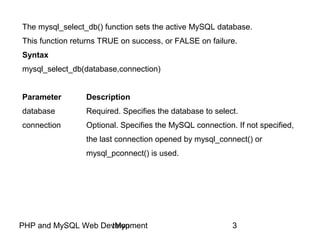
The mysql_select_db() function sets the active MySQL database.
This function returns TRUE on success, or FALSE on failure.
Syntax
mysql_select_db(database,connection)
Parameter Description
database Required. Specifies the database to select.
connection Optional. Specifies the MySQL connection. If not specified,
the last connection opened by mysql_connect() or
mysql_pconnect() is used.
PHP and MySQL Web DevelopmenttMyn 4
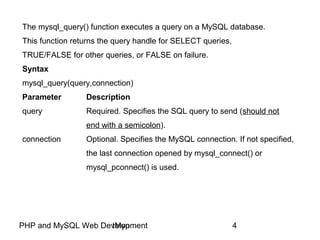
The mysql_query() function executes a query on a MySQL database.
This function returns the query handle for SELECT queries,
TRUE/FALSE for other queries, or FALSE on failure.
Syntax
mysql_query(query,connection)
Parameter Description
query Required. Specifies the SQL query to send (should not
end with a semicolon).
connection Optional. Specifies the MySQL connection. If not specified,
the last connection opened by mysql_connect() or
mysql_pconnect() is used.
PHP and MySQL Web DevelopmenttMyn 5
The mysql_fetch_array() function returns a row from a recordset as an
associative array and/or a numeric array. This function gets a row from
the mysql_query() function and returns an array on success, or FALSE
on failure or when there are no more rows.
Syntax
mysql_fetch_array(data,array_type)
Parameter Description
data Required. Specifies which data pointer to use. The data
pointer is the result from the mysql_query() function
array_type Optional. Specifies what kind of array to return.
Possible values:
MYSQL_ASSOC - Associative array
MYSQL_NUM - Numeric array
MYSQL_BOTH - Default. Both associative and numeric array
PHP and MySQL Web DevelopmenttMyn 6
The mysql_fetch_object() function returns a row from a recordset as an object.
This function gets a row from the mysql_query() function and returns an object
on success, or FALSE on failure or when there are no more rows.
Syntax
mysql_fetch_object(data)
Parameter Description
data Required. Specifies which data pointer to use. The data
pointer is the result from the mysql_query() function
Tips and Notes
Note: Each subsequent call to mysql_fetch_object() returns the
next row in the recordset.
PHP and MySQL Web DevelopmenttMyn 7
The mysql_affected_rows() function returns the number of affected rows
in the previous MySQL operation. This function returns the number of
affected rows on success, or -1 if the last operation failed.
Syntax
mysql_affected_rows(connection)
Parameter Description
connection Optional. Specifies the MySQL connection. If not specified,
the last connection opened by mysql_connect() or
mysql_pconnect() is used.
PHP and MySQL Web DevelopmenttMyn 8
The mysql_num_rows() function returns the number of rows in a recordset.
This function returns FALSE on failure.
Syntax
mysql_num_rows(data)
Parameter Description
data Required. Specifies which data pointer to use.
The data pointer is the result from the mysql_query() function
PHP and MySQL Web DevelopmenttMyn 9
The mysql_result() function returns the value of a field in a recordset.
This function returns the field value on success, or FALSE on failure.
Syntax
mysql_result(data,row,field)
Parameter Description
data Required. Specifies which result handle to use. The data
pointer is the return from the mysql_query() function
row Required. Specifies which row number to get.
Row numbers start at 0
PHP and MySQL Web DevelopmenttMyn 10
field Optional. Specifies which field to get. Can be field offset,
field name or table.fieldname. If this parameter is not defined
mysql_result() gets the first field from the specified row.
Tips and Notes
This function is slower than mysql_fetch_row(),
mysql_fetch_array(), mysql_fetch_assoc() and
mysql_fetch_object().
PHP and MySQL Web DevelopmenttMyn 11
The mysql_error() function returns the error description of the last
MySQL operation. This function returns an empty string ("") if no error occurs.
Syntax
mysql_error(connection)
Parameter Description
connection Optional. Specifies the MySQL connection. If not specified,
the last connection opened by mysql_connect() or
mysql_pconnect() is used.
PHP and MySQL Web DevelopmenttMyn 12
The mysql_close() function closes a non-persistent MySQL connection.
This function returns TRUE on success, or FALSE on failure.
Syntax
mysql_close(connection)
Parameter Description
connection Optional. Specifies the MySQL connection to close.
If not specified, the last connection opened by
mysql_connect() is used.
PHP and MySQL Web DevelopmenttMyn 13
die — Equivalent to exit()
Description
This language construct is equivalent to exit().
PHP and MySQL Web DevelopmenttMyn 14
exit — Output a message and terminate the current script
Description
void exit ([ string $status ] )
void exit ( int $status )
Terminates execution of the script.
Parameters
status
If status is a string, this function prints the status just before exiting.
If status is an integer, that value will also be used as the exit status.
Exit statuses should be in the range 0 to 254, the exit status 255 is
reserved by PHP and shall not be used. The status 0 is used to
terminate the program successfully.
PHP and MySQL Web DevelopmenttMyn 15
• A typical web database transaction consists of the
following stages, which are numbered in the Figure 1:
1. A user’s web browser issues an HTTP request for a
particular web page. For example, using an HTML form,
she might have requested a search for all books at
MikkeliOnlineProfessionalBooks.com written by Leila
Karjalainen. The search results page is called
results.php.
2. The web server receives the request for results.php,
retrieves the file, and passes it to the PHP engine for
processing.
PHP and MySQL Web DevelopmenttMyn 16
1
6
25
3
4
MySQL Server
Browser Web Server
PHP Engine
PHP and MySQL Web DevelopmenttMyn 17
3. The PHP engine begins parsing the script. Inside the
script is a command to connect to the database and
execute a query (perform the search for books). PHP
opens a connection to the MySQL server and sends on
the appropriate query.
4. The MySQL server receives the database query,
processes it, and sends the results - a list of books -
back to the PHP engine.
5. The PHP engine finishes running the script, which
usually involves formatting the query results nicely in
HTML. It then returns the resulting HTML to the web
server.
PHP and MySQL Web DevelopmenttMyn 18
6. The web server passes the HTML back to the
browser, where the user can see the list of books she
requested.
• The above described process is basically the same
regardless of which scripting engine or database server
you use.
• Sometimes the web server, PHP engine, and database
server all run on the same machine.
• However, it is quite common for the database server to
run on a different machine. You might do this for reasons
of security, increased capacity, or load spreading. From
a development perspective, this approach is much the
same to work with.
PHP and MySQL Web DevelopmenttMyn 19
• First example reads in and displays the contents of the
Friend table from the database Future.
• Our script will do the following jobs:
– Set up a connection to the appropriate database
– Query the database table
– Retrieve the results
– Present the results back to the user
• First we need to create the needed database and
database table – this time we will do it directly using
MySQL Query Browser:
PHP and MySQL Web DevelopmenttMyn 20
PHP and MySQL Web DevelopmenttMyn 21
PHP and MySQL Web DevelopmenttMyn 22
PHP and MySQL Web DevelopmenttMyn 23
• Next the PHP script:
PHP and MySQL Web DevelopmenttMyn 24
PHP and MySQL Web DevelopmenttMyn 25
PHP and MySQL Web DevelopmenttMyn 26
…and what you can see from the browser:
PHP and MySQL Web DevelopmenttMyn 27
‘$sqlResult = mysql_query...’
• When you select items from a database using
mysql_query(), the data is returned as a MySQL
result. Since we want to use this data in our program we
need to store it in a variable. $sqlResult now holds
the result from our mysql_query().
PHP and MySQL Web DevelopmenttMyn 28
‘while($sqlRow =
mysql_fetch_array( $sqlResult…)’
• The mysql_fetch_array function gets the next-in-line
associative array from a MySQL result. By putting it in a
while loop it will continue to fetch the next array until
there is no next array to fetch. This function can be
called as many times as you want, but it will return
FALSE when the last associative array has already been
returned.
• By placing this function within the conditional statement
of the while loop, we can “kill” two birds with one stone:
PHP and MySQL Web DevelopmenttMyn 29
1. We can retrieve the next associative array from our
MySQL resource, $sqlResult, so that we can print out
the retrieved information.
2. We can tell the while loop to stop printing out
information when the MySQL resource has returned the
last array, as FALSE is returned when it reaches the end
and this will cause the while loop to halt.
• A resource is a special variable, holding a reference to
an external resource.
PHP and MySQL Web DevelopmenttMyn 30
• In the above script, we have accessed the firstName
column like this: $sqlRow[‘firstName’]. That can
also be done by using integer indexing:
PHP and MySQL Web DevelopmenttMyn 31
PHP and MySQL Web DevelopmenttMyn 32
• Or finding out the number of rows in a recordset:
PHP and MySQL Web DevelopmenttMyn 33
PHP and MySQL Web DevelopmenttMyn 34
PHP and MySQL Web DevelopmenttMyn 35
• Or returning a row from a recordset as an object
PHP and MySQL Web DevelopmenttMyn 36
PHP and MySQL Web DevelopmenttMyn 37
PHP and MySQL Web DevelopmenttMyn 38
• A minor modification to the original example: let’s make it
display a message if there is an error when connecting
to the database server:
PHP and MySQL Web DevelopmenttMyn 39
PHP and MySQL Web DevelopmenttMyn 40
PHP and MySQL Web DevelopmenttMyn 41
• So it seems that die() needs no arguments because
mysql_connect() is able to give the same
information:
PHP and MySQL Web DevelopmenttMyn 42
PHP and MySQL Web DevelopmenttMyn 43
PHP and MySQL Web DevelopmenttMyn 44
• A minor modification to the original example: let’s make it
display a message if there is an error when selecting the
database we want to use:
PHP and MySQL Web DevelopmenttMyn 45
PHP and MySQL Web DevelopmenttMyn 46
PHP and MySQL Web DevelopmenttMyn 47
• In the next example we will insert one row to the Friend
table. First directly from web server to the database
server without any user interface.
PHP and MySQL Web DevelopmenttMyn 48
PHP and MySQL Web DevelopmenttMyn 49
PHP and MySQL Web DevelopmenttMyn 50
PHP and MySQL Web DevelopmenttMyn 51
Abit more complex task: Insert data from a form into a
database:
• Now we will create an HTML form that can be used to
add new records to the Friend table, file database3.html:
PHP and MySQL Web DevelopmenttMyn 52
PHP and MySQL Web DevelopmenttMyn 53
• When a user clicks the submit button in the HTML form
in the example above, the form data is sent to
database3.php.
• The database3.php file connects to a database, and
retrieves the values from the form with the PHP $_POST
variables.
• Then, the mysql_query() function executes the
INSERT INTO statement, and a new record will be
added to the Friend table.
• Here is the database3.php page:
PHP and MySQL Web DevelopmenttMyn 54
PHP and MySQL Web DevelopmenttMyn 55
PHP and MySQL Web DevelopmenttMyn 56
PHP and MySQL Web DevelopmenttMyn 57
PHP and MySQL Web DevelopmenttMyn 58
• From the previous slide it can be seen that the primary
key jumps from 4 to 9 - that is because there were some
errors when testing the example…
• The primary key can be modified directly using MySQL
Query Browser (Naturally UPDATES can be done using
our HTML user interface) if the current situation annoys
someone:
PHP and MySQL Web DevelopmenttMyn 59
PHP and MySQL Web DevelopmenttMyn 60
• A minor modification to the database3.php example:
Let’s test that all the HTML fields have at least
something inputted:
PHP and MySQL Web DevelopmenttMyn 61
PHP and MySQL Web DevelopmenttMyn 62
PHP and MySQL Web DevelopmenttMyn 63
PHP and MySQL Web DevelopmenttMyn 64
PHP and MySQL Web DevelopmenttMyn 65
PHP and MySQL Web DevelopmenttMyn 66
PHP and MySQL Web DevelopmenttMyn 67
• A minor modification to the database3.php example:
putting it all in one page.
• The first test: has the user submitted the form?
• Second test: Is there something in every field?
PHP and MySQL Web DevelopmenttMyn 68
PHP and MySQL Web DevelopmenttMyn 69
PHP and MySQL Web DevelopmenttMyn 70
PHP and MySQL Web DevelopmenttMyn 71
PHP and MySQL Web DevelopmenttMyn 72
PHP and MySQL Web DevelopmenttMyn 73
PHP and MySQL Web DevelopmenttMyn 74
• If every field does have something:
PHP and MySQL Web DevelopmenttMyn 75
PHP and MySQL Web DevelopmenttMyn 76
PHP and MySQL Web DevelopmenttMyn 77
• If there is one or more empty fields:
PHP and MySQL Web DevelopmenttMyn 78
PHP and MySQL Web DevelopmenttMyn 79
PHP and MySQL Web DevelopmenttMyn 80
PHP and MySQL Web DevelopmenttMyn 81
PHP and MySQL Web DevelopmenttMyn 82
Update data from a form into a database:
• Now we will create an HTML form that can be used to
update one column in the Friend table, file update1.php.
We have arbitrarily chosen to update the first name of
the person.
• The first test: has the user submitted the form?
• Second test: is there something in every field?
• Third test: is the new first name longer than the field
domain permits?
PHP and MySQL Web DevelopmenttMyn 83
PHP and MySQL Web DevelopmenttMyn 84
PHP and MySQL Web DevelopmenttMyn 85
PHP and MySQL Web DevelopmenttMyn 86
PHP and MySQL Web DevelopmenttMyn 87
PHP and MySQL Web DevelopmenttMyn 88
PHP and MySQL Web DevelopmenttMyn 89
• Let’s find out what there is in the table Friend:
PHP and MySQL Web DevelopmenttMyn 90
PHP and MySQL Web DevelopmenttMyn 91
• The task is to update the first name Rosalind to
Rosalind Elsie:
PHP and MySQL Web DevelopmenttMyn 92
PHP and MySQL Web DevelopmenttMyn 93
PHP and MySQL Web DevelopmenttMyn 94
• The third test: has the user inputted too long a name?:
PHP and MySQL Web DevelopmenttMyn 95
New First Name: Longer than 45 character constants
PHP and MySQL Web DevelopmenttMyn 96
PHP and MySQL Web DevelopmenttMyn 97
• One more detail from the previous example: the first
parameter of the mysql_query() is UPDATE statement.
• UPDATE and DELETE statements behave in the same
way in those kinds of situations: if there are no rows to
be updated or deleted, then there would not come any
warnings or errors back:
PHP and MySQL Web DevelopmenttMyn 98
PHP and MySQL Web DevelopmenttMyn 99
PHP and MySQL Web DevelopmenttMyn 100
• Definitely we need to improve the source code:
PHP and MySQL Web DevelopmenttMyn 101
PHP and MySQL Web DevelopmenttMyn 102
PHP and MySQL Web DevelopmenttMyn 103
• Let us test the modification. The second name and the
address are valid values:
PHP and MySQL Web DevelopmenttMyn 104
PHP and MySQL Web DevelopmenttMyn 105
PHP and MySQL Web DevelopmenttMyn 106
• The following example selects the same data as the
example above, but will display the data in an HTML
table:
PHP and MySQL Web DevelopmenttMyn 107
PHP and MySQL Web DevelopmenttMyn 108
PHP and MySQL Web DevelopmenttMyn 109

Php and MySQL Web Development

  • 1.
    PHP and MySQLWeb DevelopmenttMyn 1 PHP and MySQL Web Development • When you install PHP, you can select from a number of extensions. • The MySQL support in PHP consists of a number of functions you can call to interact with MySQL, and here are some of them:
  • 2.
    PHP and MySQLWeb DevelopmenttMyn 2 The mysql_connect() function opens a non-persistent MySQL connection. This function returns the connection on success, or FALSE and an error on failure. Syntax mysql_connect(server,user,pwd,newlink,clientflag) Parameter Description server Optional. Specifies the server to connect to (can also include a port number, e.g. "hostname:port" or a path to a local socket for the localhost). Default value is "localhost:3306" user Optional. Specifies the username to log in with. Default value is the name of the user that owns the server process pwd Optional. Specifies the password to log in with. Default is ""
  • 3.
    PHP and MySQLWeb DevelopmenttMyn 3 The mysql_select_db() function sets the active MySQL database. This function returns TRUE on success, or FALSE on failure. Syntax mysql_select_db(database,connection) Parameter Description database Required. Specifies the database to select. connection Optional. Specifies the MySQL connection. If not specified, the last connection opened by mysql_connect() or mysql_pconnect() is used.
  • 4.
    PHP and MySQLWeb DevelopmenttMyn 4 The mysql_query() function executes a query on a MySQL database. This function returns the query handle for SELECT queries, TRUE/FALSE for other queries, or FALSE on failure. Syntax mysql_query(query,connection) Parameter Description query Required. Specifies the SQL query to send (should not end with a semicolon). connection Optional. Specifies the MySQL connection. If not specified, the last connection opened by mysql_connect() or mysql_pconnect() is used.
  • 5.
    PHP and MySQLWeb DevelopmenttMyn 5 The mysql_fetch_array() function returns a row from a recordset as an associative array and/or a numeric array. This function gets a row from the mysql_query() function and returns an array on success, or FALSE on failure or when there are no more rows. Syntax mysql_fetch_array(data,array_type) Parameter Description data Required. Specifies which data pointer to use. The data pointer is the result from the mysql_query() function array_type Optional. Specifies what kind of array to return. Possible values: MYSQL_ASSOC - Associative array MYSQL_NUM - Numeric array MYSQL_BOTH - Default. Both associative and numeric array
  • 6.
    PHP and MySQLWeb DevelopmenttMyn 6 The mysql_fetch_object() function returns a row from a recordset as an object. This function gets a row from the mysql_query() function and returns an object on success, or FALSE on failure or when there are no more rows. Syntax mysql_fetch_object(data) Parameter Description data Required. Specifies which data pointer to use. The data pointer is the result from the mysql_query() function Tips and Notes Note: Each subsequent call to mysql_fetch_object() returns the next row in the recordset.
  • 7.
    PHP and MySQLWeb DevelopmenttMyn 7 The mysql_affected_rows() function returns the number of affected rows in the previous MySQL operation. This function returns the number of affected rows on success, or -1 if the last operation failed. Syntax mysql_affected_rows(connection) Parameter Description connection Optional. Specifies the MySQL connection. If not specified, the last connection opened by mysql_connect() or mysql_pconnect() is used.
  • 8.
    PHP and MySQLWeb DevelopmenttMyn 8 The mysql_num_rows() function returns the number of rows in a recordset. This function returns FALSE on failure. Syntax mysql_num_rows(data) Parameter Description data Required. Specifies which data pointer to use. The data pointer is the result from the mysql_query() function
  • 9.
    PHP and MySQLWeb DevelopmenttMyn 9 The mysql_result() function returns the value of a field in a recordset. This function returns the field value on success, or FALSE on failure. Syntax mysql_result(data,row,field) Parameter Description data Required. Specifies which result handle to use. The data pointer is the return from the mysql_query() function row Required. Specifies which row number to get. Row numbers start at 0
  • 10.
    PHP and MySQLWeb DevelopmenttMyn 10 field Optional. Specifies which field to get. Can be field offset, field name or table.fieldname. If this parameter is not defined mysql_result() gets the first field from the specified row. Tips and Notes This function is slower than mysql_fetch_row(), mysql_fetch_array(), mysql_fetch_assoc() and mysql_fetch_object().
  • 11.
    PHP and MySQLWeb DevelopmenttMyn 11 The mysql_error() function returns the error description of the last MySQL operation. This function returns an empty string ("") if no error occurs. Syntax mysql_error(connection) Parameter Description connection Optional. Specifies the MySQL connection. If not specified, the last connection opened by mysql_connect() or mysql_pconnect() is used.
  • 12.
    PHP and MySQLWeb DevelopmenttMyn 12 The mysql_close() function closes a non-persistent MySQL connection. This function returns TRUE on success, or FALSE on failure. Syntax mysql_close(connection) Parameter Description connection Optional. Specifies the MySQL connection to close. If not specified, the last connection opened by mysql_connect() is used.
  • 13.
    PHP and MySQLWeb DevelopmenttMyn 13 die — Equivalent to exit() Description This language construct is equivalent to exit().
  • 14.
    PHP and MySQLWeb DevelopmenttMyn 14 exit — Output a message and terminate the current script Description void exit ([ string $status ] ) void exit ( int $status ) Terminates execution of the script. Parameters status If status is a string, this function prints the status just before exiting. If status is an integer, that value will also be used as the exit status. Exit statuses should be in the range 0 to 254, the exit status 255 is reserved by PHP and shall not be used. The status 0 is used to terminate the program successfully.
  • 15.
    PHP and MySQLWeb DevelopmenttMyn 15 • A typical web database transaction consists of the following stages, which are numbered in the Figure 1: 1. A user’s web browser issues an HTTP request for a particular web page. For example, using an HTML form, she might have requested a search for all books at MikkeliOnlineProfessionalBooks.com written by Leila Karjalainen. The search results page is called results.php. 2. The web server receives the request for results.php, retrieves the file, and passes it to the PHP engine for processing.
  • 16.
    PHP and MySQLWeb DevelopmenttMyn 16 1 6 25 3 4 MySQL Server Browser Web Server PHP Engine
  • 17.
    PHP and MySQLWeb DevelopmenttMyn 17 3. The PHP engine begins parsing the script. Inside the script is a command to connect to the database and execute a query (perform the search for books). PHP opens a connection to the MySQL server and sends on the appropriate query. 4. The MySQL server receives the database query, processes it, and sends the results - a list of books - back to the PHP engine. 5. The PHP engine finishes running the script, which usually involves formatting the query results nicely in HTML. It then returns the resulting HTML to the web server.
  • 18.
    PHP and MySQLWeb DevelopmenttMyn 18 6. The web server passes the HTML back to the browser, where the user can see the list of books she requested. • The above described process is basically the same regardless of which scripting engine or database server you use. • Sometimes the web server, PHP engine, and database server all run on the same machine. • However, it is quite common for the database server to run on a different machine. You might do this for reasons of security, increased capacity, or load spreading. From a development perspective, this approach is much the same to work with.
  • 19.
    PHP and MySQLWeb DevelopmenttMyn 19 • First example reads in and displays the contents of the Friend table from the database Future. • Our script will do the following jobs: – Set up a connection to the appropriate database – Query the database table – Retrieve the results – Present the results back to the user • First we need to create the needed database and database table – this time we will do it directly using MySQL Query Browser:
  • 20.
    PHP and MySQLWeb DevelopmenttMyn 20
  • 21.
    PHP and MySQLWeb DevelopmenttMyn 21
  • 22.
    PHP and MySQLWeb DevelopmenttMyn 22
  • 23.
    PHP and MySQLWeb DevelopmenttMyn 23 • Next the PHP script:
  • 24.
    PHP and MySQLWeb DevelopmenttMyn 24
  • 25.
    PHP and MySQLWeb DevelopmenttMyn 25
  • 26.
    PHP and MySQLWeb DevelopmenttMyn 26 …and what you can see from the browser:
  • 27.
    PHP and MySQLWeb DevelopmenttMyn 27 ‘$sqlResult = mysql_query...’ • When you select items from a database using mysql_query(), the data is returned as a MySQL result. Since we want to use this data in our program we need to store it in a variable. $sqlResult now holds the result from our mysql_query().
  • 28.
    PHP and MySQLWeb DevelopmenttMyn 28 ‘while($sqlRow = mysql_fetch_array( $sqlResult…)’ • The mysql_fetch_array function gets the next-in-line associative array from a MySQL result. By putting it in a while loop it will continue to fetch the next array until there is no next array to fetch. This function can be called as many times as you want, but it will return FALSE when the last associative array has already been returned. • By placing this function within the conditional statement of the while loop, we can “kill” two birds with one stone:
  • 29.
    PHP and MySQLWeb DevelopmenttMyn 29 1. We can retrieve the next associative array from our MySQL resource, $sqlResult, so that we can print out the retrieved information. 2. We can tell the while loop to stop printing out information when the MySQL resource has returned the last array, as FALSE is returned when it reaches the end and this will cause the while loop to halt. • A resource is a special variable, holding a reference to an external resource.
  • 30.
    PHP and MySQLWeb DevelopmenttMyn 30 • In the above script, we have accessed the firstName column like this: $sqlRow[‘firstName’]. That can also be done by using integer indexing:
  • 31.
    PHP and MySQLWeb DevelopmenttMyn 31
  • 32.
    PHP and MySQLWeb DevelopmenttMyn 32 • Or finding out the number of rows in a recordset:
  • 33.
    PHP and MySQLWeb DevelopmenttMyn 33
  • 34.
    PHP and MySQLWeb DevelopmenttMyn 34
  • 35.
    PHP and MySQLWeb DevelopmenttMyn 35 • Or returning a row from a recordset as an object
  • 36.
    PHP and MySQLWeb DevelopmenttMyn 36
  • 37.
    PHP and MySQLWeb DevelopmenttMyn 37
  • 38.
    PHP and MySQLWeb DevelopmenttMyn 38 • A minor modification to the original example: let’s make it display a message if there is an error when connecting to the database server:
  • 39.
    PHP and MySQLWeb DevelopmenttMyn 39
  • 40.
    PHP and MySQLWeb DevelopmenttMyn 40
  • 41.
    PHP and MySQLWeb DevelopmenttMyn 41 • So it seems that die() needs no arguments because mysql_connect() is able to give the same information:
  • 42.
    PHP and MySQLWeb DevelopmenttMyn 42
  • 43.
    PHP and MySQLWeb DevelopmenttMyn 43
  • 44.
    PHP and MySQLWeb DevelopmenttMyn 44 • A minor modification to the original example: let’s make it display a message if there is an error when selecting the database we want to use:
  • 45.
    PHP and MySQLWeb DevelopmenttMyn 45
  • 46.
    PHP and MySQLWeb DevelopmenttMyn 46
  • 47.
    PHP and MySQLWeb DevelopmenttMyn 47 • In the next example we will insert one row to the Friend table. First directly from web server to the database server without any user interface.
  • 48.
    PHP and MySQLWeb DevelopmenttMyn 48
  • 49.
    PHP and MySQLWeb DevelopmenttMyn 49
  • 50.
    PHP and MySQLWeb DevelopmenttMyn 50
  • 51.
    PHP and MySQLWeb DevelopmenttMyn 51 Abit more complex task: Insert data from a form into a database: • Now we will create an HTML form that can be used to add new records to the Friend table, file database3.html:
  • 52.
    PHP and MySQLWeb DevelopmenttMyn 52
  • 53.
    PHP and MySQLWeb DevelopmenttMyn 53 • When a user clicks the submit button in the HTML form in the example above, the form data is sent to database3.php. • The database3.php file connects to a database, and retrieves the values from the form with the PHP $_POST variables. • Then, the mysql_query() function executes the INSERT INTO statement, and a new record will be added to the Friend table. • Here is the database3.php page:
  • 54.
    PHP and MySQLWeb DevelopmenttMyn 54
  • 55.
    PHP and MySQLWeb DevelopmenttMyn 55
  • 56.
    PHP and MySQLWeb DevelopmenttMyn 56
  • 57.
    PHP and MySQLWeb DevelopmenttMyn 57
  • 58.
    PHP and MySQLWeb DevelopmenttMyn 58 • From the previous slide it can be seen that the primary key jumps from 4 to 9 - that is because there were some errors when testing the example… • The primary key can be modified directly using MySQL Query Browser (Naturally UPDATES can be done using our HTML user interface) if the current situation annoys someone:
  • 59.
    PHP and MySQLWeb DevelopmenttMyn 59
  • 60.
    PHP and MySQLWeb DevelopmenttMyn 60 • A minor modification to the database3.php example: Let’s test that all the HTML fields have at least something inputted:
  • 61.
    PHP and MySQLWeb DevelopmenttMyn 61
  • 62.
    PHP and MySQLWeb DevelopmenttMyn 62
  • 63.
    PHP and MySQLWeb DevelopmenttMyn 63
  • 64.
    PHP and MySQLWeb DevelopmenttMyn 64
  • 65.
    PHP and MySQLWeb DevelopmenttMyn 65
  • 66.
    PHP and MySQLWeb DevelopmenttMyn 66
  • 67.
    PHP and MySQLWeb DevelopmenttMyn 67 • A minor modification to the database3.php example: putting it all in one page. • The first test: has the user submitted the form? • Second test: Is there something in every field?
  • 68.
    PHP and MySQLWeb DevelopmenttMyn 68
  • 69.
    PHP and MySQLWeb DevelopmenttMyn 69
  • 70.
    PHP and MySQLWeb DevelopmenttMyn 70
  • 71.
    PHP and MySQLWeb DevelopmenttMyn 71
  • 72.
    PHP and MySQLWeb DevelopmenttMyn 72
  • 73.
    PHP and MySQLWeb DevelopmenttMyn 73
  • 74.
    PHP and MySQLWeb DevelopmenttMyn 74 • If every field does have something:
  • 75.
    PHP and MySQLWeb DevelopmenttMyn 75
  • 76.
    PHP and MySQLWeb DevelopmenttMyn 76
  • 77.
    PHP and MySQLWeb DevelopmenttMyn 77 • If there is one or more empty fields:
  • 78.
    PHP and MySQLWeb DevelopmenttMyn 78
  • 79.
    PHP and MySQLWeb DevelopmenttMyn 79
  • 80.
    PHP and MySQLWeb DevelopmenttMyn 80
  • 81.
    PHP and MySQLWeb DevelopmenttMyn 81
  • 82.
    PHP and MySQLWeb DevelopmenttMyn 82 Update data from a form into a database: • Now we will create an HTML form that can be used to update one column in the Friend table, file update1.php. We have arbitrarily chosen to update the first name of the person. • The first test: has the user submitted the form? • Second test: is there something in every field? • Third test: is the new first name longer than the field domain permits?
  • 83.
    PHP and MySQLWeb DevelopmenttMyn 83
  • 84.
    PHP and MySQLWeb DevelopmenttMyn 84
  • 85.
    PHP and MySQLWeb DevelopmenttMyn 85
  • 86.
    PHP and MySQLWeb DevelopmenttMyn 86
  • 87.
    PHP and MySQLWeb DevelopmenttMyn 87
  • 88.
    PHP and MySQLWeb DevelopmenttMyn 88
  • 89.
    PHP and MySQLWeb DevelopmenttMyn 89 • Let’s find out what there is in the table Friend:
  • 90.
    PHP and MySQLWeb DevelopmenttMyn 90
  • 91.
    PHP and MySQLWeb DevelopmenttMyn 91 • The task is to update the first name Rosalind to Rosalind Elsie:
  • 92.
    PHP and MySQLWeb DevelopmenttMyn 92
  • 93.
    PHP and MySQLWeb DevelopmenttMyn 93
  • 94.
    PHP and MySQLWeb DevelopmenttMyn 94 • The third test: has the user inputted too long a name?:
  • 95.
    PHP and MySQLWeb DevelopmenttMyn 95 New First Name: Longer than 45 character constants
  • 96.
    PHP and MySQLWeb DevelopmenttMyn 96
  • 97.
    PHP and MySQLWeb DevelopmenttMyn 97 • One more detail from the previous example: the first parameter of the mysql_query() is UPDATE statement. • UPDATE and DELETE statements behave in the same way in those kinds of situations: if there are no rows to be updated or deleted, then there would not come any warnings or errors back:
  • 98.
    PHP and MySQLWeb DevelopmenttMyn 98
  • 99.
    PHP and MySQLWeb DevelopmenttMyn 99
  • 100.
    PHP and MySQLWeb DevelopmenttMyn 100 • Definitely we need to improve the source code:
  • 101.
    PHP and MySQLWeb DevelopmenttMyn 101
  • 102.
    PHP and MySQLWeb DevelopmenttMyn 102
  • 103.
    PHP and MySQLWeb DevelopmenttMyn 103 • Let us test the modification. The second name and the address are valid values:
  • 104.
    PHP and MySQLWeb DevelopmenttMyn 104
  • 105.
    PHP and MySQLWeb DevelopmenttMyn 105
  • 106.
    PHP and MySQLWeb DevelopmenttMyn 106 • The following example selects the same data as the example above, but will display the data in an HTML table:
  • 107.
    PHP and MySQLWeb DevelopmenttMyn 107
  • 108.
    PHP and MySQLWeb DevelopmenttMyn 108
  • 109.
    PHP and MySQLWeb DevelopmenttMyn 109