Chapter 3
Manipulating Strings
PHP Programming with MySQL
2nd
Edition
2PHP Programming with MySQL, 2nd
Edition
Objectives
In this chapter, you will:
• Construct text strings
• Work with single strings
• Work with multiple strings and parse strings
• Compare strings
• Use regular expressions
3PHP Programming with MySQL, 2nd
Edition
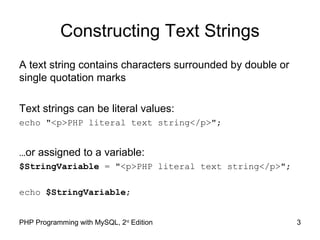
Constructing Text Strings
A text string contains characters surrounded by double or
single quotation marks
Text strings can be literal values:
echo "<p>PHP literal text string</p>";
…or assigned to a variable:
$StringVariable = "<p>PHP literal text string</p>";
echo $StringVariable;
4PHP Programming with MySQL, 2nd
Edition
To include a single or double quotation
marks in your displayed text:
$LatinQuote = '<p>"Et tu, Brute!"</p>';
echo $LatinQuote;
For single quotes:
$LatinQuote = "<p>'Et tu, Brute!'</p>";
echo $LatinQuote;
5PHP Programming with MySQL, 2nd
Edition
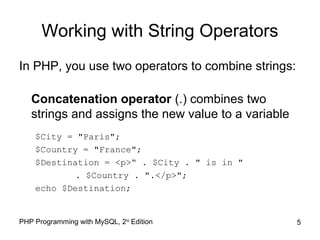
Working with String Operators
In PHP, you use two operators to combine strings:
Concatenation operator (.) combines two
strings and assigns the new value to a variable
$City = "Paris";
$Country = "France";
$Destination = <p>“ . $City . " is in "
. $Country . ".</p>";
echo $Destination;
6PHP Programming with MySQL, 2nd
Edition
Working with String Operators
• You can also combine strings using the
concatenation assignment operator (.=)
$Destination = "<p>Paris";
$Destination .= "is in France.</p>";
echo $Destination;
7PHP Programming with MySQL, 2nd
Edition
Escape Characters and Sequences
In PHP, the escape character is the backslash ()
echo '<p>This code's going to work</p>';
Do not add a backslash before an apostrophe
if you surround the text string with double
quotation marks
echo "<p>This code's going to work.</p>";
8PHP Programming with MySQL, 2nd
Edition
Escape Sequences
9PHP Programming with MySQL, 2nd
Edition
Adding Escape Characters and
Sequences (continued)
$Speaker = "Julius Caesar";
echo "<p>"Et tu, Brute!" exclaimed
$Speaker.</p>";
Figure 3-4 Output of literal text containing double quotation escape sequences
10PHP Programming with MySQL, 2nd
Edition
Simple and Complex String Syntax
Simple string syntax uses the value of a variable
within a string by including the variable name
inside a text string with double quotation marks
$Vegetable = "broccoli";
echo "<p>Do you have any $Vegetable?</p>";
Complex string syntax: variables placed within
curly braces inside of a string is called
$Vegetable = "carrot";
echo "<p>Do you have any {$Vegetable}s?</p>";
(more info on pages 131- 132)
11PHP Programming with MySQL, 2nd
Edition
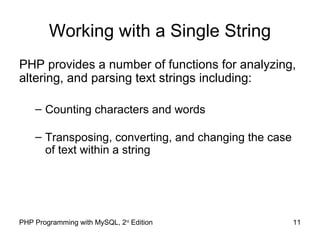
Working with a Single String
PHP provides a number of functions for analyzing,
altering, and parsing text strings including:
– Counting characters and words
– Transposing, converting, and changing the case
of text within a string
This author likes to use a lot of
words to say something simple.
•And also bullets.
•Bullets suck….in case you were
wondering.
•I have deleted a lot them. You’re
welcome.
12
13PHP Programming with MySQL, 2nd
Edition
Counting Characters and Words
The most commonly used string counting function
is the strlen() function, which returns the total
number of characters in a string
Escape sequences, such as n, are counted as
one character
$BookTitle = "The Cask of Amontillado";
echo "<p>The book title contains " .
strlen($BookTitle) . " characters.</p>";
14PHP Programming with MySQL, 2nd
Edition
Counting Characters and Words
The str_word_count() function returns the
number of words in a string
$BookTitle = "The Cask of Amontillado";
echo "<p>The book title contains " .
str_word_count($BookTitle). " words.</p>";
15PHP Programming with MySQL, 2nd
Edition
Modifying the Case of a String
strtoupper()function - uppercase
strtolower()function - lowercase
ucfirst()function - first character is uppercase
lcfirst()function - first character is lowercase
ucwords()function - uppercase first character of
each word
16PHP Programming with MySQL, 2nd Edition
Encoding and Decoding a String
Some characters in XHTML have a special
meaning and must be encoded using HTML
entities in order to preserve that meaning
– htmlspecialchars() converts special
characters to HTML entities
– html_specialcharacters_decode()
converts HTML character entities into their
equivalent characters
17PHP Programming with MySQL, 2nd Edition
Characters Converted with htmlspecialchars()
– '&' (ampersand) to '&amp;'
– '"' (double quote) to '&quot;'
when ENT_NOQUOTES is disabled (p138)
– ''' (single quote) to '&#039;'
only when ENT_QUOTES is enabled (p138)
– '<' (less than) to '&lt;'
– '>' (greater than) to '&gt;'
18PHP Programming with MySQL, 2nd Edition
Encoding and Decoding a String
If ENT_QUOTES is enabled in the PHP
configuration, both single and double quotes are
converted
If ENT_QUOTES is disabled in the PHP
configuration, neither single nor double quotes are
converted
19PHP Programming with MySQL, 2nd Edition
The md5()function - a one-way hash
– It is a fixed-length string based on the entered
text
– It is nearly impossible to determine the
original text
– Because it is one-way, there is not equivalent
decode function
– It is used to store passwords (page 138)
20PHP Programming with MySQL, 2nd Edition
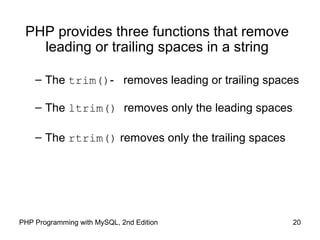
PHP provides three functions that remove
leading or trailing spaces in a string
– The trim()- removes leading or trailing spaces
– The ltrim() removes only the leading spaces
– The rtrim() removes only the trailing spaces
21PHP Programming with MySQL, 2nd Edition
The substr() returns part of a string
based on start and length parameters
$ExampleString = "woodworking project";
echo substr($ExampleString,4) . "<br />n";
echo substr($ExampleString,4,7) . "<br />n";
echo substr($ExampleString,0,8) . "<br />n";
echo substr($ExampleString,-7) . "<br />n";
echo substr($ExampleString,-12,4) . "<br />n";
(0 is the first character from the beginning)
(-1 if counting from the end.)
page (139)
22PHP Programming with MySQL, 2nd Edition
Working with Multiple Strings
Parsing is the act of dividing a string into logical
component substrings or tokens
Parsing refers to the extraction of information from
string literals and variables
23PHP Programming with MySQL, 2nd Edition
Finding Characters and Substrings
strpos()returns the position of the first
occurrence of one string in another string
strchr() searches from the beginning of a string
strrchr() searches from the end of a string
str_replace() and str_ireplace() replaces
characters within a string
strtok() breaks a string into smaller strings,
called tokens
24PHP Programming with MySQL, 2nd Edition
Dividing Strings into Smaller Pieces
$Presidents = " George Washington;John Thomas Jefferson;James
Madison;James Monroe";
$President = strtok($Presidents, ";");
while ($President != NULL) {
echo "$President<br />";
$President = strtok(";");
}
Figure 3-15 Output of a script that uses the strtok() function
25PHP Programming with MySQL, 2nd Edition
Converting Strings and Arrays
str_split() and explode() functions split a
string into an indexed array
str_split() function splits each character in a
string into an array element using the syntax:
$array = str_split(string[, length]);
The length argument represents the number
of characters you want assigned to each array
element
26PHP Programming with MySQL, 2nd Edition
Converting Strings and Arrays
explode() splits a string into an indexed array at
a specified separator
The syntax for the explode() function is:
$array = explode(separators, string);
The order of the arguments for the explode()
function is the reverse of the arguments for the
strtok() function
27PHP Programming with MySQL, 2nd Edition
Converting between Strings and
Arrays (continued)
The implode()function combines an array’s
elements into a single string, separated by specified
characters
The syntax is:
$variable = implode(separators, array);
28PHP Programming with MySQL, 2nd Edition
Converting Strings and Arrays
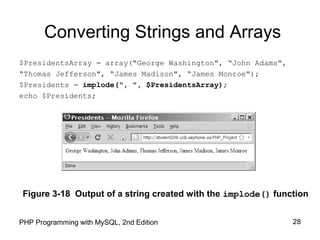
$PresidentsArray = array("George Washington", “John Adams",
“Thomas Jefferson", “James Madison", “James Monroe");
$Presidents = implode(", ", $PresidentsArray);
echo $Presidents;
Figure 3-18 Output of a string created with the implode() function
29PHP Programming with MySQL, 2nd Edition
Comparing Strings
Individual characters are compared by their position
in the American Standard Code for Information
Interchange (ASCII), which are numeric
representations of English characters
$FirstLetter = "A";
$SecondLetter = "B";
if ($SecondLetter > $FirstLetter)
echo "<p>The second letter is higher in the alphabet
than the first letter.</p>";
else
echo "<p>The second letter is lower in the alphabet
than
The first letter.</p>";
30PHP Programming with MySQL, 2nd Edition
Comparing Strings
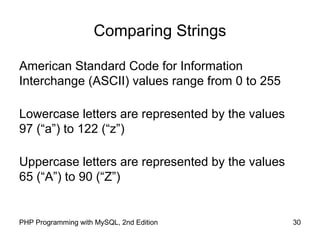
American Standard Code for Information
Interchange (ASCII) values range from 0 to 255
Lowercase letters are represented by the values
97 (“a”) to 122 (“z”)
Uppercase letters are represented by the values
65 (“A”) to 90 (“Z”)
31PHP Programming with MySQL, 2nd Edition
String Comparison Functions
strcasecmp() performs a case-insensitive
comparison of strings
strcmp() performs a case-sensitive comparison
of strings
That is all folks.
32PHP Programming with MySQL, 2nd Edition

Manipulating strings

  • 1.
    Chapter 3 Manipulating Strings PHPProgramming with MySQL 2nd Edition
  • 2.
    2PHP Programming withMySQL, 2nd Edition Objectives In this chapter, you will: • Construct text strings • Work with single strings • Work with multiple strings and parse strings • Compare strings • Use regular expressions
  • 3.
    3PHP Programming withMySQL, 2nd Edition Constructing Text Strings A text string contains characters surrounded by double or single quotation marks Text strings can be literal values: echo "<p>PHP literal text string</p>"; …or assigned to a variable: $StringVariable = "<p>PHP literal text string</p>"; echo $StringVariable;
  • 4.
    4PHP Programming withMySQL, 2nd Edition To include a single or double quotation marks in your displayed text: $LatinQuote = '<p>"Et tu, Brute!"</p>'; echo $LatinQuote; For single quotes: $LatinQuote = "<p>'Et tu, Brute!'</p>"; echo $LatinQuote;
  • 5.
    5PHP Programming withMySQL, 2nd Edition Working with String Operators In PHP, you use two operators to combine strings: Concatenation operator (.) combines two strings and assigns the new value to a variable $City = "Paris"; $Country = "France"; $Destination = <p>“ . $City . " is in " . $Country . ".</p>"; echo $Destination;
  • 6.
    6PHP Programming withMySQL, 2nd Edition Working with String Operators • You can also combine strings using the concatenation assignment operator (.=) $Destination = "<p>Paris"; $Destination .= "is in France.</p>"; echo $Destination;
  • 7.
    7PHP Programming withMySQL, 2nd Edition Escape Characters and Sequences In PHP, the escape character is the backslash () echo '<p>This code's going to work</p>'; Do not add a backslash before an apostrophe if you surround the text string with double quotation marks echo "<p>This code's going to work.</p>";
  • 8.
    8PHP Programming withMySQL, 2nd Edition Escape Sequences
  • 9.
    9PHP Programming withMySQL, 2nd Edition Adding Escape Characters and Sequences (continued) $Speaker = "Julius Caesar"; echo "<p>"Et tu, Brute!" exclaimed $Speaker.</p>"; Figure 3-4 Output of literal text containing double quotation escape sequences
  • 10.
    10PHP Programming withMySQL, 2nd Edition Simple and Complex String Syntax Simple string syntax uses the value of a variable within a string by including the variable name inside a text string with double quotation marks $Vegetable = "broccoli"; echo "<p>Do you have any $Vegetable?</p>"; Complex string syntax: variables placed within curly braces inside of a string is called $Vegetable = "carrot"; echo "<p>Do you have any {$Vegetable}s?</p>"; (more info on pages 131- 132)
  • 11.
    11PHP Programming withMySQL, 2nd Edition Working with a Single String PHP provides a number of functions for analyzing, altering, and parsing text strings including: – Counting characters and words – Transposing, converting, and changing the case of text within a string
  • 12.
    This author likesto use a lot of words to say something simple. •And also bullets. •Bullets suck….in case you were wondering. •I have deleted a lot them. You’re welcome. 12
  • 13.
    13PHP Programming withMySQL, 2nd Edition Counting Characters and Words The most commonly used string counting function is the strlen() function, which returns the total number of characters in a string Escape sequences, such as n, are counted as one character $BookTitle = "The Cask of Amontillado"; echo "<p>The book title contains " . strlen($BookTitle) . " characters.</p>";
  • 14.
    14PHP Programming withMySQL, 2nd Edition Counting Characters and Words The str_word_count() function returns the number of words in a string $BookTitle = "The Cask of Amontillado"; echo "<p>The book title contains " . str_word_count($BookTitle). " words.</p>";
  • 15.
    15PHP Programming withMySQL, 2nd Edition Modifying the Case of a String strtoupper()function - uppercase strtolower()function - lowercase ucfirst()function - first character is uppercase lcfirst()function - first character is lowercase ucwords()function - uppercase first character of each word
  • 16.
    16PHP Programming withMySQL, 2nd Edition Encoding and Decoding a String Some characters in XHTML have a special meaning and must be encoded using HTML entities in order to preserve that meaning – htmlspecialchars() converts special characters to HTML entities – html_specialcharacters_decode() converts HTML character entities into their equivalent characters
  • 17.
    17PHP Programming withMySQL, 2nd Edition Characters Converted with htmlspecialchars() – '&' (ampersand) to '&amp;' – '"' (double quote) to '&quot;' when ENT_NOQUOTES is disabled (p138) – ''' (single quote) to '&#039;' only when ENT_QUOTES is enabled (p138) – '<' (less than) to '&lt;' – '>' (greater than) to '&gt;'
  • 18.
    18PHP Programming withMySQL, 2nd Edition Encoding and Decoding a String If ENT_QUOTES is enabled in the PHP configuration, both single and double quotes are converted If ENT_QUOTES is disabled in the PHP configuration, neither single nor double quotes are converted
  • 19.
    19PHP Programming withMySQL, 2nd Edition The md5()function - a one-way hash – It is a fixed-length string based on the entered text – It is nearly impossible to determine the original text – Because it is one-way, there is not equivalent decode function – It is used to store passwords (page 138)
  • 20.
    20PHP Programming withMySQL, 2nd Edition PHP provides three functions that remove leading or trailing spaces in a string – The trim()- removes leading or trailing spaces – The ltrim() removes only the leading spaces – The rtrim() removes only the trailing spaces
  • 21.
    21PHP Programming withMySQL, 2nd Edition The substr() returns part of a string based on start and length parameters $ExampleString = "woodworking project"; echo substr($ExampleString,4) . "<br />n"; echo substr($ExampleString,4,7) . "<br />n"; echo substr($ExampleString,0,8) . "<br />n"; echo substr($ExampleString,-7) . "<br />n"; echo substr($ExampleString,-12,4) . "<br />n"; (0 is the first character from the beginning) (-1 if counting from the end.) page (139)
  • 22.
    22PHP Programming withMySQL, 2nd Edition Working with Multiple Strings Parsing is the act of dividing a string into logical component substrings or tokens Parsing refers to the extraction of information from string literals and variables
  • 23.
    23PHP Programming withMySQL, 2nd Edition Finding Characters and Substrings strpos()returns the position of the first occurrence of one string in another string strchr() searches from the beginning of a string strrchr() searches from the end of a string str_replace() and str_ireplace() replaces characters within a string strtok() breaks a string into smaller strings, called tokens
  • 24.
    24PHP Programming withMySQL, 2nd Edition Dividing Strings into Smaller Pieces $Presidents = " George Washington;John Thomas Jefferson;James Madison;James Monroe"; $President = strtok($Presidents, ";"); while ($President != NULL) { echo "$President<br />"; $President = strtok(";"); } Figure 3-15 Output of a script that uses the strtok() function
  • 25.
    25PHP Programming withMySQL, 2nd Edition Converting Strings and Arrays str_split() and explode() functions split a string into an indexed array str_split() function splits each character in a string into an array element using the syntax: $array = str_split(string[, length]); The length argument represents the number of characters you want assigned to each array element
  • 26.
    26PHP Programming withMySQL, 2nd Edition Converting Strings and Arrays explode() splits a string into an indexed array at a specified separator The syntax for the explode() function is: $array = explode(separators, string); The order of the arguments for the explode() function is the reverse of the arguments for the strtok() function
  • 27.
    27PHP Programming withMySQL, 2nd Edition Converting between Strings and Arrays (continued) The implode()function combines an array’s elements into a single string, separated by specified characters The syntax is: $variable = implode(separators, array);
  • 28.
    28PHP Programming withMySQL, 2nd Edition Converting Strings and Arrays $PresidentsArray = array("George Washington", “John Adams", “Thomas Jefferson", “James Madison", “James Monroe"); $Presidents = implode(", ", $PresidentsArray); echo $Presidents; Figure 3-18 Output of a string created with the implode() function
  • 29.
    29PHP Programming withMySQL, 2nd Edition Comparing Strings Individual characters are compared by their position in the American Standard Code for Information Interchange (ASCII), which are numeric representations of English characters $FirstLetter = "A"; $SecondLetter = "B"; if ($SecondLetter > $FirstLetter) echo "<p>The second letter is higher in the alphabet than the first letter.</p>"; else echo "<p>The second letter is lower in the alphabet than The first letter.</p>";
  • 30.
    30PHP Programming withMySQL, 2nd Edition Comparing Strings American Standard Code for Information Interchange (ASCII) values range from 0 to 255 Lowercase letters are represented by the values 97 (“a”) to 122 (“z”) Uppercase letters are represented by the values 65 (“A”) to 90 (“Z”)
  • 31.
    31PHP Programming withMySQL, 2nd Edition String Comparison Functions strcasecmp() performs a case-insensitive comparison of strings strcmp() performs a case-sensitive comparison of strings
  • 32.
    That is allfolks. 32PHP Programming with MySQL, 2nd Edition