STORYBOARD
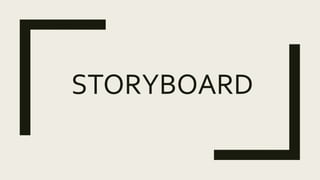
Mise- en-scene 
 Action: Alarm clock rings
 Lighting: low key
 Camera shot: extreme close up
 Sound: diegetic sound of
beeping of alarm clock
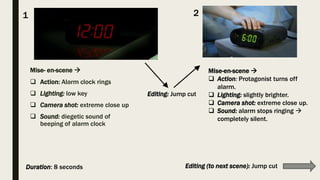
Mise-en-scene 
 Action: Protagonist turns off
alarm.
 Lighting: slightly brighter.
 Camera shot: extreme close up.
 Sound: alarm stops ringing 
completely silent.
1 2
Editing: Jump cut
Editing (to next scene): Jump cutDuration: 8 seconds
3
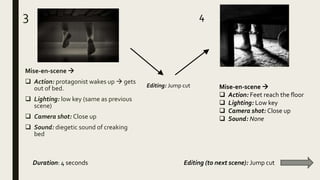
Mise-en-scene 
 Action: protagonist wakes up  gets
out of bed.
 Lighting: low key (same as previous
scene)
 Camera shot: Close up
 Sound: diegetic sound of creaking
bed
4
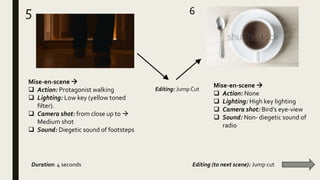
Mise-en-scene 
 Action: Feet reach the floor
 Lighting: Low key
 Camera shot: Close up
 Sound: None
Duration: 4 seconds Editing (to next scene): Jump cut
Editing: Jump cut
5 6
Mise-en-scene 
 Action: Protagonist walking
 Lighting: Low key (yellow toned
filter).
 Camera shot: from close up to 
Medium shot
 Sound: Diegetic sound of footsteps
Mise-en-scene 
 Action: None
 Lighting: High key lighting
 Camera shot: Bird’s eye-view
 Sound: Non- diegetic sound of
radio
Duration: 4 seconds Editing (to next scene): Jump cut
Editing: Jump Cut
7 8
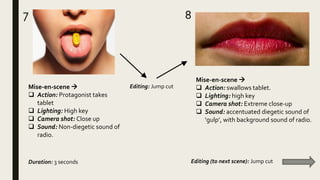
Mise-en-scene 
 Action: swallows tablet.
 Lighting: high key
 Camera shot: Extreme close-up
 Sound: accentuated diegetic sound of
‘gulp’, with background sound of radio.
Mise-en-scene 
 Action: Protagonist takes
tablet
 Lighting: High key
 Camera shot: Close up
 Sound: Non-diegetic sound of
radio.
Duration: 3 seconds
Editing: Jump cut
Editing (to next scene): Jump cut
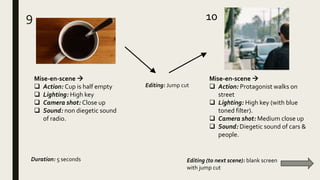
9 10
Mise-en-scene 
 Action: Cup is half empty
 Lighting: High key
 Camera shot: Close up
 Sound: non diegetic sound
of radio.
Mise-en-scene 
 Action: Protagonist walks on
street
 Lighting: High key (with blue
toned filter).
 Camera shot: Medium close up
 Sound: Diegetic sound of cars &
people.
Duration: 5 seconds Editing (to next scene): blank screen
with jump cut
Editing: Jump cut
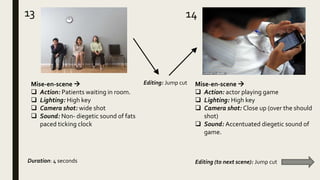
13 14
Mise-en-scene 
 Action: Patients waiting in room.
 Lighting: High key
 Camera shot: wide shot
 Sound: Non- diegetic sound of fats
paced ticking clock
Mise-en-scene 
 Action: actor playing game
 Lighting: High key
 Camera shot: Close up (over the should
shot)
 Sound: Accentuated diegetic sound of
game.
Duration: 4 seconds Editing (to next scene): Jump cut
Editing: Jump cut
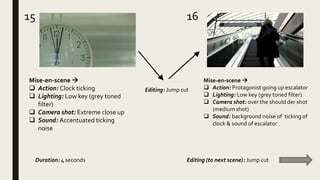
15 16
Mise-en-scene 
 Action: Clock ticking
 Lighting: Low key (grey toned
filter)
 Camera shot: Extreme close up
 Sound: Accentuated ticking
noise
Mise-en-scene 
 Action: Protagonist going up escalator
 Lighting: Low key (grey toned filter)
 Camera shot: over the should der shot
(medium shot)
 Sound: background noise of ticking of
clock & sound of escalator
Duration: 4 seconds Editing (to next scene): Jump cut
Editing: Jump cut
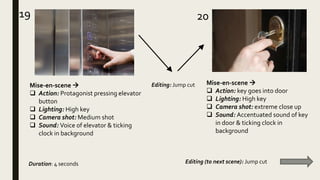
19 20
Mise-en-scene 
 Action: Protagonist pressing elevator
button
 Lighting: High key
 Camera shot: Medium shot
 Sound: Voice of elevator & ticking
clock in background
Mise-en-scene 
 Action: key goes into door
 Lighting: High key
 Camera shot: extreme close up
 Sound: Accentuated sound of key
in door & ticking clock in
background
Duration: 4 seconds Editing (to next scene): Jump cut
Editing: Jump cut
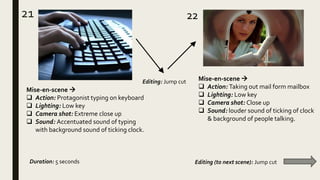
21
Mise-en-scene 
 Action: Protagonist typing on keyboard
 Lighting: Low key
 Camera shot: Extreme close up
 Sound: Accentuated sound of typing
with background sound of ticking clock.
Mise-en-scene 
 Action: Taking out mail form mailbox
 Lighting: Low key
 Camera shot: Close up
 Sound: louder sound of ticking of clock
& background of people talking.
22
Duration: 5 seconds Editing (to next scene): Jump cut
Editing: Jump cut
23
Mise-en-scene 
 Action: screen turns blank
 Lighting: /
 Camera shot: /
 Sound: All sound stops abruptly
Scenes 12 – 13 are repeated twice more in fast
paced jump cuts, with more accentuated
diegetic/non-diegetic sounds.
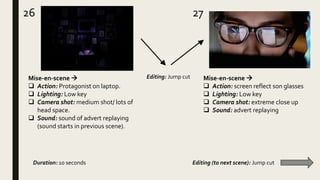
26 27
Mise-en-scene 
 Action: Protagonist on laptop.
 Lighting: Low key
 Camera shot: medium shot/ lots of
head space.
 Sound: sound of advert replaying
(sound starts in previous scene).
Mise-en-scene 
 Action: screen reflect son glasses
 Lighting: Low key
 Camera shot: extreme close up
 Sound: advert replaying
Editing: Jump cut
Duration: 10 seconds Editing (to next scene): Jump cut
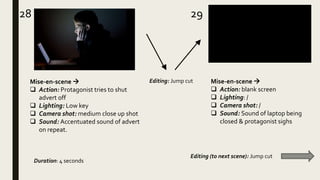
28 29
Mise-en-scene 
 Action: Protagonist tries to shut
advert off
 Lighting: Low key
 Camera shot: medium close up shot
 Sound: Accentuated sound of advert
on repeat.
Mise-en-scene 
 Action: blank screen
 Lighting: /
 Camera shot: /
 Sound: Sound of laptop being
closed & protagonist sighs
Editing: Jump cut
Duration: 4 seconds
Editing (to next scene): Jump cut
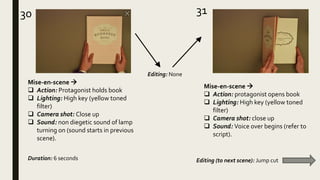
30 31
Mise-en-scene 
 Action: protagonist opens book
 Lighting: High key (yellow toned
filter)
 Camera shot: close up
 Sound: Voice over begins (refer to
script).
Mise-en-scene 
 Action: Protagonist holds book
 Lighting: High key (yellow toned
filter)
 Camera shot: Close up
 Sound: non diegetic sound of lamp
turning on (sound starts in previous
scene).
Editing: None
Duration: 6 seconds Editing (to next scene): Jump cut
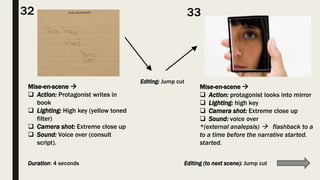
Mise-en-scene 
 Action: protagonist looks into mirror
 Lighting: high key
 Camera shot: Extreme close up
 Sound: voice over
*(external analepsis)  flashback to a
to a time before the narrative started.
started.
Mise-en-scene 
 Action: Protagonist writes in
book
 Lighting: High key (yellow toned
filter)
 Camera shot: Extreme close up
 Sound: Voice over (consult
script).
32 33
Editing: Jump cut
Duration: 4 seconds Editing (to next scene): Jump cut
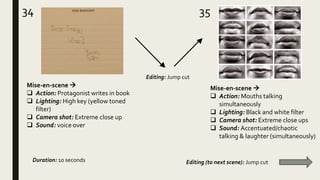
34 35
Mise-en-scene 
 Action: Protagonist writes in book
 Lighting: High key (yellow toned
filter)
 Camera shot: Extreme close up
 Sound: voice over
Mise-en-scene 
 Action: Mouths talking
simultaneously
 Lighting: Black and white filter
 Camera shot: Extreme close ups
 Sound: Accentuated/chaotic
talking & laughter (simultaneously)
Editing: Jump cut
Duration: 10 seconds Editing (to next scene): Jump cut
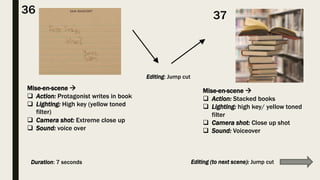
Mise-en-scene 
 Action: Protagonist writes in book
 Lighting: High key (yellow toned
filter)
 Camera shot: Extreme close up
 Sound: voice over
36 37
Mise-en-scene 
 Action: Stacked books
 Lighting: high key/ yellow toned
filter
 Camera shot: Close up shot
 Sound: Voiceover
Duration: 7 seconds Editing (to next scene): Jump cut
Editing: Jump cut
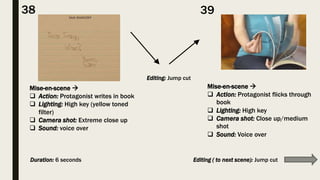
Mise-en-scene 
 Action: Protagonist flicks through
book
 Lighting: High key
 Camera shot: Close up/medium
shot
 Sound: Voice over
38 39
Mise-en-scene 
 Action: Protagonist writes in book
 Lighting: High key (yellow toned
filter)
 Camera shot: Extreme close up
 Sound: voice over
Editing: Jump cut
Duration: 6 seconds Editing ( to next scene): Jump cut
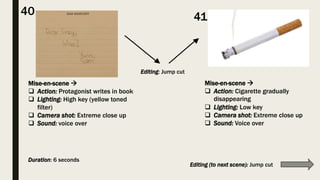
Mise-en-scene 
 Action: Cigarette gradually
disappearing
 Lighting: Low key
 Camera shot: Extreme close up
 Sound: Voice over
Mise-en-scene 
 Action: Protagonist writes in book
 Lighting: High key (yellow toned
filter)
 Camera shot: Extreme close up
 Sound: voice over
4140
Editing: Jump cut
Duration: 6 seconds
Editing (to next scene): Jump cut
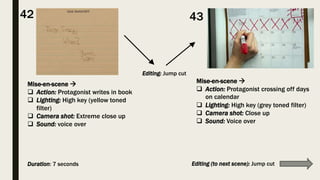
Mise-en-scene 
 Action: Protagonist crossing off days
on calendar
 Lighting: High key (grey toned filter)
 Camera shot: Close up
 Sound: Voice over
Mise-en-scene 
 Action: Protagonist writes in book
 Lighting: High key (yellow toned
filter)
 Camera shot: Extreme close up
 Sound: voice over
4342
Duration: 7 seconds
Editing: Jump cut
Editing (to next scene): Jump cut
Mise-en-scene 
 Action: Protagonist writes in
book
 Lighting: High key (yellow toned
filter)
 Camera shot: Extreme close up
 Sound: voice over
4544
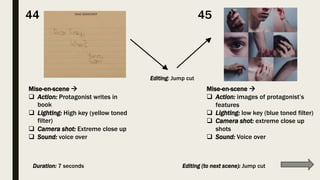
Mise-en-scene 
 Action: images of protagonist’s
features
 Lighting: low key (blue toned filter)
 Camera shot: extreme close up
shots
 Sound: Voice over
Editing: Jump cut
Duration: 7 seconds Editing (to next scene): Jump cut
Mise-en-scene 
 Action: Protagonist writes in
book
 Lighting: High key (yellow toned
toned filter)
 Camera shot: Extreme close up
up
 Sound: voice over
4746
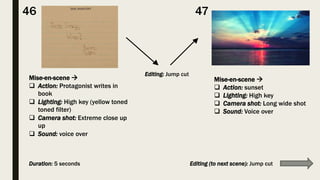
Mise-en-scene 
 Action: sunset
 Lighting: High key
 Camera shot: Long wide shot
 Sound: Voice over
Duration: 5 seconds
Editing: Jump cut
Editing (to next scene): Jump cut
48 39
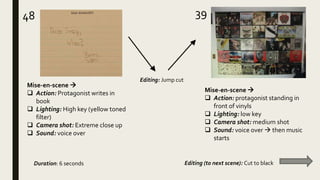
Mise-en-scene 
 Action: Protagonist writes in
book
 Lighting: High key (yellow toned
filter)
 Camera shot: Extreme close up
 Sound: voice over
Mise-en-scene 
 Action: protagonist standing in
front of vinyls
 Lighting: low key
 Camera shot: medium shot
 Sound: voice over  then music
starts
Editing: Jump cut
Duration: 6 seconds Editing (to next scene): Cut to black
5150
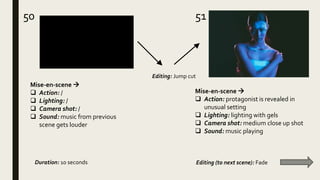
Mise-en-scene 
 Action: protagonist is revealed in
unusual setting
 Lighting: lighting with gels
 Camera shot: medium close up shot
 Sound: music playing
Mise-en-scene 
 Action: /
 Lighting: /
 Camera shot: /
 Sound: music from previous
scene gets louder
Editing: Jump cut
Duration: 10 seconds Editing (to next scene): Fade
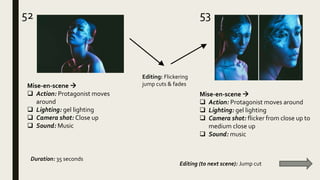
5352
Mise-en-scene 
 Action: Protagonist moves
around
 Lighting: gel lighting
 Camera shot: Close up
 Sound: Music
Mise-en-scene 
 Action: Protagonist moves around
 Lighting: gel lighting
 Camera shot: flicker from close up to
medium close up
 Sound: music
Editing: Flickering
jump cuts & fades
Duration: 35 seconds
Editing (to next scene): Jump cut
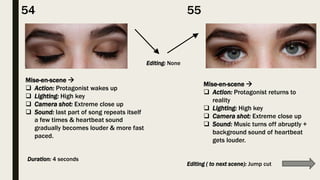
Mise-en-scene 
 Action: Protagonist wakes up
 Lighting: High key
 Camera shot: Extreme close up
 Sound: last part of song repeats itself
a few times & heartbeat sound
gradually becomes louder & more fast
paced.
Mise-en-scene 
 Action: Protagonist returns to
reality
 Lighting: High key
 Camera shot: Extreme close up
 Sound: Music turns off abruptly +
background sound of heartbeat
gets louder.
54 55
Editing: None
Duration: 4 seconds
Editing ( to next scene): Jump cut
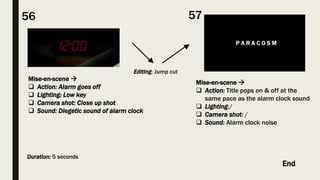
P A R A C O S M
Mise-en-scene 
 Action: Title pops on & off at the
same pace as the alarm clock sound
 Lighting:/
 Camera shot: /
 Sound: Alarm clock noise
Mise-en-scene 
 Action: Alarm goes off
 Lighting: Low key
 Camera shot: Close up shot
 Sound: Diegetic sound of alarm clock
5756
Editing: Jump cut
Duration: 5 seconds
End

Storyboard

  • 1.
  • 2.
    Mise- en-scene  Action: Alarm clock rings  Lighting: low key  Camera shot: extreme close up  Sound: diegetic sound of beeping of alarm clock Mise-en-scene   Action: Protagonist turns off alarm.  Lighting: slightly brighter.  Camera shot: extreme close up.  Sound: alarm stops ringing  completely silent. 1 2 Editing: Jump cut Editing (to next scene): Jump cutDuration: 8 seconds
  • 3.
    3 Mise-en-scene   Action:protagonist wakes up  gets out of bed.  Lighting: low key (same as previous scene)  Camera shot: Close up  Sound: diegetic sound of creaking bed 4 Mise-en-scene   Action: Feet reach the floor  Lighting: Low key  Camera shot: Close up  Sound: None Duration: 4 seconds Editing (to next scene): Jump cut Editing: Jump cut
  • 4.
    5 6 Mise-en-scene  Action: Protagonist walking  Lighting: Low key (yellow toned filter).  Camera shot: from close up to  Medium shot  Sound: Diegetic sound of footsteps Mise-en-scene   Action: None  Lighting: High key lighting  Camera shot: Bird’s eye-view  Sound: Non- diegetic sound of radio Duration: 4 seconds Editing (to next scene): Jump cut Editing: Jump Cut
  • 5.
    7 8 Mise-en-scene  Action: swallows tablet.  Lighting: high key  Camera shot: Extreme close-up  Sound: accentuated diegetic sound of ‘gulp’, with background sound of radio. Mise-en-scene   Action: Protagonist takes tablet  Lighting: High key  Camera shot: Close up  Sound: Non-diegetic sound of radio. Duration: 3 seconds Editing: Jump cut Editing (to next scene): Jump cut
  • 6.
    9 10 Mise-en-scene  Action: Cup is half empty  Lighting: High key  Camera shot: Close up  Sound: non diegetic sound of radio. Mise-en-scene   Action: Protagonist walks on street  Lighting: High key (with blue toned filter).  Camera shot: Medium close up  Sound: Diegetic sound of cars & people. Duration: 5 seconds Editing (to next scene): blank screen with jump cut Editing: Jump cut
  • 7.
    13 14 Mise-en-scene  Action: Patients waiting in room.  Lighting: High key  Camera shot: wide shot  Sound: Non- diegetic sound of fats paced ticking clock Mise-en-scene   Action: actor playing game  Lighting: High key  Camera shot: Close up (over the should shot)  Sound: Accentuated diegetic sound of game. Duration: 4 seconds Editing (to next scene): Jump cut Editing: Jump cut
  • 8.
    15 16 Mise-en-scene  Action: Clock ticking  Lighting: Low key (grey toned filter)  Camera shot: Extreme close up  Sound: Accentuated ticking noise Mise-en-scene   Action: Protagonist going up escalator  Lighting: Low key (grey toned filter)  Camera shot: over the should der shot (medium shot)  Sound: background noise of ticking of clock & sound of escalator Duration: 4 seconds Editing (to next scene): Jump cut Editing: Jump cut
  • 9.
    19 20 Mise-en-scene  Action: Protagonist pressing elevator button  Lighting: High key  Camera shot: Medium shot  Sound: Voice of elevator & ticking clock in background Mise-en-scene   Action: key goes into door  Lighting: High key  Camera shot: extreme close up  Sound: Accentuated sound of key in door & ticking clock in background Duration: 4 seconds Editing (to next scene): Jump cut Editing: Jump cut
  • 10.
    21 Mise-en-scene   Action:Protagonist typing on keyboard  Lighting: Low key  Camera shot: Extreme close up  Sound: Accentuated sound of typing with background sound of ticking clock. Mise-en-scene   Action: Taking out mail form mailbox  Lighting: Low key  Camera shot: Close up  Sound: louder sound of ticking of clock & background of people talking. 22 Duration: 5 seconds Editing (to next scene): Jump cut Editing: Jump cut
  • 11.
    23 Mise-en-scene   Action:screen turns blank  Lighting: /  Camera shot: /  Sound: All sound stops abruptly Scenes 12 – 13 are repeated twice more in fast paced jump cuts, with more accentuated diegetic/non-diegetic sounds.
  • 12.
    26 27 Mise-en-scene  Action: Protagonist on laptop.  Lighting: Low key  Camera shot: medium shot/ lots of head space.  Sound: sound of advert replaying (sound starts in previous scene). Mise-en-scene   Action: screen reflect son glasses  Lighting: Low key  Camera shot: extreme close up  Sound: advert replaying Editing: Jump cut Duration: 10 seconds Editing (to next scene): Jump cut
  • 13.
    28 29 Mise-en-scene  Action: Protagonist tries to shut advert off  Lighting: Low key  Camera shot: medium close up shot  Sound: Accentuated sound of advert on repeat. Mise-en-scene   Action: blank screen  Lighting: /  Camera shot: /  Sound: Sound of laptop being closed & protagonist sighs Editing: Jump cut Duration: 4 seconds Editing (to next scene): Jump cut
  • 14.
    30 31 Mise-en-scene  Action: protagonist opens book  Lighting: High key (yellow toned filter)  Camera shot: close up  Sound: Voice over begins (refer to script). Mise-en-scene   Action: Protagonist holds book  Lighting: High key (yellow toned filter)  Camera shot: Close up  Sound: non diegetic sound of lamp turning on (sound starts in previous scene). Editing: None Duration: 6 seconds Editing (to next scene): Jump cut
  • 15.
    Mise-en-scene   Action:protagonist looks into mirror  Lighting: high key  Camera shot: Extreme close up  Sound: voice over *(external analepsis)  flashback to a to a time before the narrative started. started. Mise-en-scene   Action: Protagonist writes in book  Lighting: High key (yellow toned filter)  Camera shot: Extreme close up  Sound: Voice over (consult script). 32 33 Editing: Jump cut Duration: 4 seconds Editing (to next scene): Jump cut
  • 16.
    34 35 Mise-en-scene  Action: Protagonist writes in book  Lighting: High key (yellow toned filter)  Camera shot: Extreme close up  Sound: voice over Mise-en-scene   Action: Mouths talking simultaneously  Lighting: Black and white filter  Camera shot: Extreme close ups  Sound: Accentuated/chaotic talking & laughter (simultaneously) Editing: Jump cut Duration: 10 seconds Editing (to next scene): Jump cut
  • 17.
    Mise-en-scene   Action:Protagonist writes in book  Lighting: High key (yellow toned filter)  Camera shot: Extreme close up  Sound: voice over 36 37 Mise-en-scene   Action: Stacked books  Lighting: high key/ yellow toned filter  Camera shot: Close up shot  Sound: Voiceover Duration: 7 seconds Editing (to next scene): Jump cut Editing: Jump cut
  • 18.
    Mise-en-scene   Action:Protagonist flicks through book  Lighting: High key  Camera shot: Close up/medium shot  Sound: Voice over 38 39 Mise-en-scene   Action: Protagonist writes in book  Lighting: High key (yellow toned filter)  Camera shot: Extreme close up  Sound: voice over Editing: Jump cut Duration: 6 seconds Editing ( to next scene): Jump cut
  • 19.
    Mise-en-scene   Action:Cigarette gradually disappearing  Lighting: Low key  Camera shot: Extreme close up  Sound: Voice over Mise-en-scene   Action: Protagonist writes in book  Lighting: High key (yellow toned filter)  Camera shot: Extreme close up  Sound: voice over 4140 Editing: Jump cut Duration: 6 seconds Editing (to next scene): Jump cut
  • 20.
    Mise-en-scene   Action:Protagonist crossing off days on calendar  Lighting: High key (grey toned filter)  Camera shot: Close up  Sound: Voice over Mise-en-scene   Action: Protagonist writes in book  Lighting: High key (yellow toned filter)  Camera shot: Extreme close up  Sound: voice over 4342 Duration: 7 seconds Editing: Jump cut Editing (to next scene): Jump cut
  • 21.
    Mise-en-scene   Action:Protagonist writes in book  Lighting: High key (yellow toned filter)  Camera shot: Extreme close up  Sound: voice over 4544 Mise-en-scene   Action: images of protagonist’s features  Lighting: low key (blue toned filter)  Camera shot: extreme close up shots  Sound: Voice over Editing: Jump cut Duration: 7 seconds Editing (to next scene): Jump cut
  • 22.
    Mise-en-scene   Action:Protagonist writes in book  Lighting: High key (yellow toned toned filter)  Camera shot: Extreme close up up  Sound: voice over 4746 Mise-en-scene   Action: sunset  Lighting: High key  Camera shot: Long wide shot  Sound: Voice over Duration: 5 seconds Editing: Jump cut Editing (to next scene): Jump cut
  • 23.
    48 39 Mise-en-scene  Action: Protagonist writes in book  Lighting: High key (yellow toned filter)  Camera shot: Extreme close up  Sound: voice over Mise-en-scene   Action: protagonist standing in front of vinyls  Lighting: low key  Camera shot: medium shot  Sound: voice over  then music starts Editing: Jump cut Duration: 6 seconds Editing (to next scene): Cut to black
  • 24.
    5150 Mise-en-scene   Action:protagonist is revealed in unusual setting  Lighting: lighting with gels  Camera shot: medium close up shot  Sound: music playing Mise-en-scene   Action: /  Lighting: /  Camera shot: /  Sound: music from previous scene gets louder Editing: Jump cut Duration: 10 seconds Editing (to next scene): Fade
  • 25.
    5352 Mise-en-scene   Action:Protagonist moves around  Lighting: gel lighting  Camera shot: Close up  Sound: Music Mise-en-scene   Action: Protagonist moves around  Lighting: gel lighting  Camera shot: flicker from close up to medium close up  Sound: music Editing: Flickering jump cuts & fades Duration: 35 seconds Editing (to next scene): Jump cut
  • 26.
    Mise-en-scene   Action:Protagonist wakes up  Lighting: High key  Camera shot: Extreme close up  Sound: last part of song repeats itself a few times & heartbeat sound gradually becomes louder & more fast paced. Mise-en-scene   Action: Protagonist returns to reality  Lighting: High key  Camera shot: Extreme close up  Sound: Music turns off abruptly + background sound of heartbeat gets louder. 54 55 Editing: None Duration: 4 seconds Editing ( to next scene): Jump cut
  • 27.
    P A RA C O S M Mise-en-scene   Action: Title pops on & off at the same pace as the alarm clock sound  Lighting:/  Camera shot: /  Sound: Alarm clock noise Mise-en-scene   Action: Alarm goes off  Lighting: Low key  Camera shot: Close up shot  Sound: Diegetic sound of alarm clock 5756 Editing: Jump cut Duration: 5 seconds End