Group Name:
Group Member List
ID Name
152-15-6226 Md. Nasir Uddin Mahamud
152-15-6227 Mohammad Tanbidul Islam
152-15-6228 Md Rasel Khan
152-15-6229 Md. Saddam Hossain
152-15-6230 Md. Arju Miah
152-15-6231 Md. Yousuf Jamil
152-15-6232 Md. Touhidur Rahman
Data Presentation Technique
Tabular Presentation
OurPresentation Topic is
TabularPresentation:
A tabular data presentation is the clear
organization of data into rows and columns
without losing any information of interest to
facilitate communication.
TabularPresentation are Three Types.
Univariate Table
Bivariate Table
Multivariate
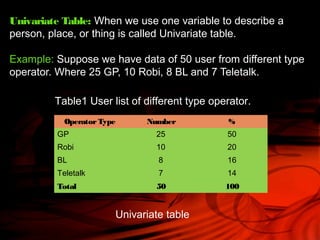
Univariate Table: When we use one variable to describe a
person, place, or thing is called Univariate table.
Example: Suppose we have data of 50 user from different type
operator. Where 25 GP, 10 Robi, 8 BL and 7 Teletalk.
OperatorType Number %
GP 25 50
Robi 10 20
BL 8 16
Teletalk 7 14
Total 50 100
Table1 User list of different type operator.
Univariate table
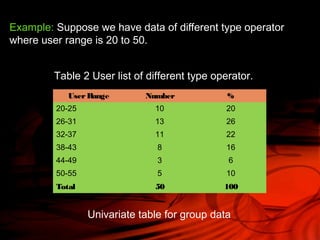
Example: Suppose we have data of different type operator
where user range is 20 to 50.
UserRange Number %
20-25 10 20
26-31 13 26
32-37 11 22
38-43 8 16
44-49 3 6
50-55 5 10
Total 50 100
Table 2 User list of different type operator.
Univariate table for group data
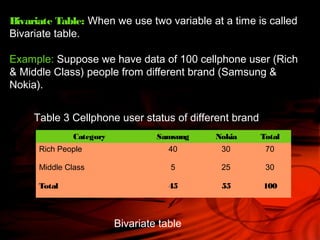
Bivariate Table: When we use two variable at a time is called
Bivariate table.
Example: Suppose we have data of 100 cellphone user (Rich
& Middle Class) people from different brand (Samsung &
Nokia).
Category Samsung Nokia Total
Rich People 40 30 70
Middle Class 5 25 30
Total 45 55 100
Table 3 Cellphone user status of different brand
Bivariate table
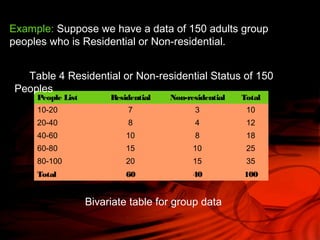
Example: Suppose we have a data of 150 adults group
peoples who is Residential or Non-residential.
People List Residential Non-residential Total
10-20 7 3 10
20-40 8 4 12
40-60 10 8 18
60-80 15 10 25
80-100 20 15 35
Total 60 40 100
Table 4 Residential or Non-residential Status of 150
Peoples
Bivariate table for group data
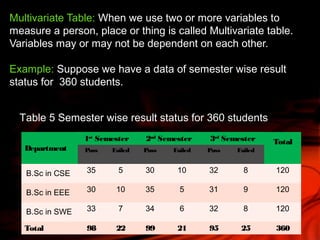
Multivariate Table: When we use two or more variables to
measure a person, place or thing is called Multivariate table.
Variables may or may not be dependent on each other.
Example: Suppose we have a data of semester wise result
status for 360 students.
Department
1st
Semester 2nd
Semester 3rd
Semester Total
Pass Failed Pass Failed Pass Failed
B.Sc in CSE 35 5 30 10 32 8 120
B.Sc in EEE 30 10 35 5 31 9 120
B.Sc in SWE 33 7 34 6 32 8 120
Total 98 22 99 21 95 25 360
Table 5 Semester wise result status for 360 students
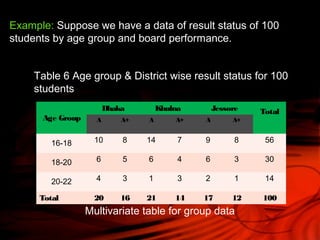
Example: Suppose we have a data of result status of 100
students by age group and board performance.
Age Group
Dhaka Khulna Jessore Total
A A+ A A+ A A+
16-18 10 8 14 7 9 8 56
18-20 6 5 6 4 6 3 30
20-22 4 3 1 3 2 1 14
Total 20 16 21 14 17 12 100
Table 6 Age group & District wise result status for 100
students
Multivariate table for group data
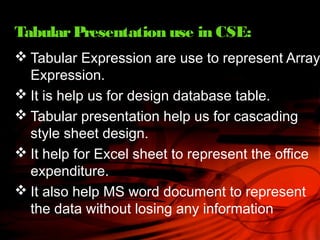
 Tabular Expression are use to represent Array
Expression.
 It is help us for design database table.
 Tabular presentation help us for cascading
style sheet design.
 It help for Excel sheet to represent the office
expenditure.
 It also help MS word document to represent
the data without losing any information
TabularPresentation use in CSE:
Thank You

Statistics presentation

  • 2.
    Group Name: Group MemberList ID Name 152-15-6226 Md. Nasir Uddin Mahamud 152-15-6227 Mohammad Tanbidul Islam 152-15-6228 Md Rasel Khan 152-15-6229 Md. Saddam Hossain 152-15-6230 Md. Arju Miah 152-15-6231 Md. Yousuf Jamil 152-15-6232 Md. Touhidur Rahman
  • 3.
    Data Presentation Technique TabularPresentation OurPresentation Topic is
  • 4.
    TabularPresentation: A tabular datapresentation is the clear organization of data into rows and columns without losing any information of interest to facilitate communication. TabularPresentation are Three Types. Univariate Table Bivariate Table Multivariate
  • 5.
    Univariate Table: Whenwe use one variable to describe a person, place, or thing is called Univariate table. Example: Suppose we have data of 50 user from different type operator. Where 25 GP, 10 Robi, 8 BL and 7 Teletalk. OperatorType Number % GP 25 50 Robi 10 20 BL 8 16 Teletalk 7 14 Total 50 100 Table1 User list of different type operator. Univariate table
  • 6.
    Example: Suppose wehave data of different type operator where user range is 20 to 50. UserRange Number % 20-25 10 20 26-31 13 26 32-37 11 22 38-43 8 16 44-49 3 6 50-55 5 10 Total 50 100 Table 2 User list of different type operator. Univariate table for group data
  • 7.
    Bivariate Table: Whenwe use two variable at a time is called Bivariate table. Example: Suppose we have data of 100 cellphone user (Rich & Middle Class) people from different brand (Samsung & Nokia). Category Samsung Nokia Total Rich People 40 30 70 Middle Class 5 25 30 Total 45 55 100 Table 3 Cellphone user status of different brand Bivariate table
  • 8.
    Example: Suppose wehave a data of 150 adults group peoples who is Residential or Non-residential. People List Residential Non-residential Total 10-20 7 3 10 20-40 8 4 12 40-60 10 8 18 60-80 15 10 25 80-100 20 15 35 Total 60 40 100 Table 4 Residential or Non-residential Status of 150 Peoples Bivariate table for group data
  • 9.
    Multivariate Table: Whenwe use two or more variables to measure a person, place or thing is called Multivariate table. Variables may or may not be dependent on each other. Example: Suppose we have a data of semester wise result status for 360 students. Department 1st Semester 2nd Semester 3rd Semester Total Pass Failed Pass Failed Pass Failed B.Sc in CSE 35 5 30 10 32 8 120 B.Sc in EEE 30 10 35 5 31 9 120 B.Sc in SWE 33 7 34 6 32 8 120 Total 98 22 99 21 95 25 360 Table 5 Semester wise result status for 360 students
  • 10.
    Example: Suppose wehave a data of result status of 100 students by age group and board performance. Age Group Dhaka Khulna Jessore Total A A+ A A+ A A+ 16-18 10 8 14 7 9 8 56 18-20 6 5 6 4 6 3 30 20-22 4 3 1 3 2 1 14 Total 20 16 21 14 17 12 100 Table 6 Age group & District wise result status for 100 students Multivariate table for group data
  • 11.
     Tabular Expressionare use to represent Array Expression.  It is help us for design database table.  Tabular presentation help us for cascading style sheet design.  It help for Excel sheet to represent the office expenditure.  It also help MS word document to represent the data without losing any information TabularPresentation use in CSE:
  • 12.