Student Result
Management
System
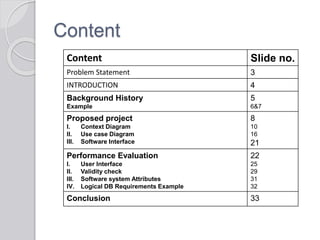
Content
Content Slide no.
Problem Statement 3
INTRODUCTION 4
Background History
Example
5
6&7
Proposed project
I. Context Diagram
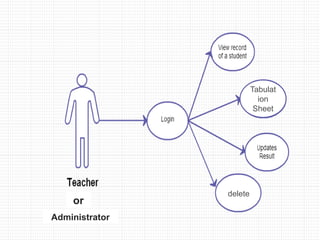
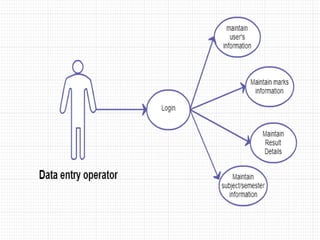
II. Use case Diagram
III. Software Interface
8
10
16
21
Performance Evaluation
I. User Interface
II. Validity check
III. Software system Attributes
IV. Logical DB Requirements Example
22
25
29
31
32
Conclusion 33
Problem Statement
To Develop a system that will manage
Information about the various Users
Information about subjects offered in
various classes
Marks obtain by Students in different
classes
Generation of tabulation sheets
And maintain institute website
1.INTRODUCTION
This document aims at defining overall software
requirement for STUDENT RESULT MANAGEMENT
SYSTEM .Efforts have been made to define the
requirements exhaustively and accurately.
This website is maintaining all academic records and
result calculation for class Six to Ten. It's also maintain
organizational structure, wings, functionality and
responsibilities.
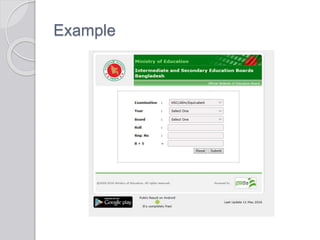
Background History
Same type website is used in different
Education Sector. Example Ministry of
Education (Intermediate and Secondary
Education Boards, Bangladesh),
Jessore Education Board, Dhaka
Education Board etc.
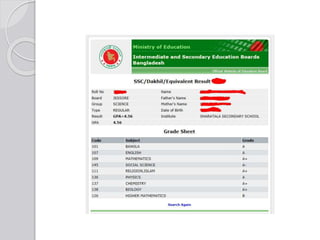
Example
2. Proposed project
The application will have capability to
maintain information about the students
enrolled in the subjects offered to
students during different classes
The marks obtained by the students in
different subjects in various class.
The software will also generate
tabulation sheet regarding student
information, class wise marks list and
GPA calculation.
It is also included the website of the
school.
The application will greatly simplify and
speed up the result preparation and
management process.
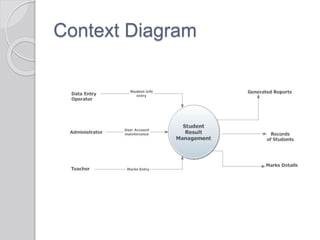
Context Diagram
Level-1 DFD
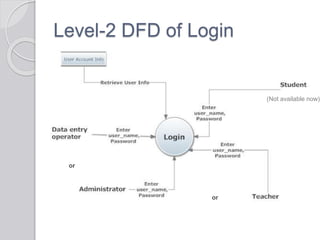
Level-2 DFD of Login
(Not available now)
or
or
Level-2 DFD of Student
information management
Level-2 DFD of Subject
information management
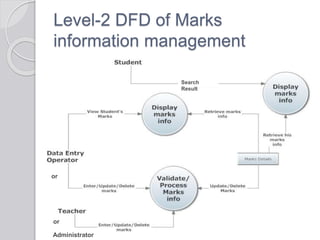
Level-2 DFD of Marks
information management
Search
Result
or
or
Administrator
USE CASE DIAGRAM
Administrator
StudentTeacher
Operator
Tabulat
ion
Sheet
delete
or
Administrator
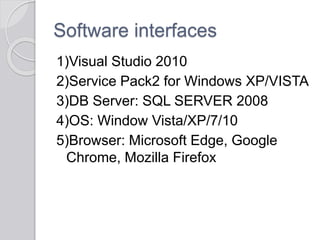
Software interfaces
1)Visual Studio 2010
2)Service Pack2 for Windows XP/VISTA
3)DB Server: SQL SERVER 2008
4)OS: Window Vista/XP/7/10
5)Browser: Microsoft Edge, Google
Chrome, Mozilla Firefox
3. Performance Evaluation
1)Login screen for entering the
username, password, type of
user(Administrator, Data entry
operator, teacher)will be provided.
Access will be based upon the role of
user. Student only search their result
only
2)User (with role Data Entry operator)
will be able to modify /add/delete
information about different students
that are enrolled for the classes.
3)User (with role of administrator) will
be able to reset the system leading to
deletion of all existing information from
the backend database. He will be able
to create/modify/delete existing user
accounts.
4)A screen showing the marks obtained
by the student in each subject.
5)The number of subjects to be taken
by the student in each class does not
change .
6)The subject types do not change.
User Interfaces
1)Login screen: This will be the first screen
that will be displayed. It allows user to
access different screens based upon the
user role.
Various fields available on these screen are:
2)Subject info Parameter Screen:
This screen will be accessible only to the
Administrator or Teacher. It will allow the
user to select the class name for which the
user wants to access the subject
information.
3)Student info Parameter Screen:
This screen will be accessible only to the
Administrator or Teacher. It will allow the
user to enter the new students
information.
4)Student Information Screen: This screen
will be accessible only to the Administrator
or Teacher. It will allow the user to modify
the information about new/existing student
for particular classes.
Various fields available on these screen are:
5)Marks Entry Screen: This screen will be
accessible only to the Teacher or admin. It
will allow the user to enter the marks
information. It will also allow the user to
add/modify/delete information about the
marks obtained in the selected subject by
different students.
1)Only user with the data entry operator will
be able to access the Subject Information
Maintenance module.
2)No group will have the same subject.
3)The subject code will be unique for each
subject .
4)Subject code, Subject name cannot be
blank.
5)Administrator or Teacher will be change
any thing, So, this check the user type.
Validity check
6)Only the user with role of teacher will be
authorized to access the Marks Information
maintenance module.
7)Marks cannot be less than 0.
8)Total marks will be calculated as :Internal
Marks in that subject + External Marks in that
subject .
9)Only user with role Administrator will be
authorized to access the User Accounts
Information Maintenance module.
10)UserId, User Name, Password cannot be
left blank
Software system Attributes
1)security: the application will be password
protected. Users will have to enter
correct information to access the
application.
2)Maintainability: The application will be
designed in a maintainable manner. It
will be easy to incorporate new req in
individual module.
3)Portability: The application will be easily
portable
Same system continues to creates the
other table and view of the database.
Logical DB Requirements Example
The following information will be placed
in DB:
1)Subject info: Subject Name, Code,
class
2)Student Info: Student id, Student roll
Number, Student name, year etc.
3)Marks info: Student id , class, theory
marks in each subject, pactrical marks
in each subject
4)User Account Info: UserName, User
Id, password, type
Conclusion
 Student result management system lead to a better
organization structure since the result management of
the students is well structured and also lead to better as
well as efficient utilization of resources.
 Student result Management System can be used by
education institutes to maintain the records of students
easily. Achieving this objective is difficult using a manual
system as the information is scattered, can be
redundant and collecting relevant information may be
very time consuming. All these problems are solved
using this project
 Our project Student Result Management System was
developed by all four of us. We, a team of four persons
took a step by step approach in order to reach our goal.
Thank You

Presentation of database management system

  • 1.
  • 2.
    Content Content Slide no. ProblemStatement 3 INTRODUCTION 4 Background History Example 5 6&7 Proposed project I. Context Diagram II. Use case Diagram III. Software Interface 8 10 16 21 Performance Evaluation I. User Interface II. Validity check III. Software system Attributes IV. Logical DB Requirements Example 22 25 29 31 32 Conclusion 33
  • 3.
    Problem Statement To Developa system that will manage Information about the various Users Information about subjects offered in various classes Marks obtain by Students in different classes Generation of tabulation sheets And maintain institute website
  • 4.
    1.INTRODUCTION This document aimsat defining overall software requirement for STUDENT RESULT MANAGEMENT SYSTEM .Efforts have been made to define the requirements exhaustively and accurately. This website is maintaining all academic records and result calculation for class Six to Ten. It's also maintain organizational structure, wings, functionality and responsibilities.
  • 5.
    Background History Same typewebsite is used in different Education Sector. Example Ministry of Education (Intermediate and Secondary Education Boards, Bangladesh), Jessore Education Board, Dhaka Education Board etc.
  • 6.
  • 8.
    2. Proposed project Theapplication will have capability to maintain information about the students enrolled in the subjects offered to students during different classes The marks obtained by the students in different subjects in various class. The software will also generate tabulation sheet regarding student information, class wise marks list and GPA calculation. It is also included the website of the school.
  • 9.
    The application willgreatly simplify and speed up the result preparation and management process.
  • 10.
  • 11.
  • 12.
    Level-2 DFD ofLogin (Not available now) or or
  • 13.
    Level-2 DFD ofStudent information management
  • 14.
    Level-2 DFD ofSubject information management
  • 15.
    Level-2 DFD ofMarks information management Search Result or or Administrator
  • 16.
  • 17.
  • 18.
  • 20.
    Software interfaces 1)Visual Studio2010 2)Service Pack2 for Windows XP/VISTA 3)DB Server: SQL SERVER 2008 4)OS: Window Vista/XP/7/10 5)Browser: Microsoft Edge, Google Chrome, Mozilla Firefox
  • 21.
    3. Performance Evaluation 1)Loginscreen for entering the username, password, type of user(Administrator, Data entry operator, teacher)will be provided. Access will be based upon the role of user. Student only search their result only 2)User (with role Data Entry operator) will be able to modify /add/delete information about different students that are enrolled for the classes.
  • 22.
    3)User (with roleof administrator) will be able to reset the system leading to deletion of all existing information from the backend database. He will be able to create/modify/delete existing user accounts. 4)A screen showing the marks obtained by the student in each subject.
  • 23.
    5)The number ofsubjects to be taken by the student in each class does not change . 6)The subject types do not change.
  • 24.
    User Interfaces 1)Login screen:This will be the first screen that will be displayed. It allows user to access different screens based upon the user role. Various fields available on these screen are:
  • 25.
    2)Subject info ParameterScreen: This screen will be accessible only to the Administrator or Teacher. It will allow the user to select the class name for which the user wants to access the subject information. 3)Student info Parameter Screen: This screen will be accessible only to the Administrator or Teacher. It will allow the user to enter the new students information.
  • 26.
    4)Student Information Screen:This screen will be accessible only to the Administrator or Teacher. It will allow the user to modify the information about new/existing student for particular classes. Various fields available on these screen are:
  • 27.
    5)Marks Entry Screen:This screen will be accessible only to the Teacher or admin. It will allow the user to enter the marks information. It will also allow the user to add/modify/delete information about the marks obtained in the selected subject by different students.
  • 28.
    1)Only user withthe data entry operator will be able to access the Subject Information Maintenance module. 2)No group will have the same subject. 3)The subject code will be unique for each subject . 4)Subject code, Subject name cannot be blank. 5)Administrator or Teacher will be change any thing, So, this check the user type. Validity check
  • 29.
    6)Only the userwith role of teacher will be authorized to access the Marks Information maintenance module. 7)Marks cannot be less than 0. 8)Total marks will be calculated as :Internal Marks in that subject + External Marks in that subject . 9)Only user with role Administrator will be authorized to access the User Accounts Information Maintenance module. 10)UserId, User Name, Password cannot be left blank
  • 30.
    Software system Attributes 1)security:the application will be password protected. Users will have to enter correct information to access the application. 2)Maintainability: The application will be designed in a maintainable manner. It will be easy to incorporate new req in individual module. 3)Portability: The application will be easily portable Same system continues to creates the other table and view of the database.
  • 31.
    Logical DB RequirementsExample The following information will be placed in DB: 1)Subject info: Subject Name, Code, class 2)Student Info: Student id, Student roll Number, Student name, year etc. 3)Marks info: Student id , class, theory marks in each subject, pactrical marks in each subject 4)User Account Info: UserName, User Id, password, type
  • 32.
    Conclusion  Student resultmanagement system lead to a better organization structure since the result management of the students is well structured and also lead to better as well as efficient utilization of resources.  Student result Management System can be used by education institutes to maintain the records of students easily. Achieving this objective is difficult using a manual system as the information is scattered, can be redundant and collecting relevant information may be very time consuming. All these problems are solved using this project  Our project Student Result Management System was developed by all four of us. We, a team of four persons took a step by step approach in order to reach our goal.
  • 33.