 Group Name : Ethernet
 Topic Name : Operating System
 Group Member : 152-15-6232 ( Md. Touhidur Rahman )
152-15-6236 (Sree Joyanto Chandro Barmon)
152-15-6237( Tusher Chandra Ghosh)
Index
• Introduction
• Definition
• How it’s work
• Resources
• Question Session
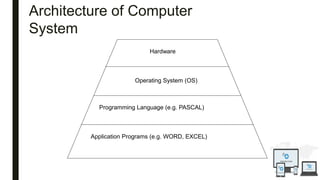
Hardware
Operating System (OS)
Programming Language (e.g. PASCAL)
Application Programs (e.g. WORD, EXCEL)
Architecture of Computer
System
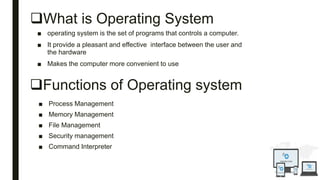
What is Operating System
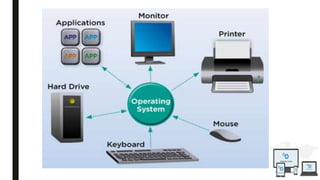
■ operating system is the set of programs that controls a computer.
■ It provide a pleasant and effective interface between the user and
the hardware
■ Makes the computer more convenient to use
Functions of Operating system
■ Process Management
■ Memory Management
■ File Management
■ Security management
■ Command Interpreter
Example
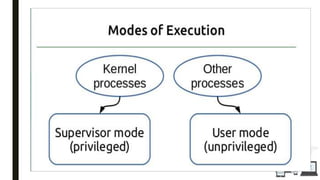
USER MODE AND KERNEL MODE
User Mode :
■ A processor in a computer running Windows has two different modes: user
mode and kernel mode. The processor switches between the two modes
depending on what type of code is running on the processor. Applications run in
user mode, and core operating system components run in kernel mode. While
many drivers run in kernel mode, some drivers may run in user mode.
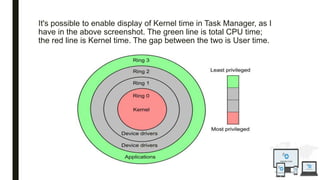
It's possible to enable display of Kernel time in Task Manager, as I
have in the above screenshot. The green line is total CPU time;
the red line is Kernel time. The gap between the two is User time.
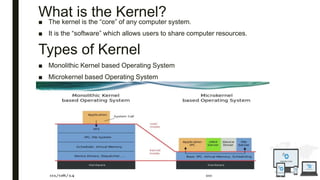
What is the Kernel?
■ The kernel is the “core” of any computer system.
■ It is the “software” which allows users to share computer resources.
Types of Kernel
■ Monolithic Kernel based Operating System
■ Microkernel based Operating System
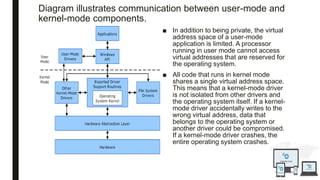
Diagram illustrates communication between user-mode and
kernel-mode components.
■ In addition to being private, the virtual
address space of a user-mode
application is limited. A processor
running in user mode cannot access
virtual addresses that are reserved for
the operating system.
■ All code that runs in kernel mode
shares a single virtual address space.
This means that a kernel-mode driver
is not isolated from other drivers and
the operating system itself. If a kernel-
mode driver accidentally writes to the
wrong virtual address, data that
belongs to the operating system or
another driver could be compromised.
If a kernel-mode driver crashes, the
entire operating system crashes.
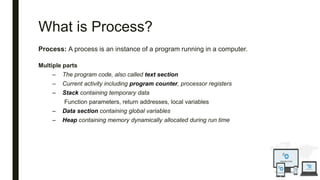
What is Process?
Process: A process is an instance of a program running in a computer.
Multiple parts
– The program code, also called text section
– Current activity including program counter, processor registers
– Stack containing temporary data
Function parameters, return addresses, local variables
– Data section containing global variables
– Heap containing memory dynamically allocated during run time
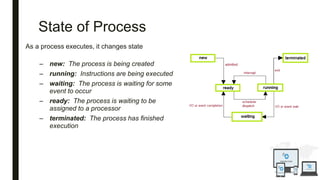
State of Process
As a process executes, it changes state
– new: The process is being created
– running: Instructions are being executed
– waiting: The process is waiting for some
event to occur
– ready: The process is waiting to be
assigned to a processor
– terminated: The process has finished
execution
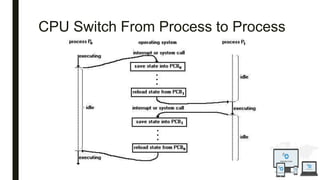
CPU Switch From Process to Process
Process Scheduling
■ Maximize CPU use, quickly switch processes onto CPU for time sharing
■ Process scheduler selects among available processes for next execution on
CPU
■ Maintains scheduling queues of processes
– Job queue – set of all processes in the system
– Ready queue – set of all processes residing in main memory, ready and
waiting to execute
– Device queues – set of processes waiting for an I/O device
– Processes migrate among the various queues
Presentation operating system

Presentation operating system

  • 2.
     Group Name: Ethernet  Topic Name : Operating System  Group Member : 152-15-6232 ( Md. Touhidur Rahman ) 152-15-6236 (Sree Joyanto Chandro Barmon) 152-15-6237( Tusher Chandra Ghosh)
  • 3.
    Index • Introduction • Definition •How it’s work • Resources • Question Session
  • 4.
    Hardware Operating System (OS) ProgrammingLanguage (e.g. PASCAL) Application Programs (e.g. WORD, EXCEL) Architecture of Computer System
  • 5.
    What is OperatingSystem ■ operating system is the set of programs that controls a computer. ■ It provide a pleasant and effective interface between the user and the hardware ■ Makes the computer more convenient to use Functions of Operating system ■ Process Management ■ Memory Management ■ File Management ■ Security management ■ Command Interpreter
  • 8.
  • 9.
    USER MODE ANDKERNEL MODE User Mode : ■ A processor in a computer running Windows has two different modes: user mode and kernel mode. The processor switches between the two modes depending on what type of code is running on the processor. Applications run in user mode, and core operating system components run in kernel mode. While many drivers run in kernel mode, some drivers may run in user mode.
  • 10.
    It's possible toenable display of Kernel time in Task Manager, as I have in the above screenshot. The green line is total CPU time; the red line is Kernel time. The gap between the two is User time.
  • 11.
    What is theKernel? ■ The kernel is the “core” of any computer system. ■ It is the “software” which allows users to share computer resources. Types of Kernel ■ Monolithic Kernel based Operating System ■ Microkernel based Operating System
  • 12.
    Diagram illustrates communicationbetween user-mode and kernel-mode components. ■ In addition to being private, the virtual address space of a user-mode application is limited. A processor running in user mode cannot access virtual addresses that are reserved for the operating system. ■ All code that runs in kernel mode shares a single virtual address space. This means that a kernel-mode driver is not isolated from other drivers and the operating system itself. If a kernel- mode driver accidentally writes to the wrong virtual address, data that belongs to the operating system or another driver could be compromised. If a kernel-mode driver crashes, the entire operating system crashes.
  • 13.
    What is Process? Process:A process is an instance of a program running in a computer. Multiple parts – The program code, also called text section – Current activity including program counter, processor registers – Stack containing temporary data Function parameters, return addresses, local variables – Data section containing global variables – Heap containing memory dynamically allocated during run time
  • 14.
    State of Process Asa process executes, it changes state – new: The process is being created – running: Instructions are being executed – waiting: The process is waiting for some event to occur – ready: The process is waiting to be assigned to a processor – terminated: The process has finished execution
  • 15.
    CPU Switch FromProcess to Process
  • 16.
    Process Scheduling ■ MaximizeCPU use, quickly switch processes onto CPU for time sharing ■ Process scheduler selects among available processes for next execution on CPU ■ Maintains scheduling queues of processes – Job queue – set of all processes in the system – Ready queue – set of all processes residing in main memory, ready and waiting to execute – Device queues – set of processes waiting for an I/O device – Processes migrate among the various queues