STANDARD OPERATING PROCEDURE (SOP)
Lab Name: Haematology Lab Lab In-charge: Attuluri Vamsi Kumar
Experiment Name:
SOP No.
1
Effective date
01-04-2023
Pages
1
Autor
Mr. Attuluri Vamsi
Kumar
Authorized by
Prof. (Dr). Ranjay
Kumar Chaudary
Version No.
1
Review Period No. of copies
2
Lab
Haematology
Location
D7
1. Scope & application:
This SOP describes the method of estimation of CBC including differential count with the help of autoanalyzer
H560
2. Responsibility:
Technical staff deputed in the haematology lab including students
3. References:
Manual of ERBA H560 autoanalyzer
4. Materials required:
o Sample-EDTA Blood
o Test tubes
o PPE
5. Procedure:
➢ Wear the PPE
➢ Turn on the machine and enter the User ID & password.
➢ Wait until the completion of auto clean procedure.
➢ Ensure that the LED light turned to green (If it is red then identify the error and inform the issue to
lab supervisor)
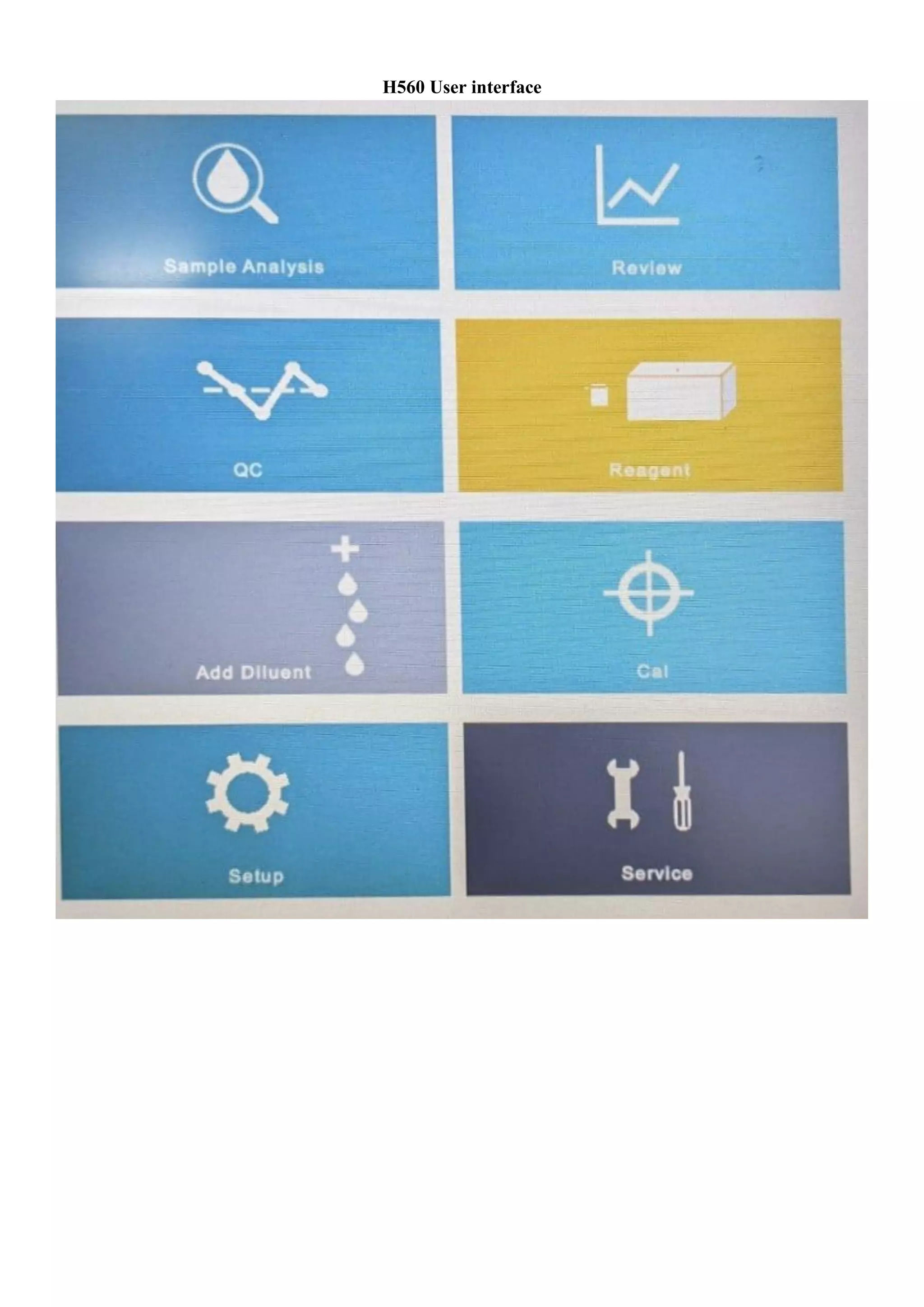
➢ Select the sample Analysis option on the home screen of H560 autoanalyzer
➢ Take an EDTA vial and label it with patient details including reg number, age, sex, others if requied
➢ Collect venous blood aseptically into the EDTA vial
➢ Remove the cap of the vial and place it near the sample probe of the machine
▪ (Note 1: Ensure that the probe is completely submerged into the blood)
▪ (Note 2: At any instant no air bubble must enter into the probe)
➢ Press the aspirate button either on the touch screen or the button provided near the probe area.
➢ Wait until the probe retract inside the machine.
➢ Remove the vial, place the cap and keep it in the test tube stand.
➢ Wait until the completion of analysis operation by the machine.
➢ Take the print of the results displayed in the screen.
6. Maintenance & cleaning: Shutting down the instrument
➢ Take the ERBA Elite H clean solution from the refrigerator
➢ Select the ERBA logo on the top let corner of the screen
➢ Press the power off button shown at the bottom of the screen
➢ Open the Elite H clean bottle cap and place near the probe ensuring complete submerge of the probe
into the solution.
➢ Click aspirate
➢ Waiting until the finishing of close operation by the machine.
➢ Switch of the instrument.
H560 User interface

Standard Operating Procedure for CBC Estimation with Autoanalyzer H560 in Haematology Lab

  • 1.
    STANDARD OPERATING PROCEDURE(SOP) Lab Name: Haematology Lab Lab In-charge: Attuluri Vamsi Kumar Experiment Name: SOP No. 1 Effective date 01-04-2023 Pages 1 Autor Mr. Attuluri Vamsi Kumar Authorized by Prof. (Dr). Ranjay Kumar Chaudary Version No. 1 Review Period No. of copies 2 Lab Haematology Location D7 1. Scope & application: This SOP describes the method of estimation of CBC including differential count with the help of autoanalyzer H560 2. Responsibility: Technical staff deputed in the haematology lab including students 3. References: Manual of ERBA H560 autoanalyzer 4. Materials required: o Sample-EDTA Blood o Test tubes o PPE 5. Procedure: ➢ Wear the PPE ➢ Turn on the machine and enter the User ID & password. ➢ Wait until the completion of auto clean procedure. ➢ Ensure that the LED light turned to green (If it is red then identify the error and inform the issue to lab supervisor) ➢ Select the sample Analysis option on the home screen of H560 autoanalyzer ➢ Take an EDTA vial and label it with patient details including reg number, age, sex, others if requied ➢ Collect venous blood aseptically into the EDTA vial ➢ Remove the cap of the vial and place it near the sample probe of the machine ▪ (Note 1: Ensure that the probe is completely submerged into the blood) ▪ (Note 2: At any instant no air bubble must enter into the probe) ➢ Press the aspirate button either on the touch screen or the button provided near the probe area. ➢ Wait until the probe retract inside the machine. ➢ Remove the vial, place the cap and keep it in the test tube stand. ➢ Wait until the completion of analysis operation by the machine. ➢ Take the print of the results displayed in the screen. 6. Maintenance & cleaning: Shutting down the instrument ➢ Take the ERBA Elite H clean solution from the refrigerator ➢ Select the ERBA logo on the top let corner of the screen ➢ Press the power off button shown at the bottom of the screen ➢ Open the Elite H clean bottle cap and place near the probe ensuring complete submerge of the probe into the solution. ➢ Click aspirate ➢ Waiting until the finishing of close operation by the machine. ➢ Switch of the instrument.
  • 2.