SOFTWARE:
SYSTEMS AND
APPLICATION
SOFTWARE
TYPES OF SOFTWARE
System Software
Application Software
SYSTEM SOFTWARE:
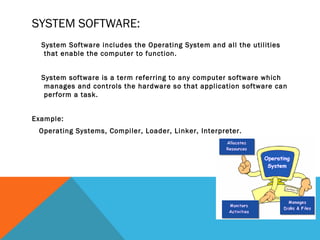
System Software includes the Operating System and all the utilities
that enable the computer to function.
System software is a term referring to any computer software which
manages and controls the hardware so that application software can
perform a task.
Example:
Operating Systems, Compiler, Loader, Linker, Interpreter.
APPLICATION SOFTWARE
Application software: helps users solve
particular problems
In most cases, application software
resides on the computer’s hard disk
Application software can also be stored
on CDs, DVDs, and flash or keychain
storage devices
SUPPORTING INDIVIDUAL, GROUP, AND
ORGANIZATIONAL GOALS (CONTINUED)
Software Supporting Individuals, Workgroups, and Enterprises
SYSTEMS SOFTWARE
Systems software
Controls operations of computer hardware
Supports application programs’ problem-solving
capabilities
Types of systems software
Operating systems
Utility programs
Middleware
OPERATING SYSTEMS
Operating system (OS): set of
programs that controls the
computer hardware and acts
as an interface with
application programs
SYSTEM SOFTWARE:
Operating System:
Operating System is a software, which makes a
computer to actually work.
It is the software the enables all the programs we
use.
The OS organizes and controls the hardware.
OS acts as an interface between the application
programs and the machine hardware.
Examples: Windows, Linux, Unix and Mac OS, etc.,
OPERATING SYSTEMS (CONTINUED)
Various combinations of OSs,
computers, and users
Single computer with a single user
Single computer with multiple users
Multiple computers
Special-purpose computers
OPERATING SYSTEMS (CONTINUED)
Activities performed by the operating system
 Perform common computer hardware functions
 Provide a user interface and input/output management
 Provide a degree of hardware independence
 Manage system memory
 Manage processing tasks
 Provide networking capability
 Control access to system resources
 Manage files
SYSTEM SOFTWARE
(CONTD):
Source
Languages
Target Languages
‘C’ language ‘C’ language
‘Pascal’ language Machine language
FORTRAN language
C++ language
ADA language
her language – the target language.
OPERATING SYSTEMS (CONTINUED)
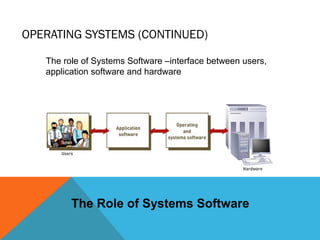
The Role of Systems Software
The role of Systems Software –interface between users,
application software and hardware
OPERATING SYSTEMS (CONTINUED)
OS acts as an intermediary between application and
hardware
OS converts basic request into a set of details
instruction that the hardware requires
Common hardware functions (e.g.)
 Get input from keyboard or some other input device
 Retrieve data from disks
 Store data on disks
 Display information on a monitor or printer
OPERATING SYSTEMS FUNCTIONS
1. User interface and input/output
management
User interface: allows individuals to access and
command the computer system
Command-based user interface: requires that
text commands be given to the computer to perform
basic activities
Graphical user interface (GUI): uses icons and
menus displayed on screen to send commands to the
computer system
OPERATING SYSTEMS FUNCTIONS (CONTINUED)
Application Program Interface Links Application Software to the
Operating System
4. Processing tasks
 Multitasking: more than one program can run at the same time
 Time-sharing: allows more than one person to use a computer
system at the same time
 Scalability: ability of the computer to handle an increasing number of
concurrent users smoothly
5. Networking capability
 Features and capabilities of the OS that aid users in connecting to a
computer network
Operating Systems (continued)
OPERATING SYSTEMS (CONTINUED)
6. Access to system resources and
security
Protection against unauthorized access
Logins and passwords
7. File management
Ensures that files in secondary storage are
available when needed and that they are
protected from access by unauthorized users
SYSTEM SOFTWARE
(CONTD):
Loader: A loader is the part of an operating system
that is responsible for loading programs into memory,
preparing them for execution and then executing
them.
The loader is usually a part of the operating system's
kernel and usually is loaded at system boot time and
stays in memory until the system is rebooted, shut
down, or powered off.
In Unix, the loader is the handler for the system call
execve().
SYSTEM SOFTWARE
(CONTD):
Linker: A linker or link editor is a program that
takes one or more objects generated by compilers
and assembles them into a single executable
program.
Linkers can take objects from a collection called
a library. The objects are program modules
containing machine code and information for the
linker.
The linker takes care of arranging the objects in
a program's address space.
SYSTEM SOFTWARE
(CONTD):
Interpreter: An interpreter is a
computer program that translates and
executes instructions written in a computer
programming language line-by-line, unit by
unit etc.,
An interpreter needs to be able to analyze,
or parse, instructions written in the source
language.
Example: Lisp systems, etc.,
CURRENT OPERATING SYSTEMS
Popular Operating Systems Cross All Three Spheres of Influence
CURRENT OPERATING SYSTEMS (CONTINUED)
Microsoft PC operating systems
 PC-DOS and MS-DOS: early, command-driven OSs
 Windows XP: greatly improved stability and security over previous
versions of Windows
 Windows XP N: for European market
 Windows XP Professional X64: for computers with newer 64-bit
capabilities
 Windows XP Media Center Edition: incorporates additional
multimedia features
 Vista: latest version of Windows
CURRENT OPERATING SYSTEMS (CONTINUED)
Apple operating systems
Often provide cutting edge tools in graphics and music
not available from Microsoft
Mac OS X
Jaguar (OS X.2)
Panther (OS X.3)
Tiger (OS aX.4): support for 64-bit computing,
Dashboard, Spotlight, etc.
CURRENT OPERATING SYSTEMS (CONTINUED)
Linux
 Developed by Linus Torvalds in 1991
 Open-source product
 Only thare kernel of an OS
 Several distributions available with capabilities/applications that form a complete
OS
 Examples: Red Hat Linux, Caldera OpenLinux
WORKGROUP OPERATING SYSTEMS
Windows Server
UNIX
NetWare
Red Hat Linux
Mac OS X Server
ENTERPRISE OPERATING SYSTEMS
z/OS
MPE/iX
HP-UX
Linux
OPERATING SYSTEMS FOR SMALL COMPUTERS,
EMBEDDED COMPUTERS, AND SPECIAL-PURPOSE
DEVICES
Palm OS
Windows Embedded
UTILITY PROGRAMS
Help to perform maintenance or correct
problems with a computer system
Common types of utility programs:
Hardware utilities
Virus-detection and recovery utilities
File-compression utilities
Spam and pop-up blocker utilities
UTILITY PROGRAMS (CONTINUED)
Network and Internet utilities
Server and mainframe utilities
Other utilities
Manages and protects corporate documents
Helps people with visual disabilities use the Internet
Monitors employees
Searches for files and documents
COMMUNICATION SOFTWARE
 Hypertext Transfer Protocol (HTTP): A client/server application
that uses TCP for transport to retrieve HTML pages.
 Domain Name Service (DNS): A name-to-address translation
application that uses both TCP and UDP transport.
 Telnet: A virtual terminal application that uses TCP for transport.
 File Transport Protocol (FTP): A file transfer application that
uses TCP for transport.
 Trivial File Transfer Protocol (TFTP): A file transfer application
that uses UDP for transport.
 Network Time Protocol (NTP): An application that synchronizes
time with a time source and uses UDP for transport.
 Border Gateway Protocol (BGP): An exterior gateway routing
protocol that uses TCP for transport. BGP is used to exchange routing
information for the Internet and is the protocol used between service
providers.
MIDDLEWARE
Middleware: software that allows
different systems to communicate
and exchange data
Middleware can also be used as an
interface between the Internet
and older legacy systems
APPLICATION SOFTWARE
Primary function is to apply the power of
the computer to give individuals,
workgroups, and the entire enterprise
the ability to solve problems and
perform specific tasks
Application programs interact with
systems software; systems software
then directs computer hardware to
perform the necessary tasks
APPLICATION SOFTWARE:
Application Software includes programs that
do real work for user.
Example:
Payroll systems, Inventory Control, Manage
student database, Word Processor,
Spreadsheet and Database Management
System etc.,
APPLICATION SOFTWARE
(CONTD…):
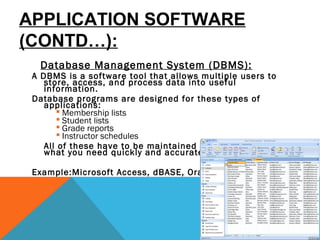
Database Management System (DBMS):
A DBMS is a software tool that allows multiple users to
store, access, and process data into useful
information.
Database programs are designed for these types of
applications:
 Membership lists
 Student lists
 Grade reports
 Instructor schedules
All of these have to be maintained so you can find
what you need quickly and accurately. 
Example:Microsoft Access, dBASE, Oracle.
APPLICATION SOFTWARE
(CONTD…):
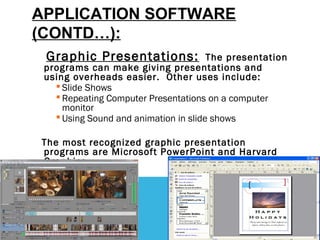
Graphic Presentations: The presentation
programs can make giving presentations and
using overheads easier.  Other uses include: 
 Slide Shows
 Repeating Computer Presentations on a computer
monitor
 Using Sound and animation in slide shows 
The most recognized graphic presentation
programs are Microsoft PowerPoint and Harvard
Graphics.
APPLICATION SOFTWARE
(CONTD…):
Spreadsheets: The spreadsheet packages
are designed to use numbers and formulas to do
calculations with ease. Examples of spreadsheets
include:
 Budgets
 Payrolls
 Grade Calculations
 Address Lists
The most commonly used spreadsheet programs
are Microsoft Excel and Lotus 123.
APPLICATION SOFTWARE:
Word Processors:
Word processing is a tool that helps user in creating,
editing, and printing documents. Word processors will
normally have the following capabilities built into
them: 
 Spell checking
 Standard layouts for normal documents
 Have some characters appear in bold print, italics, or
underlined
 Center lines, make text line up on the left side of the paper,
or the right side of the paper
 Save the document so it can be used again
 print the document.
Examples: WordPerfect and Microsoft Word
OVERVIEW OF APPLICATION SOFTWARE
Custom built softwares: one-of-a-kind
program for a specific application,
usually developed and owned by a
single company
Generic softwares: existing software
program that is purchased
OVERVIEW OF APPLICATION SOFTWARE
(CONTINUED)
Proprietary being the Custom built software and off-the-shelf being the
generic built software
Types of Application Software
OVERVIEW OF APPLICATION SOFTWARE
(CONTINUED)
A Comparison of Proprietary and Off-the-Shelf Software
OVERVIEW OF APPLICATION SOFTWARE
(CONTINUED)
A Comparison of Proprietary and Off-the-Shelf Software (continued)
PERSONAL APPLICATION SOFTWARE
Serves the needs of an individual
user
Includes personal productivity
software
Enables users to improve their personal
effectiveness
PERSONAL APPLICATION SOFTWARE (CONTINUED)
Examples of Personal Productivity Software
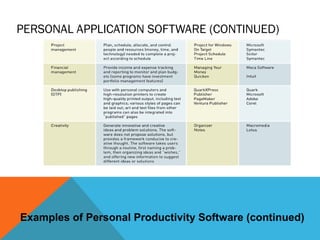
PERSONAL APPLICATION SOFTWARE (CONTINUED)
Examples of Personal Productivity Software (continued)
PERSONAL APPLICATION SOFTWARE (CONTINUED)
Software suite: collection of single application programs
packaged in a bundle
 Microsoft Office: most popular general-purpose software suite
 Other general-purpose software suites: Corel’s WordPerfect Office,
Lotus SmartSuite, Sun Microsystems’s StarOffice
Integrated application packages: offer a range of
capabilities for less money than software suites
 Example: Microsoft Works
PERSONAL APPLICATION SOFTWARE (CONTINUED)
Major Components of Leading Software Suites
WORKGROUP APPLICATION SOFTWARE
Workgroup application software: support
teamwork, whether people are in the
same location or dispersed around the
world
Groupware: software that helps groups of
people work together more efficiently and
effectively
ENTERPRISE APPLICATION SOFTWARE
Software that benefits an entire
organization
Enterprise resource planning (ERP)
software: set of integrated
programs that manage a
company’s vital business
operations for an entire multisite,
global organization
ENTERPRISE APPLICATION SOFTWARE (CONTINUED)
Examples of Enterprise Application Software
APPLICATION SOFTWARE FOR INFORMATION,
DECISION SUPPORT, AND SPECIALIZED
PURPOSES
Specialized application software for information, decision
support, and other purposes is available in every industry
Examples
 Genetic researchers use software to visualize and analyze the human
genome
 Music executives use decision support software to help pick the next hit
 Decision support software is used to increase the cure rate for cancer
PROGRAMMING LANGUAGES
Sets of keywords, symbols, and a system of rules
for constructing statements by which humans
can communicate instructions to be executed by
a computer
Different languages have different characteristics
Syntax: a set of rules associated with a
programming language
THE EVOLUTION OF PROGRAMMING LANGUAGES
The Evolution of Programming Languages
THE EVOLUTION OF PROGRAMMING
LANGUAGES (CONTINUED)
Visual, object-oriented, and artificial intelligence
languages are easier for nonprogrammers to use than
older generation languages
Visual languages use a graphical or visual interface for
program development
Object-oriented programming languages are based on
objects
Compiler: a special software program that converts
programmer’s source code into machine-language
instructions consisting of binary digits
THE EVOLUTION OF PROGRAMMING LANGUAGES
(CONTINUED)
How a Compiler Works

software system_and_application_software

  • 1.
  • 2.
    TYPES OF SOFTWARE SystemSoftware Application Software
  • 3.
    SYSTEM SOFTWARE: System Softwareincludes the Operating System and all the utilities that enable the computer to function. System software is a term referring to any computer software which manages and controls the hardware so that application software can perform a task. Example: Operating Systems, Compiler, Loader, Linker, Interpreter.
  • 4.
    APPLICATION SOFTWARE Application software:helps users solve particular problems In most cases, application software resides on the computer’s hard disk Application software can also be stored on CDs, DVDs, and flash or keychain storage devices
  • 5.
    SUPPORTING INDIVIDUAL, GROUP,AND ORGANIZATIONAL GOALS (CONTINUED) Software Supporting Individuals, Workgroups, and Enterprises
  • 6.
    SYSTEMS SOFTWARE Systems software Controlsoperations of computer hardware Supports application programs’ problem-solving capabilities Types of systems software Operating systems Utility programs Middleware
  • 7.
    OPERATING SYSTEMS Operating system(OS): set of programs that controls the computer hardware and acts as an interface with application programs
  • 8.
    SYSTEM SOFTWARE: Operating System: OperatingSystem is a software, which makes a computer to actually work. It is the software the enables all the programs we use. The OS organizes and controls the hardware. OS acts as an interface between the application programs and the machine hardware. Examples: Windows, Linux, Unix and Mac OS, etc.,
  • 9.
    OPERATING SYSTEMS (CONTINUED) Variouscombinations of OSs, computers, and users Single computer with a single user Single computer with multiple users Multiple computers Special-purpose computers
  • 10.
    OPERATING SYSTEMS (CONTINUED) Activitiesperformed by the operating system  Perform common computer hardware functions  Provide a user interface and input/output management  Provide a degree of hardware independence  Manage system memory  Manage processing tasks  Provide networking capability  Control access to system resources  Manage files
  • 11.
    SYSTEM SOFTWARE (CONTD): Source Languages Target Languages ‘C’language ‘C’ language ‘Pascal’ language Machine language FORTRAN language C++ language ADA language her language – the target language.
  • 12.
    OPERATING SYSTEMS (CONTINUED) TheRole of Systems Software The role of Systems Software –interface between users, application software and hardware
  • 13.
    OPERATING SYSTEMS (CONTINUED) OSacts as an intermediary between application and hardware OS converts basic request into a set of details instruction that the hardware requires Common hardware functions (e.g.)  Get input from keyboard or some other input device  Retrieve data from disks  Store data on disks  Display information on a monitor or printer
  • 14.
    OPERATING SYSTEMS FUNCTIONS 1.User interface and input/output management User interface: allows individuals to access and command the computer system Command-based user interface: requires that text commands be given to the computer to perform basic activities Graphical user interface (GUI): uses icons and menus displayed on screen to send commands to the computer system
  • 15.
    OPERATING SYSTEMS FUNCTIONS(CONTINUED) Application Program Interface Links Application Software to the Operating System
  • 16.
    4. Processing tasks Multitasking: more than one program can run at the same time  Time-sharing: allows more than one person to use a computer system at the same time  Scalability: ability of the computer to handle an increasing number of concurrent users smoothly 5. Networking capability  Features and capabilities of the OS that aid users in connecting to a computer network Operating Systems (continued)
  • 17.
    OPERATING SYSTEMS (CONTINUED) 6.Access to system resources and security Protection against unauthorized access Logins and passwords 7. File management Ensures that files in secondary storage are available when needed and that they are protected from access by unauthorized users
  • 18.
    SYSTEM SOFTWARE (CONTD): Loader: Aloader is the part of an operating system that is responsible for loading programs into memory, preparing them for execution and then executing them. The loader is usually a part of the operating system's kernel and usually is loaded at system boot time and stays in memory until the system is rebooted, shut down, or powered off. In Unix, the loader is the handler for the system call execve().
  • 19.
    SYSTEM SOFTWARE (CONTD): Linker: Alinker or link editor is a program that takes one or more objects generated by compilers and assembles them into a single executable program. Linkers can take objects from a collection called a library. The objects are program modules containing machine code and information for the linker. The linker takes care of arranging the objects in a program's address space.
  • 20.
    SYSTEM SOFTWARE (CONTD): Interpreter: Aninterpreter is a computer program that translates and executes instructions written in a computer programming language line-by-line, unit by unit etc., An interpreter needs to be able to analyze, or parse, instructions written in the source language. Example: Lisp systems, etc.,
  • 21.
    CURRENT OPERATING SYSTEMS PopularOperating Systems Cross All Three Spheres of Influence
  • 22.
    CURRENT OPERATING SYSTEMS(CONTINUED) Microsoft PC operating systems  PC-DOS and MS-DOS: early, command-driven OSs  Windows XP: greatly improved stability and security over previous versions of Windows  Windows XP N: for European market  Windows XP Professional X64: for computers with newer 64-bit capabilities  Windows XP Media Center Edition: incorporates additional multimedia features  Vista: latest version of Windows
  • 23.
    CURRENT OPERATING SYSTEMS(CONTINUED) Apple operating systems Often provide cutting edge tools in graphics and music not available from Microsoft Mac OS X Jaguar (OS X.2) Panther (OS X.3) Tiger (OS aX.4): support for 64-bit computing, Dashboard, Spotlight, etc.
  • 24.
    CURRENT OPERATING SYSTEMS(CONTINUED) Linux  Developed by Linus Torvalds in 1991  Open-source product  Only thare kernel of an OS  Several distributions available with capabilities/applications that form a complete OS  Examples: Red Hat Linux, Caldera OpenLinux
  • 25.
    WORKGROUP OPERATING SYSTEMS WindowsServer UNIX NetWare Red Hat Linux Mac OS X Server
  • 26.
  • 27.
    OPERATING SYSTEMS FORSMALL COMPUTERS, EMBEDDED COMPUTERS, AND SPECIAL-PURPOSE DEVICES Palm OS Windows Embedded
  • 28.
    UTILITY PROGRAMS Help toperform maintenance or correct problems with a computer system Common types of utility programs: Hardware utilities Virus-detection and recovery utilities File-compression utilities Spam and pop-up blocker utilities
  • 29.
    UTILITY PROGRAMS (CONTINUED) Networkand Internet utilities Server and mainframe utilities Other utilities Manages and protects corporate documents Helps people with visual disabilities use the Internet Monitors employees Searches for files and documents
  • 30.
    COMMUNICATION SOFTWARE  HypertextTransfer Protocol (HTTP): A client/server application that uses TCP for transport to retrieve HTML pages.  Domain Name Service (DNS): A name-to-address translation application that uses both TCP and UDP transport.  Telnet: A virtual terminal application that uses TCP for transport.  File Transport Protocol (FTP): A file transfer application that uses TCP for transport.  Trivial File Transfer Protocol (TFTP): A file transfer application that uses UDP for transport.  Network Time Protocol (NTP): An application that synchronizes time with a time source and uses UDP for transport.  Border Gateway Protocol (BGP): An exterior gateway routing protocol that uses TCP for transport. BGP is used to exchange routing information for the Internet and is the protocol used between service providers.
  • 31.
    MIDDLEWARE Middleware: software thatallows different systems to communicate and exchange data Middleware can also be used as an interface between the Internet and older legacy systems
  • 32.
    APPLICATION SOFTWARE Primary functionis to apply the power of the computer to give individuals, workgroups, and the entire enterprise the ability to solve problems and perform specific tasks Application programs interact with systems software; systems software then directs computer hardware to perform the necessary tasks
  • 33.
    APPLICATION SOFTWARE: Application Softwareincludes programs that do real work for user. Example: Payroll systems, Inventory Control, Manage student database, Word Processor, Spreadsheet and Database Management System etc.,
  • 34.
    APPLICATION SOFTWARE (CONTD…): Database ManagementSystem (DBMS): A DBMS is a software tool that allows multiple users to store, access, and process data into useful information. Database programs are designed for these types of applications:  Membership lists  Student lists  Grade reports  Instructor schedules All of these have to be maintained so you can find what you need quickly and accurately.  Example:Microsoft Access, dBASE, Oracle.
  • 35.
    APPLICATION SOFTWARE (CONTD…): Graphic Presentations:The presentation programs can make giving presentations and using overheads easier.  Other uses include:   Slide Shows  Repeating Computer Presentations on a computer monitor  Using Sound and animation in slide shows  The most recognized graphic presentation programs are Microsoft PowerPoint and Harvard Graphics.
  • 36.
    APPLICATION SOFTWARE (CONTD…): Spreadsheets: Thespreadsheet packages are designed to use numbers and formulas to do calculations with ease. Examples of spreadsheets include:  Budgets  Payrolls  Grade Calculations  Address Lists The most commonly used spreadsheet programs are Microsoft Excel and Lotus 123.
  • 37.
    APPLICATION SOFTWARE: Word Processors: Wordprocessing is a tool that helps user in creating, editing, and printing documents. Word processors will normally have the following capabilities built into them:   Spell checking  Standard layouts for normal documents  Have some characters appear in bold print, italics, or underlined  Center lines, make text line up on the left side of the paper, or the right side of the paper  Save the document so it can be used again  print the document. Examples: WordPerfect and Microsoft Word
  • 38.
    OVERVIEW OF APPLICATIONSOFTWARE Custom built softwares: one-of-a-kind program for a specific application, usually developed and owned by a single company Generic softwares: existing software program that is purchased
  • 39.
    OVERVIEW OF APPLICATIONSOFTWARE (CONTINUED) Proprietary being the Custom built software and off-the-shelf being the generic built software Types of Application Software
  • 40.
    OVERVIEW OF APPLICATIONSOFTWARE (CONTINUED) A Comparison of Proprietary and Off-the-Shelf Software
  • 41.
    OVERVIEW OF APPLICATIONSOFTWARE (CONTINUED) A Comparison of Proprietary and Off-the-Shelf Software (continued)
  • 42.
    PERSONAL APPLICATION SOFTWARE Servesthe needs of an individual user Includes personal productivity software Enables users to improve their personal effectiveness
  • 43.
    PERSONAL APPLICATION SOFTWARE(CONTINUED) Examples of Personal Productivity Software
  • 44.
    PERSONAL APPLICATION SOFTWARE(CONTINUED) Examples of Personal Productivity Software (continued)
  • 45.
    PERSONAL APPLICATION SOFTWARE(CONTINUED) Software suite: collection of single application programs packaged in a bundle  Microsoft Office: most popular general-purpose software suite  Other general-purpose software suites: Corel’s WordPerfect Office, Lotus SmartSuite, Sun Microsystems’s StarOffice Integrated application packages: offer a range of capabilities for less money than software suites  Example: Microsoft Works
  • 46.
    PERSONAL APPLICATION SOFTWARE(CONTINUED) Major Components of Leading Software Suites
  • 47.
    WORKGROUP APPLICATION SOFTWARE Workgroupapplication software: support teamwork, whether people are in the same location or dispersed around the world Groupware: software that helps groups of people work together more efficiently and effectively
  • 48.
    ENTERPRISE APPLICATION SOFTWARE Softwarethat benefits an entire organization Enterprise resource planning (ERP) software: set of integrated programs that manage a company’s vital business operations for an entire multisite, global organization
  • 49.
    ENTERPRISE APPLICATION SOFTWARE(CONTINUED) Examples of Enterprise Application Software
  • 50.
    APPLICATION SOFTWARE FORINFORMATION, DECISION SUPPORT, AND SPECIALIZED PURPOSES Specialized application software for information, decision support, and other purposes is available in every industry Examples  Genetic researchers use software to visualize and analyze the human genome  Music executives use decision support software to help pick the next hit  Decision support software is used to increase the cure rate for cancer
  • 51.
    PROGRAMMING LANGUAGES Sets ofkeywords, symbols, and a system of rules for constructing statements by which humans can communicate instructions to be executed by a computer Different languages have different characteristics Syntax: a set of rules associated with a programming language
  • 52.
    THE EVOLUTION OFPROGRAMMING LANGUAGES The Evolution of Programming Languages
  • 53.
    THE EVOLUTION OFPROGRAMMING LANGUAGES (CONTINUED) Visual, object-oriented, and artificial intelligence languages are easier for nonprogrammers to use than older generation languages Visual languages use a graphical or visual interface for program development Object-oriented programming languages are based on objects Compiler: a special software program that converts programmer’s source code into machine-language instructions consisting of binary digits
  • 54.
    THE EVOLUTION OFPROGRAMMING LANGUAGES (CONTINUED) How a Compiler Works