COMPONENTS
OF
COMPUTER
by S Bhardwaj
Computer and its components
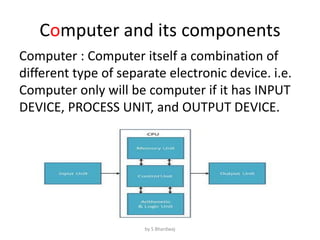
Computer : Computer itself a combination of
different type of separate electronic device. i.e.
Computer only will be computer if it has INPUT
DEVICE, PROCESS UNIT, and OUTPUT DEVICE.
by S Bhardwaj
Input Unit
• This unit contains devices with the help of
which we enter data into computer. This unit
makes link between user and computer. The
input devices translate the information into
the form understandable by computer.
– Keyboard : This is an input device which is used to
input the data into the computer.
– Mouse : This is also an input device which is used
to input the data into the computer.
by S Bhardwaj
CPU (Central Processing Unit)
• CPU is considered as the brain of the computer.
CPU performs all types of data processing
operations. It stores data, intermediate results
and instructions (program). It is heart and mind
of the computer without this unit computer
unable to process. It controls the operation of all
parts of computer. CPU itself has following three
components
– ALU(Arithmetic Logic Unit)
– Memory Unit
– Control Unit
by S Bhardwaj
Output Unit
• Output unit consists of devices with the help of
which we get the information from computer.
This unit is a link between computer and users.
Output devices translate the computer's output
into the form understandable by users.
– Monitor :
This is an output device which is used to
show the result of the instructions.
– Printers
Printer is an output device, which is used to
print information on paper.
by S Bhardwaj
by S Bhardwaj
ELEMENTS OR COMPONENTS OF
COMPUTER
The basic elements of computer systems are:
• Hardware,
• Software,
• Human ware
• live ware
• firmware.
by S Bhardwaj
• Hardware:
Hardware of a computer involves physical
units of the machine with its electronic and
mechanical functional parts. The layout of
these functional parts is called the architecture
of computer, showing how they are connected
together.
by S Bhardwaj
Software:
Software is as vital for effective use of
computer as Hardware. Instructions are to be
given to the computer for doing a particulate job.
A set of such instruction to be executed
sequentially to perform a specific task is called a
program. A collection of programs is referred to
as software.
by S Bhardwaj
Human Ware
A group of personnel associated with
various stages, from manufactured to actual use,
of a computer is known as Human ware. These
are actually interfaced between a machine and
the end user. It might include the following
personnel.
by S Bhardwaj
Sr. NoType Functions
1
Hardware
Engineers
Design, Fabrication & Maintenance of
Computer System.
2 System Analyst
Studies the problem and prepares the
solution and program specifications.
3 Programmer Writes Computer Programs.
4 Operator Operates the Computer.
by S Bhardwaj
Liveware
It was used in the computer industry as
early as 1966 to refer to computer users, often in
humorous contexts, by analogy with hardware
and software. It is a slang term used to denote
people using (attached to) computers, and is
based on the need for a human, or liveware, to
operate the system using hardware and software.
by S Bhardwaj
Firmware
Software which available as part of
hardware is called as firmware. Computer can
retrieve and use this software but cannot
modify it easily. These are the programs stored
in ROM chip. This ROM chip is affixed on the
motherboard of the computer. Thus, it is a part
of CPU.
by S Bhardwaj
SOFTWARES
• Software is a logical programme to
handle/solve the complex problem.
• Software is as vital for effective use of
computer as Hardware. Instructions are to be
given to the computer for doing a particulate
job. A set of such instruction to be executed
sequentially to perform a specific task is called
a program. A collection of programs is referred
to as software.
by S Bhardwaj
by S Bhardwaj
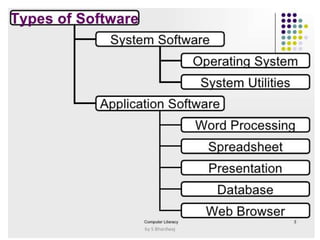
Types of Software
Software is a logical programme to handle/solve the complex
problem. Their types are:
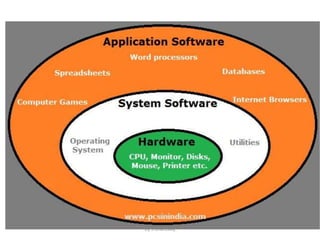
• System Software : This is special type of software which is
responsible for handle the whole computer system.
• Application Software : This is special type of software which is
used to solve a particular problem.
• Embedded Software : This type of software embedded with
hardware to do a specific type of job.
• Proprietary Software : In general, this type of software
require to purchase to use that particular software for the
some time or single user as per conditioned by the vendor of
that particular software.
• Open Source Software : This type of software may be freely
available and can not be use in commercially. We can modify,
and use it under the same license.
by S Bhardwaj
by S Bhardwaj
Computer – Software(In detail)
• Software is a set of programs, which is
designed to perform a well-defined function.
A program is a sequence of instructions
written to solve a particular problem.
There are two types of software
– System Software
– Application Software
by S Bhardwaj
SYSTEM SOFTWARE
The system software is collection of programs
designed to operate, control, and extend the
processing capabilities of the computer itself. System
software are generally prepared by computer
manufactures. These software products comprise of
programs written in low-level languages which interact
with the hardware at a very basic level. System
software serves as the interface between hardware
and the end users.
Some examples of system software are Operating
System, Compilers, Interpreter, Assemblers etc.
by S Bhardwaj
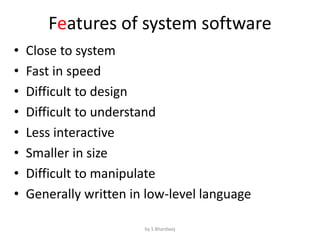
Features of system software
• Close to system
• Fast in speed
• Difficult to design
• Difficult to understand
• Less interactive
• Smaller in size
• Difficult to manipulate
• Generally written in low-level language
by S Bhardwaj
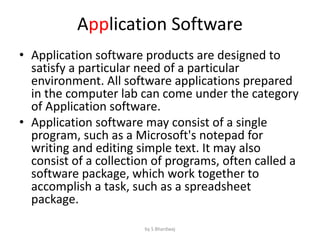
Application Software
• Application software products are designed to
satisfy a particular need of a particular
environment. All software applications prepared
in the computer lab can come under the category
of Application software.
• Application software may consist of a single
program, such as a Microsoft's notepad for
writing and editing simple text. It may also
consist of a collection of programs, often called a
software package, which work together to
accomplish a task, such as a spreadsheet
package.
by S Bhardwaj
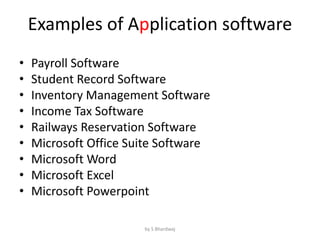
Examples of Application software
• Payroll Software
• Student Record Software
• Inventory Management Software
• Income Tax Software
• Railways Reservation Software
• Microsoft Office Suite Software
• Microsoft Word
• Microsoft Excel
• Microsoft Powerpoint
by S Bhardwaj
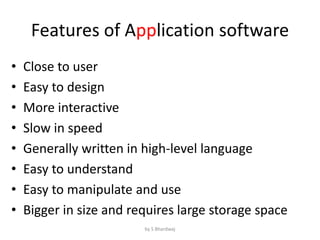
Features of Application software
• Close to user
• Easy to design
• More interactive
• Slow in speed
• Generally written in high-level language
• Easy to understand
• Easy to manipulate and use
• Bigger in size and requires large storage space
by S Bhardwaj

Components of computer and software: Introduction

  • 1.
  • 2.
    Computer and itscomponents Computer : Computer itself a combination of different type of separate electronic device. i.e. Computer only will be computer if it has INPUT DEVICE, PROCESS UNIT, and OUTPUT DEVICE. by S Bhardwaj
  • 3.
    Input Unit • Thisunit contains devices with the help of which we enter data into computer. This unit makes link between user and computer. The input devices translate the information into the form understandable by computer. – Keyboard : This is an input device which is used to input the data into the computer. – Mouse : This is also an input device which is used to input the data into the computer. by S Bhardwaj
  • 4.
    CPU (Central ProcessingUnit) • CPU is considered as the brain of the computer. CPU performs all types of data processing operations. It stores data, intermediate results and instructions (program). It is heart and mind of the computer without this unit computer unable to process. It controls the operation of all parts of computer. CPU itself has following three components – ALU(Arithmetic Logic Unit) – Memory Unit – Control Unit by S Bhardwaj
  • 5.
    Output Unit • Outputunit consists of devices with the help of which we get the information from computer. This unit is a link between computer and users. Output devices translate the computer's output into the form understandable by users. – Monitor : This is an output device which is used to show the result of the instructions. – Printers Printer is an output device, which is used to print information on paper. by S Bhardwaj
  • 6.
  • 7.
    ELEMENTS OR COMPONENTSOF COMPUTER The basic elements of computer systems are: • Hardware, • Software, • Human ware • live ware • firmware. by S Bhardwaj
  • 8.
    • Hardware: Hardware ofa computer involves physical units of the machine with its electronic and mechanical functional parts. The layout of these functional parts is called the architecture of computer, showing how they are connected together. by S Bhardwaj
  • 9.
    Software: Software is asvital for effective use of computer as Hardware. Instructions are to be given to the computer for doing a particulate job. A set of such instruction to be executed sequentially to perform a specific task is called a program. A collection of programs is referred to as software. by S Bhardwaj
  • 10.
    Human Ware A groupof personnel associated with various stages, from manufactured to actual use, of a computer is known as Human ware. These are actually interfaced between a machine and the end user. It might include the following personnel. by S Bhardwaj
  • 11.
    Sr. NoType Functions 1 Hardware Engineers Design,Fabrication & Maintenance of Computer System. 2 System Analyst Studies the problem and prepares the solution and program specifications. 3 Programmer Writes Computer Programs. 4 Operator Operates the Computer. by S Bhardwaj
  • 12.
    Liveware It was usedin the computer industry as early as 1966 to refer to computer users, often in humorous contexts, by analogy with hardware and software. It is a slang term used to denote people using (attached to) computers, and is based on the need for a human, or liveware, to operate the system using hardware and software. by S Bhardwaj
  • 13.
    Firmware Software which availableas part of hardware is called as firmware. Computer can retrieve and use this software but cannot modify it easily. These are the programs stored in ROM chip. This ROM chip is affixed on the motherboard of the computer. Thus, it is a part of CPU. by S Bhardwaj
  • 14.
    SOFTWARES • Software isa logical programme to handle/solve the complex problem. • Software is as vital for effective use of computer as Hardware. Instructions are to be given to the computer for doing a particulate job. A set of such instruction to be executed sequentially to perform a specific task is called a program. A collection of programs is referred to as software. by S Bhardwaj
  • 15.
  • 16.
    Types of Software Softwareis a logical programme to handle/solve the complex problem. Their types are: • System Software : This is special type of software which is responsible for handle the whole computer system. • Application Software : This is special type of software which is used to solve a particular problem. • Embedded Software : This type of software embedded with hardware to do a specific type of job. • Proprietary Software : In general, this type of software require to purchase to use that particular software for the some time or single user as per conditioned by the vendor of that particular software. • Open Source Software : This type of software may be freely available and can not be use in commercially. We can modify, and use it under the same license. by S Bhardwaj
  • 17.
  • 18.
    Computer – Software(Indetail) • Software is a set of programs, which is designed to perform a well-defined function. A program is a sequence of instructions written to solve a particular problem. There are two types of software – System Software – Application Software by S Bhardwaj
  • 19.
    SYSTEM SOFTWARE The systemsoftware is collection of programs designed to operate, control, and extend the processing capabilities of the computer itself. System software are generally prepared by computer manufactures. These software products comprise of programs written in low-level languages which interact with the hardware at a very basic level. System software serves as the interface between hardware and the end users. Some examples of system software are Operating System, Compilers, Interpreter, Assemblers etc. by S Bhardwaj
  • 20.
    Features of systemsoftware • Close to system • Fast in speed • Difficult to design • Difficult to understand • Less interactive • Smaller in size • Difficult to manipulate • Generally written in low-level language by S Bhardwaj
  • 21.
    Application Software • Applicationsoftware products are designed to satisfy a particular need of a particular environment. All software applications prepared in the computer lab can come under the category of Application software. • Application software may consist of a single program, such as a Microsoft's notepad for writing and editing simple text. It may also consist of a collection of programs, often called a software package, which work together to accomplish a task, such as a spreadsheet package. by S Bhardwaj
  • 22.
    Examples of Applicationsoftware • Payroll Software • Student Record Software • Inventory Management Software • Income Tax Software • Railways Reservation Software • Microsoft Office Suite Software • Microsoft Word • Microsoft Excel • Microsoft Powerpoint by S Bhardwaj
  • 23.
    Features of Applicationsoftware • Close to user • Easy to design • More interactive • Slow in speed • Generally written in high-level language • Easy to understand • Easy to manipulate and use • Bigger in size and requires large storage space by S Bhardwaj