Social Media tools for librariesReysa C. AlenzuelaDirectorThomas Jefferson Information Center
Goals1. Provide an overview of Social Media;2. Present a landscape social media environs;3.  Underscore the salient features of selected social media tools which can be used by libraries and information centers;4. Share a summary of working guidelines on how to effectively use social networking tools to deliver and expound information, engage in discussion and promote learning.
New Media LandscapeEmerging TechnologySocial MediaWeb 2.0
Emerging TechnologyA general term used to denote significant technological developments that in effect, broach new territory in some significant way in their field.
Social Media   Information content created by people using highly accessible and scalable publishing technologies.
Web 2.0  The Web 2.0 concept represents a second wave of Web technologies to create more interactive and easy-to-use Web sites using new technologies.
Social Media ToolsSocial NetworkingBlogs or WeblogsMicrobloggingWikisSocial BookmarkingPodcastingSMS and Instant Messaging (IM)Online Book CatalogsPhoto SharingAudio & Video Sharing
Social NetworkingA social networking site is an online place where a user can create a profile and build a personal network that connects him or her to other users.Communities with a common interest/ topic develop and evolve through the use of these sites.
Salient Features Page vs. Group
 Visibility
 InsightsAnnounce new books in the library
Let clienteles know what you are doing
Link to useful websites
Connect with other libraries
Create discussion threads
Solicit feedback
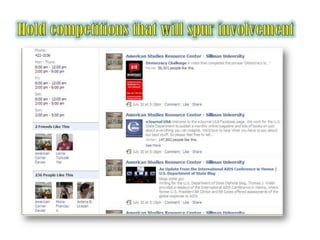
Hold competitions that will spur involvement
What are Blogs?Or weblogs are websites that are frequently updatedCan be personal or informationalCan be authored by an individual or a teamUsers can leave comments
Microblogs*a new form of communication in which users can describe their current status in short posts
 via mobile phones, email or the Web
people use microblogging to talk about their daily activities and to seek or share information
Twitter is a popular microblogging tool
WikisA website that allows visitors to add, delete and otherwise edit all available content.*Also refers to the collaborative software itself – the so-called “wiki engine” – that facilitates the operation of such a website. *Excellent for collaborative writing.
Social BookmarkingSocial bookmarking is saving links of Web sites to a public site and tagging them with keywords.It differs from bookmarks because the bookmarks are only available on the computer you are using.Visitors to social bookmarking sites can search for sites that others have linked to by keyword, person who added the site, or popularity.Hartman, Karen. 2009. Lecture Notes on" The 23 Things".
PodcastingiPod + broadcastingAudio and/or videoUsing RSS, people can subscribe to the podcasts and listen and/or watch anything you’ve done whenever they have time to do it!
Instant Messagingis a form of real-time communication between two or more people based on typed text. The text is conveyed via devices connected over a network such as the Internet.
SMSShort Message Service (SMS) is a communication service standardized in the GSM mobile communication system, using standardized communications protocols allowing the interchange of short text messages between mobile telephone devices.
Online Book CatalogDisplays all the books have added to the catalog.Each book added connects to other people.The book page gives quality data and shows you who else has the book and what they think about it.Provides connectivity.
Photo Sharing*“A picture is worth a thousand words.”Photographs – visual texts – can support communication by vividly portraying noteworthy or unfamiliar objects and experiences.
Video Sharingallow contentsuppliers to upload video effortlessly, automatically convertingfrom many different formatsUsers can easily share videos by mailing links or embedding them on web pages or in blogs. Users canalso rate and comment on videos, bringing new social aspectsto the viewing of videos.
Thoughts to PonderOne size does not fit all
Thoughts to PonderFocus on goal not on technology
Thoughts to PonderWhen we became interested… this is where it starts!!!
Reality BitesTime constraintLack of knowledgeDigital DivideHighly addictive

Social Media Tools for Libraries

  • 1.
    Social Media toolsfor librariesReysa C. AlenzuelaDirectorThomas Jefferson Information Center
  • 2.
    Goals1. Provide anoverview of Social Media;2. Present a landscape social media environs;3. Underscore the salient features of selected social media tools which can be used by libraries and information centers;4. Share a summary of working guidelines on how to effectively use social networking tools to deliver and expound information, engage in discussion and promote learning.
  • 3.
    New Media LandscapeEmergingTechnologySocial MediaWeb 2.0
  • 4.
    Emerging TechnologyA generalterm used to denote significant technological developments that in effect, broach new territory in some significant way in their field.
  • 5.
    Social Media Information content created by people using highly accessible and scalable publishing technologies.
  • 6.
    Web 2.0 The Web 2.0 concept represents a second wave of Web technologies to create more interactive and easy-to-use Web sites using new technologies.
  • 8.
    Social Media ToolsSocialNetworkingBlogs or WeblogsMicrobloggingWikisSocial BookmarkingPodcastingSMS and Instant Messaging (IM)Online Book CatalogsPhoto SharingAudio & Video Sharing
  • 9.
    Social NetworkingA socialnetworking site is an online place where a user can create a profile and build a personal network that connects him or her to other users.Communities with a common interest/ topic develop and evolve through the use of these sites.
  • 11.
  • 12.
  • 13.
    InsightsAnnounce newbooks in the library
  • 14.
    Let clienteles knowwhat you are doing
  • 15.
  • 16.
  • 17.
  • 18.
  • 19.
    Hold competitions thatwill spur involvement
  • 20.
    What are Blogs?Orweblogs are websites that are frequently updatedCan be personal or informationalCan be authored by an individual or a teamUsers can leave comments
  • 22.
    Microblogs*a new formof communication in which users can describe their current status in short posts
  • 23.
    via mobilephones, email or the Web
  • 24.
    people use microbloggingto talk about their daily activities and to seek or share information
  • 25.
    Twitter is apopular microblogging tool
  • 26.
    WikisA website thatallows visitors to add, delete and otherwise edit all available content.*Also refers to the collaborative software itself – the so-called “wiki engine” – that facilitates the operation of such a website. *Excellent for collaborative writing.
  • 29.
    Social BookmarkingSocial bookmarkingis saving links of Web sites to a public site and tagging them with keywords.It differs from bookmarks because the bookmarks are only available on the computer you are using.Visitors to social bookmarking sites can search for sites that others have linked to by keyword, person who added the site, or popularity.Hartman, Karen. 2009. Lecture Notes on" The 23 Things".
  • 31.
    PodcastingiPod + broadcastingAudioand/or videoUsing RSS, people can subscribe to the podcasts and listen and/or watch anything you’ve done whenever they have time to do it!
  • 32.
    Instant Messagingis aform of real-time communication between two or more people based on typed text. The text is conveyed via devices connected over a network such as the Internet.
  • 34.
    SMSShort Message Service(SMS) is a communication service standardized in the GSM mobile communication system, using standardized communications protocols allowing the interchange of short text messages between mobile telephone devices.
  • 36.
    Online Book CatalogDisplaysall the books have added to the catalog.Each book added connects to other people.The book page gives quality data and shows you who else has the book and what they think about it.Provides connectivity.
  • 38.
    Photo Sharing*“A pictureis worth a thousand words.”Photographs – visual texts – can support communication by vividly portraying noteworthy or unfamiliar objects and experiences.
  • 40.
    Video Sharingallow contentsuppliersto upload video effortlessly, automatically convertingfrom many different formatsUsers can easily share videos by mailing links or embedding them on web pages or in blogs. Users canalso rate and comment on videos, bringing new social aspectsto the viewing of videos.
  • 42.
    Thoughts to PonderOnesize does not fit all
  • 43.
    Thoughts to PonderFocuson goal not on technology
  • 44.
    Thoughts to PonderWhenwe became interested… this is where it starts!!!
  • 45.
    Reality BitesTime constraintLackof knowledgeDigital DivideHighly addictive

Editor's Notes

  • #8 #Philippines text-messaging capital of the world & #1 per capita in sharing content via social networkinghttp://globalwebindex.net/wp-content/uploads/downloads/2011/06/Global-Map-of-Social-Networking-GlobalWebIndex-June-20112.pdf
  • #11 http://www.checkfacebook.com/