90 DAY SEM FITNESS PLAN: CONVERSION  SMX West 2010
Kayden Kelly CEO & Managing Director
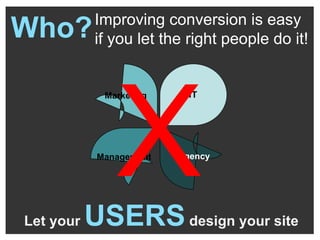
Let your  USERS  design your site Improving conversion is easy if you let the right people do it! X Who? Marketing Management Agency
Let’s assess YOUR CONVERSION FITNESS
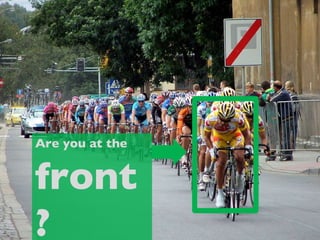
Are you at the front?
Is your site a lean & mean… user focused, goal oriented, conversion machine?
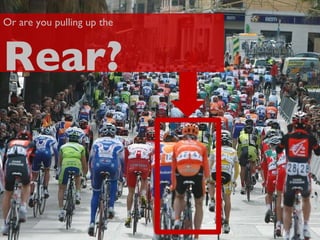
Or are you pulling up the Rear?
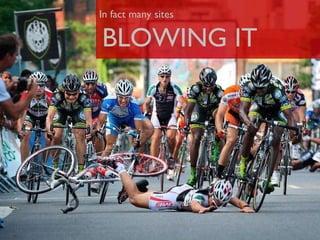
In fact many sites BLOWING IT
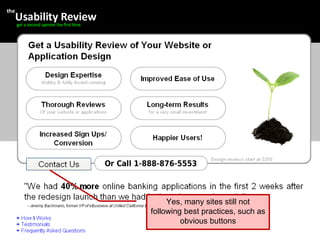
Today there are plenty of  Conversion Best Practices This is BASIC – Much more to it! Buy Now!
Yes, many sites still not following best practices, such as obvious buttons
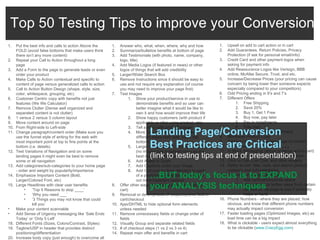
Top 50 Testing Tips to improve your Conversion Put the best info and calls to action Above the FOLD (avoid false bottoms that make users think there isn’t any more content) Repeat your Call to Action throughout a long page  Add a Form to the page to generate leads or even order your product  Make Calls to Action contextual and specific to content of page versus generalized calls to action Call to Action Button Design (shape, style, size, color, whitespace, grouping, etc) Customer Centric copy with benefits not just features (We We Calculator) Remove Clutter (Dense well organized and separated content is not clutter) 1 versus 2 versus 3 column layout Move content around on page  From Right-side to Left-side Change paragraph/content order (Make sure you use the funnel style of writing for the web with most important point at top to fine points at the bottom (i.e. details) Test Variations of Navigation and on some landing pages it might even be best to remove some or all navigation Add categories/sub-categories to your home page - order and weight by popularity/importance Emphasize Important Content (Bold, Larger/Colored Font, etc) Large Headlines with clear user benefits ‘ Top 5 Reasons to stop ____’ ‘ Why you need ___’ ‘ 3 Things you may not know that could kill you’  Make your content scannable  Add Sense of Urgency messaging like ‘Sale Ends Today’ or ‘Only 5 Left’ Different Fonts (Sizes, Colors/Contrast, Styles) Tagline/USP in header that provides distinct positioning/differentiation Increase body copy (just enough) to overcome all common objections Answer who, what, when, where, why and how Summarize/bulletize benefits at bottom of page Add Testimonials (with photo, name, company, logo, title) Add Media Logos (if featured in news) or other logos of things that will add credibility Larger/Wider Search Box Remove Instructions since it should be easy to use and not require any explanation (of course you may need to improve your page first) Test Images  Show your product/service in use to demonstrate benefits and so user can better imagine what it would be like to own it and how would improve their life Show happy customers (with product if applicable or after using product, etc) Tell a story with product images More than one image (especially different views from side, back, top, bottom) Larger versus smaller versus no images (no images has surprised many as the best result in some cases) Add Ability to Zoom Add Captions under your image Add Call-outs to draw attention to parts of a photo/image and add info to point out most important aspects Offer other ways to order by phone and fax (in cart) Removal or de-emphasis of coupon/promo field in cart/checkout Ajax/DHTML to hide optional form elements unless needed Remove unnecessary fields or change order of fields Visually Group and separate related fields # of checkout steps (1 vs 2 vs 3 vs 4)  Repeat main offer and benefits in cart Upsell on add to cart action or in cart Add Guarantees, Return Policies, Privacy Protection (if ask for personal email/info) Credit Card and other payment logos when asking for payment info Add Reassurance Logos like Verisign, BBB online, McAfee Secure, Trust, and etc. Increase/Decrease Prices (your pricing can cause concern by being lower than someone expects especially compared to your competitors) Odd Pricing ending in 9’s and 7’s Different Offers Free Shipping Save 20% Buy 1, Get 1 Free Buy now, pay later Pay in installments Free trial Longer/shorter commitment More/less Product Copy Tabbed content versus long page of content  Add reviews In Stock Messaging (above or below add to cart) Rich media like Video and Flash Animation Click to Call, Live Chat, and other widgets Ability to sort, filter, rank, and search product category and sub-categories Proximity of content elements Add vertical/horizontal space Move closer or farther away from certain content on the page to see if proximity helps or hurts Phone Numbers - where they are placed, how obvious, and know that different phone numbers may actually impact conversion Faster loading pages (Optimized Images, etc) as load time can be a big impact What is clickable - users expect almost everything to be clickable ( www.CrazyEgg.com )  Landing Page/Conversion Best Practices are Critical … (link to testing tips at end of presentation) … BUT today’s focus is to EXPAND your ANALYSIS techniques
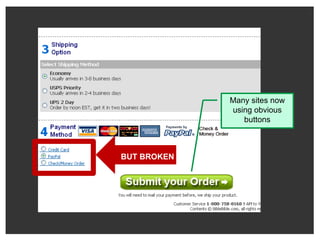
Many sites now using obvious buttons BUT BROKEN
WORKOUT #1 FIX WHAT’S BROKEN Site Errors, Flash Version Issue, Broken Links, Poor Performance
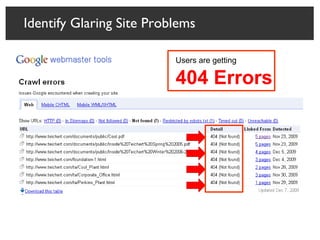
Identify Glaring Site Problems Users are getting 404 Errors
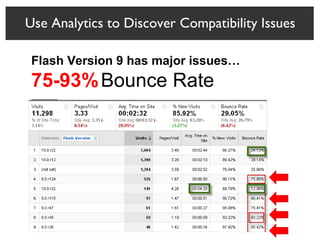
Flash Version 9 has major issues…  75-93%   Bounce Rate Use Analytics to Discover Compatibility Issues
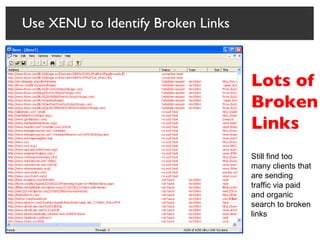
Use XENU to Identify Broken Links Lots of Broken Links Still find too many clients that are sending traffic via paid and organic search to broken links
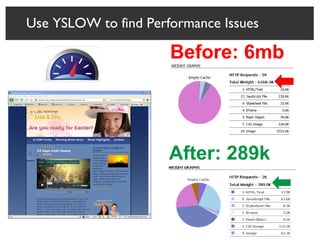
Use YSLOW to find Performance Issues Before: 6mb After: 289k
WORKOUT #2 MEASUREMENT
What People Do
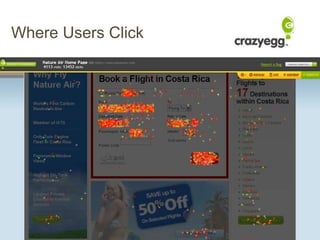
Where Users Click
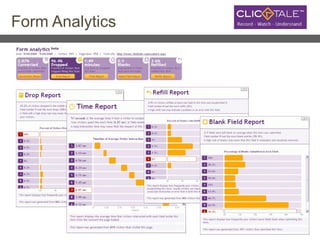
Form Analytics
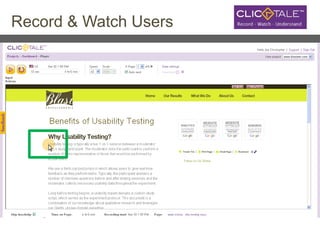
Record & Watch Users
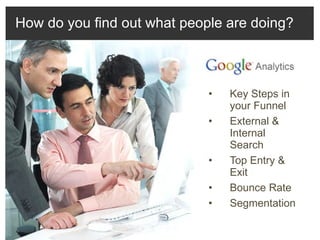
Key Steps in your Funnel  External & Internal Search Top Entry & Exit Bounce Rate Segmentation How do you find out what people are doing?
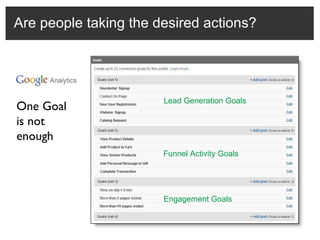
Are people taking the desired actions? One Goal is not enough Lead Generation Goals Funnel Activity Goals Engagement Goals
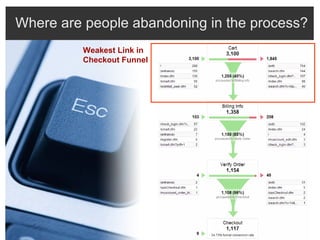
Where are people abandoning in the process? Weakest Link in  Checkout Funnel
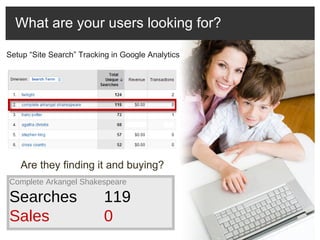
What are your users looking for? Complete Arkangel Shakespeare Searches 119 Sales 0 Setup “Site Search” Tracking in Google Analytics Are they finding it and buying?
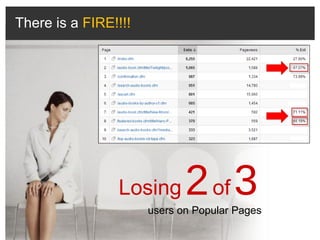
Losing   2   of   3   users on Popular Pages There is a  FIRE!!!!
“ Segmentation is the key to finding insights.  You segment, or you die! ” - Avinash Kaushik, Google
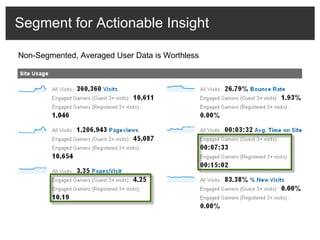
Segment for Actionable Insight Non-Segmented, Averaged User Data is Worthless
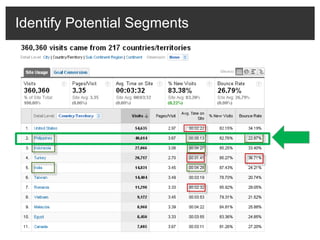
Identify Potential Segments
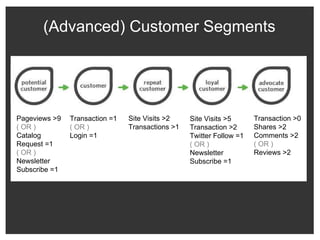
(Advanced) Customer Segments Pageviews >9 ( OR )  Catalog Request =1 ( OR ) Newsletter Subscribe =1  Transaction =1 ( OR )  Login =1 Site Visits >2 Transactions >1 Site Visits >5 Transaction >2 Twitter Follow =1 ( OR ) Newsletter Subscribe =1 Transaction >0 Shares >2 Comments >2 ( OR ) Reviews >2
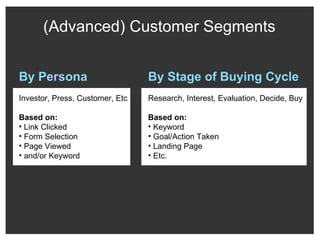
(Advanced) Customer Segments By Persona Investor, Press, Customer, Etc Based on: Link Clicked Form Selection Page Viewed and/or Keyword By Stage of Buying Cycle Research, Interest, Evaluation, Decide, Buy Based on: Keyword Goal/Action Taken Landing Page Etc.
Why People  Do What They Do
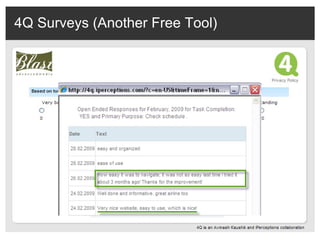
4Q Surveys (Another Free Tool)
Usability Tests Can Be Cheap &  Eye Opening! Watch & Listen to Identify Obstacles Where ,  How, Why
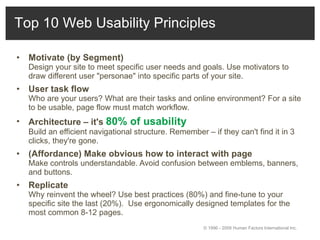
Motivate (by Segment)   Design your site to meet specific user needs and goals. Use motivators to draw different user "personae" into specific parts of your site.  User task flow   Who are your users? What are their tasks and online environment? For a site to be usable, page flow must match workflow.  Architecture – it's  80% of usability  Build an efficient navigational structure. Remember – if they can't find it in 3 clicks, they're gone.  (Affordance) Make obvious how to interact with page   Make controls understandable. Avoid confusion between emblems, banners, and buttons.  Replicate   Why reinvent the wheel? Use best practices (80%) and fine-tune to your specific site the last (20%).  Use ergonomically designed templates for the most common 8-12 pages.  Top 10 Web Usability Principles © 1996 - 2009 Human Factors International Inc.
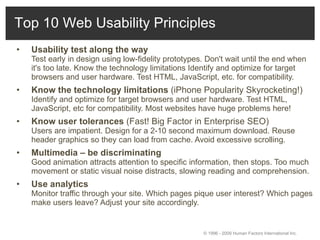
Usability test along the way   Test early in design using low-fidelity prototypes. Don't wait until the end when it's too late. Know the technology limitations Identify and optimize for target browsers and user hardware. Test HTML, JavaScript, etc. for compatibility.  Know the technology limitations  (iPhone Popularity Skyrocketing!) Identify and optimize for target browsers and user hardware. Test HTML, JavaScript, etc for compatibility. Most websites have huge problems here! Know user tolerances  (Fast! Big Factor in Enterprise SEO) Users are impatient. Design for a 2-10 second maximum download. Reuse header graphics so they can load from cache. Avoid excessive scrolling.  Multimedia – be discriminating   Good animation attracts attention to specific information, then stops. Too much movement or static visual noise distracts, slowing reading and comprehension.  Use analytics   Monitor traffic through your site. Which pages pique user interest? Which pages make users leave? Adjust your site accordingly.  © 1996 - 2009 Human Factors International Inc.  Top 10 Web Usability Principles
WORKOUT #3 FOCUS ON USER
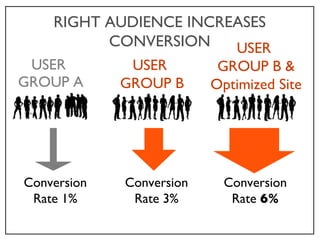
USER  GROUP A Conversion Rate 1% RIGHT AUDIENCE INCREASES CONVERSION USER  GROUP B Conversion Rate 3% USER  GROUP B & Optimized Site Conversion Rate  6%
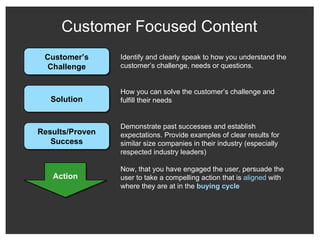
Customer Focused Content Identify and clearly speak to how you understand the customer’s challenge, needs or questions. Action Customer’s Challenge Solution Results/Proven Success Demonstrate past successes and establish expectations. Provide examples of clear results for similar size companies in their industry (especially respected industry leaders) How you can solve the customer’s challenge and fulfill their needs Now, that you have engaged the user, persuade the user to take a compelling action that is  aligned  with where they are at in the  buying cycle
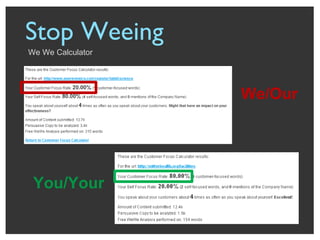
Stop Weeing  We We Calculator You/Your We/Our
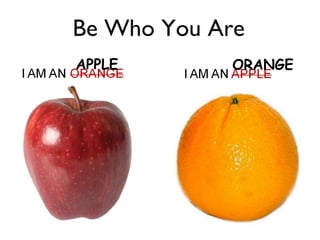
I AM AN ORANGE
I AM AN APPLE CONTEMPORARY
Be Who You Are APPLE ORANGE
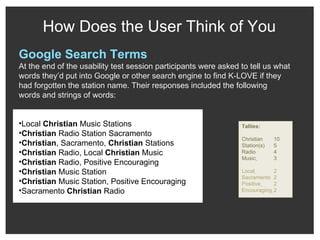
How Does the User Think of You Google Search Terms At the end of the usability test session participants were asked to tell us what words they’d put into Google or other search engine to find K-LOVE if they had forgotten the station name. Their responses included the following words and strings of words: Local  Christian  Music Stations Christian  Radio Station Sacramento Christian , Sacramento,  Christian  Stations Christian  Radio, Local  Christian  Music Christian  Radio, Positive Encouraging Christian  Music Station Christian  Music Station, Positive Encouraging Sacramento  Christian  Radio Tallies:  Christian 10 Station(s) 5 Radio 4 Music   3 Local   2 Sacramento 2 Positive   2 Encouraging   2
Understand and Map content and actions to user’s Buying Cycle Interaction  Create Interest – Learning Ctr, Whitepaper Edu-Sell Communications - Case Studies Purchase & Validate – Proof of Concept, References, Promos 1 3-X X+ Consider Solutions - Webinars & Demo 2 Search for Solutions Evaluate Solutions Recognize Need Justify Solution Purchase Evaluate Decision Buying Cycle Credit: Lauren McDonald, SilverPop
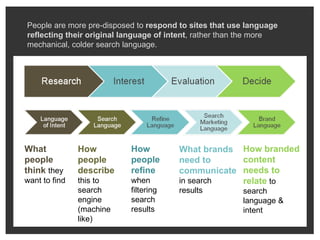
What people think  they want to find How people describe  this to search engine (machine like) How people refine  when filtering search results What brands need to communicate   in search results How branded content needs to relate   to search language & intent People are more pre-disposed to  respond to sites that use language reflecting their original language of intent , rather than the more mechanical, colder search language.
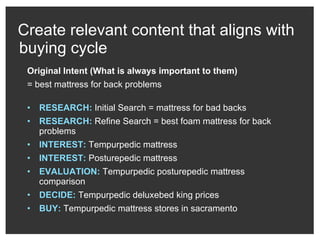
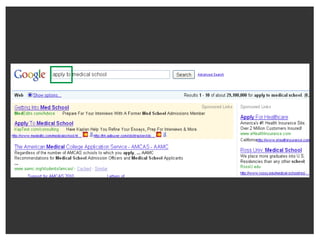
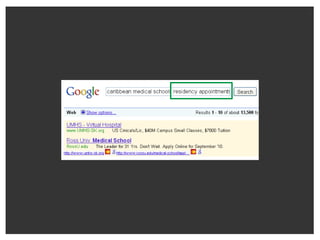
Create relevant content that aligns with buying cycle Original Intent (What is always important to them) = best mattress for back problems RESEARCH:  Initial Search = mattress for bad backs RESEARCH:  Refine Search = best foam mattress for back problems INTEREST:  Tempurpedic mattress  INTEREST:  Posturepedic mattress EVALUATION:  Tempurpedic posturepedic mattress comparison DECIDE:  Tempurpedic deluxebed king prices BUY:  Tempurpedic mattress stores in sacramento
 
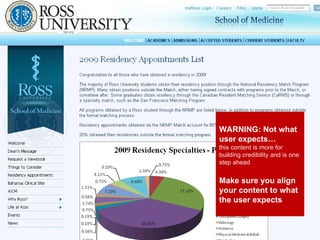
Screenshot showing how search matches site (per stage of buying cycle) WARNING: Not what user expects…  this content is more for building credibility and is one step ahead Make sure you align your content to what the user expects
 
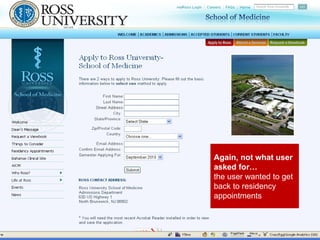
Again, not what user asked for… the user wanted to get back to residency appointments
WORKOUT #4 S.M.A.R.T. GOALS
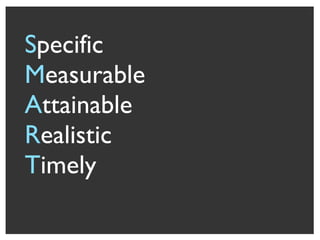
S pecific M easurable A ttainable R ealistic T imely
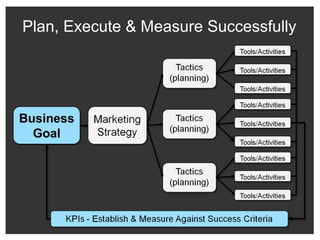
Plan, Execute & Measure Successfully Business Goal
WORKOUT #5 TESTING
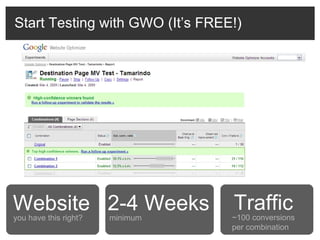
Start Testing with GWO (It’s FREE!) minimum 2-4 Weeks ~100 conversions per combination Traffic Website you have this right?
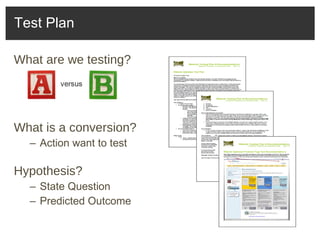
What are we testing? What is a conversion? Action want to test Hypothesis? State Question Predicted Outcome Test Plan
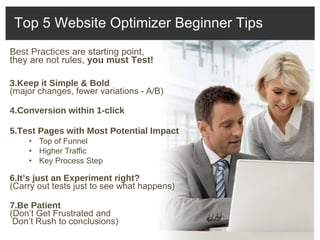
Best Practices  are starting point,  they are not rules,  you must Test!  Keep it Simple & Bold  (major changes, fewer variations - A/B) Conversion within 1-click Test Pages with Most Potential Impact Top of Funnel Higher Traffic Key Process Step It’s just an Experiment right? (Carry out tests just to see what happens) Be Patient (Don’t Get Frustrated and   Don’t Rush to conclusions) Top 5 Website Optimizer Beginner Tips
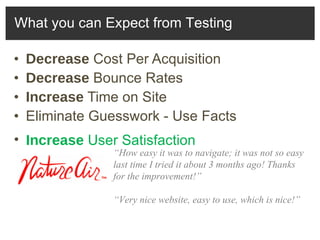
Decrease  Cost Per Acquisition Decrease  Bounce Rates Increase  Time on Site Eliminate Guesswork - Use Facts What you can Expect from Testing Increase  User Satisfaction “ How easy it was to navigate; it was not so easy last time I tried it about 3 months ago! Thanks for the improvement!” “ Very nice website, easy to use, which is nice!”
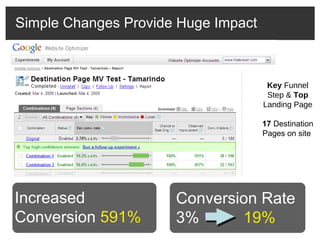
Simple Changes Provide Huge Impact Key  Funnel Step &  Top  Landing Page 17  Destination Pages on site  Before After Conversion Rate 3%  19% Increased Conversion  591%
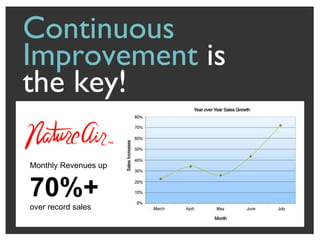
Continuous Improvement  is  the key! Monthly Revenues up  70%+   over record sales
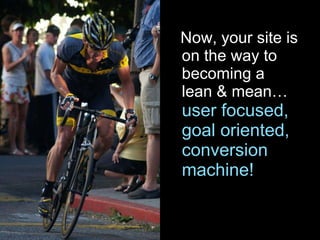
Now, your site is on the way to becoming a lean & mean…  user focused, goal oriented, conversion machine!
Twitter @blastam Top 50 Tips for What to Test http://bit.ly/top50sessj Email [email_address] Thank you... Please go make some simple changes and make some big profits!

SMX West 2010 - Conversion Optimization Tips

  • 1.
    90 DAY SEMFITNESS PLAN: CONVERSION SMX West 2010
  • 2.
    Kayden Kelly CEO& Managing Director
  • 3.
    Let your USERS design your site Improving conversion is easy if you let the right people do it! X Who? Marketing Management Agency
  • 4.
    Let’s assess YOURCONVERSION FITNESS
  • 5.
    Are you atthe front?
  • 6.
    Is your sitea lean & mean… user focused, goal oriented, conversion machine?
  • 7.
    Or are youpulling up the Rear?
  • 8.
    In fact manysites BLOWING IT
  • 9.
    Today there areplenty of Conversion Best Practices This is BASIC – Much more to it! Buy Now!
  • 10.
    Yes, many sitesstill not following best practices, such as obvious buttons
  • 11.
    Top 50 TestingTips to improve your Conversion Put the best info and calls to action Above the FOLD (avoid false bottoms that make users think there isn’t any more content) Repeat your Call to Action throughout a long page Add a Form to the page to generate leads or even order your product Make Calls to Action contextual and specific to content of page versus generalized calls to action Call to Action Button Design (shape, style, size, color, whitespace, grouping, etc) Customer Centric copy with benefits not just features (We We Calculator) Remove Clutter (Dense well organized and separated content is not clutter) 1 versus 2 versus 3 column layout Move content around on page From Right-side to Left-side Change paragraph/content order (Make sure you use the funnel style of writing for the web with most important point at top to fine points at the bottom (i.e. details) Test Variations of Navigation and on some landing pages it might even be best to remove some or all navigation Add categories/sub-categories to your home page - order and weight by popularity/importance Emphasize Important Content (Bold, Larger/Colored Font, etc) Large Headlines with clear user benefits ‘ Top 5 Reasons to stop ____’ ‘ Why you need ___’ ‘ 3 Things you may not know that could kill you’ Make your content scannable Add Sense of Urgency messaging like ‘Sale Ends Today’ or ‘Only 5 Left’ Different Fonts (Sizes, Colors/Contrast, Styles) Tagline/USP in header that provides distinct positioning/differentiation Increase body copy (just enough) to overcome all common objections Answer who, what, when, where, why and how Summarize/bulletize benefits at bottom of page Add Testimonials (with photo, name, company, logo, title) Add Media Logos (if featured in news) or other logos of things that will add credibility Larger/Wider Search Box Remove Instructions since it should be easy to use and not require any explanation (of course you may need to improve your page first) Test Images Show your product/service in use to demonstrate benefits and so user can better imagine what it would be like to own it and how would improve their life Show happy customers (with product if applicable or after using product, etc) Tell a story with product images More than one image (especially different views from side, back, top, bottom) Larger versus smaller versus no images (no images has surprised many as the best result in some cases) Add Ability to Zoom Add Captions under your image Add Call-outs to draw attention to parts of a photo/image and add info to point out most important aspects Offer other ways to order by phone and fax (in cart) Removal or de-emphasis of coupon/promo field in cart/checkout Ajax/DHTML to hide optional form elements unless needed Remove unnecessary fields or change order of fields Visually Group and separate related fields # of checkout steps (1 vs 2 vs 3 vs 4) Repeat main offer and benefits in cart Upsell on add to cart action or in cart Add Guarantees, Return Policies, Privacy Protection (if ask for personal email/info) Credit Card and other payment logos when asking for payment info Add Reassurance Logos like Verisign, BBB online, McAfee Secure, Trust, and etc. Increase/Decrease Prices (your pricing can cause concern by being lower than someone expects especially compared to your competitors) Odd Pricing ending in 9’s and 7’s Different Offers Free Shipping Save 20% Buy 1, Get 1 Free Buy now, pay later Pay in installments Free trial Longer/shorter commitment More/less Product Copy Tabbed content versus long page of content Add reviews In Stock Messaging (above or below add to cart) Rich media like Video and Flash Animation Click to Call, Live Chat, and other widgets Ability to sort, filter, rank, and search product category and sub-categories Proximity of content elements Add vertical/horizontal space Move closer or farther away from certain content on the page to see if proximity helps or hurts Phone Numbers - where they are placed, how obvious, and know that different phone numbers may actually impact conversion Faster loading pages (Optimized Images, etc) as load time can be a big impact What is clickable - users expect almost everything to be clickable ( www.CrazyEgg.com ) Landing Page/Conversion Best Practices are Critical … (link to testing tips at end of presentation) … BUT today’s focus is to EXPAND your ANALYSIS techniques
  • 12.
    Many sites nowusing obvious buttons BUT BROKEN
  • 13.
    WORKOUT #1 FIXWHAT’S BROKEN Site Errors, Flash Version Issue, Broken Links, Poor Performance
  • 14.
    Identify Glaring SiteProblems Users are getting 404 Errors
  • 15.
    Flash Version 9has major issues… 75-93% Bounce Rate Use Analytics to Discover Compatibility Issues
  • 16.
    Use XENU toIdentify Broken Links Lots of Broken Links Still find too many clients that are sending traffic via paid and organic search to broken links
  • 17.
    Use YSLOW tofind Performance Issues Before: 6mb After: 289k
  • 18.
  • 19.
  • 20.
  • 21.
  • 22.
  • 23.
    Key Steps inyour Funnel External & Internal Search Top Entry & Exit Bounce Rate Segmentation How do you find out what people are doing?
  • 24.
    Are people takingthe desired actions? One Goal is not enough Lead Generation Goals Funnel Activity Goals Engagement Goals
  • 25.
    Where are peopleabandoning in the process? Weakest Link in Checkout Funnel
  • 26.
    What are yourusers looking for? Complete Arkangel Shakespeare Searches 119 Sales 0 Setup “Site Search” Tracking in Google Analytics Are they finding it and buying?
  • 27.
    Losing 2 of 3 users on Popular Pages There is a FIRE!!!!
  • 28.
    “ Segmentation isthe key to finding insights. You segment, or you die! ” - Avinash Kaushik, Google
  • 29.
    Segment for ActionableInsight Non-Segmented, Averaged User Data is Worthless
  • 30.
  • 31.
    (Advanced) Customer SegmentsPageviews >9 ( OR ) Catalog Request =1 ( OR ) Newsletter Subscribe =1 Transaction =1 ( OR ) Login =1 Site Visits >2 Transactions >1 Site Visits >5 Transaction >2 Twitter Follow =1 ( OR ) Newsletter Subscribe =1 Transaction >0 Shares >2 Comments >2 ( OR ) Reviews >2
  • 32.
    (Advanced) Customer SegmentsBy Persona Investor, Press, Customer, Etc Based on: Link Clicked Form Selection Page Viewed and/or Keyword By Stage of Buying Cycle Research, Interest, Evaluation, Decide, Buy Based on: Keyword Goal/Action Taken Landing Page Etc.
  • 33.
    Why People Do What They Do
  • 34.
  • 35.
    Usability Tests CanBe Cheap & Eye Opening! Watch & Listen to Identify Obstacles Where , How, Why
  • 36.
    Motivate (by Segment) Design your site to meet specific user needs and goals. Use motivators to draw different user "personae" into specific parts of your site. User task flow Who are your users? What are their tasks and online environment? For a site to be usable, page flow must match workflow. Architecture – it's 80% of usability Build an efficient navigational structure. Remember – if they can't find it in 3 clicks, they're gone. (Affordance) Make obvious how to interact with page Make controls understandable. Avoid confusion between emblems, banners, and buttons. Replicate Why reinvent the wheel? Use best practices (80%) and fine-tune to your specific site the last (20%). Use ergonomically designed templates for the most common 8-12 pages. Top 10 Web Usability Principles © 1996 - 2009 Human Factors International Inc.
  • 37.
    Usability test alongthe way Test early in design using low-fidelity prototypes. Don't wait until the end when it's too late. Know the technology limitations Identify and optimize for target browsers and user hardware. Test HTML, JavaScript, etc. for compatibility. Know the technology limitations (iPhone Popularity Skyrocketing!) Identify and optimize for target browsers and user hardware. Test HTML, JavaScript, etc for compatibility. Most websites have huge problems here! Know user tolerances (Fast! Big Factor in Enterprise SEO) Users are impatient. Design for a 2-10 second maximum download. Reuse header graphics so they can load from cache. Avoid excessive scrolling. Multimedia – be discriminating Good animation attracts attention to specific information, then stops. Too much movement or static visual noise distracts, slowing reading and comprehension. Use analytics Monitor traffic through your site. Which pages pique user interest? Which pages make users leave? Adjust your site accordingly. © 1996 - 2009 Human Factors International Inc. Top 10 Web Usability Principles
  • 38.
  • 39.
    USER GROUPA Conversion Rate 1% RIGHT AUDIENCE INCREASES CONVERSION USER GROUP B Conversion Rate 3% USER GROUP B & Optimized Site Conversion Rate 6%
  • 40.
    Customer Focused ContentIdentify and clearly speak to how you understand the customer’s challenge, needs or questions. Action Customer’s Challenge Solution Results/Proven Success Demonstrate past successes and establish expectations. Provide examples of clear results for similar size companies in their industry (especially respected industry leaders) How you can solve the customer’s challenge and fulfill their needs Now, that you have engaged the user, persuade the user to take a compelling action that is aligned with where they are at in the buying cycle
  • 41.
    Stop Weeing We We Calculator You/Your We/Our
  • 42.
    I AM ANORANGE
  • 43.
    I AM ANAPPLE CONTEMPORARY
  • 44.
    Be Who YouAre APPLE ORANGE
  • 45.
    How Does theUser Think of You Google Search Terms At the end of the usability test session participants were asked to tell us what words they’d put into Google or other search engine to find K-LOVE if they had forgotten the station name. Their responses included the following words and strings of words: Local Christian Music Stations Christian Radio Station Sacramento Christian , Sacramento, Christian Stations Christian Radio, Local Christian Music Christian Radio, Positive Encouraging Christian Music Station Christian Music Station, Positive Encouraging Sacramento Christian Radio Tallies: Christian 10 Station(s) 5 Radio 4 Music 3 Local 2 Sacramento 2 Positive 2 Encouraging 2
  • 46.
    Understand and Mapcontent and actions to user’s Buying Cycle Interaction Create Interest – Learning Ctr, Whitepaper Edu-Sell Communications - Case Studies Purchase & Validate – Proof of Concept, References, Promos 1 3-X X+ Consider Solutions - Webinars & Demo 2 Search for Solutions Evaluate Solutions Recognize Need Justify Solution Purchase Evaluate Decision Buying Cycle Credit: Lauren McDonald, SilverPop
  • 47.
    What people think they want to find How people describe this to search engine (machine like) How people refine when filtering search results What brands need to communicate in search results How branded content needs to relate to search language & intent People are more pre-disposed to respond to sites that use language reflecting their original language of intent , rather than the more mechanical, colder search language.
  • 48.
    Create relevant contentthat aligns with buying cycle Original Intent (What is always important to them) = best mattress for back problems RESEARCH: Initial Search = mattress for bad backs RESEARCH: Refine Search = best foam mattress for back problems INTEREST: Tempurpedic mattress INTEREST: Posturepedic mattress EVALUATION: Tempurpedic posturepedic mattress comparison DECIDE: Tempurpedic deluxebed king prices BUY: Tempurpedic mattress stores in sacramento
  • 49.
  • 50.
    Screenshot showing howsearch matches site (per stage of buying cycle) WARNING: Not what user expects… this content is more for building credibility and is one step ahead Make sure you align your content to what the user expects
  • 51.
  • 52.
    Again, not whatuser asked for… the user wanted to get back to residency appointments
  • 53.
  • 54.
    S pecific Measurable A ttainable R ealistic T imely
  • 55.
    Plan, Execute &Measure Successfully Business Goal
  • 56.
  • 57.
    Start Testing withGWO (It’s FREE!) minimum 2-4 Weeks ~100 conversions per combination Traffic Website you have this right?
  • 58.
    What are wetesting? What is a conversion? Action want to test Hypothesis? State Question Predicted Outcome Test Plan
  • 59.
    Best Practices are starting point, they are not rules, you must Test! Keep it Simple & Bold (major changes, fewer variations - A/B) Conversion within 1-click Test Pages with Most Potential Impact Top of Funnel Higher Traffic Key Process Step It’s just an Experiment right? (Carry out tests just to see what happens) Be Patient (Don’t Get Frustrated and Don’t Rush to conclusions) Top 5 Website Optimizer Beginner Tips
  • 60.
    Decrease CostPer Acquisition Decrease Bounce Rates Increase Time on Site Eliminate Guesswork - Use Facts What you can Expect from Testing Increase User Satisfaction “ How easy it was to navigate; it was not so easy last time I tried it about 3 months ago! Thanks for the improvement!” “ Very nice website, easy to use, which is nice!”
  • 61.
    Simple Changes ProvideHuge Impact Key Funnel Step & Top Landing Page 17 Destination Pages on site Before After Conversion Rate 3% 19% Increased Conversion 591%
  • 62.
    Continuous Improvement is the key! Monthly Revenues up 70%+ over record sales
  • 63.
    Now, your siteis on the way to becoming a lean & mean… user focused, goal oriented, conversion machine!
  • 64.
    Twitter @blastam Top50 Tips for What to Test http://bit.ly/top50sessj Email [email_address] Thank you... Please go make some simple changes and make some big profits!

Editor's Notes

  • #10 Many are starting to figure out the basics
  • #11 Many are starting to figure out the basics
  • #14 Not sexy but will save you from irritating people and losing money
  • #35 Don’t Assume – Ask Your Actual Users
  • #36 Test with real people Watch what they do, where they go, how they get to where they’re going Identify points of frustration or hesitation Best Practices are starting point, they are not rules, you must Test! (ex. assurance messaging negligible) Enlist Friends Family Staff (not cursed by knowledge) Only 15-30 minutes Inexpensive Tools Watch and take notes Camtasia to record (capture more details)
  • #43 WHEN WANT TO BE SOMETHING THEY AREN’T, ESPECIALLY WHEN BETTER
  • #44 WHEN DON’T WANT
  • #45 SEO EASIER, CONVERSION IMPROVED – NOT FOOLING ANYONE BUT YOURSELVES
  • #59 Blurry image vs clear image