CAMPAIGN TRACKING
FUNDAMENTALS
                             MARCH 8TH & 9TH, 2012
                                 SAN FRANCISCO, CA


Kayden Kelly
Founder, Managing Director
www.blastam.com
OBJECTIVES
1) Tagging Overview
2) Tag Specifications
3) Troubleshooting
+Bonus Analysis Tips

                       2
OBJECTIVES
1) Tagging Overview
2) Tag Specifications
3) Troubleshooting


                       3
BENEFITS
of Campaign Tracking


                       4
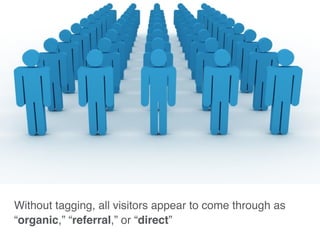
Without tagging, all visitors appear to come through as
“organic,” “referral,” or “direct”
                                                          5
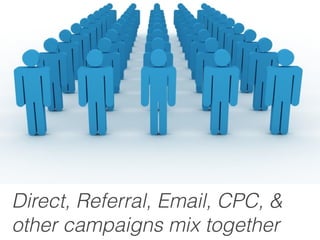
Direct, Referral, Email, CPC, &
other campaigns mix together      6
GAUGE | March 2012

Campaign Tracking Fundamentals


      $              Direct
                                 7
GAUGE | March 2012

Campaign Tracking Fundamentals


      $ Inflated      Direct
                                 8
GAUGE | March 2012

Campaign Tracking Fundamentals


           $ Direct
           $ Email
                                 9
Optimal accountability is achieved when
see each marketing campaign separately    10
How does
Campaign Tracking work?


                          11
GAUGE | March 2012

Campaign Tracking Fundamentals


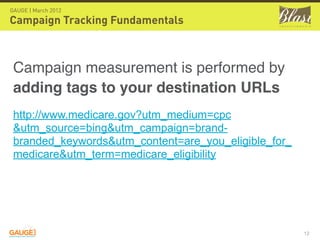
 Campaign measurement is performed by
 adding tags to your destination URLs
 http://www.medicare.gov?utm_medium=cpc
 &utm_source=bing&utm_campaign=brand-
 branded_keywords&utm_content=are_you_eligible_for_
 medicare&utm_term=medicare_eligibility


                                                      12
GAUGE | March 2012

Campaign Tracking Fundamentals


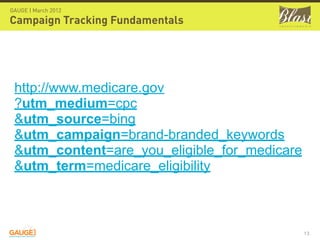
 http://www.medicare.gov
 ?utm_medium=cpc
 &utm_source=bing
 &utm_campaign=brand-branded_keywords
 &utm_content=are_you_eligible_for_medicare
 &utm_term=medicare_eligibility


                                              13
GAUGE | March 2012

Campaign Tracking Fundamentals


See all
post-click
performance in
one place
                                 14
GAUGE | March 2012

Campaign Tracking Fundamentals


ONLY
Adwords CPC “pre-click”
data available in GA


                                 15
GAUGE | March 2012

Campaign Tracking Fundamentals


All campaigns need to be tagged
in order to be tracked in Google Analytics


                                             16
Campaign Tagging
STANDARDS


                   17
GAUGE | March 2012

Campaign Tracking Fundamentals


Be consistent
(standardized tag names will make future
analysis easier and more effective)


                                           18
GAUGE | March 2012

Campaign Tracking Fundamentals


Always use lowercase
(Note: we always added a
custom profile filter in Google
Analytics to enforce lowercase)


                                  19
GAUGE | March 2012

Campaign Tracking Fundamentals


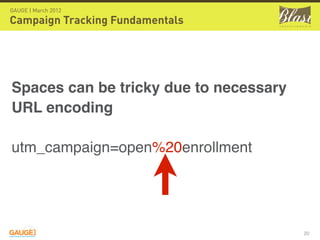
Spaces can be tricky due to necessary
URL encoding

utm_campaign=open%20enrollment


                                        20
GAUGE | March 2012

Campaign Tracking Fundamentals


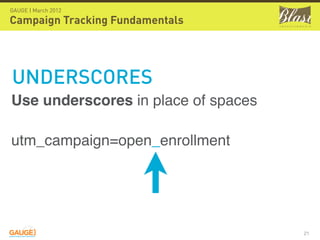
UNDERSCORES
Use underscores in place of spaces

utm_campaign=open_enrollment


                                     21
GAUGE | March 2012

Campaign Tracking Fundamentals


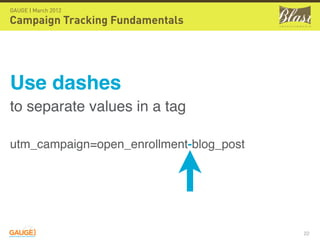
Use dashes
to separate values in a tag

utm_campaign=open_enrollment-blog_post


                                         22
GAUGE | March 2012

Campaign Tracking Fundamentals


Don’t use punctuation
like commas, question marks, periods,
colons, semicolons, etc in campaign
tags (unless it is for a site URL)


                                        23
GAUGE | March 2012

Campaign Tracking Fundamentals


Keywords = KEYWORDS
Don’t use anything but
keywords in the keyword field


                                 24
GAUGE | March 2012

Campaign Tracking Fundamentals


Don’t use agency names as
campaign names
Use true campaign names for effective multi-directional
analysis.

If necessary, add agency name after campaign name
(e.g. utm_campaign=campaign_name-agency_name).


                                                          25
GAUGE | March 2012

Campaign Tracking Fundamentals


                     If you link to a micro-site or external site


         !           that is under your control make sure
                     cross domain tracking is in place.

                     Be careful about 301, 302, ad serving and
                     meta refresh redirects that will lose
                     campaign tracking.


                                                                    26
Campaign Tagging
TOOLS


                   27
GAUGE | March 2012

Campaign Tracking Fundamentals

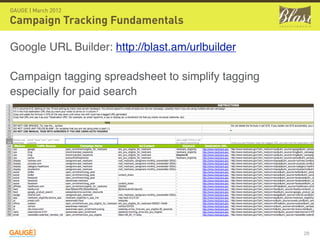
Google URL Builder: http://blast.am/urlbuilder

Campaign tagging spreadsheet to simplify tagging
especially for paid search


                                                   28
Campaign Tagging
Requirements


                   29
GAUGE | March 2012

Campaign Tracking Fundamentals


Required Tags
                     Source is where the visitor was sent from.
                     Examples: google, nytimes.com, facebook.com
                     Medium is the channel through which the visitor arrived at
                     your site.
                     Examples: cpc, display, social, organic
                     Campaign should either indicate the overarching name for
                     the marketing effort or just the specific ad campaign in
                     which the ad lives.


                                                                              30
GAUGE | March 2012

Campaign Tracking Fundamentals


Optional Tags
                     Keyword is the search term that you bid on (search
                     engines only)
                     Ad Content should indicate the ad name, copy, or other
                     helpful information to identify the type of ad that was
                     clicked.


                                                                               31
Tagging Overview
Any Questions?


                 ?
                     32
OBJECTIVES
1) Tagging Overview
2) Tag Specifications
3) Troubleshooting


                       33
GAUGE | March 2012

Campaign Tracking Fundamentals

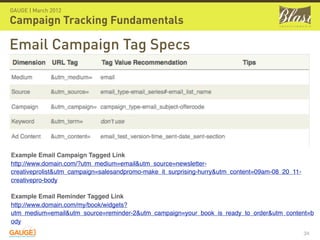
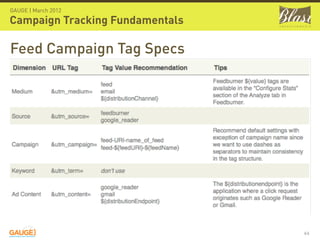
Email Campaign Tag Specs


Example Email Campaign Tagged Link
http://www.domain.com/?utm_medium=email&utm_source=newsletter-
creativeprolist&utm_campaign=salesandpromo-make_it_surprising-hurry&utm_content=09am-08_20_11-
creativepro-body

Example Email Reminder Tagged Link
http://www.domain.com/my/book/widgets?
utm_medium=email&utm_source=reminder-2&utm_campaign=your_book_is_ready_to_order&utm_content=b
ody
                                                                                                 34
GAUGE | March 2012

Campaign Tracking Fundamentals

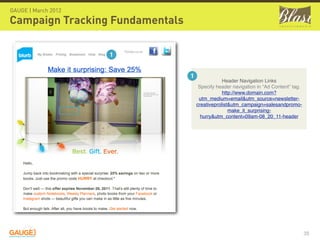
                     1


                                 1
                                                 Header Navigation Links
                                      Specify header navigation in “Ad Content” tag.
                                                 http://www.domain.com?
                                      utm_medium=email&utm_source=newsletter-
                                     creativeprolist&utm_campaign=salesandpromo-
                                                    make_it_surprising-
                                       hurry&utm_content=09am-08_20_11-header


                                                                                       35
GAUGE | March 2012

Campaign Tracking Fundamentals

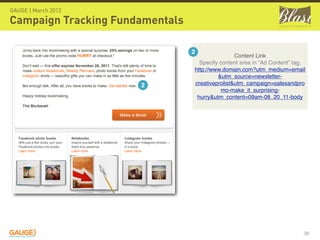
                                 2
                                                 Content Link
                                   Specify content area in “Ad Content” tag.
                                 http://www.domain.com?utm_medium=email
                                          &utm_source=newsletter-
                      2          creativeprolist&utm_campaign=salesandpro
                                            mo-make_it_surprising-
                                  hurry&utm_content=09am-08_20_11-body


                                                                           36
GAUGE | March 2012

Campaign Tracking Fundamentals


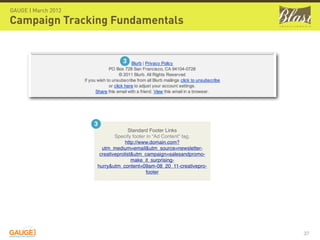
                               3


                     3
                                    Standard Footer Links
                             Specify footer in “Ad Content” tag.
                                  http://www.domain.com?
                       utm_medium=email&utm_source=newsletter-
                      creativeprolist&utm_campaign=salesandpromo-
                                     make_it_surprising-
                     hurry&utm_content=09am-08_20_11-creativepro-
                                           footer


                                                                    37
GAUGE | March 2012

Campaign Tracking Fundamentals

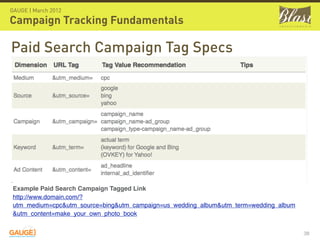
Paid Search Campaign Tag Specs


Example Paid Search Campaign Tagged Link
http://www.domain.com/?
utm_medium=cpc&utm_source=bing&utm_campaign=us_wedding_album&utm_term=wedding_album
&utm_content=make_your_own_photo_book


                                                                                      38
GAUGE | March 2012

Campaign Tracking Fundamentals

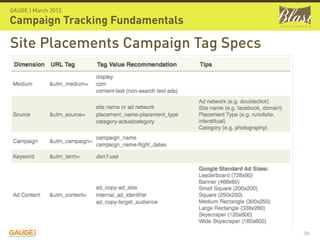
Site Placements Campaign Tag Specs


                                     39
GAUGE | March 2012

Campaign Tracking Fundamentals
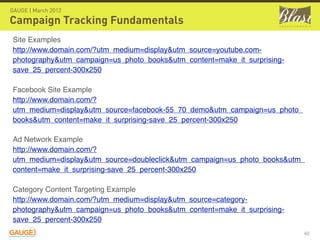
Site Examples
http://www.domain.com/?utm_medium=display&utm_source=youtube.com-
photography&utm_campaign=us_photo_books&utm_content=make_it_surprising-
save_25_percent-300x250

Facebook Site Example
http://www.domain.com/?
utm_medium=display&utm_source=facebook-55_70_demo&utm_campaign=us_photo_
books&utm_content=make_it_surprising-save_25_percent-300x250

Ad Network Example
http://www.domain.com/?
utm_medium=display&utm_source=doubleclick&utm_campaign=us_photo_books&utm_
content=make_it_surprising-save_25_percent-300x250

Category Content Targeting Example
http://www.domain.com/?utm_medium=display&utm_source=category-
photography&utm_campaign=us_photo_books&utm_content=make_it_surprising-
save_25_percent-300x250
                                                                           40
GAUGE | March 2012

Campaign Tracking Fundamentals


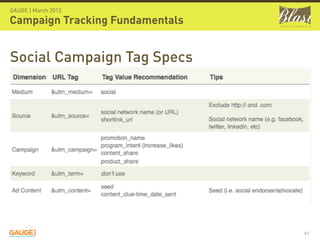
Social Campaign Tag Specs


                                 41
GAUGE | March 2012

Campaign Tracking Fundamentals

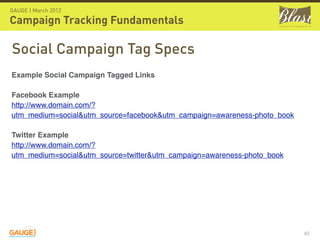
Social Campaign Tag Specs
Example Social Campaign Tagged Links

Facebook Example
http://www.domain.com/?
utm_medium=social&utm_source=facebook&utm_campaign=awareness-photo_book

Twitter Example
http://www.domain.com/?
utm_medium=social&utm_source=twitter&utm_campaign=awareness-photo_book


                                                                          42
GAUGE | March 2012

Campaign Tracking Fundamentals

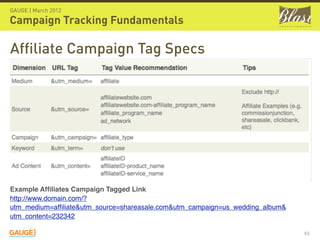
Affiliate Campaign Tag Specs


Example Affiliates Campaign Tagged Link
http://www.domain.com/?
utm_medium=affiliate&utm_source=shareasale.com&utm_campaign=us_wedding_album&
utm_content=232342

                                                                               43
GAUGE | March 2012

Campaign Tracking Fundamentals

Feed Campaign Tag Specs


                                 44
GAUGE | March 2012

Campaign Tracking Fundamentals

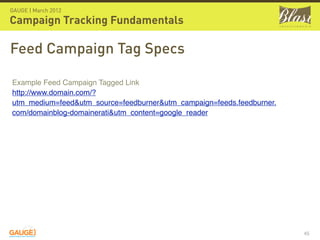
Feed Campaign Tag Specs

Example Feed Campaign Tagged Link
http://www.domain.com/?
utm_medium=feed&utm_source=feedburner&utm_campaign=feeds.feedburner.
com/domainblog-domainerati&utm_content=google_reader


                                                                       45
GAUGE | March 2012

Campaign Tracking Fundamentals

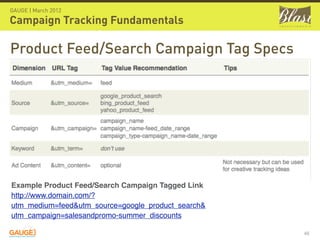
Product Feed/Search Campaign Tag Specs


Example Product Feed/Search Campaign Tagged Link
http://www.domain.com/?
utm_medium=feed&utm_source=google_product_search&
utm_campaign=salesandpromo-summer_discounts

                                                    46
GAUGE | March 2012

Campaign Tracking Fundamentals

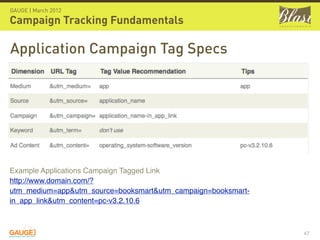
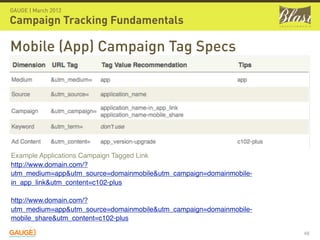
Application Campaign Tag Specs


Example Applications Campaign Tagged Link
http://www.domain.com/?
utm_medium=app&utm_source=booksmart&utm_campaign=booksmart-
in_app_link&utm_content=pc-v3.2.10.6


                                                              47
GAUGE | March 2012

Campaign Tracking Fundamentals

Mobile (App) Campaign Tag Specs


Example Applications Campaign Tagged Link
http://www.domain.com/?
utm_medium=app&utm_source=domainmobile&utm_campaign=domainmobile-
in_app_link&utm_content=c102-plus

http://www.domain.com/?
utm_medium=app&utm_source=domainmobile&utm_campaign=domainmobile-
mobile_share&utm_content=c102-plus

                                                                    48
GAUGE | March 2012

Campaign Tracking Fundamentals

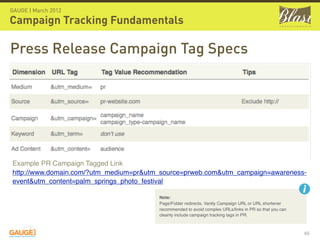
Press Release Campaign Tag Specs


Example PR Campaign Tagged Link
http://www.domain.com/?utm_medium=pr&utm_source=prweb.com&utm_campaign=awareness-
event&utm_content=palm_springs_photo_festival

                                        Note:
                                        Page/Folder redirects, Vanity Campaign URL or URL shortener
                                        recommended to avoid complex URLs/links in PR so that you can
                                        cleanly include campaign tracking tags in PR.


                                                                                                        49
GAUGE | March 2012

Campaign Tracking Fundamentals

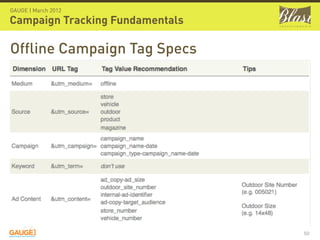
Offline Campaign Tag Specs


                                 50
GAUGE | March 2012

Campaign Tracking Fundamentals

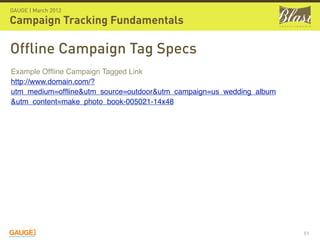
Offline Campaign Tag Specs
Example Offline Campaign Tagged Link
http://www.domain.com/?
utm_medium=offline&utm_source=outdoor&utm_campaign=us_wedding_album
&utm_content=make_photo_book-005021-14x48


                                                                     51
GAUGE | March 2012

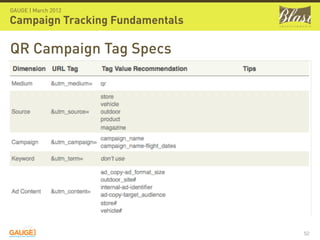
Campaign Tracking Fundamentals

QR Campaign Tag Specs


                                 52
GAUGE | March 2012

Campaign Tracking Fundamentals

QR Campaign Tag Specs
Example QR Campaign Tagged Link
http://www.domain.com/?
utm_medium=qr&utm_source=vehicle&utm_campaign=awareness-
photo_book&utm_content=vehicle123123


 Helpful Info:
 Google URL shortener http://goo.gl can be used to
 create QR codes.


                                                           53
GAUGE | March 2012

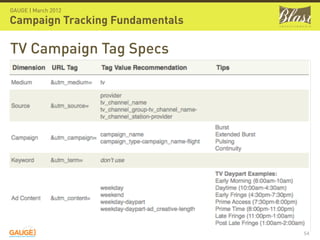
Campaign Tracking Fundamentals

TV Campaign Tag Specs


                                 54
GAUGE | March 2012

Campaign Tracking Fundamentals

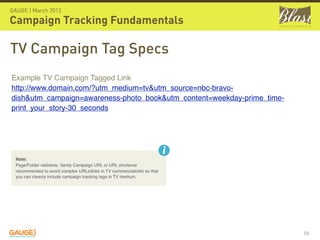
TV Campaign Tag Specs
Example TV Campaign Tagged Link
http://www.domain.com/?utm_medium=tv&utm_source=nbc-bravo-
dish&utm_campaign=awareness-photo_book&utm_content=weekday-prime_time-
print_your_story-30_seconds


 Note:
 Page/Folder redirects, Vanity Campaign URL or URL shortener
 recommended to avoid complex URLs/links in TV commercials/etc so that
 you can cleanly include campaign tracking tags in TV medium.


                                                                         55
GAUGE | March 2012

Campaign Tracking Fundamentals

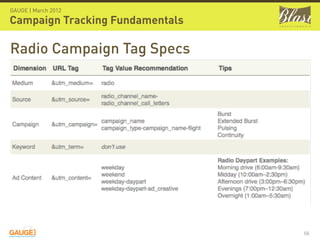
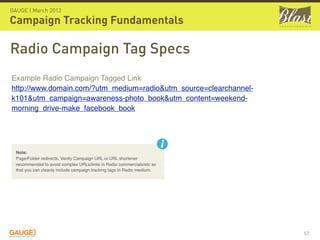
Radio Campaign Tag Specs


                                 56
GAUGE | March 2012

Campaign Tracking Fundamentals

Radio Campaign Tag Specs
Example Radio Campaign Tagged Link
http://www.domain.com/?utm_medium=radio&utm_source=clearchannel-
k101&utm_campaign=awareness-photo_book&utm_content=weekend-
morning_drive-make_facebook_book


  Note:
  Page/Folder redirects, Vanity Campaign URL or URL shortener
  recommended to avoid complex URLs/links in Radio commercials/etc so
  that you can cleanly include campaign tracking tags in Radio medium.


                                                                         57
GAUGE | March 2012

Campaign Tracking Fundamentals


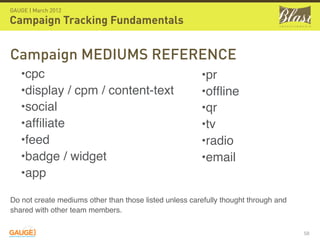
Campaign MEDIUMS REFERENCE
   •cpc                                                 •pr
   •display / cpm / content-text                        •offline
   •social                                              •qr
   •affiliate                                            •tv
   •feed                                                •radio
   •badge / widget                                      •email
   •app

Do not create mediums other than those listed unless carefully thought through and
shared with other team members.


                                                                                     58
GAUGE | March 2012

Campaign Tracking Fundamentals


                     It is very important
         !           that mediums are
                     kept to a small set
                     for optimal analysis.

                                             59
Tag Specifications
Any Questions?


                 ?
                     60
OBJECTIVES
1) Tagging Overview
2) Tag Specifications
3) Troubleshooting


                       61
GAUGE | March 2012

Campaign Tracking Fundamentals

Troubleshooting
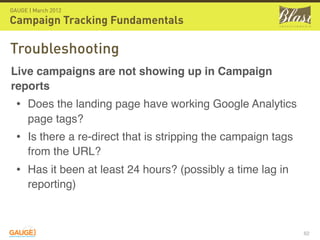
Live campaigns are not showing up in Campaign
reports
  • Does the landing page have working Google Analytics
      page tags?
  • Is there a re-direct that is stripping the campaign tags
      from the URL?
  • Has it been at least 24 hours? (possibly a time lag in
      reporting)


                                                               62
GAUGE | March 2012

Campaign Tracking Fundamentals

Troubleshooting
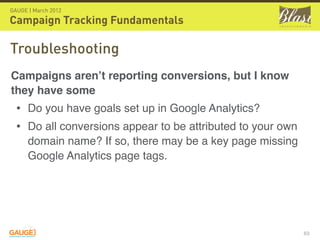
Campaigns aren’t reporting conversions, but I know
they have some
  • Do you have goals set up in Google Analytics?
  • Do all conversions appear to be attributed to your own
      domain name? If so, there may be a key page missing
      Google Analytics page tags.


                                                             63
GAUGE | March 2012

Campaign Tracking Fundamentals

Troubleshooting
Parts of my campaign tag (term, ad content, etc) aren’t
appearing
  • Are all campaign tags present in the destination URL
      within your ad serving tool?


                                                           64
GAUGE | March 2012

Campaign Tracking Fundamentals

Troubleshooting

Inconsistent capitalization is making analysis difficult
  • Consider ‘custom profile filters’.
      • Choose “lowercase”
      • and then apply it to:
          • ‘campaign medium’,
          • ‘campaign term’,
          • etc to force them all to lowercase

                                                          65
GAUGE | March 2012

Campaign Tracking Fundamentals

Technical Testing via Tracking Pixel
 Tool Recommendation: 
 You can use any of the recommended tools
 described here: 
 http://code.google.com/apis/analytics/docs/tracking/
 gaTrackingTroubleshooting.html#debuggingTools.  


 Easiest to use
 GA tracking code debugger for Chrome


                                                        66
GAUGE | March 2012

Campaign Tracking Fundamentals

Technical Testing via Tracking Pixel
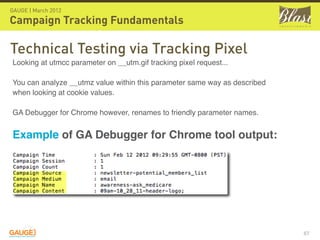
Looking at utmcc parameter on __utm.gif tracking pixel request...

You can analyze __utmz value within this parameter same way as described
when looking at cookie values.

GA Debugger for Chrome however, renames to friendly parameter names.


Example of GA Debugger for Chrome tool output:


                                                                           67
GAUGE | March 2012

Campaign Tracking Fundamentals

Technical Testing via Cookies
 Tool Recommendation: 
 Use a browser plugin for Firefox                             Note:
                                                              Each time your
 called 'Web Developer Toolbar'.                              campaign tracking
                                                              parameters
                                                              change, the
                                                              values in the
 After installed, it has a toolbar option called 'Cookies'    __utmz will
                                                              change.  This is
 where you can 'View Cookie Information' for the current
                                                              starting a new
 page.  You can also delete all of your cookies relative to   session in GA.
 a domain/page with this tool, which is very handy when
 testing.


                                                                                  68
GAUGE | March 2012

Campaign Tracking Fundamentals

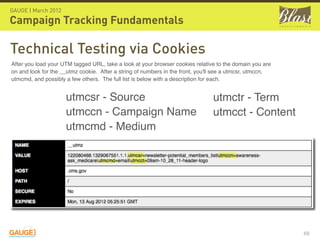
Technical Testing via Cookies
After you load your UTM tagged URL, take a look at your browser cookies relative to the domain you are
on and look for the __utmz cookie.  After a string of numbers in the front, you'll see a utmcsr, utmccn,
utmcmd, and possibly a few others.  The full list is below with a description for each.


                     utmcsr - Source                                            utmctr - Term
                     utmccn - Campaign Name                                     utmcct - Content
                     utmcmd - Medium


                                                                                                           69
Troubleshooting
Any Questions?


                  ?
                      70
GAUGE | March 2012

Campaign Tracking Fundamentals

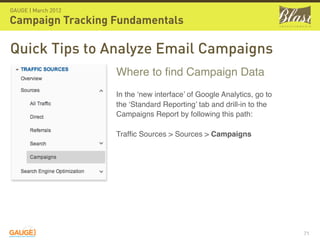
Quick Tips to Analyze Email Campaigns
                     Where to find Campaign Data
                     In the ‘new interface’ of Google Analytics, go to
                     the ‘Standard Reporting’ tab and drill-in to the
                     Campaigns Report by following this path:

                     Traffic Sources > Sources > Campaigns


                                                                         71
GAUGE | March 2012

Campaign Tracking Fundamentals
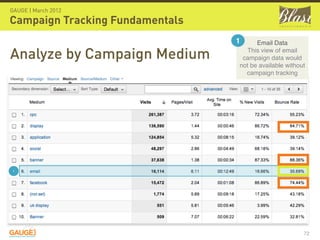
                                 1     Email Data

Analyze by Campaign Medium          This view of email
                                  campaign data would
                                 not be available without
                                   campaign tracking


 1


                                                        72
GAUGE | March 2012

Campaign Tracking Fundamentals

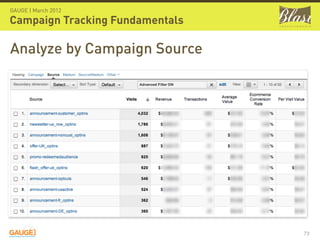
Analyze by Campaign Source


                                 73
GAUGE | March 2012

Campaign Tracking Fundamentals

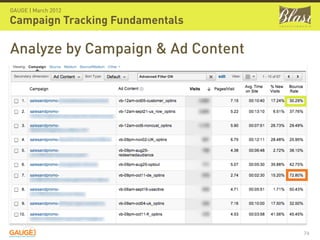
Analyze by Campaign & Ad Content


                                   74
Thank you!

Google Analytics Campaign Tracking Fundamentals

  • 1.
    CAMPAIGN TRACKING FUNDAMENTALS MARCH 8TH & 9TH, 2012 SAN FRANCISCO, CA Kayden Kelly Founder, Managing Director www.blastam.com
  • 2.
    OBJECTIVES 1) Tagging Overview 2)Tag Specifications 3) Troubleshooting +Bonus Analysis Tips 2
  • 3.
    OBJECTIVES 1) Tagging Overview 2)Tag Specifications 3) Troubleshooting 3
  • 4.
  • 5.
    Without tagging, allvisitors appear to come through as “organic,” “referral,” or “direct” 5
  • 6.
    Direct, Referral, Email,CPC, & other campaigns mix together 6
  • 7.
    GAUGE | March2012 Campaign Tracking Fundamentals $ Direct 7
  • 8.
    GAUGE | March2012 Campaign Tracking Fundamentals $ Inflated Direct 8
  • 9.
    GAUGE | March2012 Campaign Tracking Fundamentals $ Direct $ Email 9
  • 10.
    Optimal accountability isachieved when see each marketing campaign separately 10
  • 11.
  • 12.
    GAUGE | March2012 Campaign Tracking Fundamentals Campaign measurement is performed by adding tags to your destination URLs http://www.medicare.gov?utm_medium=cpc &utm_source=bing&utm_campaign=brand- branded_keywords&utm_content=are_you_eligible_for_ medicare&utm_term=medicare_eligibility 12
  • 13.
    GAUGE | March2012 Campaign Tracking Fundamentals http://www.medicare.gov ?utm_medium=cpc &utm_source=bing &utm_campaign=brand-branded_keywords &utm_content=are_you_eligible_for_medicare &utm_term=medicare_eligibility 13
  • 14.
    GAUGE | March2012 Campaign Tracking Fundamentals See all post-click performance in one place 14
  • 15.
    GAUGE | March2012 Campaign Tracking Fundamentals ONLY Adwords CPC “pre-click” data available in GA 15
  • 16.
    GAUGE | March2012 Campaign Tracking Fundamentals All campaigns need to be tagged in order to be tracked in Google Analytics 16
  • 17.
  • 18.
    GAUGE | March2012 Campaign Tracking Fundamentals Be consistent (standardized tag names will make future analysis easier and more effective) 18
  • 19.
    GAUGE | March2012 Campaign Tracking Fundamentals Always use lowercase (Note: we always added a custom profile filter in Google Analytics to enforce lowercase) 19
  • 20.
    GAUGE | March2012 Campaign Tracking Fundamentals Spaces can be tricky due to necessary URL encoding utm_campaign=open%20enrollment 20
  • 21.
    GAUGE | March2012 Campaign Tracking Fundamentals UNDERSCORES Use underscores in place of spaces utm_campaign=open_enrollment 21
  • 22.
    GAUGE | March2012 Campaign Tracking Fundamentals Use dashes to separate values in a tag utm_campaign=open_enrollment-blog_post 22
  • 23.
    GAUGE | March2012 Campaign Tracking Fundamentals Don’t use punctuation like commas, question marks, periods, colons, semicolons, etc in campaign tags (unless it is for a site URL) 23
  • 24.
    GAUGE | March2012 Campaign Tracking Fundamentals Keywords = KEYWORDS Don’t use anything but keywords in the keyword field 24
  • 25.
    GAUGE | March2012 Campaign Tracking Fundamentals Don’t use agency names as campaign names Use true campaign names for effective multi-directional analysis. If necessary, add agency name after campaign name (e.g. utm_campaign=campaign_name-agency_name). 25
  • 26.
    GAUGE | March2012 Campaign Tracking Fundamentals If you link to a micro-site or external site ! that is under your control make sure cross domain tracking is in place. Be careful about 301, 302, ad serving and meta refresh redirects that will lose campaign tracking. 26
  • 27.
  • 28.
    GAUGE | March2012 Campaign Tracking Fundamentals Google URL Builder: http://blast.am/urlbuilder Campaign tagging spreadsheet to simplify tagging especially for paid search 28
  • 29.
  • 30.
    GAUGE | March2012 Campaign Tracking Fundamentals Required Tags Source is where the visitor was sent from. Examples: google, nytimes.com, facebook.com Medium is the channel through which the visitor arrived at your site. Examples: cpc, display, social, organic Campaign should either indicate the overarching name for the marketing effort or just the specific ad campaign in which the ad lives. 30
  • 31.
    GAUGE | March2012 Campaign Tracking Fundamentals Optional Tags Keyword is the search term that you bid on (search engines only) Ad Content should indicate the ad name, copy, or other helpful information to identify the type of ad that was clicked. 31
  • 32.
  • 33.
    OBJECTIVES 1) Tagging Overview 2)Tag Specifications 3) Troubleshooting 33
  • 34.
    GAUGE | March2012 Campaign Tracking Fundamentals Email Campaign Tag Specs Example Email Campaign Tagged Link http://www.domain.com/?utm_medium=email&utm_source=newsletter- creativeprolist&utm_campaign=salesandpromo-make_it_surprising-hurry&utm_content=09am-08_20_11- creativepro-body Example Email Reminder Tagged Link http://www.domain.com/my/book/widgets? utm_medium=email&utm_source=reminder-2&utm_campaign=your_book_is_ready_to_order&utm_content=b ody 34
  • 35.
    GAUGE | March2012 Campaign Tracking Fundamentals 1 1 Header Navigation Links Specify header navigation in “Ad Content” tag. http://www.domain.com? utm_medium=email&utm_source=newsletter- creativeprolist&utm_campaign=salesandpromo- make_it_surprising- hurry&utm_content=09am-08_20_11-header 35
  • 36.
    GAUGE | March2012 Campaign Tracking Fundamentals 2 Content Link Specify content area in “Ad Content” tag. http://www.domain.com?utm_medium=email &utm_source=newsletter- 2 creativeprolist&utm_campaign=salesandpro mo-make_it_surprising- hurry&utm_content=09am-08_20_11-body 36
  • 37.
    GAUGE | March2012 Campaign Tracking Fundamentals 3 3 Standard Footer Links Specify footer in “Ad Content” tag. http://www.domain.com? utm_medium=email&utm_source=newsletter- creativeprolist&utm_campaign=salesandpromo- make_it_surprising- hurry&utm_content=09am-08_20_11-creativepro- footer 37
  • 38.
    GAUGE | March2012 Campaign Tracking Fundamentals Paid Search Campaign Tag Specs Example Paid Search Campaign Tagged Link http://www.domain.com/? utm_medium=cpc&utm_source=bing&utm_campaign=us_wedding_album&utm_term=wedding_album &utm_content=make_your_own_photo_book 38
  • 39.
    GAUGE | March2012 Campaign Tracking Fundamentals Site Placements Campaign Tag Specs 39
  • 40.
    GAUGE | March2012 Campaign Tracking Fundamentals Site Examples http://www.domain.com/?utm_medium=display&utm_source=youtube.com- photography&utm_campaign=us_photo_books&utm_content=make_it_surprising- save_25_percent-300x250 Facebook Site Example http://www.domain.com/? utm_medium=display&utm_source=facebook-55_70_demo&utm_campaign=us_photo_ books&utm_content=make_it_surprising-save_25_percent-300x250 Ad Network Example http://www.domain.com/? utm_medium=display&utm_source=doubleclick&utm_campaign=us_photo_books&utm_ content=make_it_surprising-save_25_percent-300x250 Category Content Targeting Example http://www.domain.com/?utm_medium=display&utm_source=category- photography&utm_campaign=us_photo_books&utm_content=make_it_surprising- save_25_percent-300x250 40
  • 41.
    GAUGE | March2012 Campaign Tracking Fundamentals Social Campaign Tag Specs 41
  • 42.
    GAUGE | March2012 Campaign Tracking Fundamentals Social Campaign Tag Specs Example Social Campaign Tagged Links Facebook Example http://www.domain.com/? utm_medium=social&utm_source=facebook&utm_campaign=awareness-photo_book Twitter Example http://www.domain.com/? utm_medium=social&utm_source=twitter&utm_campaign=awareness-photo_book 42
  • 43.
    GAUGE | March2012 Campaign Tracking Fundamentals Affiliate Campaign Tag Specs Example Affiliates Campaign Tagged Link http://www.domain.com/? utm_medium=affiliate&utm_source=shareasale.com&utm_campaign=us_wedding_album& utm_content=232342 43
  • 44.
    GAUGE | March2012 Campaign Tracking Fundamentals Feed Campaign Tag Specs 44
  • 45.
    GAUGE | March2012 Campaign Tracking Fundamentals Feed Campaign Tag Specs Example Feed Campaign Tagged Link http://www.domain.com/? utm_medium=feed&utm_source=feedburner&utm_campaign=feeds.feedburner. com/domainblog-domainerati&utm_content=google_reader 45
  • 46.
    GAUGE | March2012 Campaign Tracking Fundamentals Product Feed/Search Campaign Tag Specs Example Product Feed/Search Campaign Tagged Link http://www.domain.com/? utm_medium=feed&utm_source=google_product_search& utm_campaign=salesandpromo-summer_discounts 46
  • 47.
    GAUGE | March2012 Campaign Tracking Fundamentals Application Campaign Tag Specs Example Applications Campaign Tagged Link http://www.domain.com/? utm_medium=app&utm_source=booksmart&utm_campaign=booksmart- in_app_link&utm_content=pc-v3.2.10.6 47
  • 48.
    GAUGE | March2012 Campaign Tracking Fundamentals Mobile (App) Campaign Tag Specs Example Applications Campaign Tagged Link http://www.domain.com/? utm_medium=app&utm_source=domainmobile&utm_campaign=domainmobile- in_app_link&utm_content=c102-plus http://www.domain.com/? utm_medium=app&utm_source=domainmobile&utm_campaign=domainmobile- mobile_share&utm_content=c102-plus 48
  • 49.
    GAUGE | March2012 Campaign Tracking Fundamentals Press Release Campaign Tag Specs Example PR Campaign Tagged Link http://www.domain.com/?utm_medium=pr&utm_source=prweb.com&utm_campaign=awareness- event&utm_content=palm_springs_photo_festival Note: Page/Folder redirects, Vanity Campaign URL or URL shortener recommended to avoid complex URLs/links in PR so that you can cleanly include campaign tracking tags in PR. 49
  • 50.
    GAUGE | March2012 Campaign Tracking Fundamentals Offline Campaign Tag Specs 50
  • 51.
    GAUGE | March2012 Campaign Tracking Fundamentals Offline Campaign Tag Specs Example Offline Campaign Tagged Link http://www.domain.com/? utm_medium=offline&utm_source=outdoor&utm_campaign=us_wedding_album &utm_content=make_photo_book-005021-14x48 51
  • 52.
    GAUGE | March2012 Campaign Tracking Fundamentals QR Campaign Tag Specs 52
  • 53.
    GAUGE | March2012 Campaign Tracking Fundamentals QR Campaign Tag Specs Example QR Campaign Tagged Link http://www.domain.com/? utm_medium=qr&utm_source=vehicle&utm_campaign=awareness- photo_book&utm_content=vehicle123123 Helpful Info: Google URL shortener http://goo.gl can be used to create QR codes. 53
  • 54.
    GAUGE | March2012 Campaign Tracking Fundamentals TV Campaign Tag Specs 54
  • 55.
    GAUGE | March2012 Campaign Tracking Fundamentals TV Campaign Tag Specs Example TV Campaign Tagged Link http://www.domain.com/?utm_medium=tv&utm_source=nbc-bravo- dish&utm_campaign=awareness-photo_book&utm_content=weekday-prime_time- print_your_story-30_seconds Note: Page/Folder redirects, Vanity Campaign URL or URL shortener recommended to avoid complex URLs/links in TV commercials/etc so that you can cleanly include campaign tracking tags in TV medium. 55
  • 56.
    GAUGE | March2012 Campaign Tracking Fundamentals Radio Campaign Tag Specs 56
  • 57.
    GAUGE | March2012 Campaign Tracking Fundamentals Radio Campaign Tag Specs Example Radio Campaign Tagged Link http://www.domain.com/?utm_medium=radio&utm_source=clearchannel- k101&utm_campaign=awareness-photo_book&utm_content=weekend- morning_drive-make_facebook_book Note: Page/Folder redirects, Vanity Campaign URL or URL shortener recommended to avoid complex URLs/links in Radio commercials/etc so that you can cleanly include campaign tracking tags in Radio medium. 57
  • 58.
    GAUGE | March2012 Campaign Tracking Fundamentals Campaign MEDIUMS REFERENCE •cpc •pr •display / cpm / content-text •offline •social •qr •affiliate •tv •feed •radio •badge / widget •email •app Do not create mediums other than those listed unless carefully thought through and shared with other team members. 58
  • 59.
    GAUGE | March2012 Campaign Tracking Fundamentals It is very important ! that mediums are kept to a small set for optimal analysis. 59
  • 60.
  • 61.
    OBJECTIVES 1) Tagging Overview 2)Tag Specifications 3) Troubleshooting 61
  • 62.
    GAUGE | March2012 Campaign Tracking Fundamentals Troubleshooting Live campaigns are not showing up in Campaign reports • Does the landing page have working Google Analytics page tags? • Is there a re-direct that is stripping the campaign tags from the URL? • Has it been at least 24 hours? (possibly a time lag in reporting) 62
  • 63.
    GAUGE | March2012 Campaign Tracking Fundamentals Troubleshooting Campaigns aren’t reporting conversions, but I know they have some • Do you have goals set up in Google Analytics? • Do all conversions appear to be attributed to your own domain name? If so, there may be a key page missing Google Analytics page tags. 63
  • 64.
    GAUGE | March2012 Campaign Tracking Fundamentals Troubleshooting Parts of my campaign tag (term, ad content, etc) aren’t appearing • Are all campaign tags present in the destination URL within your ad serving tool? 64
  • 65.
    GAUGE | March2012 Campaign Tracking Fundamentals Troubleshooting Inconsistent capitalization is making analysis difficult • Consider ‘custom profile filters’. • Choose “lowercase” • and then apply it to: • ‘campaign medium’, • ‘campaign term’, • etc to force them all to lowercase 65
  • 66.
    GAUGE | March2012 Campaign Tracking Fundamentals Technical Testing via Tracking Pixel Tool Recommendation:  You can use any of the recommended tools described here:  http://code.google.com/apis/analytics/docs/tracking/ gaTrackingTroubleshooting.html#debuggingTools.   Easiest to use GA tracking code debugger for Chrome 66
  • 67.
    GAUGE | March2012 Campaign Tracking Fundamentals Technical Testing via Tracking Pixel Looking at utmcc parameter on __utm.gif tracking pixel request... You can analyze __utmz value within this parameter same way as described when looking at cookie values. GA Debugger for Chrome however, renames to friendly parameter names. Example of GA Debugger for Chrome tool output: 67
  • 68.
    GAUGE | March2012 Campaign Tracking Fundamentals Technical Testing via Cookies Tool Recommendation:  Use a browser plugin for Firefox Note: Each time your called 'Web Developer Toolbar'. campaign tracking parameters change, the values in the After installed, it has a toolbar option called 'Cookies' __utmz will change.  This is where you can 'View Cookie Information' for the current starting a new page.  You can also delete all of your cookies relative to session in GA. a domain/page with this tool, which is very handy when testing. 68
  • 69.
    GAUGE | March2012 Campaign Tracking Fundamentals Technical Testing via Cookies After you load your UTM tagged URL, take a look at your browser cookies relative to the domain you are on and look for the __utmz cookie.  After a string of numbers in the front, you'll see a utmcsr, utmccn, utmcmd, and possibly a few others.  The full list is below with a description for each. utmcsr - Source utmctr - Term utmccn - Campaign Name utmcct - Content utmcmd - Medium 69
  • 70.
  • 71.
    GAUGE | March2012 Campaign Tracking Fundamentals Quick Tips to Analyze Email Campaigns Where to find Campaign Data In the ‘new interface’ of Google Analytics, go to the ‘Standard Reporting’ tab and drill-in to the Campaigns Report by following this path: Traffic Sources > Sources > Campaigns 71
  • 72.
    GAUGE | March2012 Campaign Tracking Fundamentals 1 Email Data Analyze by Campaign Medium This view of email campaign data would not be available without campaign tracking 1 72
  • 73.
    GAUGE | March2012 Campaign Tracking Fundamentals Analyze by Campaign Source 73
  • 74.
    GAUGE | March2012 Campaign Tracking Fundamentals Analyze by Campaign & Ad Content 74
  • 75.