SMART PHONE AND MOBILE
DEVICE SECURITY
Mr. RAJASEKAR RAMALINGAM
Faculty - Department of IT
College of Applied Sciences – Sur,
Sultanate of Oman.
vrrsekar@yahoo.com
CONTENT
1. Security challenges of smart phone & mobile device
2. Visualizing mobile security
3. Attacks moving to mobile – why?
4. What your phone knows & what it shares
5. Smart phone & mobile device the threats
6. Countermeasures
7. Mobile security best practices
SMART PHONE AND MOBILE DEVICE SECURITY
2
1. SECURITY CHALLENGES OF SMART PHONE & MOBILE DEVICE
SMART PHONE AND MOBILE DEVICE SECURITY
• 1 in 20 Mobile devices stolen in 2010.
• 70% of Mobile device spam is fraudulent financial services.
• 350% by which Wi-Fi hotspots are set to increase by 2015, providing
more opportunities for “man-in-the middle” attacks.
• 155% by which mobile malware increased 2011.
• 77% growth in Google Android malware from Jun 2010 to Jan 2011.
• 10 Billion Android app downloads reached by the end of 2011 – over
90% of the top 100 have been hacked.
Source: Evans Data Mobile Developer Survey Mobile Development Report 2012 Volume
Source: Business Insider (September 2012)
3
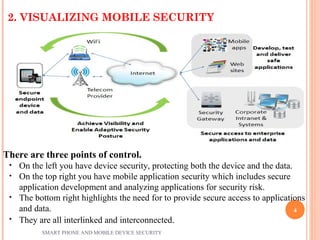
2. VISUALIZING MOBILE SECURITY
There are three points of control.
• On the left you have device security, protecting both the device and the data.
• On the top right you have mobile application security which includes secure
application development and analyzing applications for security risk.
• The bottom right highlights the need for to provide secure access to applications
and data.
• They are all interlinked and interconnected.
SMART PHONE AND MOBILE DEVICE SECURITY
4
3. ATTACKS MOVING TO MOBILE – WHY?
3.1 Mobile devices are connection-enabled
3G/LTE Wi-Fi
Bluetooth NFC
Camera – QR Code GSM – SMS
3.2 Valuable data
Phone information - IMEI, Phone number, SMS history, etc.
Contact list - Social engineering, Spam database
Geo-location information - Spy, Track history
Images/Camera - Spy, Surrounding environment
3.3 Valuable resource
High speed CPU
Powerful computing
Always-On Internet connection
3.4 Smart OS eco-system
App store market : Easy access / Simple
install
Awareness : Permission review / Security tools
PC threats in mobile: email, links, browsers,
flash, etc.
SMART PHONE AND MOBILE DEVICE SECURITY
5
4.1. IT KNOWS TOO MUCH!
By owning a smart phone, users assuming a certain level of risk.
There is no way to mitigate 100% of the risk.
Contracted agreement puts your information and data in hands of third
party(s)
4.2. INFORMATION UP FOR GRABS
4.2.1 Location Data
a) GPS
b) Cell Network
c) WIFI
4.2.2 Personal Data
a) App-permissions
b) Social Media
4. WHAT YOUR PHONE KNOWS & WHAT IT SHARES
SMART PHONE AND MOBILE DEVICE SECURITY
6
4.2.1 LOCATION DATA
a) GPS
ď‚— Most obvious
ď‚— Pretty accurate outdoors, but not so much indoors
ď‚— Very useful
 Third party applications use GPS for correlation
 Sometimes stored locally and accessible.
b) CELL-NETWORK
ď‚— Tower Triangulation
ď‚— Can be used alongside GPS
ď‚— Mandatory use in emergencies
 Law enforcement
 Carriers
ď‚— As long as you have a phone, this information is available
 Sometimes legalities or warrants involved
SMART PHONE AND MOBILE DEVICE SECURITY
7
c) Wi-Fi
ď‚—Carriers collect WIFI network names/BSSIDs and correlating
GPS data
Fine-tune location
Can be used indoors
ď‚—Google got in trouble in 2010 for collecting data with their
StreetView cars
Decided it was simpler to use mobile devices
Enormous userbase
Constantly updated
SMART PHONE AND MOBILE DEVICE SECURITY
8
4.2.2 PERSONAL DATA
a) APP PERMISSIONS
ď‚—Android
Always displayed before you download from Google Play
store
ie: “Why does this calorie counter need to access my camera
and phone calls?”
ď‚—iOS
A little more secure
Apps now default to no permissions outside of their sandbox
ie: “This app wants to use your location."
ď‚—Windows
App settings are viewable before install or through “Settings”
Similar to Android
SMART PHONE AND MOBILE DEVICE SECURITY
9
b) SOCIAL MEDIA
ď‚—A problem in and of itself
The success of mobile devices and global rise of social media
are unquestionably intertwined
Outside of the obvious personal data
ď‚—Geo-tagged updates on Facebook and Twitter
ď‚—Facebook Graph search makes hiding online much more
difficult
ď‚—LinkedIn open by default
Useful tool for social engineers
Site is scraped for names and corporate structure
SMART PHONE AND MOBILE DEVICE SECURITY
10
5. SMART PHONE & MOBILE DEVICE THREATS
Four Major Actors
ď‚— Government agencies
ď‚— Carriers/Providers
ď‚— Hackers
ď‚— Thieves
SMART PHONE AND MOBILE DEVICE SECURITY
11
A) GOVERNMENT AGENCIESA) GOVERNMENT AGENCIES
 Nothing known for sure about collection/ exploitation
ď‚—Lots of leaks
ď‚—Lots of partial information
ď‚—Lots of conjecture
 Some companies have admitted to cooperation
ď‚—You can choose to avoid those services
May be worried about nothing
Companies claiming to protect your rights may not be on
the up-and-up
 Again, if you're really concerned about it, avoid mobile devices
all together
SMART PHONE AND MOBILE DEVICE SECURITY
12
B) CARRIERS/PROVIDERSB) CARRIERS/PROVIDERS
 Revenue-driven
ď‚—Want to know where you've spent money
ď‚—The better targeted the ad, the more likely you'll click
 Service-driven
ď‚—Collecting WIFI points means more accuracy
ď‚—More accuracy might give them an edge in the market
 Nothing that isn't already open-source collected
ď‚—Just more organized
SMART PHONE AND MOBILE DEVICE SECURITY
13
C1) HACKERS - TRADITIONALC1) HACKERS - TRADITIONAL
 Network-Based
ď‚—Normal web-based rules apply
ď‚—Beware public Wi-Fi networks
App security is getting better everyday
A lot of unencrypted sensitive traffic is still sent and
received
ď‚—Major hole in iOS7 < 7.0.6 / iOS6 < 6.1.6
ď‚—70% of Android devices in circulation
Affected by known, remote code execution vulnerability
Beware QR Codes!
SMART PHONE AND MOBILE DEVICE SECURITY
14
C2) HACKERS - PHISHINGC2) HACKERS - PHISHING
 Social Engineering-based attacks
ď‚—Getting people to do things that may not be in their best
interests
 Many people check email via phones/tablets
ď‚—Harder to distinguish phish from legitimate email
ď‚—Can't "hover" over a link to see where it'll take you

 Phishing via SMS
ď‚—Very common in Europe and Asia, but the tactic has crossed
the pond
ď‚—Same basic premise: visit this link
"To claim your gift card…”
 Use shrunken URLs for obscurity
SMART PHONE AND MOBILE DEVICE SECURITY
15
C3) HACKERS - MALICIOUS APPLICATIONSC3) HACKERS - MALICIOUS APPLICATIONS
 Apps get permission to do questionable things
ď‚—Access your Address Book
ď‚—Access your location
ď‚—Make calls/Send SMS
 Apple vs. Android
ď‚— Less of an issue for Apple
Stringent requirements to get into app store
Fewer (known) instances
Doesn't mitigate risk entirely
ď‚—Android is a bigger risk
Play Store is more open
Possible to install spoofed apps by mistake
People don’t always read app permissions or understand them.SMART PHONE AND MOBILE DEVICE SECURITY
16
C4) HACKERS - LEAKY WI-FIC4) HACKERS - LEAKY WI-FI
 Whenever a device's Wi-Fi is enabled, probes are made for
known networks
 Possible to build pattern of life by examining network probes
 Powerful when combined with open-source data (Wigle.net)
 Snoopy and Corporate Wi-Fi
“Evil Access Point” attack
ď‚—Possible to intercept usernames and hashed passwords
ď‚—Offline cracking means a hacker can work at his own pace
SMART PHONE AND MOBILE DEVICE SECURITY
17
C5) THIEVESC5) THIEVES
 Many mobile devices lost, stolen each year:
 113 mobile phones lost/stolen every minute in the U.S.
 56% of us misplace our mobile phone or laptop each month.
 Lookout Security found $2.5 billion worth of phones in 2011 via
its Android app.
 Symantec placed 50 “lost” smartphones throughout U.S. cities.
 96% were accessed by finders
 80% of finders tried to access “sensitive” data on phone.
 Physical Access to the device
ď‚—Much easier to get at sensitive data
ď‚—Loosens time constraints
ď‚—Less trouble-shooting than remotely exploiting
SMART PHONE AND MOBILE DEVICE SECURITY
18
6.1 MOBILE ACCESS CONTROL
 Very easy for attacker to control a mobile device if he/she
has physical access
• Especially if there’s no way to authenticate user
• Then device can join botnet, send SMS spam, etc.
 Need access controls for mobile devices
• Authentication, authorization, accountability
• Authentication workflow:
 Request access
 Supplication (user provides identity, e.g., John Smith)
 Authentication (system determines user is John)
 Authorization (system determines what John
can/cannot do)
6. COUNTERMEASURES
SMART PHONE AND MOBILE DEVICE SECURITY
19
6.2 AUTHENTICATION:
CATEGORIES
Authentication generally based on:
ď‚—Something supplicant knows
Password/passphrase
Unlock pattern
ď‚—Something supplicant has
Magnetic key card
Smart card
Token device
ď‚—Something supplicant is
Fingerprint
Retina scan
SMART PHONE AND MOBILE DEVICE SECURITY
20
6.2.1 AUTHENTICATION:
PASSWORDS
 Cheapest, easiest form of authentication
 Works well with most applications
 Also the weakest form of access control
Lazy users’ passwords: 1234, password, letmein, etc.
ď‚—Can be defeated using dictionary, brute force attacks
 Requires administrative controls to be effective
ď‚—Minimum length/complexity
ď‚—Password aging
ď‚—Limit failed attempts
SMART PHONE AND MOBILE DEVICE SECURITY
21
6.2.2 AUTHENTICATION: SMART CARDS/SECURITY
TOKENS
 More expensive, harder to implement
 Vulnerability: prone to loss or theft
 Very strong when combined with another form of
authentication, e.g., a password
 Does not work well in all applications
ď‚—Try carrying a smart card in addition to a mobile
device!
SMART PHONE AND MOBILE DEVICE SECURITY
22
6.2.3 AUTHENTICATION:
BIOMETRICS
 More expensive/harder to implement
 Prone to error:
ď‚—False negatives: not authenticate authorized user
ď‚—False positives: authenticate unauthorized user
 Strong authentication when it works
 Does not work well in all applications
ď‚—Fingerprint readers becoming more common on mobile
devices (Atrix 4G)
SMART PHONE AND MOBILE DEVICE SECURITY
23
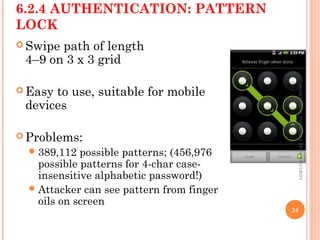
6.2.4 AUTHENTICATION: PATTERN
LOCK
 Swipe path of length
4–9 on 3 x 3 grid
 Easy to use, suitable for mobile
devices
 Problems:
ď‚—389,112 possible patterns; (456,976
possible patterns for 4-char case-
insensitive alphabetic password!)
ď‚—Attacker can see pattern from finger
oils on screen
SMARTPHONEANDMOBILEDEVICESECURITY
24
7. MOBILE SECURITY BEST PRACTICES
1)Lock the device with a password or Personal Identification
Number (PIN).
2)Install Apps only from trusted sources.
3)Back up your data.
4)Keep your system updated.
5)Do not hack (jail-break) your device.
6)Remember to log out of banking and shopping sites.
7)Turn off Wi-Fi and Bluetooth services when not in use.
8)Avoid sending personal information via Text or Email.
SMART PHONE AND MOBILE DEVICE SECURITY
25

Smart phone and mobile device security

  • 1.
    SMART PHONE ANDMOBILE DEVICE SECURITY Mr. RAJASEKAR RAMALINGAM Faculty - Department of IT College of Applied Sciences – Sur, Sultanate of Oman. vrrsekar@yahoo.com
  • 2.
    CONTENT 1. Security challengesof smart phone & mobile device 2. Visualizing mobile security 3. Attacks moving to mobile – why? 4. What your phone knows & what it shares 5. Smart phone & mobile device the threats 6. Countermeasures 7. Mobile security best practices SMART PHONE AND MOBILE DEVICE SECURITY 2
  • 3.
    1. SECURITY CHALLENGESOF SMART PHONE & MOBILE DEVICE SMART PHONE AND MOBILE DEVICE SECURITY • 1 in 20 Mobile devices stolen in 2010. • 70% of Mobile device spam is fraudulent financial services. • 350% by which Wi-Fi hotspots are set to increase by 2015, providing more opportunities for “man-in-the middle” attacks. • 155% by which mobile malware increased 2011. • 77% growth in Google Android malware from Jun 2010 to Jan 2011. • 10 Billion Android app downloads reached by the end of 2011 – over 90% of the top 100 have been hacked. Source: Evans Data Mobile Developer Survey Mobile Development Report 2012 Volume Source: Business Insider (September 2012) 3
  • 4.
    2. VISUALIZING MOBILESECURITY There are three points of control. • On the left you have device security, protecting both the device and the data. • On the top right you have mobile application security which includes secure application development and analyzing applications for security risk. • The bottom right highlights the need for to provide secure access to applications and data. • They are all interlinked and interconnected. SMART PHONE AND MOBILE DEVICE SECURITY 4
  • 5.
    3. ATTACKS MOVINGTO MOBILE – WHY? 3.1 Mobile devices are connection-enabled 3G/LTE Wi-Fi Bluetooth NFC Camera – QR Code GSM – SMS 3.2 Valuable data Phone information - IMEI, Phone number, SMS history, etc. Contact list - Social engineering, Spam database Geo-location information - Spy, Track history Images/Camera - Spy, Surrounding environment 3.3 Valuable resource High speed CPU Powerful computing Always-On Internet connection 3.4 Smart OS eco-system App store market : Easy access / Simple install Awareness : Permission review / Security tools PC threats in mobile: email, links, browsers, flash, etc. SMART PHONE AND MOBILE DEVICE SECURITY 5
  • 6.
    4.1. IT KNOWSTOO MUCH! By owning a smart phone, users assuming a certain level of risk. There is no way to mitigate 100% of the risk. Contracted agreement puts your information and data in hands of third party(s) 4.2. INFORMATION UP FOR GRABS 4.2.1 Location Data a) GPS b) Cell Network c) WIFI 4.2.2 Personal Data a) App-permissions b) Social Media 4. WHAT YOUR PHONE KNOWS & WHAT IT SHARES SMART PHONE AND MOBILE DEVICE SECURITY 6
  • 7.
    4.2.1 LOCATION DATA a)GPS  Most obvious  Pretty accurate outdoors, but not so much indoors  Very useful  Third party applications use GPS for correlation  Sometimes stored locally and accessible. b) CELL-NETWORK  Tower Triangulation  Can be used alongside GPS  Mandatory use in emergencies  Law enforcement  Carriers  As long as you have a phone, this information is available  Sometimes legalities or warrants involved SMART PHONE AND MOBILE DEVICE SECURITY 7
  • 8.
    c) Wi-Fi Carriers collectWIFI network names/BSSIDs and correlating GPS data Fine-tune location Can be used indoors Google got in trouble in 2010 for collecting data with their StreetView cars Decided it was simpler to use mobile devices Enormous userbase Constantly updated SMART PHONE AND MOBILE DEVICE SECURITY 8
  • 9.
    4.2.2 PERSONAL DATA a)APP PERMISSIONS Android Always displayed before you download from Google Play store ie: “Why does this calorie counter need to access my camera and phone calls?” iOS A little more secure Apps now default to no permissions outside of their sandbox ie: “This app wants to use your location." Windows App settings are viewable before install or through “Settings” Similar to Android SMART PHONE AND MOBILE DEVICE SECURITY 9
  • 10.
    b) SOCIAL MEDIA Aproblem in and of itself The success of mobile devices and global rise of social media are unquestionably intertwined Outside of the obvious personal data Geo-tagged updates on Facebook and Twitter Facebook Graph search makes hiding online much more difficult LinkedIn open by default Useful tool for social engineers Site is scraped for names and corporate structure SMART PHONE AND MOBILE DEVICE SECURITY 10
  • 11.
    5. SMART PHONE& MOBILE DEVICE THREATS Four Major Actors  Government agencies  Carriers/Providers  Hackers  Thieves SMART PHONE AND MOBILE DEVICE SECURITY 11
  • 12.
    A) GOVERNMENT AGENCIESA)GOVERNMENT AGENCIES  Nothing known for sure about collection/ exploitation Lots of leaks Lots of partial information Lots of conjecture  Some companies have admitted to cooperation You can choose to avoid those services May be worried about nothing Companies claiming to protect your rights may not be on the up-and-up  Again, if you're really concerned about it, avoid mobile devices all together SMART PHONE AND MOBILE DEVICE SECURITY 12
  • 13.
    B) CARRIERS/PROVIDERSB) CARRIERS/PROVIDERS Revenue-driven Want to know where you've spent money The better targeted the ad, the more likely you'll click  Service-driven Collecting WIFI points means more accuracy More accuracy might give them an edge in the market  Nothing that isn't already open-source collected Just more organized SMART PHONE AND MOBILE DEVICE SECURITY 13
  • 14.
    C1) HACKERS -TRADITIONALC1) HACKERS - TRADITIONAL  Network-Based Normal web-based rules apply Beware public Wi-Fi networks App security is getting better everyday A lot of unencrypted sensitive traffic is still sent and received Major hole in iOS7 < 7.0.6 / iOS6 < 6.1.6 70% of Android devices in circulation Affected by known, remote code execution vulnerability Beware QR Codes! SMART PHONE AND MOBILE DEVICE SECURITY 14
  • 15.
    C2) HACKERS -PHISHINGC2) HACKERS - PHISHING  Social Engineering-based attacks Getting people to do things that may not be in their best interests  Many people check email via phones/tablets Harder to distinguish phish from legitimate email Can't "hover" over a link to see where it'll take you   Phishing via SMS Very common in Europe and Asia, but the tactic has crossed the pond Same basic premise: visit this link "To claim your gift card…”  Use shrunken URLs for obscurity SMART PHONE AND MOBILE DEVICE SECURITY 15
  • 16.
    C3) HACKERS -MALICIOUS APPLICATIONSC3) HACKERS - MALICIOUS APPLICATIONS  Apps get permission to do questionable things Access your Address Book Access your location Make calls/Send SMS  Apple vs. Android  Less of an issue for Apple Stringent requirements to get into app store Fewer (known) instances Doesn't mitigate risk entirely Android is a bigger risk Play Store is more open Possible to install spoofed apps by mistake People don’t always read app permissions or understand them.SMART PHONE AND MOBILE DEVICE SECURITY 16
  • 17.
    C4) HACKERS -LEAKY WI-FIC4) HACKERS - LEAKY WI-FI  Whenever a device's Wi-Fi is enabled, probes are made for known networks  Possible to build pattern of life by examining network probes  Powerful when combined with open-source data (Wigle.net)  Snoopy and Corporate Wi-Fi “Evil Access Point” attack Possible to intercept usernames and hashed passwords Offline cracking means a hacker can work at his own pace SMART PHONE AND MOBILE DEVICE SECURITY 17
  • 18.
    C5) THIEVESC5) THIEVES Many mobile devices lost, stolen each year:  113 mobile phones lost/stolen every minute in the U.S.  56% of us misplace our mobile phone or laptop each month.  Lookout Security found $2.5 billion worth of phones in 2011 via its Android app.  Symantec placed 50 “lost” smartphones throughout U.S. cities.  96% were accessed by finders  80% of finders tried to access “sensitive” data on phone.  Physical Access to the device Much easier to get at sensitive data Loosens time constraints Less trouble-shooting than remotely exploiting SMART PHONE AND MOBILE DEVICE SECURITY 18
  • 19.
    6.1 MOBILE ACCESSCONTROL  Very easy for attacker to control a mobile device if he/she has physical access • Especially if there’s no way to authenticate user • Then device can join botnet, send SMS spam, etc.  Need access controls for mobile devices • Authentication, authorization, accountability • Authentication workflow:  Request access  Supplication (user provides identity, e.g., John Smith)  Authentication (system determines user is John)  Authorization (system determines what John can/cannot do) 6. COUNTERMEASURES SMART PHONE AND MOBILE DEVICE SECURITY 19
  • 20.
    6.2 AUTHENTICATION: CATEGORIES Authentication generallybased on: Something supplicant knows Password/passphrase Unlock pattern Something supplicant has Magnetic key card Smart card Token device Something supplicant is Fingerprint Retina scan SMART PHONE AND MOBILE DEVICE SECURITY 20
  • 21.
    6.2.1 AUTHENTICATION: PASSWORDS  Cheapest,easiest form of authentication  Works well with most applications  Also the weakest form of access control Lazy users’ passwords: 1234, password, letmein, etc. Can be defeated using dictionary, brute force attacks  Requires administrative controls to be effective Minimum length/complexity Password aging Limit failed attempts SMART PHONE AND MOBILE DEVICE SECURITY 21
  • 22.
    6.2.2 AUTHENTICATION: SMARTCARDS/SECURITY TOKENS  More expensive, harder to implement  Vulnerability: prone to loss or theft  Very strong when combined with another form of authentication, e.g., a password  Does not work well in all applications Try carrying a smart card in addition to a mobile device! SMART PHONE AND MOBILE DEVICE SECURITY 22
  • 23.
    6.2.3 AUTHENTICATION: BIOMETRICS  Moreexpensive/harder to implement  Prone to error: False negatives: not authenticate authorized user False positives: authenticate unauthorized user  Strong authentication when it works  Does not work well in all applications Fingerprint readers becoming more common on mobile devices (Atrix 4G) SMART PHONE AND MOBILE DEVICE SECURITY 23
  • 24.
    6.2.4 AUTHENTICATION: PATTERN LOCK Swipe path of length 4–9 on 3 x 3 grid  Easy to use, suitable for mobile devices  Problems: 389,112 possible patterns; (456,976 possible patterns for 4-char case- insensitive alphabetic password!) Attacker can see pattern from finger oils on screen SMARTPHONEANDMOBILEDEVICESECURITY 24
  • 25.
    7. MOBILE SECURITYBEST PRACTICES 1)Lock the device with a password or Personal Identification Number (PIN). 2)Install Apps only from trusted sources. 3)Back up your data. 4)Keep your system updated. 5)Do not hack (jail-break) your device. 6)Remember to log out of banking and shopping sites. 7)Turn off Wi-Fi and Bluetooth services when not in use. 8)Avoid sending personal information via Text or Email. SMART PHONE AND MOBILE DEVICE SECURITY 25

Editor's Notes

  • #4 Twice as appealing to hackers – both corporate and personal data