

SKILLWISE-ENHANCING
DOTNET APP
Enhancing performance of .NET
applications
Content
• Implementing value types correctly
• Applying pre-compilation
• Using unsafe code and pointers
• Choosing a collection
• Make your code as parallel as necessary
IMPLEMENTING VALUE TYPES
CORRECTLY
Two Categories of Types
• Reference types
– Offer a set of managed services: locks, inheritance, and
more
• Value types
– Do not offer these services
• Additional superficial differences
– Parameter passing
– Equality
Object Layout
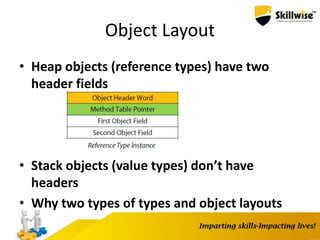
• Heap objects (reference types) have two
header fields
• Stack objects (value types) don’t have
headers
• Why two types of types and object layouts
Using Value Types
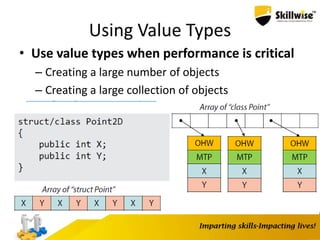
• Use value types when performance is critical
– Creating a large number of objects
– Creating a large collection of objects
Basic Value Type
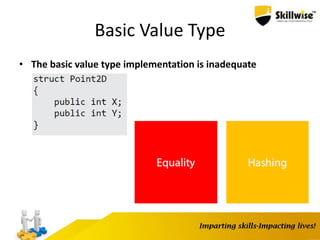
• The basic value type implementation is inadequate
Origins of Equals
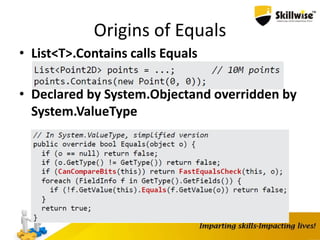
• List<T>.Contains calls Equals
• Declared by System.Objectand overridden by
System.ValueType
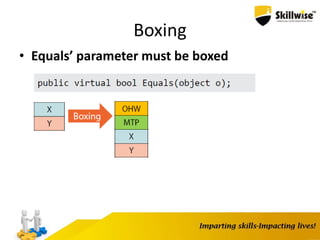
Boxing
• Equals’ parameter must be boxed
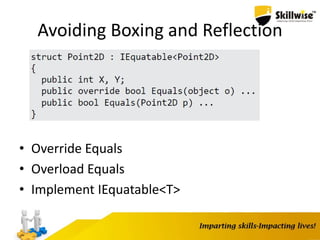
Avoiding Boxing and Reflection
• Override Equals
• Overload Equals
• Implement IEquatable<T>
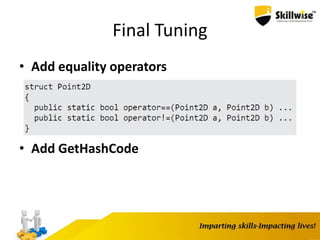
Final Tuning
• Add equality operators
• Add GetHashCode
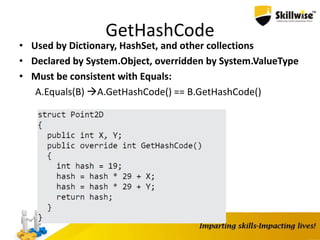
GetHashCode
• Used by Dictionary, HashSet, and other collections
• Declared by System.Object, overridden by System.ValueType
• Must be consistent with Equals:
A.Equals(B) A.GetHashCode() == B.GetHashCode()
• Use value types in high-performance
scenarios
– Tight loops, large collections
• Implement value types correctly
– Equals, IEquatable<T>, GetHashCode
Applying precompilation
• Improving startup time
• Precompilation
– Ngen
– Serialization assemblies
– Regular expressions
• Other ways of improving startup time
– Multi-core background JIT
– MPGO
Startup Costs
• Cold startup
– Disk I/O
• Warm Startup
– JIT compilation
– Signature validation
– DLL rebasing
– Initialization
Improving Startup Time with NGen
• NGen precompiles .NET assemblies to native code
> ngen install MyApp.exe
– Includes dependencies
– Precompiled assemblies stored in
C:WindowsAssemblyNativeImages_*
– Fall back to original if stale
• Automatic NGen in Windows 8 and CLR 4.5
Multi-Core Background JIT
• Usually, methods are compiled to native when invoked
• Multi-core background JIT in CLR 4.5
– Opt in using System.Runtime.ProfileOptimization class
using System.Runtime;
ProfileOptimization.SetProfileRoot(folderName);
ProfileOptimization.StartProfile(profileName);
• Relies on profile information generated at runtime
– Can use multiple profiles
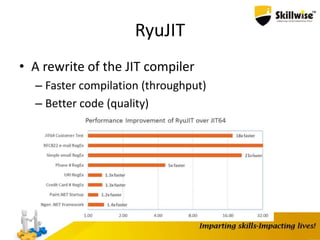
RyuJIT
• A rewrite of the JIT compiler
– Faster compilation (throughput)
– Better code (quality)
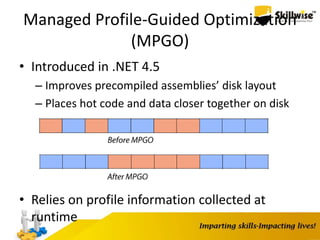
Managed Profile-Guided Optimization
(MPGO)
• Introduced in .NET 4.5
– Improves precompiled assemblies’ disk layout
– Places hot code and data closer together on disk
• Relies on profile information collected at
runtime
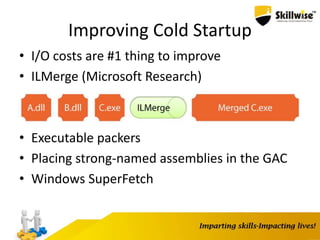
Improving Cold Startup
• I/O costs are #1 thing to improve
• ILMerge (Microsoft Research)
• Executable packers
• Placing strong-named assemblies in the GAC
• Windows SuperFetch
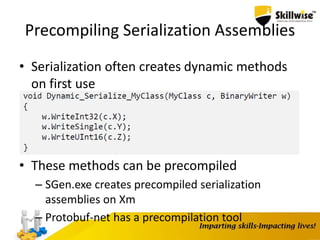
Precompiling Serialization Assemblies
• Serialization often creates dynamic methods
on first use
• These methods can be precompiled
– SGen.exe creates precompiled serialization
assemblies on Xm
– Protobuf-net has a precompilation tool
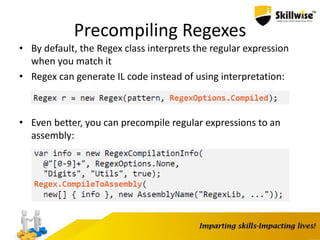
Precompiling Regexes
• By default, the Regex class interprets the regular expression
when you match it
• Regex can generate IL code instead of using interpretation:
• Even better, you can precompile regular expressions to an
assembly:
USING UNSAFE CODE AND
POINTERS
Pointers? In C#?
• Raw pointers are part of the C# syntax
• Interoperability with Win32 and other DLLs
• Performance in specific scenarios
Pointers and Pinning
• We want to go from byte[]to byte*
• When getting a pointer to a heap object, what if the GC moves it?
• Pinning is required
byte[] source = ...;
fixed(byte* p = &source)
{
...
}
• Directly manipulate memory
*p = (byte)12;
int x = *(int*)p;
• Requires unsafeblock and “Allow unsafe code”
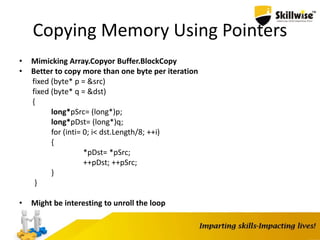
Copying Memory Using Pointers
• Mimicking Array.Copyor Buffer.BlockCopy
• Better to copy more than one byte per iteration
fixed (byte* p = &src)
fixed (byte* q = &dst)
{
long*pSrc= (long*)p;
long*pDst= (long*)q;
for (inti= 0; i< dst.Length/8; ++i)
{
*pDst= *pSrc;
++pDst; ++pSrc;
}
}
• Might be interesting to unroll the loop
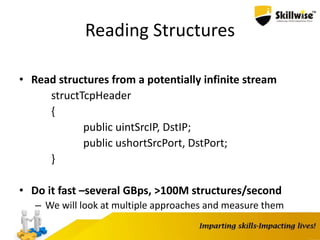
Reading Structures
• Read structures from a potentially infinite stream
structTcpHeader
{
public uintSrcIP, DstIP;
public ushortSrcPort, DstPort;
}
• Do it fast –several GBps, >100M structures/second
– We will look at multiple approaches and measure them
The Pointer-Free Approach
TcpHeaderRead(byte[] data, intoffset)
{
MemoryStreamms= new MemoryStream(data);
BinaryReaderbr= new BinaryReader(ms);
TcpHeaderresult = new TcpHeader();
result.SrcIP= br.ReadUInt32();
result.DstIP= br.ReadUInt32();
result.SrcPort= br.ReadUInt16();
result.DstPort= br.ReadUInt16();
return result;
}
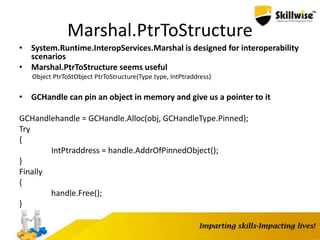
Marshal.PtrToStructure
• System.Runtime.InteropServices.Marshal is designed for interoperability
scenarios
• Marshal.PtrToStructure seems useful
Object PtrToStObject PtrToStructure(Type type, IntPtraddress)
• GCHandle can pin an object in memory and give us a pointer to it
GCHandlehandle = GCHandle.Alloc(obj, GCHandleType.Pinned);
Try
{
IntPtraddress = handle.AddrOfPinnedObject();
}
Finally
{
handle.Free();
}
Using Pointers
• Pointers can help by casting
fixed (byte* p = &data[offset])
{
TcpHeader* pHeader= (TcpHeader*)p;
return *pHeader;
}
• Very simple, doesn’t require helper routines
A Generic Approach
• Unfortunately, T*doesn’t work –T must be blittable
unsafe T Read(byte[] data, int offset)
{
fixed (byte* p = &data[offset])
{
return *(T*)p;
}
}
• We can generate a method for each T and call it when necessary
– Reflection.Emit
– CSharpCodeProvider
– Roslyn
CHOOSING A COLLECTION
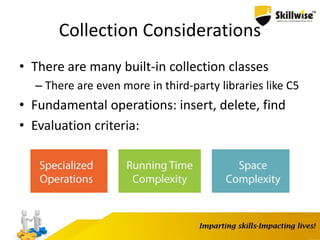
Collection Considerations
• There are many built-in collection classes
– There are even more in third-party libraries like C5
• Fundamental operations: insert, delete, find
• Evaluation criteria:
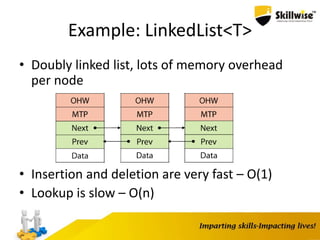
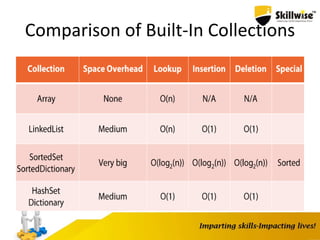
Example: LinkedList<T>
• Doubly linked list, lots of memory overhead
per node
• Insertion and deletion are very fast – O(1)
• Lookup is slow – O(n)
Arrays
• Flat, sequential, statically sized
• Very fast access to elements
• No per-element overhead
• Foundation for many other collection classes
List<T>
• Dynamic (resizable) array
– Doubles its size with each expansion
– For 100,000,000 insertions: [log 100,000,000] = 27
expansions
• Insertions not at the end are very expensive
– Good for append-only data
• No specialized lookup facility
• Still no per-element overhead
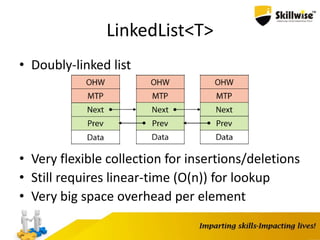
LinkedList<T>
• Doubly-linked list
• Very flexible collection for insertions/deletions
• Still requires linear-time (O(n)) for lookup
• Very big space overhead per element
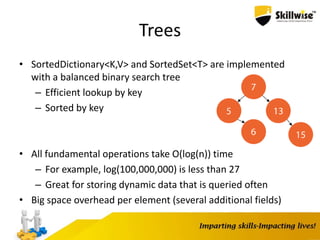
Trees
• SortedDictionary<K,V> and SortedSet<T> are implemented
with a balanced binary search tree
– Efficient lookup by key
– Sorted by key
• All fundamental operations take O(log(n)) time
– For example, log(100,000,000) is less than 27
– Great for storing dynamic data that is queried often
• Big space overhead per element (several additional fields)
Associative Collections
• Dictionary<K,V> and HashSet<T> use hashing to arrange the
elements
• Insertion, deletion and lookup work in constant time – O(1)
– GetHashCode must be well-distributed for this to happen
• Medium memory overhead
– Combination of arrays and linked lists
– Smaller than trees in most cases
Comparison of Built-In Collections
Scenarios
• Word frequency in a large body of text
– Dictionary<string,uint>
• Queue of orders in a restaurant
– LinkedList<Order>
• Buffer of continuous log messages
– List<LogMessage>
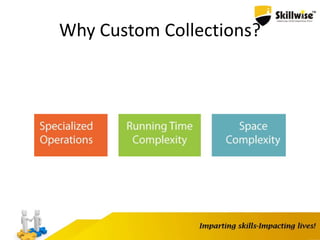
Why Custom Collections?
Tries
• A text editor needs to store a dictionary of words
– “run”, “dolphin”, “regard” but also “running”, “dolphins”,
“regardless”
– Offers spell checking and automatic word completion
• HashSet
– Super-fast spell checking
– Not sorted, so automatic completion by prefix is O(n)
• SortedSet
– Still fast spell checking
– Sorted but access to predecessor/successor is not exposed
• Enter: Trie
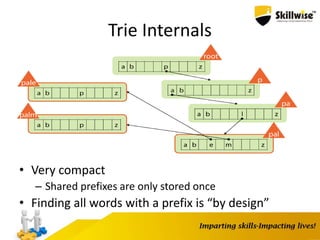
Trie Internals
• Very compact
– Shared prefixes are only stored once
• Finding all words with a prefix is “by design”
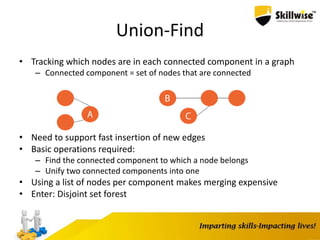
Union-Find
• Tracking which nodes are in each connected component in a graph
– Connected component = set of nodes that are connected
• Need to support fast insertion of new edges
• Basic operations required:
– Find the connected component to which a node belongs
– Unify two connected components into one
• Using a list of nodes per component makes merging expensive
• Enter: Disjoint set forest
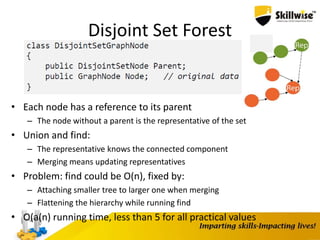
Disjoint Set Forest
• Each node has a reference to its parent
– The node without a parent is the representative of the set
• Union and find:
– The representative knows the connected component
– Merging means updating representatives
• Problem: find could be O(n), fixed by:
– Attaching smaller tree to larger one when merging
– Flattening the hierarchy while running find
• O(a(n) running time, less than 5 for all practical values
GARBAGE COLLECTION INTERNALS
Garbage Collection
• Garbage collection means we don’t have to manually free
memory
• Garbage collection isn’t free and has performance trade-offs
– Questionable on real-time systems, mobile devices, etc.
• The CLR garbage collector (GC) is an almost-concurrent,
parallel, compacting, mark-and-sweep, generational, tracing
GC
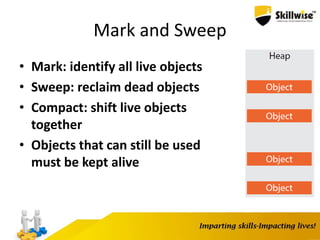
Mark and Sweep
• Mark: identify all live objects
• Sweep: reclaim dead objects
• Compact: shift live objects
together
• Objects that can still be used
must be kept alive
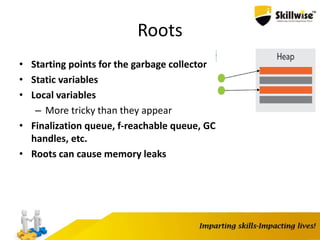
Roots
• Starting points for the garbage collector
• Static variables
• Local variables
– More tricky than they appear
• Finalization queue, f-reachable queue, GC
handles, etc.
• Roots can cause memory leaks
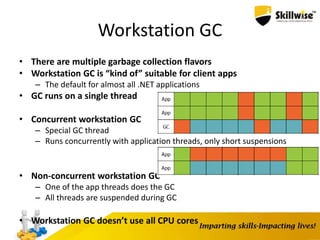
Workstation GC
• There are multiple garbage collection flavors
• Workstation GC is “kind of” suitable for client apps
– The default for almost all .NET applications
• GC runs on a single thread
• Concurrent workstation GC
– Special GC thread
– Runs concurrently with application threads, only short suspensions
• Non-concurrent workstation GC
– One of the app threads does the GC
– All threads are suspended during GC
• Workstation GC doesn’t use all CPU cores
Server GC
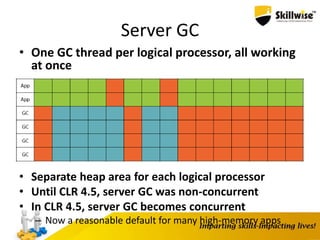
• One GC thread per logical processor, all working
at once
• Separate heap area for each logical processor
• Until CLR 4.5, server GC was non-concurrent
• In CLR 4.5, server GC becomes concurrent
– Now a reasonable default for many high-memory apps
Switching GC Flavors
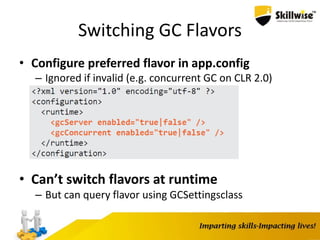
• Configure preferred flavor in app.config
– Ignored if invalid (e.g. concurrent GC on CLR 2.0)
• Can’t switch flavors at runtime
– But can query flavor using GCSettingsclass
Generational Garbage Collection
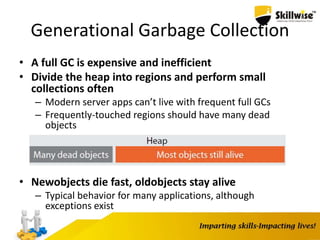
• A full GC is expensive and inefficient
• Divide the heap into regions and perform small
collections often
– Modern server apps can’t live with frequent full GCs
– Frequently-touched regions should have many dead
objects
• Newobjects die fast, oldobjects stay alive
– Typical behavior for many applications, although
exceptions exist
.NET Generations
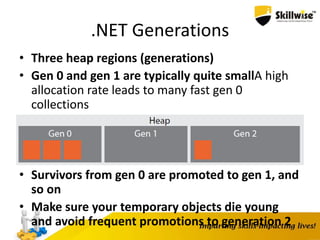
• Three heap regions (generations)
• Gen 0 and gen 1 are typically quite smallA high
allocation rate leads to many fast gen 0
collections
• Survivors from gen 0 are promoted to gen 1, and
so on
• Make sure your temporary objects die young
and avoid frequent promotions to generation 2
The Large Object Heap
• Large objects are stored in a separate heap region (LOH)
• Large means larger than 85,000 bytes or array of >1,000
doubles
• The GC doesn’t compact the LOH
– This may cause fragmentation
• The LOH is considered part of generation 2
– Temporary large objects are a common GC performance
problem
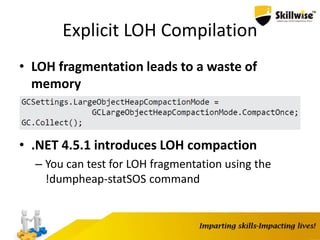
Explicit LOH Compilation
• LOH fragmentation leads to a waste of
memory
• .NET 4.5.1 introduces LOH compaction
– You can test for LOH fragmentation using the
!dumpheap-statSOS command
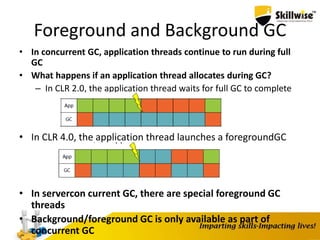
Foreground and Background GC
• In concurrent GC, application threads continue to run during full
GC
• What happens if an application thread allocates during GC?
– In CLR 2.0, the application thread waits for full GC to complete
• In CLR 4.0, the application thread launches a foregroundGC
• In servercon current GC, there are special foreground GC
threads
• Background/foreground GC is only available as part of
concurrent GC
Resource Cleanup
• The GC only takes care of memory, not all
reclaimable resources
– Sockets, file handles, database transactions, etc.
– When a database transaction dies, it has to abort the
transaction and close the network connection
• C++ has destructors: deterministic cleanup
• The .NET GC doesn’t release objects
deterministically
Finalization
• The CLR runs a finalizer after the object becomes
unreachable
• Let’s design the finalization mechanism:
– Finalization queue for potentially “finalizable” objects
– Identifying candidates for finalization
– Selecting a thread for finalization: the finalizer thread
– F-reachable queue for finalization candidates
– Objects removed from f-reachable queue can be GC’d
• This is pretty much how CLR finalization works!
Performance Problems with Finalization
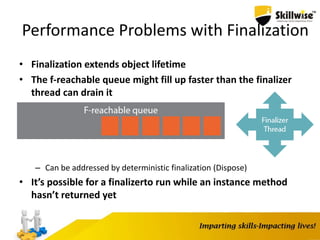
• Finalization extends object lifetime
• The f-reachable queue might fill up faster than the finalizer
thread can drain it
– Can be addressed by deterministic finalization (Dispose)
• It’s possible for a finalizerto run while an instance method
hasn’t returned yet
The Dispose Pattern
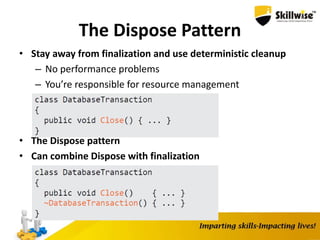
• Stay away from finalization and use deterministic cleanup
– No performance problems
– You’re responsible for resource management
• The Dispose pattern
• Can combine Dispose with finalization
Resurrection and Object Pooling
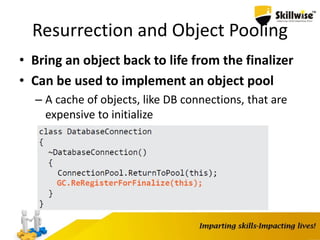
• Bring an object back to life from the finalizer
• Can be used to implement an object pool
– A cache of objects, like DB connections, that are
expensive to initialize
MAKE YOUR CODE AS PARALLEL AS
NECESSARY
Kinds of Parallelism
• Parallelism - Running multiple threads in
parallel
• Concurrency - Doing multiple things at once
• Asynchrony - Without blocking the caller’s
thread
Kinds of Workloads
• CPU bound
• I/O bound
• Mixed
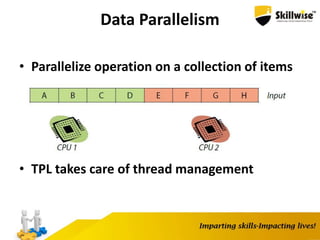
Data Parallelism
• Parallelize operation on a collection of items
• TPL takes care of thread management
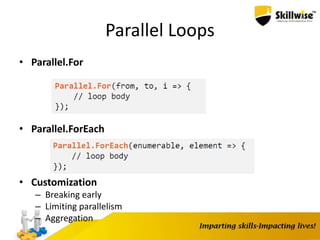
Parallel Loops
• Parallel.For
• Parallel.ForEach
• Customization
– Breaking early
– Limiting parallelism
– Aggregation
I/O-Bound Workloads and Asynchronous I/O
• Data parallelism is suited for CPU-bound
workloads
– CPUs aren’t good at sitting and waiting for I/O
• Asynchronous I/O operations
– Asynchronous file read
– Asynchronous HTTP POST
• Multiple outstanding I/O operations per
thread
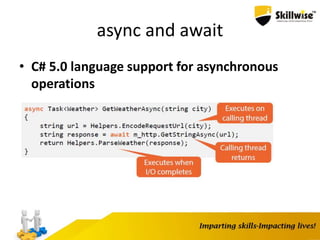
async and await
• C# 5.0 language support for asynchronous
operations
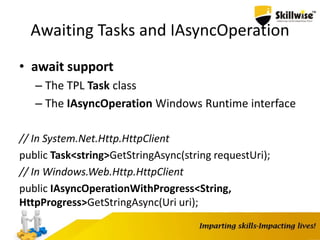
Awaiting Tasks and IAsyncOperation
• await support
– The TPL Task class
– The IAsyncOperation Windows Runtime interface
// In System.Net.Http.HttpClient
public Task<string>GetStringAsync(string requestUri);
// In Windows.Web.Http.HttpClient
public IAsyncOperationWithProgress<String,
HttpProgress>GetStringAsync(Uri uri);
Parallelizing I/O Requests
• Start a few outstanding I/O operations and
then..
– Wait-All : Process results when all operations are
done
– Wait-Any : Process each operation’s results when
available
Task.WhenAll
Task<string>[] tasks = new Task<string>[] {
m_http.GetStringAsync(url1),
m_http.GetStringAsync(url2),
m_http.GetStringAsync(url3)
};
Task<string[]> all = Task.WhenAll(tasks);
string[] results = await all;
// Process the results
Task.WhenAny
List<Task<string>> tasks = new List<Task<string>>[] {
m_http.GetStringAsync(url1),
m_http.GetStringAsync(url2),
m_http.GetStringAsync(url3)
};
while (tasks.Count> 0)
{
Task<Task<string>> any = Task.WhenAny(tasks);
Task<string> completed = await any;
// Process the result in completed.Result
tasks.Remove(completed);
}
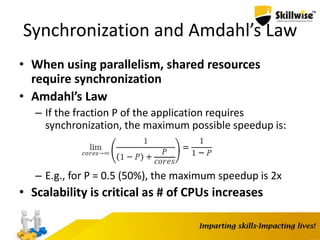
Synchronization and Amdahl’s Law
• When using parallelism, shared resources
require synchronization
• Amdahl’s Law
– If the fraction P of the application requires
synchronization, the maximum possible speedup is:
– E.g., for P = 0.5 (50%), the maximum speedup is 2x
• Scalability is critical as # of CPUs increases
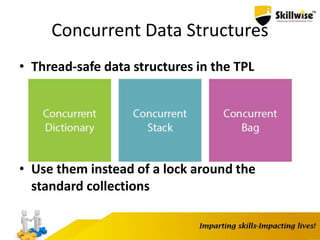
Concurrent Data Structures
• Thread-safe data structures in the TPL
• Use them instead of a lock around the
standard collections
Aggregation
• Collect intermediate results into thread-local structures
Parallel.For(
from,
to,
() => produce thread local state,
(i, _, local) => do work and return new local state,
local => combine local states into global state
);
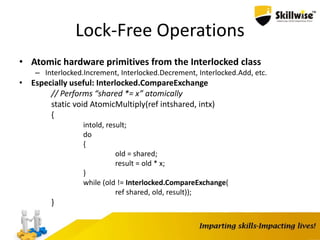
Lock-Free Operations
• Atomic hardware primitives from the Interlocked class
– Interlocked.Increment, Interlocked.Decrement, Interlocked.Add, etc.
• Especially useful: Interlocked.CompareExchange
// Performs “shared *= x” atomically
static void AtomicMultiply(ref intshared, intx)
{
intold, result;
do
{
old = shared;
result = old * x;
}
while (old != Interlocked.CompareExchange(
ref shared, old, result));
}
Skillwise - Enhancing dotnet app

Skillwise - Enhancing dotnet app

  • 1.
  • 2.
    Enhancing performance of.NET applications
  • 3.
    Content • Implementing valuetypes correctly • Applying pre-compilation • Using unsafe code and pointers • Choosing a collection • Make your code as parallel as necessary
  • 4.
  • 5.
    Two Categories ofTypes • Reference types – Offer a set of managed services: locks, inheritance, and more • Value types – Do not offer these services • Additional superficial differences – Parameter passing – Equality
  • 6.
    Object Layout • Heapobjects (reference types) have two header fields • Stack objects (value types) don’t have headers • Why two types of types and object layouts
  • 7.
    Using Value Types •Use value types when performance is critical – Creating a large number of objects – Creating a large collection of objects
  • 8.
    Basic Value Type •The basic value type implementation is inadequate
  • 9.
    Origins of Equals •List<T>.Contains calls Equals • Declared by System.Objectand overridden by System.ValueType
  • 10.
  • 11.
    Avoiding Boxing andReflection • Override Equals • Overload Equals • Implement IEquatable<T>
  • 12.
    Final Tuning • Addequality operators • Add GetHashCode
  • 13.
    GetHashCode • Used byDictionary, HashSet, and other collections • Declared by System.Object, overridden by System.ValueType • Must be consistent with Equals: A.Equals(B) A.GetHashCode() == B.GetHashCode()
  • 14.
    • Use valuetypes in high-performance scenarios – Tight loops, large collections • Implement value types correctly – Equals, IEquatable<T>, GetHashCode
  • 15.
    Applying precompilation • Improvingstartup time • Precompilation – Ngen – Serialization assemblies – Regular expressions • Other ways of improving startup time – Multi-core background JIT – MPGO
  • 16.
    Startup Costs • Coldstartup – Disk I/O • Warm Startup – JIT compilation – Signature validation – DLL rebasing – Initialization
  • 17.
    Improving Startup Timewith NGen • NGen precompiles .NET assemblies to native code > ngen install MyApp.exe – Includes dependencies – Precompiled assemblies stored in C:WindowsAssemblyNativeImages_* – Fall back to original if stale • Automatic NGen in Windows 8 and CLR 4.5
  • 18.
    Multi-Core Background JIT •Usually, methods are compiled to native when invoked • Multi-core background JIT in CLR 4.5 – Opt in using System.Runtime.ProfileOptimization class using System.Runtime; ProfileOptimization.SetProfileRoot(folderName); ProfileOptimization.StartProfile(profileName); • Relies on profile information generated at runtime – Can use multiple profiles
  • 19.
    RyuJIT • A rewriteof the JIT compiler – Faster compilation (throughput) – Better code (quality)
  • 20.
    Managed Profile-Guided Optimization (MPGO) •Introduced in .NET 4.5 – Improves precompiled assemblies’ disk layout – Places hot code and data closer together on disk • Relies on profile information collected at runtime
  • 21.
    Improving Cold Startup •I/O costs are #1 thing to improve • ILMerge (Microsoft Research) • Executable packers • Placing strong-named assemblies in the GAC • Windows SuperFetch
  • 22.
    Precompiling Serialization Assemblies •Serialization often creates dynamic methods on first use • These methods can be precompiled – SGen.exe creates precompiled serialization assemblies on Xm – Protobuf-net has a precompilation tool
  • 23.
    Precompiling Regexes • Bydefault, the Regex class interprets the regular expression when you match it • Regex can generate IL code instead of using interpretation: • Even better, you can precompile regular expressions to an assembly:
  • 24.
    USING UNSAFE CODEAND POINTERS
  • 25.
    Pointers? In C#? •Raw pointers are part of the C# syntax • Interoperability with Win32 and other DLLs • Performance in specific scenarios
  • 26.
    Pointers and Pinning •We want to go from byte[]to byte* • When getting a pointer to a heap object, what if the GC moves it? • Pinning is required byte[] source = ...; fixed(byte* p = &source) { ... } • Directly manipulate memory *p = (byte)12; int x = *(int*)p; • Requires unsafeblock and “Allow unsafe code”
  • 27.
    Copying Memory UsingPointers • Mimicking Array.Copyor Buffer.BlockCopy • Better to copy more than one byte per iteration fixed (byte* p = &src) fixed (byte* q = &dst) { long*pSrc= (long*)p; long*pDst= (long*)q; for (inti= 0; i< dst.Length/8; ++i) { *pDst= *pSrc; ++pDst; ++pSrc; } } • Might be interesting to unroll the loop
  • 28.
    Reading Structures • Readstructures from a potentially infinite stream structTcpHeader { public uintSrcIP, DstIP; public ushortSrcPort, DstPort; } • Do it fast –several GBps, >100M structures/second – We will look at multiple approaches and measure them
  • 29.
    The Pointer-Free Approach TcpHeaderRead(byte[]data, intoffset) { MemoryStreamms= new MemoryStream(data); BinaryReaderbr= new BinaryReader(ms); TcpHeaderresult = new TcpHeader(); result.SrcIP= br.ReadUInt32(); result.DstIP= br.ReadUInt32(); result.SrcPort= br.ReadUInt16(); result.DstPort= br.ReadUInt16(); return result; }
  • 30.
    Marshal.PtrToStructure • System.Runtime.InteropServices.Marshal isdesigned for interoperability scenarios • Marshal.PtrToStructure seems useful Object PtrToStObject PtrToStructure(Type type, IntPtraddress) • GCHandle can pin an object in memory and give us a pointer to it GCHandlehandle = GCHandle.Alloc(obj, GCHandleType.Pinned); Try { IntPtraddress = handle.AddrOfPinnedObject(); } Finally { handle.Free(); }
  • 31.
    Using Pointers • Pointerscan help by casting fixed (byte* p = &data[offset]) { TcpHeader* pHeader= (TcpHeader*)p; return *pHeader; } • Very simple, doesn’t require helper routines
  • 32.
    A Generic Approach •Unfortunately, T*doesn’t work –T must be blittable unsafe T Read(byte[] data, int offset) { fixed (byte* p = &data[offset]) { return *(T*)p; } } • We can generate a method for each T and call it when necessary – Reflection.Emit – CSharpCodeProvider – Roslyn
  • 33.
  • 34.
    Collection Considerations • Thereare many built-in collection classes – There are even more in third-party libraries like C5 • Fundamental operations: insert, delete, find • Evaluation criteria:
  • 35.
    Example: LinkedList<T> • Doublylinked list, lots of memory overhead per node • Insertion and deletion are very fast – O(1) • Lookup is slow – O(n)
  • 36.
    Arrays • Flat, sequential,statically sized • Very fast access to elements • No per-element overhead • Foundation for many other collection classes
  • 37.
    List<T> • Dynamic (resizable)array – Doubles its size with each expansion – For 100,000,000 insertions: [log 100,000,000] = 27 expansions • Insertions not at the end are very expensive – Good for append-only data • No specialized lookup facility • Still no per-element overhead
  • 38.
    LinkedList<T> • Doubly-linked list •Very flexible collection for insertions/deletions • Still requires linear-time (O(n)) for lookup • Very big space overhead per element
  • 39.
    Trees • SortedDictionary<K,V> andSortedSet<T> are implemented with a balanced binary search tree – Efficient lookup by key – Sorted by key • All fundamental operations take O(log(n)) time – For example, log(100,000,000) is less than 27 – Great for storing dynamic data that is queried often • Big space overhead per element (several additional fields)
  • 40.
    Associative Collections • Dictionary<K,V>and HashSet<T> use hashing to arrange the elements • Insertion, deletion and lookup work in constant time – O(1) – GetHashCode must be well-distributed for this to happen • Medium memory overhead – Combination of arrays and linked lists – Smaller than trees in most cases
  • 41.
  • 42.
    Scenarios • Word frequencyin a large body of text – Dictionary<string,uint> • Queue of orders in a restaurant – LinkedList<Order> • Buffer of continuous log messages – List<LogMessage>
  • 43.
  • 44.
    Tries • A texteditor needs to store a dictionary of words – “run”, “dolphin”, “regard” but also “running”, “dolphins”, “regardless” – Offers spell checking and automatic word completion • HashSet – Super-fast spell checking – Not sorted, so automatic completion by prefix is O(n) • SortedSet – Still fast spell checking – Sorted but access to predecessor/successor is not exposed • Enter: Trie
  • 45.
    Trie Internals • Verycompact – Shared prefixes are only stored once • Finding all words with a prefix is “by design”
  • 46.
    Union-Find • Tracking whichnodes are in each connected component in a graph – Connected component = set of nodes that are connected • Need to support fast insertion of new edges • Basic operations required: – Find the connected component to which a node belongs – Unify two connected components into one • Using a list of nodes per component makes merging expensive • Enter: Disjoint set forest
  • 47.
    Disjoint Set Forest •Each node has a reference to its parent – The node without a parent is the representative of the set • Union and find: – The representative knows the connected component – Merging means updating representatives • Problem: find could be O(n), fixed by: – Attaching smaller tree to larger one when merging – Flattening the hierarchy while running find • O(a(n) running time, less than 5 for all practical values
  • 48.
  • 49.
    Garbage Collection • Garbagecollection means we don’t have to manually free memory • Garbage collection isn’t free and has performance trade-offs – Questionable on real-time systems, mobile devices, etc. • The CLR garbage collector (GC) is an almost-concurrent, parallel, compacting, mark-and-sweep, generational, tracing GC
  • 50.
    Mark and Sweep •Mark: identify all live objects • Sweep: reclaim dead objects • Compact: shift live objects together • Objects that can still be used must be kept alive
  • 51.
    Roots • Starting pointsfor the garbage collector • Static variables • Local variables – More tricky than they appear • Finalization queue, f-reachable queue, GC handles, etc. • Roots can cause memory leaks
  • 52.
    Workstation GC • Thereare multiple garbage collection flavors • Workstation GC is “kind of” suitable for client apps – The default for almost all .NET applications • GC runs on a single thread • Concurrent workstation GC – Special GC thread – Runs concurrently with application threads, only short suspensions • Non-concurrent workstation GC – One of the app threads does the GC – All threads are suspended during GC • Workstation GC doesn’t use all CPU cores
  • 53.
    Server GC • OneGC thread per logical processor, all working at once • Separate heap area for each logical processor • Until CLR 4.5, server GC was non-concurrent • In CLR 4.5, server GC becomes concurrent – Now a reasonable default for many high-memory apps
  • 54.
    Switching GC Flavors •Configure preferred flavor in app.config – Ignored if invalid (e.g. concurrent GC on CLR 2.0) • Can’t switch flavors at runtime – But can query flavor using GCSettingsclass
  • 55.
    Generational Garbage Collection •A full GC is expensive and inefficient • Divide the heap into regions and perform small collections often – Modern server apps can’t live with frequent full GCs – Frequently-touched regions should have many dead objects • Newobjects die fast, oldobjects stay alive – Typical behavior for many applications, although exceptions exist
  • 56.
    .NET Generations • Threeheap regions (generations) • Gen 0 and gen 1 are typically quite smallA high allocation rate leads to many fast gen 0 collections • Survivors from gen 0 are promoted to gen 1, and so on • Make sure your temporary objects die young and avoid frequent promotions to generation 2
  • 57.
    The Large ObjectHeap • Large objects are stored in a separate heap region (LOH) • Large means larger than 85,000 bytes or array of >1,000 doubles • The GC doesn’t compact the LOH – This may cause fragmentation • The LOH is considered part of generation 2 – Temporary large objects are a common GC performance problem
  • 58.
    Explicit LOH Compilation •LOH fragmentation leads to a waste of memory • .NET 4.5.1 introduces LOH compaction – You can test for LOH fragmentation using the !dumpheap-statSOS command
  • 59.
    Foreground and BackgroundGC • In concurrent GC, application threads continue to run during full GC • What happens if an application thread allocates during GC? – In CLR 2.0, the application thread waits for full GC to complete • In CLR 4.0, the application thread launches a foregroundGC • In servercon current GC, there are special foreground GC threads • Background/foreground GC is only available as part of concurrent GC
  • 60.
    Resource Cleanup • TheGC only takes care of memory, not all reclaimable resources – Sockets, file handles, database transactions, etc. – When a database transaction dies, it has to abort the transaction and close the network connection • C++ has destructors: deterministic cleanup • The .NET GC doesn’t release objects deterministically
  • 61.
    Finalization • The CLRruns a finalizer after the object becomes unreachable • Let’s design the finalization mechanism: – Finalization queue for potentially “finalizable” objects – Identifying candidates for finalization – Selecting a thread for finalization: the finalizer thread – F-reachable queue for finalization candidates – Objects removed from f-reachable queue can be GC’d • This is pretty much how CLR finalization works!
  • 62.
    Performance Problems withFinalization • Finalization extends object lifetime • The f-reachable queue might fill up faster than the finalizer thread can drain it – Can be addressed by deterministic finalization (Dispose) • It’s possible for a finalizerto run while an instance method hasn’t returned yet
  • 63.
    The Dispose Pattern •Stay away from finalization and use deterministic cleanup – No performance problems – You’re responsible for resource management • The Dispose pattern • Can combine Dispose with finalization
  • 64.
    Resurrection and ObjectPooling • Bring an object back to life from the finalizer • Can be used to implement an object pool – A cache of objects, like DB connections, that are expensive to initialize
  • 65.
    MAKE YOUR CODEAS PARALLEL AS NECESSARY
  • 66.
    Kinds of Parallelism •Parallelism - Running multiple threads in parallel • Concurrency - Doing multiple things at once • Asynchrony - Without blocking the caller’s thread
  • 67.
    Kinds of Workloads •CPU bound • I/O bound • Mixed
  • 68.
    Data Parallelism • Parallelizeoperation on a collection of items • TPL takes care of thread management
  • 69.
    Parallel Loops • Parallel.For •Parallel.ForEach • Customization – Breaking early – Limiting parallelism – Aggregation
  • 70.
    I/O-Bound Workloads andAsynchronous I/O • Data parallelism is suited for CPU-bound workloads – CPUs aren’t good at sitting and waiting for I/O • Asynchronous I/O operations – Asynchronous file read – Asynchronous HTTP POST • Multiple outstanding I/O operations per thread
  • 71.
    async and await •C# 5.0 language support for asynchronous operations
  • 72.
    Awaiting Tasks andIAsyncOperation • await support – The TPL Task class – The IAsyncOperation Windows Runtime interface // In System.Net.Http.HttpClient public Task<string>GetStringAsync(string requestUri); // In Windows.Web.Http.HttpClient public IAsyncOperationWithProgress<String, HttpProgress>GetStringAsync(Uri uri);
  • 73.
    Parallelizing I/O Requests •Start a few outstanding I/O operations and then.. – Wait-All : Process results when all operations are done – Wait-Any : Process each operation’s results when available
  • 74.
    Task.WhenAll Task<string>[] tasks =new Task<string>[] { m_http.GetStringAsync(url1), m_http.GetStringAsync(url2), m_http.GetStringAsync(url3) }; Task<string[]> all = Task.WhenAll(tasks); string[] results = await all; // Process the results
  • 75.
    Task.WhenAny List<Task<string>> tasks =new List<Task<string>>[] { m_http.GetStringAsync(url1), m_http.GetStringAsync(url2), m_http.GetStringAsync(url3) }; while (tasks.Count> 0) { Task<Task<string>> any = Task.WhenAny(tasks); Task<string> completed = await any; // Process the result in completed.Result tasks.Remove(completed); }
  • 76.
    Synchronization and Amdahl’sLaw • When using parallelism, shared resources require synchronization • Amdahl’s Law – If the fraction P of the application requires synchronization, the maximum possible speedup is: – E.g., for P = 0.5 (50%), the maximum speedup is 2x • Scalability is critical as # of CPUs increases
  • 77.
    Concurrent Data Structures •Thread-safe data structures in the TPL • Use them instead of a lock around the standard collections
  • 78.
    Aggregation • Collect intermediateresults into thread-local structures Parallel.For( from, to, () => produce thread local state, (i, _, local) => do work and return new local state, local => combine local states into global state );
  • 79.
    Lock-Free Operations • Atomichardware primitives from the Interlocked class – Interlocked.Increment, Interlocked.Decrement, Interlocked.Add, etc. • Especially useful: Interlocked.CompareExchange // Performs “shared *= x” atomically static void AtomicMultiply(ref intshared, intx) { intold, result; do { old = shared; result = old * x; } while (old != Interlocked.CompareExchange( ref shared, old, result)); }