
SKILLWISE-CICS APPLICATION
PROGRAMMING
Pre-requisites
 MVS and TSO/ISPF subsystem
 JCL & VSAM concepts
 Programming in COBOL
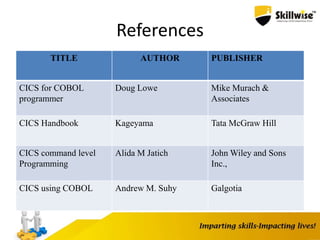
References
TITLE AUTHOR PUBLISHER
CICS for COBOL
programmer
Doug Lowe Mike Murach &
Associates
CICS Handbook Kageyama Tata McGraw Hill
CICS command level
Programming
Alida M Jatich John Wiley and Sons
Inc.,
CICS using COBOL Andrew M. Suhy Galgotia
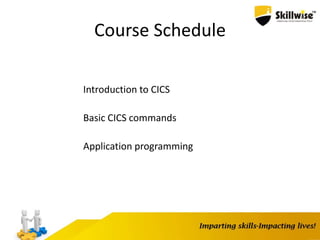
Course Schedule
Introduction to CICS
Basic CICS commands
Application programming
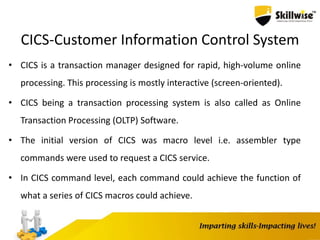
CICS-Customer Information Control System
• CICS is a transaction manager designed for rapid, high-volume online
processing. This processing is mostly interactive (screen-oriented).
• CICS being a transaction processing system is also called as Online
Transaction Processing (OLTP) Software.
• The initial version of CICS was macro level i.e. assembler type
commands were used to request a CICS service.
• In CICS command level, each command could achieve the function of
what a series of CICS macros could achieve.
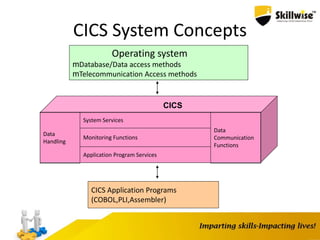
CICS System Concepts
Operating system
mDatabase/Data access methods
mTelecommunication Access methods
CICS Application Programs
(COBOL,PLI,Assembler)
Data
Handling
System Services
Monitoring Functions
Data
Communication
Functions
Application Program Services
CICS
CICS System Components
CICS consists of five major system components
Data-Communication Functions
Data-Handling Functions
Application Program Services
System Services
Monitoring Functions
CICS System Components(contd..)
Data Communication Functions :-
Provides an interface between CICS and terminals
or other systems.
Data Handling Functions :-
Provides an interface between CICS and data.
CICS System Components (contd..)
Application Program Services :-
Provides an interface between CICS and application
programs
System Services :-
Provides an interface between CICS and the operating
system.
Monitoring Functions :-
Monitors various events within CICS and provides a series of
statistics to be used for system tuning.
CICS Control Program and Tables
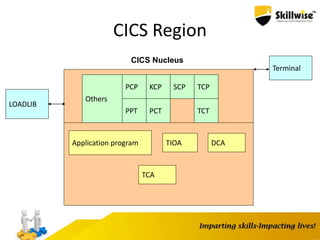
The core portion of CICS(called the CICS nucleus)
consists of IBM-supplied CICS control programs and
corresponding user-specified CICS control tables.
CICS Region
CICS Nucleus
Application program
TCA
TIOA
PCP
PPT PCT
SCPKCP
TCT
TCP
Others
LOADLIB
Terminal
DCA
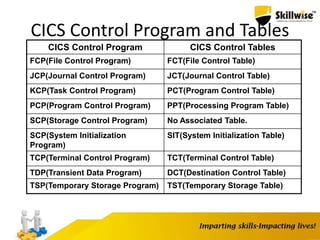
CICS Control Program and Tables
CICS Control Program CICS Control Tables
FCP(File Control Program) FCT(File Control Table)
JCP(Journal Control Program) JCT(Journal Control Table)
KCP(Task Control Program) PCT(Program Control Table)
PCP(Program Control Program) PPT(Processing Program Table)
SCP(Storage Control Program) No Associated Table.
SCP(System Initialization
Program)
SIT(System Initialization Table)
TCP(Terminal Control Program) TCT(Terminal Control Table)
TDP(Transient Data Program) DCT(Destination Control Table)
TSP(Temporary Storage Program) TST(Temporary Storage Table)
Transaction
• CICS transaction is a collection of logically related
programs in an application
• All CICS transactions have four character identifiers
associated with them known as Trans IDs
CICS Start-Up
CICS itself is a job in which the main job step is the
CICS System Initialization Program (SIP).
Upon execution SIP loads the corresponding System
Initialization Table (SIT), based on which all the
control programs and tables are loaded.
Finally CICS is ready to execute a transaction within
it’s own region.
CICS SIGNON AND SIGNOFF
CICS supplied transaction CESN/CSSN is used to sign
on to the CICS region. The security information of all
users is registered in SignOn Table(SNT).
The primary function of CICS sign-off is used to
disassociate CICS user identifier from CICS in terms of
security.
Structure of CICS Application Program
IDENTIFICATION DIVISION
• Program-ID is required.
ENVIRONMENT DIVISION
• Only the header is required. No other entries such as INPUT-
OUTPUT SECTION, FILE CONTROL or SELECT needed
DATA DIVISION
• FILE SECTION (including FD) not required.
• WORKING-STORAGE SECTION is required.
• LINKAGE SECTION is optional
Structure of CICS Application
Program(Cont..)
PROCEDURE DIVISION
• Code is mixture of standard COBOL statements and special CICS
commands
• The following statements are prohibited:
ACCEPT, DISPLAY, STOP RUN, CURRENT-DATE, DAY
Any I/O statements
(OPEN,CLOSE,READ,WRITE,REWRITE,DELETE.START)
• SORT feature
• CICS application programs must end with CICS RETURN
command.
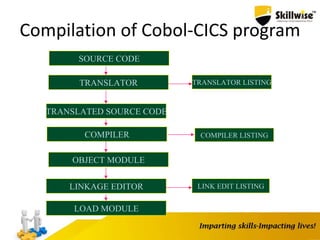
Compilation of Cobol-CICS program
SOURCE CODE
TRANSLATOR TRANSLATOR LISTING
TRANSLATED SOURCE CODE
COMPILER COMPILER LISTING
OBJECT MODULE
LINKAGE EDITOR
LOAD MODULE
LINK EDIT LISTING
CICS Command Format
• General Command Format:
EXEC CICS Command
[option (value)] ....
END-EXEC
• command : a CICS service request
• option : one of the options available to command
• value : determines the characteristics of the value to be
placed for the option as detailed information
Example: EXEC CICS SEND
FROM(ws-var)
LENGTH(emprec)
END-EXEC
Program Execution Process
• Plan the transaction and design the program
• Code the program
• Translate, compile and link edit the program to create Load
module
• Define Program in PPT
• Define transaction in PCT with program name
• Define the mapset in PPT
• Define the files, if required, in FCT
• Sign on to CICS
• Enter the transaction identifier
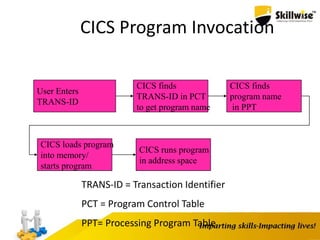
CICS Program Invocation
User Enters
TRANS-ID
CICS finds
TRANS-ID in PCT
to get program name
CICS finds
program name
in PPT
CICS loads program
into memory/
starts program
CICS runs program
in address space
TRANS-ID = Transaction Identifier
PCT = Program Control Table
PPT= Processing Program Table
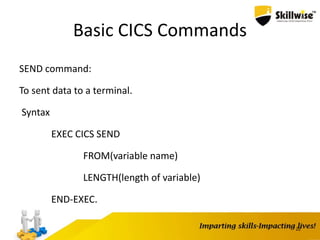
Basic CICS Commands
SEND command:
To sent data to a terminal.
Syntax
EXEC CICS SEND
FROM(variable name)
LENGTH(length of variable)
END-EXEC.
22
Ways of Initiating a Transaction
Entering a transaction identifier in a terminal with
ENTER key.
Transaction identifier associated with a terminal for
pseudo-conversation.
START command which initiates a transaction
specified in the parameter.
Automatic Transaction Initiation(ATI).
By a 3270 attention identifier by defining PF and PA
keys in PCT for IBM 3270 terminal.
23
Basic CICS commands (Cont…)
RECEIVE command:
To receive data from a terminal.
Syntax
EXEC CICS RECEIVE
INTO (variable name)
LENGTH(length of variable)
END-EXEC.
24
Basic CICS commands (Cont…)
• RETURN command:
To terminate the transaction and return control to CICS.
Syntax:
EXEC CICS RETURN
END-EXEC.
25
Exception Handling in CICS
• To handle expected CICS errors
– HANDLE CONDITION
– RESP
– The above errors can be ignored by using IGNORE
CONDITION or NO HANDLE
26
Handle and Ignore Condition
• HANDLE CONDITION
EXEC CICS HANDLE CONDITION
LENGERR (LENGTH-ERR-PARA)
INVREQ (INVREQ-ERR-PARA)
DUPKEY (DUPKEY-ERR-PARA)
ERROR (GEN-ERR-PARA)
END-EXEC.
• IGNORE CONDITION
EXEC CICS IGNORE CONDITION
LENGERR
END-EXEC.
27
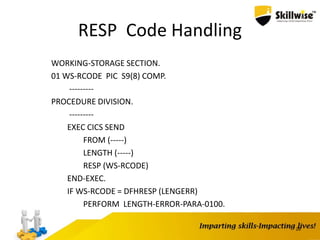
RESP Code Handling
WORKING-STORAGE SECTION.
01 WS-RCODE PIC S9(8) COMP.
---------
PROCEDURE DIVISION.
---------
EXEC CICS SEND
FROM (-----)
LENGTH (-----)
RESP (WS-RCODE)
END-EXEC.
IF WS-RCODE = DFHRESP (LENGERR)
PERFORM LENGTH-ERROR-PARA-0100.
28
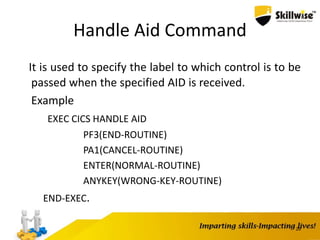
Handle Aid Command
It is used to specify the label to which control is to be
passed when the specified AID is received.
Example
EXEC CICS HANDLE AID
PF3(END-ROUTINE)
PA1(CANCEL-ROUTINE)
ENTER(NORMAL-ROUTINE)
ANYKEY(WRONG-KEY-ROUTINE)
END-EXEC.
29
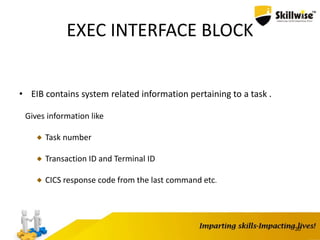
EXEC INTERFACE BLOCK
• EIB contains system related information pertaining to a task .
Gives information like
Task number
Transaction ID and Terminal ID
CICS response code from the last command etc.
30
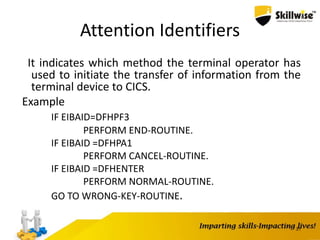
Attention Identifiers
It indicates which method the terminal operator has
used to initiate the transfer of information from the
terminal device to CICS.
Example
IF EIBAID=DFHPF3
PERFORM END-ROUTINE.
IF EIBAID =DFHPA1
PERFORM CANCEL-ROUTINE.
IF EIBAID =DFHENTER
PERFORM NORMAL-ROUTINE.
GO TO WRONG-KEY-ROUTINE.
31
CICS Supplied Transactions
CESN : CICS Execute Sign ON
CEDA : CICS Execute Definition and Administration
CEMT :CICS Execute Master Terminal
CECI : CICS Execute Command Interpreter
CEDF : CICS Execute Debug Facility
CESF : CICS Execute Sign OFF
CEBR : CICS Execute temporary storage BRowse
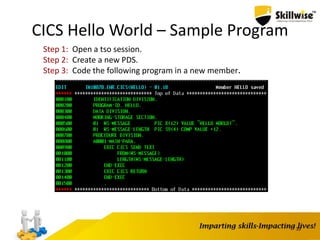
CICS Hello World – Sample Program
33
Step 1: Open a tso session.
Step 2: Create a new PDS.
Step 3: Code the following program in a new member.
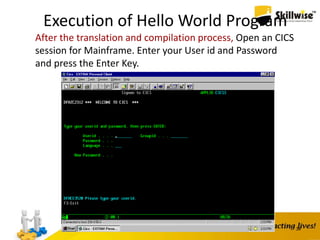
Execution of Hello World Program
34
After the translation and compilation process, Open an CICS
session for Mainframe. Enter your User id and Password
and press the Enter Key.
Defining Resource in Control Tables
• To define a Transaction entry in PCT Table use the below
command in CICS region.
CEDA DEFINE TRANSACTION(TRAN-
ID) PROGRAM(PROGRAM-NAME)
• Once define process is completed , need
the Installation process for Transaction id in PCT table. Use the
below command for installation.
CEDA INSTALL TRANSACTION(TRAN-ID)
• Once Installation is completed for Tran-id, use the below
command in CICS region To Find out a Transaction- Id details
from PCT table.
CEMT INQUIRE TRANSACTION(TRAN-ID)
35
Defining Resource in Control Tables
(Cont…)
• PPT(Processing Program Table) :This Table contains the name
of the program and map details.
• To define a program entry or MAP entry in PPT table , use the
below command in CICS region.
CEDA DEFINE PROGRAM(PROGRAM- NAME) -
For program definition
CEDA DEFINE MAPSET(MAPSET- NAME)
– For Map definition
36
Defining Resource in Control Tables
(Cont…)• Once define process is completed , need the installation
process for Program, Map
CEDA INSTALLATION PROGRAM(PROGRAM-NAME)
CEDA INSTALLATION MAPSET(MAPSET NAME)
• After completing the installation process for entry, use the
command in CICS region to find out the program details from
PPT Table.
CEMT INQUIRE PROGRAM(PROGRAM-NAME)
• By using below command in CICS region, we can find the Tran-
id Details for the specified program.
CEMT INQUIRE TRANSACTION PROGRAM(PROGRAM-NAME)
37
Defining Resource in Control Tables
(Cont…)
• If CICS program is modified or compiled, the new copy of the
load module has to be loaded into main storage. CEMT is used
to refresh the load module
CEMT SET PROGRAM(PROGRAM-
NAME) NEWCOPY (OR)
CECI SET PROGRAM(PROGRAM- NAME) NEWCOPY
• Using below command we can test the map
CECI SEND MAP(MAPNAME) MAPSET(MAPS ET-
NAME)
Skillwise cics part 1

Skillwise cics part 1

  • 1.
  • 2.
    Pre-requisites  MVS andTSO/ISPF subsystem  JCL & VSAM concepts  Programming in COBOL
  • 3.
    References TITLE AUTHOR PUBLISHER CICSfor COBOL programmer Doug Lowe Mike Murach & Associates CICS Handbook Kageyama Tata McGraw Hill CICS command level Programming Alida M Jatich John Wiley and Sons Inc., CICS using COBOL Andrew M. Suhy Galgotia
  • 4.
    Course Schedule Introduction toCICS Basic CICS commands Application programming
  • 5.
    CICS-Customer Information ControlSystem • CICS is a transaction manager designed for rapid, high-volume online processing. This processing is mostly interactive (screen-oriented). • CICS being a transaction processing system is also called as Online Transaction Processing (OLTP) Software. • The initial version of CICS was macro level i.e. assembler type commands were used to request a CICS service. • In CICS command level, each command could achieve the function of what a series of CICS macros could achieve.
  • 6.
    CICS System Concepts Operatingsystem mDatabase/Data access methods mTelecommunication Access methods CICS Application Programs (COBOL,PLI,Assembler) Data Handling System Services Monitoring Functions Data Communication Functions Application Program Services CICS
  • 7.
    CICS System Components CICSconsists of five major system components Data-Communication Functions Data-Handling Functions Application Program Services System Services Monitoring Functions
  • 8.
    CICS System Components(contd..) DataCommunication Functions :- Provides an interface between CICS and terminals or other systems. Data Handling Functions :- Provides an interface between CICS and data.
  • 9.
    CICS System Components(contd..) Application Program Services :- Provides an interface between CICS and application programs System Services :- Provides an interface between CICS and the operating system. Monitoring Functions :- Monitors various events within CICS and provides a series of statistics to be used for system tuning.
  • 10.
    CICS Control Programand Tables The core portion of CICS(called the CICS nucleus) consists of IBM-supplied CICS control programs and corresponding user-specified CICS control tables.
  • 11.
    CICS Region CICS Nucleus Applicationprogram TCA TIOA PCP PPT PCT SCPKCP TCT TCP Others LOADLIB Terminal DCA
  • 12.
    CICS Control Programand Tables CICS Control Program CICS Control Tables FCP(File Control Program) FCT(File Control Table) JCP(Journal Control Program) JCT(Journal Control Table) KCP(Task Control Program) PCT(Program Control Table) PCP(Program Control Program) PPT(Processing Program Table) SCP(Storage Control Program) No Associated Table. SCP(System Initialization Program) SIT(System Initialization Table) TCP(Terminal Control Program) TCT(Terminal Control Table) TDP(Transient Data Program) DCT(Destination Control Table) TSP(Temporary Storage Program) TST(Temporary Storage Table)
  • 13.
    Transaction • CICS transactionis a collection of logically related programs in an application • All CICS transactions have four character identifiers associated with them known as Trans IDs
  • 14.
    CICS Start-Up CICS itselfis a job in which the main job step is the CICS System Initialization Program (SIP). Upon execution SIP loads the corresponding System Initialization Table (SIT), based on which all the control programs and tables are loaded. Finally CICS is ready to execute a transaction within it’s own region.
  • 15.
    CICS SIGNON ANDSIGNOFF CICS supplied transaction CESN/CSSN is used to sign on to the CICS region. The security information of all users is registered in SignOn Table(SNT). The primary function of CICS sign-off is used to disassociate CICS user identifier from CICS in terms of security.
  • 16.
    Structure of CICSApplication Program IDENTIFICATION DIVISION • Program-ID is required. ENVIRONMENT DIVISION • Only the header is required. No other entries such as INPUT- OUTPUT SECTION, FILE CONTROL or SELECT needed DATA DIVISION • FILE SECTION (including FD) not required. • WORKING-STORAGE SECTION is required. • LINKAGE SECTION is optional
  • 17.
    Structure of CICSApplication Program(Cont..) PROCEDURE DIVISION • Code is mixture of standard COBOL statements and special CICS commands • The following statements are prohibited: ACCEPT, DISPLAY, STOP RUN, CURRENT-DATE, DAY Any I/O statements (OPEN,CLOSE,READ,WRITE,REWRITE,DELETE.START) • SORT feature • CICS application programs must end with CICS RETURN command.
  • 18.
    Compilation of Cobol-CICSprogram SOURCE CODE TRANSLATOR TRANSLATOR LISTING TRANSLATED SOURCE CODE COMPILER COMPILER LISTING OBJECT MODULE LINKAGE EDITOR LOAD MODULE LINK EDIT LISTING
  • 19.
    CICS Command Format •General Command Format: EXEC CICS Command [option (value)] .... END-EXEC • command : a CICS service request • option : one of the options available to command • value : determines the characteristics of the value to be placed for the option as detailed information Example: EXEC CICS SEND FROM(ws-var) LENGTH(emprec) END-EXEC
  • 20.
    Program Execution Process •Plan the transaction and design the program • Code the program • Translate, compile and link edit the program to create Load module • Define Program in PPT • Define transaction in PCT with program name • Define the mapset in PPT • Define the files, if required, in FCT • Sign on to CICS • Enter the transaction identifier
  • 21.
    CICS Program Invocation UserEnters TRANS-ID CICS finds TRANS-ID in PCT to get program name CICS finds program name in PPT CICS loads program into memory/ starts program CICS runs program in address space TRANS-ID = Transaction Identifier PCT = Program Control Table PPT= Processing Program Table
  • 22.
    Basic CICS Commands SENDcommand: To sent data to a terminal. Syntax EXEC CICS SEND FROM(variable name) LENGTH(length of variable) END-EXEC. 22
  • 23.
    Ways of Initiatinga Transaction Entering a transaction identifier in a terminal with ENTER key. Transaction identifier associated with a terminal for pseudo-conversation. START command which initiates a transaction specified in the parameter. Automatic Transaction Initiation(ATI). By a 3270 attention identifier by defining PF and PA keys in PCT for IBM 3270 terminal. 23
  • 24.
    Basic CICS commands(Cont…) RECEIVE command: To receive data from a terminal. Syntax EXEC CICS RECEIVE INTO (variable name) LENGTH(length of variable) END-EXEC. 24
  • 25.
    Basic CICS commands(Cont…) • RETURN command: To terminate the transaction and return control to CICS. Syntax: EXEC CICS RETURN END-EXEC. 25
  • 26.
    Exception Handling inCICS • To handle expected CICS errors – HANDLE CONDITION – RESP – The above errors can be ignored by using IGNORE CONDITION or NO HANDLE 26
  • 27.
    Handle and IgnoreCondition • HANDLE CONDITION EXEC CICS HANDLE CONDITION LENGERR (LENGTH-ERR-PARA) INVREQ (INVREQ-ERR-PARA) DUPKEY (DUPKEY-ERR-PARA) ERROR (GEN-ERR-PARA) END-EXEC. • IGNORE CONDITION EXEC CICS IGNORE CONDITION LENGERR END-EXEC. 27
  • 28.
    RESP Code Handling WORKING-STORAGESECTION. 01 WS-RCODE PIC S9(8) COMP. --------- PROCEDURE DIVISION. --------- EXEC CICS SEND FROM (-----) LENGTH (-----) RESP (WS-RCODE) END-EXEC. IF WS-RCODE = DFHRESP (LENGERR) PERFORM LENGTH-ERROR-PARA-0100. 28
  • 29.
    Handle Aid Command Itis used to specify the label to which control is to be passed when the specified AID is received. Example EXEC CICS HANDLE AID PF3(END-ROUTINE) PA1(CANCEL-ROUTINE) ENTER(NORMAL-ROUTINE) ANYKEY(WRONG-KEY-ROUTINE) END-EXEC. 29
  • 30.
    EXEC INTERFACE BLOCK •EIB contains system related information pertaining to a task . Gives information like Task number Transaction ID and Terminal ID CICS response code from the last command etc. 30
  • 31.
    Attention Identifiers It indicateswhich method the terminal operator has used to initiate the transfer of information from the terminal device to CICS. Example IF EIBAID=DFHPF3 PERFORM END-ROUTINE. IF EIBAID =DFHPA1 PERFORM CANCEL-ROUTINE. IF EIBAID =DFHENTER PERFORM NORMAL-ROUTINE. GO TO WRONG-KEY-ROUTINE. 31
  • 32.
    CICS Supplied Transactions CESN: CICS Execute Sign ON CEDA : CICS Execute Definition and Administration CEMT :CICS Execute Master Terminal CECI : CICS Execute Command Interpreter CEDF : CICS Execute Debug Facility CESF : CICS Execute Sign OFF CEBR : CICS Execute temporary storage BRowse
  • 33.
    CICS Hello World– Sample Program 33 Step 1: Open a tso session. Step 2: Create a new PDS. Step 3: Code the following program in a new member.
  • 34.
    Execution of HelloWorld Program 34 After the translation and compilation process, Open an CICS session for Mainframe. Enter your User id and Password and press the Enter Key.
  • 35.
    Defining Resource inControl Tables • To define a Transaction entry in PCT Table use the below command in CICS region. CEDA DEFINE TRANSACTION(TRAN- ID) PROGRAM(PROGRAM-NAME) • Once define process is completed , need the Installation process for Transaction id in PCT table. Use the below command for installation. CEDA INSTALL TRANSACTION(TRAN-ID) • Once Installation is completed for Tran-id, use the below command in CICS region To Find out a Transaction- Id details from PCT table. CEMT INQUIRE TRANSACTION(TRAN-ID) 35
  • 36.
    Defining Resource inControl Tables (Cont…) • PPT(Processing Program Table) :This Table contains the name of the program and map details. • To define a program entry or MAP entry in PPT table , use the below command in CICS region. CEDA DEFINE PROGRAM(PROGRAM- NAME) - For program definition CEDA DEFINE MAPSET(MAPSET- NAME) – For Map definition 36
  • 37.
    Defining Resource inControl Tables (Cont…)• Once define process is completed , need the installation process for Program, Map CEDA INSTALLATION PROGRAM(PROGRAM-NAME) CEDA INSTALLATION MAPSET(MAPSET NAME) • After completing the installation process for entry, use the command in CICS region to find out the program details from PPT Table. CEMT INQUIRE PROGRAM(PROGRAM-NAME) • By using below command in CICS region, we can find the Tran- id Details for the specified program. CEMT INQUIRE TRANSACTION PROGRAM(PROGRAM-NAME) 37
  • 38.
    Defining Resource inControl Tables (Cont…) • If CICS program is modified or compiled, the new copy of the load module has to be loaded into main storage. CEMT is used to refresh the load module CEMT SET PROGRAM(PROGRAM- NAME) NEWCOPY (OR) CECI SET PROGRAM(PROGRAM- NAME) NEWCOPY • Using below command we can test the map CECI SEND MAP(MAPNAME) MAPSET(MAPS ET- NAME)