Dr. Manasvi Sharma
Moderator: Dr Rajesh Kar
 How can anaesthetist experience the difficulties of
patient care without putting patients at undue risk?
 How can we assess the abilities of anaesthetist as
individuals and teams when each patient is unique?
The answer is
SIMULATIONS
Simulation refers to the artificial
replication of sufficient elements of
a real-world domain to achieve a
stated goal.
This technique well known in the
military, aviation, space flight, and
nuclear power industries.
Uses of simulations
 Team training, as human factor or CRM training
 Training in dynamic plant control
 Training in diagnostic skills
 Dynamic mockup for design evaluation
 Test bed for checking operating instructions
 Source of data on human errors relevant to risk
and reliability assessment
 Vehicle for (compulsory) testing/assessment and
recertification of operators
Objectives
 Describe the current state of education and research
in simulation.
 List the various simulators, mannequins and models
available for emergency medicine training.
 Discuss the strengths and weaknesses of each
simulation modality.
 List some of the best practice examples for using
simulation in EM residencies.
Outline
 Introduction
 Spectrum of Simulation Equipment
 Best Practice Examples
Introduction
 Characteristics
 Cues and consequences are like reality
 Situations can be complex
 Fidelity (exactness of duplication) is not perfect
 Feedback to users questions, decisions, and actions.
 History
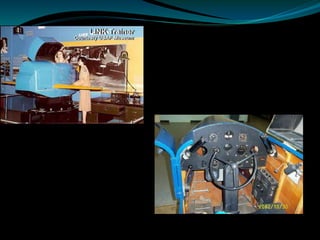
 1928 Edwin Link develops first flight simulator – “Link Trainer”
 1960 Laerdal introduces first “Resusci-Annie”
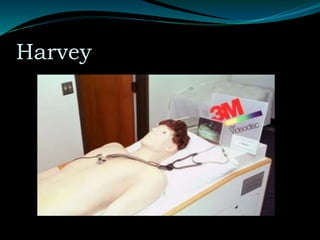
 1968 “Harvey” cardiology simulator
 1970 First power plant simulators
 1973 First computer aided modeling of physiology
 1975 Standardized patients and OSCE’s introduced
 1988 First full body, computerized mannequin at Stanford
 1989 ACRM – Anesthesia focused on patient safety and
education movement at this time
 1990 Term Virtual Reality was introduced, Screen Based
Simulators Introduced
Harvey
Introduction
 Why is this a valuable tool? Or is it?
 Learners can learn without risk to patient.
 Learning can be focused without regard to patient care
needs/safety/etc.
 Opportunity to repeat lesson/skill to mastery.
 Specific learning opportunities guaranteed.
 Learning can be done at convenient times.
 Performance can be observed/recorded.
Introduction
 Why is simulation important in medical education?
 Problems with clinical teaching
 New technologies for diagnosis/treatment
 Assessing professional competence
 Medical errors and patient safety
 Deliberate practice
Setting of the Simulation Exercise
 Setting introduction (SI): The introduction
delivers general information on how the exercise
will be conducted, logistical information, and
some of the known pitfalls of the course.
 Simulator briefing (SB) or familiarization: They
learn how to use the simulator, what it can and
cannot do, what is “normal” (e.g., normal breath
sounds), and how they can interact with the
environment (e.g., how to call for help, how to
request information about the patient that is not
directly available in the simulation environment).
 Theory input (T): Most exercises have didactic
and theory components on relevant content
information. Sometimes this material is made
available in advance via readings or online
exercises.
 Breaks (B): For complex courses (e.g.,
anesthesia crisis resource management
[ACRM]), breaks are important for socialization
between participants and with instructors. It also
is a venue for informal sharing and storytelling.
 Case briefing (C): In many simulation scenarios,
participants receive a briefing about the upcoming case.
 Simulation scenario (S): Most simulation exercises
involve a scenario that posits a given clinical situation
and challenges to be posed for participants to deal with.
 Debriefing (D): Most scenarios are followed by some form
of debriefing or feedback.
 Ending (E): Especially for multiple-scenario courses,
there may be a separate final session to end the course.
This is an opportunity to summarize issues that were
covered, to address questions, and to consider how best
to apply the principles covered to real patient care.
Site of Simulation
 Dedicated centre - One or more simulators are
used in a dedicated simulation facility, typically
in rooms that can partially or fully replicate, in a
relatively generic fashion, various clinical
environments (e.g., operating room, ICU, labor
and delivery, emergency department).
In-Situ Simulation
In-situ simulation is conducted in an actual clinical
workplace; the simulator “replaces” a patient.
It is especially useful for unusual workplaces that are
difficult to recreate realistically in a simulation center,
such as a catheterization laboratory, computed
tomography scanner, ambulances, or air rescue aircraft.
Most in-situ simulation is performed “mobile” as a
temporary setup, but increasingly in-situ simulation is
established as “residential simulation,” in which a
simulator is permanently installed in a clinical workplace
(e.g., creating a simulation-specific room in the actual
ICU.
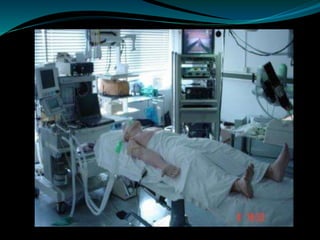
Moving Patient Simulation -
The advent of completely portable and wireless
simulators supports exercises in which the
simulated patient can be moved from one clinical
site to another.
Mobile Simulation: “Have Simulator—Will Travel”
Mobile simulation means the simulator and the
audiovisual gear are moved (made mobile)
outside the originating institution for purposes of
the simulation event.
Mobile simulation can be conducted as in-situ
simulation in an actual site of a remote client
institution, by setting up for simulation in
conference rooms or hotel meeting rooms, or by
having a simulation facility built into a truck or
bus.
Outline
 Introduction
 Spectrum of Simulation Equipment
 Best Practice Examples
Available Simulation
Equipment
 Standardized Patients
 Improvised Technology
 Screen Based Simulation
 Task Trainers
 Low/Mid/High Fidelity Mannequins
 Virtual Reality
Evaluating Simulators
 Usability
 Validity
 Face, Content, Construct, Concurrent, Predictive
 Transfer
 Efficiency
 Cost
 Evidence
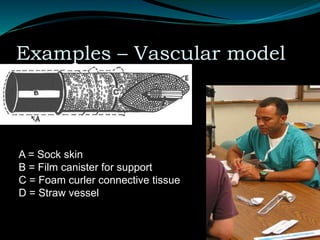
Examples – Vascular model
A = Sock skin
B = Film canister for support
C = Foam curler connective tissue
D = Straw vessel
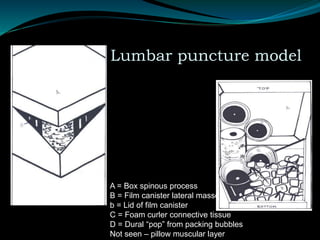
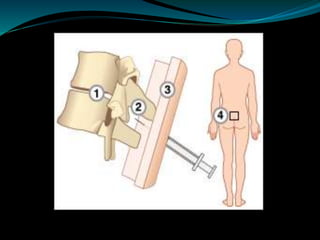
Examples – Lumbar puncture model
A = Box spinous process
B = Film canister lateral masses
b = Lid of film canister
C = Foam curler connective tissue
D = Dural “pop” from packing bubbles
Not seen – pillow muscular layer
Screen Based Simulation
 Desktop Computer
 Strengths – low cost, distance learning, variety of
cases, improving realism, self guided
 Weaknesses – procedural skills, teamwork skills
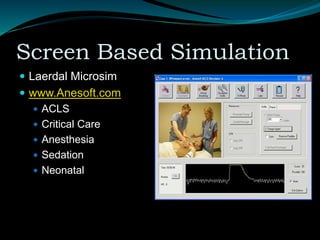
Screen Based Simulation
 Laerdal Microsim
 www.Anesoft.com
 ACLS
 Critical Care
 Anesthesia
 Sedation
 Neonatal
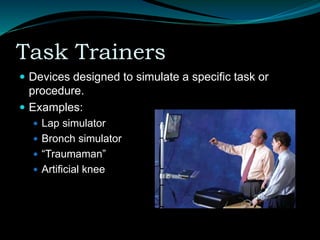
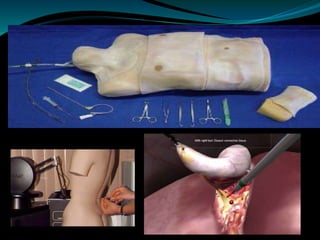
Task Trainers
 Devices designed to simulate a specific task or
procedure.
 Examples:
 Lap simulator
 Bronch simulator
 “Traumaman”
 Artificial knee
Task Trainers
Task Trainers
 Strengths
 High fidelity,
 good research on efficacy,
 may have self guided teaching, metrics available
 Weaknesses
 Poor haptics on most machines,
 expensive,
 focus on single task,
 not integrated into complete patient care
Low Fidelity Mannequins
 Features:
 Static airways
 +/- rhythm generation
 No/minimal programmed responses.
 Strengths: Low cost, reliable, easy to use, portable
 Weaknesses: Limited features, less interactive,
instructor required
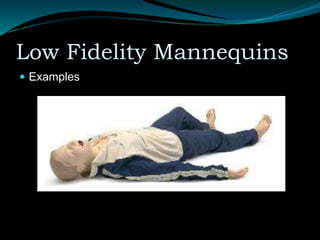
Low Fidelity Mannequins
 Examples
Mid Fidelity Mannequins
 Relatively new class of mannequins, often used for
ACLS training.
 Features:
 Active airways – ETT, LMA, Combitube
 Breathing/pulses, rhythms
 Basic procedures – pacing, defibrillation
 Some automated response and programmed
scenarios
Mid Fidelity Mannequins
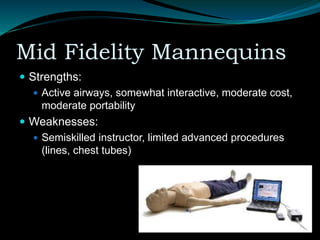
 Strengths:
 Active airways, somewhat interactive, moderate cost,
moderate portability
 Weaknesses:
 Semiskilled instructor, limited advanced procedures
(lines, chest tubes)
High Fidelity Mannequins
 Mannequin with electrical, pneumatic functions
driven by a computer.
 Adult, child and newborn models
 Features:
 Dynamic airways, reactive pupils
 Heart sounds, lung sounds, chest movement
 Pulses, rhythms, vital signs
 Abdominal sounds, voice
 CO2 exhalation, cardiac output, invasive pressures
 Bleeding, salivation, lacrimation
High Fidelity Mannequins
 Procedures
 O2, BVM, Oral/nasal airway, ETT, LMA, Cric
 Pericardiocentesis, PIV
 Defibrillation, Pacing, CPR
 Needle or open thoracentesis
 TOF, Internal gas analysis
 Foley placement
 Reacts to medications
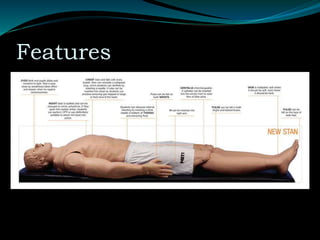
Features
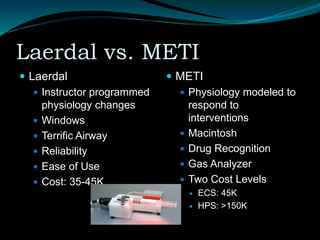
Laerdal vs. METI
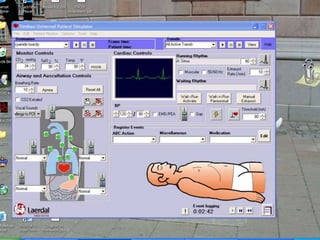
 Laerdal
 Instructor programmed
physiology changes
 Windows
 Terrific Airway
 Reliability
 Ease of Use
 Cost: 35-45K
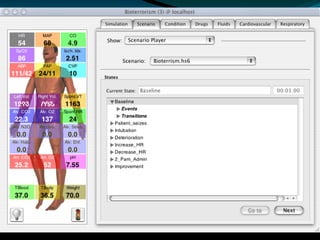
 METI
 Physiology modeled to
respond to
interventions
 Macintosh
 Drug Recognition
 Gas Analyzer
 Two Cost Levels
 ECS: 45K
 HPS: >150K
High Fidelity Mannequins
 Strengths
 Many dynamic responses, preprogrammed scenarios,
widest variety of procedures, most immersive.
 Weaknesses
 Cost, procedures are not very realistic, reliability, lack
of portability, significant instructor training required.
Virtual Reality
 Advanced form of human-computer interaction
 Allow humans to work in the computer’s world
 Environment understandable to us
 Four necessary components
 Software
 Hardware
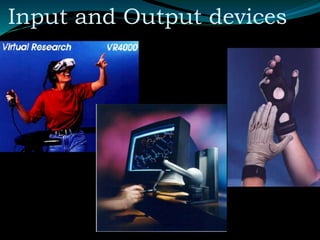
 Input devices
 Output devises
Input and Output devices
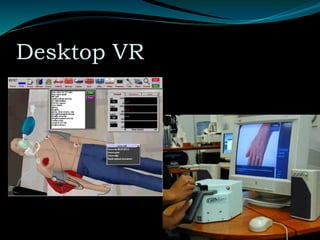
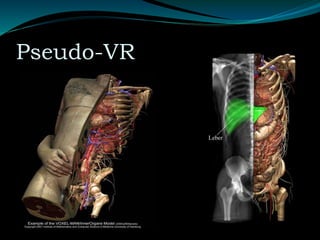
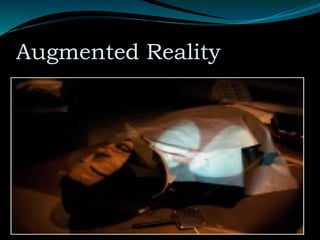
Virtual Reality
 Types of VR applicable to medicine
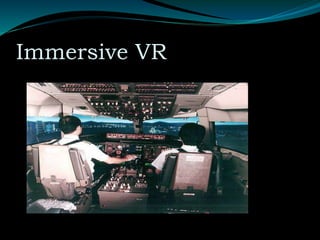
 Immersive VR
 Desktop VR
 Pseudo-VR
 Augmented reality
Immersive VR
Desktop VR
Pseudo-VR
Augmented Reality
Outline
 Introduction
 Spectrum of Simulation Equipment
 Best Practice Examples
Research
 Rapidly expanding body of literature since 2000.
 First issue of ‘Simulation in Healthcare’ Jan 2006.
 Many articles on ‘look at what we did’ level and data
that says ‘everyone thought it was nifty.’
 Focus on best practices in teaching/learning and
assessment using simulation.
Best Teaching Practices
 Screen based teaching with feedback is better than self
study.
 Comparing simulation to other teaching modalities
demonstrates some slight advantages.
 Simulation can be an effective replacement for live
practice for some skills.
 Learner centered teaching with simulation.
 Team behavior can be effected by focused simulation
experiences.
Best Teaching Practices
 Orientation
 Introduction to session
 Expectations
 What is real/what is not
 Self assessment
 Debriefing
 Evaluation
How To Best Use Simulation
 Provide feedback
 Give opportunities for repetitive practice
 Integrate simulation into overall curriculum
 Provide increasing levels of difficulty
 Provide clinical variation in scenarios
 Control environment
 Provide individual and team learning
 Define outcomes and benchmarks
Best Assessment Practices
 Simulation has some data to support its
use as an assessment modality.
 Task trainers appear to be a valid method
for assessing procedural competence.
 Multiple simulated encounters are needed
to accurately assess resident abilities.
 Checklists scoring of videotaped
performance can have a high degree of
inter-rater reliability.
 Validation that simulator performance correlates
with real practice.
 There are many aspects of human
knowledge/skills/attitudes to assess and the
correct tool must be used for each one.
 ”Softer” competencies like professionalism can
be assessed with the aid of simulation
technology.
 The scoring/evaluation system chosen to assess
simulated performance is critical.
Best Assessment Practices
 Determine what you want to assess.
 Design a simulation that provokes this performance.
 Observe/record the performance.
 Analyze the performance using some type of rubric:
checklist, GAS, etc.
 Debriefing, feedback and teaching.
Summary
Simulation is one tool
(new, expensive and exciting)
in our educational repertoire.
(Similar to lecture, case discussion, skill lab, MCQ, SP, etc.)
Summary
 Provide feedback
 Give opportunities for repetitive
practice
 Integrate simulation into overall
curriculum
 Provide increasing levels of
difficulty
 Provide clinical variation in
scenarios
 Control environment
 Provide individual and team
learning
 Define outcomes and
benchmarks
 Determine what you want to
assess.
 Design a simulation that
provokes this performance.
 Observe/record the
performance.
 Analyze the performance using
some type of rubric: checklist,
GAS, etc.
 Debriefing, feedback and
teaching.
THANK-YOU

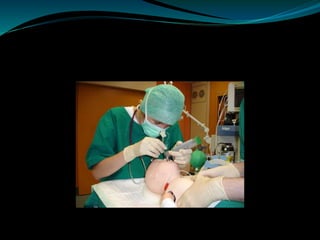
Simulators in Anaesthesia, the future and past

  • 1.
  • 2.
     How cananaesthetist experience the difficulties of patient care without putting patients at undue risk?  How can we assess the abilities of anaesthetist as individuals and teams when each patient is unique?
  • 3.
  • 4.
    Simulation refers tothe artificial replication of sufficient elements of a real-world domain to achieve a stated goal. This technique well known in the military, aviation, space flight, and nuclear power industries.
  • 5.
    Uses of simulations Team training, as human factor or CRM training  Training in dynamic plant control  Training in diagnostic skills  Dynamic mockup for design evaluation  Test bed for checking operating instructions  Source of data on human errors relevant to risk and reliability assessment  Vehicle for (compulsory) testing/assessment and recertification of operators
  • 6.
    Objectives  Describe thecurrent state of education and research in simulation.  List the various simulators, mannequins and models available for emergency medicine training.  Discuss the strengths and weaknesses of each simulation modality.  List some of the best practice examples for using simulation in EM residencies.
  • 7.
    Outline  Introduction  Spectrumof Simulation Equipment  Best Practice Examples
  • 8.
    Introduction  Characteristics  Cuesand consequences are like reality  Situations can be complex  Fidelity (exactness of duplication) is not perfect  Feedback to users questions, decisions, and actions.
  • 9.
     History  1928Edwin Link develops first flight simulator – “Link Trainer”  1960 Laerdal introduces first “Resusci-Annie”  1968 “Harvey” cardiology simulator  1970 First power plant simulators  1973 First computer aided modeling of physiology  1975 Standardized patients and OSCE’s introduced  1988 First full body, computerized mannequin at Stanford  1989 ACRM – Anesthesia focused on patient safety and education movement at this time  1990 Term Virtual Reality was introduced, Screen Based Simulators Introduced
  • 11.
  • 12.
    Introduction  Why isthis a valuable tool? Or is it?  Learners can learn without risk to patient.  Learning can be focused without regard to patient care needs/safety/etc.  Opportunity to repeat lesson/skill to mastery.  Specific learning opportunities guaranteed.  Learning can be done at convenient times.  Performance can be observed/recorded.
  • 13.
    Introduction  Why issimulation important in medical education?  Problems with clinical teaching  New technologies for diagnosis/treatment  Assessing professional competence  Medical errors and patient safety  Deliberate practice
  • 14.
    Setting of theSimulation Exercise  Setting introduction (SI): The introduction delivers general information on how the exercise will be conducted, logistical information, and some of the known pitfalls of the course.  Simulator briefing (SB) or familiarization: They learn how to use the simulator, what it can and cannot do, what is “normal” (e.g., normal breath sounds), and how they can interact with the environment (e.g., how to call for help, how to request information about the patient that is not directly available in the simulation environment).
  • 15.
     Theory input(T): Most exercises have didactic and theory components on relevant content information. Sometimes this material is made available in advance via readings or online exercises.  Breaks (B): For complex courses (e.g., anesthesia crisis resource management [ACRM]), breaks are important for socialization between participants and with instructors. It also is a venue for informal sharing and storytelling.
  • 16.
     Case briefing(C): In many simulation scenarios, participants receive a briefing about the upcoming case.  Simulation scenario (S): Most simulation exercises involve a scenario that posits a given clinical situation and challenges to be posed for participants to deal with.  Debriefing (D): Most scenarios are followed by some form of debriefing or feedback.  Ending (E): Especially for multiple-scenario courses, there may be a separate final session to end the course. This is an opportunity to summarize issues that were covered, to address questions, and to consider how best to apply the principles covered to real patient care.
  • 17.
    Site of Simulation Dedicated centre - One or more simulators are used in a dedicated simulation facility, typically in rooms that can partially or fully replicate, in a relatively generic fashion, various clinical environments (e.g., operating room, ICU, labor and delivery, emergency department).
  • 18.
    In-Situ Simulation In-situ simulationis conducted in an actual clinical workplace; the simulator “replaces” a patient. It is especially useful for unusual workplaces that are difficult to recreate realistically in a simulation center, such as a catheterization laboratory, computed tomography scanner, ambulances, or air rescue aircraft. Most in-situ simulation is performed “mobile” as a temporary setup, but increasingly in-situ simulation is established as “residential simulation,” in which a simulator is permanently installed in a clinical workplace (e.g., creating a simulation-specific room in the actual ICU.
  • 19.
    Moving Patient Simulation- The advent of completely portable and wireless simulators supports exercises in which the simulated patient can be moved from one clinical site to another.
  • 20.
    Mobile Simulation: “HaveSimulator—Will Travel” Mobile simulation means the simulator and the audiovisual gear are moved (made mobile) outside the originating institution for purposes of the simulation event. Mobile simulation can be conducted as in-situ simulation in an actual site of a remote client institution, by setting up for simulation in conference rooms or hotel meeting rooms, or by having a simulation facility built into a truck or bus.
  • 21.
    Outline  Introduction  Spectrumof Simulation Equipment  Best Practice Examples
  • 22.
    Available Simulation Equipment  StandardizedPatients  Improvised Technology  Screen Based Simulation  Task Trainers  Low/Mid/High Fidelity Mannequins  Virtual Reality
  • 23.
    Evaluating Simulators  Usability Validity  Face, Content, Construct, Concurrent, Predictive  Transfer  Efficiency  Cost  Evidence
  • 24.
    Examples – Vascularmodel A = Sock skin B = Film canister for support C = Foam curler connective tissue D = Straw vessel
  • 25.
    Examples – Lumbarpuncture model A = Box spinous process B = Film canister lateral masses b = Lid of film canister C = Foam curler connective tissue D = Dural “pop” from packing bubbles Not seen – pillow muscular layer
  • 27.
    Screen Based Simulation Desktop Computer  Strengths – low cost, distance learning, variety of cases, improving realism, self guided  Weaknesses – procedural skills, teamwork skills
  • 28.
    Screen Based Simulation Laerdal Microsim  www.Anesoft.com  ACLS  Critical Care  Anesthesia  Sedation  Neonatal
  • 29.
    Task Trainers  Devicesdesigned to simulate a specific task or procedure.  Examples:  Lap simulator  Bronch simulator  “Traumaman”  Artificial knee
  • 30.
  • 31.
    Task Trainers  Strengths High fidelity,  good research on efficacy,  may have self guided teaching, metrics available  Weaknesses  Poor haptics on most machines,  expensive,  focus on single task,  not integrated into complete patient care
  • 32.
    Low Fidelity Mannequins Features:  Static airways  +/- rhythm generation  No/minimal programmed responses.  Strengths: Low cost, reliable, easy to use, portable  Weaknesses: Limited features, less interactive, instructor required
  • 33.
  • 36.
    Mid Fidelity Mannequins Relatively new class of mannequins, often used for ACLS training.  Features:  Active airways – ETT, LMA, Combitube  Breathing/pulses, rhythms  Basic procedures – pacing, defibrillation  Some automated response and programmed scenarios
  • 37.
    Mid Fidelity Mannequins Strengths:  Active airways, somewhat interactive, moderate cost, moderate portability  Weaknesses:  Semiskilled instructor, limited advanced procedures (lines, chest tubes)
  • 39.
    High Fidelity Mannequins Mannequin with electrical, pneumatic functions driven by a computer.  Adult, child and newborn models  Features:  Dynamic airways, reactive pupils  Heart sounds, lung sounds, chest movement  Pulses, rhythms, vital signs  Abdominal sounds, voice  CO2 exhalation, cardiac output, invasive pressures  Bleeding, salivation, lacrimation
  • 40.
    High Fidelity Mannequins Procedures  O2, BVM, Oral/nasal airway, ETT, LMA, Cric  Pericardiocentesis, PIV  Defibrillation, Pacing, CPR  Needle or open thoracentesis  TOF, Internal gas analysis  Foley placement  Reacts to medications
  • 41.
  • 42.
    Laerdal vs. METI Laerdal  Instructor programmed physiology changes  Windows  Terrific Airway  Reliability  Ease of Use  Cost: 35-45K  METI  Physiology modeled to respond to interventions  Macintosh  Drug Recognition  Gas Analyzer  Two Cost Levels  ECS: 45K  HPS: >150K
  • 45.
    High Fidelity Mannequins Strengths  Many dynamic responses, preprogrammed scenarios, widest variety of procedures, most immersive.  Weaknesses  Cost, procedures are not very realistic, reliability, lack of portability, significant instructor training required.
  • 46.
    Virtual Reality  Advancedform of human-computer interaction  Allow humans to work in the computer’s world  Environment understandable to us  Four necessary components  Software  Hardware  Input devices  Output devises
  • 47.
  • 48.
    Virtual Reality  Typesof VR applicable to medicine  Immersive VR  Desktop VR  Pseudo-VR  Augmented reality
  • 49.
  • 50.
  • 51.
  • 52.
  • 54.
    Outline  Introduction  Spectrumof Simulation Equipment  Best Practice Examples
  • 55.
    Research  Rapidly expandingbody of literature since 2000.  First issue of ‘Simulation in Healthcare’ Jan 2006.  Many articles on ‘look at what we did’ level and data that says ‘everyone thought it was nifty.’  Focus on best practices in teaching/learning and assessment using simulation.
  • 56.
    Best Teaching Practices Screen based teaching with feedback is better than self study.  Comparing simulation to other teaching modalities demonstrates some slight advantages.  Simulation can be an effective replacement for live practice for some skills.  Learner centered teaching with simulation.  Team behavior can be effected by focused simulation experiences.
  • 57.
    Best Teaching Practices Orientation  Introduction to session  Expectations  What is real/what is not  Self assessment  Debriefing  Evaluation
  • 58.
    How To BestUse Simulation  Provide feedback  Give opportunities for repetitive practice  Integrate simulation into overall curriculum  Provide increasing levels of difficulty  Provide clinical variation in scenarios  Control environment  Provide individual and team learning  Define outcomes and benchmarks
  • 59.
    Best Assessment Practices Simulation has some data to support its use as an assessment modality.  Task trainers appear to be a valid method for assessing procedural competence.  Multiple simulated encounters are needed to accurately assess resident abilities.  Checklists scoring of videotaped performance can have a high degree of inter-rater reliability.
  • 60.
     Validation thatsimulator performance correlates with real practice.  There are many aspects of human knowledge/skills/attitudes to assess and the correct tool must be used for each one.  ”Softer” competencies like professionalism can be assessed with the aid of simulation technology.  The scoring/evaluation system chosen to assess simulated performance is critical.
  • 61.
    Best Assessment Practices Determine what you want to assess.  Design a simulation that provokes this performance.  Observe/record the performance.  Analyze the performance using some type of rubric: checklist, GAS, etc.  Debriefing, feedback and teaching.
  • 62.
    Summary Simulation is onetool (new, expensive and exciting) in our educational repertoire. (Similar to lecture, case discussion, skill lab, MCQ, SP, etc.)
  • 63.
    Summary  Provide feedback Give opportunities for repetitive practice  Integrate simulation into overall curriculum  Provide increasing levels of difficulty  Provide clinical variation in scenarios  Control environment  Provide individual and team learning  Define outcomes and benchmarks  Determine what you want to assess.  Design a simulation that provokes this performance.  Observe/record the performance.  Analyze the performance using some type of rubric: checklist, GAS, etc.  Debriefing, feedback and teaching.
  • 64.