Description
The project “Automatic monitoring system” aims to collecting digital data from different
external sources such as sensor networks, web and digital cameras, digital sensors and devices,
transmitting the data onto a server part and processing it with special user defined scripts, reacting on
it with special an embedded functionality is to send e-mail or sms, to recognize a voice and an image
and so on. The current release has possibility to watch for an object or a place with home web camera
that is equipped by microphone reacts on a motion or a sound event with an assigned level of noise and
after that the received compressed image, video or sound will be transmitted into a database, processes
the data with a script and notifies an user about the happened event and the user can see all data in the
special UI application which is named “Monitor” in real-time mode. This solution represents a
platform for a huge amount of projects such as babysitter, alarm system for your house, countryside
house or garage, car with opportunity to watch and to control condition and state of the object from
any part of the world via the Internet. This project also can be used as part of “smart house” or system
with voice control for external devices, watching for pressure of gas or oil pipes, boilers and so on.
Brief information about the project applications:
The user applications:
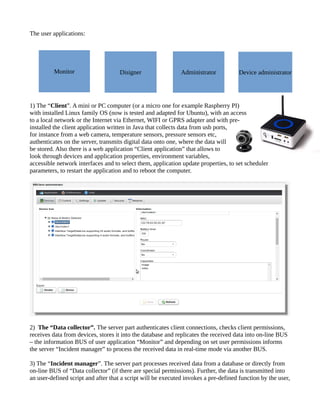
1) The “Client”. A mini or PC computer (or a micro one for example Raspberry PI)
with installed Linux family OS (now is tested and adapted for Ubuntu), with an access
to a local network or the Internet via Ethernet, WIFI or GPRS adapter and with pre-
installed the client application written in Java that collects data from usb ports,
for instance from a web camera, temperature sensors, pressure sensors etc,
authenticates on the server, transmits digital data onto one, where the data will
be stored. Also there is a web application “Client application” that allows to
look through devices and application properties, environment variables,
accessible network interfaces and to select them, application update properties, to set scheduler
parameters, to restart the application and to reboot the computer.
2) The “Data collector”. The server part authenticates client connections, checks client permissions,
receives data from devices, stores it into the database and replicates the received data into on-line BUS
– the information BUS of user application “Monitor” and depending on set user permissions informs
the server “Incident manager” to process the received data in real-time mode via another BUS.
3) The “Incident manager”. The server part processes received data from a database or directly from
on-line BUS of “Data collector” (if there are special permissions). Further, the data is transmitted into
an user-defined script and after that a script will be executed invokes a pre-defined function by the user,
Monitor Disigner Administrator Device administrator
performs an action: sms or e-mail sending, putting a photo in a social network, controlling external
devices. Also the server has an access to virtual file system that can be mapped on different types of
servers and protocols such as ftp, webdav, local file system, hadoop etc. Each user has an account in the
file system and possibility to load and to save data there. As rule, data processing is high cost operation
and takes much performance of CPU and there is an opportunity to use distributed computing on multi
servers connected to “Incident manager” to approach minimal delay of time in computing process.
4) Database. Stores and keeps all received data from “Data collector”, user data and settings,
authentication data, permissions, log data, scene maps and so on. The current release uses MySQL
database, but in the near future it is going to consider Cassandra, the cause is the better performance.
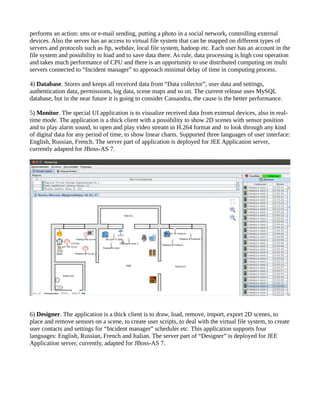
5) Monitor. The special UI application is to visualize received data from external devices, also in real-
time mode. The application is a thick client with a possibility to show 2D scenes with sensor position
and to play alarm sound, to open and play video stream in H.264 format and to look through any kind
of digital data for any period of time, to show linear charts. Supported three languages of user interface:
English, Russian, French. The server part of application is deployed for JEE Application server,
currently adapted for JBoss-AS 7.
6) Designer. The application is a thick client is to draw, load, remove, import, export 2D scenes, to
place and remove sensors on a scene, to create user scripts, to deal with the virtual file system, to create
user contacts and settings for “Incident manager” scheduler etc. This application supports four
languages: English, Russian, French and Italian. The server part of “Designer” is deployed for JEE
Application server, currently, adapted for JBoss-AS 7.
7) Administrator. The web application is to administrate users, adding and removing of users,
changing their attributes and properties, adding and removing their permissions. Supports two
languages English and Russian, the application is deployed for an JEE Application server, adapted for
JBoss-AS 7.
8) Device administrator. The web application is to register and remove devices, to set parameters for
the devices, adding and removing supported device data type, measures, vendors and device models.
The application supports two languages English and Russian and adapted for JBoss-AS 7 application
server.
There are also two thick clients to administrate two servers - “Incident manager” and “Data collector”.
The applications allow to monitor different system information about database, server states, system
memory, network traffic, user sessions, to control servers, to change attributes and parameters etc.
They support two languages English and Russian and server parts are deployed for any web application
servers.
The cases.
- Watching for a house, domestic animals like a cat or a dog with sound or motion sensors or a web
camera:
- Installing a watching camera and a sound detector in a car is to watch for one in parking and nearby a
house with gprs adapter;
- Controlling temperature amount from external sensors inside rooms, chambers and storages;
Browsing the data charts from sensors:
- To use with sensor nets is to watch for pressure and temperature in gas or oil pipes;
- To use the system as a base of “smart home”, for example as a recognizer and processor of voice
commands;
- To use the system with a radio telescope or an electronic telescope is to watch for motion in the sky or
in foreground of the Moon;
- To use the system in projects are related to Raspberry PI;
- To process incoming data from robotic system and to operate it;
- To use the system in different projects are concerning of receiving and processing data;

project

  • 1.
    Description The project “Automaticmonitoring system” aims to collecting digital data from different external sources such as sensor networks, web and digital cameras, digital sensors and devices, transmitting the data onto a server part and processing it with special user defined scripts, reacting on it with special an embedded functionality is to send e-mail or sms, to recognize a voice and an image and so on. The current release has possibility to watch for an object or a place with home web camera that is equipped by microphone reacts on a motion or a sound event with an assigned level of noise and after that the received compressed image, video or sound will be transmitted into a database, processes the data with a script and notifies an user about the happened event and the user can see all data in the special UI application which is named “Monitor” in real-time mode. This solution represents a platform for a huge amount of projects such as babysitter, alarm system for your house, countryside house or garage, car with opportunity to watch and to control condition and state of the object from any part of the world via the Internet. This project also can be used as part of “smart house” or system with voice control for external devices, watching for pressure of gas or oil pipes, boilers and so on. Brief information about the project applications:
  • 2.
    The user applications: 1)The “Client”. A mini or PC computer (or a micro one for example Raspberry PI) with installed Linux family OS (now is tested and adapted for Ubuntu), with an access to a local network or the Internet via Ethernet, WIFI or GPRS adapter and with pre- installed the client application written in Java that collects data from usb ports, for instance from a web camera, temperature sensors, pressure sensors etc, authenticates on the server, transmits digital data onto one, where the data will be stored. Also there is a web application “Client application” that allows to look through devices and application properties, environment variables, accessible network interfaces and to select them, application update properties, to set scheduler parameters, to restart the application and to reboot the computer. 2) The “Data collector”. The server part authenticates client connections, checks client permissions, receives data from devices, stores it into the database and replicates the received data into on-line BUS – the information BUS of user application “Monitor” and depending on set user permissions informs the server “Incident manager” to process the received data in real-time mode via another BUS. 3) The “Incident manager”. The server part processes received data from a database or directly from on-line BUS of “Data collector” (if there are special permissions). Further, the data is transmitted into an user-defined script and after that a script will be executed invokes a pre-defined function by the user, Monitor Disigner Administrator Device administrator
  • 3.
    performs an action:sms or e-mail sending, putting a photo in a social network, controlling external devices. Also the server has an access to virtual file system that can be mapped on different types of servers and protocols such as ftp, webdav, local file system, hadoop etc. Each user has an account in the file system and possibility to load and to save data there. As rule, data processing is high cost operation and takes much performance of CPU and there is an opportunity to use distributed computing on multi servers connected to “Incident manager” to approach minimal delay of time in computing process. 4) Database. Stores and keeps all received data from “Data collector”, user data and settings, authentication data, permissions, log data, scene maps and so on. The current release uses MySQL database, but in the near future it is going to consider Cassandra, the cause is the better performance. 5) Monitor. The special UI application is to visualize received data from external devices, also in real- time mode. The application is a thick client with a possibility to show 2D scenes with sensor position and to play alarm sound, to open and play video stream in H.264 format and to look through any kind of digital data for any period of time, to show linear charts. Supported three languages of user interface: English, Russian, French. The server part of application is deployed for JEE Application server, currently adapted for JBoss-AS 7. 6) Designer. The application is a thick client is to draw, load, remove, import, export 2D scenes, to place and remove sensors on a scene, to create user scripts, to deal with the virtual file system, to create user contacts and settings for “Incident manager” scheduler etc. This application supports four languages: English, Russian, French and Italian. The server part of “Designer” is deployed for JEE Application server, currently, adapted for JBoss-AS 7.
  • 4.
    7) Administrator. Theweb application is to administrate users, adding and removing of users, changing their attributes and properties, adding and removing their permissions. Supports two languages English and Russian, the application is deployed for an JEE Application server, adapted for JBoss-AS 7.
  • 5.
    8) Device administrator.The web application is to register and remove devices, to set parameters for the devices, adding and removing supported device data type, measures, vendors and device models. The application supports two languages English and Russian and adapted for JBoss-AS 7 application server.
  • 6.
    There are alsotwo thick clients to administrate two servers - “Incident manager” and “Data collector”. The applications allow to monitor different system information about database, server states, system memory, network traffic, user sessions, to control servers, to change attributes and parameters etc. They support two languages English and Russian and server parts are deployed for any web application servers.
  • 7.
    The cases. - Watchingfor a house, domestic animals like a cat or a dog with sound or motion sensors or a web camera:
  • 8.
    - Installing awatching camera and a sound detector in a car is to watch for one in parking and nearby a house with gprs adapter; - Controlling temperature amount from external sensors inside rooms, chambers and storages; Browsing the data charts from sensors: - To use with sensor nets is to watch for pressure and temperature in gas or oil pipes; - To use the system as a base of “smart home”, for example as a recognizer and processor of voice commands; - To use the system with a radio telescope or an electronic telescope is to watch for motion in the sky or in foreground of the Moon; - To use the system in projects are related to Raspberry PI; - To process incoming data from robotic system and to operate it; - To use the system in different projects are concerning of receiving and processing data;