SEQUENCE DIAGRAM
Dr. Kaushik Ghosh
School of Computer Science
University of Petroleum and Energy Studies
• Sequence diagrams are part of interaction model
• Each use case requires one or more sequence diagrams to describe its
behavior.
• Represents:
• (i) objects that interact
• (ii) time sequence of their interaction
Definition: A Sequence diagram is an interaction diagram that shows how
processes operate with one another and in what order.
Elements of a Sequence Diagram
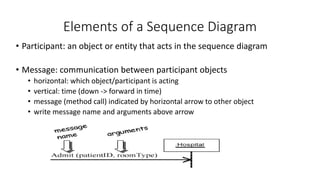
• Participant: an object or entity that acts in the sequence diagram
• Message: communication between participant objects
• horizontal: which object/participant is acting
• vertical: time (down -> forward in time)
• message (method call) indicated by horizontal arrow to other object
• write message name and arguments above arrow
Contd.
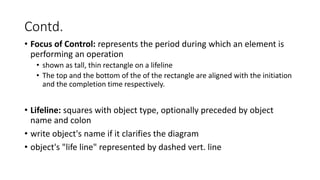
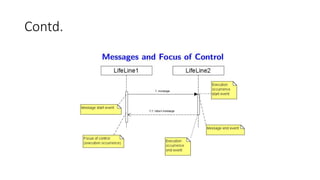
• Focus of Control: represents the period during which an element is
performing an operation
• shown as tall, thin rectangle on a lifeline
• The top and the bottom of the of the rectangle are aligned with the initiation
and the completion time respectively.
• Lifeline: squares with object type, optionally preceded by object
name and colon
• write object's name if it clarifies the diagram
• object's "life line" represented by dashed vert. line
Contd.
Lifetime of Objects
• Object creation: arrow with 'new' written above it
• Object deletion: an X at bottom of object's lifeline
An object created after the start of the scenario
appears lower than the others
Concurrent Processes
• Activations: show when a method is active – either executing or
waiting for a subroutine to return
• Asynchronous Message: (half arrow) a message which does not
block the caller, allowing the caller to carry on with its own
processing.
• Asynchronous messages can: (i)Create a new thread (ii) Create a new
object (iii) Communicate with a thread that is already running
• Deletion: an object deletes itself
• Synchronous Message: (full arrow) a message that blocks the caller
Fragments
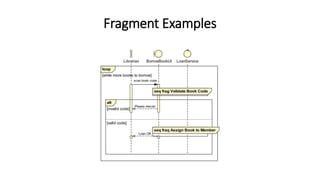
• Sequence diagrams support a Fragment notation. The uses of
fragments include:
• Showing sequence loops
• Showing alternative paths
• Allowing two or more scenarios to be shown on one diagram
• Showing a reference to another detailed Sequence diagram fragment
• Allowing you to break up a large diagram into several smaller
diagrams
Fragment Examples
Sequence Diagram Examples
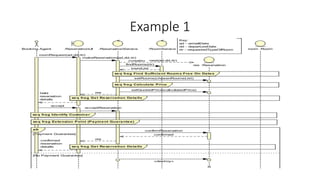
• Example 1: Primary (successful) scenario and a secondary(unsuccessful)
scenario in one diagram using an alt fragment
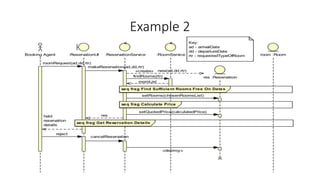
• Example 2: Secondary (unsuccessful) scenario where rooms offered are
rejected by the booking agent
• Example 3: A Fragment Sequence diagram showing the finer details for
the Get Reservation Details fragment, and includes a loop fragment
Example 1
Example 2
Example 3
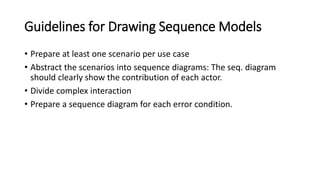
Guidelines for Drawing Sequence Models
• Prepare at least one scenario per use case
• Abstract the scenarios into sequence diagrams: The seq. diagram
should clearly show the contribution of each actor.
• Divide complex interaction
• Prepare a sequence diagram for each error condition.
Case Study: Attendance Management System
• Scenario 1 : Log in
Scenario 2 : Update Student or faculty profile.
• Scenario 3 : Update Attendance
THANK YOU
•QUESTIONS ?

Sequence diagram

  • 1.
    SEQUENCE DIAGRAM Dr. KaushikGhosh School of Computer Science University of Petroleum and Energy Studies
  • 2.
    • Sequence diagramsare part of interaction model • Each use case requires one or more sequence diagrams to describe its behavior. • Represents: • (i) objects that interact • (ii) time sequence of their interaction Definition: A Sequence diagram is an interaction diagram that shows how processes operate with one another and in what order.
  • 3.
    Elements of aSequence Diagram • Participant: an object or entity that acts in the sequence diagram • Message: communication between participant objects • horizontal: which object/participant is acting • vertical: time (down -> forward in time) • message (method call) indicated by horizontal arrow to other object • write message name and arguments above arrow
  • 4.
    Contd. • Focus ofControl: represents the period during which an element is performing an operation • shown as tall, thin rectangle on a lifeline • The top and the bottom of the of the rectangle are aligned with the initiation and the completion time respectively. • Lifeline: squares with object type, optionally preceded by object name and colon • write object's name if it clarifies the diagram • object's "life line" represented by dashed vert. line
  • 5.
  • 6.
    Lifetime of Objects •Object creation: arrow with 'new' written above it • Object deletion: an X at bottom of object's lifeline
  • 8.
    An object createdafter the start of the scenario appears lower than the others
  • 9.
    Concurrent Processes • Activations:show when a method is active – either executing or waiting for a subroutine to return • Asynchronous Message: (half arrow) a message which does not block the caller, allowing the caller to carry on with its own processing. • Asynchronous messages can: (i)Create a new thread (ii) Create a new object (iii) Communicate with a thread that is already running • Deletion: an object deletes itself • Synchronous Message: (full arrow) a message that blocks the caller
  • 10.
    Fragments • Sequence diagramssupport a Fragment notation. The uses of fragments include: • Showing sequence loops • Showing alternative paths • Allowing two or more scenarios to be shown on one diagram • Showing a reference to another detailed Sequence diagram fragment • Allowing you to break up a large diagram into several smaller diagrams
  • 11.
  • 12.
    Sequence Diagram Examples •Example 1: Primary (successful) scenario and a secondary(unsuccessful) scenario in one diagram using an alt fragment • Example 2: Secondary (unsuccessful) scenario where rooms offered are rejected by the booking agent • Example 3: A Fragment Sequence diagram showing the finer details for the Get Reservation Details fragment, and includes a loop fragment
  • 13.
  • 14.
  • 15.
  • 16.
    Guidelines for DrawingSequence Models • Prepare at least one scenario per use case • Abstract the scenarios into sequence diagrams: The seq. diagram should clearly show the contribution of each actor. • Divide complex interaction • Prepare a sequence diagram for each error condition.
  • 17.
    Case Study: AttendanceManagement System • Scenario 1 : Log in
  • 18.
    Scenario 2 :Update Student or faculty profile.
  • 19.
    • Scenario 3: Update Attendance
  • 20.
  • 21.