Motion Graphics Now By Daniel Hopkins
Pixels
In order for any digital computer processing to be carried out
on an image, it must first be stored within the computer in a
suitable form that can be manipulated by a computer program.
The easiest way of doing this is to divide the image up into a
collection of discrete, tiny cells which are known as pixels
In digital imaging, a pixel is a physical point in a raster image and the smallest addressable
element in a display device. This means it is the smallest controllable element of a picture
represented a screen. It is a minute are of illumination on a display screen, one of many from
which an image is composed. A pixel features the closes shaded of colour as possible to an
image and can be manipulated through many different means. Though each pixel can only be
one colour, when put together they blend to form various shades of colour, which is what we
see in a final photograph or picture. Pixels can only be viewed once zoomed in greatly. Each
individual pixel is represented by a square.
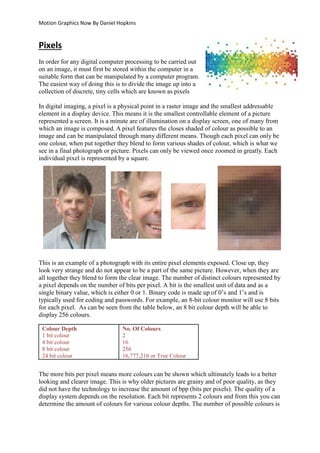
This is an example of a photograph with its entire pixel elements exposed. Close up, they
look very strange and do not appear to be a part of the same picture. However, when they are
all together they blend to form the clear image. The number of distinct colours represented by
a pixel depends on the number of bits per pixel. A bit is the smallest unit of data and as a
single binary value, which is either 0 or 1. Binary code is made up of 0’s and 1’s and is
typically used for coding and passwords. For example, an 8-bit colour monitor will use 8 bits
for each pixel. As can be seen from the table below, an 8 bit colour depth will be able to
display 256 colours.
The more bits per pixel means more colours can be shown which ultimately leads to a better
looking and clearer image. This is why older pictures are grainy and of poor quality, as they
did not have the technology to increase the amount of bpp (bits per pixels). The quality of a
display system depends on the resolution. Each bit represents 2 colours and from this you can
determine the amount of colours for various colour depths. The number of possible colours is
Colour Depth
1 bit colour
4 bit colour
8 bit colour
24 bit colour
No. Of Colours
2
16
256
16,777,216 or True Colour
Motion Graphics Now By Daniel Hopkins
2 to the power of the number of bits per pixel. For example, a colour depth of 4 bits would be
2 times itself 4 times. So a colour depth of 4 bits would be 2 times itself 4 times. The sum is
2x2x2x2 = 16 colours. This same sum is applied for calculating all of the numbers of colours
in a bit-colour depth. It can be assumed that a picture consists of huge blocks of colours but,
once an image has been exposed, you can see its pixel elements. This can also allow people
to see colours that are lost to discretization.
Instead of film like from older cameras such as disposable cameras, a digital camera has a
sensor that converts light into electrical charges. A digital camera takes light and focuses it
via the lens onto a sensor. The sensor is made out of a grid of tiny things called ‘photosites’,
which are sensitive to light. They are usually called pixels- a shortened term of the phrase
‘picture elements’. There are millions of these individual pixels in a sensor of a digital
camera, allowing for high-quality pictures which capture millions of colours.
Resolution
Resolution refers to the sharpness and clarity of an image. It refers to the number of
pixels/dots that make up an image. The term is most often used to describe monitors, printers,
and bit-mapped graphic images. The resolution can be changed depending on different
various things, so the quality can be changed. As stated above images are composed of pixels.
Image resolution is simply the number of Pixels per Inch (PPI) in the image grid (technically
known as a bitmap image and a bitmap grid). There are two aspects to every bitmap image -
its size (width and height in inches) and resolution (the number of pixels per inch). These two
factors will determine the total number of pixels in an image.
Above is a series of the same image, when displayed by their resolution. As stated above
resolution means the number of pixels per inch. So, as the inches are expanded the image
become clearer as more pixels become prominent to form the image. For graphics monitors,
the screen resolution signifies the number of dots (pixels) on the entire screen. For example, a
640-by-480 pixel screen is capable of displaying 640 distinct dots on each of 480 lines, or
about 300,000 pixels. The following are examples of the most common camera resolutions:
256x256 –This is usually found on very cheap cameras and the quality is often very poor. The
relatively small amount of 65,000 pixels means that the picture won’t have full colour
qualities and sharpness.
640x480 - This is the lowest resolution on most decent camera. Though the quality still isn’t
very great, it can be acceptable for things such as emailing and posting pictures online.
1216x912 - This is a "megapixel" image size of about 1,109,000 total pixels.
Motion Graphics Now By Daniel Hopkins
1600x1200 – This is the resolution size that is considered as being of ‘High Resolution’. This
means that it can have the same quality as ones created in places such as photo labs.
2240x1680 - Found on 4 megapixel cameras, this is a general standard of picture that can
produce large pictures that retain a good quality.
4064x2704 – This is the best type of resolution on the market, which can retain quality
images up to 13x6 inches large.
The measure of how closely lines can be resolved in an image is called spatial resolution, and
it depends on properties of the system creating the image, not just the pixel resolution in
pixels per inch (ppi). The clarity of the image is often decided by its spatial resolution, not the
number of its pixels.
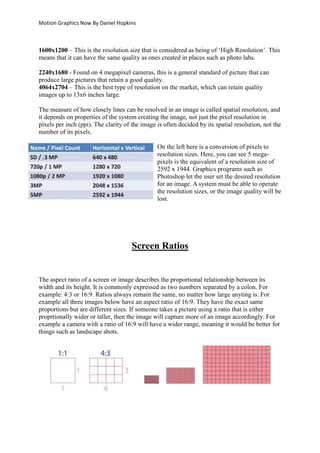
On the left here is a conversion of pixels to
resolution sizes. Here, you can see 5 mega-
pixels is the equivalent of a resolution size of
2592 x 1944. Graphics programs such as
Photoshop let the user set the desired resolution
for an image. A system must be able to operate
the resolution sizes, or the image quality will be
lost.
Screen Ratios
The aspect ratio of a screen or image describes the proportional relationship between its
width and its height. It is commonly expressed as two numbers separated by a colon. For
example: 4:3 or 16:9. Ratios always remain the same, no matter how large anyting is. For
example all three images below have an aspect ratio of 16:9. They have the exact same
proportions but are different sizes. If someone takes a picture using a ratio that is either
proprtionally wider or taller, then the image will capture more of an image accordingly. For
example a camera with a ratio of 16:9 will have a wider range, meaning it would be better for
things such as landscape shots.
Motion Graphics Now By Daniel Hopkins
An aspect ratio is a form of screen ratio. Aspect ratio is the ratio of width to height of an
image. A 4:3 aspect ratio means that for every 4 inches of width in an image, you will have 3
inches of height. In mathematical terms, that comes out to the screen being 33% wider than it
is high. This means that a 16:9 aspect ratio has 16 inches of width and 9 inches of height,
making it around 77% wider. The 16:9 format is often adopted by film producers, to make
their films bigger and more attractive. As conversion from theatres to TV and DVD’s will be
great, to retain quality some of the picture may be cut out. This could be done either by
zooming or cropping.
The above is from the theatrical release of a film and below
is from the release on Netflix. When converting a large film
for DVD, black bars will often be placed at the side or bottom
of the screen according to the aspect ratio. This is done to
retain the original film quality. Neflix cut out the bars and
cropped segments of the film out to fit the screen. This was
done for looks, as they believed a screen to be more attractive
without the bars. However, cutting them out meant the screen
looked stretched and would lose some components from the
film. As shown on the left, the character on the right has been
cut and the scene looks much smaller.
Many digital cameras give people the option to change a screen ratio, allowing for either a
more width-based or height-based shot. For example, someone who wants to take a portrait
photo will most likely opt for 4:3, while someone looking for a landscape shot will most go
for 16:9. This is because they will get more of what they want in their respective shots.
Frame Rates
Frame rate is the measure of the number of frames displayed per second of animation in order
to create the illusion of motion. The higher the frame rate the smoother the motion of the
footage, as there are more frames per second to display the numerous transitions between the
constant flow of images. Early silent films had a maximum frame rate of around 14 to 24 FPS
which was enough for the sense of motion, but it would appear very jerky and sped up. Frame
rate describes both the speed of recording and the speed of
playback. The more frames recorded per second, the more
accurately motion is documented onto the recording medium.
Here is an image illustrating the types of frames in 1 second
of animation. Options such as those of 12fps will restrict
smoothness and look like it is constantly being broken up,
appearing to be a generally poor film with bad continuity
errors. However, 60 fps will make the motion appear smooth
Motion Graphics Now By Daniel Hopkins
and the quick flow of frames will make the transitions between visual images appear natural.
His is because the device using that amount of frames will capture more movement. Original
silent films usually only featured a few people and so the footage doesn’t look that bad as it
only appears jerky when a character makes fast movements. Cameras used to film those
scenes would not now be able to capture fast moving things such as cars, as the fast
movement would not allow it to be captured smoothly in a limited amount of frames.
If someone was to film a rubber ball bouncing on a sidewalk at 24 frames per second, the
movie would have 24 unique photographs of the position of the ball. However, if it was
filmed at 100 frames per second, there would be nearly four times as many photographs of
the ball’s position during the same period of time. The more frames per second, the more
precisely the exact position of the ball is documented. The human eye can process 10 to 12
separate images a second. A person can perceive just above this as being fluid in motion.
Cinema frame rates are approximately 24 fps, though this has been different in recent years.
For example, The Hobbit displayed its film at 48fps which many people criticized for being
pointless and unneeded. The average TV in Europe and Asia
will feature approximately 50 frames a second using the PAL
and Secam formats while in America they use the 60 fps NTSC
format. This is why there are different DVD regions, as some
will not be equipped to play certain frame rates. 3D TV’s are
around 100 fps, though 3D TV’s which lay at a low frame rate
will often experience ghosting and shadowing of frames. This
was prominent when 3D glasses such as the ones to the right
were commonly used.
Video Formats
A video format defines the way in which video is recorded and stored. Video formats are
usually described by the following characteristics: The type of compressor, frame rate, frame
size, frame and pixel aspect ratio and the scanning method. Among the most common formats
are DV, HDV and AVCHD. The two former formats are tape-based and can be transferred to
Motion Graphics Now By Daniel Hopkins
a computer for editing. AVCHD formats are already file-based and so can be transferred to a
computer via a USB or card reader.
Video formats involve two distinct and very different kinds of technology: containers and
codecs. A container describes the structure of the file, such as where the various pieces of it
are stored and which codecs are used by which pieces. When dealing with a video that has a
large amount of data, the information is often compressed and written into a container file. A
codec is a way of encoding audio or video into a
stream of bytes.
There are many video file formats available for
distributing media across the Internet. The MP4
format is very commonly used in the industry. The
format is supported by most portable media players,
internet-connected TVs and software based media
players. Originally, all video formats were analog.
Analog video uses a signal that consists of a
constantly varying voltage level, called a waveform,
which represents video and audio information. Analog signals must be digitized, or captured,
for use by Final Cut Pro. VHS and Betacam SP are both analog tape formats.
More recently, digital SD video formats were introduced,
as well as digital high definition (HD) video formats.
Most consumer camcorders today record SD digital
video (such as DV), and professional cameras may
record SD, HD, or digital cinema video. The SD format
has been used to broadcast television since the early
1950’s.
The HD industry uses a variety of digital recording
formats for professional HD production. These formats
use the existing standard definition formats, but with
new compressed bit streams. Playing back HD content
onto the computer can require large quantities of fast
storage.
Motion Graphics Now By Daniel Hopkins
Video Compression
Video compression is the reduction of a file's size by means of a compression program. Video
takes up a lot of space and because of this it must be compressed before it is put on the web.
“Compressed” just means that the information is packed into a smaller space. A codec is
software that acts a compression programme. Codec is short for coder-decoder and describes
the method in which video data is encoded into a file and decoded when the file is played
back. Most videos are compressed during encoding, and so the terms codec and compressor
are often used interchangeably. Codec allows for the conversion to take place and means a
raw data file can be turned into a compressed one. Due to compressed files only being able to
hold some data from the original file, the codec acts as the ‘translator’ that decided what data
is discarded and what is put into the compressed version.
Compression, or "data compression," is used to reduce the size of one or more files. When a
file is compressed, it takes up less disk space than an uncompressed version and can be
transferred to other systems more quickly. Therefore, compression is often used to save disk
space and reduce the time needed to transfer files over the Internet. Compressed file formats
include MP3, JPEG and MPEG. By encoding the information fewer are bits are used for the
original representation. Here are examples of codecs.
As stated in the table, it says whether or not the codec is ‘lossless’. This means that the
codecs do not get rid of any data. Alternatively, they can be ‘lossy’ which means that the data
is lost during encoding. However, ‘lossy’ does not necessarily mean that all data is lost, but
the original quality of what being transferred is.
As some data can be lost during the codec
process and the discarding of data, much
quality will be lost. This is why things such as
pirate copies of films have such poor quality,
as much of the data will be lost when
compressing it into a DVD.
Motion Graphics Now By Daniel Hopkins
Video Compositing
Compositing when visual elements from separate sources are merged into a single image,
often giving the illusion that they are part of the same scene. Basically, compositing is taking
an image from another source and putting somewhere where it is not. The process may
involve layering many elements into one image. In visual FX and video postproduction, the
term 'compositing' is defined in one source as the process of combining two or more image
layers together with the use of a matte to define the transparencies of the layers
Examples of its usage include in blockbuster movies, where a person may fight an alien or
talk to a 20 foot tall tree. It is commonly used on TV, as a backdrop for a weatherperson or
newsreader. The use of the green screen means that when the image is projected into people’s
homes the the two images or video streams blend together based on the colour hues.
Here is an example from the film ‘Star Wars: Episode 1:
The Phantom Menace’. When it was originally made in
1998, the technology did not yet exist to create a CGI
Yoda and so they used a puppet, as they had done in the
original film nearly 20 years before. However, a few years
later they digitally removed puppet Yoda from the footage
and replaced him with a much sharper looking CGI
version.
Here is a common example, a before
and after the country has been
overlayed ontot he green screen.
The image of her on the left will be
passed through a system which
involves compositing software,
where the image of the country will
then be overlayed onto all the green areas. This may not always happen however if the software
cannot pick up all of the green. For example a bend in her arm may trap a small amount of green
screen and it may not be fully picked up resulting in a slight green blur on her body.
Motion Graphics Now By Daniel Hopkins
Sources:
 http://homepages.inf.ed.ac.uk/rbf/HIPR2/pixel.htm
 http://www.webopedia.com/TERM/R/resolution.html
 http://en.wikipedia.org/wiki/Aspect_ratio_(image)
 https://documentation.apple.com/en/finalcutpro/usermanual/index.html#chapter=D%2
6section=1%26tasks=true
 http://www.videomaker.com/article/15362-video-formats-explained
 http://desktopvideo.about.com/od/glossary/g/vidcompression.htm
 http://www.techterms.com/definition/compression
 http://linux.about.com/cs/linux101/g/Compression.htm
 http://en.wikipedia.org/wiki/List_of_changes_in_Star_Wars_re-releases

Pixels

  • 1.
    Motion Graphics NowBy Daniel Hopkins Pixels In order for any digital computer processing to be carried out on an image, it must first be stored within the computer in a suitable form that can be manipulated by a computer program. The easiest way of doing this is to divide the image up into a collection of discrete, tiny cells which are known as pixels In digital imaging, a pixel is a physical point in a raster image and the smallest addressable element in a display device. This means it is the smallest controllable element of a picture represented a screen. It is a minute are of illumination on a display screen, one of many from which an image is composed. A pixel features the closes shaded of colour as possible to an image and can be manipulated through many different means. Though each pixel can only be one colour, when put together they blend to form various shades of colour, which is what we see in a final photograph or picture. Pixels can only be viewed once zoomed in greatly. Each individual pixel is represented by a square. This is an example of a photograph with its entire pixel elements exposed. Close up, they look very strange and do not appear to be a part of the same picture. However, when they are all together they blend to form the clear image. The number of distinct colours represented by a pixel depends on the number of bits per pixel. A bit is the smallest unit of data and as a single binary value, which is either 0 or 1. Binary code is made up of 0’s and 1’s and is typically used for coding and passwords. For example, an 8-bit colour monitor will use 8 bits for each pixel. As can be seen from the table below, an 8 bit colour depth will be able to display 256 colours. The more bits per pixel means more colours can be shown which ultimately leads to a better looking and clearer image. This is why older pictures are grainy and of poor quality, as they did not have the technology to increase the amount of bpp (bits per pixels). The quality of a display system depends on the resolution. Each bit represents 2 colours and from this you can determine the amount of colours for various colour depths. The number of possible colours is Colour Depth 1 bit colour 4 bit colour 8 bit colour 24 bit colour No. Of Colours 2 16 256 16,777,216 or True Colour
  • 2.
    Motion Graphics NowBy Daniel Hopkins 2 to the power of the number of bits per pixel. For example, a colour depth of 4 bits would be 2 times itself 4 times. So a colour depth of 4 bits would be 2 times itself 4 times. The sum is 2x2x2x2 = 16 colours. This same sum is applied for calculating all of the numbers of colours in a bit-colour depth. It can be assumed that a picture consists of huge blocks of colours but, once an image has been exposed, you can see its pixel elements. This can also allow people to see colours that are lost to discretization. Instead of film like from older cameras such as disposable cameras, a digital camera has a sensor that converts light into electrical charges. A digital camera takes light and focuses it via the lens onto a sensor. The sensor is made out of a grid of tiny things called ‘photosites’, which are sensitive to light. They are usually called pixels- a shortened term of the phrase ‘picture elements’. There are millions of these individual pixels in a sensor of a digital camera, allowing for high-quality pictures which capture millions of colours. Resolution Resolution refers to the sharpness and clarity of an image. It refers to the number of pixels/dots that make up an image. The term is most often used to describe monitors, printers, and bit-mapped graphic images. The resolution can be changed depending on different various things, so the quality can be changed. As stated above images are composed of pixels. Image resolution is simply the number of Pixels per Inch (PPI) in the image grid (technically known as a bitmap image and a bitmap grid). There are two aspects to every bitmap image - its size (width and height in inches) and resolution (the number of pixels per inch). These two factors will determine the total number of pixels in an image. Above is a series of the same image, when displayed by their resolution. As stated above resolution means the number of pixels per inch. So, as the inches are expanded the image become clearer as more pixels become prominent to form the image. For graphics monitors, the screen resolution signifies the number of dots (pixels) on the entire screen. For example, a 640-by-480 pixel screen is capable of displaying 640 distinct dots on each of 480 lines, or about 300,000 pixels. The following are examples of the most common camera resolutions: 256x256 –This is usually found on very cheap cameras and the quality is often very poor. The relatively small amount of 65,000 pixels means that the picture won’t have full colour qualities and sharpness. 640x480 - This is the lowest resolution on most decent camera. Though the quality still isn’t very great, it can be acceptable for things such as emailing and posting pictures online. 1216x912 - This is a "megapixel" image size of about 1,109,000 total pixels.
  • 3.
    Motion Graphics NowBy Daniel Hopkins 1600x1200 – This is the resolution size that is considered as being of ‘High Resolution’. This means that it can have the same quality as ones created in places such as photo labs. 2240x1680 - Found on 4 megapixel cameras, this is a general standard of picture that can produce large pictures that retain a good quality. 4064x2704 – This is the best type of resolution on the market, which can retain quality images up to 13x6 inches large. The measure of how closely lines can be resolved in an image is called spatial resolution, and it depends on properties of the system creating the image, not just the pixel resolution in pixels per inch (ppi). The clarity of the image is often decided by its spatial resolution, not the number of its pixels. On the left here is a conversion of pixels to resolution sizes. Here, you can see 5 mega- pixels is the equivalent of a resolution size of 2592 x 1944. Graphics programs such as Photoshop let the user set the desired resolution for an image. A system must be able to operate the resolution sizes, or the image quality will be lost. Screen Ratios The aspect ratio of a screen or image describes the proportional relationship between its width and its height. It is commonly expressed as two numbers separated by a colon. For example: 4:3 or 16:9. Ratios always remain the same, no matter how large anyting is. For example all three images below have an aspect ratio of 16:9. They have the exact same proportions but are different sizes. If someone takes a picture using a ratio that is either proprtionally wider or taller, then the image will capture more of an image accordingly. For example a camera with a ratio of 16:9 will have a wider range, meaning it would be better for things such as landscape shots.
  • 4.
    Motion Graphics NowBy Daniel Hopkins An aspect ratio is a form of screen ratio. Aspect ratio is the ratio of width to height of an image. A 4:3 aspect ratio means that for every 4 inches of width in an image, you will have 3 inches of height. In mathematical terms, that comes out to the screen being 33% wider than it is high. This means that a 16:9 aspect ratio has 16 inches of width and 9 inches of height, making it around 77% wider. The 16:9 format is often adopted by film producers, to make their films bigger and more attractive. As conversion from theatres to TV and DVD’s will be great, to retain quality some of the picture may be cut out. This could be done either by zooming or cropping. The above is from the theatrical release of a film and below is from the release on Netflix. When converting a large film for DVD, black bars will often be placed at the side or bottom of the screen according to the aspect ratio. This is done to retain the original film quality. Neflix cut out the bars and cropped segments of the film out to fit the screen. This was done for looks, as they believed a screen to be more attractive without the bars. However, cutting them out meant the screen looked stretched and would lose some components from the film. As shown on the left, the character on the right has been cut and the scene looks much smaller. Many digital cameras give people the option to change a screen ratio, allowing for either a more width-based or height-based shot. For example, someone who wants to take a portrait photo will most likely opt for 4:3, while someone looking for a landscape shot will most go for 16:9. This is because they will get more of what they want in their respective shots. Frame Rates Frame rate is the measure of the number of frames displayed per second of animation in order to create the illusion of motion. The higher the frame rate the smoother the motion of the footage, as there are more frames per second to display the numerous transitions between the constant flow of images. Early silent films had a maximum frame rate of around 14 to 24 FPS which was enough for the sense of motion, but it would appear very jerky and sped up. Frame rate describes both the speed of recording and the speed of playback. The more frames recorded per second, the more accurately motion is documented onto the recording medium. Here is an image illustrating the types of frames in 1 second of animation. Options such as those of 12fps will restrict smoothness and look like it is constantly being broken up, appearing to be a generally poor film with bad continuity errors. However, 60 fps will make the motion appear smooth
  • 5.
    Motion Graphics NowBy Daniel Hopkins and the quick flow of frames will make the transitions between visual images appear natural. His is because the device using that amount of frames will capture more movement. Original silent films usually only featured a few people and so the footage doesn’t look that bad as it only appears jerky when a character makes fast movements. Cameras used to film those scenes would not now be able to capture fast moving things such as cars, as the fast movement would not allow it to be captured smoothly in a limited amount of frames. If someone was to film a rubber ball bouncing on a sidewalk at 24 frames per second, the movie would have 24 unique photographs of the position of the ball. However, if it was filmed at 100 frames per second, there would be nearly four times as many photographs of the ball’s position during the same period of time. The more frames per second, the more precisely the exact position of the ball is documented. The human eye can process 10 to 12 separate images a second. A person can perceive just above this as being fluid in motion. Cinema frame rates are approximately 24 fps, though this has been different in recent years. For example, The Hobbit displayed its film at 48fps which many people criticized for being pointless and unneeded. The average TV in Europe and Asia will feature approximately 50 frames a second using the PAL and Secam formats while in America they use the 60 fps NTSC format. This is why there are different DVD regions, as some will not be equipped to play certain frame rates. 3D TV’s are around 100 fps, though 3D TV’s which lay at a low frame rate will often experience ghosting and shadowing of frames. This was prominent when 3D glasses such as the ones to the right were commonly used. Video Formats A video format defines the way in which video is recorded and stored. Video formats are usually described by the following characteristics: The type of compressor, frame rate, frame size, frame and pixel aspect ratio and the scanning method. Among the most common formats are DV, HDV and AVCHD. The two former formats are tape-based and can be transferred to
  • 6.
    Motion Graphics NowBy Daniel Hopkins a computer for editing. AVCHD formats are already file-based and so can be transferred to a computer via a USB or card reader. Video formats involve two distinct and very different kinds of technology: containers and codecs. A container describes the structure of the file, such as where the various pieces of it are stored and which codecs are used by which pieces. When dealing with a video that has a large amount of data, the information is often compressed and written into a container file. A codec is a way of encoding audio or video into a stream of bytes. There are many video file formats available for distributing media across the Internet. The MP4 format is very commonly used in the industry. The format is supported by most portable media players, internet-connected TVs and software based media players. Originally, all video formats were analog. Analog video uses a signal that consists of a constantly varying voltage level, called a waveform, which represents video and audio information. Analog signals must be digitized, or captured, for use by Final Cut Pro. VHS and Betacam SP are both analog tape formats. More recently, digital SD video formats were introduced, as well as digital high definition (HD) video formats. Most consumer camcorders today record SD digital video (such as DV), and professional cameras may record SD, HD, or digital cinema video. The SD format has been used to broadcast television since the early 1950’s. The HD industry uses a variety of digital recording formats for professional HD production. These formats use the existing standard definition formats, but with new compressed bit streams. Playing back HD content onto the computer can require large quantities of fast storage.
  • 7.
    Motion Graphics NowBy Daniel Hopkins Video Compression Video compression is the reduction of a file's size by means of a compression program. Video takes up a lot of space and because of this it must be compressed before it is put on the web. “Compressed” just means that the information is packed into a smaller space. A codec is software that acts a compression programme. Codec is short for coder-decoder and describes the method in which video data is encoded into a file and decoded when the file is played back. Most videos are compressed during encoding, and so the terms codec and compressor are often used interchangeably. Codec allows for the conversion to take place and means a raw data file can be turned into a compressed one. Due to compressed files only being able to hold some data from the original file, the codec acts as the ‘translator’ that decided what data is discarded and what is put into the compressed version. Compression, or "data compression," is used to reduce the size of one or more files. When a file is compressed, it takes up less disk space than an uncompressed version and can be transferred to other systems more quickly. Therefore, compression is often used to save disk space and reduce the time needed to transfer files over the Internet. Compressed file formats include MP3, JPEG and MPEG. By encoding the information fewer are bits are used for the original representation. Here are examples of codecs. As stated in the table, it says whether or not the codec is ‘lossless’. This means that the codecs do not get rid of any data. Alternatively, they can be ‘lossy’ which means that the data is lost during encoding. However, ‘lossy’ does not necessarily mean that all data is lost, but the original quality of what being transferred is. As some data can be lost during the codec process and the discarding of data, much quality will be lost. This is why things such as pirate copies of films have such poor quality, as much of the data will be lost when compressing it into a DVD.
  • 8.
    Motion Graphics NowBy Daniel Hopkins Video Compositing Compositing when visual elements from separate sources are merged into a single image, often giving the illusion that they are part of the same scene. Basically, compositing is taking an image from another source and putting somewhere where it is not. The process may involve layering many elements into one image. In visual FX and video postproduction, the term 'compositing' is defined in one source as the process of combining two or more image layers together with the use of a matte to define the transparencies of the layers Examples of its usage include in blockbuster movies, where a person may fight an alien or talk to a 20 foot tall tree. It is commonly used on TV, as a backdrop for a weatherperson or newsreader. The use of the green screen means that when the image is projected into people’s homes the the two images or video streams blend together based on the colour hues. Here is an example from the film ‘Star Wars: Episode 1: The Phantom Menace’. When it was originally made in 1998, the technology did not yet exist to create a CGI Yoda and so they used a puppet, as they had done in the original film nearly 20 years before. However, a few years later they digitally removed puppet Yoda from the footage and replaced him with a much sharper looking CGI version. Here is a common example, a before and after the country has been overlayed ontot he green screen. The image of her on the left will be passed through a system which involves compositing software, where the image of the country will then be overlayed onto all the green areas. This may not always happen however if the software cannot pick up all of the green. For example a bend in her arm may trap a small amount of green screen and it may not be fully picked up resulting in a slight green blur on her body.
  • 9.
    Motion Graphics NowBy Daniel Hopkins Sources:  http://homepages.inf.ed.ac.uk/rbf/HIPR2/pixel.htm  http://www.webopedia.com/TERM/R/resolution.html  http://en.wikipedia.org/wiki/Aspect_ratio_(image)  https://documentation.apple.com/en/finalcutpro/usermanual/index.html#chapter=D%2 6section=1%26tasks=true  http://www.videomaker.com/article/15362-video-formats-explained  http://desktopvideo.about.com/od/glossary/g/vidcompression.htm  http://www.techterms.com/definition/compression  http://linux.about.com/cs/linux101/g/Compression.htm  http://en.wikipedia.org/wiki/List_of_changes_in_Star_Wars_re-releases