Now Playing:
Pilot
The Notwist
from Neon Golden
Released February 25, 2003
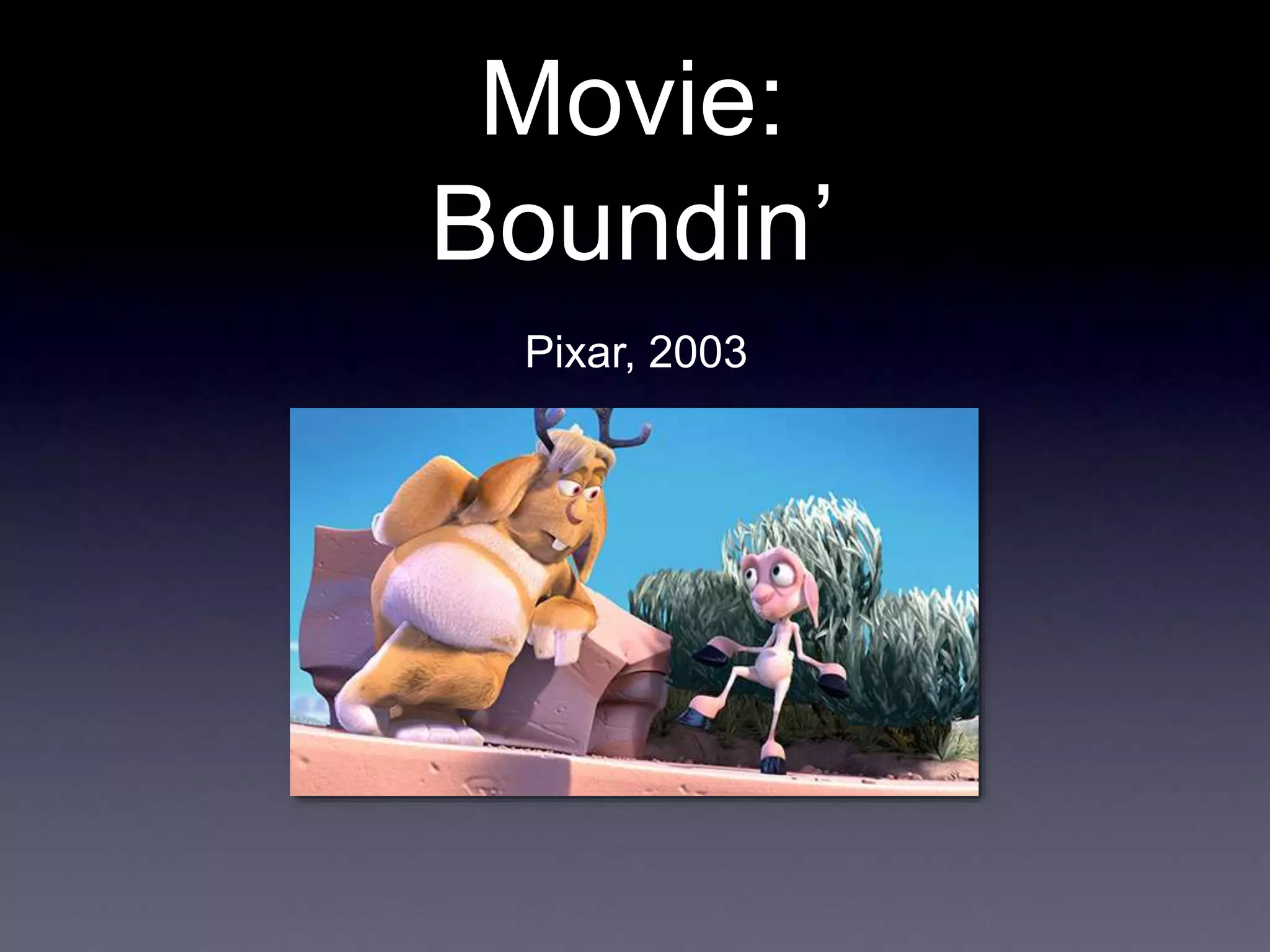
Movie:
Boundin’
Pixar, 2003
Ray Tracing II
Rick Skarbez, Instructor
COMP 575
November 1, 2007
Announcements
• Assignment 3 (texture mapping and ray
tracing) is out, due Thursday by the end
of class
• Also due on Thursday is your project
proposal
• Make sure you meet with me if you haven’t
already
• Programming Assignment 4 (Ray
tracer) is out today, due Tuesday 11/20
by 11:59pm
Assignment 3
• Homework 3 is due next time
• Texture mapping
• Ray generation
• Ray-object intersection
• Refraction
• Any questions?
Programming
Assignment 4
• Build a ray tracer
• Components:
• Handle file output
• You will be storing your images to disk
• Generate ray casted images
• Generate ray traced images
Ray Caster Overview
For Each
Pixel
Camera Ray
Generates
Linked List of Objects
Sphere
Plane
Etc.
App Camera
Matrix
Test For
Closest
Sphere
Closest Object
Linked List of Materials
Material #1
Material #2
Linked List of Lights
Ambient #1
Point #1
Point #2
Shade()
Material #2
Shade()
Surface Material
Illuminated
By
Pixel Color
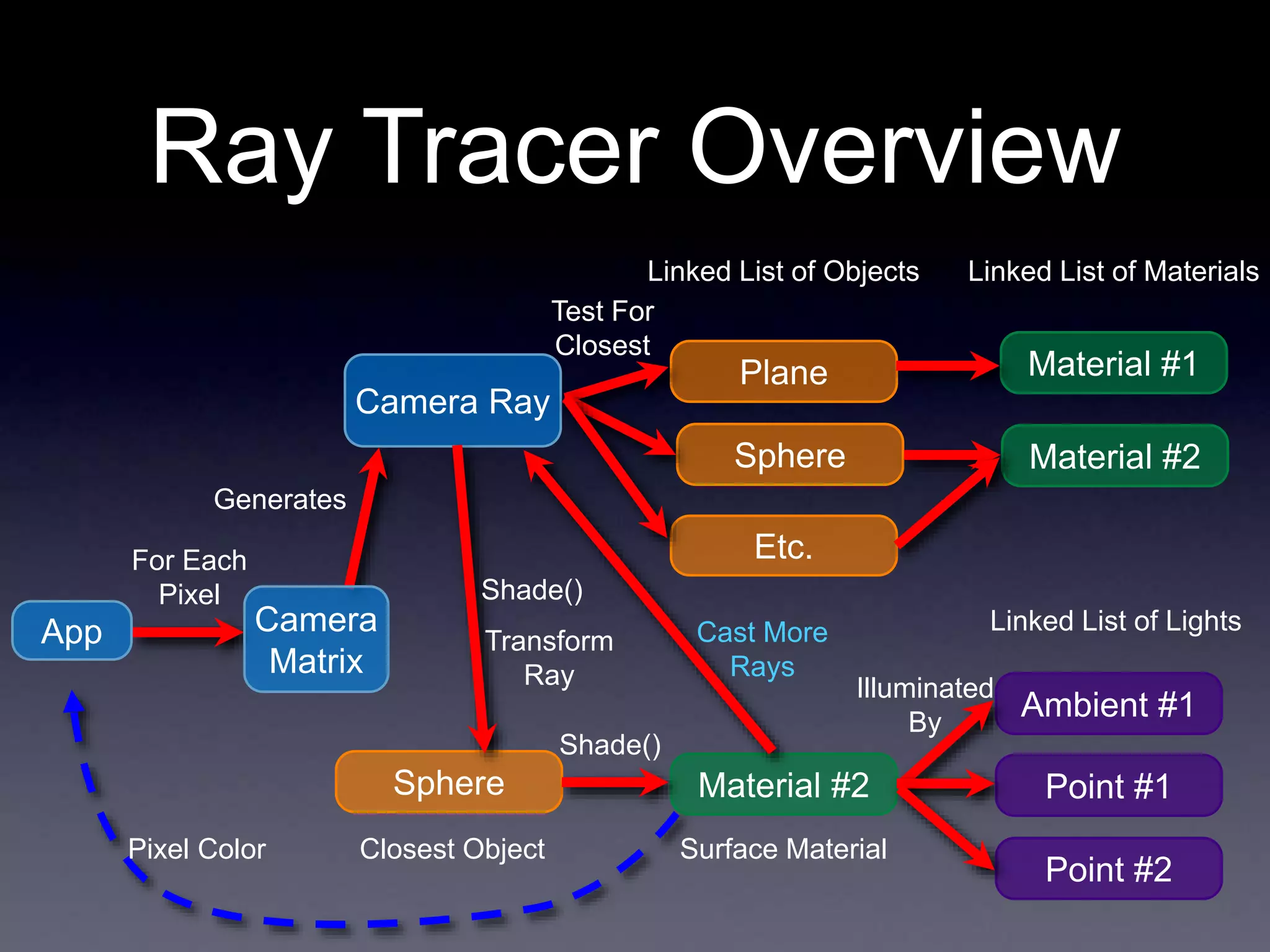
Ray Tracer Overview
For Each
Pixel
Camera Ray
Generates
Linked List of Objects
Sphere
Plane
Etc.
App Camera
Matrix
Test For
Closest
Sphere
Closest Object
Linked List of Materials
Material #1
Material #2
Linked List of Lights
Ambient #1
Point #1
Point #2
Shade()
Material #2
Shade()
Surface Material
Illuminated
By
Pixel Color
Cast More
Rays
Transform
Ray
What I will give you
• FSF image format specification
• FSF Viewer
• Matrix / Vector / Ray classes
• .ray file format specification
• Some sample .ray files
• All available on the website
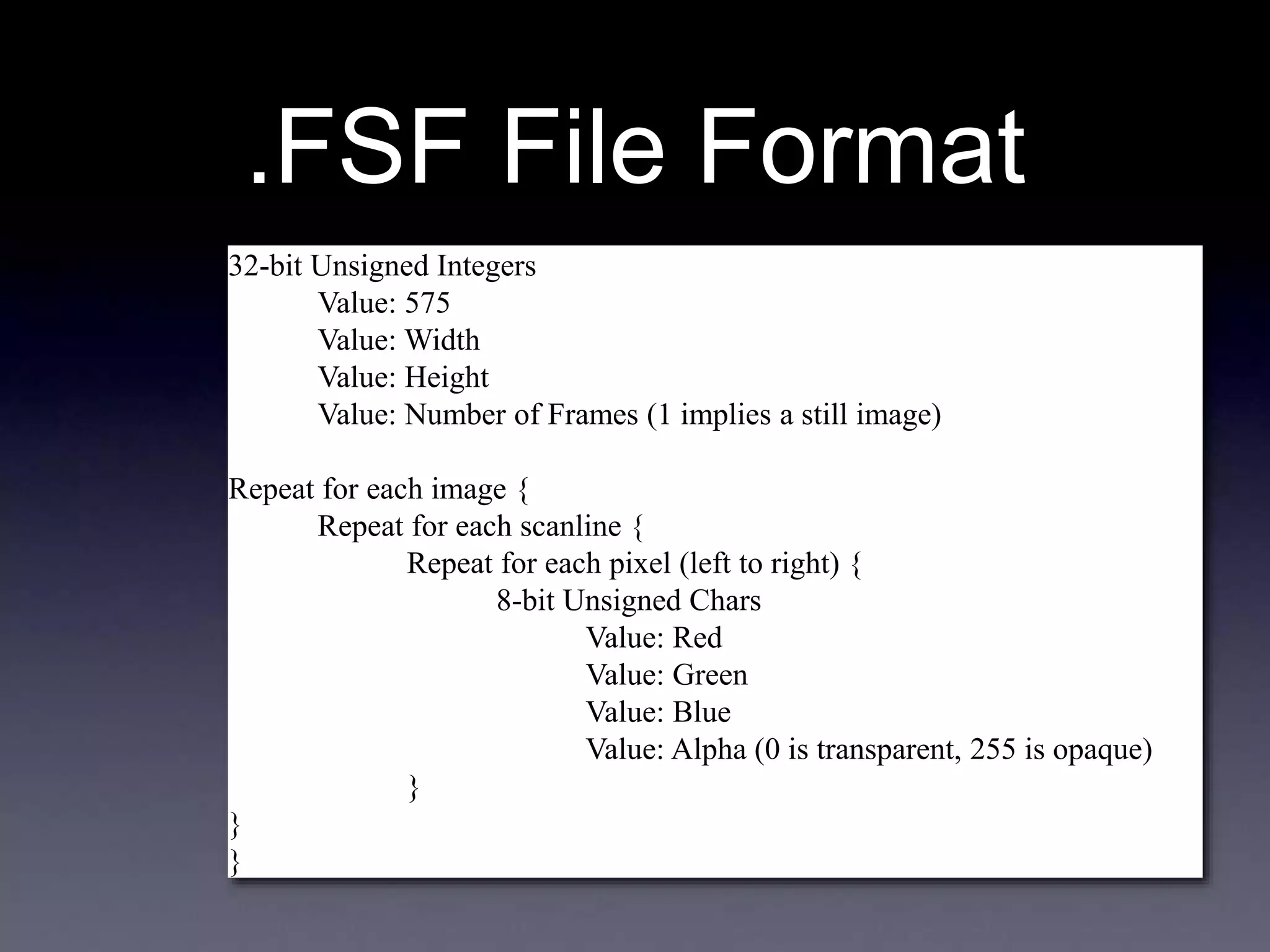
.FSF File Format
• You will be outputting your result images
in this format
• 32-byte (RGBA) uncompressed ASCII
format
• This was developed by Eric Bennett for
COMP 575 last year
• Info is online on his website:
http://www.ericpbennett.com/COMP575/FSF.
htm
.FSF File Format
32-bit Unsigned Integers
Value: 575
Value: Width
Value: Height
Value: Number of Frames (1 implies a still image)
Repeat for each image {
Repeat for each scanline {
Repeat for each pixel (left to right) {
8-bit Unsigned Chars
Value: Red
Value: Green
Value: Blue
Value: Alpha (0 is transparent, 255 is opaque)
}
}
}
.RAY File Format
• Adapted from the scene descriptions
used by Prof. Leonard McMillan and
Eric Bennett
• A plain text file specifying the scene
• Each line is a command
Example Scene
eye 0 0 5
lookat 0 0 0
up 0 1 0
fov 60
background .5 0 0.5
material 0 1 0 .3 .7 0 0 0 0 0
sphere
light 1 1 1 ambient
light 0.6 0.6 0.6 point 3 3 3
test2.ray
500x300
Expected Raycasting
Results
test1.ray
test2.ray
test3.ray
Example Scene
You may not get a
perfect match, but it
should look very similar
eye -2 1.5 10
lookat 0 0 0
up 0 1 0
fov 45
background 0.078 0.361 0.753
material 1 0 0 0.3 .7 .5 100 .5 0 0
reset
scale .5 .5 .5
translate -2 -.5 0
sphere
material 0 1.0 0 0.3 .7 .5 100 .5 0 0
reset
scale .75 .75 .75
translate -.25 -.25 0
sphere
material 0 0 1.0 0.3 .7 .5 100 .5 0 0
reset
scale 1.25 1.25 1.25
translate 2 .25 0
sphere
material 1 1 1 0.1 .3 .3 100 .8 0 0
reset
scale 2 2 2
translate -1.5 1.25 -3
sphere
material .6 .6 .6 0.3 .7 1.0 50 .5 0 0
reset
translate 0 -1 0
plane
light 1 1 1 ambient
light 1.0 1.0 1.0 point 5 9 10
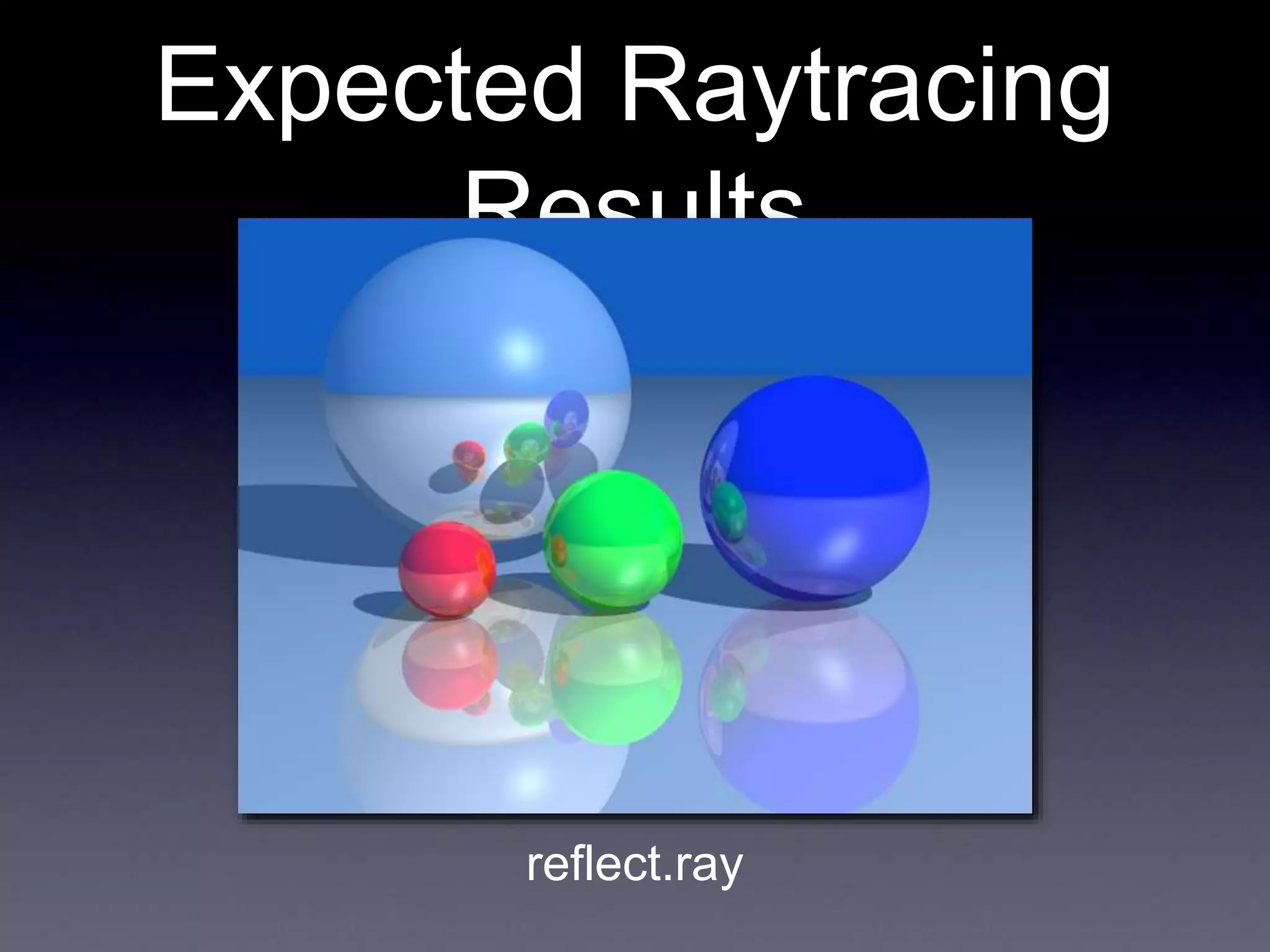
reflect.ray
Expected Raytracing
Results
reflect.ray
Last Time
• Discussed how to implement
• Shadows
• Reflection
• Refraction
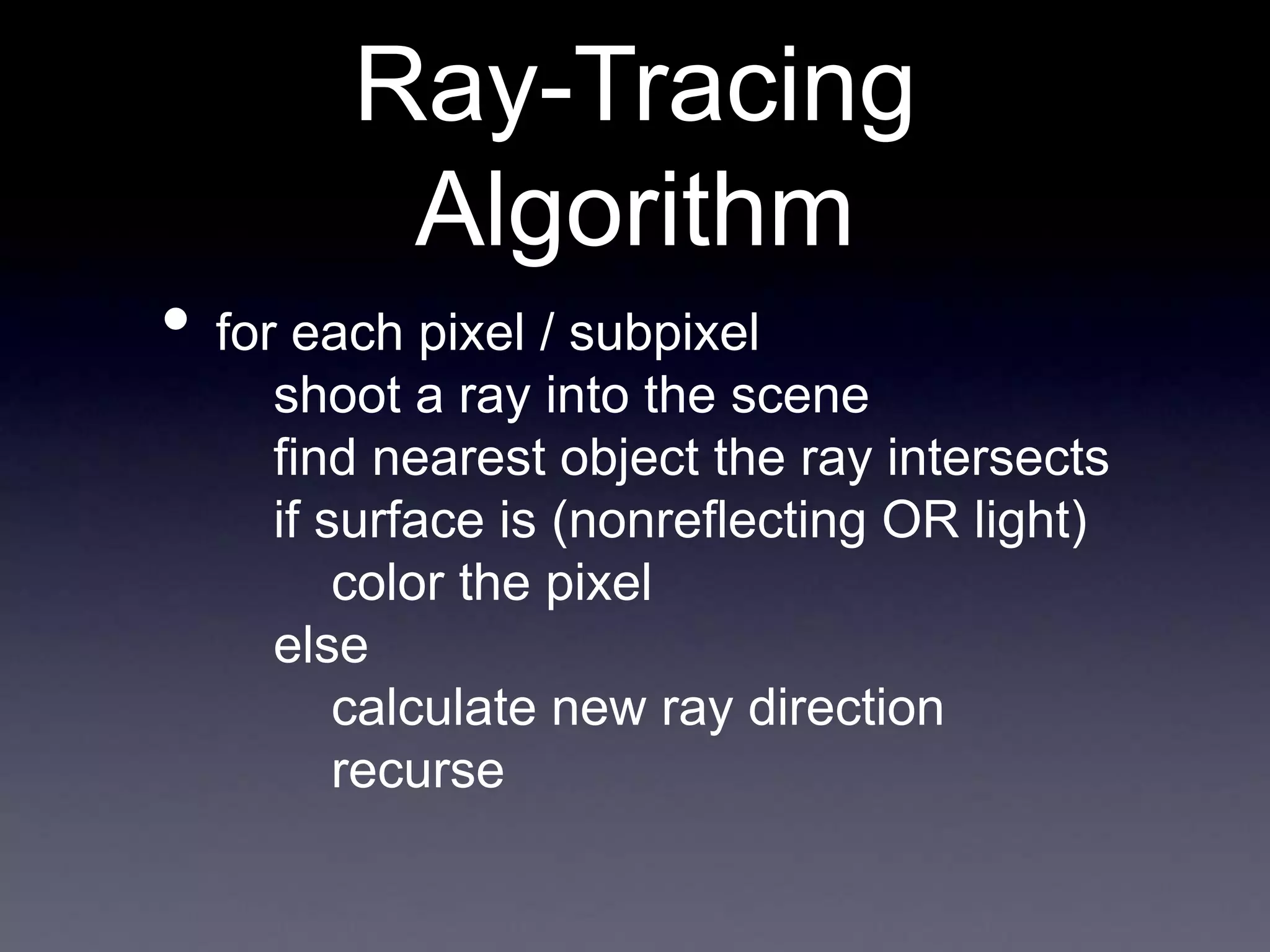
• for each pixel / subpixel
shoot a ray into the scene
find nearest object the ray intersects
if surface is (nonreflecting OR light)
color the pixel
else
calculate new ray direction
recurse
Ray-Tracing
Algorithm
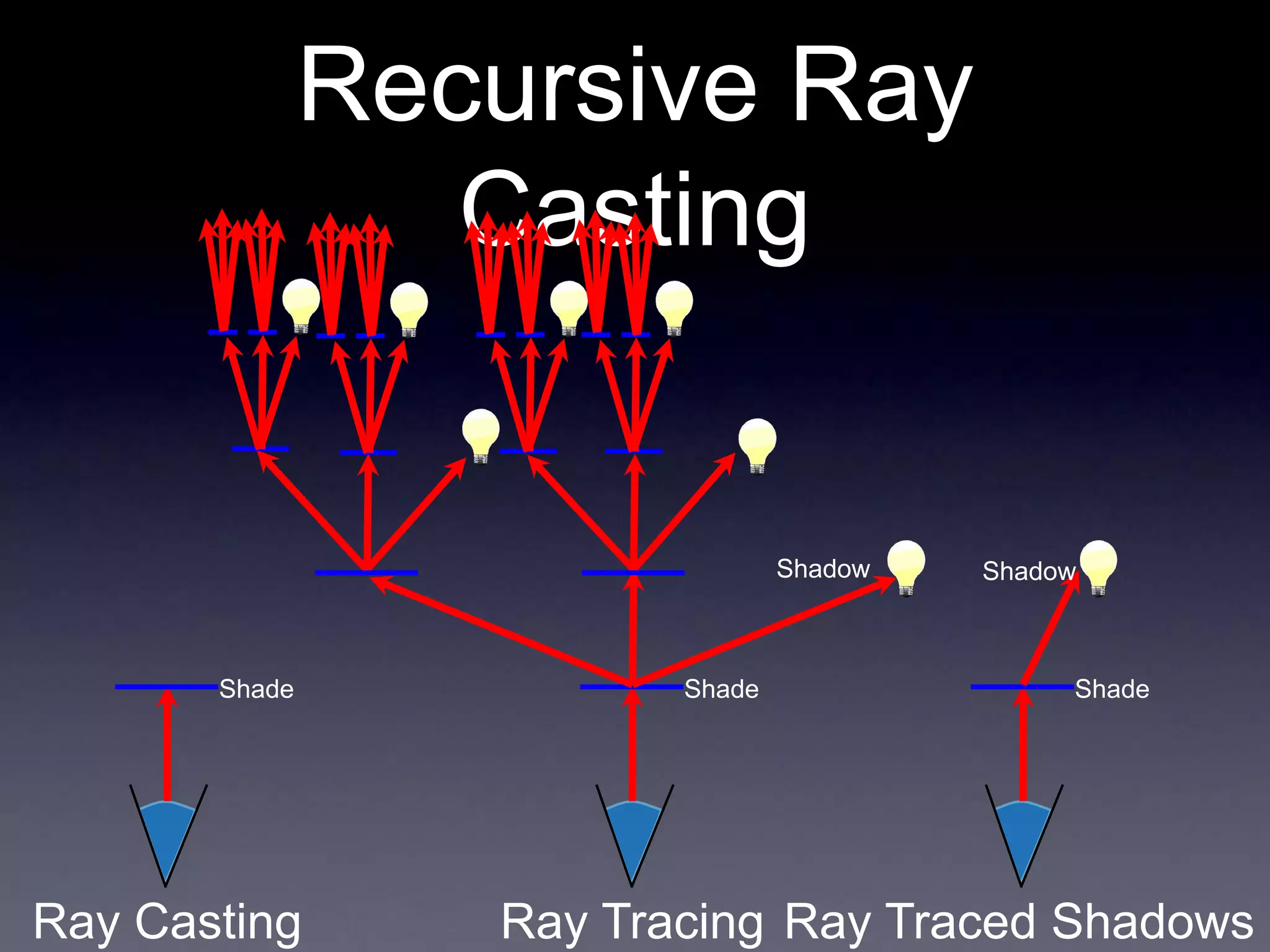
Recursive Ray
Casting
Ray Casting
Shade
Ray Traced Shadows
Shade
Ray Tracing
Shade
Shadow Shadow
Implementing
Shadows
• All we do is generate a new ray, starting
at the point and directed along the light
vector
• Test it just like any other ray
• If an intersection occurs, then the point may
be shadowed
Shadow
Ray
Implementing
Shadows
• To be thorough, we need to check the
distance on the intersection
• The object is only in shadow if the t value for
the intersection is less than the t value of the
light
Shadow
Ray
Here the point
is shadowed
Here it is not
• Point light sources at an infinite (or near
infinite) distance
• How does this affect our shadow rays?
• Any intersection with a positive t is valid
(generates a shadow)
Directional Lights
• Similar to point lights, but intensity of
emitted light varies by direction
• Need to make sure that the shadow ray is
inside the cone
Spot Lights
Spot Lights
Vector Similarity: S • L
Point Being Shaded
L
• Can test your shadow ray against the
extents of your spotlight
• If |S • L| <= |S • angleMax|, go
ahead
angleMax
S
L
• The most difficult case
• No longer just one shadow ray
• Really, infinitely many shadow rays
• Can address by shooting many shadow rays
for each light
• This is a sampling/reconstruction
problem
• We’ll come back to it later
Area Lights
Ray Reflection
N
R E
L
• Define a ray with
• P = intersection point
• V = reflection vector
• Reflection of the eye
vector, to be clear
How to Integrate
This?
• I = (1 - r)Σ[Ia(Ra, La) + Id(n, l, Rd, Ld, a,
b, c, d)
+ Is(r, v, Rs, Ls, n, a, b, c,d)]
• This was our shading equation before:
Ambient
Specular
Diffuse
Lights
• Add another term, say r * (refColor)
• Where r is how reflective the surface is
• [0, 1]
• And refColor is the color from the reflection
ray
Refraction
• Refraction works just like reflection
• When a ray hits a surface
• Shade as normal
• Figure out if you need to cast a refraction
ray
• If so, calculate the new ray
• Shade it as normal, and add it as yet
another term to our shading equation
Refraction Rays
• Need to store the index of refraction
and a transparency coefficient or each
material
• If the object is transparent, generate a new
ray using Snell’s law
• Continue just as in reflection
n1 sin α1 = n2 sin α2
Review Over
• Any questions?
Today
• Cover “the rest” of our ray tracer
• Talk about instantiation of multiple objects
• Address some potential problems
• Talk about data structures
• Talk about optimizations
Instantiation
• We know how to handle canonical
versions of objects
• Say, a unit sphere centered at the origin
• Or an infinite plane at y = 0
• How do we handle multiple objects?
• Or objects with different sizes/shapes?
• These are all part of instantiation
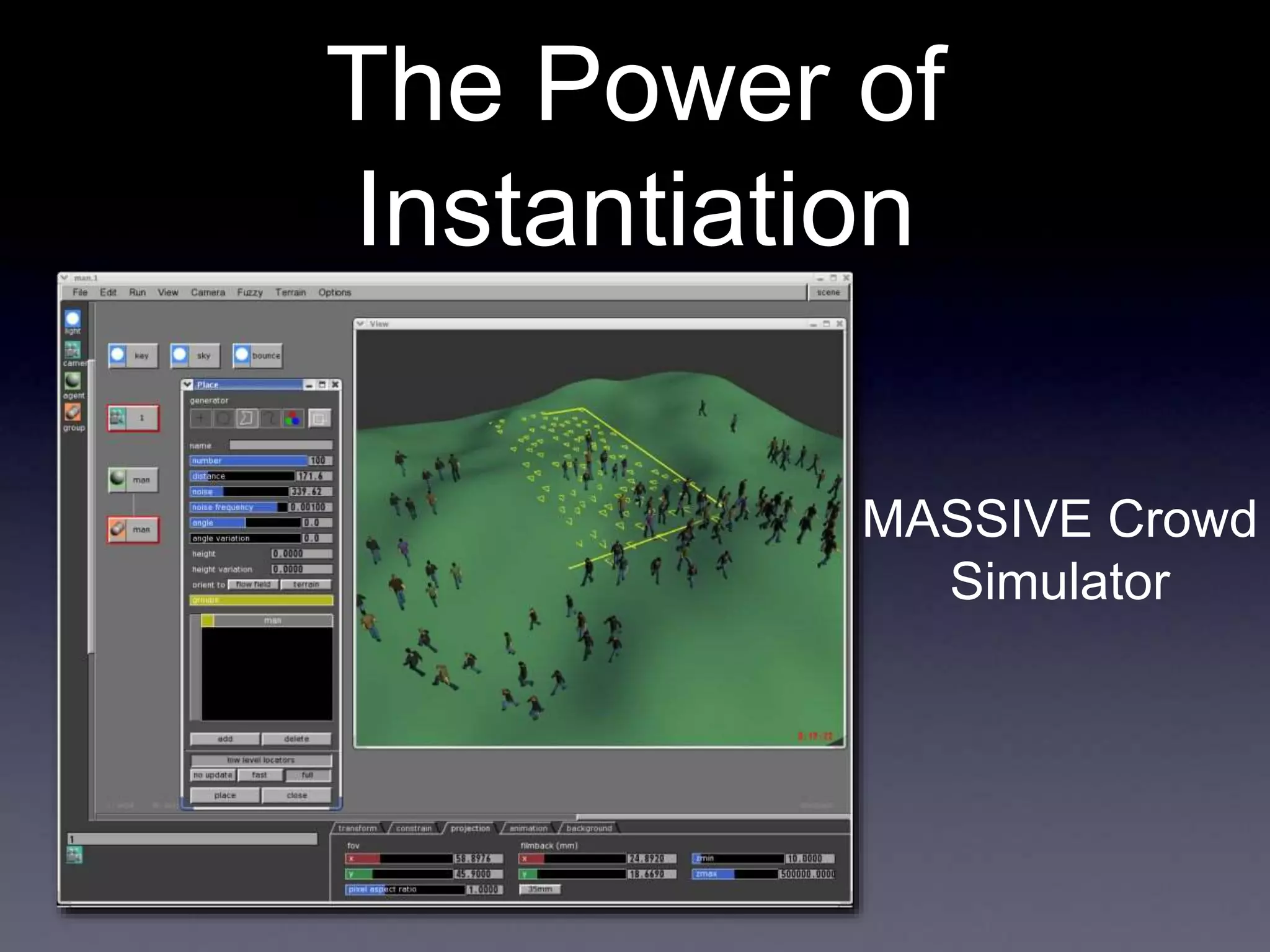
The Power of
Instantiation
MASSIVE Crowd
Simulator
Bonus Movie:
Carlton Draught’s
“Big Ad”
George Patterson & Partners, 2005
Transforming Objects
• We talked extensively about transforms
earlier in the class
• Translation
• Rotation
• Scaling
• We’re going to be using them here, but
now we have to build the matrices
ourselves
• Let’s review
Translation in 3D
• We will represent translation with a
matrix of the following form:
t is the x-offset
u is the y-offset
v is the z-offset
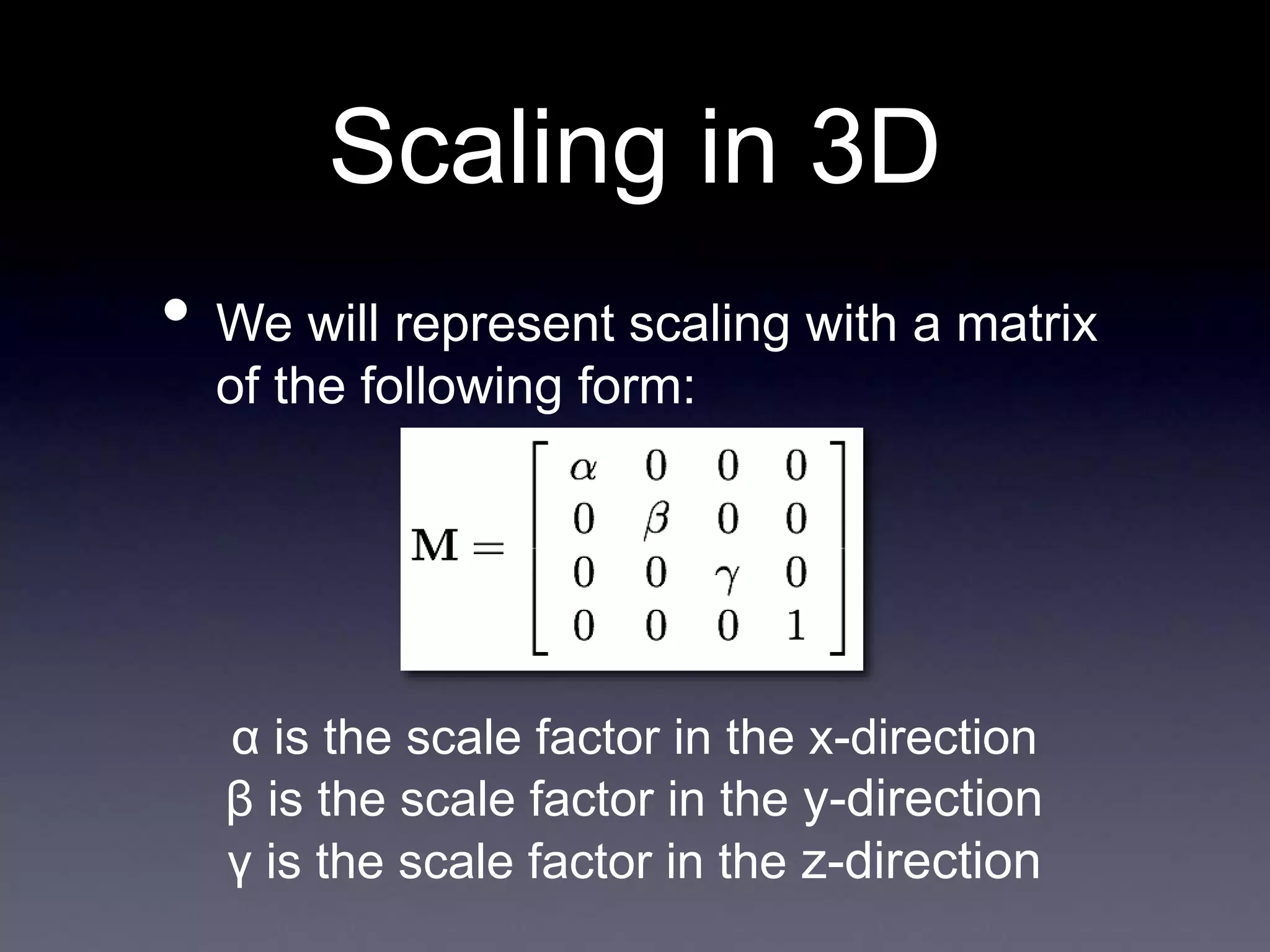
Scaling in 3D
• We will represent scaling with a matrix
of the following form:
α is the scale factor in the x-direction
β is the scale factor in the y-direction
γ is the scale factor in the z-direction
Rotation in 3D
Rotation About
The Z-Axis
Rotation About
The X-Axis
Rotation About
The Y-Axis
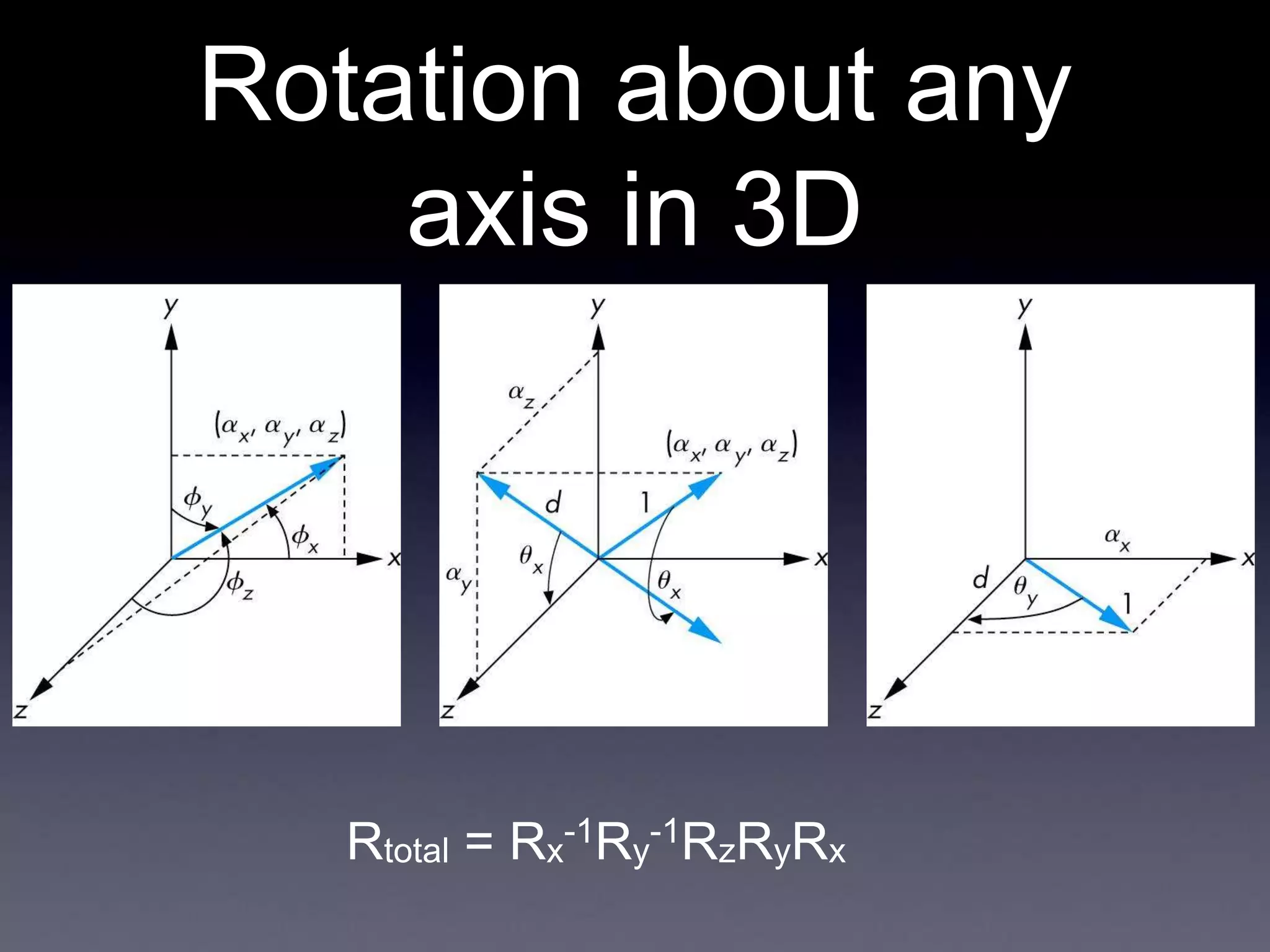
Rotation about any
axis in 3D
• How can we extend this to rotation
about any axis, not just the principle
axes?
• Need to move the axis we want to
rotate about to one of the principle
axes (say, the z axis)
• First, apply a rotation about x, to
move the axis into the yz-plane (Rx)
• Then, apply a rotation about y, to
move the axis onto the z-axis (Ry)
• Then apply your desired rotation,
followed by the inverses of the other
Rotation about any
axis in 3D
Rtotal = Rx
-1Ry
-1RzRyRx
Rotation about any
point and any axis in
3D
• To rotate about a non-origin point,
extend in the same way as in 2D
• First, translate to the origin (Txyz
-1)
• Then apply your rotation (in the most
general case, Rx
-1Ry
-1RzRyRx)
• Then translate back (Txyz)
Rtotal = Txyz Rx
-1Ry
-1RzRyRx Txyz
-1
One More Thing...
What is the difference in the images
generated by the two scenes below?
(3,0,0)
(0,0,-5)
(0,0,0)
(-3,0,-5)
As it turns out, there isn’t any
Remember This?
• We talked about how applying a
transformation to the world is the same
as applying the inverse transformation
to the camera
• Why might this be useful?
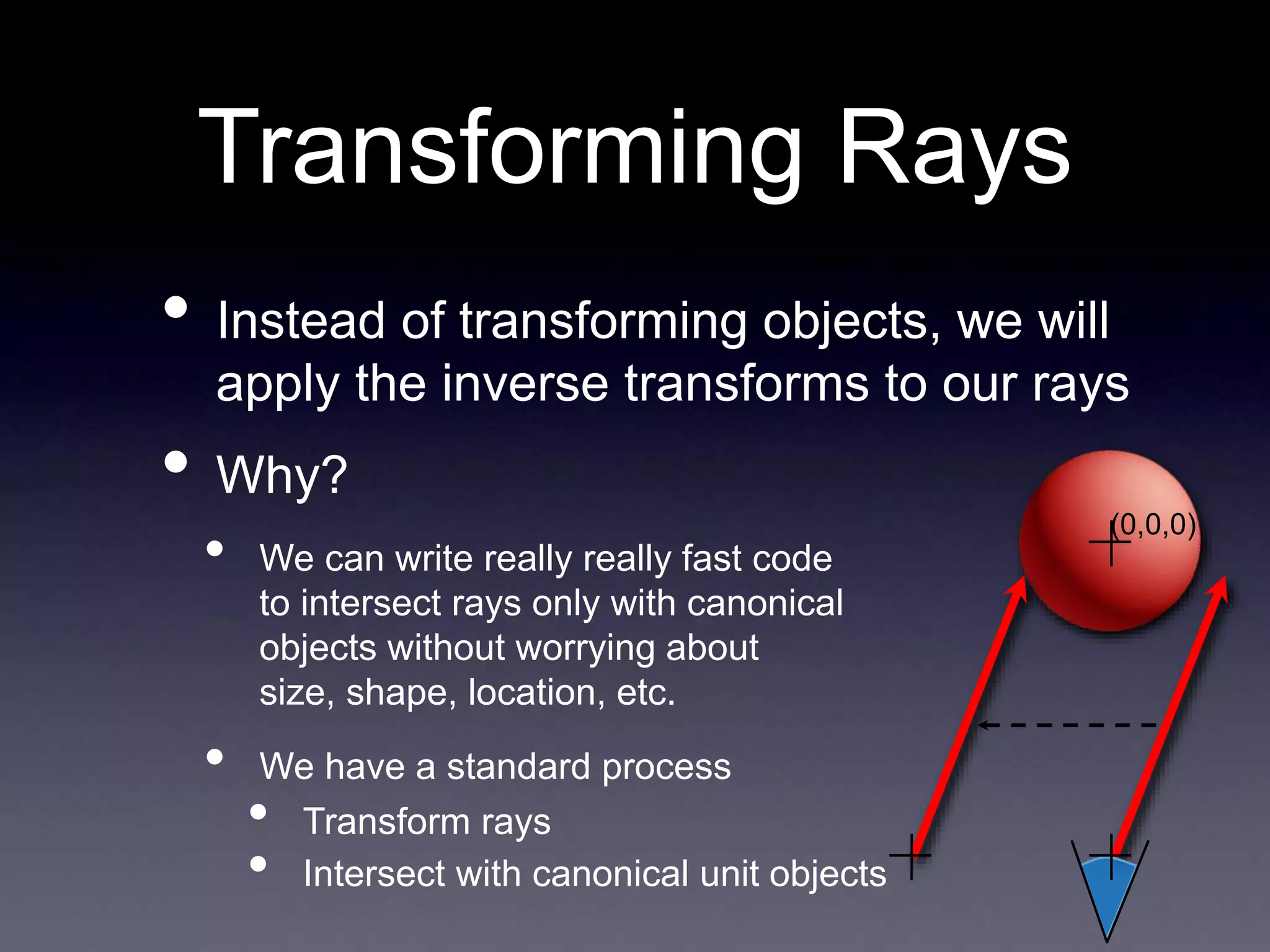
Transforming Rays
• Instead of transforming objects, we will
apply the inverse transforms to our rays
• Why?
• We can write really really fast code
to intersect rays only with canonical
objects without worrying about
size, shape, location, etc.
• We have a standard process
• Transform rays
• Intersect with canonical unit objects
(0,0,0)
Inverse Transforms
For all of our transforms, changing their direction
generates the inverse matrix
This conveniently saves us the trouble (and cost)
of implementing matrix inversion
Inverting Composed
Transforms
• Remember that one of the benefits of
using matrices for transforms was that
we could compose many transforms
into one matrix
• Can we easily get the inverse of this
composed matrix?
Inverting Composed
Transforms
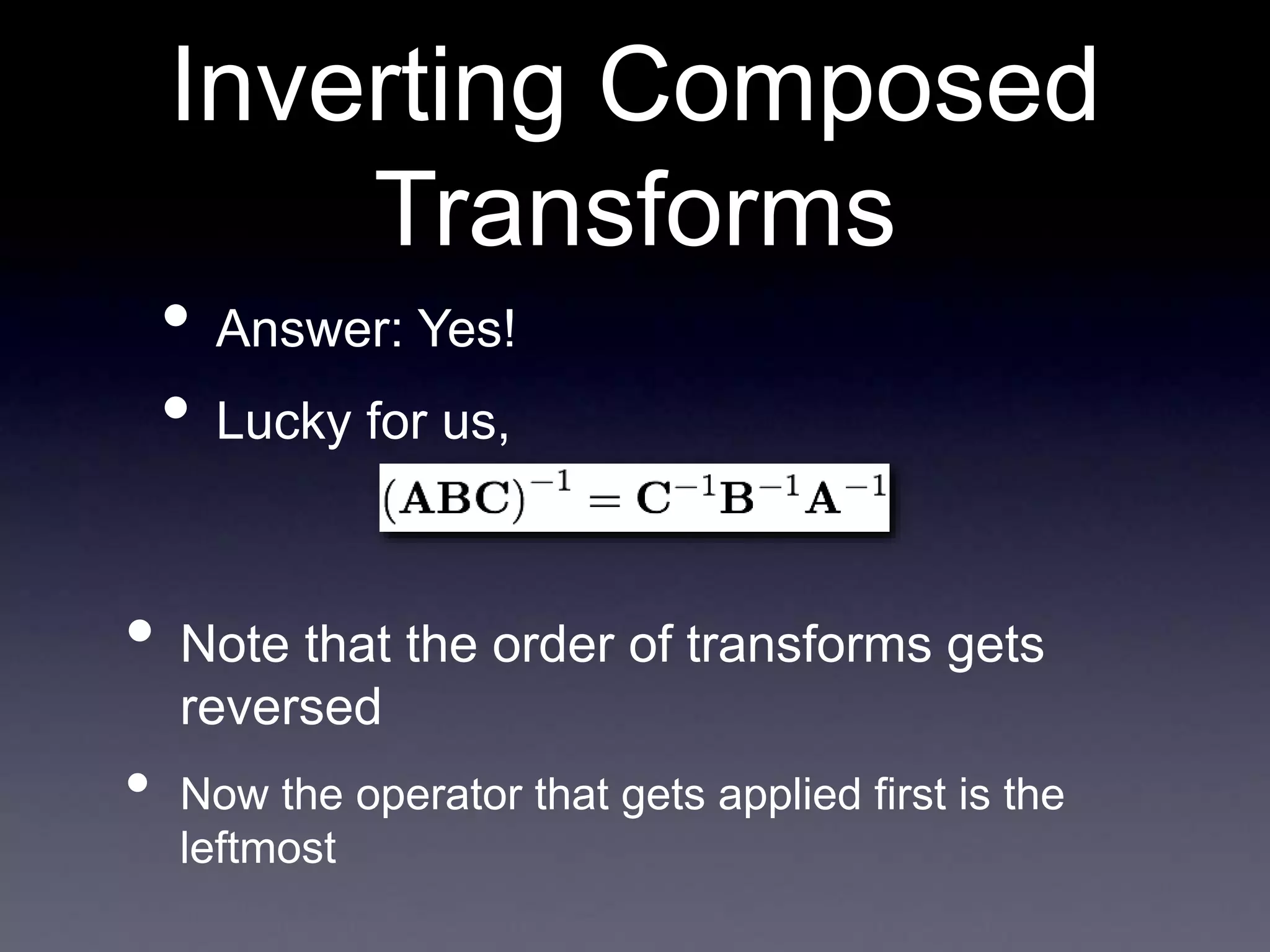
• Answer: Yes!
• Lucky for us,
• Note that the order of transforms gets
reversed
• Now the operator that gets applied first is the
leftmost
Transforming Rays
• So, now we know how to invert our
transforms
• And we know that we can use these to
transform the camera
• But how do these affect our rays?
• Remember: A ray is a point and a vector
• The point is affected by translation
• The ray is affected by rotation
• Both are affected by scaling
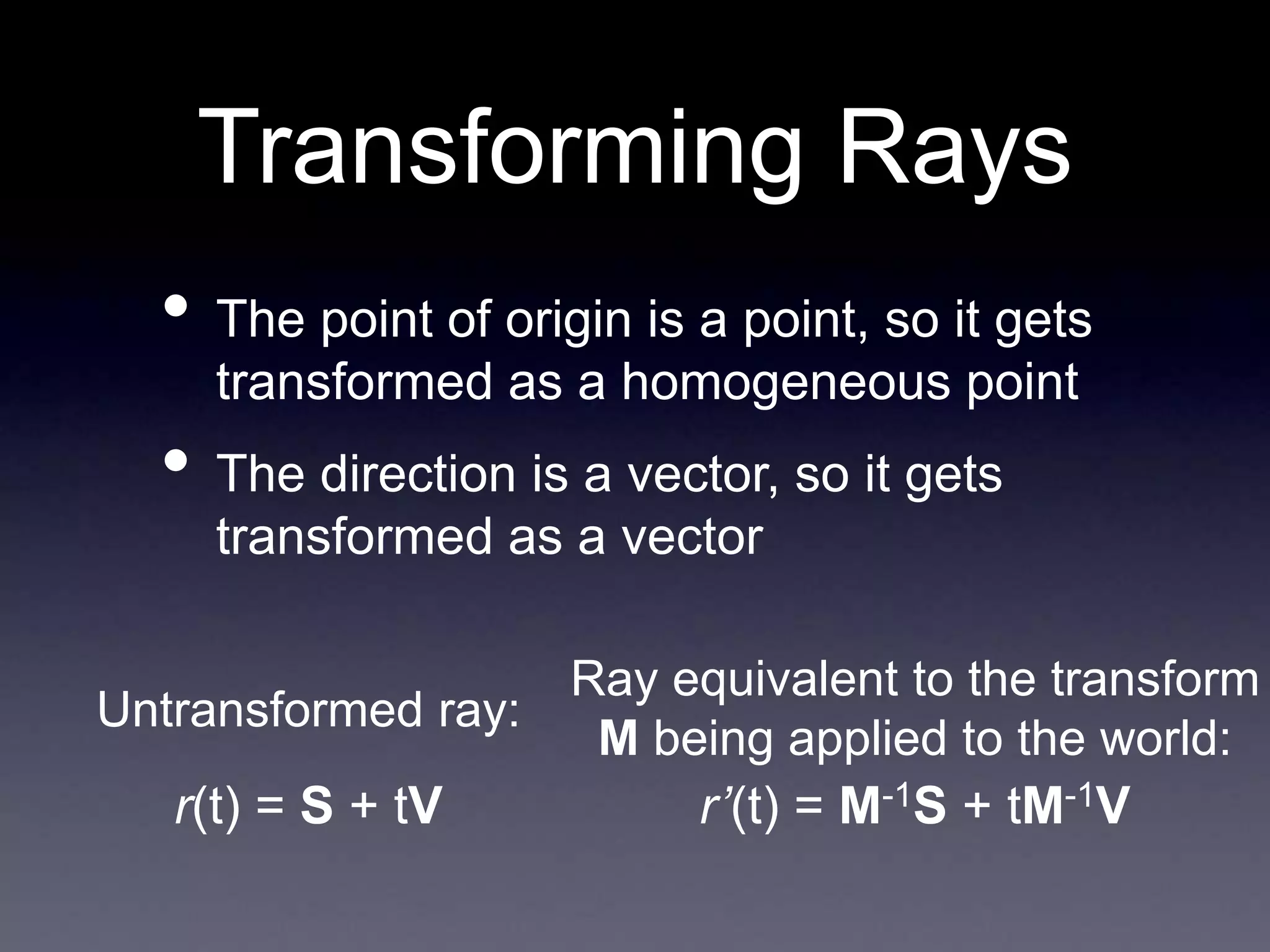
Transforming Rays
• The point of origin is a point, so it gets
transformed as a homogeneous point
• The direction is a vector, so it gets
transformed as a vector
Untransformed ray:
Ray equivalent to the transform
M being applied to the world:
r(t) = S + tV r’(t) = M-1S + tM-1V
Object Intersections
with Transformed
Rays
• Once the ray is transformed, just
intersect it with your canonical objects
as normal
• The resulting t value can be plugged
into the original untransformed ray to
find the point of intersection in world
space
Caution: Do not normalize the vector in the ray
after transformation r’, or else values of t will not
be comparable to each other
You didn’t really think
it would be that
easy...
• That gets us the new ray to the eye
• But that isn’t the only thing we need for
shading
• What about the normal vector?
• Normals do not remain “normal” after
transformation
Finding the New
Normal Vector
• For just a minute, let’s pretend that we’re
doing it the old way
• Transforming the world, not the ray
• Before the transform
• N • T = 0 (N: normal vector, T: tangent vector)
• After the transform
• T’ = MT (tangent vectors remain tangent)
• N’ • T’ = 0
• So, what is N’?
Finding the New
Normal Vector
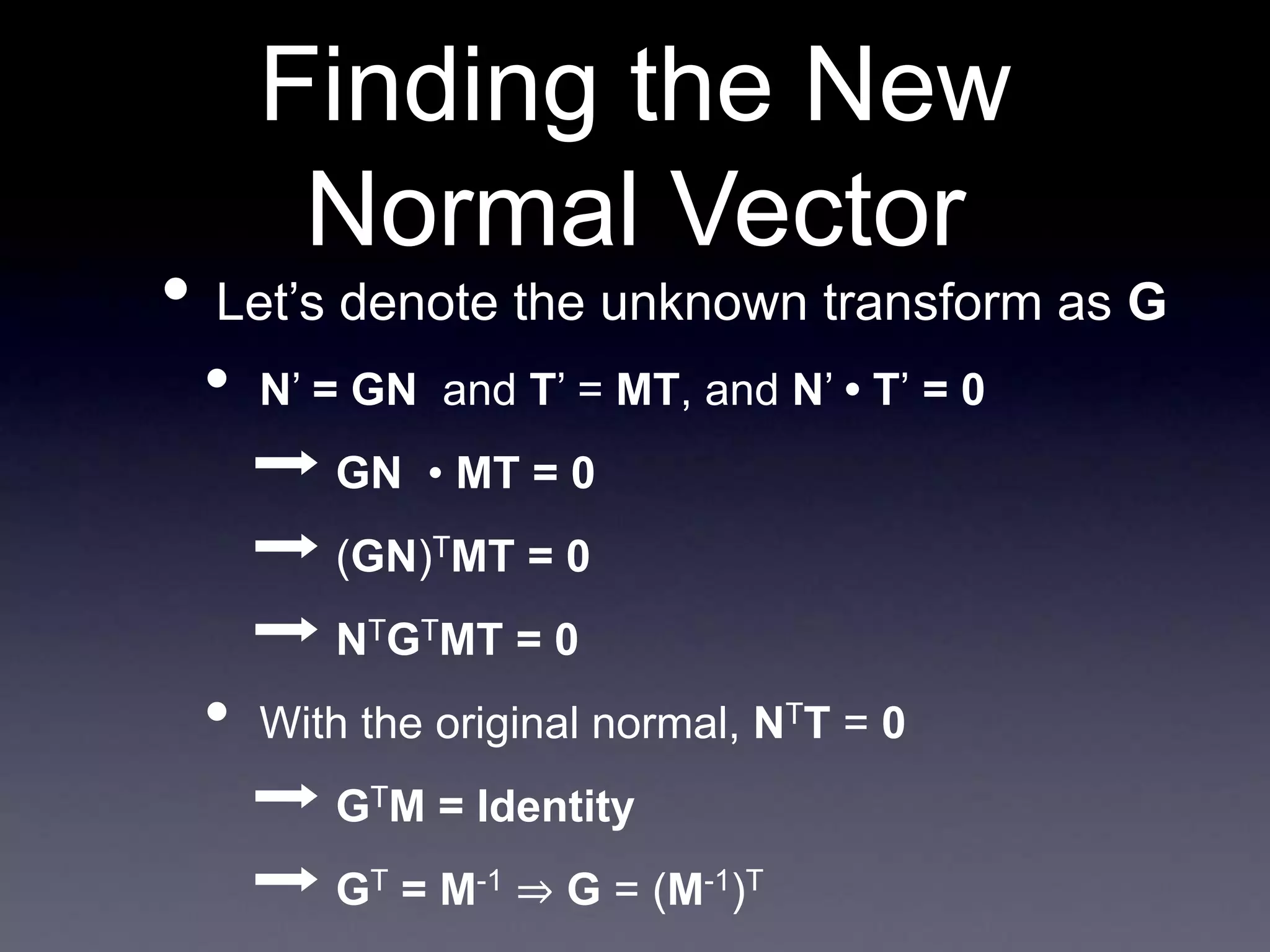
• Let’s denote the unknown transform as G
• N’ = GN and T’ = MT, and N’ • T’ = 0
➡ GN • MT = 0
➡ (GN)TMT = 0
➡ NTGTMT = 0
• With the original normal, NTT = 0
➡ GTM = Identity
➡ GT = M-1 ⇒ G = (M-1)T
Finding the New
Normal Vector
• So, in the end, the new normal vector is
given by
• N’ = (M-1)TN
• Since we already know how to compute
the inverse of the transform matrix
• All that is left to do is transpose it!
Putting it All Together:
Applying Ray
Transforms
• For each ray-object intersection
• Apply the inverse of any object transforms to
the ray
• Intersect the resulting ray with the canonical
object
• If there is a valid intersection
• Plug t into the original ray equation to get the
location of the intersection in world space
• Get the correct normal as shown on the last
slide
So why do things this
way?
• Only need to store a single model of an
object
• For each instance of it, maintain
• Material properties
• Object transform
• Can precompute inverse and inverse
transpose for improved performance
Potential Problem:
Re-Intersection
• This could be a tricky problem
• Consider this situation:
• We intersect a ray with a mirrored sphere
• We find the reflection ray
• We intersect that ray with all objects
• It, by definition, intersects the sphere at
the exact same point!
Re-Intersection
Illustration
A ray tracer without any re-intersection handling
Why does this
happen?
• Short answer: numerical precision issues
• Sequences of floating point multiplies
(accumulated in our transforms) result in small
inaccuracies
• It is essentially random whether a ray from
any given point will work correctly (because
the point is at t=0 or just behind it) or fail
(because the point is at t>0)
• Note that this is a problem for shadow
rays too
Solutions
• Solution #1
• Simply do not allow intersections for values of t
< ε
• Where ε is a very small number, like .0001
• Solution #2
• When a new ray is generated, offset it’s origin
point by ε in the direction of the surface normal
Next Time
• Covering whatever raytracer
implementation details we didn’t get
through today
• Discussing some advanced raytracer
functionality
• Acceleration data structures
• Monte Carlo sampling for various effects

november6.ppt

  • 1.
    Now Playing: Pilot The Notwist fromNeon Golden Released February 25, 2003
  • 2.
  • 3.
    Ray Tracing II RickSkarbez, Instructor COMP 575 November 1, 2007
  • 4.
    Announcements • Assignment 3(texture mapping and ray tracing) is out, due Thursday by the end of class • Also due on Thursday is your project proposal • Make sure you meet with me if you haven’t already • Programming Assignment 4 (Ray tracer) is out today, due Tuesday 11/20 by 11:59pm
  • 5.
    Assignment 3 • Homework3 is due next time • Texture mapping • Ray generation • Ray-object intersection • Refraction • Any questions?
  • 6.
    Programming Assignment 4 • Builda ray tracer • Components: • Handle file output • You will be storing your images to disk • Generate ray casted images • Generate ray traced images
  • 7.
    Ray Caster Overview ForEach Pixel Camera Ray Generates Linked List of Objects Sphere Plane Etc. App Camera Matrix Test For Closest Sphere Closest Object Linked List of Materials Material #1 Material #2 Linked List of Lights Ambient #1 Point #1 Point #2 Shade() Material #2 Shade() Surface Material Illuminated By Pixel Color
  • 8.
    Ray Tracer Overview ForEach Pixel Camera Ray Generates Linked List of Objects Sphere Plane Etc. App Camera Matrix Test For Closest Sphere Closest Object Linked List of Materials Material #1 Material #2 Linked List of Lights Ambient #1 Point #1 Point #2 Shade() Material #2 Shade() Surface Material Illuminated By Pixel Color Cast More Rays Transform Ray
  • 9.
    What I willgive you • FSF image format specification • FSF Viewer • Matrix / Vector / Ray classes • .ray file format specification • Some sample .ray files • All available on the website
  • 10.
    .FSF File Format •You will be outputting your result images in this format • 32-byte (RGBA) uncompressed ASCII format • This was developed by Eric Bennett for COMP 575 last year • Info is online on his website: http://www.ericpbennett.com/COMP575/FSF. htm
  • 11.
    .FSF File Format 32-bitUnsigned Integers Value: 575 Value: Width Value: Height Value: Number of Frames (1 implies a still image) Repeat for each image { Repeat for each scanline { Repeat for each pixel (left to right) { 8-bit Unsigned Chars Value: Red Value: Green Value: Blue Value: Alpha (0 is transparent, 255 is opaque) } } }
  • 12.
    .RAY File Format •Adapted from the scene descriptions used by Prof. Leonard McMillan and Eric Bennett • A plain text file specifying the scene • Each line is a command
  • 13.
    Example Scene eye 00 5 lookat 0 0 0 up 0 1 0 fov 60 background .5 0 0.5 material 0 1 0 .3 .7 0 0 0 0 0 sphere light 1 1 1 ambient light 0.6 0.6 0.6 point 3 3 3 test2.ray 500x300
  • 14.
  • 15.
    Example Scene You maynot get a perfect match, but it should look very similar eye -2 1.5 10 lookat 0 0 0 up 0 1 0 fov 45 background 0.078 0.361 0.753 material 1 0 0 0.3 .7 .5 100 .5 0 0 reset scale .5 .5 .5 translate -2 -.5 0 sphere material 0 1.0 0 0.3 .7 .5 100 .5 0 0 reset scale .75 .75 .75 translate -.25 -.25 0 sphere material 0 0 1.0 0.3 .7 .5 100 .5 0 0 reset scale 1.25 1.25 1.25 translate 2 .25 0 sphere material 1 1 1 0.1 .3 .3 100 .8 0 0 reset scale 2 2 2 translate -1.5 1.25 -3 sphere material .6 .6 .6 0.3 .7 1.0 50 .5 0 0 reset translate 0 -1 0 plane light 1 1 1 ambient light 1.0 1.0 1.0 point 5 9 10 reflect.ray
  • 16.
  • 17.
    Last Time • Discussedhow to implement • Shadows • Reflection • Refraction
  • 18.
    • for eachpixel / subpixel shoot a ray into the scene find nearest object the ray intersects if surface is (nonreflecting OR light) color the pixel else calculate new ray direction recurse Ray-Tracing Algorithm
  • 19.
    Recursive Ray Casting Ray Casting Shade RayTraced Shadows Shade Ray Tracing Shade Shadow Shadow
  • 20.
    Implementing Shadows • All wedo is generate a new ray, starting at the point and directed along the light vector • Test it just like any other ray • If an intersection occurs, then the point may be shadowed Shadow Ray
  • 21.
    Implementing Shadows • To bethorough, we need to check the distance on the intersection • The object is only in shadow if the t value for the intersection is less than the t value of the light Shadow Ray Here the point is shadowed Here it is not
  • 22.
    • Point lightsources at an infinite (or near infinite) distance • How does this affect our shadow rays? • Any intersection with a positive t is valid (generates a shadow) Directional Lights
  • 23.
    • Similar topoint lights, but intensity of emitted light varies by direction • Need to make sure that the shadow ray is inside the cone Spot Lights
  • 24.
    Spot Lights Vector Similarity:S • L Point Being Shaded L • Can test your shadow ray against the extents of your spotlight • If |S • L| <= |S • angleMax|, go ahead angleMax S L
  • 25.
    • The mostdifficult case • No longer just one shadow ray • Really, infinitely many shadow rays • Can address by shooting many shadow rays for each light • This is a sampling/reconstruction problem • We’ll come back to it later Area Lights
  • 26.
    Ray Reflection N R E L •Define a ray with • P = intersection point • V = reflection vector • Reflection of the eye vector, to be clear
  • 27.
    How to Integrate This? •I = (1 - r)Σ[Ia(Ra, La) + Id(n, l, Rd, Ld, a, b, c, d) + Is(r, v, Rs, Ls, n, a, b, c,d)] • This was our shading equation before: Ambient Specular Diffuse Lights • Add another term, say r * (refColor) • Where r is how reflective the surface is • [0, 1] • And refColor is the color from the reflection ray
  • 28.
    Refraction • Refraction worksjust like reflection • When a ray hits a surface • Shade as normal • Figure out if you need to cast a refraction ray • If so, calculate the new ray • Shade it as normal, and add it as yet another term to our shading equation
  • 29.
    Refraction Rays • Needto store the index of refraction and a transparency coefficient or each material • If the object is transparent, generate a new ray using Snell’s law • Continue just as in reflection n1 sin α1 = n2 sin α2
  • 30.
  • 31.
    Today • Cover “therest” of our ray tracer • Talk about instantiation of multiple objects • Address some potential problems • Talk about data structures • Talk about optimizations
  • 32.
    Instantiation • We knowhow to handle canonical versions of objects • Say, a unit sphere centered at the origin • Or an infinite plane at y = 0 • How do we handle multiple objects? • Or objects with different sizes/shapes? • These are all part of instantiation
  • 33.
  • 34.
    Bonus Movie: Carlton Draught’s “BigAd” George Patterson & Partners, 2005
  • 35.
    Transforming Objects • Wetalked extensively about transforms earlier in the class • Translation • Rotation • Scaling • We’re going to be using them here, but now we have to build the matrices ourselves • Let’s review
  • 36.
    Translation in 3D •We will represent translation with a matrix of the following form: t is the x-offset u is the y-offset v is the z-offset
  • 37.
    Scaling in 3D •We will represent scaling with a matrix of the following form: α is the scale factor in the x-direction β is the scale factor in the y-direction γ is the scale factor in the z-direction
  • 38.
    Rotation in 3D RotationAbout The Z-Axis Rotation About The X-Axis Rotation About The Y-Axis
  • 39.
    Rotation about any axisin 3D • How can we extend this to rotation about any axis, not just the principle axes? • Need to move the axis we want to rotate about to one of the principle axes (say, the z axis) • First, apply a rotation about x, to move the axis into the yz-plane (Rx) • Then, apply a rotation about y, to move the axis onto the z-axis (Ry) • Then apply your desired rotation, followed by the inverses of the other
  • 40.
    Rotation about any axisin 3D Rtotal = Rx -1Ry -1RzRyRx
  • 41.
    Rotation about any pointand any axis in 3D • To rotate about a non-origin point, extend in the same way as in 2D • First, translate to the origin (Txyz -1) • Then apply your rotation (in the most general case, Rx -1Ry -1RzRyRx) • Then translate back (Txyz) Rtotal = Txyz Rx -1Ry -1RzRyRx Txyz -1
  • 42.
    One More Thing... Whatis the difference in the images generated by the two scenes below? (3,0,0) (0,0,-5) (0,0,0) (-3,0,-5) As it turns out, there isn’t any
  • 43.
    Remember This? • Wetalked about how applying a transformation to the world is the same as applying the inverse transformation to the camera • Why might this be useful?
  • 44.
    Transforming Rays • Insteadof transforming objects, we will apply the inverse transforms to our rays • Why? • We can write really really fast code to intersect rays only with canonical objects without worrying about size, shape, location, etc. • We have a standard process • Transform rays • Intersect with canonical unit objects (0,0,0)
  • 45.
    Inverse Transforms For allof our transforms, changing their direction generates the inverse matrix This conveniently saves us the trouble (and cost) of implementing matrix inversion
  • 46.
    Inverting Composed Transforms • Rememberthat one of the benefits of using matrices for transforms was that we could compose many transforms into one matrix • Can we easily get the inverse of this composed matrix?
  • 47.
    Inverting Composed Transforms • Answer:Yes! • Lucky for us, • Note that the order of transforms gets reversed • Now the operator that gets applied first is the leftmost
  • 48.
    Transforming Rays • So,now we know how to invert our transforms • And we know that we can use these to transform the camera • But how do these affect our rays? • Remember: A ray is a point and a vector • The point is affected by translation • The ray is affected by rotation • Both are affected by scaling
  • 49.
    Transforming Rays • Thepoint of origin is a point, so it gets transformed as a homogeneous point • The direction is a vector, so it gets transformed as a vector Untransformed ray: Ray equivalent to the transform M being applied to the world: r(t) = S + tV r’(t) = M-1S + tM-1V
  • 50.
    Object Intersections with Transformed Rays •Once the ray is transformed, just intersect it with your canonical objects as normal • The resulting t value can be plugged into the original untransformed ray to find the point of intersection in world space Caution: Do not normalize the vector in the ray after transformation r’, or else values of t will not be comparable to each other
  • 51.
    You didn’t reallythink it would be that easy... • That gets us the new ray to the eye • But that isn’t the only thing we need for shading • What about the normal vector? • Normals do not remain “normal” after transformation
  • 52.
    Finding the New NormalVector • For just a minute, let’s pretend that we’re doing it the old way • Transforming the world, not the ray • Before the transform • N • T = 0 (N: normal vector, T: tangent vector) • After the transform • T’ = MT (tangent vectors remain tangent) • N’ • T’ = 0 • So, what is N’?
  • 53.
    Finding the New NormalVector • Let’s denote the unknown transform as G • N’ = GN and T’ = MT, and N’ • T’ = 0 ➡ GN • MT = 0 ➡ (GN)TMT = 0 ➡ NTGTMT = 0 • With the original normal, NTT = 0 ➡ GTM = Identity ➡ GT = M-1 ⇒ G = (M-1)T
  • 54.
    Finding the New NormalVector • So, in the end, the new normal vector is given by • N’ = (M-1)TN • Since we already know how to compute the inverse of the transform matrix • All that is left to do is transpose it!
  • 55.
    Putting it AllTogether: Applying Ray Transforms • For each ray-object intersection • Apply the inverse of any object transforms to the ray • Intersect the resulting ray with the canonical object • If there is a valid intersection • Plug t into the original ray equation to get the location of the intersection in world space • Get the correct normal as shown on the last slide
  • 56.
    So why dothings this way? • Only need to store a single model of an object • For each instance of it, maintain • Material properties • Object transform • Can precompute inverse and inverse transpose for improved performance
  • 57.
    Potential Problem: Re-Intersection • Thiscould be a tricky problem • Consider this situation: • We intersect a ray with a mirrored sphere • We find the reflection ray • We intersect that ray with all objects • It, by definition, intersects the sphere at the exact same point!
  • 58.
    Re-Intersection Illustration A ray tracerwithout any re-intersection handling
  • 59.
    Why does this happen? •Short answer: numerical precision issues • Sequences of floating point multiplies (accumulated in our transforms) result in small inaccuracies • It is essentially random whether a ray from any given point will work correctly (because the point is at t=0 or just behind it) or fail (because the point is at t>0) • Note that this is a problem for shadow rays too
  • 60.
    Solutions • Solution #1 •Simply do not allow intersections for values of t < ε • Where ε is a very small number, like .0001 • Solution #2 • When a new ray is generated, offset it’s origin point by ε in the direction of the surface normal
  • 61.
    Next Time • Coveringwhatever raytracer implementation details we didn’t get through today • Discussing some advanced raytracer functionality • Acceleration data structures • Monte Carlo sampling for various effects