Floored 
3D Visualization & Virtual Reality for Real Estate
Introduction 
- Hi, my name is Nick Brancaccio 
- I work on graphics at Floored 
- Floored does real time 3D architectural visualization on the web
Introduction 
- Demo 
- Check out floored.com for more
Challenges 
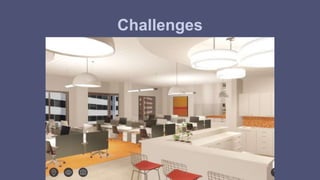
Architectural 
- Clean, light-filled aesthetic 
- Can’t hide tech / art deficiencies with grungy textures
Challenges
Challenges 
Interior Spaces 
- Many secondary light sources, rather than single key light 
- Direct light fairly high frequency (directionally and spatially) 

- Sunlight does not dominate many of our scenes 
- Especially in NYC
Challenges 
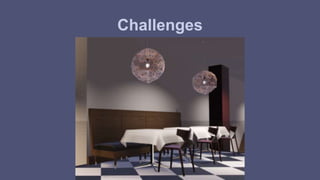
Real world material representation 
- Important for communicating quality / mood / feel 
- Comparable real-life counterparts 
- Customers are comparing to high-quality offline rendering
Challenges
Challenges 
webGL 
- Limited OpenGL ES API 
- Variable browser support
Approach 
- Physically Based Shading 
- Deferred Rendering 
- Temporal Amortization
Approach 
- Physically Based Shading 
- Deferred Rendering 
- Temporal Amortization [Yang 09][Herzog 10][Wronski 14][Karis 14]
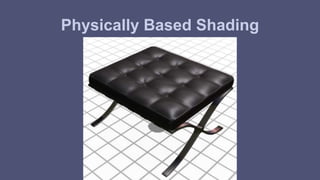
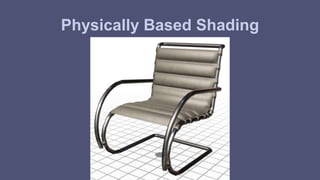
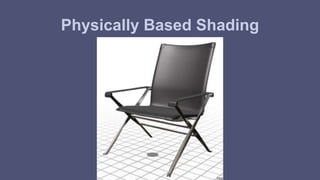
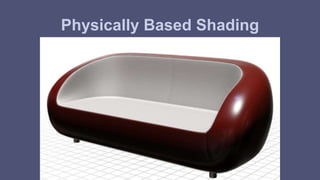
Physically Based Shading
Physically Based Shading 
- Scalable Quality 
- Architectural visualization industry has embraced PBS in offline 
rendering for quite some time 
- Maxwell, VRay, Arnold, etc 
- High Standards 
- Vocabulary of PBS connects real time and offline disciplines 
- Offline can more readily consume real time assets 
- Real time can more readily consume offline assets
Physically Based Shading 
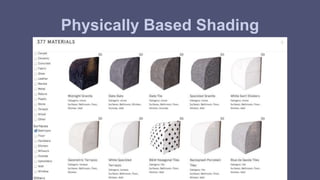
- Authoring cost is high, but so is reusability 
- Floored has a variety of art assets: spaces, furniture, lighting, 
materials 
- PBS supports reusability across projects
Physically Based Shading
Material Parameterization
Standard Material Parameterization 
Full Artist Control 
- Albedo 
- Specular Color 
- Alpha 
- Emission 
- Gloss 
- Normal
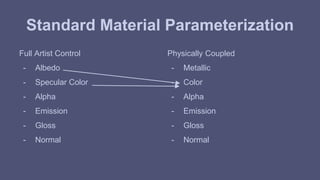
Standard Material Parameterization 
Full Artist Control 
- Albedo 
- Specular Color 
- Alpha 
- Emission 
- Gloss 
- Normal 
Physically Coupled 
- Metallic 
- Color 
- Alpha 
- Emission 
- Gloss 
- Normal
Microfacet BRDF 
- Microfacet Specular: 
- D: Normal Distribution Function: GGX [Walter 07] 
- G: Geometry Shadow Masking Function: Height-Correlated Smith [Heitz 14] 
- F: Fresnel: Spherical Gaussian Schlick’s Approximation [Schlick 94] 
- Microfacet Diffuse 
- Qualitative Oren Nayar [Oren 94]
Standard Material Parameterization 
Time to shameless steal from Real-Time Rendering [Möller 08]...
Standard Material Parameterization 
Time to shameless steal from Real-Time Rendering [Möller 08]...
Standard Material Parameterization 
- Give color parameter conditional meaning [Burley 12], [Karis 13] 
if (!metallic) { 
albedo = color; 
specularColor = vec3(0.04); 
} else { 
albedo = vec3(0.0); 
specularColor = color; 
}
Standard Material Parameterization 
- Can throw out a whole vec3 parameter 
- Less knobs help enforce physically plausible materials 
- Significantly lighter g-buffer storage 
- Less textures, better download times 
- What control did we lose? 
- Video of non-metallic materials sweeping through physically plausible range of 
specular colors 
- 0.02 to 0.05 [Hoffman 10][Lagarde 11]
Standard Material Parameterization 
- Our standard material does not support: 
- Translucency (Skin, Foliage, Snow) 
- Anisotropic Gloss (Brushed Metal, Hair, Fabrics) 
- Layered Materials (Clear coat) 
- Partially Metallic / Filtered Hybrid Materials (Car paints, Sci Fi Materials)
Deferred Rendering
Forward Pipeline Overview 
- For each model: 
- For each primitive: 
- For each vertex: 
- Transform vertex by modelViewProjectionMatrix 
- For each pixel: 
- For each light: 
- outgoing radiance += incoming radiance * brdf * projected area 
- Remap outgoing radiance to perceptual, display domain 
- Tonemap 
- Gamma / Color Space Conversion
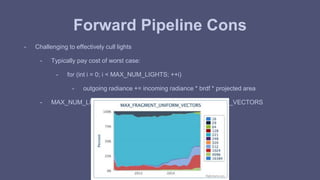
Forward Pipeline Cons 
- Challenging to effectively cull lights 
- Typically pay cost of worst case: 
- for (int i = 0; i < MAX_NUM_LIGHTS; ++i) 
- outgoing radiance += incoming radiance * brdf * projected area 
- MAX_NUM_LIGHTS small due to MAX_FRAGMENT_UNIFORM_VECTORS
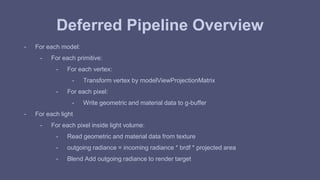
Deferred Pipeline Overview 
- For each model: 
- For each primitive: 
- For each vertex: 
- Transform vertex by modelViewProjectionMatrix 
- For each pixel: 
- Write geometric and material data to g-buffer 
- For each light 
- For each pixel inside light volume: 
- Read geometric and material data from texture 
- outgoing radiance = incoming radiance * brdf * projected area 
- Blend Add outgoing radiance to render target
Deferred Pipeline Cons 
- Heavy on read bandwidth 
- Read G-Buffer for each light source 
- Heavy on write bandwidth 
- Blend add outgoing radiance for each light source 
- Material parameterization limited by G-Buffer storage 
- Challenging to support non-standard materials
G-Buffer
G-Buffer 
- Parameters: What data do we need to execute shading? 
- Rasterization: How do we access these parameters? 
- Storage: How do we store these parameters?
G-Buffer Parameters
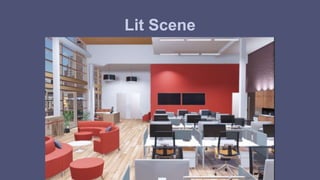
Lit Scene
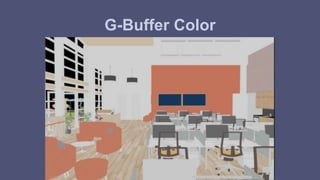
G-Buffer Color
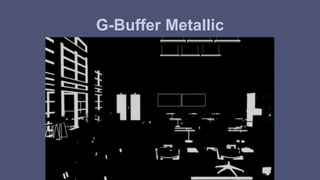
G-Buffer Metallic
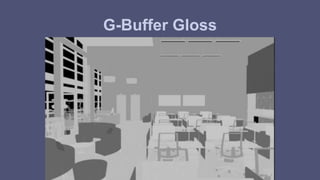
G-Buffer Gloss
G-Buffer Depth
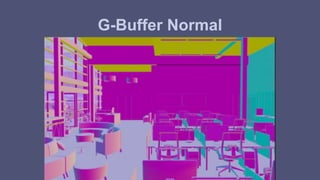
G-Buffer Normal
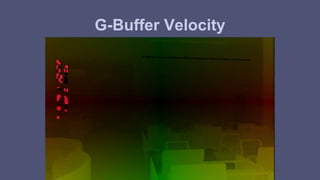
G-Buffer Velocity
G-Buffer Rasterization
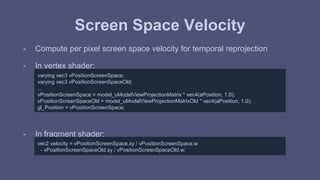
Screen Space Velocity 
- Compute per pixel screen space velocity for temporal reprojection 
- In vertex shader: 
varying vec3 vPositionScreenSpace; 
varying vec3 vPositionScreenSpaceOld; 
... 
vPositionScreenSpace = model_uModelViewProjectionMatrix * vec4(aPosition, 1.0); 
vPositionScreenSpaceOld = model_uModelViewProjectionMatrixOld * vec4(aPosition, 1.0); 
gl_Position = vPositionScreenSpace; 
- In fragment shader: 
vec2 velocity = vPositionScreenSpace.xy / vPositionScreenSpace.w 
- vPositionScreenSpaceOld.xy / vPositionScreenSpaceOld.w;
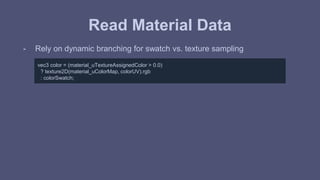
Read Material Data 
- Rely on dynamic branching for swatch vs. texture sampling 
vec3 color = (material_uTextureAssignedColor > 0.0) 
? texture2D(material_uColorMap, colorUV).rgb 
: colorSwatch;
Encode 
- and after skipping some tangential details... 
gBufferComponents buffer; 
buffer.metallic = metallic; 
buffer.color = color; 
buffer.gloss = gloss; 
buffer.normal = normalCameraSpace; 
buffer.depth = depthViewSpace; 
buffer.velocity = velocity; 
- .. our data is ready. Now we just need to write it out
G-Buffer Storage
Challenges: Storage 
- In vanilla webGL, largest pixel storage we can write to is a single RGBA 
unsigned byte texture. This isn’t going to cut it. 
- What extensions can we pull in? 
- Poll webglstats.com for support
Challenges: Storage 
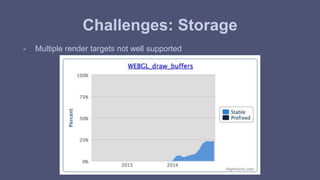
- Multiple render targets not well supported
Challenges: Storage 
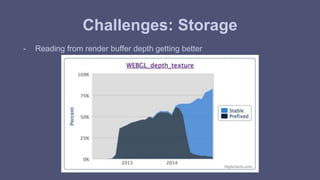
- Reading from render buffer depth getting better
Challenges: Storage 
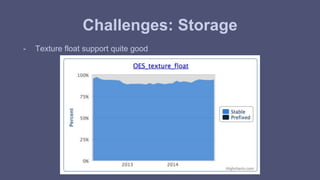
- Texture float support quite good
Challenges: Storage 
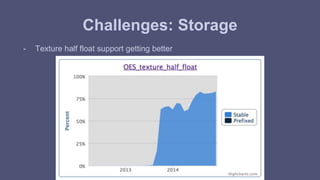
- Texture half float support getting better
Challenges: Encode / Decode 
- Texture float looks like our best option 
- Can we store all our G-Buffer data into a single floating point texture? 
- Pack the data
Integer Packing
Integer Packing 
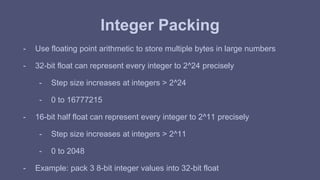
- Use floating point arithmetic to store multiple bytes in large numbers 
- 32-bit float can represent every integer to 2^24 precisely 
- Step size increases at integers > 2^24 
- 0 to 16777215 
- 16-bit half float can represent every integer to 2^11 precisely 
- Step size increases at integers > 2^11 
- 0 to 2048 
- Example: pack 3 8-bit integer values into 32-bit float
Integer Packing 
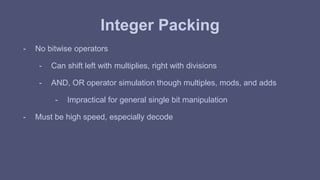
- No bitwise operators 
- Can shift left with multiplies, right with divisions 
- AND, OR operator simulation though multiples, mods, and adds 
- Impractical for general single bit manipulation 
- Must be high speed, especially decode
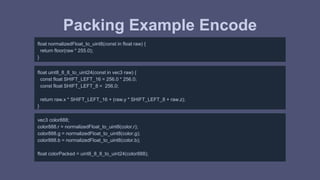
Packing Example Encode 
float normalizedFloat_to_uint8(const in float raw) { 
return floor(raw * 255.0); 
} 
float uint8_8_8_to_uint24(const in vec3 raw) { 
const float SHIFT_LEFT_16 = 256.0 * 256.0; 
const float SHIFT_LEFT_8 = 256.0; 
return raw.x * SHIFT_LEFT_16 + (raw.y * SHIFT_LEFT_8 + raw.z); 
} 
vec3 color888; 
color888.r = normalizedFloat_to_uint8(color.r); 
color888.g = normalizedFloat_to_uint8(color.g); 
color888.b = normalizedFloat_to_uint8(color.b); 
float colorPacked = uint8_8_8_to_uint24(color888);
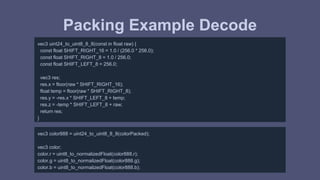
Packing Example Decode 
vec3 uint24_to_uint8_8_8(const in float raw) { 
const float SHIFT_RIGHT_16 = 1.0 / (256.0 * 256.0); 
const float SHIFT_RIGHT_8 = 1.0 / 256.0; 
const float SHIFT_LEFT_8 = 256.0; 
vec3 res; 
res.x = floor(raw * SHIFT_RIGHT_16); 
float temp = floor(raw * SHIFT_RIGHT_8); 
res.y = -res.x * SHIFT_LEFT_8 + temp; 
res.z = -temp * SHIFT_LEFT_8 + raw; 
return res; 
} 
vec3 color888 = uint24_to_uint8_8_8(colorPacked); 
vec3 color; 
color.r = uint8_to_normalizedFloat(color888.r); 
color.g = uint8_to_normalizedFloat(color888.g); 
color.b = uint8_to_normalizedFloat(color888.b);
Unit Testing
Unit Testing 
- Important to unit test packing functions 
- Easy to miss collisions 
- Easy to miss precision issues 
- Watch out for glsl functions such as mod() that expand to multiple 
arithmetic instructions 
- Desirable to test on the gpu 
- WebGL has no support for readPixels on floating point textures 
- Requires packing!
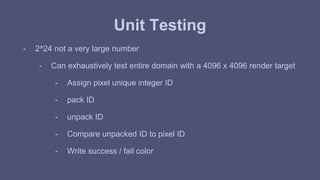
Unit Testing 
- 2^24 not a very large number 
- Can exhaustively test entire domain with a 4096 x 4096 render target 
- Assign pixel unique integer ID 
- pack ID 
- unpack ID 
- Compare unpacked ID to pixel ID 
- Write success / fail color
Packing Unit Test Single Pass 
void main() { 
// Covers the range of all uint24 with a 4k x 4k canvas. 
// Avoid floor(gl_FragCoord) here. It’s mediump in webGL. Not enough precision to uniquely identify pixels in a 4k target 
vec2 pixelCoord = floor(vUV * pass_uViewportResolution); 
float expected = pixelCoord.y * pass_uViewportResolution.x + pixelCoord.x; 
// Encode, Decode, and Compare 
vec3 expectedEncoded = uint8_8_8_to_sample(uint24_to_uint8_8_8(expected)); 
float expectedDecoded = uint8_8_8_to_uint24(sample_to_uint8_8_8(expectedEncode)); 
if (expectedDecoded == expected) { 
// Packing Successful 
gl_FragColor = vec4(0.0, 1.0, 0.0, 1.0); 
} else { 
// Packing Failed 
gl_FragColor = vec4(1.0, 0.0, 0.0, 1.0); 
} 
}
Unit Testing 
- Single pass verifies our packing functions are mathematically correct: 
- Pass 1: Pack data, upack data, compare to expected value 
- In practice, we will write / read from textures in between pack / unpack 
phases 
- Better to run a more exhaustive, two pass test: 
- Pass 1: Pack data, render to texture 
- Pass 2: Read texture, unpack data, compare to expected value
Packing Unit Test Two Pass 
- Pass 1: Pack data, render to texture 
void main() { 
// Covers the range of all uint24 with a 4k x 4k canvas. 
// Avoid floor(gl_FragCoord) here. It’s mediump in webGL. Not enough precision to uniquely identify pixels in a 4k target 
vec2 pixelCoord = floor(vUV * pass_uViewportResolution); 
float expected = pixelCoord.y * pass_uViewportResolution.x + pixelCoord.x; 
gl_FragColor.rgb = uint8_8_8_to_sample(uint24_to_uint8_8_8(expected)); 
}
Packing Unit Test Two Pass 
- Pass 2: Read texture, unpack data, compare to expected value 
void main() { 
// Covers the range of all uint24 with a 4k x 4k canvas. 
// Avoid floor(gl_FragCoord) here. It’s mediump in webGL. Not enough precision to uniquely identify pixels in a 4k target 
vec2 pixelCoord = floor(vUV * pass_uViewportResolution); 
float expected = pixelCoord.y * pass_uViewportResolution.x + pixelCoord.x; 
vec3 encoded = texture2D(encodedSampler, vUV).xyz; 
float decoded = uint8_8_8_to_uint24(sample_to_uint8_8_8(encoded)); 
if (decoded == expected) { 
// Packing Successful 
gl_FragColor = vec4(0.0, 1.0, 0.0, 1.0); 
} else { 
// Packing Failed 
gl_FragColor = vec4(1.0, 0.0, 0.0, 1.0); 
} 
}
G-Buffer Packing 
Compression
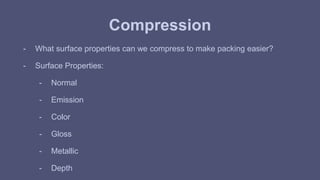
Compression 
- What surface properties can we compress to make packing easier? 
- Surface Properties: 
- Normal 
- Emission 
- Color 
- Gloss 
- Metallic 
- Depth
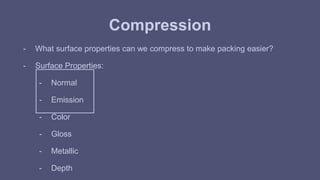
Compression 
- What surface properties can we compress to make packing easier? 
- Surface Properties: 
- Normal 
- Emission 
- Color 
- Gloss 
- Metallic 
- Depth
Normal Compression 
- Normal data encoded in octahedral space [Cigolle 14] 
- Transform normal to 2D Basis 
- Reasonably uniform discretization across the sphere 
- Uses full 0 to 1 domain 
- Cheap encode / decode
Emission 
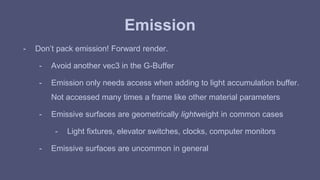
- Don’t pack emission! Forward render. 
- Avoid another vec3 in the G-Buffer 
- Emission only needs access when adding to light accumulation buffer. 
Not accessed many times a frame like other material parameters 
- Emissive surfaces are geometrically lightweight in common cases 
- Light fixtures, elevator switches, clocks, computer monitors 
- Emissive surfaces are uncommon in general
Color Compression 
- Transform to perceptual basis: YUV, YCrCb, YCoCg 
- Human perceptual system sensitive to luminance shifts 
- Human perceptual system fairly insensitive to chroma shifts 
- Color swatches / textures can be pre-transformed 
- Already a practice for higher quality dxt compression [Waveren 07] 
- Store chroma components at a lower frequency 
- Write 2 components of the signal, alternating between chroma bases 
- Color data encoded in checkerboarded YCoCg space [Mavridis 12]
G-Buffer Packing 
Format
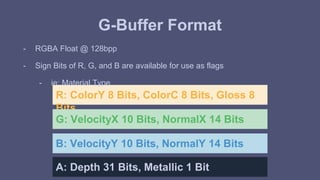
G-Buffer Format 
- RGBA Float @ 128bpp 
- Sign Bits of R, G, and B are available for use as flags 
- ie: Material Type 
R: ColorY 8 Bits, ColorC 8 Bits, Gloss 8 
Bits 
G: VelocityX 10 Bits, NormalX 14 Bits 
B: VelocityY 10 Bits, NormalY 14 Bits 
A: Depth 31 Bits, Metallic 1 Bit
G-Buffer Format 
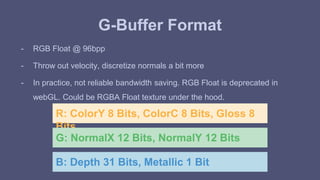
- RGB Float @ 96bpp 
- Throw out velocity, discretize normals a bit more 
- In practice, not reliable bandwidth saving. RGB Float is deprecated in 
webGL. Could be RGBA Float texture under the hood. 
R: ColorY 8 Bits, ColorC 8 Bits, Gloss 8 
Bits 
G: NormalX 12 Bits, NormalY 12 Bits 
B: Depth 31 Bits, Metallic 1 Bit
G-Buffer Format 
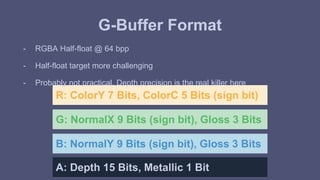
- RGBA Half-float @ 64 bpp 
- Half-float target more challenging 
- Probably not practical. Depth precision is the real killer here 
R: ColorY 7 Bits, ColorC 5 Bits (sign bit) 
G: NormalX 9 Bits (sign bit), Gloss 3 Bits 
B: NormalY 9 Bits (sign bit), Gloss 3 Bits 
A: Depth 15 Bits, Metallic 1 Bit
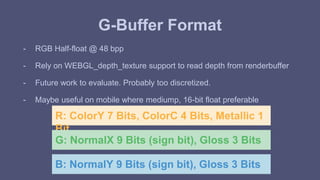
G-Buffer Format 
- RGB Half-float @ 48 bpp 
- Rely on WEBGL_depth_texture support to read depth from renderbuffer 
- Future work to evaluate. Probably too discretized. 
- Maybe useful on mobile where mediump, 16-bit float preferable 
R: ColorY 7 Bits, ColorC 4 Bits, Metallic 1 
Bit 
G: NormalX 9 Bits (sign bit), Gloss 3 Bits 
B: NormalY 9 Bits (sign bit), Gloss 3 Bits
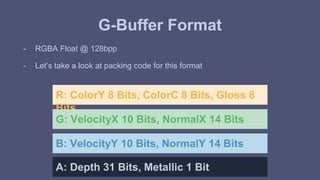
G-Buffer Format 
- RGBA Float @ 128bpp 
- Let’s take a look at packing code for this format 
R: ColorY 8 Bits, ColorC 8 Bits, Gloss 8 
Bits 
G: VelocityX 10 Bits, NormalX 14 Bits 
B: VelocityY 10 Bits, NormalY 14 Bits 
A: Depth 31 Bits, Metallic 1 Bit
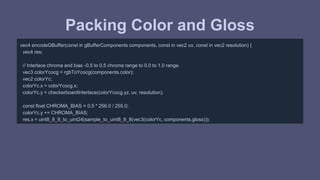
Packing Color and Gloss 
vec4 encodeGBuffer(const in gBufferComponents components, const in vec2 uv, const in vec2 resolution) { 
vec4 res; 
// Interlace chroma and bias -0.5 to 0.5 chroma range to 0.0 to 1.0 range. 
vec3 colorYcocg = rgbToYcocg(components.color); 
vec2 colorYc; 
colorYc.x = colorYcocg.x; 
colorYc.y = checkerboardInterlace(colorYcocg.yz, uv, resolution); 
const float CHROMA_BIAS = 0.5 * 256.0 / 255.0; 
colorYc.y += CHROMA_BIAS; 
res.x = uint8_8_8_to_uint24(sample_to_uint8_8_8(vec3(colorYc, components.gloss)));
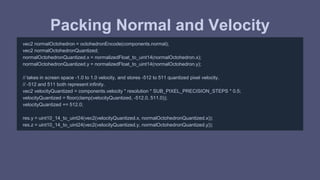
Packing Normal and Velocity 
vec2 normalOctohedron = octohedronEncode(components.normal); 
vec2 normalOctohedronQuantized; 
normalOctohedronQuantized.x = normalizedFloat_to_uint14(normalOctohedron.x); 
normalOctohedronQuantized.y = normalizedFloat_to_uint14(normalOctohedron.y); 
// takes in screen space -1.0 to 1.0 velocity, and stores -512 to 511 quantized pixel velocity. 
// -512 and 511 both represent infinity. 
vec2 velocityQuantized = components.velocity * resolution * SUB_PIXEL_PRECISION_STEPS * 0.5; 
velocityQuantized = floor(clamp(velocityQuantized, -512.0, 511.0)); 
velocityQuantized += 512.0; 
res.y = uint10_14_to_uint24(vec2(velocityQuantized.x, normalOctohedronQuantized.x)); 
res.z = uint10_14_to_uint24(vec2(velocityQuantized.y, normalOctohedronQuantized.y));
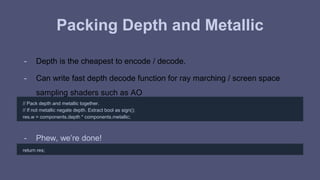
Packing Depth and Metallic 
- Depth is the cheapest to encode / decode. 
- Can write fast depth decode function for ray marching / screen space 
sampling shaders such as AO 
// Pack depth and metallic together. 
// If not metallic negate depth. Extract bool as sign(); 
res.w = components.depth * components.metallic; 
- Phew, we’re done! 
return res;
Packing Challenges 
- Must balance packing efficiency with cost of encoding / decoding 
- Packed pixels cannot be correctly hardware filtered: 
- Deferred decals cannot be alpha blended 
- No MSAA
Direct Light
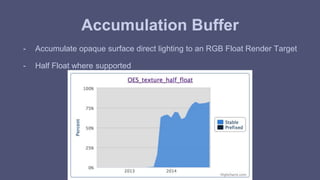
Accumulation Buffer 
- Accumulate opaque surface direct lighting to an RGB Float Render Target 
- Half Float where supported
Light Uniforms 
- ClipFar: float 
- Color: vec3 
- Decay Exponent: float 
- Gobo: sampler2D 
- HotspotLengthScreenSpace: float 
- Luminous Intensity: float 
- Position: vec3 
- TextureAssignedGobo: float 
- ViewProjectionMatrix: mat4 
- ViewMatrix: mat4
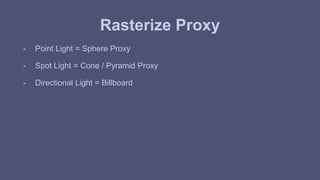
Rasterize Proxy 
- Point Light = Sphere Proxy 
- Spot Light = Cone / Pyramid Proxy 
- Directional Light = Billboard
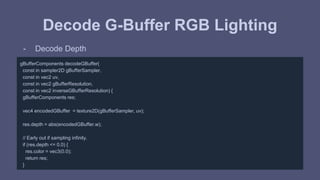
Decode G-Buffer RGB Lighting 
- Decode Depth 
gBufferComponents decodeGBuffer( 
const in sampler2D gBufferSampler, 
const in vec2 uv, 
const in vec2 gBufferResolution, 
const in vec2 inverseGBufferResolution) { 
gBufferComponents res; 
vec4 encodedGBuffer = texture2D(gBufferSampler, uv); 
res.depth = abs(encodedGBuffer.w); 
// Early out if sampling infinity. 
if (res.depth <= 0.0) { 
res.color = vec3(0.0); 
return res; 
}
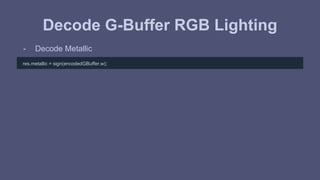
Decode G-Buffer RGB Lighting 
- Decode Metallic 
res.metallic = sign(encodedGBuffer.w);
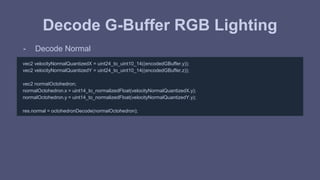
Decode G-Buffer RGB Lighting 
- Decode Normal 
vec2 velocityNormalQuantizedX = uint24_to_uint10_14((encodedGBuffer.y)); 
vec2 velocityNormalQuantizedY = uint24_to_uint10_14((encodedGBuffer.z)); 
vec2 normalOctohedron; 
normalOctohedron.x = uint14_to_normalizedFloat(velocityNormalQuantizedX.y); 
normalOctohedron.y = uint14_to_normalizedFloat(velocityNormalQuantizedY.y); 
res.normal = octohedronDecode(normalOctohedron);
Decode G-Buffer RGB Lighting 
- Decode Velocity 
res.velocity = vec2(velocityNormalQuantizedX.x, velocityNormalQuantizedY.x); 
res.velocity -= 512.0; 
if (max(abs(res.velocity.x), abs(res.velocity.y)) > 510.0) { 
// When velocity is out of representable range, throw it outside of screenspace for culling in future passes. 
// sqrt(2) + 1e-3 
res.velocity = vec2(1.41521356); 
} else { 
res.velocity *= inverseGBufferResolution * INVERSE_SUB_PIXEL_PRECISION_STEPS; 
}
Decode G-Buffer RGB Lighting 
- Decode Gloss 
vec3 colorGlossData = uint8_8_8_to_sample(uint24_to_uint8_8_8(encodedGBuffer.x)); 
res.gloss = colorGlossData.z;
Decode G-Buffer RGB Lighting 
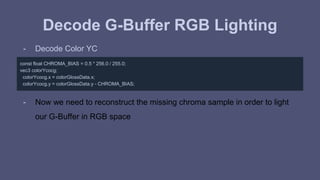
- Decode Color YC 
const float CHROMA_BIAS = 0.5 * 256.0 / 255.0; 
vec3 colorYcocg; 
colorYcocg.x = colorGlossData.x; 
colorYcocg.y = colorGlossData.y - CHROMA_BIAS; 
- Now we need to reconstruct the missing chroma sample in order to light 
our G-Buffer in RGB space
Decode G-Buffer RGB Lighting 
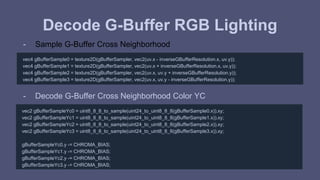
- Sample G-Buffer Cross Neighborhood 
vec4 gBufferSample0 = texture2D(gBufferSampler, vec2(uv.x - inverseGBufferResolution.x, uv.y)); 
vec4 gBufferSample1 = texture2D(gBufferSampler, vec2(uv.x + inverseGBufferResolution.x, uv.y)); 
vec4 gBufferSample2 = texture2D(gBufferSampler, vec2(uv.x, uv.y + inverseGBufferResolution.y)); 
vec4 gBufferSample3 = texture2D(gBufferSampler, vec2(uv.x, uv.y - inverseGBufferResolution.y)); 
- Decode G-Buffer Cross Neighborhood Color YC 
vec2 gBufferSampleYc0 = uint8_8_8_to_sample(uint24_to_uint8_8_8(gBufferSample0.x)).xy; 
vec2 gBufferSampleYc1 = uint8_8_8_to_sample(uint24_to_uint8_8_8(gBufferSample1.x)).xy; 
vec2 gBufferSampleYc2 = uint8_8_8_to_sample(uint24_to_uint8_8_8(gBufferSample2.x)).xy; 
vec2 gBufferSampleYc3 = uint8_8_8_to_sample(uint24_to_uint8_8_8(gBufferSample3.x)).xy; 
gBufferSampleYc0.y -= CHROMA_BIAS; 
gBufferSampleYc1.y -= CHROMA_BIAS; 
gBufferSampleYc2.y -= CHROMA_BIAS; 
gBufferSampleYc3.y -= CHROMA_BIAS;
Decode G-Buffer RGB Lighting 
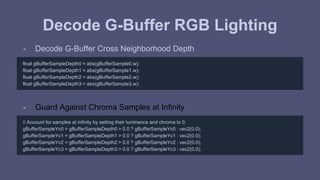
- Decode G-Buffer Cross Neighborhood Depth 
float gBufferSampleDepth0 = abs(gBufferSample0.w); 
float gBufferSampleDepth1 = abs(gBufferSample1.w); 
float gBufferSampleDepth2 = abs(gBufferSample2.w); 
float gBufferSampleDepth3 = abs(gBufferSample3.w); 
- Guard Against Chroma Samples at Infinity 
// Account for samples at infinity by setting their luminance and chroma to 0. 
gBufferSampleYc0 = gBufferSampleDepth0 > 0.0 ? gBufferSampleYc0 : vec2(0.0); 
gBufferSampleYc1 = gBufferSampleDepth1 > 0.0 ? gBufferSampleYc1 : vec2(0.0); 
gBufferSampleYc2 = gBufferSampleDepth2 > 0.0 ? gBufferSampleYc2 : vec2(0.0); 
gBufferSampleYc3 = gBufferSampleDepth3 > 0.0 ? gBufferSampleYc3 : vec2(0.0);
Decode G-Buffer RGB Lighting 
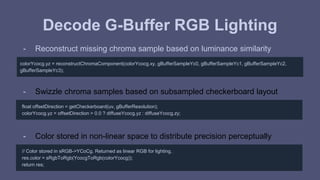
- Reconstruct missing chroma sample based on luminance similarity 
colorYcocg.yz = reconstructChromaComponent(colorYcocg.xy, gBufferSampleYc0, gBufferSampleYc1, gBufferSampleYc2, 
gBufferSampleYc3); 
- Swizzle chroma samples based on subsampled checkerboard layout 
float offsetDirection = getCheckerboard(uv, gBufferResolution); 
colorYcocg.yz = offsetDirection > 0.0 ? diffuseYcocg.yz : diffuseYcocg.zy; 
- Color stored in non-linear space to distribute precision perceptually 
// Color stored in sRGB->YCoCg. Returned as linear RGB for lighting. 
res.color = sRgbToRgb(YcocgToRgb(colorYcocg)); 
return res;
Decode G-Buffer RGB Lighting 
- Quite a bit of work went into reconstructing that missing chroma 
component 
- Can we defer reconstruction later down the pipe?
Light Pre-pass
Light Pre-pass 
- Many resources: 
- [Geldreich 04][Shishkovtsov 05][Lobanchikov 09][Mittring 09][Hoffman 09][Sousa 13][Pranckevičius 13] 
- Accumulate lighting, unmodulated by albedo or specular color 
- Modulate by albedo and specular color in resolve pass 
- Pulls fresnel out of the integral with nDotV approximation 
- Bad for microfacet model. We want nDotH. 
- Could light pre-pass all non-metallic pixels due to constant 0.04 
- Keep fresnel inside the integral for nDotH evaluation 
- Requires running through all lights twice
YC Lighting
YC Lighting 
- Light our G-Buffer in chroma subsampled YC space 
- Reconstruct missing chroma component in a post process
Artifacts?
Results 
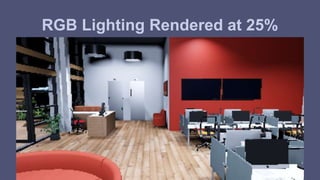
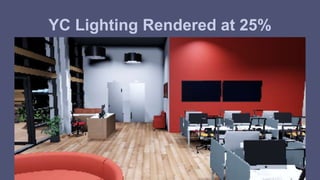
- All results are rendered: 
- Direct Light Only 
- No Anti-Aliasing 
- No Temporal Techniques 
- G-Buffer Color Component YCoCg Checkerboard Interlaced 
- Unique settings will accompany each result 
- Percentages represent render target dimensions, not pixel count
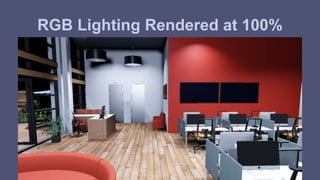
RGB Lighting Rendered at 100%
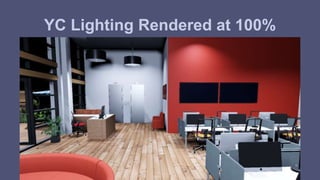
YC Lighting Rendered at 100%
RGB Lighting Rendered at 25%
YC Lighting Rendered at 25%
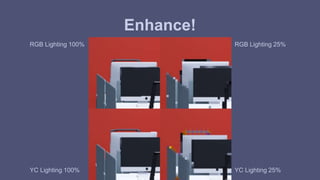
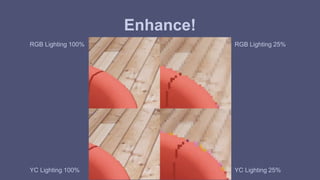
Let’s take a closer look
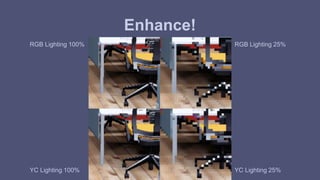
Enhance! 
RGB Lighting 100% 
RGB Lighting 25% 
YC Lighting 100% YC Lighting 25%
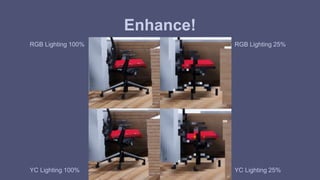
Enhance! 
RGB Lighting 100% 
RGB Lighting 25% 
YC Lighting 100% YC Lighting 25%
Enhance! 
RGB Lighting 100% 
RGB Lighting 25% 
YC Lighting 100% YC Lighting 25%
Enhance! 
RGB Lighting 100% 
RGB Lighting 25% 
YC Lighting 100% YC Lighting 25%
Results 
- Chroma artifacts incurred from YC Lighting seem a fair tradeoff for decode savings 
- Challenging to find artifacts when viewed at 100% 
- Easy to find artifacts in detail shots 
- Artifacts occur at strong chroma boundaries 
- Depends on art direction 
- Temporal techniques can significantly mitigate artifacts 
- Can alternate checkerboard pattern each frame
Implementation
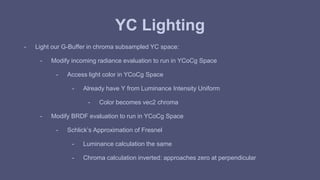
YC Lighting 
- Light our G-Buffer in chroma subsampled YC space: 
- Modify incoming radiance evaluation to run in YCoCg Space 
- Access light color in YCoCg Space 
- Already have Y from Luminance Intensity Uniform 
- Color becomes vec2 chroma 
- Modify BRDF evaluation to run in YCoCg Space 
- Schlick’s Approximation of Fresnel 
- Luminance calculation the same 
- Chroma calculation inverted: approaches zero at perpendicular
YC Lighting 
- RGB Schlick’s Approximation of Fresnel [Schlick 94]: 
vec3 fresnelSchlick(const in float vDotH, const in vec3 reflectionCoefficient) { 
float power = pow(1.0 - vDotH, 5.0); 
return (1.0 - reflectionCoefficient) * power + reflectionCoefficient; 
}
YC Lighting 
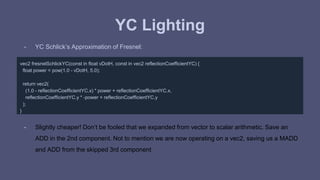
- YC Schlick’s Approximation of Fresnel: 
vec2 fresnelSchlickYC(const in float vDotH, const in vec2 reflectionCoefficientYC) { 
float power = pow(1.0 - vDotH, 5.0); 
return vec2( 
(1.0 - reflectionCoefficientYC.x) * power + reflectionCoefficientYC.x, 
reflectionCoefficientYC.y * -power + reflectionCoefficientYC.y 
); 
} 
- Slightly cheaper! Don’t be fooled that we expanded from vector to scalar arithmetic. Save an 
ADD in the 2nd component. Not to mention we are now operating on a vec2, saving us a MADD 
and ADD from the skipped 3rd component
YC Lighting 
- Works fine with spherical gaussian [Lagarde 12] approximation too 
vec2 fresnelSchlickSphericalGaussianYC(const in float vDotH, const in vec2 reflectionCoefficientYC) { 
float power = exp2((-5.55473 * vDotH - 6.98316) * vDotH); 
return vec2( 
(1.0 - reflectionCoefficientYC.x) * power + reflectionCoefficientYC.x, 
reflectionCoefficientYC.y * -power + reflectionCoefficientYC.y 
); 
}
YC Lighting 
- Write YC to RG components of render target 
- Frees up B component 
- Could write outgoing radiance, unmodulated by albedo for more accurate light meter data
YC Lighting 
- Write YC to RG components of render target 
- Could write to an RGBA target and light 2 pixels at once: YCYC 
- Write bandwidth savings 
- Where typical scenes are bottlenecked! 
- Only applicable for billboard rasterization 
- Can’t conservatively depth / stencil test light proxies 
- Interesting for tiled deferred [Olsson 11] / clustered [Billeter 12] approaches. 
- Future work.
YC Lighting 
- Reconstruct missing chroma component in a post process: 
- Bilateral Filter 
- Luminance Similarity 
- Geometric Similarity 
- Depth 
- Normal 
- Plane 
- Wrap into a pre-existing billboard pass. Plenty of candidates: 
- OIT Transparency Composite 
- Anti-Aliasing
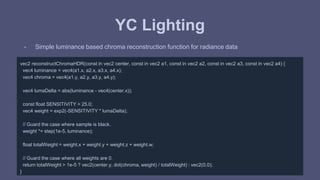
YC Lighting 
- Simple luminance based chroma reconstruction function for radiance data 
vec2 reconstructChromaHDR(const in vec2 center, const in vec2 a1, const in vec2 a2, const in vec2 a3, const in vec2 a4) { 
vec4 luminance = vec4(a1.x, a2.x, a3.x, a4.x); 
vec4 chroma = vec4(a1.y, a2.y, a3.y, a4.y); 
vec4 lumaDelta = abs(luminance - vec4(center.x)); 
const float SENSITIVITY = 25.0; 
vec4 weight = exp2(-SENSITIVITY * lumaDelta); 
// Guard the case where sample is black. 
weight *= step(1e-5, luminance); 
float totalWeight = weight.x + weight.y + weight.z + weight.w; 
// Guard the case where all weights are 0. 
return totalWeight > 1e-5 ? vec2(center.y, dot(chroma, weight) / totalWeight) : vec2(0.0); 
}
Thanks for listening!
Oh right, we’re hiring 
- If you enjoy working on these sorts of problems, let us know! 
- Contact Josh Paul: 
- Our very own talent scout: josh@floored.com
Thanks, Floored Engineering 
Juan Andres Andrango, Neha Batra, Dustin Byrne, Emma Carlson, Won Chun, Andrey Dmitrov, Lars 
Hamre, Judy He, Josh Karges, Ben LeVeque, Yingxue Li, Rob Thomas, Angela Wei
Questions? 
nick@floored.com 
@pastasfuture
Resources 
[WebGLStats] WebGL Stats 
http://webglstats.com, 2014. 
[Möller 08] Real-Time Rendering, 
Thomas Akenine-Möller, Eric Haines, Naty Hoffman, 2008 
[Hoffman 10] Physically-Based Shading Models in Film and Game Production 
http://renderwonk.com/publications/s2010-shading-course/hoffman/s2010_physically_based_shading_hoffman_a_notes.pdf, Naty Hoffman, Siggraph, 2010 
[Lagarde 11] Feeding a Physically-Based Shading Model 
http://seblagarde.wordpress.com/2011/08/17/feeding-a-physical-based-lighting-mode/, Sébastien Lagarde, 2011 
[Burley 12] Physically-Based Shading at Disney, 
http://disney-animation.s3.amazonaws.com/library/s2012_pbs_disney_brdf_notes_v2.pdf, Brent Burley, 2012 
[Karis 13] Real Shading in Unreal Engine 4, 
http://blog.selfshadow.com/publications/s2013-shading-course/karis/s2013_pbs_epic_notes_v2.pdf, Brian Karis, 2013
Resources 
[Pranckevičius 09] Encoding Floats to RGBA - The final? 
http://aras-p.info/blog/2009/07/30/encoding-floats-to-rgba-the-final, Aras Pranckevičius 2009. 
[Cigolle 14] A Survey of Efficient Representations for Independent Unit Vectors, 
http://jcgt.org/published/0003/02/01/, Cigolle, Donow, Evangelakos, Mara, McGuire, Meyer, 2014 
[Mavridis 12] The Compact YCoCg Frame Buffer 
http://jcgt.org/published/0001/01/02/, Mavridis and Papaioannou, Journal of Computer Graphics Techniques, 2012 
[Waveren 07] Real-Time YCoCg-DXT Compression 
http://developer.download.nvidia.com/whitepapers/2007/Real-Time-YCoCg-DXT-Compression/Real-Time%20YCoCg-DXT%20Compression.pdf, J.M.P van 
Waveren, Ignacio Castaño, 2007 
[Geldreich 04] Deferred Lighting and Shading 
https://sites.google.com/site/richgel99/home, Rich Geldreich, Matt Pritchard, John Brooks, 2004. 
[Hoffman 09] Deferred Lighting Approaches 
http://www.realtimerendering.com/blog/deferred-lighting-approaches, Naty Hoffman, 2009.
Resources 
[Shishkovtsov 05] Deferred Shading in S.T.A.L.K.E.R. 
http://http.developer.nvidia.com/GPUGems2/gpugems2_chapter09.html, Oles Shishkovtsov, 2005 
[Lobanchikov 09] GSC Game World’s S.T.A.L.K.E.R: Clear Sky - a Showcase for Direct3D 10.0/1 
http://amd-dev.wpengine.netdna-cdn.com/wordpress/media/2012/10/01GDC09AD3DDStalkerClearSky210309.ppt, Igor A. Lobanchikov, Holger Gruen, Game 
Developers Conference, 2009 
[Mittring 09] A Bit More Deferred - CryEngine 3 
http://www.crytek.com/cryengine/cryengine3/presentations/a-bit-more-deferred---cryengine3, Martin Mittring, 2009. 
[Sousa 13] The Rendering Technologies of Crysis 3 
http://www.crytek.com/cryengine/presentations/the-rendering-technologies-of-crysis-3, Tiago Sousa, 2013 
[Pranckevičius 13] Physically Based Shading in Unity 
http://aras-p.info/texts/files/201403-GDC_UnityPhysicallyBasedShading_notes.pdf, Aras Pranckevičius, Game Developers Conference, 2013 
[Olsson 11] Clustered Deferred and Forward Shading 
http://www.cse.chalmers.se/~olaolss/main_frame.php?contents=publication&id=tiled_shading, Ola Olsson, Ulf Assarsson, 2011
Resources 
[Billeter 12] Clustered Deferred and Forward Shading 
http://www.cse.chalmers.se/~olaolss/main_frame.php?contents=publication&id=clustered_shading, Markus Billeter, Ola Olsson, Ulf Assarsson, 2012 
[Yang 09] Amortized Supersampling, 
http://research.microsoft.com/en-us/um/people/hoppe/supersample.pdf, Lei Yang, Diego Nehab, Pedro V. Sander, Pitchaya Sitthi-amorn, Jason Lawrence, 
Hugues Hoppe, 2009 
[Herzog 10] Spatio-Temporal Upsampling on the GPU, 
https://people.mpi-inf.mpg.de/~rherzog/Papers/spatioTemporalUpsampling_preprintI3D2010.pdf, Robert Herzog, Elmar Eisemann, Karol Myszkowski, H.-P. 
Seidel, 2010 
[Wronski 14] Temporal Supersampling and Antialiasing, 
http://bartwronski.com/2014/03/15/temporal-supersampling-and-antialiasing/, Bart Wronski, 2014 
[Karis 14] High Quality Temporal Supersampling, 
https://de45xmedrsdbp.cloudfront.net/Resources/files/TemporalAA_small-71938806.pptx, Brian Karis, 2014 
[Walter 07] Microfacet Models for Refraction Through Rough Surfaces, 
http://www.cs.cornell.edu/~srm/publications/EGSR07-btdf.pdf, Bruce Walter, Stephan R. Marschner, Hongsong Li, Kenneth E. Torrance, 2007
Resources 
[Heitz 14] Understanding the Shadow Masking Function, 
http://jcgt.org/published/0003/02/03/paper.pdf, Eric Heitz, 2014 
[Schlick 94] An Inexpensive BRDF Model for Physically-based Rendering 
http://www.cs.virginia.edu/~jdl/bib/appearance/analytic%20models/schlick94b.pdf, Christophe Schlick, 1994 
[Lagarde 12] Spherical Gaussian Approximation for Blinn-Phong, Phong, and Fresnel 
http://seblagarde.wordpress.com/2012/06/03/spherical-gaussien-approximation-for-blinn-phong-phong-and-fresnel/, Sebastien Lagarde, 2012 
[Oren 94] Generalization of Lambert’s Reflectance Model, 
http://www1.cs.columbia.edu/CAVE/publications/pdfs/Oren_SIGGRAPH94.pdf, Michael Oren, Shree K. Nayar 1994

Penn graphics

  • 1.
    Floored 3D Visualization& Virtual Reality for Real Estate
  • 2.
    Introduction - Hi,my name is Nick Brancaccio - I work on graphics at Floored - Floored does real time 3D architectural visualization on the web
  • 3.
    Introduction - Demo - Check out floored.com for more
  • 4.
    Challenges Architectural -Clean, light-filled aesthetic - Can’t hide tech / art deficiencies with grungy textures
  • 5.
  • 6.
    Challenges Interior Spaces - Many secondary light sources, rather than single key light - Direct light fairly high frequency (directionally and spatially) - Sunlight does not dominate many of our scenes - Especially in NYC
  • 7.
    Challenges Real worldmaterial representation - Important for communicating quality / mood / feel - Comparable real-life counterparts - Customers are comparing to high-quality offline rendering
  • 8.
  • 9.
    Challenges webGL -Limited OpenGL ES API - Variable browser support
  • 10.
    Approach - PhysicallyBased Shading - Deferred Rendering - Temporal Amortization
  • 11.
    Approach - PhysicallyBased Shading - Deferred Rendering - Temporal Amortization [Yang 09][Herzog 10][Wronski 14][Karis 14]
  • 12.
  • 13.
    Physically Based Shading - Scalable Quality - Architectural visualization industry has embraced PBS in offline rendering for quite some time - Maxwell, VRay, Arnold, etc - High Standards - Vocabulary of PBS connects real time and offline disciplines - Offline can more readily consume real time assets - Real time can more readily consume offline assets
  • 14.
    Physically Based Shading - Authoring cost is high, but so is reusability - Floored has a variety of art assets: spaces, furniture, lighting, materials - PBS supports reusability across projects
  • 15.
  • 16.
  • 17.
  • 18.
  • 19.
  • 20.
  • 21.
    Standard Material Parameterization Full Artist Control - Albedo - Specular Color - Alpha - Emission - Gloss - Normal
  • 22.
    Standard Material Parameterization Full Artist Control - Albedo - Specular Color - Alpha - Emission - Gloss - Normal Physically Coupled - Metallic - Color - Alpha - Emission - Gloss - Normal
  • 23.
    Microfacet BRDF -Microfacet Specular: - D: Normal Distribution Function: GGX [Walter 07] - G: Geometry Shadow Masking Function: Height-Correlated Smith [Heitz 14] - F: Fresnel: Spherical Gaussian Schlick’s Approximation [Schlick 94] - Microfacet Diffuse - Qualitative Oren Nayar [Oren 94]
  • 24.
    Standard Material Parameterization Time to shameless steal from Real-Time Rendering [Möller 08]...
  • 25.
    Standard Material Parameterization Time to shameless steal from Real-Time Rendering [Möller 08]...
  • 26.
    Standard Material Parameterization - Give color parameter conditional meaning [Burley 12], [Karis 13] if (!metallic) { albedo = color; specularColor = vec3(0.04); } else { albedo = vec3(0.0); specularColor = color; }
  • 27.
    Standard Material Parameterization - Can throw out a whole vec3 parameter - Less knobs help enforce physically plausible materials - Significantly lighter g-buffer storage - Less textures, better download times - What control did we lose? - Video of non-metallic materials sweeping through physically plausible range of specular colors - 0.02 to 0.05 [Hoffman 10][Lagarde 11]
  • 28.
    Standard Material Parameterization - Our standard material does not support: - Translucency (Skin, Foliage, Snow) - Anisotropic Gloss (Brushed Metal, Hair, Fabrics) - Layered Materials (Clear coat) - Partially Metallic / Filtered Hybrid Materials (Car paints, Sci Fi Materials)
  • 29.
  • 30.
    Forward Pipeline Overview - For each model: - For each primitive: - For each vertex: - Transform vertex by modelViewProjectionMatrix - For each pixel: - For each light: - outgoing radiance += incoming radiance * brdf * projected area - Remap outgoing radiance to perceptual, display domain - Tonemap - Gamma / Color Space Conversion
  • 31.
    Forward Pipeline Cons - Challenging to effectively cull lights - Typically pay cost of worst case: - for (int i = 0; i < MAX_NUM_LIGHTS; ++i) - outgoing radiance += incoming radiance * brdf * projected area - MAX_NUM_LIGHTS small due to MAX_FRAGMENT_UNIFORM_VECTORS
  • 32.
    Deferred Pipeline Overview - For each model: - For each primitive: - For each vertex: - Transform vertex by modelViewProjectionMatrix - For each pixel: - Write geometric and material data to g-buffer - For each light - For each pixel inside light volume: - Read geometric and material data from texture - outgoing radiance = incoming radiance * brdf * projected area - Blend Add outgoing radiance to render target
  • 33.
    Deferred Pipeline Cons - Heavy on read bandwidth - Read G-Buffer for each light source - Heavy on write bandwidth - Blend add outgoing radiance for each light source - Material parameterization limited by G-Buffer storage - Challenging to support non-standard materials
  • 34.
  • 35.
    G-Buffer - Parameters:What data do we need to execute shading? - Rasterization: How do we access these parameters? - Storage: How do we store these parameters?
  • 36.
  • 37.
  • 38.
  • 39.
  • 40.
  • 41.
  • 42.
  • 43.
  • 44.
  • 45.
    Screen Space Velocity - Compute per pixel screen space velocity for temporal reprojection - In vertex shader: varying vec3 vPositionScreenSpace; varying vec3 vPositionScreenSpaceOld; ... vPositionScreenSpace = model_uModelViewProjectionMatrix * vec4(aPosition, 1.0); vPositionScreenSpaceOld = model_uModelViewProjectionMatrixOld * vec4(aPosition, 1.0); gl_Position = vPositionScreenSpace; - In fragment shader: vec2 velocity = vPositionScreenSpace.xy / vPositionScreenSpace.w - vPositionScreenSpaceOld.xy / vPositionScreenSpaceOld.w;
  • 46.
    Read Material Data - Rely on dynamic branching for swatch vs. texture sampling vec3 color = (material_uTextureAssignedColor > 0.0) ? texture2D(material_uColorMap, colorUV).rgb : colorSwatch;
  • 47.
    Encode - andafter skipping some tangential details... gBufferComponents buffer; buffer.metallic = metallic; buffer.color = color; buffer.gloss = gloss; buffer.normal = normalCameraSpace; buffer.depth = depthViewSpace; buffer.velocity = velocity; - .. our data is ready. Now we just need to write it out
  • 48.
  • 49.
    Challenges: Storage -In vanilla webGL, largest pixel storage we can write to is a single RGBA unsigned byte texture. This isn’t going to cut it. - What extensions can we pull in? - Poll webglstats.com for support
  • 50.
    Challenges: Storage -Multiple render targets not well supported
  • 51.
    Challenges: Storage -Reading from render buffer depth getting better
  • 52.
    Challenges: Storage -Texture float support quite good
  • 53.
    Challenges: Storage -Texture half float support getting better
  • 54.
    Challenges: Encode /Decode - Texture float looks like our best option - Can we store all our G-Buffer data into a single floating point texture? - Pack the data
  • 55.
  • 56.
    Integer Packing -Use floating point arithmetic to store multiple bytes in large numbers - 32-bit float can represent every integer to 2^24 precisely - Step size increases at integers > 2^24 - 0 to 16777215 - 16-bit half float can represent every integer to 2^11 precisely - Step size increases at integers > 2^11 - 0 to 2048 - Example: pack 3 8-bit integer values into 32-bit float
  • 57.
    Integer Packing -No bitwise operators - Can shift left with multiplies, right with divisions - AND, OR operator simulation though multiples, mods, and adds - Impractical for general single bit manipulation - Must be high speed, especially decode
  • 58.
    Packing Example Encode float normalizedFloat_to_uint8(const in float raw) { return floor(raw * 255.0); } float uint8_8_8_to_uint24(const in vec3 raw) { const float SHIFT_LEFT_16 = 256.0 * 256.0; const float SHIFT_LEFT_8 = 256.0; return raw.x * SHIFT_LEFT_16 + (raw.y * SHIFT_LEFT_8 + raw.z); } vec3 color888; color888.r = normalizedFloat_to_uint8(color.r); color888.g = normalizedFloat_to_uint8(color.g); color888.b = normalizedFloat_to_uint8(color.b); float colorPacked = uint8_8_8_to_uint24(color888);
  • 59.
    Packing Example Decode vec3 uint24_to_uint8_8_8(const in float raw) { const float SHIFT_RIGHT_16 = 1.0 / (256.0 * 256.0); const float SHIFT_RIGHT_8 = 1.0 / 256.0; const float SHIFT_LEFT_8 = 256.0; vec3 res; res.x = floor(raw * SHIFT_RIGHT_16); float temp = floor(raw * SHIFT_RIGHT_8); res.y = -res.x * SHIFT_LEFT_8 + temp; res.z = -temp * SHIFT_LEFT_8 + raw; return res; } vec3 color888 = uint24_to_uint8_8_8(colorPacked); vec3 color; color.r = uint8_to_normalizedFloat(color888.r); color.g = uint8_to_normalizedFloat(color888.g); color.b = uint8_to_normalizedFloat(color888.b);
  • 60.
  • 61.
    Unit Testing -Important to unit test packing functions - Easy to miss collisions - Easy to miss precision issues - Watch out for glsl functions such as mod() that expand to multiple arithmetic instructions - Desirable to test on the gpu - WebGL has no support for readPixels on floating point textures - Requires packing!
  • 62.
    Unit Testing -2^24 not a very large number - Can exhaustively test entire domain with a 4096 x 4096 render target - Assign pixel unique integer ID - pack ID - unpack ID - Compare unpacked ID to pixel ID - Write success / fail color
  • 63.
    Packing Unit TestSingle Pass void main() { // Covers the range of all uint24 with a 4k x 4k canvas. // Avoid floor(gl_FragCoord) here. It’s mediump in webGL. Not enough precision to uniquely identify pixels in a 4k target vec2 pixelCoord = floor(vUV * pass_uViewportResolution); float expected = pixelCoord.y * pass_uViewportResolution.x + pixelCoord.x; // Encode, Decode, and Compare vec3 expectedEncoded = uint8_8_8_to_sample(uint24_to_uint8_8_8(expected)); float expectedDecoded = uint8_8_8_to_uint24(sample_to_uint8_8_8(expectedEncode)); if (expectedDecoded == expected) { // Packing Successful gl_FragColor = vec4(0.0, 1.0, 0.0, 1.0); } else { // Packing Failed gl_FragColor = vec4(1.0, 0.0, 0.0, 1.0); } }
  • 64.
    Unit Testing -Single pass verifies our packing functions are mathematically correct: - Pass 1: Pack data, upack data, compare to expected value - In practice, we will write / read from textures in between pack / unpack phases - Better to run a more exhaustive, two pass test: - Pass 1: Pack data, render to texture - Pass 2: Read texture, unpack data, compare to expected value
  • 65.
    Packing Unit TestTwo Pass - Pass 1: Pack data, render to texture void main() { // Covers the range of all uint24 with a 4k x 4k canvas. // Avoid floor(gl_FragCoord) here. It’s mediump in webGL. Not enough precision to uniquely identify pixels in a 4k target vec2 pixelCoord = floor(vUV * pass_uViewportResolution); float expected = pixelCoord.y * pass_uViewportResolution.x + pixelCoord.x; gl_FragColor.rgb = uint8_8_8_to_sample(uint24_to_uint8_8_8(expected)); }
  • 66.
    Packing Unit TestTwo Pass - Pass 2: Read texture, unpack data, compare to expected value void main() { // Covers the range of all uint24 with a 4k x 4k canvas. // Avoid floor(gl_FragCoord) here. It’s mediump in webGL. Not enough precision to uniquely identify pixels in a 4k target vec2 pixelCoord = floor(vUV * pass_uViewportResolution); float expected = pixelCoord.y * pass_uViewportResolution.x + pixelCoord.x; vec3 encoded = texture2D(encodedSampler, vUV).xyz; float decoded = uint8_8_8_to_uint24(sample_to_uint8_8_8(encoded)); if (decoded == expected) { // Packing Successful gl_FragColor = vec4(0.0, 1.0, 0.0, 1.0); } else { // Packing Failed gl_FragColor = vec4(1.0, 0.0, 0.0, 1.0); } }
  • 67.
  • 68.
    Compression - Whatsurface properties can we compress to make packing easier? - Surface Properties: - Normal - Emission - Color - Gloss - Metallic - Depth
  • 69.
    Compression - Whatsurface properties can we compress to make packing easier? - Surface Properties: - Normal - Emission - Color - Gloss - Metallic - Depth
  • 70.
    Normal Compression -Normal data encoded in octahedral space [Cigolle 14] - Transform normal to 2D Basis - Reasonably uniform discretization across the sphere - Uses full 0 to 1 domain - Cheap encode / decode
  • 71.
    Emission - Don’tpack emission! Forward render. - Avoid another vec3 in the G-Buffer - Emission only needs access when adding to light accumulation buffer. Not accessed many times a frame like other material parameters - Emissive surfaces are geometrically lightweight in common cases - Light fixtures, elevator switches, clocks, computer monitors - Emissive surfaces are uncommon in general
  • 72.
    Color Compression -Transform to perceptual basis: YUV, YCrCb, YCoCg - Human perceptual system sensitive to luminance shifts - Human perceptual system fairly insensitive to chroma shifts - Color swatches / textures can be pre-transformed - Already a practice for higher quality dxt compression [Waveren 07] - Store chroma components at a lower frequency - Write 2 components of the signal, alternating between chroma bases - Color data encoded in checkerboarded YCoCg space [Mavridis 12]
  • 73.
  • 74.
    G-Buffer Format -RGBA Float @ 128bpp - Sign Bits of R, G, and B are available for use as flags - ie: Material Type R: ColorY 8 Bits, ColorC 8 Bits, Gloss 8 Bits G: VelocityX 10 Bits, NormalX 14 Bits B: VelocityY 10 Bits, NormalY 14 Bits A: Depth 31 Bits, Metallic 1 Bit
  • 75.
    G-Buffer Format -RGB Float @ 96bpp - Throw out velocity, discretize normals a bit more - In practice, not reliable bandwidth saving. RGB Float is deprecated in webGL. Could be RGBA Float texture under the hood. R: ColorY 8 Bits, ColorC 8 Bits, Gloss 8 Bits G: NormalX 12 Bits, NormalY 12 Bits B: Depth 31 Bits, Metallic 1 Bit
  • 76.
    G-Buffer Format -RGBA Half-float @ 64 bpp - Half-float target more challenging - Probably not practical. Depth precision is the real killer here R: ColorY 7 Bits, ColorC 5 Bits (sign bit) G: NormalX 9 Bits (sign bit), Gloss 3 Bits B: NormalY 9 Bits (sign bit), Gloss 3 Bits A: Depth 15 Bits, Metallic 1 Bit
  • 77.
    G-Buffer Format -RGB Half-float @ 48 bpp - Rely on WEBGL_depth_texture support to read depth from renderbuffer - Future work to evaluate. Probably too discretized. - Maybe useful on mobile where mediump, 16-bit float preferable R: ColorY 7 Bits, ColorC 4 Bits, Metallic 1 Bit G: NormalX 9 Bits (sign bit), Gloss 3 Bits B: NormalY 9 Bits (sign bit), Gloss 3 Bits
  • 78.
    G-Buffer Format -RGBA Float @ 128bpp - Let’s take a look at packing code for this format R: ColorY 8 Bits, ColorC 8 Bits, Gloss 8 Bits G: VelocityX 10 Bits, NormalX 14 Bits B: VelocityY 10 Bits, NormalY 14 Bits A: Depth 31 Bits, Metallic 1 Bit
  • 79.
    Packing Color andGloss vec4 encodeGBuffer(const in gBufferComponents components, const in vec2 uv, const in vec2 resolution) { vec4 res; // Interlace chroma and bias -0.5 to 0.5 chroma range to 0.0 to 1.0 range. vec3 colorYcocg = rgbToYcocg(components.color); vec2 colorYc; colorYc.x = colorYcocg.x; colorYc.y = checkerboardInterlace(colorYcocg.yz, uv, resolution); const float CHROMA_BIAS = 0.5 * 256.0 / 255.0; colorYc.y += CHROMA_BIAS; res.x = uint8_8_8_to_uint24(sample_to_uint8_8_8(vec3(colorYc, components.gloss)));
  • 80.
    Packing Normal andVelocity vec2 normalOctohedron = octohedronEncode(components.normal); vec2 normalOctohedronQuantized; normalOctohedronQuantized.x = normalizedFloat_to_uint14(normalOctohedron.x); normalOctohedronQuantized.y = normalizedFloat_to_uint14(normalOctohedron.y); // takes in screen space -1.0 to 1.0 velocity, and stores -512 to 511 quantized pixel velocity. // -512 and 511 both represent infinity. vec2 velocityQuantized = components.velocity * resolution * SUB_PIXEL_PRECISION_STEPS * 0.5; velocityQuantized = floor(clamp(velocityQuantized, -512.0, 511.0)); velocityQuantized += 512.0; res.y = uint10_14_to_uint24(vec2(velocityQuantized.x, normalOctohedronQuantized.x)); res.z = uint10_14_to_uint24(vec2(velocityQuantized.y, normalOctohedronQuantized.y));
  • 81.
    Packing Depth andMetallic - Depth is the cheapest to encode / decode. - Can write fast depth decode function for ray marching / screen space sampling shaders such as AO // Pack depth and metallic together. // If not metallic negate depth. Extract bool as sign(); res.w = components.depth * components.metallic; - Phew, we’re done! return res;
  • 82.
    Packing Challenges -Must balance packing efficiency with cost of encoding / decoding - Packed pixels cannot be correctly hardware filtered: - Deferred decals cannot be alpha blended - No MSAA
  • 83.
  • 84.
    Accumulation Buffer -Accumulate opaque surface direct lighting to an RGB Float Render Target - Half Float where supported
  • 85.
    Light Uniforms -ClipFar: float - Color: vec3 - Decay Exponent: float - Gobo: sampler2D - HotspotLengthScreenSpace: float - Luminous Intensity: float - Position: vec3 - TextureAssignedGobo: float - ViewProjectionMatrix: mat4 - ViewMatrix: mat4
  • 86.
    Rasterize Proxy -Point Light = Sphere Proxy - Spot Light = Cone / Pyramid Proxy - Directional Light = Billboard
  • 87.
    Decode G-Buffer RGBLighting - Decode Depth gBufferComponents decodeGBuffer( const in sampler2D gBufferSampler, const in vec2 uv, const in vec2 gBufferResolution, const in vec2 inverseGBufferResolution) { gBufferComponents res; vec4 encodedGBuffer = texture2D(gBufferSampler, uv); res.depth = abs(encodedGBuffer.w); // Early out if sampling infinity. if (res.depth <= 0.0) { res.color = vec3(0.0); return res; }
  • 88.
    Decode G-Buffer RGBLighting - Decode Metallic res.metallic = sign(encodedGBuffer.w);
  • 89.
    Decode G-Buffer RGBLighting - Decode Normal vec2 velocityNormalQuantizedX = uint24_to_uint10_14((encodedGBuffer.y)); vec2 velocityNormalQuantizedY = uint24_to_uint10_14((encodedGBuffer.z)); vec2 normalOctohedron; normalOctohedron.x = uint14_to_normalizedFloat(velocityNormalQuantizedX.y); normalOctohedron.y = uint14_to_normalizedFloat(velocityNormalQuantizedY.y); res.normal = octohedronDecode(normalOctohedron);
  • 90.
    Decode G-Buffer RGBLighting - Decode Velocity res.velocity = vec2(velocityNormalQuantizedX.x, velocityNormalQuantizedY.x); res.velocity -= 512.0; if (max(abs(res.velocity.x), abs(res.velocity.y)) > 510.0) { // When velocity is out of representable range, throw it outside of screenspace for culling in future passes. // sqrt(2) + 1e-3 res.velocity = vec2(1.41521356); } else { res.velocity *= inverseGBufferResolution * INVERSE_SUB_PIXEL_PRECISION_STEPS; }
  • 91.
    Decode G-Buffer RGBLighting - Decode Gloss vec3 colorGlossData = uint8_8_8_to_sample(uint24_to_uint8_8_8(encodedGBuffer.x)); res.gloss = colorGlossData.z;
  • 92.
    Decode G-Buffer RGBLighting - Decode Color YC const float CHROMA_BIAS = 0.5 * 256.0 / 255.0; vec3 colorYcocg; colorYcocg.x = colorGlossData.x; colorYcocg.y = colorGlossData.y - CHROMA_BIAS; - Now we need to reconstruct the missing chroma sample in order to light our G-Buffer in RGB space
  • 93.
    Decode G-Buffer RGBLighting - Sample G-Buffer Cross Neighborhood vec4 gBufferSample0 = texture2D(gBufferSampler, vec2(uv.x - inverseGBufferResolution.x, uv.y)); vec4 gBufferSample1 = texture2D(gBufferSampler, vec2(uv.x + inverseGBufferResolution.x, uv.y)); vec4 gBufferSample2 = texture2D(gBufferSampler, vec2(uv.x, uv.y + inverseGBufferResolution.y)); vec4 gBufferSample3 = texture2D(gBufferSampler, vec2(uv.x, uv.y - inverseGBufferResolution.y)); - Decode G-Buffer Cross Neighborhood Color YC vec2 gBufferSampleYc0 = uint8_8_8_to_sample(uint24_to_uint8_8_8(gBufferSample0.x)).xy; vec2 gBufferSampleYc1 = uint8_8_8_to_sample(uint24_to_uint8_8_8(gBufferSample1.x)).xy; vec2 gBufferSampleYc2 = uint8_8_8_to_sample(uint24_to_uint8_8_8(gBufferSample2.x)).xy; vec2 gBufferSampleYc3 = uint8_8_8_to_sample(uint24_to_uint8_8_8(gBufferSample3.x)).xy; gBufferSampleYc0.y -= CHROMA_BIAS; gBufferSampleYc1.y -= CHROMA_BIAS; gBufferSampleYc2.y -= CHROMA_BIAS; gBufferSampleYc3.y -= CHROMA_BIAS;
  • 94.
    Decode G-Buffer RGBLighting - Decode G-Buffer Cross Neighborhood Depth float gBufferSampleDepth0 = abs(gBufferSample0.w); float gBufferSampleDepth1 = abs(gBufferSample1.w); float gBufferSampleDepth2 = abs(gBufferSample2.w); float gBufferSampleDepth3 = abs(gBufferSample3.w); - Guard Against Chroma Samples at Infinity // Account for samples at infinity by setting their luminance and chroma to 0. gBufferSampleYc0 = gBufferSampleDepth0 > 0.0 ? gBufferSampleYc0 : vec2(0.0); gBufferSampleYc1 = gBufferSampleDepth1 > 0.0 ? gBufferSampleYc1 : vec2(0.0); gBufferSampleYc2 = gBufferSampleDepth2 > 0.0 ? gBufferSampleYc2 : vec2(0.0); gBufferSampleYc3 = gBufferSampleDepth3 > 0.0 ? gBufferSampleYc3 : vec2(0.0);
  • 95.
    Decode G-Buffer RGBLighting - Reconstruct missing chroma sample based on luminance similarity colorYcocg.yz = reconstructChromaComponent(colorYcocg.xy, gBufferSampleYc0, gBufferSampleYc1, gBufferSampleYc2, gBufferSampleYc3); - Swizzle chroma samples based on subsampled checkerboard layout float offsetDirection = getCheckerboard(uv, gBufferResolution); colorYcocg.yz = offsetDirection > 0.0 ? diffuseYcocg.yz : diffuseYcocg.zy; - Color stored in non-linear space to distribute precision perceptually // Color stored in sRGB->YCoCg. Returned as linear RGB for lighting. res.color = sRgbToRgb(YcocgToRgb(colorYcocg)); return res;
  • 96.
    Decode G-Buffer RGBLighting - Quite a bit of work went into reconstructing that missing chroma component - Can we defer reconstruction later down the pipe?
  • 97.
  • 98.
    Light Pre-pass -Many resources: - [Geldreich 04][Shishkovtsov 05][Lobanchikov 09][Mittring 09][Hoffman 09][Sousa 13][Pranckevičius 13] - Accumulate lighting, unmodulated by albedo or specular color - Modulate by albedo and specular color in resolve pass - Pulls fresnel out of the integral with nDotV approximation - Bad for microfacet model. We want nDotH. - Could light pre-pass all non-metallic pixels due to constant 0.04 - Keep fresnel inside the integral for nDotH evaluation - Requires running through all lights twice
  • 99.
  • 100.
    YC Lighting -Light our G-Buffer in chroma subsampled YC space - Reconstruct missing chroma component in a post process
  • 101.
  • 102.
    Results - Allresults are rendered: - Direct Light Only - No Anti-Aliasing - No Temporal Techniques - G-Buffer Color Component YCoCg Checkerboard Interlaced - Unique settings will accompany each result - Percentages represent render target dimensions, not pixel count
  • 103.
  • 104.
  • 105.
  • 106.
  • 107.
    Let’s take acloser look
  • 108.
    Enhance! RGB Lighting100% RGB Lighting 25% YC Lighting 100% YC Lighting 25%
  • 109.
    Enhance! RGB Lighting100% RGB Lighting 25% YC Lighting 100% YC Lighting 25%
  • 110.
    Enhance! RGB Lighting100% RGB Lighting 25% YC Lighting 100% YC Lighting 25%
  • 111.
    Enhance! RGB Lighting100% RGB Lighting 25% YC Lighting 100% YC Lighting 25%
  • 112.
    Results - Chromaartifacts incurred from YC Lighting seem a fair tradeoff for decode savings - Challenging to find artifacts when viewed at 100% - Easy to find artifacts in detail shots - Artifacts occur at strong chroma boundaries - Depends on art direction - Temporal techniques can significantly mitigate artifacts - Can alternate checkerboard pattern each frame
  • 113.
  • 114.
    YC Lighting -Light our G-Buffer in chroma subsampled YC space: - Modify incoming radiance evaluation to run in YCoCg Space - Access light color in YCoCg Space - Already have Y from Luminance Intensity Uniform - Color becomes vec2 chroma - Modify BRDF evaluation to run in YCoCg Space - Schlick’s Approximation of Fresnel - Luminance calculation the same - Chroma calculation inverted: approaches zero at perpendicular
  • 115.
    YC Lighting -RGB Schlick’s Approximation of Fresnel [Schlick 94]: vec3 fresnelSchlick(const in float vDotH, const in vec3 reflectionCoefficient) { float power = pow(1.0 - vDotH, 5.0); return (1.0 - reflectionCoefficient) * power + reflectionCoefficient; }
  • 116.
    YC Lighting -YC Schlick’s Approximation of Fresnel: vec2 fresnelSchlickYC(const in float vDotH, const in vec2 reflectionCoefficientYC) { float power = pow(1.0 - vDotH, 5.0); return vec2( (1.0 - reflectionCoefficientYC.x) * power + reflectionCoefficientYC.x, reflectionCoefficientYC.y * -power + reflectionCoefficientYC.y ); } - Slightly cheaper! Don’t be fooled that we expanded from vector to scalar arithmetic. Save an ADD in the 2nd component. Not to mention we are now operating on a vec2, saving us a MADD and ADD from the skipped 3rd component
  • 117.
    YC Lighting -Works fine with spherical gaussian [Lagarde 12] approximation too vec2 fresnelSchlickSphericalGaussianYC(const in float vDotH, const in vec2 reflectionCoefficientYC) { float power = exp2((-5.55473 * vDotH - 6.98316) * vDotH); return vec2( (1.0 - reflectionCoefficientYC.x) * power + reflectionCoefficientYC.x, reflectionCoefficientYC.y * -power + reflectionCoefficientYC.y ); }
  • 118.
    YC Lighting -Write YC to RG components of render target - Frees up B component - Could write outgoing radiance, unmodulated by albedo for more accurate light meter data
  • 119.
    YC Lighting -Write YC to RG components of render target - Could write to an RGBA target and light 2 pixels at once: YCYC - Write bandwidth savings - Where typical scenes are bottlenecked! - Only applicable for billboard rasterization - Can’t conservatively depth / stencil test light proxies - Interesting for tiled deferred [Olsson 11] / clustered [Billeter 12] approaches. - Future work.
  • 120.
    YC Lighting -Reconstruct missing chroma component in a post process: - Bilateral Filter - Luminance Similarity - Geometric Similarity - Depth - Normal - Plane - Wrap into a pre-existing billboard pass. Plenty of candidates: - OIT Transparency Composite - Anti-Aliasing
  • 121.
    YC Lighting -Simple luminance based chroma reconstruction function for radiance data vec2 reconstructChromaHDR(const in vec2 center, const in vec2 a1, const in vec2 a2, const in vec2 a3, const in vec2 a4) { vec4 luminance = vec4(a1.x, a2.x, a3.x, a4.x); vec4 chroma = vec4(a1.y, a2.y, a3.y, a4.y); vec4 lumaDelta = abs(luminance - vec4(center.x)); const float SENSITIVITY = 25.0; vec4 weight = exp2(-SENSITIVITY * lumaDelta); // Guard the case where sample is black. weight *= step(1e-5, luminance); float totalWeight = weight.x + weight.y + weight.z + weight.w; // Guard the case where all weights are 0. return totalWeight > 1e-5 ? vec2(center.y, dot(chroma, weight) / totalWeight) : vec2(0.0); }
  • 122.
  • 123.
    Oh right, we’rehiring - If you enjoy working on these sorts of problems, let us know! - Contact Josh Paul: - Our very own talent scout: josh@floored.com
  • 124.
    Thanks, Floored Engineering Juan Andres Andrango, Neha Batra, Dustin Byrne, Emma Carlson, Won Chun, Andrey Dmitrov, Lars Hamre, Judy He, Josh Karges, Ben LeVeque, Yingxue Li, Rob Thomas, Angela Wei
  • 125.
  • 126.
    Resources [WebGLStats] WebGLStats http://webglstats.com, 2014. [Möller 08] Real-Time Rendering, Thomas Akenine-Möller, Eric Haines, Naty Hoffman, 2008 [Hoffman 10] Physically-Based Shading Models in Film and Game Production http://renderwonk.com/publications/s2010-shading-course/hoffman/s2010_physically_based_shading_hoffman_a_notes.pdf, Naty Hoffman, Siggraph, 2010 [Lagarde 11] Feeding a Physically-Based Shading Model http://seblagarde.wordpress.com/2011/08/17/feeding-a-physical-based-lighting-mode/, Sébastien Lagarde, 2011 [Burley 12] Physically-Based Shading at Disney, http://disney-animation.s3.amazonaws.com/library/s2012_pbs_disney_brdf_notes_v2.pdf, Brent Burley, 2012 [Karis 13] Real Shading in Unreal Engine 4, http://blog.selfshadow.com/publications/s2013-shading-course/karis/s2013_pbs_epic_notes_v2.pdf, Brian Karis, 2013
  • 127.
    Resources [Pranckevičius 09]Encoding Floats to RGBA - The final? http://aras-p.info/blog/2009/07/30/encoding-floats-to-rgba-the-final, Aras Pranckevičius 2009. [Cigolle 14] A Survey of Efficient Representations for Independent Unit Vectors, http://jcgt.org/published/0003/02/01/, Cigolle, Donow, Evangelakos, Mara, McGuire, Meyer, 2014 [Mavridis 12] The Compact YCoCg Frame Buffer http://jcgt.org/published/0001/01/02/, Mavridis and Papaioannou, Journal of Computer Graphics Techniques, 2012 [Waveren 07] Real-Time YCoCg-DXT Compression http://developer.download.nvidia.com/whitepapers/2007/Real-Time-YCoCg-DXT-Compression/Real-Time%20YCoCg-DXT%20Compression.pdf, J.M.P van Waveren, Ignacio Castaño, 2007 [Geldreich 04] Deferred Lighting and Shading https://sites.google.com/site/richgel99/home, Rich Geldreich, Matt Pritchard, John Brooks, 2004. [Hoffman 09] Deferred Lighting Approaches http://www.realtimerendering.com/blog/deferred-lighting-approaches, Naty Hoffman, 2009.
  • 128.
    Resources [Shishkovtsov 05]Deferred Shading in S.T.A.L.K.E.R. http://http.developer.nvidia.com/GPUGems2/gpugems2_chapter09.html, Oles Shishkovtsov, 2005 [Lobanchikov 09] GSC Game World’s S.T.A.L.K.E.R: Clear Sky - a Showcase for Direct3D 10.0/1 http://amd-dev.wpengine.netdna-cdn.com/wordpress/media/2012/10/01GDC09AD3DDStalkerClearSky210309.ppt, Igor A. Lobanchikov, Holger Gruen, Game Developers Conference, 2009 [Mittring 09] A Bit More Deferred - CryEngine 3 http://www.crytek.com/cryengine/cryengine3/presentations/a-bit-more-deferred---cryengine3, Martin Mittring, 2009. [Sousa 13] The Rendering Technologies of Crysis 3 http://www.crytek.com/cryengine/presentations/the-rendering-technologies-of-crysis-3, Tiago Sousa, 2013 [Pranckevičius 13] Physically Based Shading in Unity http://aras-p.info/texts/files/201403-GDC_UnityPhysicallyBasedShading_notes.pdf, Aras Pranckevičius, Game Developers Conference, 2013 [Olsson 11] Clustered Deferred and Forward Shading http://www.cse.chalmers.se/~olaolss/main_frame.php?contents=publication&id=tiled_shading, Ola Olsson, Ulf Assarsson, 2011
  • 129.
    Resources [Billeter 12]Clustered Deferred and Forward Shading http://www.cse.chalmers.se/~olaolss/main_frame.php?contents=publication&id=clustered_shading, Markus Billeter, Ola Olsson, Ulf Assarsson, 2012 [Yang 09] Amortized Supersampling, http://research.microsoft.com/en-us/um/people/hoppe/supersample.pdf, Lei Yang, Diego Nehab, Pedro V. Sander, Pitchaya Sitthi-amorn, Jason Lawrence, Hugues Hoppe, 2009 [Herzog 10] Spatio-Temporal Upsampling on the GPU, https://people.mpi-inf.mpg.de/~rherzog/Papers/spatioTemporalUpsampling_preprintI3D2010.pdf, Robert Herzog, Elmar Eisemann, Karol Myszkowski, H.-P. Seidel, 2010 [Wronski 14] Temporal Supersampling and Antialiasing, http://bartwronski.com/2014/03/15/temporal-supersampling-and-antialiasing/, Bart Wronski, 2014 [Karis 14] High Quality Temporal Supersampling, https://de45xmedrsdbp.cloudfront.net/Resources/files/TemporalAA_small-71938806.pptx, Brian Karis, 2014 [Walter 07] Microfacet Models for Refraction Through Rough Surfaces, http://www.cs.cornell.edu/~srm/publications/EGSR07-btdf.pdf, Bruce Walter, Stephan R. Marschner, Hongsong Li, Kenneth E. Torrance, 2007
  • 130.
    Resources [Heitz 14]Understanding the Shadow Masking Function, http://jcgt.org/published/0003/02/03/paper.pdf, Eric Heitz, 2014 [Schlick 94] An Inexpensive BRDF Model for Physically-based Rendering http://www.cs.virginia.edu/~jdl/bib/appearance/analytic%20models/schlick94b.pdf, Christophe Schlick, 1994 [Lagarde 12] Spherical Gaussian Approximation for Blinn-Phong, Phong, and Fresnel http://seblagarde.wordpress.com/2012/06/03/spherical-gaussien-approximation-for-blinn-phong-phong-and-fresnel/, Sebastien Lagarde, 2012 [Oren 94] Generalization of Lambert’s Reflectance Model, http://www1.cs.columbia.edu/CAVE/publications/pdfs/Oren_SIGGRAPH94.pdf, Michael Oren, Shree K. Nayar 1994

Editor's Notes

  • #46 maybe could cut this. if you keep it i’d move it after the cotangent frame stuff since it’s a more “advanced” feature - RT