Sponsored by 
Using System Center 
Configuration Manager 2012 R2 
to Patch Linux, UNIX and Macs 
© 2014 Monterey Technology Group Inc.
Thanks to 
© 2014 Monterey Technology Group Inc. 
www.Lumension.com
Preview of Key 
Points 
 Need for patching from Data center to desktop 
 System Center support for *nix 
 8 steps for patching *nix from System Center 
 How far does that get you and what’s left? 
 Show elegant Lumension Patch Manager DataCenter solution for 
bringing WSUS functionality to *nix with compliance reporting unified 
with SC for single pane of glass patch management from Data center 
to desktop
The situation 
 Have to be compliant and secure 
 Everything has to be patched 
 Everything includes 
 Windows 
 MS Apps 
 3rd party apps 
 UNIX 
 Linux 
 Mac OS X 
 Don’t just have to be secure 
 Have to be able show you are secure and compliant 
 Can waste a lot of time on 
 Patching the one-offs and minority systems – 80/20 rule 
 Showing compliance
System Center 
 System Center de facto standard in MS-centric environments 
 25% of OpsMgr environments already monitor Linux and UNIX 
 System Center 2012 R2 has Linux, UNIX and Mac support 
 Inventory 
 Hardware 
 Software 
 Script execution
System Center 
 Can you patch *nix from SC? 
 Yes 
 Manual 
 Patch by patch 
 Watering can 
 Can you show compliance? 
 Not without significant custom work 
 Everything repeated for each flavor/distribution 
 Walk you through how to do the above 
 Show elegant Lumension Patch Manager DataCenter solution for 
bringing WSUS functionality to *nix with compliance reporting unified 
with SC for single pane of glass patch management from Data center 
to desktop
Patching *nix 
from System 
Center 
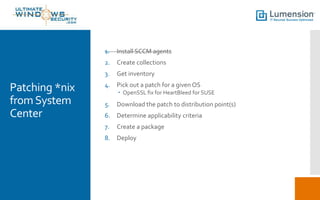
1. Install SCCM agents 
2. Create collections 
3. Get inventory 
4. Pick out a patch for a given OS 
 OpenSSL fix for HeartBleed for SUSE 
5. Download the patch to distribution point(s) 
6. Determine applicability criteria 
7. Create a package 
8. Deploy
1. Install SCCM 
Agents 
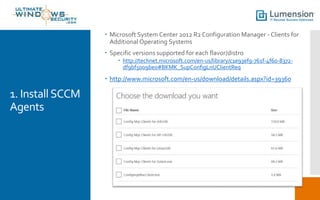
 Microsoft System Center 2012 R2 Configuration Manager - Clients for 
Additional Operating Systems 
 Specific versions supported for each flavor/distro 
 http://technet.microsoft.com/en-us/library/c1e93ef9-761f-4f60-8372- 
df9bf5009be0#BKMK_SupConfigLnUClientReq 
 http://www.microsoft.com/en-us/download/details.aspx?id=39360
1. Install SCCM 
Agents 
 Mac 
 http://channel9.msdn.com/Events/TechEd/NorthAmerica/2014/PCIT-B336# 
fbid= 
 Steps 
 Download the Mac client msi file to a Windows system 
 Run the msi and it will create a dmg file under the default location 
“C:Program Files (x86)MicrosoftSystem Center 2012 Configuration 
Manager Mac Client” on the Windows system 
 Copy the dmg file to a network share or a folder on a Mac computer 
 Access and open the dmg file on a Mac computer and install the client using 
instructions in the online documentation. http://technet.microsoft.com/en-us/ 
library/jj591553.aspx
1. Install SCCM 
Agents 
 Linux 
 http://prajwaldesai.com/how-to-install-sccm-2012-sp1-client-agent-on-linux- 
computers/ 
 https://vlabs.holsystems.com/vlabs/technet?eng=VLabs&auth=none&src 
=microsoft.holsystems.com&altadd=true&labid=10436 
 Steps 
 On a Windows computer download the Linux client 
 The downloaded file is a self-extracting exe and will extract tar files for 
the different versions of your operating system. 
 Copy the install script and the .tar file for your computer’s operating 
system version to a folder on your Linux computer. 
 Install the client using instructions in the online documentation. 
http://technet.microsoft.com/en-us/library/jj573939.aspx
1. Install SCCM 
Agents 
 UNIX 
 http://technet.microsoft.com/en-us/library/jj573939.aspx 
 Steps 
 On a Windows computer download the appropriate file for UNIX flavor 
you wish to manage 
 The downloaded file is a self-extracting exe and will extract tar files for 
the different versions of your operating system. 
 Copy the install script and the .tar file for your computer’s operating 
system version to a folder on your UNIX computer. 
 Install the client using instructions in the online documentation. 
http://technet.microsoft.com/en-us/library/jj573939.aspx
A little more 
 Rootless discover 
 http://blogs.catapultsystems.com/ttaylor/archive/2012/01/17/scom-manual- 
linux-agent-install-and-rootless-discovery-1.aspx 
 Troubleshooting 
 http://social.technet.microsoft.com/wiki/contents/articles/4966.troubles 
hooting-unixlinux-agent-discovery-in-system-center-2012-operations-manager. 
aspx 
 Licensing 
 Remember, you probably need valid subscriptions to legally patch most 
flavors
Patching *nix 
from System 
Center 
1. Install SCCM agents 
2. Create collections 
3. Get inventory 
4. Pick out a patch for a given OS 
 OpenSSL fix for HeartBleed for SUSE 
5. Download the patch to distribution point(s) 
6. Determine applicability criteria 
7. Create a package 
8. Deploy
Watering can 
patching 
 Automatic updates on Linux 
 Yum 
 Zypper 
 Others? 
 Mac 
 Automatic Updates 
 http://blogs.technet.com/b/scd-odtsp/archive/2013/05/29/system-center-configuration- 
manager-2012-sp1-automatic-updates-on-a-mac-2.aspx 
 Problems with this approach 
 No control, granularity, management 
 Every computer downloads directly from vendor over Internet 
 No maintenance windows 
 Not an enterprise solution 
 No reporting or compliance
What’s left? 
 What’s left? 
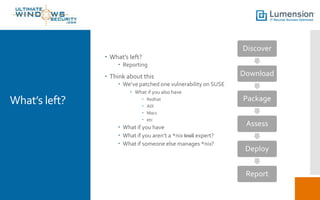
 Reporting 
 Think about this 
 We’ve patched one vulnerability on SUSE 
 What if you also have 
 Redhat 
 AIX 
 Macs 
 etc 
 What if you have 
 What if you aren’t a *nix troll expert? 
 What if someone else manages *nix? 
Discover 
Download 
Package 
Assess 
Deploy 
Report
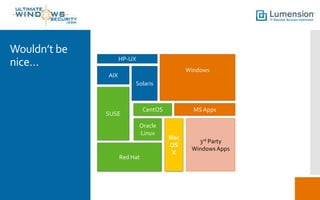
Wouldn’t be 
nice… 
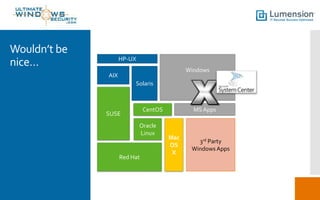
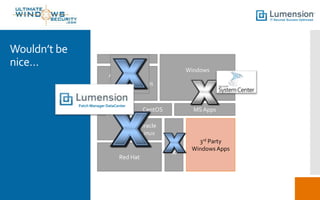
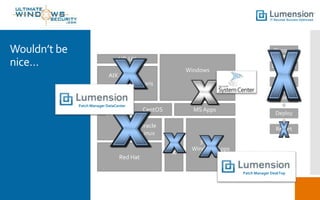
 Wouldn’t it be nice… 
 If you could get WSUS-like functionality for Linux, UNIX, Mac 
 Download patches 
 Assess applicability 
 Deploy 
 Report 
 Without leaving System Center 
 And be able to report on everything from one console? 
 And wouldn’t be nice 
 To add 3rd Party Windows apps to all of that?
Wouldn’t be 
nice… 
AIX 
HP-UX 
Solaris 
Mac 
OS 
X 
CentOS 
Oracle 
Linux 
SUSE 
Red Hat 
Windows 
MS Apps 
3rd Party 
Windows Apps
Wouldn’t be 
nice… 
AIX 
HP-UX 
Solaris 
Mac 
OS 
X 
CentOS 
Oracle 
Linux 
SUSE 
Red Hat 
Windows 
MS Apps 
3rd Party 
Windows Apps
Wouldn’t be 
nice… 
AIX 
HP-UX 
Solaris 
Mac 
OS 
X 
CentOS 
Oracle 
Linux 
SUSE 
Red Hat 
Windows 
MS Apps 
3rd Party 
Windows Apps 
Patch Manager DataCenter
Wouldn’t be 
nice… 
AIX 
HP-UX 
Solaris 
Mac 
OS 
X 
CentOS 
Oracle 
Linux 
SUSE 
Red Hat 
Windows 
MS Apps 
3rd Party 
Windows Apps 
Patch Manager DataCenter 
Patch Manager DeskTop
Wouldn’t be 
nice… 
AIX 
HP-UX 
Solaris 
Mac 
OS 
X 
CentOS 
Oracle 
Linux 
SUSE 
Red Hat 
Windows 
MS Apps 
3rd Party 
Windows Apps 
Patch Manager DataCenter 
Discover 
Download 
Package 
Assess 
Deploy 
Report 
Patch Manager DeskTop
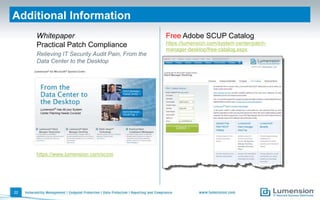
Additional Information 
22 
Whitepaper 
Practical Patch Compliance 
Relieving IT Security Audit Pain, From the 
Data Center to the Desktop 
https://www.lumension.com/sccm 
Free Adobe SCUP Catalog 
https://lumension.com/system-center/patch-manager- 
desktop/free-catalog.aspx

Using SCCM 2012 r2 to Patch Linux, UNIX and Macs

  • 1.
    Sponsored by UsingSystem Center Configuration Manager 2012 R2 to Patch Linux, UNIX and Macs © 2014 Monterey Technology Group Inc.
  • 2.
    Thanks to ©2014 Monterey Technology Group Inc. www.Lumension.com
  • 3.
    Preview of Key Points  Need for patching from Data center to desktop  System Center support for *nix  8 steps for patching *nix from System Center  How far does that get you and what’s left?  Show elegant Lumension Patch Manager DataCenter solution for bringing WSUS functionality to *nix with compliance reporting unified with SC for single pane of glass patch management from Data center to desktop
  • 4.
    The situation Have to be compliant and secure  Everything has to be patched  Everything includes  Windows  MS Apps  3rd party apps  UNIX  Linux  Mac OS X  Don’t just have to be secure  Have to be able show you are secure and compliant  Can waste a lot of time on  Patching the one-offs and minority systems – 80/20 rule  Showing compliance
  • 5.
    System Center System Center de facto standard in MS-centric environments  25% of OpsMgr environments already monitor Linux and UNIX  System Center 2012 R2 has Linux, UNIX and Mac support  Inventory  Hardware  Software  Script execution
  • 6.
    System Center Can you patch *nix from SC?  Yes  Manual  Patch by patch  Watering can  Can you show compliance?  Not without significant custom work  Everything repeated for each flavor/distribution  Walk you through how to do the above  Show elegant Lumension Patch Manager DataCenter solution for bringing WSUS functionality to *nix with compliance reporting unified with SC for single pane of glass patch management from Data center to desktop
  • 7.
    Patching *nix fromSystem Center 1. Install SCCM agents 2. Create collections 3. Get inventory 4. Pick out a patch for a given OS  OpenSSL fix for HeartBleed for SUSE 5. Download the patch to distribution point(s) 6. Determine applicability criteria 7. Create a package 8. Deploy
  • 8.
    1. Install SCCM Agents  Microsoft System Center 2012 R2 Configuration Manager - Clients for Additional Operating Systems  Specific versions supported for each flavor/distro  http://technet.microsoft.com/en-us/library/c1e93ef9-761f-4f60-8372- df9bf5009be0#BKMK_SupConfigLnUClientReq  http://www.microsoft.com/en-us/download/details.aspx?id=39360
  • 9.
    1. Install SCCM Agents  Mac  http://channel9.msdn.com/Events/TechEd/NorthAmerica/2014/PCIT-B336# fbid=  Steps  Download the Mac client msi file to a Windows system  Run the msi and it will create a dmg file under the default location “C:Program Files (x86)MicrosoftSystem Center 2012 Configuration Manager Mac Client” on the Windows system  Copy the dmg file to a network share or a folder on a Mac computer  Access and open the dmg file on a Mac computer and install the client using instructions in the online documentation. http://technet.microsoft.com/en-us/ library/jj591553.aspx
  • 10.
    1. Install SCCM Agents  Linux  http://prajwaldesai.com/how-to-install-sccm-2012-sp1-client-agent-on-linux- computers/  https://vlabs.holsystems.com/vlabs/technet?eng=VLabs&auth=none&src =microsoft.holsystems.com&altadd=true&labid=10436  Steps  On a Windows computer download the Linux client  The downloaded file is a self-extracting exe and will extract tar files for the different versions of your operating system.  Copy the install script and the .tar file for your computer’s operating system version to a folder on your Linux computer.  Install the client using instructions in the online documentation. http://technet.microsoft.com/en-us/library/jj573939.aspx
  • 11.
    1. Install SCCM Agents  UNIX  http://technet.microsoft.com/en-us/library/jj573939.aspx  Steps  On a Windows computer download the appropriate file for UNIX flavor you wish to manage  The downloaded file is a self-extracting exe and will extract tar files for the different versions of your operating system.  Copy the install script and the .tar file for your computer’s operating system version to a folder on your UNIX computer.  Install the client using instructions in the online documentation. http://technet.microsoft.com/en-us/library/jj573939.aspx
  • 12.
    A little more  Rootless discover  http://blogs.catapultsystems.com/ttaylor/archive/2012/01/17/scom-manual- linux-agent-install-and-rootless-discovery-1.aspx  Troubleshooting  http://social.technet.microsoft.com/wiki/contents/articles/4966.troubles hooting-unixlinux-agent-discovery-in-system-center-2012-operations-manager. aspx  Licensing  Remember, you probably need valid subscriptions to legally patch most flavors
  • 13.
    Patching *nix fromSystem Center 1. Install SCCM agents 2. Create collections 3. Get inventory 4. Pick out a patch for a given OS  OpenSSL fix for HeartBleed for SUSE 5. Download the patch to distribution point(s) 6. Determine applicability criteria 7. Create a package 8. Deploy
  • 14.
    Watering can patching  Automatic updates on Linux  Yum  Zypper  Others?  Mac  Automatic Updates  http://blogs.technet.com/b/scd-odtsp/archive/2013/05/29/system-center-configuration- manager-2012-sp1-automatic-updates-on-a-mac-2.aspx  Problems with this approach  No control, granularity, management  Every computer downloads directly from vendor over Internet  No maintenance windows  Not an enterprise solution  No reporting or compliance
  • 15.
    What’s left? What’s left?  Reporting  Think about this  We’ve patched one vulnerability on SUSE  What if you also have  Redhat  AIX  Macs  etc  What if you have  What if you aren’t a *nix troll expert?  What if someone else manages *nix? Discover Download Package Assess Deploy Report
  • 16.
    Wouldn’t be nice…  Wouldn’t it be nice…  If you could get WSUS-like functionality for Linux, UNIX, Mac  Download patches  Assess applicability  Deploy  Report  Without leaving System Center  And be able to report on everything from one console?  And wouldn’t be nice  To add 3rd Party Windows apps to all of that?
  • 17.
    Wouldn’t be nice… AIX HP-UX Solaris Mac OS X CentOS Oracle Linux SUSE Red Hat Windows MS Apps 3rd Party Windows Apps
  • 18.
    Wouldn’t be nice… AIX HP-UX Solaris Mac OS X CentOS Oracle Linux SUSE Red Hat Windows MS Apps 3rd Party Windows Apps
  • 19.
    Wouldn’t be nice… AIX HP-UX Solaris Mac OS X CentOS Oracle Linux SUSE Red Hat Windows MS Apps 3rd Party Windows Apps Patch Manager DataCenter
  • 20.
    Wouldn’t be nice… AIX HP-UX Solaris Mac OS X CentOS Oracle Linux SUSE Red Hat Windows MS Apps 3rd Party Windows Apps Patch Manager DataCenter Patch Manager DeskTop
  • 21.
    Wouldn’t be nice… AIX HP-UX Solaris Mac OS X CentOS Oracle Linux SUSE Red Hat Windows MS Apps 3rd Party Windows Apps Patch Manager DataCenter Discover Download Package Assess Deploy Report Patch Manager DeskTop
  • 22.
    Additional Information 22 Whitepaper Practical Patch Compliance Relieving IT Security Audit Pain, From the Data Center to the Desktop https://www.lumension.com/sccm Free Adobe SCUP Catalog https://lumension.com/system-center/patch-manager- desktop/free-catalog.aspx