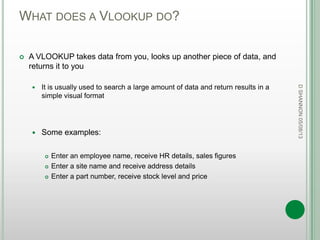
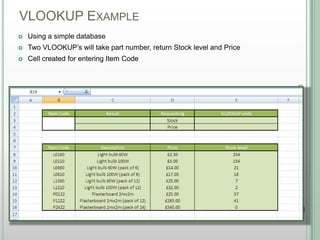
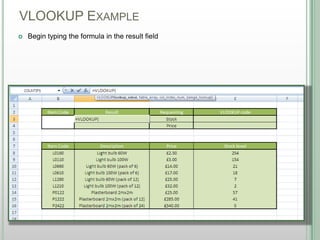
The document explains how to create a VLOOKUP formula in Microsoft Excel 2010 to search for data in a table and return matching values. It describes the four components of a VLOOKUP formula - the lookup value, table array, column index number, and optional range lookup parameter. An example is provided demonstrating how to use VLOOKUP to search an inventory database by part number and return the stock level and price.


![VLOOKUP COMPONENTS
DSHANNON05/08/13
=VLOOKUP(lookup_value, table_array, col_index_num,[range_lookup])](https://image.slidesharecdn.com/sage050813-creatingavlookupv1-130807060806-phpapp02/85/Creating-a-vlookup-v1-0-050813-4-320.jpg)
![VLOOKUP COMPONENTS
DSHANNON05/08/13
=VLOOKUP(lookup_value, table_array, col_index_num,[range_lookup])
tells Excel that a formula is coming up
=
VLOOKUP tells Excel which formula to expect](https://image.slidesharecdn.com/sage050813-creatingavlookupv1-130807060806-phpapp02/85/Creating-a-vlookup-v1-0-050813-5-320.jpg)
![VLOOKUP COMPONENTS
DSHANNON05/08/13
=VLOOKUP(lookup_value, table_array, col_index_num,[range_lookup])](https://image.slidesharecdn.com/sage050813-creatingavlookupv1-130807060806-phpapp02/85/Creating-a-vlookup-v1-0-050813-6-320.jpg)
![VLOOKUP COMPONENTS
DSHANNON05/08/13
=VLOOKUP(lookup_value, table_array, col_index_num,[range_lookup])
The data you need to enter – It‟s best to put a cell number in here so you can
look up different items/names easily
The cells where you want VLOOKUP to search. These can be in a different
sheet or workbook, but both need to be open
A count across to the column that contains the data you want bringing back
Whether you want just that precise number or want anything close. Usually you
will want a precise number
lookup_value
table_array
col_index_num
[range_lookup]](https://image.slidesharecdn.com/sage050813-creatingavlookupv1-130807060806-phpapp02/85/Creating-a-vlookup-v1-0-050813-7-320.jpg)
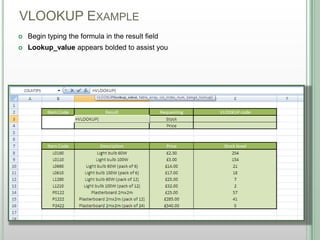
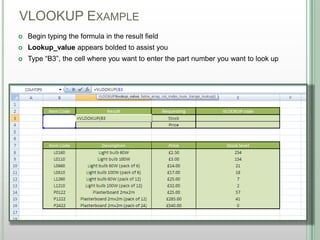
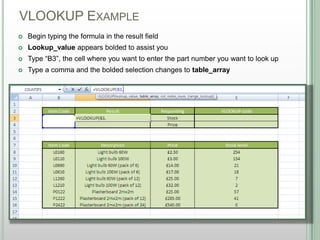
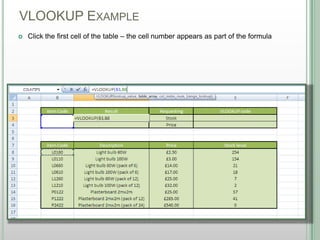
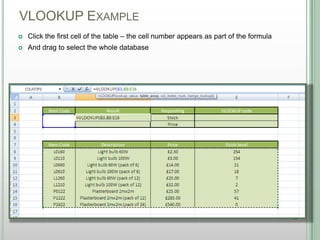
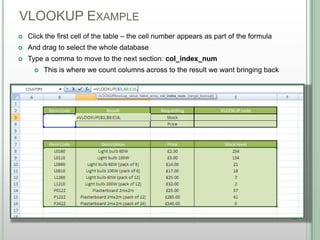
![VLOOKUP EXAMPLE
DSHANNON05/08/13
Type 4 for the col_index_num field, and a comma
[range_lookup] appears bolded, and a drop down appears](https://image.slidesharecdn.com/sage050813-creatingavlookupv1-130807060806-phpapp02/85/Creating-a-vlookup-v1-0-050813-16-320.jpg)
![VLOOKUP EXAMPLE
DSHANNON05/08/13
Type 4 for the col_index_num field, and a comma
[range_lookup] appears bolded, and a drop down appears
Select “FALSE” so that an exact match will be returned](https://image.slidesharecdn.com/sage050813-creatingavlookupv1-130807060806-phpapp02/85/Creating-a-vlookup-v1-0-050813-17-320.jpg)
![VLOOKUP EXAMPLE
DSHANNON05/08/13
Type 4 for the col_index_num field, and a comma
[range_lookup] appears bolded, and a drop down appears
Select “FALSE” so that an exact match will be returned
Close the brackets](https://image.slidesharecdn.com/sage050813-creatingavlookupv1-130807060806-phpapp02/85/Creating-a-vlookup-v1-0-050813-18-320.jpg)
![VLOOKUP EXAMPLE
DSHANNON05/08/13
Type 4 for the col_index_num field, and a comma
[range_lookup] appears bolded, and a drop down appears
Select “FALSE” so that an exact match will be returned
Close the brackets and press „Enter‟](https://image.slidesharecdn.com/sage050813-creatingavlookupv1-130807060806-phpapp02/85/Creating-a-vlookup-v1-0-050813-19-320.jpg)
![VLOOKUP- SUMMARY
Four elements:
A cell to type your data in
A selection to search in
The number of columns over
Exact or near match
*Electronic versions of this presentation are available on request
DSHANNON05/08/13
lookup_value
table_array
col_index_num
[range_lookup]](https://image.slidesharecdn.com/sage050813-creatingavlookupv1-130807060806-phpapp02/85/Creating-a-vlookup-v1-0-050813-25-320.jpg)