Cisco Internetworking Revision Sheet
                                                   Basic Router Operations
To get to User Mode                                                Press ENTER and a password if required.
To get to Privileged Mode                                          Router>enable
To get back to User Mode                                           Router#disable
To Exit the Router                                                 Router>exit or logoff
Break Key                                                          <shift>+<ctrl>+6   ‘x’

To move to the beginning of the command line                       Ctrl+A
To move to the end of the command line                             Ctrl+E
To move forward one character                                      Ctrl+F [or right arrow key]
To move back one character                                         Ctrl+B [or left arrow key]
To repeat the previous command                                     Ctrl+P   [or up arrow key]
To repeat the most recent (last) command                           Ctrl+N   [or down arrow key]
To move back one word                                              Esc+B
To move forward one word                                           Esc+F
To erase a word                                                    Ctrl+W
To erase a line                                                    Ctrl+U
To redisplay a line                                                Ctrl+R

Ends configuration mode and returns to privileged mode             Router#Ctrl+Z
To auto complete a command                                         <tab>

To show the command buffer                                         Router>show history
To set the command buffer size                                     Router>terminal history size
To disable advanced editing features                               Router>terminal no editing
To re-enable advanced editing features                             Router>terminal editing
                                                Viewing Router Information
View IOS version                                                   Router#show version
View current configuration file (RAM)                              Router#show running-config
View saved configuration file (NVRAM)                              Router#show startup-config
View IOS version, size of IOS, and free space in FLASH             Router#show flash
View CPU utilization                                               Router#show processes cpu
View info about programs in RAM                                    Router#show processes
Display interfaces on router and their status                      Router#show interface
Display the ip interfaces on router and their status               Router#show ip interface
Display which protocols are configured on the router               Router#show protocol
Display ip protocol info                                           Router#show ip protocol


                                                   Cisco Discovery Protocol
View info of neighboring Cisco devices (routers, switches,etc)     Router#show cdp neighbors    [ show cdp neighbor detail]
View interface info, default encap, cdp update and holdtime freq   Router#show cdp interface
View a neighbors details                                           Router#show cdp entry RouterB
View cdp update and holdtime frequency                             Router#show cdp
Change update frequency                                            Router#cdp timer 90               [60 sec is default]
Change how long to hold a CDP entry of a neighbor for              Router#cdp holdtime 240
Turn off CDP on an interface                                       Router(config-if)#no cdp enable
CDP is enabled globally [CDP is enabled by default]                Router(config)# cdp run


David J. Zanich Router Commands Rev 2                                                                                      Page   1 of 5
Managing Configuration Files
Run the initial configuration dialog                                     Router#setup
Reboot the router and reload the startup config from NVRAM               Router#reload
Enter global configuration mode                                          Router#config terminal
Copy configuration file in RAM to NVRAM                                  Router#copy running-config startup-config
Copy configuration file in NVRAM to RAM                                  Router#copy startup-config running-config
Erase the configuration file in NVRAM [run initial config dialog]        Router#erase startup-config
Copy startup config file from TFTP to NVRAM                              Router#copy tftp startup-config
Copy startup config file from NVRAM to TFTP                              Router#copy startup-config tftp
Copy startup config file from TFTP to RAM                                Router#copy tftp running-config
Copy running config file from RAM to TFTP                                Router#copy running-config tftp
Backup IOS to file server                                                Router#copy flash tftp
Upgrade the IOS from the file server                                     Router#copy tftp flash
Tell router which IOS file in Flash to boot from                         Router(config)# boot system flash (ios_filename)
Tell router which IOS to request from the TFTP server (fallback)         Router(config)# boot system tftp (ios_filename) tftp_ip_address
Tell router to boot from IOS in ROM                                      Router(config)# boot rom


                                                                 Password
Set the enable secret password [to enter privileged mode]                Router(config)#enable secret Rimmer
Set the enable password                                                  Router(config)#enable Rimmer
Set the password for Telnet                                              Router(config)#line vty 0 4 ;0 4 specifies num of telnet sessions
                                                                         Router(config-line)#login
                                                                         Router(config-line)# password Holly
Set the console port password                                            Router(config)#line con 0
                                                                         Router(config-line)#login
                                                                         Router(config-line)# password Holly
Set the auxiliary password                                               Router(config)#line aux 0
                                                                         Router(config-line)#login
                                                                         Router(config-line)# password Holly
Passwords can be encrypted                                               Routerconfig)#service password-encryption
To de-encrypt the passwords                                              Routerconfig)# no service password-encryption
                                                         Router Identification
Message of the day                                                       Router(config)# banner motd # You are in… #
Give the router a hostname                                               Router(config)#hostname RouterC
                                                               Auto-Install
Router broadcasts to get its own TCP/IP address using                    BOOTP
Router broadcasts again to locate the file server IP addr using          TFTP
Router attempts TFTP to get the IP-to-Hostname mapping file              Network-confg
  If above fails, fallback to 8.3 DOS compatible filename conven          Cisconet.cfg
Router attempts TFTP to get its specific Hostname running config         {Hostname}-confg
 If above fails, fallback to 8.3 DOS compatibile filename conven           {Hostname}.cfg
Note: {Hostname}is determined by parsing network-confg file and checking all Hostnames listed against own IP address

                                                   Configuring a Serial Interface
Is it DCE or DTE?                                                        Router#show controller serial 1
Enter sub interface mode                                                   Router(config)#interface serial 1
Set clock rate on DCE                                                         Router(config-if)#clock rate 64000 [or clockrate 64000]
Set the bandwidth                                                             Router(config-if)# bandwidth 64
Enable the interface                                                          Router(config-if)#no shutdown
Check interface status                                                   Router#show interface serial 1
                                                                         Router#show ip interface brief


David J. Zanich Router Commands Rev 2                                                                                       Page   2 of 5
TCP/IP
Disable IP routing on a router (enabled by default)                    Router(config)#no ip routing
Put an IP address on an interface                                      Router(config)#interface serial 0
                                                                          Router(config-if)#ip address 172.16.1.3 255.255.0.0
                                                                          Router(config-if)#exit
                                                                       Router(config)#interface ethernet 0
                                                                          Router(config-if)#ip address 208.10.10.3 255.255.255.0
Configure RIP                                                          Router(config)# router rip
                                                                          Router(config-router)#network 157.2.0.0
                                                                          Router(config-router)#network 177.2.0.0
Disable RIP routing                                                    Router(config)# no router rip
Configure IGRP                                                         Router(config)# router igrp 300
                                                                          Router(config-router)#network 157.2.0.0
                                                                          Router(config-router)#network 177.2.0.0
Disable IGRP routing                                                   Router(config)#no router igrp 300
View the IP routing table                                              Router#show ip route
View RIP Debug                                                         Router#debug ip rip
View IGRP Debug                                                        Router#debug ip igrp events
                                                                       Router#debug ip igrp transactions

                                                                IPX/SPX
Enable IPX on the router (disabled by default)                         Router(config)#ipx routing
Enable load balancing                                                  Router(config)#ipx maximum-paths 4
Enable IPX on an interface                                             Router(config)#interface serial 0
  Set the IPX network number to 2000 use default encapsulation           Router(config-if)#ipx network 2000
  Ethernet = novell-ether    Serial = HDLC
Note: IPX routing is automatically enabled as soon as an IPX address is on an interface.
To force and encapsulation type:
  Ethernet_802.3 => novell-ether                                       Router(config-if)#ipx network 2000 encap novell-ether
  Ethernet_802.2 => sap                                                Router(config-if)#ipx network 2000 encap sap
  Ethernet_II   => arpa                                                Router(config-if)#ipx network 2000 encap arpa
  Ethernet_SNAP => snap                                                Router(config-if)#ipx network 2000 encap snap
View the SAP tables [list the servers discovered by SAP’s]             Router#show ipx servers
View the IPX routing table                                             Router#show ipx route
View traffic statistics [displays RIP and SAP information]             Router#show ipx traffic
View the IPX address and encapsulation on an interface                 Router#show ipx interface
View the routed protocols on the router                                Router#show protocol
Test host to host connectivity                                         Router#ping ipx <host_address>
Debug Commands
Debug IPX RIP packets                                                  Router#debug ipx routing activity
Debug SAP packets                                                      Router#debug ipx sap
Turn off the debug command                                             Router#undebug ipx routing activity
                                                              Config-Reg
ROM Monitor Mode [prompt will be either: > or rommon>]                 Router(config)# Config-reg 0x0000
Boot from ROM and enter RXBOOT mode                                    Router(config)# Config-reg 0x0001
[prompt will be: Router_Name(boot)> ]
Boot from ROM & check NVRAM for startup [boot] commands                Router(config)# Config-reg 0x0002 [through to 0x000F]
RXBOOT (diagnostics mode, use ‘b’ to continue boot)                    Router(config)# Config-reg 0x2000
Boot from ROM, use NVRAM (upgrade flash in run-from-flash )            Router(config)# Config-reg 0x2101
Boot from ROM, skip NVRAM (disaster recovery)                          Router(config)# Config-reg 0x2141
Boot from FLASH, use NVRAM (normal operation)                          Router(config)# Config-reg 0x2102
Boot from FLASH, skip NVRAM (password recovery)                        Router(config)# Config-reg 0x2142


David J. Zanich Router Commands Rev 2                                                                                   Page   3 of 5
Access-Lists
<1-99>                                                                      IP standard access list
<100-199>                                                                   IP extended access-list
<200-299>                                                                   Protocol type-code access list
<300-399>                                                                   DECnet access list
<400-499>                                                                   XNS standard access list
<500-599>                                                                   XNS extended access list
<600-699>                                                                   Appletalk access list
<700-799>                                                                   48 bit MAC address access list
<800-899>                                                                   IPX standard access list
<900-999>                                                                   IPX extended access list
<1000-1099>                                                                 IPX SAP access list
<1100-1199>                                                                 Extended 48 bit MAC address access list
<1200-1299>                                                                 IPX summary address access list
View which access lists are applied to an interface                         Router#show ip interface serial 0
                                                                            Router#show ipx interface serial 0
                                                                            Router#show appletalk interface serial 0
View all access lists on the router and list each line of the list          Router#show access-lists
View i p access lists only                                                  Router#show ip access-lists
View ipx access lists only                                                  Router#show ipx access-lists
View appletalk access lists only                                            Router#show appletalk access-lists
                           IP Standard Access-Lists [1-99] filter on Source Address Template
Deny the subnet 200.10.10.0/24 from entering port E0                        Router(config)# access-list 1 deny 200.10.10.0 0.0.0.255
Permit all others [any =0.0.0.0 255.255.255.255]                            Router(config)# access-list 1 permit any
Implicit deny all at the end of the access list è                              Router(config)#access-list 1 deny any any
The access list is not operational until bound to an interface              Router(config)#interface e0
                                                                              Router(config-if)#ip access-group 1 in
Deny the host 200.10.10.2/24 from entering port E0                          Router(config)# access-list 88 deny host 200.10.10.2
Permit all others [host =200.10.10.2 0.0.0.0]                               Router(config)# access-list 88 permit any
                                                                        è
An implicit deny all other traffic is the default line of an access listè      Router(config)#access-list 88 deny any any
The access list is not operational until bound to an interface              Router(config)#interface e0
                                                                              Router(config-if)#ip access-group 88 in
           IP Extended Access-Lists [100-199] filter on Srce+Dest Address Template, Port, Protocol
Stop all hosts on network 4.4.4.0 from accessing the web (www)              Router(config)# access-list 101 deny tcp 4.4.4.0 0.0.0.255 any eq 80
Stop host 2.2.2.2 from telneting to host 3.3.3.3 out E0                     Router(config)# access-list 101 deny tcp host 2.2.2.2 host 3.3.3.3 eq 23
Permit all others to have access                                            Router(config)# access-list 101 permit any any
                                                                        è
An implicit deny all other traffic is the default line of an access listè      Router(config)#access-list 101 deny any any
The access list is not operational until bound to an interface              Router(config)#interface e0
                                                                              Router(config-if)#ip access-group 101 out
                     IPX Standard Access-Lists [800-899] filter on Srce+Dest Address Template
Stop network 7B from getting to network 8000                                Router(config)# access-list 801 deny 7B 8000
Allow all other networks [-1 è any network]                                 Router(config)# access-list 801 permit –1 -1
                                                                        è
An implicit deny all other traffic is the default line of an access listè
The access list is not operational until bound to an interface              Router(config)#interface e0
                                                                              Router(config-if)#ipx access-group 801 out
        IPX Extended Access-Lists [900-999] filter on Srce+Dest Address Template, Socket, Protocol
Deny all traffic from network 50 going to network 10 [0=all skts]           Router(config)# access-list 901 deny –1 50 0 10 0
Permit all other traffic to all other networks
                                                                        è
An implicit deny all other traffic is the default line of an access listè   Router(config)# access-list 901 permit -1 –1 0 -1 0
The access list is not operational until bound to an interface              Router(config)#interface e0
                                                                              Router(config-if)#ipx access-group 901 out
                       IPX SAP Access-Lists [1000-1999] filter on Source, Port , Service Name
Allow all packets from network to enter E0 and be included in               Router(config)# access-list 1001 permit 11.0000.0000.0001 0
SAP updates across the network. [0 = all service types]
The access list is not operational until bound to an interface              Router(config)#interface e0
                                                   Stop it coming in          Router(config-if)#ipx input-sap-filter 1001
                                                Or stop it going out           Router(config-if)#ipx output-sap-filter 1001

David J. Zanich Router Commands Rev 2                                                                                                Page    4 of 5
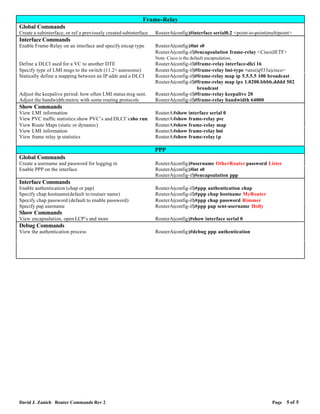
Frame-Relay
Global Commands
Create a subinterface, or ref a previously created subinterface   RouterA(config)#interface serial0.2 <point-to-point|multipoint>
Interface Commands
Enable Frame-Relay on an interface and specify encap type         RouterA(config)#int s0
                                                                  RouterA(config-if)#encapsulation frame-relay <Cisco|IETF>
                                                                  Note: Cisco is the default encapsulation .
Define a DLCI used for a VC to another DTE                        RouterA(config-if)#frame-relay interface-dlci 16
Specify type of LMI msgs to the switch (11.2+ autosense)          RouterA(config-if)#frame-relay lmi-type <ansi|q933a|cisco>
Statically define a mapping between an IP addr and a DLCI         RouterA(config-if)#frame-relay map ip 5.5.5.5 100 broadcast
                                                                  RouterA(config-if)#frame-relay map ipx 1.0200.bbbb.dddd 502
                                                                                         broadcast
Adjust the keepalive period: how often LMI status msg sent.       RouterA(config-if)#frame-relay keepalive 20
Adjust the bandwidth:metric with some routing protocols           RouterA(config-if)#frame-relay bandwidth 64000
Show Commands
View LMI information                                              RouterA#show interface serial 0
View PVC traffic statistics:show PVC’s and DLCI’s:sho run         RouterA#show frame-relay pvc
View Route Maps (static or dynamic)                               RouterA#show frame-relay map
View LMI information                                              RouterA#show frame-relay lmi
View frame relay ip statistics                                    RouterA#show frame-relay i p

                                                                  PPP
Global Commands
Create a username and password for logging in                     RouterA(config)#username OtherRouter password Lister
Enable PPP on the interface                                       RouterA(config)#int s0
                                                                  RouterA(config-if)#encapsulation ppp
Interface Commands
Enable authentication (chap or pap)                               RouterA(config-if)#ppp authentication chap
Specify chap hostname(default to routuer name)                    RouterA(config-if)#ppp chap hostname MyRouter
Specify chap password (default to enable password)                RouterA(config-if)#ppp chap password Rimmer
Specify pap username                                              RouterA(config-if)#ppp pap sent-username Holly
Show Commands
View encapsulation, open LCP’s and more                           RouterA(config)#show interface serial 0
Debug Commands
View the authentication process                                   RouterA(config)#debug ppp authentication


David J. Zanich Router Commands Rev 2                                                                                  Page   5 of 5

Router commands

  • 1.
    Cisco Internetworking RevisionSheet Basic Router Operations To get to User Mode Press ENTER and a password if required. To get to Privileged Mode Router>enable To get back to User Mode Router#disable To Exit the Router Router>exit or logoff Break Key <shift>+<ctrl>+6 ‘x’ To move to the beginning of the command line Ctrl+A To move to the end of the command line Ctrl+E To move forward one character Ctrl+F [or right arrow key] To move back one character Ctrl+B [or left arrow key] To repeat the previous command Ctrl+P [or up arrow key] To repeat the most recent (last) command Ctrl+N [or down arrow key] To move back one word Esc+B To move forward one word Esc+F To erase a word Ctrl+W To erase a line Ctrl+U To redisplay a line Ctrl+R Ends configuration mode and returns to privileged mode Router#Ctrl+Z To auto complete a command <tab> To show the command buffer Router>show history To set the command buffer size Router>terminal history size To disable advanced editing features Router>terminal no editing To re-enable advanced editing features Router>terminal editing Viewing Router Information View IOS version Router#show version View current configuration file (RAM) Router#show running-config View saved configuration file (NVRAM) Router#show startup-config View IOS version, size of IOS, and free space in FLASH Router#show flash View CPU utilization Router#show processes cpu View info about programs in RAM Router#show processes Display interfaces on router and their status Router#show interface Display the ip interfaces on router and their status Router#show ip interface Display which protocols are configured on the router Router#show protocol Display ip protocol info Router#show ip protocol Cisco Discovery Protocol View info of neighboring Cisco devices (routers, switches,etc) Router#show cdp neighbors [ show cdp neighbor detail] View interface info, default encap, cdp update and holdtime freq Router#show cdp interface View a neighbors details Router#show cdp entry RouterB View cdp update and holdtime frequency Router#show cdp Change update frequency Router#cdp timer 90 [60 sec is default] Change how long to hold a CDP entry of a neighbor for Router#cdp holdtime 240 Turn off CDP on an interface Router(config-if)#no cdp enable CDP is enabled globally [CDP is enabled by default] Router(config)# cdp run David J. Zanich Router Commands Rev 2 Page 1 of 5
  • 2.
    Managing Configuration Files Runthe initial configuration dialog Router#setup Reboot the router and reload the startup config from NVRAM Router#reload Enter global configuration mode Router#config terminal Copy configuration file in RAM to NVRAM Router#copy running-config startup-config Copy configuration file in NVRAM to RAM Router#copy startup-config running-config Erase the configuration file in NVRAM [run initial config dialog] Router#erase startup-config Copy startup config file from TFTP to NVRAM Router#copy tftp startup-config Copy startup config file from NVRAM to TFTP Router#copy startup-config tftp Copy startup config file from TFTP to RAM Router#copy tftp running-config Copy running config file from RAM to TFTP Router#copy running-config tftp Backup IOS to file server Router#copy flash tftp Upgrade the IOS from the file server Router#copy tftp flash Tell router which IOS file in Flash to boot from Router(config)# boot system flash (ios_filename) Tell router which IOS to request from the TFTP server (fallback) Router(config)# boot system tftp (ios_filename) tftp_ip_address Tell router to boot from IOS in ROM Router(config)# boot rom Password Set the enable secret password [to enter privileged mode] Router(config)#enable secret Rimmer Set the enable password Router(config)#enable Rimmer Set the password for Telnet Router(config)#line vty 0 4 ;0 4 specifies num of telnet sessions Router(config-line)#login Router(config-line)# password Holly Set the console port password Router(config)#line con 0 Router(config-line)#login Router(config-line)# password Holly Set the auxiliary password Router(config)#line aux 0 Router(config-line)#login Router(config-line)# password Holly Passwords can be encrypted Routerconfig)#service password-encryption To de-encrypt the passwords Routerconfig)# no service password-encryption Router Identification Message of the day Router(config)# banner motd # You are in… # Give the router a hostname Router(config)#hostname RouterC Auto-Install Router broadcasts to get its own TCP/IP address using BOOTP Router broadcasts again to locate the file server IP addr using TFTP Router attempts TFTP to get the IP-to-Hostname mapping file Network-confg If above fails, fallback to 8.3 DOS compatible filename conven Cisconet.cfg Router attempts TFTP to get its specific Hostname running config {Hostname}-confg If above fails, fallback to 8.3 DOS compatibile filename conven {Hostname}.cfg Note: {Hostname}is determined by parsing network-confg file and checking all Hostnames listed against own IP address Configuring a Serial Interface Is it DCE or DTE? Router#show controller serial 1 Enter sub interface mode Router(config)#interface serial 1 Set clock rate on DCE Router(config-if)#clock rate 64000 [or clockrate 64000] Set the bandwidth Router(config-if)# bandwidth 64 Enable the interface Router(config-if)#no shutdown Check interface status Router#show interface serial 1 Router#show ip interface brief David J. Zanich Router Commands Rev 2 Page 2 of 5
  • 3.
    TCP/IP Disable IP routingon a router (enabled by default) Router(config)#no ip routing Put an IP address on an interface Router(config)#interface serial 0 Router(config-if)#ip address 172.16.1.3 255.255.0.0 Router(config-if)#exit Router(config)#interface ethernet 0 Router(config-if)#ip address 208.10.10.3 255.255.255.0 Configure RIP Router(config)# router rip Router(config-router)#network 157.2.0.0 Router(config-router)#network 177.2.0.0 Disable RIP routing Router(config)# no router rip Configure IGRP Router(config)# router igrp 300 Router(config-router)#network 157.2.0.0 Router(config-router)#network 177.2.0.0 Disable IGRP routing Router(config)#no router igrp 300 View the IP routing table Router#show ip route View RIP Debug Router#debug ip rip View IGRP Debug Router#debug ip igrp events Router#debug ip igrp transactions IPX/SPX Enable IPX on the router (disabled by default) Router(config)#ipx routing Enable load balancing Router(config)#ipx maximum-paths 4 Enable IPX on an interface Router(config)#interface serial 0 Set the IPX network number to 2000 use default encapsulation Router(config-if)#ipx network 2000 Ethernet = novell-ether Serial = HDLC Note: IPX routing is automatically enabled as soon as an IPX address is on an interface. To force and encapsulation type: Ethernet_802.3 => novell-ether Router(config-if)#ipx network 2000 encap novell-ether Ethernet_802.2 => sap Router(config-if)#ipx network 2000 encap sap Ethernet_II => arpa Router(config-if)#ipx network 2000 encap arpa Ethernet_SNAP => snap Router(config-if)#ipx network 2000 encap snap View the SAP tables [list the servers discovered by SAP’s] Router#show ipx servers View the IPX routing table Router#show ipx route View traffic statistics [displays RIP and SAP information] Router#show ipx traffic View the IPX address and encapsulation on an interface Router#show ipx interface View the routed protocols on the router Router#show protocol Test host to host connectivity Router#ping ipx <host_address> Debug Commands Debug IPX RIP packets Router#debug ipx routing activity Debug SAP packets Router#debug ipx sap Turn off the debug command Router#undebug ipx routing activity Config-Reg ROM Monitor Mode [prompt will be either: > or rommon>] Router(config)# Config-reg 0x0000 Boot from ROM and enter RXBOOT mode Router(config)# Config-reg 0x0001 [prompt will be: Router_Name(boot)> ] Boot from ROM & check NVRAM for startup [boot] commands Router(config)# Config-reg 0x0002 [through to 0x000F] RXBOOT (diagnostics mode, use ‘b’ to continue boot) Router(config)# Config-reg 0x2000 Boot from ROM, use NVRAM (upgrade flash in run-from-flash ) Router(config)# Config-reg 0x2101 Boot from ROM, skip NVRAM (disaster recovery) Router(config)# Config-reg 0x2141 Boot from FLASH, use NVRAM (normal operation) Router(config)# Config-reg 0x2102 Boot from FLASH, skip NVRAM (password recovery) Router(config)# Config-reg 0x2142 David J. Zanich Router Commands Rev 2 Page 3 of 5
  • 4.
    Access-Lists <1-99> IP standard access list <100-199> IP extended access-list <200-299> Protocol type-code access list <300-399> DECnet access list <400-499> XNS standard access list <500-599> XNS extended access list <600-699> Appletalk access list <700-799> 48 bit MAC address access list <800-899> IPX standard access list <900-999> IPX extended access list <1000-1099> IPX SAP access list <1100-1199> Extended 48 bit MAC address access list <1200-1299> IPX summary address access list View which access lists are applied to an interface Router#show ip interface serial 0 Router#show ipx interface serial 0 Router#show appletalk interface serial 0 View all access lists on the router and list each line of the list Router#show access-lists View i p access lists only Router#show ip access-lists View ipx access lists only Router#show ipx access-lists View appletalk access lists only Router#show appletalk access-lists IP Standard Access-Lists [1-99] filter on Source Address Template Deny the subnet 200.10.10.0/24 from entering port E0 Router(config)# access-list 1 deny 200.10.10.0 0.0.0.255 Permit all others [any =0.0.0.0 255.255.255.255] Router(config)# access-list 1 permit any Implicit deny all at the end of the access list è Router(config)#access-list 1 deny any any The access list is not operational until bound to an interface Router(config)#interface e0 Router(config-if)#ip access-group 1 in Deny the host 200.10.10.2/24 from entering port E0 Router(config)# access-list 88 deny host 200.10.10.2 Permit all others [host =200.10.10.2 0.0.0.0] Router(config)# access-list 88 permit any è An implicit deny all other traffic is the default line of an access listè Router(config)#access-list 88 deny any any The access list is not operational until bound to an interface Router(config)#interface e0 Router(config-if)#ip access-group 88 in IP Extended Access-Lists [100-199] filter on Srce+Dest Address Template, Port, Protocol Stop all hosts on network 4.4.4.0 from accessing the web (www) Router(config)# access-list 101 deny tcp 4.4.4.0 0.0.0.255 any eq 80 Stop host 2.2.2.2 from telneting to host 3.3.3.3 out E0 Router(config)# access-list 101 deny tcp host 2.2.2.2 host 3.3.3.3 eq 23 Permit all others to have access Router(config)# access-list 101 permit any any è An implicit deny all other traffic is the default line of an access listè Router(config)#access-list 101 deny any any The access list is not operational until bound to an interface Router(config)#interface e0 Router(config-if)#ip access-group 101 out IPX Standard Access-Lists [800-899] filter on Srce+Dest Address Template Stop network 7B from getting to network 8000 Router(config)# access-list 801 deny 7B 8000 Allow all other networks [-1 è any network] Router(config)# access-list 801 permit –1 -1 è An implicit deny all other traffic is the default line of an access listè The access list is not operational until bound to an interface Router(config)#interface e0 Router(config-if)#ipx access-group 801 out IPX Extended Access-Lists [900-999] filter on Srce+Dest Address Template, Socket, Protocol Deny all traffic from network 50 going to network 10 [0=all skts] Router(config)# access-list 901 deny –1 50 0 10 0 Permit all other traffic to all other networks è An implicit deny all other traffic is the default line of an access listè Router(config)# access-list 901 permit -1 –1 0 -1 0 The access list is not operational until bound to an interface Router(config)#interface e0 Router(config-if)#ipx access-group 901 out IPX SAP Access-Lists [1000-1999] filter on Source, Port , Service Name Allow all packets from network to enter E0 and be included in Router(config)# access-list 1001 permit 11.0000.0000.0001 0 SAP updates across the network. [0 = all service types] The access list is not operational until bound to an interface Router(config)#interface e0 Stop it coming in Router(config-if)#ipx input-sap-filter 1001 Or stop it going out Router(config-if)#ipx output-sap-filter 1001 David J. Zanich Router Commands Rev 2 Page 4 of 5
  • 5.
    Frame-Relay Global Commands Create asubinterface, or ref a previously created subinterface RouterA(config)#interface serial0.2 <point-to-point|multipoint> Interface Commands Enable Frame-Relay on an interface and specify encap type RouterA(config)#int s0 RouterA(config-if)#encapsulation frame-relay <Cisco|IETF> Note: Cisco is the default encapsulation . Define a DLCI used for a VC to another DTE RouterA(config-if)#frame-relay interface-dlci 16 Specify type of LMI msgs to the switch (11.2+ autosense) RouterA(config-if)#frame-relay lmi-type <ansi|q933a|cisco> Statically define a mapping between an IP addr and a DLCI RouterA(config-if)#frame-relay map ip 5.5.5.5 100 broadcast RouterA(config-if)#frame-relay map ipx 1.0200.bbbb.dddd 502 broadcast Adjust the keepalive period: how often LMI status msg sent. RouterA(config-if)#frame-relay keepalive 20 Adjust the bandwidth:metric with some routing protocols RouterA(config-if)#frame-relay bandwidth 64000 Show Commands View LMI information RouterA#show interface serial 0 View PVC traffic statistics:show PVC’s and DLCI’s:sho run RouterA#show frame-relay pvc View Route Maps (static or dynamic) RouterA#show frame-relay map View LMI information RouterA#show frame-relay lmi View frame relay ip statistics RouterA#show frame-relay i p PPP Global Commands Create a username and password for logging in RouterA(config)#username OtherRouter password Lister Enable PPP on the interface RouterA(config)#int s0 RouterA(config-if)#encapsulation ppp Interface Commands Enable authentication (chap or pap) RouterA(config-if)#ppp authentication chap Specify chap hostname(default to routuer name) RouterA(config-if)#ppp chap hostname MyRouter Specify chap password (default to enable password) RouterA(config-if)#ppp chap password Rimmer Specify pap username RouterA(config-if)#ppp pap sent-username Holly Show Commands View encapsulation, open LCP’s and more RouterA(config)#show interface serial 0 Debug Commands View the authentication process RouterA(config)#debug ppp authentication David J. Zanich Router Commands Rev 2 Page 5 of 5