© 2008 Cisco Systems, Inc. All rights reserved. Cisco ConfidentialPresentation_ID 1
Instructor Materials
Chapter 6: VLANs
CCNA Routing and Switching
Routing and Switching Essentials v6.0
© 2008 Cisco Systems, Inc. All rights reserved. Cisco ConfidentialPresentation_ID 14
Chapter 6: VLANs
Routing and Switching Essentials v6.0
Presentation_ID 15© 2008 Cisco Systems, Inc. All rights reserved. Cisco Confidential
Chapter 6 - Sections & Objectives
6.1 VLAN Segmentation
• Explain the purpose of VLANs in a switched network.
• Explain how a switch forwards frames based on VLAN configuration in a multi-
switch environment.
6.2 VLAN Implementations
• Configure a switch port to be assigned to a VLAN based on requirements.
• Configure a trunk port on a LAN switch.
• Troubleshoot VLAN and trunk configurations in a switched network.
6.3 Inter-VLAN Routing Using Routers
• Describe the two options for configuring Inter-VLAN routing.
• Configure Legacy Inter-VLAN Routing.
• Configure Router-on-a-Stick Inter-VLAN Routing
© 2008 Cisco Systems, Inc. All rights reserved. Cisco ConfidentialPresentation_ID 16
6.1 VLAN Segmentation
Presentation_ID 17© 2008 Cisco Systems, Inc. All rights reserved. Cisco Confidential
Overview of VLANs
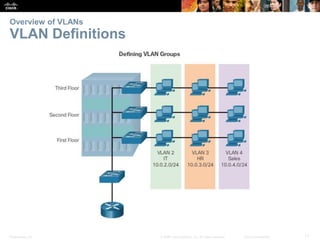
VLAN Definitions
Presentation_ID 18© 2008 Cisco Systems, Inc. All rights reserved. Cisco Confidential
Overview of VLANs
VLAN Definitions (cont.)
 VLANs allow an administrator to segment networks based on factors such
as function, project team, or application, without regard for the physical
location of the user or device.
 VLANs enable the implementation of access and security policies
according to specific groupings of users.
 A VLAN is a logical partition of a Layer 2 network.
 Multiple partitions can be created, allowing for multiple VLANs to co-exist.
 Each VLAN is a broadcast domain, usually with its own IP network.
 VLANs are mutually isolated, and packets can only pass between them
via a router.
 The partitioning of the Layer 2 network takes place inside a Layer 2
device, usually via a switch.
 The hosts grouped within a VLAN are unaware of the VLAN’s existence.
Presentation_ID 19© 2008 Cisco Systems, Inc. All rights reserved. Cisco Confidential
Overview of VLANs
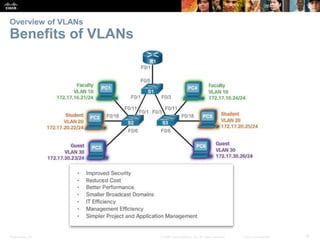
Benefits of VLANs
Presentation_ID 20© 2008 Cisco Systems, Inc. All rights reserved. Cisco Confidential
Overview of VLANs
Types of VLANs
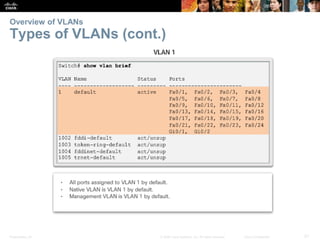
 Data VLAN – user generated traffic
 Default VLAN – all switch ports become part of this VLAN until switch is
configured, show vlan brief
 Native VLAN – used for untagged traffic
 Management VLAN – used to access management capabilities
Presentation_ID 21© 2008 Cisco Systems, Inc. All rights reserved. Cisco Confidential
Overview of VLANs
Types of VLANs (cont.)
Presentation_ID 22© 2008 Cisco Systems, Inc. All rights reserved. Cisco Confidential
Overview of VLANs
Voice VLANs
Presentation_ID 23© 2008 Cisco Systems, Inc. All rights reserved. Cisco Confidential
Overview of VLANs
Voice VLANs (cont.)
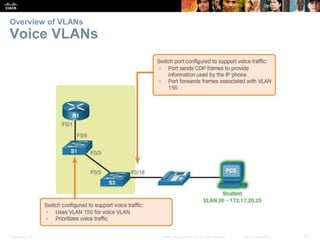
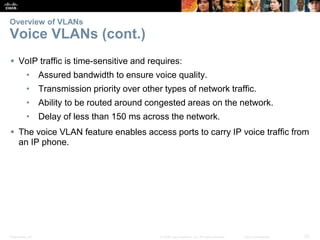
 VoIP traffic is time-sensitive and requires:
• Assured bandwidth to ensure voice quality.
• Transmission priority over other types of network traffic.
• Ability to be routed around congested areas on the network.
• Delay of less than 150 ms across the network.
 The voice VLAN feature enables access ports to carry IP voice traffic from
an IP phone.
Presentation_ID 24© 2008 Cisco Systems, Inc. All rights reserved. Cisco Confidential
VLANs in a Multi-Switched Environment
VLAN Trunks
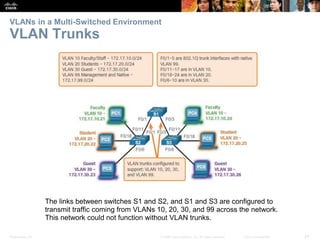
The links between switches S1 and S2, and S1 and S3 are configured to
transmit traffic coming from VLANs 10, 20, 30, and 99 across the network.
This network could not function without VLAN trunks.
Presentation_ID 25© 2008 Cisco Systems, Inc. All rights reserved. Cisco Confidential
VLANs in a Multi-Switched Environment
VLAN Trunks (cont.)
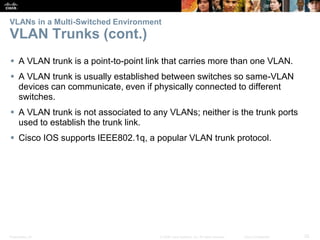
 A VLAN trunk is a point-to-point link that carries more than one VLAN.
 A VLAN trunk is usually established between switches so same-VLAN
devices can communicate, even if physically connected to different
switches.
 A VLAN trunk is not associated to any VLANs; neither is the trunk ports
used to establish the trunk link.
 Cisco IOS supports IEEE802.1q, a popular VLAN trunk protocol.
Presentation_ID 26© 2008 Cisco Systems, Inc. All rights reserved. Cisco Confidential
VLANs in a Multi-Switched Environment
Controlling Broadcast Domains with VLANs
Presentation_ID 27© 2008 Cisco Systems, Inc. All rights reserved. Cisco Confidential
VLANs in a Multi-Switched Environment
Controlling Broadcast Domains with VLANs
Presentation_ID 28© 2008 Cisco Systems, Inc. All rights reserved. Cisco Confidential
VLANs in a Multi-Switched Environment
Controlling Broadcast Domains with VLANs
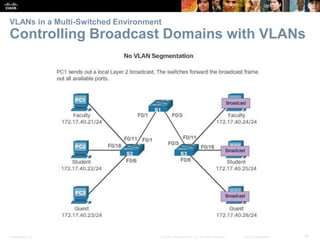
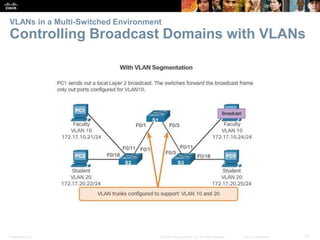
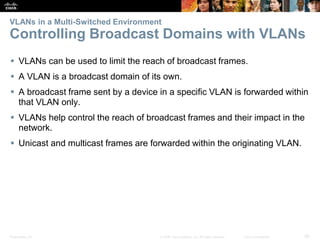
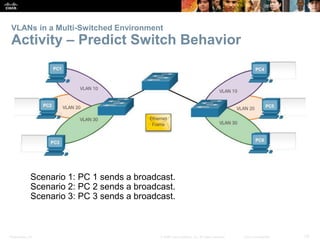
 VLANs can be used to limit the reach of broadcast frames.
 A VLAN is a broadcast domain of its own.
 A broadcast frame sent by a device in a specific VLAN is forwarded within
that VLAN only.
 VLANs help control the reach of broadcast frames and their impact in the
network.
 Unicast and multicast frames are forwarded within the originating VLAN.
Presentation_ID 29© 2008 Cisco Systems, Inc. All rights reserved. Cisco Confidential
VLANs in a Multi-Switched Environment
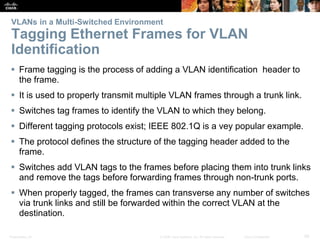
Tagging Ethernet Frames for VLAN
Identification
 Frame tagging is the process of adding a VLAN identification header to
the frame.
 It is used to properly transmit multiple VLAN frames through a trunk link.
 Switches tag frames to identify the VLAN to which they belong.
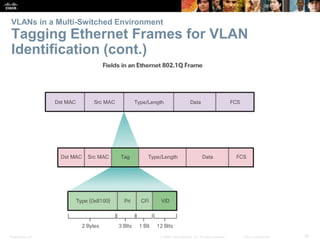
 Different tagging protocols exist; IEEE 802.1Q is a vey popular example.
 The protocol defines the structure of the tagging header added to the
frame.
 Switches add VLAN tags to the frames before placing them into trunk links
and remove the tags before forwarding frames through non-trunk ports.
 When properly tagged, the frames can transverse any number of switches
via trunk links and still be forwarded within the correct VLAN at the
destination.
Presentation_ID 30© 2008 Cisco Systems, Inc. All rights reserved. Cisco Confidential
VLANs in a Multi-Switched Environment
Tagging Ethernet Frames for VLAN
Identification (cont.)
Presentation_ID 31© 2008 Cisco Systems, Inc. All rights reserved. Cisco Confidential
VLANs in a Multi-Switched Environment
Native VLANs and 802.1Q Tagging
 Control traffic sent on the native VLAN should not be tagged.
 Frames received untagged, remain untagged and are placed in the native
VLAN when forwarded.
 If there are no ports associated to the native VLAN and no other trunk
links, an untagged frame is dropped.
 When configuring a switch port on a Cisco switch, configure devices so
that they do not send tagged frames on the native VLAN.
 In Cisco switches, the native VLAN is VLAN 1, by default.
Presentation_ID 32© 2008 Cisco Systems, Inc. All rights reserved. Cisco Confidential
VLANs in a Multi-Switched Environment
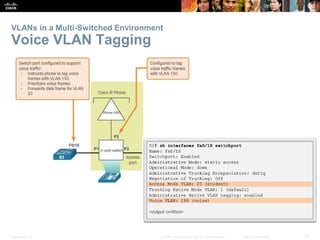
Voice VLAN Tagging
Presentation_ID 33© 2008 Cisco Systems, Inc. All rights reserved. Cisco Confidential
VLANs in a Multi-Switched Environment
Activity – Predict Switch Behavior
Scenario 1: PC 1 sends a broadcast.
Scenario 2: PC 2 sends a broadcast.
Scenario 3: PC 3 sends a broadcast.
© 2008 Cisco Systems, Inc. All rights reserved. Cisco ConfidentialPresentation_ID 34
6.2 VLAN Implementations
Presentation_ID 35© 2008 Cisco Systems, Inc. All rights reserved. Cisco Confidential
VLAN Assignment
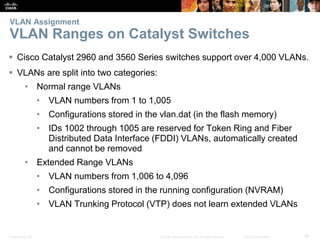
VLAN Ranges on Catalyst Switches
 Cisco Catalyst 2960 and 3560 Series switches support over 4,000 VLANs.
 VLANs are split into two categories:
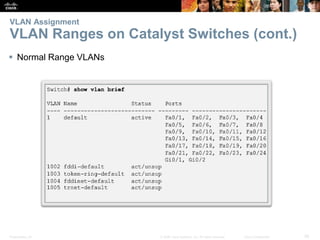
• Normal range VLANs
• VLAN numbers from 1 to 1,005
• Configurations stored in the vlan.dat (in the flash memory)
• IDs 1002 through 1005 are reserved for Token Ring and Fiber
Distributed Data Interface (FDDI) VLANs, automatically created
and cannot be removed
• Extended Range VLANs
• VLAN numbers from 1,006 to 4,096
• Configurations stored in the running configuration (NVRAM)
• VLAN Trunking Protocol (VTP) does not learn extended VLANs
Presentation_ID 36© 2008 Cisco Systems, Inc. All rights reserved. Cisco Confidential
VLAN Assignment
VLAN Ranges on Catalyst Switches (cont.)
 Normal Range VLANs
Presentation_ID 37© 2008 Cisco Systems, Inc. All rights reserved. Cisco Confidential
VLAN Assignment
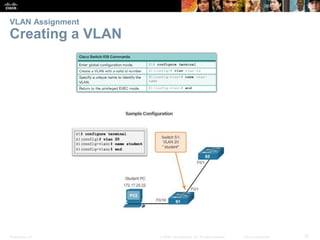
Creating a VLAN
Presentation_ID 38© 2008 Cisco Systems, Inc. All rights reserved. Cisco Confidential
VLAN Assignment
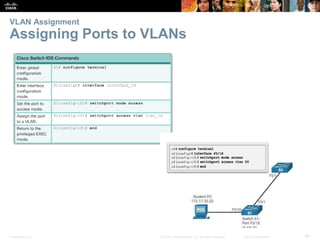
Assigning Ports to VLANs
Presentation_ID 39© 2008 Cisco Systems, Inc. All rights reserved. Cisco Confidential
VLAN Assignment
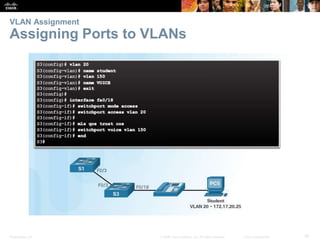
Assigning Ports to VLANs
Presentation_ID 40© 2008 Cisco Systems, Inc. All rights reserved. Cisco Confidential
VLAN Assignment
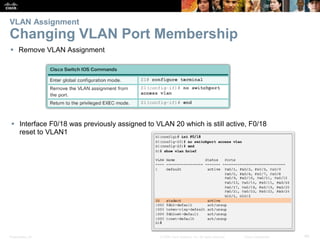
Changing VLAN Port Membership
 Remove VLAN Assignment
 Interface F0/18 was previously assigned to VLAN 20 which is still active, F0/18
reset to VLAN1
Presentation_ID 41© 2008 Cisco Systems, Inc. All rights reserved. Cisco Confidential
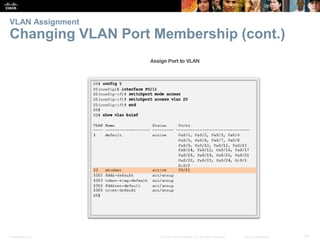
VLAN Assignment
Changing VLAN Port Membership (cont.)
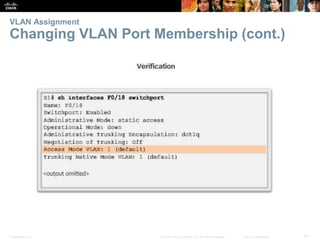
Presentation_ID 42© 2008 Cisco Systems, Inc. All rights reserved. Cisco Confidential
VLAN Assignment
Changing VLAN Port Membership (cont.)
Presentation_ID 43© 2008 Cisco Systems, Inc. All rights reserved. Cisco Confidential
VLAN Assignment
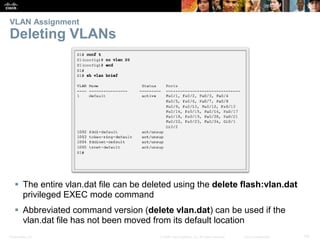
Deleting VLANs
 The entire vlan.dat file can be deleted using the delete flash:vlan.dat
privileged EXEC mode command
 Abbreviated command version (delete vlan.dat) can be used if the
vlan.dat file has not been moved from its default location
Presentation_ID 44© 2008 Cisco Systems, Inc. All rights reserved. Cisco Confidential
VLAN Assignment
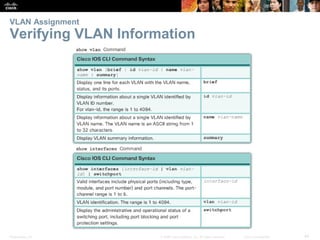
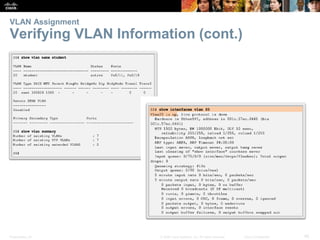
Verifying VLAN Information
Presentation_ID 45© 2008 Cisco Systems, Inc. All rights reserved. Cisco Confidential
VLAN Assignment
Verifying VLAN Information (cont.)
Presentation_ID 46© 2008 Cisco Systems, Inc. All rights reserved. Cisco Confidential
VLAN Trunks
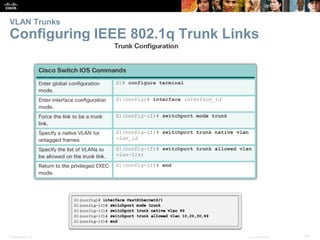
Configuring IEEE 802.1q Trunk Links
Presentation_ID 47© 2008 Cisco Systems, Inc. All rights reserved. Cisco Confidential
VLAN Assignment
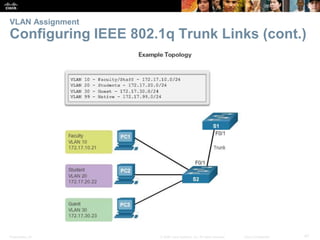
Configuring IEEE 802.1q Trunk Links (cont.)
Presentation_ID 48© 2008 Cisco Systems, Inc. All rights reserved. Cisco Confidential
VLAN Trunks
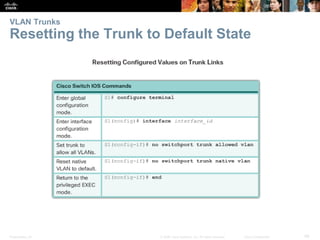
Resetting the Trunk to Default State
Presentation_ID 49© 2008 Cisco Systems, Inc. All rights reserved. Cisco Confidential
VLAN Trunks
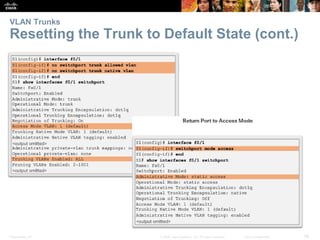
Resetting the Trunk to Default State (cont.)
Presentation_ID 50© 2008 Cisco Systems, Inc. All rights reserved. Cisco Confidential
VLAN Trunks
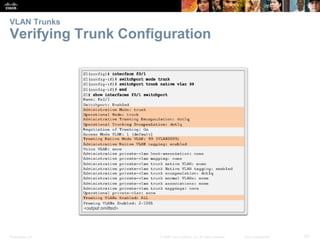
Verifying Trunk Configuration
Presentation_ID 51© 2008 Cisco Systems, Inc. All rights reserved. Cisco Confidential
Troubleshoot VLANs and Trunks
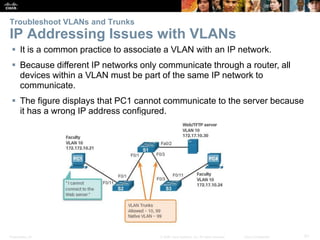
IP Addressing Issues with VLANs
 It is a common practice to associate a VLAN with an IP network.
 Because different IP networks only communicate through a router, all
devices within a VLAN must be part of the same IP network to
communicate.
 The figure displays that PC1 cannot communicate to the server because
it has a wrong IP address configured.
Presentation_ID 52© 2008 Cisco Systems, Inc. All rights reserved. Cisco Confidential
Troubleshoot VLANs and Trunks
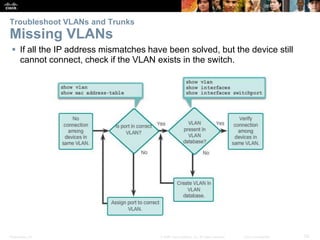
Missing VLANs
 If all the IP address mismatches have been solved, but the device still
cannot connect, check if the VLAN exists in the switch.
Presentation_ID 53© 2008 Cisco Systems, Inc. All rights reserved. Cisco Confidential
Troubleshoot VLANs and Trunks
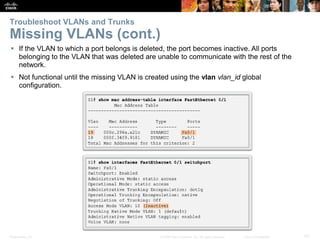
Missing VLANs (cont.)
 If the VLAN to which a port belongs is deleted, the port becomes inactive. All ports
belonging to the VLAN that was deleted are unable to communicate with the rest of the
network.
 Not functional until the missing VLAN is created using the vlan vlan_id global
configuration.
Presentation_ID 54© 2008 Cisco Systems, Inc. All rights reserved. Cisco Confidential
Troubleshoot VLANs and Trunks
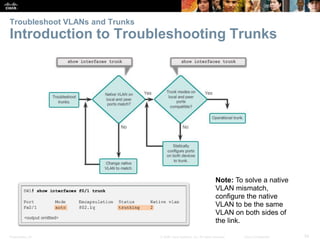
Introduction to Troubleshooting Trunks
Note: To solve a native
VLAN mismatch,
configure the native
VLAN to be the same
VLAN on both sides of
the link.
Presentation_ID 55© 2008 Cisco Systems, Inc. All rights reserved. Cisco Confidential
Troubleshoot VLANs and Trunks
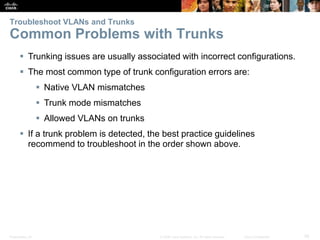
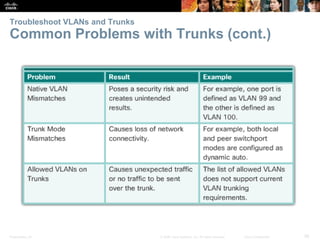
Common Problems with Trunks
 Trunking issues are usually associated with incorrect configurations.
 The most common type of trunk configuration errors are:
 Native VLAN mismatches
 Trunk mode mismatches
 Allowed VLANs on trunks
 If a trunk problem is detected, the best practice guidelines
recommend to troubleshoot in the order shown above.
Presentation_ID 56© 2008 Cisco Systems, Inc. All rights reserved. Cisco Confidential
Troubleshoot VLANs and Trunks
Common Problems with Trunks (cont.)
Presentation_ID 57© 2008 Cisco Systems, Inc. All rights reserved. Cisco Confidential
Troubleshoot VLANs and Trunks
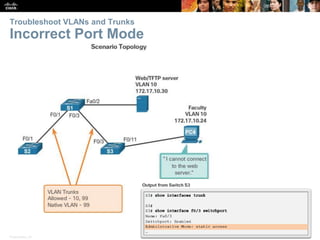
Incorrect Port Mode
Presentation_ID 58© 2008 Cisco Systems, Inc. All rights reserved. Cisco Confidential
Troubleshoot VLANs and Trunks
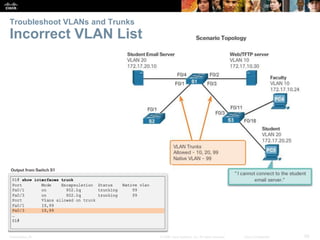
Incorrect VLAN List
Presentation_ID 59© 2008 Cisco Systems, Inc. All rights reserved. Cisco Confidential
Troubleshoot VLANs and Trunks
Incorrect VLAN List (cont.)
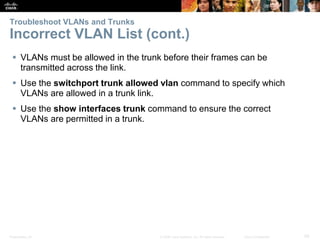
 VLANs must be allowed in the trunk before their frames can be
transmitted across the link.
 Use the switchport trunk allowed vlan command to specify which
VLANs are allowed in a trunk link.
 Use the show interfaces trunk command to ensure the correct
VLANs are permitted in a trunk.
© 2008 Cisco Systems, Inc. All rights reserved. Cisco ConfidentialPresentation_ID 60
6.3 Inter-VLAN Routing
Using Routers
Presentation_ID 61© 2008 Cisco Systems, Inc. All rights reserved. Cisco Confidential
Inter-VLAN Routing Operation
What is Inter-VLAN Routing?
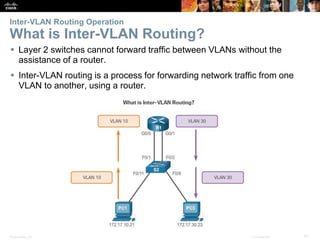
 Layer 2 switches cannot forward traffic between VLANs without the
assistance of a router.
 Inter-VLAN routing is a process for forwarding network traffic from one
VLAN to another, using a router.
Presentation_ID 62© 2008 Cisco Systems, Inc. All rights reserved. Cisco Confidential
Inter-VLAN Routing Operation
Legacy Inter-VLAN Routing
In the past:
 Actual routers were used to route between VLANs.
 Each VLAN was connected to a different physical router interface.
 Packets would arrive on the router through one interface, be routed and
leave through another.
 Because the router interfaces were connected to VLANs and had IP
addresses from that specific VLAN, routing between VLANs was
achieved.
 Large networks with large number of VLANs required many router
interfaces.
Presentation_ID 63© 2008 Cisco Systems, Inc. All rights reserved. Cisco Confidential
Inter-VLAN Routing Operation
Legacy Inter-VLAN Routing (cont.)
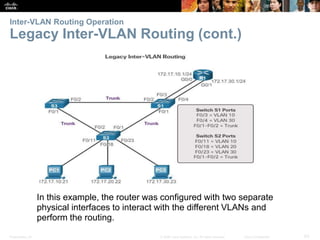
In this example, the router was configured with two separate
physical interfaces to interact with the different VLANs and
perform the routing.
Presentation_ID 64© 2008 Cisco Systems, Inc. All rights reserved. Cisco Confidential
Inter-VLAN Routing Operation
Router-on-a-Stick Inter-VLAN Routing
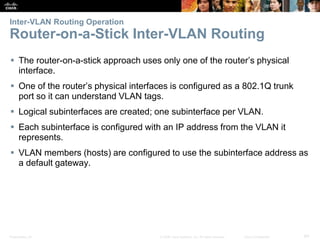
 The router-on-a-stick approach uses only one of the router’s physical
interface.
 One of the router’s physical interfaces is configured as a 802.1Q trunk
port so it can understand VLAN tags.
 Logical subinterfaces are created; one subinterface per VLAN.
 Each subinterface is configured with an IP address from the VLAN it
represents.
 VLAN members (hosts) are configured to use the subinterface address as
a default gateway.
Presentation_ID 65© 2008 Cisco Systems, Inc. All rights reserved. Cisco Confidential
Inter-VLAN Routing Operation
Router-on-a-Stick Inter-VLAN Routing
(cont.)
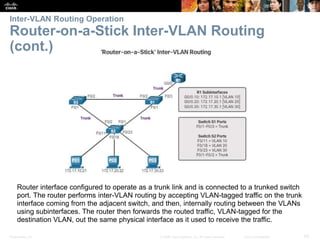
Router interface configured to operate as a trunk link and is connected to a trunked switch
port. The router performs inter-VLAN routing by accepting VLAN-tagged traffic on the trunk
interface coming from the adjacent switch, and then, internally routing between the VLANs
using subinterfaces. The router then forwards the routed traffic, VLAN-tagged for the
destination VLAN, out the same physical interface as it used to receive the traffic.
Presentation_ID 66© 2008 Cisco Systems, Inc. All rights reserved. Cisco Confidential
Inter-VLAN Routing Operation
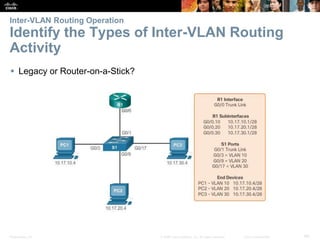
Identify the Types of Inter-VLAN Routing
Activity
 Legacy or Router-on-a-Stick?
Presentation_ID 67© 2008 Cisco Systems, Inc. All rights reserved. Cisco Confidential
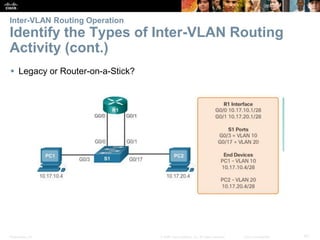
Inter-VLAN Routing Operation
Identify the Types of Inter-VLAN Routing
Activity (cont.)
 Legacy or Router-on-a-Stick?
Presentation_ID 68© 2008 Cisco Systems, Inc. All rights reserved. Cisco Confidential
Configure Legacy Inter-VLAN Routing
Configure Legacy Inter-VLAN Routing:
Preparation
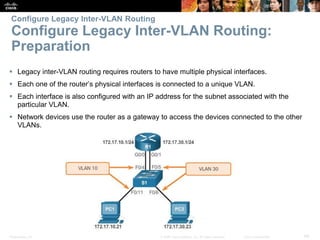
 Legacy inter-VLAN routing requires routers to have multiple physical interfaces.
 Each one of the router’s physical interfaces is connected to a unique VLAN.
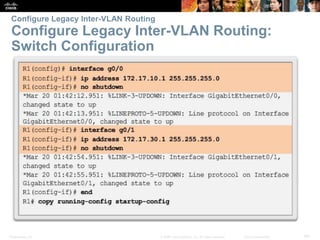
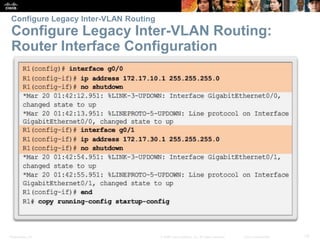
 Each interface is also configured with an IP address for the subnet associated with the
particular VLAN.
 Network devices use the router as a gateway to access the devices connected to the other
VLANs.
Presentation_ID 69© 2008 Cisco Systems, Inc. All rights reserved. Cisco Confidential
Configure Legacy Inter-VLAN Routing
Configure Legacy Inter-VLAN Routing:
Switch Configuration
Presentation_ID 70© 2008 Cisco Systems, Inc. All rights reserved. Cisco Confidential
Configure Legacy Inter-VLAN Routing
Configure Legacy Inter-VLAN Routing:
Router Interface Configuration
Presentation_ID 71© 2008 Cisco Systems, Inc. All rights reserved. Cisco Confidential
Configure Router-on-a-Stick Inter-VLAN Routing
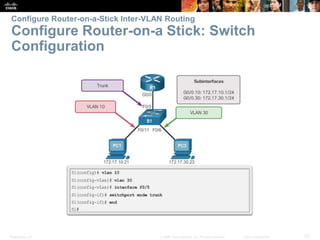
Configure Router-on-a Stick: Preparation
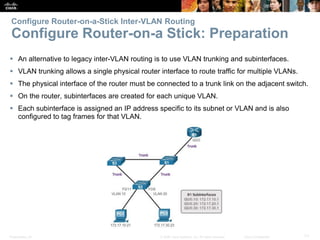
 An alternative to legacy inter-VLAN routing is to use VLAN trunking and subinterfaces.
 VLAN trunking allows a single physical router interface to route traffic for multiple VLANs.
 The physical interface of the router must be connected to a trunk link on the adjacent switch.
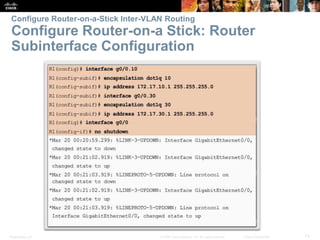
 On the router, subinterfaces are created for each unique VLAN.
 Each subinterface is assigned an IP address specific to its subnet or VLAN and is also
configured to tag frames for that VLAN.
Presentation_ID 72© 2008 Cisco Systems, Inc. All rights reserved. Cisco Confidential
Configure Router-on-a-Stick Inter-VLAN Routing
Configure Router-on-a Stick: Switch
Configuration
Presentation_ID 73© 2008 Cisco Systems, Inc. All rights reserved. Cisco Confidential
Configure Router-on-a-Stick Inter-VLAN Routing
Configure Router-on-a Stick: Router
Subinterface Configuration
Presentation_ID 74© 2008 Cisco Systems, Inc. All rights reserved. Cisco Confidential
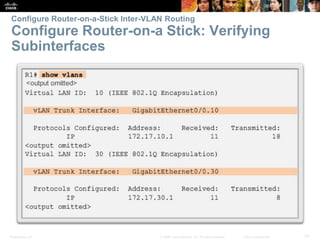
Configure Router-on-a-Stick Inter-VLAN Routing
Configure Router-on-a Stick: Verifying
Subinterfaces
Presentation_ID 75© 2008 Cisco Systems, Inc. All rights reserved. Cisco Confidential
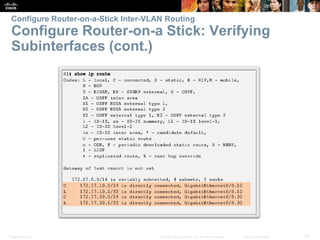
Configure Router-on-a-Stick Inter-VLAN Routing
Configure Router-on-a Stick: Verifying
Subinterfaces (cont.)
Presentation_ID 76© 2008 Cisco Systems, Inc. All rights reserved. Cisco Confidential
Configure Router-on-a-Stick Inter-VLAN Routing
Configure Router-on-a Stick: Verifying
Routing
 Access to devices on remote VLANs can be tested using
the ping command.
 The ping command sends an ICMP echo request to the destination
address.
 When a host receives an ICMP echo request, it responds with an ICMP
echo reply.
 Tracert is a useful utility for confirming the routed path taken between
two devices.
© 2008 Cisco Systems, Inc. All rights reserved. Cisco ConfidentialPresentation_ID 77
6.4 Chapter Summary
Presentation_ID 78© 2008 Cisco Systems, Inc. All rights reserved. Cisco Confidential
• Explain the purpose of VLANs in a switched network.
• Explain how a switch forwards frames based on VLAN configuration in a multi-switch
environment.
• Configure a switch port to be assigned to a VLAN based on requirements.
• Configure a trunk port on a LAN switch.
• Troubleshoot VLAN and trunk configurations in a switched network.
• Describe the two options for configuring inter-VLAN routing.
• Configure Legacy Inter-VLAN Routing.
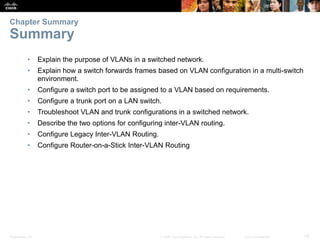
• Configure Router-on-a-Stick Inter-VLAN Routing
Chapter Summary
Summary
Presentation_ID 82© 2008 Cisco Systems, Inc. All rights reserved. Cisco Confidential
Presentation_ID 83© 2008 Cisco Systems, Inc. All rights reserved. Cisco Confidential

CCNA2 Verson6 Chapter6

  • 1.
    © 2008 CiscoSystems, Inc. All rights reserved. Cisco ConfidentialPresentation_ID 1 Instructor Materials Chapter 6: VLANs CCNA Routing and Switching Routing and Switching Essentials v6.0
  • 2.
    © 2008 CiscoSystems, Inc. All rights reserved. Cisco ConfidentialPresentation_ID 14 Chapter 6: VLANs Routing and Switching Essentials v6.0
  • 3.
    Presentation_ID 15© 2008Cisco Systems, Inc. All rights reserved. Cisco Confidential Chapter 6 - Sections & Objectives 6.1 VLAN Segmentation • Explain the purpose of VLANs in a switched network. • Explain how a switch forwards frames based on VLAN configuration in a multi- switch environment. 6.2 VLAN Implementations • Configure a switch port to be assigned to a VLAN based on requirements. • Configure a trunk port on a LAN switch. • Troubleshoot VLAN and trunk configurations in a switched network. 6.3 Inter-VLAN Routing Using Routers • Describe the two options for configuring Inter-VLAN routing. • Configure Legacy Inter-VLAN Routing. • Configure Router-on-a-Stick Inter-VLAN Routing
  • 4.
    © 2008 CiscoSystems, Inc. All rights reserved. Cisco ConfidentialPresentation_ID 16 6.1 VLAN Segmentation
  • 5.
    Presentation_ID 17© 2008Cisco Systems, Inc. All rights reserved. Cisco Confidential Overview of VLANs VLAN Definitions
  • 6.
    Presentation_ID 18© 2008Cisco Systems, Inc. All rights reserved. Cisco Confidential Overview of VLANs VLAN Definitions (cont.)  VLANs allow an administrator to segment networks based on factors such as function, project team, or application, without regard for the physical location of the user or device.  VLANs enable the implementation of access and security policies according to specific groupings of users.  A VLAN is a logical partition of a Layer 2 network.  Multiple partitions can be created, allowing for multiple VLANs to co-exist.  Each VLAN is a broadcast domain, usually with its own IP network.  VLANs are mutually isolated, and packets can only pass between them via a router.  The partitioning of the Layer 2 network takes place inside a Layer 2 device, usually via a switch.  The hosts grouped within a VLAN are unaware of the VLAN’s existence.
  • 7.
    Presentation_ID 19© 2008Cisco Systems, Inc. All rights reserved. Cisco Confidential Overview of VLANs Benefits of VLANs
  • 8.
    Presentation_ID 20© 2008Cisco Systems, Inc. All rights reserved. Cisco Confidential Overview of VLANs Types of VLANs  Data VLAN – user generated traffic  Default VLAN – all switch ports become part of this VLAN until switch is configured, show vlan brief  Native VLAN – used for untagged traffic  Management VLAN – used to access management capabilities
  • 9.
    Presentation_ID 21© 2008Cisco Systems, Inc. All rights reserved. Cisco Confidential Overview of VLANs Types of VLANs (cont.)
  • 10.
    Presentation_ID 22© 2008Cisco Systems, Inc. All rights reserved. Cisco Confidential Overview of VLANs Voice VLANs
  • 11.
    Presentation_ID 23© 2008Cisco Systems, Inc. All rights reserved. Cisco Confidential Overview of VLANs Voice VLANs (cont.)  VoIP traffic is time-sensitive and requires: • Assured bandwidth to ensure voice quality. • Transmission priority over other types of network traffic. • Ability to be routed around congested areas on the network. • Delay of less than 150 ms across the network.  The voice VLAN feature enables access ports to carry IP voice traffic from an IP phone.
  • 12.
    Presentation_ID 24© 2008Cisco Systems, Inc. All rights reserved. Cisco Confidential VLANs in a Multi-Switched Environment VLAN Trunks The links between switches S1 and S2, and S1 and S3 are configured to transmit traffic coming from VLANs 10, 20, 30, and 99 across the network. This network could not function without VLAN trunks.
  • 13.
    Presentation_ID 25© 2008Cisco Systems, Inc. All rights reserved. Cisco Confidential VLANs in a Multi-Switched Environment VLAN Trunks (cont.)  A VLAN trunk is a point-to-point link that carries more than one VLAN.  A VLAN trunk is usually established between switches so same-VLAN devices can communicate, even if physically connected to different switches.  A VLAN trunk is not associated to any VLANs; neither is the trunk ports used to establish the trunk link.  Cisco IOS supports IEEE802.1q, a popular VLAN trunk protocol.
  • 14.
    Presentation_ID 26© 2008Cisco Systems, Inc. All rights reserved. Cisco Confidential VLANs in a Multi-Switched Environment Controlling Broadcast Domains with VLANs
  • 15.
    Presentation_ID 27© 2008Cisco Systems, Inc. All rights reserved. Cisco Confidential VLANs in a Multi-Switched Environment Controlling Broadcast Domains with VLANs
  • 16.
    Presentation_ID 28© 2008Cisco Systems, Inc. All rights reserved. Cisco Confidential VLANs in a Multi-Switched Environment Controlling Broadcast Domains with VLANs  VLANs can be used to limit the reach of broadcast frames.  A VLAN is a broadcast domain of its own.  A broadcast frame sent by a device in a specific VLAN is forwarded within that VLAN only.  VLANs help control the reach of broadcast frames and their impact in the network.  Unicast and multicast frames are forwarded within the originating VLAN.
  • 17.
    Presentation_ID 29© 2008Cisco Systems, Inc. All rights reserved. Cisco Confidential VLANs in a Multi-Switched Environment Tagging Ethernet Frames for VLAN Identification  Frame tagging is the process of adding a VLAN identification header to the frame.  It is used to properly transmit multiple VLAN frames through a trunk link.  Switches tag frames to identify the VLAN to which they belong.  Different tagging protocols exist; IEEE 802.1Q is a vey popular example.  The protocol defines the structure of the tagging header added to the frame.  Switches add VLAN tags to the frames before placing them into trunk links and remove the tags before forwarding frames through non-trunk ports.  When properly tagged, the frames can transverse any number of switches via trunk links and still be forwarded within the correct VLAN at the destination.
  • 18.
    Presentation_ID 30© 2008Cisco Systems, Inc. All rights reserved. Cisco Confidential VLANs in a Multi-Switched Environment Tagging Ethernet Frames for VLAN Identification (cont.)
  • 19.
    Presentation_ID 31© 2008Cisco Systems, Inc. All rights reserved. Cisco Confidential VLANs in a Multi-Switched Environment Native VLANs and 802.1Q Tagging  Control traffic sent on the native VLAN should not be tagged.  Frames received untagged, remain untagged and are placed in the native VLAN when forwarded.  If there are no ports associated to the native VLAN and no other trunk links, an untagged frame is dropped.  When configuring a switch port on a Cisco switch, configure devices so that they do not send tagged frames on the native VLAN.  In Cisco switches, the native VLAN is VLAN 1, by default.
  • 20.
    Presentation_ID 32© 2008Cisco Systems, Inc. All rights reserved. Cisco Confidential VLANs in a Multi-Switched Environment Voice VLAN Tagging
  • 21.
    Presentation_ID 33© 2008Cisco Systems, Inc. All rights reserved. Cisco Confidential VLANs in a Multi-Switched Environment Activity – Predict Switch Behavior Scenario 1: PC 1 sends a broadcast. Scenario 2: PC 2 sends a broadcast. Scenario 3: PC 3 sends a broadcast.
  • 22.
    © 2008 CiscoSystems, Inc. All rights reserved. Cisco ConfidentialPresentation_ID 34 6.2 VLAN Implementations
  • 23.
    Presentation_ID 35© 2008Cisco Systems, Inc. All rights reserved. Cisco Confidential VLAN Assignment VLAN Ranges on Catalyst Switches  Cisco Catalyst 2960 and 3560 Series switches support over 4,000 VLANs.  VLANs are split into two categories: • Normal range VLANs • VLAN numbers from 1 to 1,005 • Configurations stored in the vlan.dat (in the flash memory) • IDs 1002 through 1005 are reserved for Token Ring and Fiber Distributed Data Interface (FDDI) VLANs, automatically created and cannot be removed • Extended Range VLANs • VLAN numbers from 1,006 to 4,096 • Configurations stored in the running configuration (NVRAM) • VLAN Trunking Protocol (VTP) does not learn extended VLANs
  • 24.
    Presentation_ID 36© 2008Cisco Systems, Inc. All rights reserved. Cisco Confidential VLAN Assignment VLAN Ranges on Catalyst Switches (cont.)  Normal Range VLANs
  • 25.
    Presentation_ID 37© 2008Cisco Systems, Inc. All rights reserved. Cisco Confidential VLAN Assignment Creating a VLAN
  • 26.
    Presentation_ID 38© 2008Cisco Systems, Inc. All rights reserved. Cisco Confidential VLAN Assignment Assigning Ports to VLANs
  • 27.
    Presentation_ID 39© 2008Cisco Systems, Inc. All rights reserved. Cisco Confidential VLAN Assignment Assigning Ports to VLANs
  • 28.
    Presentation_ID 40© 2008Cisco Systems, Inc. All rights reserved. Cisco Confidential VLAN Assignment Changing VLAN Port Membership  Remove VLAN Assignment  Interface F0/18 was previously assigned to VLAN 20 which is still active, F0/18 reset to VLAN1
  • 29.
    Presentation_ID 41© 2008Cisco Systems, Inc. All rights reserved. Cisco Confidential VLAN Assignment Changing VLAN Port Membership (cont.)
  • 30.
    Presentation_ID 42© 2008Cisco Systems, Inc. All rights reserved. Cisco Confidential VLAN Assignment Changing VLAN Port Membership (cont.)
  • 31.
    Presentation_ID 43© 2008Cisco Systems, Inc. All rights reserved. Cisco Confidential VLAN Assignment Deleting VLANs  The entire vlan.dat file can be deleted using the delete flash:vlan.dat privileged EXEC mode command  Abbreviated command version (delete vlan.dat) can be used if the vlan.dat file has not been moved from its default location
  • 32.
    Presentation_ID 44© 2008Cisco Systems, Inc. All rights reserved. Cisco Confidential VLAN Assignment Verifying VLAN Information
  • 33.
    Presentation_ID 45© 2008Cisco Systems, Inc. All rights reserved. Cisco Confidential VLAN Assignment Verifying VLAN Information (cont.)
  • 34.
    Presentation_ID 46© 2008Cisco Systems, Inc. All rights reserved. Cisco Confidential VLAN Trunks Configuring IEEE 802.1q Trunk Links
  • 35.
    Presentation_ID 47© 2008Cisco Systems, Inc. All rights reserved. Cisco Confidential VLAN Assignment Configuring IEEE 802.1q Trunk Links (cont.)
  • 36.
    Presentation_ID 48© 2008Cisco Systems, Inc. All rights reserved. Cisco Confidential VLAN Trunks Resetting the Trunk to Default State
  • 37.
    Presentation_ID 49© 2008Cisco Systems, Inc. All rights reserved. Cisco Confidential VLAN Trunks Resetting the Trunk to Default State (cont.)
  • 38.
    Presentation_ID 50© 2008Cisco Systems, Inc. All rights reserved. Cisco Confidential VLAN Trunks Verifying Trunk Configuration
  • 39.
    Presentation_ID 51© 2008Cisco Systems, Inc. All rights reserved. Cisco Confidential Troubleshoot VLANs and Trunks IP Addressing Issues with VLANs  It is a common practice to associate a VLAN with an IP network.  Because different IP networks only communicate through a router, all devices within a VLAN must be part of the same IP network to communicate.  The figure displays that PC1 cannot communicate to the server because it has a wrong IP address configured.
  • 40.
    Presentation_ID 52© 2008Cisco Systems, Inc. All rights reserved. Cisco Confidential Troubleshoot VLANs and Trunks Missing VLANs  If all the IP address mismatches have been solved, but the device still cannot connect, check if the VLAN exists in the switch.
  • 41.
    Presentation_ID 53© 2008Cisco Systems, Inc. All rights reserved. Cisco Confidential Troubleshoot VLANs and Trunks Missing VLANs (cont.)  If the VLAN to which a port belongs is deleted, the port becomes inactive. All ports belonging to the VLAN that was deleted are unable to communicate with the rest of the network.  Not functional until the missing VLAN is created using the vlan vlan_id global configuration.
  • 42.
    Presentation_ID 54© 2008Cisco Systems, Inc. All rights reserved. Cisco Confidential Troubleshoot VLANs and Trunks Introduction to Troubleshooting Trunks Note: To solve a native VLAN mismatch, configure the native VLAN to be the same VLAN on both sides of the link.
  • 43.
    Presentation_ID 55© 2008Cisco Systems, Inc. All rights reserved. Cisco Confidential Troubleshoot VLANs and Trunks Common Problems with Trunks  Trunking issues are usually associated with incorrect configurations.  The most common type of trunk configuration errors are:  Native VLAN mismatches  Trunk mode mismatches  Allowed VLANs on trunks  If a trunk problem is detected, the best practice guidelines recommend to troubleshoot in the order shown above.
  • 44.
    Presentation_ID 56© 2008Cisco Systems, Inc. All rights reserved. Cisco Confidential Troubleshoot VLANs and Trunks Common Problems with Trunks (cont.)
  • 45.
    Presentation_ID 57© 2008Cisco Systems, Inc. All rights reserved. Cisco Confidential Troubleshoot VLANs and Trunks Incorrect Port Mode
  • 46.
    Presentation_ID 58© 2008Cisco Systems, Inc. All rights reserved. Cisco Confidential Troubleshoot VLANs and Trunks Incorrect VLAN List
  • 47.
    Presentation_ID 59© 2008Cisco Systems, Inc. All rights reserved. Cisco Confidential Troubleshoot VLANs and Trunks Incorrect VLAN List (cont.)  VLANs must be allowed in the trunk before their frames can be transmitted across the link.  Use the switchport trunk allowed vlan command to specify which VLANs are allowed in a trunk link.  Use the show interfaces trunk command to ensure the correct VLANs are permitted in a trunk.
  • 48.
    © 2008 CiscoSystems, Inc. All rights reserved. Cisco ConfidentialPresentation_ID 60 6.3 Inter-VLAN Routing Using Routers
  • 49.
    Presentation_ID 61© 2008Cisco Systems, Inc. All rights reserved. Cisco Confidential Inter-VLAN Routing Operation What is Inter-VLAN Routing?  Layer 2 switches cannot forward traffic between VLANs without the assistance of a router.  Inter-VLAN routing is a process for forwarding network traffic from one VLAN to another, using a router.
  • 50.
    Presentation_ID 62© 2008Cisco Systems, Inc. All rights reserved. Cisco Confidential Inter-VLAN Routing Operation Legacy Inter-VLAN Routing In the past:  Actual routers were used to route between VLANs.  Each VLAN was connected to a different physical router interface.  Packets would arrive on the router through one interface, be routed and leave through another.  Because the router interfaces were connected to VLANs and had IP addresses from that specific VLAN, routing between VLANs was achieved.  Large networks with large number of VLANs required many router interfaces.
  • 51.
    Presentation_ID 63© 2008Cisco Systems, Inc. All rights reserved. Cisco Confidential Inter-VLAN Routing Operation Legacy Inter-VLAN Routing (cont.) In this example, the router was configured with two separate physical interfaces to interact with the different VLANs and perform the routing.
  • 52.
    Presentation_ID 64© 2008Cisco Systems, Inc. All rights reserved. Cisco Confidential Inter-VLAN Routing Operation Router-on-a-Stick Inter-VLAN Routing  The router-on-a-stick approach uses only one of the router’s physical interface.  One of the router’s physical interfaces is configured as a 802.1Q trunk port so it can understand VLAN tags.  Logical subinterfaces are created; one subinterface per VLAN.  Each subinterface is configured with an IP address from the VLAN it represents.  VLAN members (hosts) are configured to use the subinterface address as a default gateway.
  • 53.
    Presentation_ID 65© 2008Cisco Systems, Inc. All rights reserved. Cisco Confidential Inter-VLAN Routing Operation Router-on-a-Stick Inter-VLAN Routing (cont.) Router interface configured to operate as a trunk link and is connected to a trunked switch port. The router performs inter-VLAN routing by accepting VLAN-tagged traffic on the trunk interface coming from the adjacent switch, and then, internally routing between the VLANs using subinterfaces. The router then forwards the routed traffic, VLAN-tagged for the destination VLAN, out the same physical interface as it used to receive the traffic.
  • 54.
    Presentation_ID 66© 2008Cisco Systems, Inc. All rights reserved. Cisco Confidential Inter-VLAN Routing Operation Identify the Types of Inter-VLAN Routing Activity  Legacy or Router-on-a-Stick?
  • 55.
    Presentation_ID 67© 2008Cisco Systems, Inc. All rights reserved. Cisco Confidential Inter-VLAN Routing Operation Identify the Types of Inter-VLAN Routing Activity (cont.)  Legacy or Router-on-a-Stick?
  • 56.
    Presentation_ID 68© 2008Cisco Systems, Inc. All rights reserved. Cisco Confidential Configure Legacy Inter-VLAN Routing Configure Legacy Inter-VLAN Routing: Preparation  Legacy inter-VLAN routing requires routers to have multiple physical interfaces.  Each one of the router’s physical interfaces is connected to a unique VLAN.  Each interface is also configured with an IP address for the subnet associated with the particular VLAN.  Network devices use the router as a gateway to access the devices connected to the other VLANs.
  • 57.
    Presentation_ID 69© 2008Cisco Systems, Inc. All rights reserved. Cisco Confidential Configure Legacy Inter-VLAN Routing Configure Legacy Inter-VLAN Routing: Switch Configuration
  • 58.
    Presentation_ID 70© 2008Cisco Systems, Inc. All rights reserved. Cisco Confidential Configure Legacy Inter-VLAN Routing Configure Legacy Inter-VLAN Routing: Router Interface Configuration
  • 59.
    Presentation_ID 71© 2008Cisco Systems, Inc. All rights reserved. Cisco Confidential Configure Router-on-a-Stick Inter-VLAN Routing Configure Router-on-a Stick: Preparation  An alternative to legacy inter-VLAN routing is to use VLAN trunking and subinterfaces.  VLAN trunking allows a single physical router interface to route traffic for multiple VLANs.  The physical interface of the router must be connected to a trunk link on the adjacent switch.  On the router, subinterfaces are created for each unique VLAN.  Each subinterface is assigned an IP address specific to its subnet or VLAN and is also configured to tag frames for that VLAN.
  • 60.
    Presentation_ID 72© 2008Cisco Systems, Inc. All rights reserved. Cisco Confidential Configure Router-on-a-Stick Inter-VLAN Routing Configure Router-on-a Stick: Switch Configuration
  • 61.
    Presentation_ID 73© 2008Cisco Systems, Inc. All rights reserved. Cisco Confidential Configure Router-on-a-Stick Inter-VLAN Routing Configure Router-on-a Stick: Router Subinterface Configuration
  • 62.
    Presentation_ID 74© 2008Cisco Systems, Inc. All rights reserved. Cisco Confidential Configure Router-on-a-Stick Inter-VLAN Routing Configure Router-on-a Stick: Verifying Subinterfaces
  • 63.
    Presentation_ID 75© 2008Cisco Systems, Inc. All rights reserved. Cisco Confidential Configure Router-on-a-Stick Inter-VLAN Routing Configure Router-on-a Stick: Verifying Subinterfaces (cont.)
  • 64.
    Presentation_ID 76© 2008Cisco Systems, Inc. All rights reserved. Cisco Confidential Configure Router-on-a-Stick Inter-VLAN Routing Configure Router-on-a Stick: Verifying Routing  Access to devices on remote VLANs can be tested using the ping command.  The ping command sends an ICMP echo request to the destination address.  When a host receives an ICMP echo request, it responds with an ICMP echo reply.  Tracert is a useful utility for confirming the routed path taken between two devices.
  • 65.
    © 2008 CiscoSystems, Inc. All rights reserved. Cisco ConfidentialPresentation_ID 77 6.4 Chapter Summary
  • 66.
    Presentation_ID 78© 2008Cisco Systems, Inc. All rights reserved. Cisco Confidential • Explain the purpose of VLANs in a switched network. • Explain how a switch forwards frames based on VLAN configuration in a multi-switch environment. • Configure a switch port to be assigned to a VLAN based on requirements. • Configure a trunk port on a LAN switch. • Troubleshoot VLAN and trunk configurations in a switched network. • Describe the two options for configuring inter-VLAN routing. • Configure Legacy Inter-VLAN Routing. • Configure Router-on-a-Stick Inter-VLAN Routing Chapter Summary Summary
  • 67.
    Presentation_ID 82© 2008Cisco Systems, Inc. All rights reserved. Cisco Confidential
  • 68.
    Presentation_ID 83© 2008Cisco Systems, Inc. All rights reserved. Cisco Confidential