Embedding Information Management
into your Firm’s Culture
Robyna May
Director – IT & Knowledge
Cooper Grace Ward Lawyers
Who am I?
• Robyna May,
  Director – IT & Knowledge,
  Cooper Grace Ward
  Lawyers

• 12 years experience in IT
  (developer background)

• 5 years in IT management

• Contact Details:
  robyna.may@cgw.com.au
What I will cover….

• Cultural challenges with Information
  Management (IM)
• Establishing IM touch points
• Illustrating the value of IM
• Getting the best return on existing
  applications
• How to get staff to “own” their training
Information Management
                   Process
                   &
                   Training                      •   Capture at best time
                                     Capture     •   Ease of use
                                   Information   •   Background capture


•   Ensure information
    remains relevant            Maintain
•   Single source of truth    Information
•   Data quality


                                                 •   Accurate
                                      Deliver
                                                 •   Easy to access
                                   Information
                                                 •   Many view points
Information Management
                     Capturing information,
                     Delivering information &
                     Accessing information
                   Technology &
                   Process


                   Training

                   Ownership &
                   Adoption
                   Information
                   Management
                   Culture
The vicious cycle


                                    Opportunity
                                      Break
                       IM issue
                     needs to be
                      addressed


                                                                       Opportunity
                                                                         Break
 Solution
                                                  Ask Lawyers
 doesn’t
                                                   for input
meet needs


       Put forth a


                                                         Opportunity
        solution                   Unavailable


                                                           Break
          with                     due to time
        minimal                    constraints
         input
Ways to break the cycle
•   Information Management focus group
•   Partner sponsor
•   Demonstrate quick wins first
•   Demonstrate time value
•   Start small
•   Listen and understand your users’ frustrations
Re-frame


How do I get the Lawyers to
   How can I protect the
spend time on Information
billable hour of my clients?
       Management?
Case Study:
           Focus group at CGW
• Reps from each work group
• Reps from a variety of positions
• Reps report back to their workgroups and champion
  projects
• We meet every four weeks and a mixture of items
  covered
• Demos and trials of new technology occur regulary
• Agenda circulated prior to meeting
• Minutes and action items circulated after meeting
• Provides a forum for whole team to put forth their
  challenges
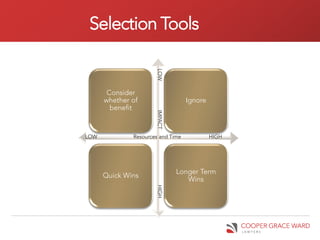
Selection Tools


                      LOW
       Consider
      whether of                   Ignore
        benefit


                      IMPACT
LOW           Resources and Time            HIGH


                               Longer Term
      Quick Wins
                                  Wins
                      HIGH
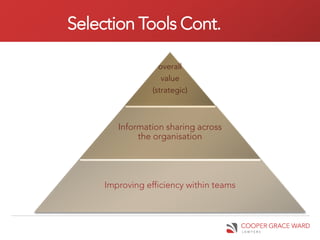
Selection Tools Cont.

                   overall
                    value
                 (strategic)


        Information sharing across
             the organisation


     Improving efficiency within teams
When/how to capture information
  • Make use of information already captured
  • Avoid repeat of entry
  • Capture at time most relevant – whilst “in
    motion”
  • Single source of truth
  • Tools – Processes, accessing database
    content, collaboration spaces
When/how to present information

•   Provide information in appropriate context
•   Multiple views of single source
•   Cater for a variety of learning styles
•   Tools – portals (SharePoint)
Getting the best return on existing applications


The stone age has been defined as
 the clever use of crude tools, the
information age is the crude use
           of clever tools
“Owning” training
• Have a training strategy that covers all training
  (induction, project, internal etc.)
• Identify key competencies against particular
  groups
• Use self assessment tools so that users
  understand their limitations
• Ensure users know what they are expected to
  know (and what they aren’t and what they can access
  easily)
• Identify the key functionality that you want
  utilised and focus training on that
Training Layers

      Advanced     • Super users, hands on training - ongoing

       training

      “How to”             • Smaller groups, hands on training
       training


     Overview of                   • Whole firm, focus on what they
     application                     will be expected to know


Awareness and strategy                      • Whole firm, seminar
                                              style and other
      training                                broadcast mediums
Reference & Support
• Not everyone needs to be an expert …
• But somebody does (and keep in mind succession and
  availability of that person)
• Have easy to use reference resources
   – Wikis
   – Online training
   – Videos
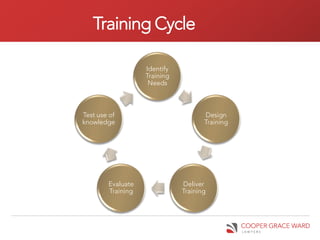
Training Cycle

                   Identify
                   Training
                    Needs


Test use of                          Design
knowledge                            Training


        Evaluate              Deliver
        Training              Training
Evaluation

Kilpatrick’s             Reactions        • Measures how participants have reacted to the
                                            training.
Evaluation
Layers
                         Learning                 • Measures what participants have
                                                    learned from the training.


                                                          • Measures whether what was
                         Behaviour                          learned is being applied on the
                                                            job.


                                                                  • Measures whether the
                          Results                                   application of training
                                                                    is achieving results
                                                                  • ROI layer


Kirkpatrick's Four Levels of Evaluation
Online Training Resources
•   Articulate - http://www.articulate.com/products/quizmaker-demos.php
•   Camtasia - http://www.techsmith.com/camtasia/
•   LMS – various available
•   Utilise what’s available – e.g. Office 2010:
     – Ribbon hero
     – Search command ribbon
     – Convert tools
     – Productivity hub
Key Points
• Challenges of Information Management
   – Getting buy-in
   – Getting engagement
   – Demonstrating value
   – Getting ROI from investment in applications
   – Getting users to “own” their training
• Solutions
   – IM touch points
   – Listen to users and start small
   – Have a competency assessment program & a training
     strategy
   – Train in a variety of methods
   – Utilise available training tools
Q&A

Robyna may

  • 1.
    Embedding Information Management intoyour Firm’s Culture Robyna May Director – IT & Knowledge Cooper Grace Ward Lawyers
  • 2.
    Who am I? •Robyna May, Director – IT & Knowledge, Cooper Grace Ward Lawyers • 12 years experience in IT (developer background) • 5 years in IT management • Contact Details: robyna.may@cgw.com.au
  • 3.
    What I willcover…. • Cultural challenges with Information Management (IM) • Establishing IM touch points • Illustrating the value of IM • Getting the best return on existing applications • How to get staff to “own” their training
  • 4.
    Information Management Process & Training • Capture at best time Capture • Ease of use Information • Background capture • Ensure information remains relevant Maintain • Single source of truth Information • Data quality • Accurate Deliver • Easy to access Information • Many view points
  • 5.
    Information Management Capturing information, Delivering information & Accessing information Technology & Process Training Ownership & Adoption Information Management Culture
  • 6.
    The vicious cycle Opportunity Break IM issue needs to be addressed Opportunity Break Solution Ask Lawyers doesn’t for input meet needs Put forth a Opportunity solution Unavailable Break with due to time minimal constraints input
  • 7.
    Ways to breakthe cycle • Information Management focus group • Partner sponsor • Demonstrate quick wins first • Demonstrate time value • Start small • Listen and understand your users’ frustrations
  • 8.
    Re-frame How do Iget the Lawyers to How can I protect the spend time on Information billable hour of my clients? Management?
  • 9.
    Case Study: Focus group at CGW • Reps from each work group • Reps from a variety of positions • Reps report back to their workgroups and champion projects • We meet every four weeks and a mixture of items covered • Demos and trials of new technology occur regulary • Agenda circulated prior to meeting • Minutes and action items circulated after meeting • Provides a forum for whole team to put forth their challenges
  • 10.
    Selection Tools LOW Consider whether of Ignore benefit IMPACT LOW Resources and Time HIGH Longer Term Quick Wins Wins HIGH
  • 11.
    Selection Tools Cont. overall value (strategic) Information sharing across the organisation Improving efficiency within teams
  • 12.
    When/how to captureinformation • Make use of information already captured • Avoid repeat of entry • Capture at time most relevant – whilst “in motion” • Single source of truth • Tools – Processes, accessing database content, collaboration spaces
  • 13.
    When/how to presentinformation • Provide information in appropriate context • Multiple views of single source • Cater for a variety of learning styles • Tools – portals (SharePoint)
  • 14.
    Getting the bestreturn on existing applications The stone age has been defined as the clever use of crude tools, the information age is the crude use of clever tools
  • 15.
    “Owning” training • Havea training strategy that covers all training (induction, project, internal etc.) • Identify key competencies against particular groups • Use self assessment tools so that users understand their limitations • Ensure users know what they are expected to know (and what they aren’t and what they can access easily) • Identify the key functionality that you want utilised and focus training on that
  • 16.
    Training Layers Advanced • Super users, hands on training - ongoing training “How to” • Smaller groups, hands on training training Overview of • Whole firm, focus on what they application will be expected to know Awareness and strategy • Whole firm, seminar style and other training broadcast mediums
  • 17.
    Reference & Support •Not everyone needs to be an expert … • But somebody does (and keep in mind succession and availability of that person) • Have easy to use reference resources – Wikis – Online training – Videos
  • 18.
    Training Cycle Identify Training Needs Test use of Design knowledge Training Evaluate Deliver Training Training
  • 19.
    Evaluation Kilpatrick’s Reactions • Measures how participants have reacted to the training. Evaluation Layers Learning • Measures what participants have learned from the training. • Measures whether what was Behaviour learned is being applied on the job. • Measures whether the Results application of training is achieving results • ROI layer Kirkpatrick's Four Levels of Evaluation
  • 20.
    Online Training Resources • Articulate - http://www.articulate.com/products/quizmaker-demos.php • Camtasia - http://www.techsmith.com/camtasia/ • LMS – various available • Utilise what’s available – e.g. Office 2010: – Ribbon hero – Search command ribbon – Convert tools – Productivity hub
  • 21.
    Key Points • Challengesof Information Management – Getting buy-in – Getting engagement – Demonstrating value – Getting ROI from investment in applications – Getting users to “own” their training • Solutions – IM touch points – Listen to users and start small – Have a competency assessment program & a training strategy – Train in a variety of methods – Utilise available training tools
  • 22.