VALIDATION MASTER PLAN
 The guidance for validation of all Computer systems will be documented in a
Validation Master Plan (VMP)
 The Validation Master Plan will include:
 Identifying components requiring validation
 Prioritizing and justifying the validations to be performed
 All activities and assigned responsibilities
 Establishing site specific procedures to support validation
WHAT IS A COMPUTER SYSTEM ?
‘Computer system’ can be defined as any of the following:
 Desktop systems; client or server systems; automated process
 Control and laboratory systems; host based
 Software ; data acquisition and analysis systems; and all associated software.
 The associated software comprises application software or firmware, system
software, and computer system supporting documentation.
Computer systems shall be validated. The computer validation must ensure
accuracy, reliability, consistent intended performance, and the ability to
discern invalid or altered records.
COMPUTERIZED SYSTEM
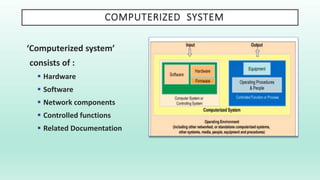
‘Computerized system’
consists of :
 Hardware
 Software
 Network components
 Controlled functions
 Related Documentation
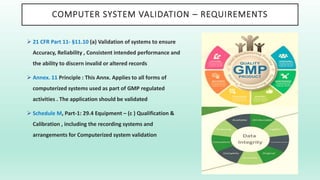
COMPUTER SYSTEM VALIDATION – REQUIREMENTS
 21 CFR Part 11- §11.10 (a) Validation of systems to ensure
Accuracy, Reliability , Consistent intended performance and
the ability to discern invalid or altered records
 Annex. 11 Principle : This Annx. Applies to all forms of
computerized systems used as part of GMP regulated
activities . The application should be validated
 Schedule M, Part-1: 29.4 Equipment – (c ) Qualification &
Calibration , including the recording systems and
arrangements for Computerized system validation
COMPUTER SYSTEM VALIDATION ….. A JOURNEY
Critical thinking , planning and Assessment is required for this journey …..
 What is the business process / workflow ?
 What is the intended use of this System ?
 For what purpose shall it be used ?
 What decisions shall be taken on the Data ?
 What are the anticipated RISKS in the entire Life cycle of the validated
system ?
Risk based approach for Computer System validation
COMPUTER SYSTEM VALIDATION ….. BUSINESS PROCESS
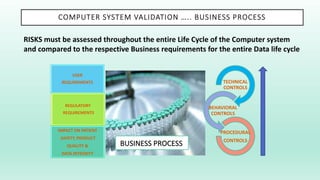
RISKS must be assessed throughout the entire Life Cycle of the Computer system
and compared to the respective Business requirements for the entire Data life cycle
USER
REQUIREMENTS
REGULATORY
REQUIREMENTS
IMPACT ON PATIENT
SAFETY, PRODUCT
QUALITY &
DATA INTEGRITY
TECHNICAL
CONTROLS
BEHAVIORAL
CONTROLS
PROCEDURAL
CONTROLS
BUSINESS PROCESS
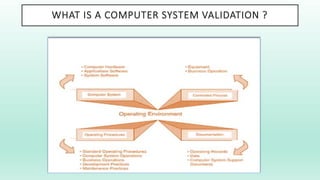
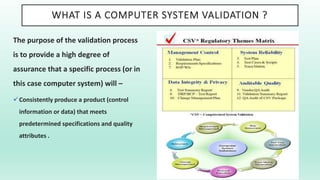
WHAT IS A COMPUTER SYSTEM VALIDATION ?
The purpose of the validation process
is to provide a high degree of
assurance that a specific process (or in
this case computer system) will –
Consistently produce a product (control
information or data) that meets
predetermined specifications and quality
attributes .
WHAT IS A COMPUTER SYSTEM VALIDATION ?
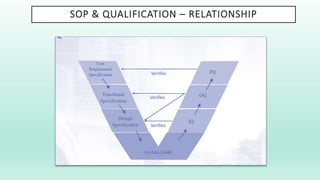
SOP & QUALIFICATION – RELATIONSHIP
CSV / QUALITY UNIT – ROLES & RESPONSIBILITIES
The QUALITY UNIT has a key role in successfully planning & managing the
compliance and fitness for intended use of computerized systems . The role and
activities need to be independent in nature and are mainly concerned to –
 Approval or audit of key documentation e.g. Policies, Procedures, Acceptance criteria,
Plans, Reports etc.
 Focus on Critical Quality aspects
 Involvement of SMEs (Subject matter experts)
 Approval of changes that potentially affect patient safety, product quality, or data integrity
 Audit processes and supporting documentary evidence to verify that compliance activities
are effective
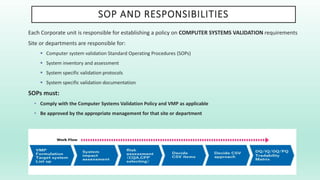
SOP AND RESPONSIBILITIES
Each Corporate unit is responsible for establishing a policy on COMPUTER SYSTEMS VALIDATION requirements
Site or departments are responsible for:
 Computer system validation Standard Operating Procedures (SOPs)
 System inventory and assessment
 System specific validation protocols
 System specific validation documentation
SOPs must:
• Comply with the Computer Systems Validation Policy and VMP as applicable
• Be approved by the appropriate management for that site or department
WHY VALIDATION IS REQUIRED ?
 Reduces Risk and legal liability
 Ensures GMP compliance requirements
 Ensures adherence to the current requirements of Software validation and compliances
 Validation is applied to many aspects of the healthcare and other regulated industries
and businesses. Examples include:
o Services
o Equipment
o Computer Systems
o Processes
 To produce documented evidence, that provides a high degree of assurance that all
parts of the system will consistently work correctly when in use
Computer systems validation includes validation of both new and existing
computer systems
WHY DO WE VALIDATE COMPUTER SYSTEMS ?
Computer systems are validated for two important reasons:
 To ensure that GMP practices are followed and to adhere to Regulatory requirements.
 To demonstrate conformance with the system requirements specification
 To ensure assurance of the trustworthiness of the Data and information.
 Demonstrate the suitability of computer hardware and software to perform the assigned task
Regulatory compliances shall help in :
 Minimizing regulatory actions
 Maintaining a positive relationship with regulatory agencies
 Expediting submissions to and approval by the FDA
 Avoiding product recalls and negative publicity
Key Objectives -
 Patient safety
 Product quality
 Data integrity
WHICH SYSTEMS SHOULD BE VALIDATED ?
Computer Systems throughout the organization involved in
the –
 Development
 Production
 Storage
 Distribution
of Pharmaceutical products or Medical devices need to be
considered for Computer System Validation
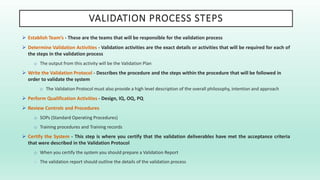
VALIDATION PROCESS STEPS
 Establish Team’s - These are the teams that will be responsible for the validation process
 Determine Validation Activities - Validation activities are the exact details or activities that will be required for each of
the steps in the validation process
o The output from this activity will be the Validation Plan
 Write the Validation Protocol - Describes the procedure and the steps within the procedure that will be followed in
order to validate the system
o The Validation Protocol must also provide a high level description of the overall philosophy, intention and approach
 Perform Qualification Activities - Design, IQ, OQ, PQ
 Review Controls and Procedures
o SOPs (Standard Operating Procedures)
o Training procedures and Training records
 Certify the System - This step is where you certify that the validation deliverables have met the acceptance criteria
that were described in the Validation Protocol
o When you certify the system you should prepare a Validation Report
o The validation report should outline the details of the validation process
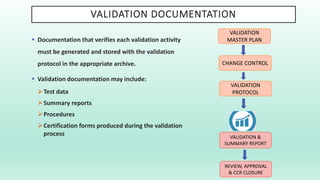
VALIDATION DOCUMENTATION
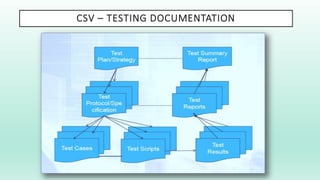
 Documentation that verifies each validation activity
must be generated and stored with the validation
protocol in the appropriate archive.
 Validation documentation may include:
Test data
Summary reports
Procedures
Certification forms produced during the validation
process
VALIDATION
MASTER PLAN
CHANGE CONTROL
VALIDATION &
SUMMARY REPORT
VALIDATION
PROTOCOL
REVIEW, APPROVAL
& CCR CLOSURE
CSV – TESTING DOCUMENTATION
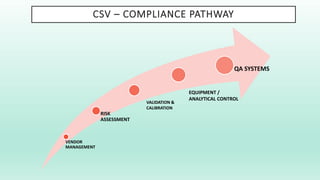
CSV – COMPLIANCE PATHWAY
VENDOR
MANAGEMENT
RISK
ASSESSMENT
QA SYSTEMS
VALIDATION &
CALIBRATION
EQUIPMENT /
ANALYTICAL CONTROL
CSV – RISK BASED APPROACH
The risk based approach for Computer System validation has been
promoted by all major Regulators –
 US FDA has been promoting the Risk based approach since 2002
 GAMP 5 laid out a practical approach to using Risk for Computerized system
validation
 EU & PIC/S GMP Annx.11 recommends that Risk management be applied throughout
the lifecycle of the computerized system
QUALITY RISK MANAGEMENT - CSV
 Quality Risk Management is a systematic process for the ASSESSMENT,
CONTROL, COMMUNICATION & REVIEW OF RISKS.
 Application of Quality Risk Management enables effort to be focused on
critical aspects of a Computerized system, in a controlled and justified
manner.
 Quality Risk Management should be based on clear process
understanding and potential impact on patient safety, product quality,
and Data integrity.
 Qualitative or quantitative techniques may be used to identify and
manage risks. Controls are developed to reduce risks to an acceptable
level.
 Implemented controls are monitored during operation to ensure ongoing
effectiveness.
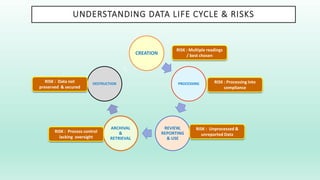
UNDERSTANDING DATA LIFE CYCLE & RISKS
CREATION
PROCESSING
REVIEW,
REPORTING
& USE
ARCHIVAL
&
RETRIEVAL
DESTRUCTION
RISK : Multiple readings
/ best chosen
RISK : Processing into
compliance
RISK : Unprocessed &
unreported Data
RISK : Process control
lacking oversight
RISK : Data not
preserved & secured
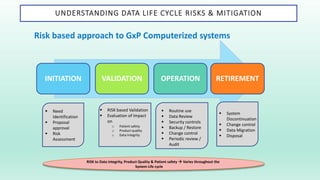
UNDERSTANDING DATA LIFE CYCLE RISKS & MITIGATION
Risk based approach to GxP Computerized systems
INITIATION VALIDATION OPERATION RETIREMENT
 Need
Identification
 Proposal
approval
 Risk
Assessment
 RISK based Validation
 Evaluation of Impact
on
o Patient safety
o Product quality
o Data Integrity
 Routine use
 Data Review
 Security controls
 Backup / Restore
 Change control
 Periodic review /
Audit
 System
Discontinuation
 Change control
 Data Migration
 Disposal
RISK to Data integrity, Product Quality & Patient safety  Varies throughout the
System Life cycle
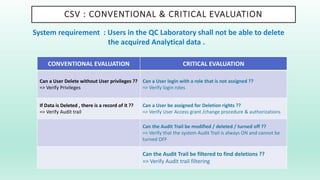
CSV : CONVENTIONAL & CRITICAL EVALUATION
CONVENTIONAL EVALUATION CRITICAL EVALUATION
Can a User Delete without User privileges ??
=> Verify Privileges
Can a User login with a role that is not assigned ??
=> Verify login roles
If Data is Deleted , there is a record of it ??
=> Verify Audit trail
Can a User be assigned for Deletion rights ??
=> Verify User Access grant /change procedure & authorizations
Can the Audit Trail be modified / deleted / turned off ??
=> Verify that the system Audit Trail is always ON and cannot be
turned OFF
Can the Audit Trail be filtered to find deletions ??
=> Verify Audit trail filtering
System requirement : Users in the QC Laboratory shall not be able to delete
the acquired Analytical data .
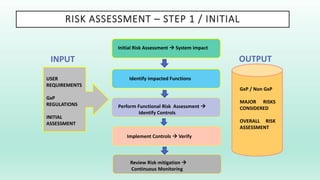
RISK ASSESSMENT – STEP 1 / INITIAL
Initial Risk Assessment  System impact
Review Risk mitigation 
Continuous Monitoring
Implement Controls  Verify
Perform Functional Risk Assessment 
Identify Controls
Identify impacted Functions
USER
REQUIREMENTS
GxP
REGULATIONS
INITIAL
ASSESSMENT
INPUT OUTPUT
GxP / Non GxP
MAJOR RISKS
CONSIDERED
OVERALL RISK
ASSESSMENT
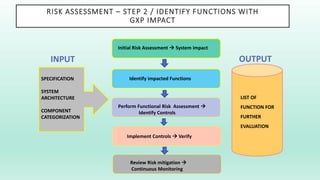
RISK ASSESSMENT – STEP 2 / IDENTIFY FUNCTIONS WITH
GXP IMPACT
Initial Risk Assessment  System impact
Review Risk mitigation 
Continuous Monitoring
Implement Controls  Verify
Perform Functional Risk Assessment 
Identify Controls
Identify impacted Functions
SPECIFICATION
SYSTEM
ARCHITECTURE
COMPONENT
CATEGORIZATION
INPUT OUTPUT
LIST OF
FUNCTION FOR
FURTHER
EVALUATION
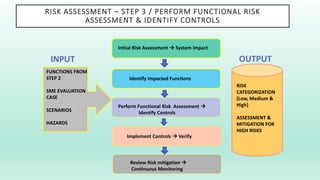
RISK ASSESSMENT – STEP 3 / PERFORM FUNCTIONAL RISK
ASSESSMENT & IDENTIFY CONTROLS
Initial Risk Assessment  System impact
Review Risk mitigation 
Continuous Monitoring
Implement Controls  Verify
Perform Functional Risk Assessment 
Identify Controls
Identify impacted Functions
FUNCTIONS FROM
STEP 2
SME EVALUATION
CASE
SCENARIOS
HAZARDS
INPUT OUTPUT
RISK
CATEGORIZATION
(Low, Medium &
High)
ASSESSMENT &
MITIGATION FOR
HIGH RISKS
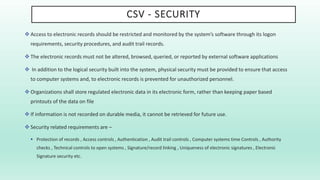
CSV - SECURITY
 Access to electronic records should be restricted and monitored by the system’s software through its logon
requirements, security procedures, and audit trail records.
 The electronic records must not be altered, browsed, queried, or reported by external software applications
 In addition to the logical security built into the system, physical security must be provided to ensure that access
to computer systems and, to electronic records is prevented for unauthorized personnel.
 Organizations shall store regulated electronic data in its electronic form, rather than keeping paper based
printouts of the data on file
 If information is not recorded on durable media, it cannot be retrieved for future use.
 Security related requirements are –
 Protection of records , Access controls , Authentication , Audit trail controls , Computer systems time Controls , Authority
checks , Technical controls to open systems , Signature/record linking , Uniqueness of electronic signatures , Electronic
Signature security etc.
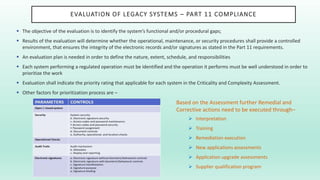
EVALUATION OF LEGACY SYSTEMS – PART 11 COMPLIANCE
 The objective of the evaluation is to identify the system’s functional and/or procedural gaps;
 Results of the evaluation will determine whether the operational, maintenance, or security procedures shall provide a controlled
environment, that ensures the integrity of the electronic records and/or signatures as stated in the Part 11 requirements.
 An evaluation plan is needed in order to define the nature, extent, schedule, and responsibilities
 Each system performing a regulated operation must be identified and the operation it performs must be well understood in order to
prioritize the work
 Evaluation shall indicate the priority rating that applicable for each system in the Criticality and Complexity Assessment.
 Other factors for prioritization process are –
Based on the Assessment further Remedial and
Corrective actions need to be executed through–
 Interpretation
 Training
 Remediation execution
 New applications assessments
 Application upgrade assessments
 Supplier qualification program
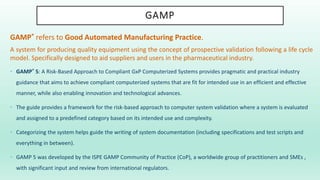
GAMP
GAMP® refers to Good Automated Manufacturing Practice.
A system for producing quality equipment using the concept of prospective validation following a life cycle
model. Specifically designed to aid suppliers and users in the pharmaceutical industry.
• GAMP® 5: A Risk-Based Approach to Compliant GxP Computerized Systems provides pragmatic and practical industry
guidance that aims to achieve compliant computerized systems that are fit for intended use in an efficient and effective
manner, while also enabling innovation and technological advances.
• The guide provides a framework for the risk-based approach to computer system validation where a system is evaluated
and assigned to a predefined category based on its intended use and complexity.
• Categorizing the system helps guide the writing of system documentation (including specifications and test scripts and
everything in between).
• GAMP 5 was developed by the ISPE GAMP Community of Practice (CoP), a worldwide group of practitioners and SMEs ,
with significant input and review from international regulators.
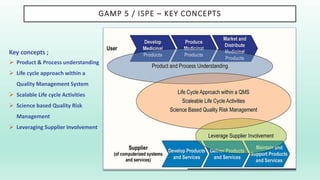
GAMP 5 / ISPE – KEY CONCEPTS
Key concepts ;
 Product & Process understanding
 Life cycle approach within a
Quality Management System
 Scalable Life cycle Activities
 Science based Quality Risk
Management
 Leveraging Supplier Involvement
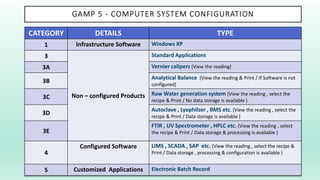
GAMP 5 - COMPUTER SYSTEM CONFIGURATION
CATEGORY DETAILS TYPE
1 Infrastructure Software Windows XP
3
Non – configured Products
Standard Applications
3A Vernier calipers (View the reading)
3B
Analytical Balance (View the reading & Print / If Software is not
configured)
3C
Raw Water generation system (View the reading , select the
recipe & Print / No data storage is available )
3D
Autoclave , Lyophilzer , BMS etc. (View the reading , select the
recipe & Print / Data storage is available )
3E
FTIR , UV Spectrometer , HPLC etc. (View the reading , select
the recipe & Print / Data storage & processing is available )
4
Configured Software LIMS , SCADA , SAP etc. (View the reading , select the recipe &
Print / Data storage , processing & configuration is available )
5 Customized Applications Electronic Batch Record
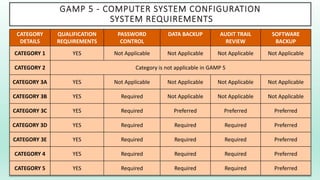
GAMP 5 - COMPUTER SYSTEM CONFIGURATION
SYSTEM REQUIREMENTS
CATEGORY
DETAILS
QUALIFICATION
REQUIREMENTS
PASSWORD
CONTROL
DATA BACKUP AUDIT TRAIL
REVIEW
SOFTWARE
BACKUP
CATEGORY 1 YES Not Applicable Not Applicable Not Applicable Not Applicable
CATEGORY 2 Category is not applicable in GAMP 5
CATEGORY 3A YES Not Applicable Not Applicable Not Applicable Not Applicable
CATEGORY 3B YES Required Not Applicable Not Applicable Not Applicable
CATEGORY 3C YES Required Preferred Preferred Preferred
CATEGORY 3D YES Required Required Required Preferred
CATEGORY 3E YES Required Required Required Preferred
CATEGORY 4 YES Required Required Required Preferred
CATEGORY 5 YES Required Required Required Preferred
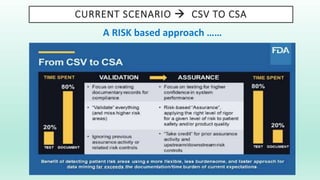
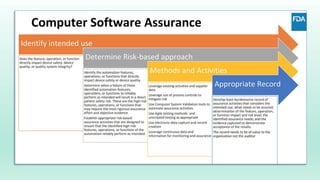
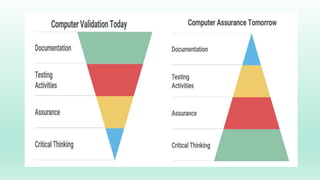
CURRENT SCENARIO  CSV TO CSA
A RISK based approach ……
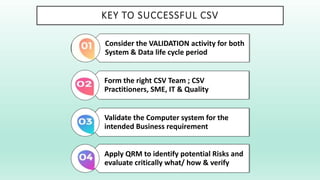
KEY TO SUCCESSFUL CSV
Consider the VALIDATION activity for both
System & Data life cycle period
Form the right CSV Team ; CSV
Practitioners, SME, IT & Quality
Validate the Computer system for the
intended Business requirement
Apply QRM to identify potential Risks and
evaluate critically what/ how & verify
If you would like to donate us?
Scan below and donate us 0.013$ (US dollar) (5Rs Indian rupee)
Contact: If you want PPT/PDF files, please contact below.
Email: gnccmysore@gmail.com
Telegram:+919738137533(only for Chat)
Risk assessment for computer system validation

Risk assessment for computer system validation

  • 2.
    VALIDATION MASTER PLAN The guidance for validation of all Computer systems will be documented in a Validation Master Plan (VMP)  The Validation Master Plan will include:  Identifying components requiring validation  Prioritizing and justifying the validations to be performed  All activities and assigned responsibilities  Establishing site specific procedures to support validation
  • 3.
    WHAT IS ACOMPUTER SYSTEM ? ‘Computer system’ can be defined as any of the following:  Desktop systems; client or server systems; automated process  Control and laboratory systems; host based  Software ; data acquisition and analysis systems; and all associated software.  The associated software comprises application software or firmware, system software, and computer system supporting documentation. Computer systems shall be validated. The computer validation must ensure accuracy, reliability, consistent intended performance, and the ability to discern invalid or altered records.
  • 4.
    COMPUTERIZED SYSTEM ‘Computerized system’ consistsof :  Hardware  Software  Network components  Controlled functions  Related Documentation
  • 5.
    COMPUTER SYSTEM VALIDATION– REQUIREMENTS  21 CFR Part 11- §11.10 (a) Validation of systems to ensure Accuracy, Reliability , Consistent intended performance and the ability to discern invalid or altered records  Annex. 11 Principle : This Annx. Applies to all forms of computerized systems used as part of GMP regulated activities . The application should be validated  Schedule M, Part-1: 29.4 Equipment – (c ) Qualification & Calibration , including the recording systems and arrangements for Computerized system validation
  • 6.
    COMPUTER SYSTEM VALIDATION….. A JOURNEY Critical thinking , planning and Assessment is required for this journey …..  What is the business process / workflow ?  What is the intended use of this System ?  For what purpose shall it be used ?  What decisions shall be taken on the Data ?  What are the anticipated RISKS in the entire Life cycle of the validated system ? Risk based approach for Computer System validation
  • 7.
    COMPUTER SYSTEM VALIDATION….. BUSINESS PROCESS RISKS must be assessed throughout the entire Life Cycle of the Computer system and compared to the respective Business requirements for the entire Data life cycle USER REQUIREMENTS REGULATORY REQUIREMENTS IMPACT ON PATIENT SAFETY, PRODUCT QUALITY & DATA INTEGRITY TECHNICAL CONTROLS BEHAVIORAL CONTROLS PROCEDURAL CONTROLS BUSINESS PROCESS
  • 8.
    WHAT IS ACOMPUTER SYSTEM VALIDATION ? The purpose of the validation process is to provide a high degree of assurance that a specific process (or in this case computer system) will – Consistently produce a product (control information or data) that meets predetermined specifications and quality attributes .
  • 9.
    WHAT IS ACOMPUTER SYSTEM VALIDATION ?
  • 10.
    SOP & QUALIFICATION– RELATIONSHIP
  • 11.
    CSV / QUALITYUNIT – ROLES & RESPONSIBILITIES The QUALITY UNIT has a key role in successfully planning & managing the compliance and fitness for intended use of computerized systems . The role and activities need to be independent in nature and are mainly concerned to –  Approval or audit of key documentation e.g. Policies, Procedures, Acceptance criteria, Plans, Reports etc.  Focus on Critical Quality aspects  Involvement of SMEs (Subject matter experts)  Approval of changes that potentially affect patient safety, product quality, or data integrity  Audit processes and supporting documentary evidence to verify that compliance activities are effective
  • 12.
    SOP AND RESPONSIBILITIES EachCorporate unit is responsible for establishing a policy on COMPUTER SYSTEMS VALIDATION requirements Site or departments are responsible for:  Computer system validation Standard Operating Procedures (SOPs)  System inventory and assessment  System specific validation protocols  System specific validation documentation SOPs must: • Comply with the Computer Systems Validation Policy and VMP as applicable • Be approved by the appropriate management for that site or department
  • 14.
    WHY VALIDATION ISREQUIRED ?  Reduces Risk and legal liability  Ensures GMP compliance requirements  Ensures adherence to the current requirements of Software validation and compliances  Validation is applied to many aspects of the healthcare and other regulated industries and businesses. Examples include: o Services o Equipment o Computer Systems o Processes  To produce documented evidence, that provides a high degree of assurance that all parts of the system will consistently work correctly when in use Computer systems validation includes validation of both new and existing computer systems
  • 15.
    WHY DO WEVALIDATE COMPUTER SYSTEMS ? Computer systems are validated for two important reasons:  To ensure that GMP practices are followed and to adhere to Regulatory requirements.  To demonstrate conformance with the system requirements specification  To ensure assurance of the trustworthiness of the Data and information.  Demonstrate the suitability of computer hardware and software to perform the assigned task Regulatory compliances shall help in :  Minimizing regulatory actions  Maintaining a positive relationship with regulatory agencies  Expediting submissions to and approval by the FDA  Avoiding product recalls and negative publicity Key Objectives -  Patient safety  Product quality  Data integrity
  • 16.
    WHICH SYSTEMS SHOULDBE VALIDATED ? Computer Systems throughout the organization involved in the –  Development  Production  Storage  Distribution of Pharmaceutical products or Medical devices need to be considered for Computer System Validation
  • 17.
    VALIDATION PROCESS STEPS Establish Team’s - These are the teams that will be responsible for the validation process  Determine Validation Activities - Validation activities are the exact details or activities that will be required for each of the steps in the validation process o The output from this activity will be the Validation Plan  Write the Validation Protocol - Describes the procedure and the steps within the procedure that will be followed in order to validate the system o The Validation Protocol must also provide a high level description of the overall philosophy, intention and approach  Perform Qualification Activities - Design, IQ, OQ, PQ  Review Controls and Procedures o SOPs (Standard Operating Procedures) o Training procedures and Training records  Certify the System - This step is where you certify that the validation deliverables have met the acceptance criteria that were described in the Validation Protocol o When you certify the system you should prepare a Validation Report o The validation report should outline the details of the validation process
  • 18.
    VALIDATION DOCUMENTATION  Documentationthat verifies each validation activity must be generated and stored with the validation protocol in the appropriate archive.  Validation documentation may include: Test data Summary reports Procedures Certification forms produced during the validation process VALIDATION MASTER PLAN CHANGE CONTROL VALIDATION & SUMMARY REPORT VALIDATION PROTOCOL REVIEW, APPROVAL & CCR CLOSURE
  • 19.
    CSV – TESTINGDOCUMENTATION
  • 20.
    CSV – COMPLIANCEPATHWAY VENDOR MANAGEMENT RISK ASSESSMENT QA SYSTEMS VALIDATION & CALIBRATION EQUIPMENT / ANALYTICAL CONTROL
  • 21.
    CSV – RISKBASED APPROACH The risk based approach for Computer System validation has been promoted by all major Regulators –  US FDA has been promoting the Risk based approach since 2002  GAMP 5 laid out a practical approach to using Risk for Computerized system validation  EU & PIC/S GMP Annx.11 recommends that Risk management be applied throughout the lifecycle of the computerized system
  • 22.
    QUALITY RISK MANAGEMENT- CSV  Quality Risk Management is a systematic process for the ASSESSMENT, CONTROL, COMMUNICATION & REVIEW OF RISKS.  Application of Quality Risk Management enables effort to be focused on critical aspects of a Computerized system, in a controlled and justified manner.  Quality Risk Management should be based on clear process understanding and potential impact on patient safety, product quality, and Data integrity.  Qualitative or quantitative techniques may be used to identify and manage risks. Controls are developed to reduce risks to an acceptable level.  Implemented controls are monitored during operation to ensure ongoing effectiveness.
  • 23.
    UNDERSTANDING DATA LIFECYCLE & RISKS CREATION PROCESSING REVIEW, REPORTING & USE ARCHIVAL & RETRIEVAL DESTRUCTION RISK : Multiple readings / best chosen RISK : Processing into compliance RISK : Unprocessed & unreported Data RISK : Process control lacking oversight RISK : Data not preserved & secured
  • 24.
    UNDERSTANDING DATA LIFECYCLE RISKS & MITIGATION Risk based approach to GxP Computerized systems INITIATION VALIDATION OPERATION RETIREMENT  Need Identification  Proposal approval  Risk Assessment  RISK based Validation  Evaluation of Impact on o Patient safety o Product quality o Data Integrity  Routine use  Data Review  Security controls  Backup / Restore  Change control  Periodic review / Audit  System Discontinuation  Change control  Data Migration  Disposal RISK to Data integrity, Product Quality & Patient safety  Varies throughout the System Life cycle
  • 25.
    CSV : CONVENTIONAL& CRITICAL EVALUATION CONVENTIONAL EVALUATION CRITICAL EVALUATION Can a User Delete without User privileges ?? => Verify Privileges Can a User login with a role that is not assigned ?? => Verify login roles If Data is Deleted , there is a record of it ?? => Verify Audit trail Can a User be assigned for Deletion rights ?? => Verify User Access grant /change procedure & authorizations Can the Audit Trail be modified / deleted / turned off ?? => Verify that the system Audit Trail is always ON and cannot be turned OFF Can the Audit Trail be filtered to find deletions ?? => Verify Audit trail filtering System requirement : Users in the QC Laboratory shall not be able to delete the acquired Analytical data .
  • 26.
    RISK ASSESSMENT –STEP 1 / INITIAL Initial Risk Assessment  System impact Review Risk mitigation  Continuous Monitoring Implement Controls  Verify Perform Functional Risk Assessment  Identify Controls Identify impacted Functions USER REQUIREMENTS GxP REGULATIONS INITIAL ASSESSMENT INPUT OUTPUT GxP / Non GxP MAJOR RISKS CONSIDERED OVERALL RISK ASSESSMENT
  • 27.
    RISK ASSESSMENT –STEP 2 / IDENTIFY FUNCTIONS WITH GXP IMPACT Initial Risk Assessment  System impact Review Risk mitigation  Continuous Monitoring Implement Controls  Verify Perform Functional Risk Assessment  Identify Controls Identify impacted Functions SPECIFICATION SYSTEM ARCHITECTURE COMPONENT CATEGORIZATION INPUT OUTPUT LIST OF FUNCTION FOR FURTHER EVALUATION
  • 28.
    RISK ASSESSMENT –STEP 3 / PERFORM FUNCTIONAL RISK ASSESSMENT & IDENTIFY CONTROLS Initial Risk Assessment  System impact Review Risk mitigation  Continuous Monitoring Implement Controls  Verify Perform Functional Risk Assessment  Identify Controls Identify impacted Functions FUNCTIONS FROM STEP 2 SME EVALUATION CASE SCENARIOS HAZARDS INPUT OUTPUT RISK CATEGORIZATION (Low, Medium & High) ASSESSMENT & MITIGATION FOR HIGH RISKS
  • 29.
    CSV - SECURITY Access to electronic records should be restricted and monitored by the system’s software through its logon requirements, security procedures, and audit trail records.  The electronic records must not be altered, browsed, queried, or reported by external software applications  In addition to the logical security built into the system, physical security must be provided to ensure that access to computer systems and, to electronic records is prevented for unauthorized personnel.  Organizations shall store regulated electronic data in its electronic form, rather than keeping paper based printouts of the data on file  If information is not recorded on durable media, it cannot be retrieved for future use.  Security related requirements are –  Protection of records , Access controls , Authentication , Audit trail controls , Computer systems time Controls , Authority checks , Technical controls to open systems , Signature/record linking , Uniqueness of electronic signatures , Electronic Signature security etc.
  • 30.
    EVALUATION OF LEGACYSYSTEMS – PART 11 COMPLIANCE  The objective of the evaluation is to identify the system’s functional and/or procedural gaps;  Results of the evaluation will determine whether the operational, maintenance, or security procedures shall provide a controlled environment, that ensures the integrity of the electronic records and/or signatures as stated in the Part 11 requirements.  An evaluation plan is needed in order to define the nature, extent, schedule, and responsibilities  Each system performing a regulated operation must be identified and the operation it performs must be well understood in order to prioritize the work  Evaluation shall indicate the priority rating that applicable for each system in the Criticality and Complexity Assessment.  Other factors for prioritization process are – Based on the Assessment further Remedial and Corrective actions need to be executed through–  Interpretation  Training  Remediation execution  New applications assessments  Application upgrade assessments  Supplier qualification program
  • 31.
    GAMP GAMP® refers toGood Automated Manufacturing Practice. A system for producing quality equipment using the concept of prospective validation following a life cycle model. Specifically designed to aid suppliers and users in the pharmaceutical industry. • GAMP® 5: A Risk-Based Approach to Compliant GxP Computerized Systems provides pragmatic and practical industry guidance that aims to achieve compliant computerized systems that are fit for intended use in an efficient and effective manner, while also enabling innovation and technological advances. • The guide provides a framework for the risk-based approach to computer system validation where a system is evaluated and assigned to a predefined category based on its intended use and complexity. • Categorizing the system helps guide the writing of system documentation (including specifications and test scripts and everything in between). • GAMP 5 was developed by the ISPE GAMP Community of Practice (CoP), a worldwide group of practitioners and SMEs , with significant input and review from international regulators.
  • 32.
    GAMP 5 /ISPE – KEY CONCEPTS Key concepts ;  Product & Process understanding  Life cycle approach within a Quality Management System  Scalable Life cycle Activities  Science based Quality Risk Management  Leveraging Supplier Involvement
  • 33.
    GAMP 5 -COMPUTER SYSTEM CONFIGURATION CATEGORY DETAILS TYPE 1 Infrastructure Software Windows XP 3 Non – configured Products Standard Applications 3A Vernier calipers (View the reading) 3B Analytical Balance (View the reading & Print / If Software is not configured) 3C Raw Water generation system (View the reading , select the recipe & Print / No data storage is available ) 3D Autoclave , Lyophilzer , BMS etc. (View the reading , select the recipe & Print / Data storage is available ) 3E FTIR , UV Spectrometer , HPLC etc. (View the reading , select the recipe & Print / Data storage & processing is available ) 4 Configured Software LIMS , SCADA , SAP etc. (View the reading , select the recipe & Print / Data storage , processing & configuration is available ) 5 Customized Applications Electronic Batch Record
  • 34.
    GAMP 5 -COMPUTER SYSTEM CONFIGURATION SYSTEM REQUIREMENTS CATEGORY DETAILS QUALIFICATION REQUIREMENTS PASSWORD CONTROL DATA BACKUP AUDIT TRAIL REVIEW SOFTWARE BACKUP CATEGORY 1 YES Not Applicable Not Applicable Not Applicable Not Applicable CATEGORY 2 Category is not applicable in GAMP 5 CATEGORY 3A YES Not Applicable Not Applicable Not Applicable Not Applicable CATEGORY 3B YES Required Not Applicable Not Applicable Not Applicable CATEGORY 3C YES Required Preferred Preferred Preferred CATEGORY 3D YES Required Required Required Preferred CATEGORY 3E YES Required Required Required Preferred CATEGORY 4 YES Required Required Required Preferred CATEGORY 5 YES Required Required Required Preferred
  • 35.
    CURRENT SCENARIO CSV TO CSA A RISK based approach ……
  • 38.
    KEY TO SUCCESSFULCSV Consider the VALIDATION activity for both System & Data life cycle period Form the right CSV Team ; CSV Practitioners, SME, IT & Quality Validate the Computer system for the intended Business requirement Apply QRM to identify potential Risks and evaluate critically what/ how & verify
  • 39.
    If you wouldlike to donate us? Scan below and donate us 0.013$ (US dollar) (5Rs Indian rupee) Contact: If you want PPT/PDF files, please contact below. Email: gnccmysore@gmail.com Telegram:+919738137533(only for Chat)