Resource material
for
Research
By
Jack Abebe
Research guide
•
•
•
•
•
•
•
•
•
•
•
•

Introduction
The general research process
Research guide
Material for Information
Tools
Understanding citations
Identifying journal titles from abbreviations
Advanced searching techniques
Evaluating information sources: Basic principles
Resource persons
Resource centres
Conclusion
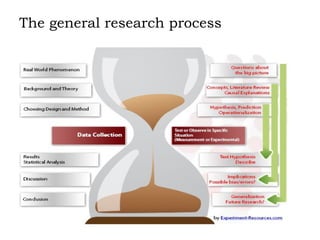
The general research process

MMUST PhD 2012 CDS/H/220/12
Research guide



o
o
o
o

1.  Choosing a topic
2.  Refining a topic
3.  Searching for Information
How To Find... (Books, Articles, Primary sources & more)
Understanding Citations
Advanced Searching techniques
How Libraries classify Books (and How to take advantage
of it)
Research guide

contd

4. Evaluating Information Sources: 
 Basic Principles
 Scholarly journals vs. Popular Magazines
 Evaluating Web Pages
5.  Writing a paper:
 The writing studio can help!
 Citing Sources
 Avoiding Plagiarism
 Guide to Library vocabulary
1.Choosing a topic
 a. Brainstorm possible topic ideas

Consider your personal interests.
 Engage in conversations in class or with classmates
 Read articles in encyclopedias or dictionaries and
review class readings.
 Browse recent issues of journals or magazines in
Current Periodicals (Bostock 1).
 Browse the shelves for books on your subject
(see catelogue to know where to look).

b.  Review assignment requirements

What kind of assignment is it - 5 minute oral
presentation, 10 page paper, 50 page paper?
 How much information do you need?
 Does it need to be recent information?
 What types of publications do you want to read newspaper articles, books, journal articles, diaries,
trade publications?
 What formats do you need - visual, audio, printed,
electronic?
 Is point of view an issue? Do you need opinions?
 How much time do you have?

c.  List keyword to define your topic





State your research topic as a question.
Think about the significant terms, concepts, and keywords
that describe your topic. These terms will become the
key for searching for information about your subject in
library catalogs, online databases, and other resources.
Sample keywords for research topic e.g.”Assessing the
effectiveness of the electronic waste disposal guidelines in
Kiambu County,Kenya
d. Gather background information on your topic


It's hard to get started if you don't know much about
your topic



Do some general reading in things like encyclopedias and
subject –specific dictionaries to get an overview of the
topic

 


This is also a great first step towards refining your topic
2.Refining a Topic
i) Narrowing a Topic:Too Much Information!

o
o
o
o

If your topic seems too broad, consider questions
like:
What do you already know about the subject?
Is there a specific time period you want to cover?
Is there a geographic region or country on which you
would like to focus?
Is there a particular aspect of this topic that interests
you? For example, public policy implications, historical
influence, sociological aspects, psychological angles,
specific groups or individuals involved in the topic
Example
Original Topic: Government environmental policies
(too broad!)
 Focused Time Period: 2011-2012
Focused Location: Kenya
Focused event/aspect: Electronic waste disposal
Refined topic: Effectiveness of Kenya government
electronic waste disposal guidelines

ii) Broadening a Topic: Not Enough
Information!

o
o
o
o

If your topic is so specific that you can't find sources that
specifically address it, consider questions like:
Could you add elements to your topic for examination?
Could you think more broadly about this topic? Give
thought to the wider implications of your research.
Who are the key players in this topic?
What other issues are involved in this topic?
Example






Original topic:  What is the effect of deforestation on
Kenya’s long-term ability to feed its citizens? 
(too specific!)
Alternative place: East Africa
Widened focus: agriculture, sustainable development.
Key person or group: East African govts
Alternative event/aspect: birth control
Revised topic:  How can the East African govts
encourage their countries to employ sustainable
development practices?
3.Material for Information
Advertisements
Articles
Audiobooks
Books
Parliamentary papers
Government resources/policy documents
CD-ROMs
Citation Guides
City directories
Data & Statistics
Dissertation & Theses
eBooks
Encyclopedias &
Dictionaries
Film & Video
Images
Journals
Manuscripts
Maps & GIS
Microforms
Music

Newspapers
Online periodicals
Resources
Podcasts
Primary Sources
Public documents
Reserves
Library Materials
Tax forms & Publications
Trade Statistics
Census Materials
Internet Websites
4.Technology and equipment
Computers(Desk tops PC s, laptops, I-pads, Tablet etc)
Off-campus access to online resources – modem
Printers
Scanners
Computer hardware ( flash disks, CDs, memory cards)
Computer software (SPSS, Microsoft Project, Project
minder)
Databases
Technology & equipment (contd)
Typing services
Photocopiers
Group study rooms
Library
Lockers & carrels
Multimedia Project Studio
5. Tools
i) Planning tools

Work plan/Action plan/Logframe
PERT
GANTT
Guides to research
Guides to research report writing
Specifications from overseeing authority
Permissions (MMUST,NCST)
ii) Writing tools
Pen/pencil
Paper
Notebooks
Computer
Printer
Library catalogue
Search tools
Material for Information –listed above
iii) Research and Analysis Tools
Information gathering tools
• Questionnaires
• Schedules
• Procedures
• Rules (sampling, organizational)
Analysis tools
 Statistical approaches/ formulae
 Computer software
 Research assistants/Data analysts/statisticians
iv) Refining Tools
Brainstorming
Class Presentations
Discussions
Corrections
Extract papers
Arguments
6.Understanding Citations
Citation:  A reference to a source used in an article,
essay, book, etc.
 Most citations of articles :

Author
Article title
Journal or magazine title
Volume number of the journal or magazine
Date of publication
Page numbers of the article (some citations
only include the beginning page number)
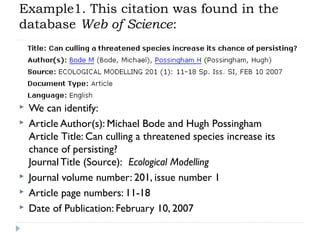
Example1. This citation was found in the
database Web of Science:








We can identify:
Article Author(s): Michael Bode and Hugh Possingham
Article Title: Can culling a threatened species increase its
chance of persisting?
Journal Title (Source):  Ecological Modelling
Journal volume number: 201, issue number 1
Article page numbers: 11-18
Date of Publication: February 10, 2007





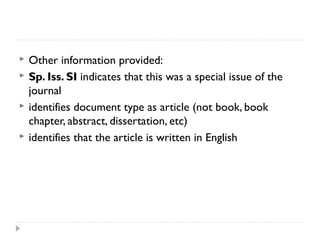
Other information provided:
Sp. Iss. SI indicates that this was a special issue of the
journal
identifies document type as article (not book, book
chapter, abstract, dissertation, etc)
identifies that the article is written in English
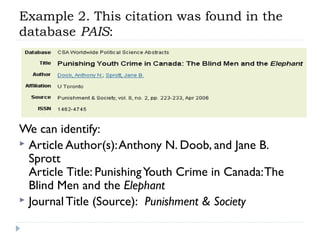
Example 2. This citation was found in the
database PAIS:

We can identify:
 Article Author(s): Anthony N. Doob, and Jane B.
Sprott
Article Title: Punishing Youth Crime in Canada: The
Blind Men and the Elephant
 Journal Title (Source):  Punishment & Society








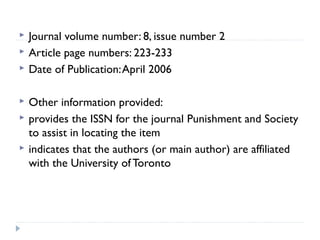
Journal volume number: 8, issue number 2
Article page numbers: 223-233
Date of Publication: April 2006
Other information provided:
provides the ISSN for the journal Punishment and Society
to assist in locating the item
indicates that the authors (or main author) are affiliated
with the University of Toronto
7. Identifying Journal Titles from
Abbreviations
Titles of magazines or journals are often abbreviated
in citations. In most cases, you will need the full title
to search for the journal in the online catalog or as
an e-journal. Try:
 Selecting a link for the "full citation" or "complete
reference" in an online source
 Selecting the link for a database's source list, and then
looking for your journal title
 Looking in the beginning of a print journal, book or
periodical index, as there may be an abbreviations list

contd


Looking in the book Periodical Title Abbreviations, available
at the Reference Desk and Ready Reference



All That JAS: Journal Abbreviation Sources provides links
for the natural and social sciences, law, and philosophy



Ask a librarian
8. Advanced Searching Techniques


Natural Language Searching - A Search Like
Google



Google has made most of us comfortable with
Natural Language searching.  It takes the words you
type into the box and searches for them using the
Boolean operator 'and' (see below on Boolean
searching).  It also tries to find instances where the
words are close to each other within the result; this
is called proximity (see also below). It does not
search the words as a phrase unless you put
quotation marks around the whole thing


Most online catalog and many of their article databases
now use Natural Language Searching, so when you type in
a keyword search like 'java web application' you will
probably get some hits.  However, you will be able to
significantly improve the results from your searching by
using the following techniques
Boolean Searching





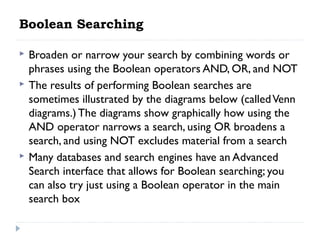
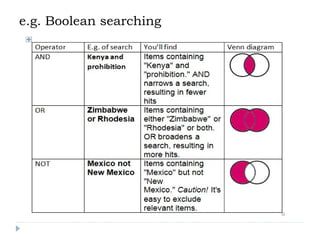
Broaden or narrow your search by combining words or
phrases using the Boolean operators AND, OR, and NOT
The results of performing Boolean searches are
sometimes illustrated by the diagrams below (called Venn
diagrams.) The diagrams show graphically how using the
AND operator narrows a search, using OR broadens a
search, and using NOT excludes material from a search
Many databases and search engines have an Advanced
Search interface that allows for Boolean searching; you
can also try just using a Boolean operator in the main
search box
e.g. Boolean searching
Parentheses (Nesting)




Use parentheses to clarify relationships between search
terms.
Example: (television or mass media) and women
This search looks for both "television and women" and
"mass media and women."
Truncation or Wildcards








A symbol at the end of a word stem provides for all variants on the
word stem. The most commonly used symbol is the asterisk (*).
Example: educat* will retrieve educate, educating, education,
educational, educator, educators, etc.
Be careful not to truncate too far, or you will retrieve unrelated
words!
A symbol within a word provides for all possible variants inside a
word or word stem. A commonly used symbol for internal
truncation is !. Example: wom!n will retrieve woman and
women.
You may combine truncation symbols in one search.
Look at the help pages for the database you are using to determine
the truncation symbols. Most systems provide truncation but some
provide only simple plurals.
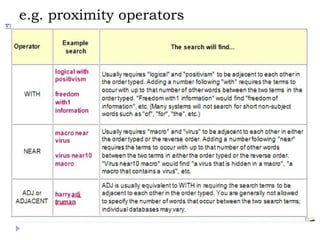
Proximity Operators


Sometimes in a full text search you want words that
occur close to one another but not as a phrase

 


Many full text article databases allow searching with
proximity operators in their advanced search interfaces

 


Consult the help pages of the database you are using to
see what proximity operators work for it
e.g. proximity operators
Field Searching


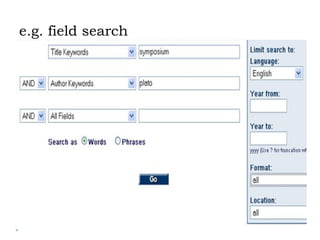
The Advanced Search screen of the Most online catalogs
are a good example of field searching, where you can
select a particular part of the electronic record to search

 


Note that you can often combine different field searches
using Boolean operators



Most article databases have an Advanced Search interface
that allows some kind of field searching
e.g. field search
9.Evaluating Information Sources: Basic
Principles


Quantity
Enough resources are needed to:



Support your argument
Include a variety of viewpoints and materials


Diversity
Variety is necessary. Include many different resources.
 Primary Sources







Contemporary accounts of an event and original documents
Examples: letters, diaries, audio-recordings of speeches,
newspaper articles

Secondary Resources



Retrospective sources based on primary resources; include
scientific or scholarly analysis
Examples: books, articles, editorials, reviews, scientific studies
Date of Publication



When was the source published? Make sure the date of
publication is appropriate for your project.
Current Events Research




Use resources that are recent and reflect current attitudes.

Historical Research


Use a variety of resources from different time periods
including both primary and secondary resources.
Quality and Reliability










When choosing your resources, the most difficult task is
determining their quality and reliability. Factors to think about:
What is the tone?
Who is the intended audience?
What is the purpose of the publication?
What assumptions does the author make?
What are the bases of the author's conclusions?
Does the author agree or disagree with other authors of the
subject?
Does the content agree with what you know or have learned
about the issue?
To help determine this, it might also help to look over the
source's documentation and read some reviews of the source.
Additional Resources
Does the source provide other leads?
 Documentation (i.e., footnotes and bibliography)
 Provides additional resources
 Substantiates the author's research

Evaluating Web Pages








Before using information found on a web page for your
research project, consider the following criteria to
evaluate its credibility.
Authority
Purpose/Intended Audience
Currency
Objectivity
Support
Authority
Criteria & Questions to Consider
 Who wrote the page?
 What are the author's credentials?
 Can you verify the author's credentials?
 Could the credentials be made up?
 Did the author include contact information?
 Whose web site is this?
 What organization is sponsoring the web page?
Tips & Ideas on authority






Look for the author's name near the top or the bottom
of the page. If you can't find a name, look for a copyright
credit (©) or link to an organization.
Look for biographical information or the author's
affiliations (university department, organization, corporate
title, etc.).
Anyone who has visited a chat room knows that people
don't always identify themselves accurately.
contd


Look for an email link, address, or phone number for the
author. A responsible author should give you the means
to contact him/her



To verify a site's organizational sponsorship:




Look at the domain (.com, .edu, .org, etc.).
Look for an "about this site" link.
Be careful of a web page that has a tilde (~) in the URL, as this
usually identifies a personal directory on a web site.
Purpose/Intended Audience
Criteria & Questions to Consider
 What is the purpose of the page?


Why did the author create it?



Who is the target audience?
Tips & Ideas on purpose/intended
audience




The purpose of the page could be advertising, advocacy,
news, entertainment, opinion, fandom, scholarship, satire,
etc.
Some pages have more than one purpose. For
example, http://www.dowjones.com/ provides free
business information but also encourages you to
subscribe to the Wall Street Journal or other Dow Jones
products.
Identify target audience


(contd)

To Look at reading level of the page: is it easy to read or
challenging? Does it assume previous knowledge of the
subject?




Consider the design of the web page: are there banner ads and
animated GIFs, or does the page present a lot of text with little
decoration?
Possible audiences include: academic researchers, kids, buyer's
of competitor's products, participants in a support group,
political extremists, and more.
Currency
Criteria & Questions to Consider

Is there a date at the top or bottom of the page?
 Is the information up-to-date?
 Tips & Ideas
 Note: A recent date doesn't necessarily mean the
information is current. The content might be years
out of date even if the date given is recent. (The last
update of the page might have been from someone
changing an email address or fixing a typo)

(contd)
To determine if information is up-to-date, compare the
information on the web page to information available
through other sources. Broken links are one measure of
an out-of-date page


In general, information in science, technology, and
business fields ages quickly. Information in the humanities
and social sciences age less quickly. In some cases, old
information can be perfectly valid
Objectivity
Criteria & Questions to Consider
 Is the author being objective or biased?
 Tips & Ideas

Biased information is not necessarily "bad", but you
must take the bias into account when interpreting or
using the information given.
 Look at the facts the author provides, and the facts
the author doesn't provide.
 Are the facts accurately and completely cited?

contd


Is the author fair, balanced, and moderate in his/her views,
or is the author overly emotional or extreme?



Based on the author's authority, try to identify any
conflict of interest. Determine if the advertising is clearly
separated from the objective information on the page.
Support







Criteria & Questions to Consider
Does the author support the information he/she uses?
Is the support respectable?
Tips & Ideas
Look for links or citations to sources. Some academic
web pages include bibliographies.
Does the page cite well-known sources or authorities?
contd





Does the page cite a variety of sources? Do other pages
on the same topic cite some of the same sources?
The web page in question should have a mix of internal
links (links to web pages on the same site or by the same
author) and external links (links to other sources or
experts).
If a web page makes it hard for you to check the support,
be suspicious.
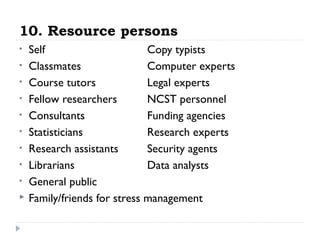
10. Resource persons
•
•
•
•
•
•
•
•
•


Self
Copy typists
Classmates
Computer experts
Course tutors
Legal experts
Fellow researchers
NCST personnel
Consultants
Funding agencies
Statisticians
Research experts
Research assistants
Security agents
Librarians
Data analysts
General public
Family/friends for stress management
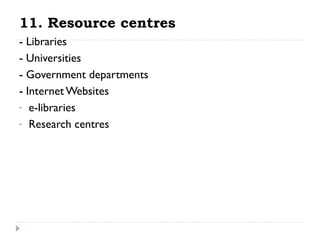
11. Resource centres
- Libraries
- Universities
- Government departments
- Internet Websites
- e-libraries
- Research centres
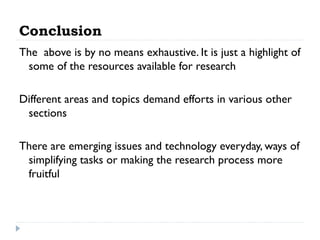
Conclusion
The above is by no means exhaustive. It is just a highlight of
some of the resources available for research
Different areas and topics demand efforts in various other
sections
There are emerging issues and technology everyday, ways of
simplifying tasks or making the research process more
fruitful
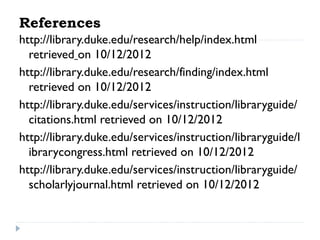
References
http://library.duke.edu/research/help/index.html
retrieved on 10/12/2012
http://library.duke.edu/research/finding/index.html
retrieved on 10/12/2012
http://library.duke.edu/services/instruction/libraryguide/
citations.html retrieved on 10/12/2012
http://library.duke.edu/services/instruction/libraryguide/l
ibrarycongress.html retrieved on 10/12/2012
http://library.duke.edu/services/instruction/libraryguide/
scholarlyjournal.html retrieved on 10/12/2012
Thank you
for
your attention

Resource material for research

  • 1.
  • 2.
    Research guide • • • • • • • • • • • • Introduction The generalresearch process Research guide Material for Information Tools Understanding citations Identifying journal titles from abbreviations Advanced searching techniques Evaluating information sources: Basic principles Resource persons Resource centres Conclusion
  • 3.
    The general researchprocess MMUST PhD 2012 CDS/H/220/12
  • 4.
    Research guide    o o o o 1.  Choosing atopic 2.  Refining a topic 3.  Searching for Information How To Find... (Books, Articles, Primary sources & more) Understanding Citations Advanced Searching techniques How Libraries classify Books (and How to take advantage of it)
  • 5.
    Research guide contd 4. EvaluatingInformation Sources:   Basic Principles  Scholarly journals vs. Popular Magazines  Evaluating Web Pages 5.  Writing a paper:  The writing studio can help!  Citing Sources  Avoiding Plagiarism  Guide to Library vocabulary
  • 6.
    1.Choosing a topic  a. Brainstormpossible topic ideas Consider your personal interests.  Engage in conversations in class or with classmates  Read articles in encyclopedias or dictionaries and review class readings.  Browse recent issues of journals or magazines in Current Periodicals (Bostock 1).  Browse the shelves for books on your subject (see catelogue to know where to look). 
  • 7.
    b.  Review assignmentrequirements What kind of assignment is it - 5 minute oral presentation, 10 page paper, 50 page paper?  How much information do you need?  Does it need to be recent information?  What types of publications do you want to read newspaper articles, books, journal articles, diaries, trade publications?  What formats do you need - visual, audio, printed, electronic?  Is point of view an issue? Do you need opinions?  How much time do you have? 
  • 8.
    c.  List keywordto define your topic    State your research topic as a question. Think about the significant terms, concepts, and keywords that describe your topic. These terms will become the key for searching for information about your subject in library catalogs, online databases, and other resources. Sample keywords for research topic e.g.”Assessing the effectiveness of the electronic waste disposal guidelines in Kiambu County,Kenya
  • 9.
    d. Gather backgroundinformation on your topic  It's hard to get started if you don't know much about your topic  Do some general reading in things like encyclopedias and subject –specific dictionaries to get an overview of the topic    This is also a great first step towards refining your topic
  • 10.
    2.Refining a Topic i)Narrowing a Topic:Too Much Information!  o o o o If your topic seems too broad, consider questions like: What do you already know about the subject? Is there a specific time period you want to cover? Is there a geographic region or country on which you would like to focus? Is there a particular aspect of this topic that interests you? For example, public policy implications, historical influence, sociological aspects, psychological angles, specific groups or individuals involved in the topic
  • 11.
    Example Original Topic: Government environmentalpolicies (too broad!)  Focused Time Period: 2011-2012 Focused Location: Kenya Focused event/aspect: Electronic waste disposal Refined topic: Effectiveness of Kenya government electronic waste disposal guidelines 
  • 12.
    ii) Broadening aTopic: Not Enough Information!  o o o o If your topic is so specific that you can't find sources that specifically address it, consider questions like: Could you add elements to your topic for examination? Could you think more broadly about this topic? Give thought to the wider implications of your research. Who are the key players in this topic? What other issues are involved in this topic?
  • 13.
    Example    Original topic:  What isthe effect of deforestation on Kenya’s long-term ability to feed its citizens?  (too specific!) Alternative place: East Africa Widened focus: agriculture, sustainable development. Key person or group: East African govts Alternative event/aspect: birth control Revised topic:  How can the East African govts encourage their countries to employ sustainable development practices?
  • 14.
    3.Material for Information Advertisements Articles Audiobooks Books Parliamentarypapers Government resources/policy documents CD-ROMs Citation Guides City directories Data & Statistics
  • 15.
    Dissertation & Theses eBooks Encyclopedias& Dictionaries Film & Video Images Journals Manuscripts Maps & GIS Microforms Music Newspapers Online periodicals Resources Podcasts Primary Sources Public documents Reserves Library Materials Tax forms & Publications Trade Statistics Census Materials Internet Websites
  • 16.
    4.Technology and equipment Computers(Desktops PC s, laptops, I-pads, Tablet etc) Off-campus access to online resources – modem Printers Scanners Computer hardware ( flash disks, CDs, memory cards) Computer software (SPSS, Microsoft Project, Project minder) Databases
  • 17.
    Technology & equipment(contd) Typing services Photocopiers Group study rooms Library Lockers & carrels Multimedia Project Studio
  • 18.
    5. Tools i) Planningtools Work plan/Action plan/Logframe PERT GANTT Guides to research Guides to research report writing Specifications from overseeing authority Permissions (MMUST,NCST)
  • 19.
    ii) Writing tools Pen/pencil Paper Notebooks Computer Printer Librarycatalogue Search tools Material for Information –listed above
  • 20.
    iii) Research andAnalysis Tools Information gathering tools • Questionnaires • Schedules • Procedures • Rules (sampling, organizational) Analysis tools  Statistical approaches/ formulae  Computer software  Research assistants/Data analysts/statisticians
  • 21.
    iv) Refining Tools Brainstorming ClassPresentations Discussions Corrections Extract papers Arguments
  • 22.
    6.Understanding Citations Citation:  A referenceto a source used in an article, essay, book, etc.  Most citations of articles : Author Article title Journal or magazine title Volume number of the journal or magazine Date of publication Page numbers of the article (some citations only include the beginning page number)
  • 23.
    Example1. This citationwas found in the database Web of Science:      We can identify: Article Author(s): Michael Bode and Hugh Possingham Article Title: Can culling a threatened species increase its chance of persisting? Journal Title (Source):  Ecological Modelling Journal volume number: 201, issue number 1 Article page numbers: 11-18 Date of Publication: February 10, 2007
  • 24.
        Other information provided: Sp.Iss. SI indicates that this was a special issue of the journal identifies document type as article (not book, book chapter, abstract, dissertation, etc) identifies that the article is written in English
  • 25.
    Example 2. Thiscitation was found in the database PAIS: We can identify:  Article Author(s): Anthony N. Doob, and Jane B. Sprott Article Title: Punishing Youth Crime in Canada: The Blind Men and the Elephant  Journal Title (Source):  Punishment & Society
  • 26.
          Journal volume number:8, issue number 2 Article page numbers: 223-233 Date of Publication: April 2006 Other information provided: provides the ISSN for the journal Punishment and Society to assist in locating the item indicates that the authors (or main author) are affiliated with the University of Toronto
  • 27.
    7. Identifying Journal Titlesfrom Abbreviations Titles of magazines or journals are often abbreviated in citations. In most cases, you will need the full title to search for the journal in the online catalog or as an e-journal. Try:  Selecting a link for the "full citation" or "complete reference" in an online source  Selecting the link for a database's source list, and then looking for your journal title  Looking in the beginning of a print journal, book or periodical index, as there may be an abbreviations list 
  • 28.
    contd  Looking in thebook Periodical Title Abbreviations, available at the Reference Desk and Ready Reference  All That JAS: Journal Abbreviation Sources provides links for the natural and social sciences, law, and philosophy  Ask a librarian
  • 29.
    8. Advanced SearchingTechniques  Natural Language Searching - A Search Like Google  Google has made most of us comfortable with Natural Language searching.  It takes the words you type into the box and searches for them using the Boolean operator 'and' (see below on Boolean searching).  It also tries to find instances where the words are close to each other within the result; this is called proximity (see also below). It does not search the words as a phrase unless you put quotation marks around the whole thing
  • 30.
     Most online catalogand many of their article databases now use Natural Language Searching, so when you type in a keyword search like 'java web application' you will probably get some hits.  However, you will be able to significantly improve the results from your searching by using the following techniques
  • 31.
    Boolean Searching    Broaden ornarrow your search by combining words or phrases using the Boolean operators AND, OR, and NOT The results of performing Boolean searches are sometimes illustrated by the diagrams below (called Venn diagrams.) The diagrams show graphically how using the AND operator narrows a search, using OR broadens a search, and using NOT excludes material from a search Many databases and search engines have an Advanced Search interface that allows for Boolean searching; you can also try just using a Boolean operator in the main search box
  • 32.
  • 33.
    Parentheses (Nesting)    Use parenthesesto clarify relationships between search terms. Example: (television or mass media) and women This search looks for both "television and women" and "mass media and women."
  • 34.
    Truncation or Wildcards       Asymbol at the end of a word stem provides for all variants on the word stem. The most commonly used symbol is the asterisk (*). Example: educat* will retrieve educate, educating, education, educational, educator, educators, etc. Be careful not to truncate too far, or you will retrieve unrelated words! A symbol within a word provides for all possible variants inside a word or word stem. A commonly used symbol for internal truncation is !. Example: wom!n will retrieve woman and women. You may combine truncation symbols in one search. Look at the help pages for the database you are using to determine the truncation symbols. Most systems provide truncation but some provide only simple plurals.
  • 35.
    Proximity Operators  Sometimes ina full text search you want words that occur close to one another but not as a phrase    Many full text article databases allow searching with proximity operators in their advanced search interfaces    Consult the help pages of the database you are using to see what proximity operators work for it
  • 36.
  • 37.
    Field Searching  The AdvancedSearch screen of the Most online catalogs are a good example of field searching, where you can select a particular part of the electronic record to search    Note that you can often combine different field searches using Boolean operators  Most article databases have an Advanced Search interface that allows some kind of field searching
  • 38.
  • 39.
    9.Evaluating Information Sources:Basic Principles  Quantity Enough resources are needed to:  Support your argument Include a variety of viewpoints and materials 
  • 40.
    Diversity Variety is necessary.Include many different resources.  Primary Sources     Contemporary accounts of an event and original documents Examples: letters, diaries, audio-recordings of speeches, newspaper articles Secondary Resources   Retrospective sources based on primary resources; include scientific or scholarly analysis Examples: books, articles, editorials, reviews, scientific studies
  • 41.
    Date of Publication   Whenwas the source published? Make sure the date of publication is appropriate for your project. Current Events Research   Use resources that are recent and reflect current attitudes. Historical Research  Use a variety of resources from different time periods including both primary and secondary resources.
  • 42.
    Quality and Reliability          Whenchoosing your resources, the most difficult task is determining their quality and reliability. Factors to think about: What is the tone? Who is the intended audience? What is the purpose of the publication? What assumptions does the author make? What are the bases of the author's conclusions? Does the author agree or disagree with other authors of the subject? Does the content agree with what you know or have learned about the issue? To help determine this, it might also help to look over the source's documentation and read some reviews of the source.
  • 43.
    Additional Resources Does thesource provide other leads?  Documentation (i.e., footnotes and bibliography)  Provides additional resources  Substantiates the author's research 
  • 44.
    Evaluating Web Pages       Beforeusing information found on a web page for your research project, consider the following criteria to evaluate its credibility. Authority Purpose/Intended Audience Currency Objectivity Support
  • 45.
    Authority Criteria & Questionsto Consider  Who wrote the page?  What are the author's credentials?  Can you verify the author's credentials?  Could the credentials be made up?  Did the author include contact information?  Whose web site is this?  What organization is sponsoring the web page?
  • 46.
    Tips & Ideason authority    Look for the author's name near the top or the bottom of the page. If you can't find a name, look for a copyright credit (©) or link to an organization. Look for biographical information or the author's affiliations (university department, organization, corporate title, etc.). Anyone who has visited a chat room knows that people don't always identify themselves accurately.
  • 47.
    contd  Look for anemail link, address, or phone number for the author. A responsible author should give you the means to contact him/her  To verify a site's organizational sponsorship:    Look at the domain (.com, .edu, .org, etc.). Look for an "about this site" link. Be careful of a web page that has a tilde (~) in the URL, as this usually identifies a personal directory on a web site.
  • 48.
    Purpose/Intended Audience Criteria &Questions to Consider  What is the purpose of the page?  Why did the author create it?  Who is the target audience?
  • 49.
    Tips & Ideason purpose/intended audience   The purpose of the page could be advertising, advocacy, news, entertainment, opinion, fandom, scholarship, satire, etc. Some pages have more than one purpose. For example, http://www.dowjones.com/ provides free business information but also encourages you to subscribe to the Wall Street Journal or other Dow Jones products.
  • 50.
    Identify target audience  (contd) ToLook at reading level of the page: is it easy to read or challenging? Does it assume previous knowledge of the subject?   Consider the design of the web page: are there banner ads and animated GIFs, or does the page present a lot of text with little decoration? Possible audiences include: academic researchers, kids, buyer's of competitor's products, participants in a support group, political extremists, and more.
  • 51.
    Currency Criteria & Questionsto Consider Is there a date at the top or bottom of the page?  Is the information up-to-date?  Tips & Ideas  Note: A recent date doesn't necessarily mean the information is current. The content might be years out of date even if the date given is recent. (The last update of the page might have been from someone changing an email address or fixing a typo) 
  • 52.
    (contd) To determine ifinformation is up-to-date, compare the information on the web page to information available through other sources. Broken links are one measure of an out-of-date page  In general, information in science, technology, and business fields ages quickly. Information in the humanities and social sciences age less quickly. In some cases, old information can be perfectly valid
  • 53.
    Objectivity Criteria & Questionsto Consider  Is the author being objective or biased?  Tips & Ideas Biased information is not necessarily "bad", but you must take the bias into account when interpreting or using the information given.  Look at the facts the author provides, and the facts the author doesn't provide.  Are the facts accurately and completely cited? 
  • 54.
    contd  Is the authorfair, balanced, and moderate in his/her views, or is the author overly emotional or extreme?  Based on the author's authority, try to identify any conflict of interest. Determine if the advertising is clearly separated from the objective information on the page.
  • 55.
    Support       Criteria & Questionsto Consider Does the author support the information he/she uses? Is the support respectable? Tips & Ideas Look for links or citations to sources. Some academic web pages include bibliographies. Does the page cite well-known sources or authorities?
  • 56.
    contd    Does the pagecite a variety of sources? Do other pages on the same topic cite some of the same sources? The web page in question should have a mix of internal links (links to web pages on the same site or by the same author) and external links (links to other sources or experts). If a web page makes it hard for you to check the support, be suspicious.
  • 57.
    10. Resource persons • • • • • • • • •  Self Copytypists Classmates Computer experts Course tutors Legal experts Fellow researchers NCST personnel Consultants Funding agencies Statisticians Research experts Research assistants Security agents Librarians Data analysts General public Family/friends for stress management
  • 58.
    11. Resource centres -Libraries - Universities - Government departments - Internet Websites - e-libraries - Research centres
  • 59.
    Conclusion The above isby no means exhaustive. It is just a highlight of some of the resources available for research Different areas and topics demand efforts in various other sections There are emerging issues and technology everyday, ways of simplifying tasks or making the research process more fruitful
  • 60.
    References http://library.duke.edu/research/help/index.html retrieved on 10/12/2012 http://library.duke.edu/research/finding/index.html retrievedon 10/12/2012 http://library.duke.edu/services/instruction/libraryguide/ citations.html retrieved on 10/12/2012 http://library.duke.edu/services/instruction/libraryguide/l ibrarycongress.html retrieved on 10/12/2012 http://library.duke.edu/services/instruction/libraryguide/ scholarlyjournal.html retrieved on 10/12/2012
  • 61.