Mahnoor Sheikh
Roll# 11
 A software system that is designed to do
keyword searches for information on
the World Wide Web.
 They produce a line of results often referred
to as search engine results pages (SERPs).
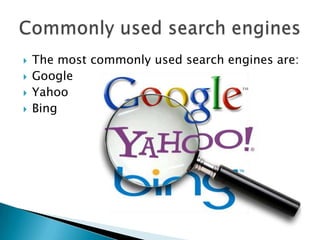
 The most commonly used search engines are:
 Google
 Yahoo
 Bing
 Most famous and the most frequently used
search engine.
 Google Web site has a blinking cursor in an
edit box where you can type the word or
phrase that you are interested in.
 Google Instant is a search enhancement that
shows results as you type.
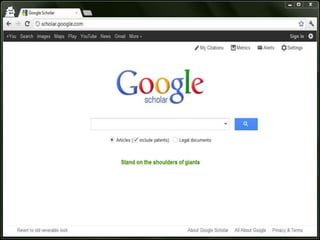
 One of the tools of Google that provides a
simple way to broadly search for scholarly
literature.
 A bibliographic database that is meant to find
abstracts and full text articles published on
various topics.
 Google Scholar arose out of a discussion
between Alex Verstak and Anurag Acharya.
 In 2011, Google removed Scholar from the
toolbars on its search pages.
 In 2012, an individual Google Scholar page
feature was added.
 “Google Scholar library” was introduced in
November 2013 where the logged-in users
can save search results.
 „Group of‟ feature:
Shows the available links to journal
articles.
 „Cited by‟ feature:
Provides access to abstracts of articles
that have cited the article being viewed.
 „Related articles‟ feature:
Presents a list of closely related articles.
 „Advanced search‟ feature:
Helps people to narrow down their
searches to find the most recent articles.
 „Keyword‟ feature:
The most relevant results for the
searched keywords will be listed first.
 „Ranking articles‟ feature:
Tells the ranking of the articles and the
journals.
 Google's homepage and Gmail have a "More"
link on the top.
 Click on the link and select "Scholar" from the
drop-down menu.
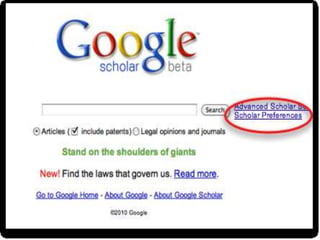
 Set your “Scholar preferences”.
 Use “Advanced search" option.
 Choose a “Subject” area.
 Click on "Search Scholar”.
 It covers a wide range of academic content
areas and is continually being updated.
 Full text articles are available.
 Google Scholar can connect you to library
resources.
 Ranks and lists search results in order of
relativity to search query.
 Sources found are more academic versus
regular search engine.
 Some articles require payment for full view of
text.
 Google Scholar does not state where search
result was found from.
 Your results may not be current or as
comprehensive as you need.
 Google Scholar has less coverage in
Humanities and more in Science and
Technology.
 Not compatible with EndNote citation
software
 The increasing availability of online
information resources and open access
journals will place Google Scholar at the
fingertips of most working scholars.
 Improvements in the Google Scholar system
will increase its use by those already familiar
with it and gain it new users.
Presentation google scholar

Presentation google scholar

  • 2.
  • 4.
     A softwaresystem that is designed to do keyword searches for information on the World Wide Web.  They produce a line of results often referred to as search engine results pages (SERPs).
  • 5.
     The mostcommonly used search engines are:  Google  Yahoo  Bing
  • 6.
     Most famousand the most frequently used search engine.  Google Web site has a blinking cursor in an edit box where you can type the word or phrase that you are interested in.  Google Instant is a search enhancement that shows results as you type.
  • 7.
     One ofthe tools of Google that provides a simple way to broadly search for scholarly literature.  A bibliographic database that is meant to find abstracts and full text articles published on various topics.
  • 9.
     Google Scholararose out of a discussion between Alex Verstak and Anurag Acharya.  In 2011, Google removed Scholar from the toolbars on its search pages.  In 2012, an individual Google Scholar page feature was added.  “Google Scholar library” was introduced in November 2013 where the logged-in users can save search results.
  • 10.
     „Group of‟feature: Shows the available links to journal articles.  „Cited by‟ feature: Provides access to abstracts of articles that have cited the article being viewed.  „Related articles‟ feature: Presents a list of closely related articles.
  • 11.
     „Advanced search‟feature: Helps people to narrow down their searches to find the most recent articles.  „Keyword‟ feature: The most relevant results for the searched keywords will be listed first.  „Ranking articles‟ feature: Tells the ranking of the articles and the journals.
  • 12.
     Google's homepageand Gmail have a "More" link on the top.  Click on the link and select "Scholar" from the drop-down menu.  Set your “Scholar preferences”.  Use “Advanced search" option.  Choose a “Subject” area.  Click on "Search Scholar”.
  • 14.
     It coversa wide range of academic content areas and is continually being updated.  Full text articles are available.  Google Scholar can connect you to library resources.  Ranks and lists search results in order of relativity to search query.  Sources found are more academic versus regular search engine.
  • 15.
     Some articlesrequire payment for full view of text.  Google Scholar does not state where search result was found from.  Your results may not be current or as comprehensive as you need.  Google Scholar has less coverage in Humanities and more in Science and Technology.  Not compatible with EndNote citation software
  • 16.
     The increasingavailability of online information resources and open access journals will place Google Scholar at the fingertips of most working scholars.  Improvements in the Google Scholar system will increase its use by those already familiar with it and gain it new users.