TennesseeStateUniversityLibrary, Avon Williams Campus

Chris Langer
User Services Librarian


Information Literacy for Institute of Government Students


The goal of this course is to ensure that Tennessee State University Institute of
Government graduates are literate in regard to information, and can determine the type
and amount of information they need; can access and judge the information critically and
incorporate this information into a knowledge base and ethical outlook, use the
information effectively to accomplish a specific purpose and understand the economic,
legal and social issues about the use of information.


Institute of Government Students in General will be able to:


                • determine the what information is needed by

                                - identify aresearch topic by consulting with teachers and
                                         librarians to

                                - the information can be formulated as a question

                                - learning how to broaden or narrow the topic as needed to
                                         fit the research concept

                                - put a finger on the key words, concepts, or categories that
                                         define the research topic

                                - using analytical and critical thinking skills in identifying

                                         information needed

                • identify, locate and retrieve information by

                                - finding what sort of information is needed

                                - determining where to find the information

                                - finding strategies to drill down to the needed information
                                         in various sources


                                                                                                 1
• utilize or construct and implement effective search strategies by

                                 - formulating an effective search strategy

                                 - conducting searches using appropriate resources

                                 - evaluating search results and modifying search

                                         strategies as needed


First Year Institute of Government Students will be able to:


                • go to the library‟s website and navigate it efficiently

                • query the Library‟s online resources effectively, including the online     catalog,
                databases, journals, e-books, etc.

                • use controlled vocabulary to define topics and concepts and search for them
                using library resources.

                • evaluate the scope, content and organization of various

                        sources and information, and compile pertinent citation informationfor
                        possible use

                • glean conclusions from the information gathered, meld new

                        information with previous information and identify the concepts of
                        topics which support the chosen thesis

                • know what plagiarism is and what its deleterious effects are

                • find a citation style that fits your topic and use it correctly and consistently


Intermediate and Advanced Level Institute of Government Students will be able to:


                • develop a thesis statement and formulate questions based on the

                        needed information

                • evaluate potential resources in a variety of formats, including

                        databases, data set, web sites, printed materials and others


                                                                                                     2
• useinternet search engines with a variety of

                        command languages, protocols and search parameters.

                • know how to use interlibrary loan, Athena, and TALC

                • recognize that existing information combined with original thought,

                        analysis and experimentation can produce new information

                • know that knowledge is organized into disciplines and that this can

                        influence the way information is acquired

                • use various methods to retrieve information in various formats,

                        including software, reader/printer scanners, audio visual equipment

                        and others

                • evaluatethe reliability, validity, accuracy, authority and bias, if any, of
                        theinformation using various methods

                • use computer and other technologies, including databases,

                        spreadsheets, charts to study the interaction of ideas

                • broaden the research topic to construct new hypothesis that may

                        require additional information

                • test theories with appropriate discipline techniques, including

                        formulas, simulations

                • properly use the obtained information by citing resources according to

                        the copyright laws


RESEARCH STRATEGIES-OUTLINE


I. Define a Topic in Public Administration


                                                                                                3
1. Search for Ideas

        2. Narrow or Broaden Your Topic as Needed

        3. State Your Topic as a Question

        4. Identify the Type of Information Needed


II. Gather Background Information

        1. Encyclopedias

        2. Dictionaries

        3. Almanacs and Yearbooks

        4. Handbooks and Bibliographies

        5. Dissertations, Theses and Senior Projects

        6. Current Research


III. Search Databases for Journal Articles, Technical Reports,

Conference Proceedings and Standards

        1. What are Databases?

                a. Structure

                b. Type

                          1.Bibliographic

                          2. Full-Text

                          3. Numeric

                          4. Image

                          5. Audio

                c. Coverage

                          1. Subject Area

                          2. Type of Publication


                                                                 4
d. Attributes

2. Searching Databases

       a. Search Strategies

       b. Use of TSU Database Subscriptions in

         Public Administration

               ABI/Inform

               Columbia International

               Congressional Universe

               Country Analysis

               Dissertation Abstracts

               EBSCOhost - Academic Search Premier

               Emerald

               ERIC

               Ethnic NewsWatch

               FACTS

               GenderWatch

               InfoPlease

               INFOTRAC

               JSTOR

               Keesing's Online

               Lexis-Nexis

               MIT Press

               NewsBank

               Opposing Viewpoints Resource Center

               Project MUSE

               ScienceDirect


                                                     5
SpringerLINK

                        Statistical Abstract of the United States

                        Westlaw Campus

                        Wiley InterScience

                        WilsonWeb - Social Sciences

       3. Locating Print and Electronic Journal Articles


IV. Search TSU Online Catalog for Books and Other Resources

       1. How to use TSU Online catalog?

               a. Keyword Search

               b. Subject search

               c. Author Search

               d. Title Search

               e. Search Commands

                        1. Boolean operators

                        2. Search Qualifiers

                        3. Tips

       2. Location of Materials

       3. Library of Congress Classification System

       4. What is a Call Number ?

       5. How to Read Call Numbers?

       6. Electronic Books


V. Explore Internet Resources

       1. Structures and Attributes of the Internet

       2. Search Tools for the Internet


                                                                    6
a. Google

               b. AllThe.com

               c. Yahoo

               d. AltaVista

               e. Ask Jeeves

               f. HotBot

               g. Dogpile

               h. Search Engine Tips

       3. Types of Web Sites

       4. Categories of Information on the Internet

               a. Free Web Sites with Valuable Information

                       1. Current Company Information

                       2. Current Events or Topics

                       3. State and federal Government

                                  Information

                       4. Information About and From

                                  Associations

                       5. WWW Resources at TSU

                                  1. Virtual reference

                                  2. Tennessee Resources

                                  3. Government Resources

                                  6. Web Sites in Public Administration


VI. Evaluate Research Materials

       1. Criteria to Evaluate Research Materials in Public Administration

       2. Criteria to Evaluate the Web Resources


                                                                             7
VII. Write the Research Paper

        1. Organization of Information

        2. Citing Sources and Ethical Issues

        3. Guidebooks on Research


VIII. Cite Your Sources

        1. Style Manuals


I. Define a Topic in Public Administration

        Presume you are interested in writing a paper on

        Civil service . You may want to define the scope of your

        paper by outlining the operations of the Civil Service in Germany.

                1. Search for Ideas

                          If you do not have an idea what constitutes Civil Service ,

                          search and read articles or books on the topic.

                          For example, use Emerald online database,

                          set fields to search for all fields, set Fields to search for all fields, and
                          sort results by relevance. Type:

                          Civil Service

                          You will access articles with varying numbers according to the

                          search choices you made.

                          OR, you may do a subject search in the Library‟s online catalog

                          under Civil Service.

                          After scanning through some articles and books, you should

                          be able to come up with preliminary ideas about your

                          topic. You can always talk to your reference librarians in the


                                                                                                          8
Reference Area or send e-mails or chat online via the ASK A

       LIBRARIAN service located on the Library‟s web page. You can

       also consult your instructor.

2. Narrow or Broaden Your Topic

       You may find too much information on your topic. In that case,

       you may want to narrow your topic. For example, in Emerald

       you may find 65 full-text articles under Civil Service. You may

       qualify your search by limiting your topic to a certain area such as

       Germany.

       If you can find only few sources, you may want to broaden your

       topic by related fields such as bureaucracy. For example, you may find
       104 articles in Emerald that can assist you in broadening your topic.

3. State Your Topic as a Question

       Stating your topic as a question may help you to stay within the

       scope of your selected topic. For example, what is the corporate culture
       of civil service in Germany?

4. Identify the Type of Information Needed

       The type of information needed depends on the following:

       • Type of Assignment- is this a presentation, term paper, senior
               project,thesis or dissertation?

       • Amount of Information- how much information is needed ?

       • Currency of Information- does this assignment require current,

               historical information or a combination of both?

       • Type of Resources Needed- should the information come from

               scholarly and professional journals only, or can they come from
               more popular sources?

       • Primary vs. Secondary Resources- should the information come
               fromprimary or secondary sources?


                                                                                  9
• Information in Various Formats- should the information come from
                       only print resources or include other formats such as   visual/
                       graphicsources, numeric sources (statistics), audio     sources and/or
                       electronicsources?


II. Gather Background Information

       Gathering background information on your subject will help you limit the scope of the
       subject and make an outline.Make note of differing concepts, issues in the field, and main
       ideas. Good sources for locating

       background information include encyclopedias, almanacs and yearbooks,

       and handbooks and bibliographies. In order to find information on the

       Civil Service, you need to look for background resources in Public Administration. You
       will locate these resources by

               1. Searching the Library‟s online catalog under the subject

                       heading Encyclopedias and Dictionaries. From the

                       entries retrieved, you may chose the relevant ones.

               2. Note the appropriate classification numbers for

                       specific resources or resources in the subject area and

                       locate them in the appropriate reference section. For example, if you find
                       a good source under HJ2305 in the stacks, look under the same number
                       in the reference section to find reference books on the subject.

               3. You may enhance your search by using

                       keyword searching and combining words in general areas such as

                       Civil Service, bureaucracy, with such words

                       as encyclopedia, dictionary, etc.

               Resources that provide background information include

                       1. Encyclopedias –

                               General-

                                       Britannica Online

                                       http://www.tnstate.edu/library/database/htm#B


                                                                                              10
Encyclopedia Americana

                                            Ref. AE 5 .E333

                                 Subject-

                                            Encyclopedia of Taxation and Tax Policy

                                            Ref. HJ2305

                         2. Dictionaries-

                                 General-

                                            Random House Webster‟s Dictionary

                                            Ref.PE 1628 .R294

                         3. Almanacs and Yearbooks-

                                 Infoplease.com (electronic resource)

                                            http://www.infoplease.com/

                                 FACTS(electronic resource)

                                            http://www.2facts.com/stories/mainmenu.asp

                         4. Handbooks and Bibliographies

                                 Handbook of Public Administration JF 1351

                                 Public Administration, Politics and the People JF 1321

                                 International Handbook of the Ombudsman JF 1525

                                 U.S. Government Manual JK 421


III. Search the Databases for Journal Articles,

        Technical Reports, Conference Proceedings and Standards

        1. What are databases?


                                                                                          11
In general, databases are organized collections of

information. For example, TSU Library‟s online

catalog is a database as well as electronic periodical

indexes that provide full-text articles, including

Academic Search Premier, Emerald, and citation

Indexes such as CompendexWeb and others. You may

locate and access Library‟s databases online from

our web page at

http://www.tnstate.edu/library/database_oncampus.htm

In order to use the databases properly, you should be

able to understand the structure, type, coverage and

attributes of them.

        a. Structure-

        Databases contain records that are information

        about each item within those databases.

        For example, the Library‟s online catalog

        has a record for each book, journal, microfilm,

        etc owned by it. In turn, each record contains

        information called fields. The fields in a record

        may include author, title, publisher, subject

        headings, and others. Other database records

        may contain fields that include author,

        title, title of the periodical, volume

        number, date, year and page numbers.

        b. Type-

        The nature of the information contained in a


                                                            12
database determines its type. The main types

of databases include Bibliographic, Full-text

Numeric, Image, Audio and Mixed.

Bibliographic databases do not contain the

items, however, they provide information as

to where you can find it. The information

provided by the Bibliographic database may

contain items such as Author, Title, Publisher,

Date, Volume Number, Page Number and

others that is called “citation”. Sometimes

they include abstracts ( a summary) or

descriptions of items. If you are interested in

finding records or citations about a certain

topic then you can choose to use these

databases to create bibliographies. However, if

you want to read the information in its entirety,

you will either locate the source given in the

record or use a full-text database. An example

of a record from a bibliographic database such

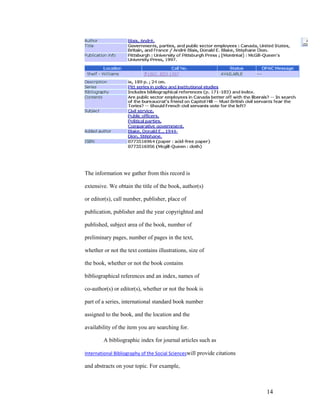
as an online catalog may look like this:


                                                    13
The information we gather from this record is

extensive. We obtain the title of the book, author(s)

or editor(s), call number, publisher, place of

publication, publisher and the year copyrighted and

published, subject area of the book, number of

preliminary pages, number of pages in the text,

whether or not the text contains illustrations, size of

the book, whether or not the book contains

bibliographical references and an index, names of

co-author(s) or editor(s), whether or not the book is

part of a series, international standard book number

assigned to the book, and the location and the

availability of the item you are searching for.

        A bibliographic index for journal articles such as

International Bibliography of the Social Scienceswill provide citations

and abstracts on your topic. For example,


                                                                          14
you may search under Civil Service and Germany.

If you used the above example, you will

retrieve 291 records which are available to you

immediately..Press view record to see the abstract, accession

number, language, publication year and publication type.

Full-text Databases

These databases are called full-text because they

contain the complete text of publications. For

example, EbscoHost provides full-text

articles from public administration journals and books in

addition to summaries. For example, a search under civil service will retrieve
3075documents. You may choose to read the abstract to

determine if this article is useful for your research.

If so you may want to read or print the article.

Numeric Databases

These databases generally provide numeric data,

including statistics, financial data, census

information, economic indicators and others.

For example, FIS Online will provide statistical

information about companies and countries. Census

Data would provide statistics about people,

business and others.

Image Databases

These are the databases that provide access to art

prints, animations, photos and others. For example,

If you access the Library‟s Virtual Reference web

page you will find a list of art


                                                                                 15
resources that display images.

Audio Databases

These databases provide access to audio clips to

music and sound effects. For example, Library‟s

Virtual Reference web page would provide access

to the Internet Public Library Listening Room

where you may listen to and observe the videos of

Ray Brooks, Steve Wood Quintet, Pamela Wise,

Blue Dog and others.

c. Coverage

The selection of appropriate databases is an

important factor in finding relevant information.

A description of information covered by a database

is usually found in the introductory screen.

Subject Area-

Some databases cover a specific subject area or

discipline such as Public Administration, psychology, nursing

and others. Others cover areas in more general in

nature or a mixture of subject areas. For example,

in Public Administration, your library provides you access to

EbscoHost, Infotrac, Congressional Universe, Westlaw,

Wiley Interscience and Wilsonweb-Social Sciences.

You can also find a list of databasesaccording to their

subject coverage in the Library‟sweb page under

Databases by Subject at

http://www.tnstate.edu/library/databases_subject.html


                                                                16
Type of Publication-

Databases may contain information from only

periodicals. For example, Project Muse will give you

access to periodical articles they publish in the areas

of social sciences. Some databases will

include information from a combination of sources

such as periodicals and books. For example,

WilsonWeb-Social Sciences, and Wiley InterScience will

provide you with articles from periodicals and

chapters from books. Some databases include

only popular sources such as magazines and

newspapers. You can use these databases for leisure

reading. On the other hand, some databases

include scholarly materials found in scientific

journals, conference proceedings and reports.

For example, Wiley InterScience, Project Muse

and SpringerLinkwill provide access to scholarly

journals and materials. Databases differ in terms of

frequency of updating materials, accessibility of

the most recent periodical articles and the

publication dates of the materials included.

Sometimes publishers put an embargo on the

availability of the recent issues. For example, while

searching the EBSCOHost, you may come across

some periodicals that are not currently accessible.

That is, an embargo has been placed for the last two


                                                          17
years. Another feature to consider in selecting a

database is the availability of the material. You

may select a full-text database so that you can read

the material immediately. Or you may choose a

database that may provide only bibliographic

information, however, you library owns a majority

of the items. If you are willing to wait, you may use

a more comprehensive database that indexed a great

number of items your library does not subscribe to

but is able to obtain them for you through

interlibrary loan. The decision is yours.

d. Attributes

After you make the selection of the databases you

would like to use, you will need to determine if the

databases use controlled vocabulary and if the

databases do field search or free-text indexing.

In performing searches you will find that some

databases use controlled vocabulary which is a

specific list of subject terms in organizing the

database contents by subject. If you want to retrieve

relevant items or information , you should be aware

of “controlled vocabulary”. For example,

ERIC provides you with the ERIC Thesaurus.

This is a list of subject terms you can use

to retrieve the relevant information you need. If you

look under Government and Politics you will find 166


                                                        18
subject headings to choose from.

        Subject Headings may be found in special

        thesauruses, like in ERIC, or may be provided by the database

        or in the Library of Congress Subject Headings

        source. You may search most databases by

        subject, using controlled vocabularyOR

        keyword, by using your own words.

        Some databases use field searching which means

        that the search term you used is only looked in

        specific fields. For example, if you are using the

        Library‟s online catalog and select the keyword

        search, your search will locate items with that

        specific search term in the title, subject or content

        fields. On the other hand, some databases use free-

        text searching which means that the search term

        you have selected will locate items anywhere in a

        document or record. This type of searching may

        return false drops or irrelevant items because the

        search term you have located will be located no

        matter where it is. Some databases may give you the

        choice for field or free-text searching. Check the

        sites for this information before you begin your

        search.

2. Searching Databases

A. Search Strategies –

Your library provides access to over 101 databases.


                                                                        19
You can search these databases from any computer

on campus and/or from off campus sites. In

selecting the type of database that will provide

appropriate and relevant articles, you may consider

the following:

• subject discipline of your topic –

specialized or multidisciplinary

• type of resources needed – basic sources,

scholarly sources or professional/trade

sources

• the target audience – is the research for a term

paper, independent study, senior project,

thesis or dissertation?

B. Use of Databases Subscribed by TSU

Libraries relevant to the Institute of Government.

Your Library subscribes to over 101 online

databases in general and subject fields. The

databases in subject field – Public Administration

include the following that provide the

most appropriate and relevant information:

CIAO (Columbia International Affairs Online)

Contains working papers, books, policy briefs, case studies,

course packs and maps.

Truncation: *and ?

Search Tips:

1. You need to use truncation (*) to search for words that begin


                                                                   20
with the same letters. For example, global* will return with globalization,

globalizing.

2. Use ? as a placeholder for any single letter. E.g., f?n will return fun, fan, or fin.
3. Truncation is allowed for one word only, not a phrase.Wildcards can by anywhere in
   a query term (leading, middle, or trailing).


Congressional Universe

Years Covered: Varies by source, ranging from 1987 to present

Relevancy: Laws, legislative activities, public policy, American politics.

Truncation: *, !

Search Tips:

Each part of Congressional Universe necessarily uses different search methods. There are
13 parts. For example, to search for regulations in the Federal Register, you need to
specify the citation page number. If you are searching for testimony before Congress, you
can search by keyword and by the witness‟ name.

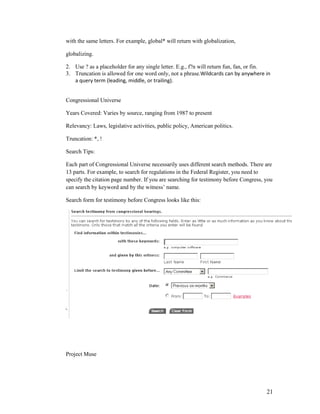
Search form for testimony before Congress looks like this:


Project Muse


                                                                                      21
Relevancy: cultural studies, education, political science, gender studies, economics, and
   social sciences.

   Truncation: Truncate with an asterisk (*) at the ends of terms only.

   Examples:

   Weimar, k* to retrieve Weimar, Klaus
   modern* to retrieve modern, modernity, modernism, etc.
   histor* to retrieve history, historical, etc.
   cat* to search cat and cats, etc.

    Muse does not currently offer a mechanism to expand search terms within          or at
the beginning of words


                                                                                             22
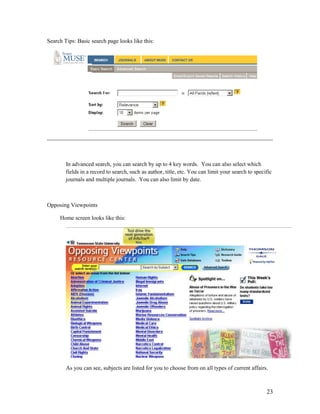
Search Tips: Basic search page looks like this:


        In advanced search, you can search by up to 4 key words. You can also select which
        fields in a record to search, such as author, title, etc. You can limit your search to specific
        journals and multiple journals. You can also limit by date.


Opposing Viewpoints

     Home screen looks like this:


        As you can see, subjects are listed for you to choose from on all types of current affairs.


                                                                                                    23
Relevancy: Current Affairs, Social Issues

Truncation:

        The * (standing for any number of characters) is placed at the end of the term’s
        root. The search retrieves all words sharing the same root. For example, the
        term environment* retrieves essays that contain the words environment,
        environmental, or environmentalism.
        The ? is used to replace exactly one character within a word to retrieve various
        forms of that word. For example, the term wom?n retrieves essays that contain
        either woman or women; and psych????y matches either psychology or
        psychiatry but not psychotherapy.
        The ! point stands for one or no characters. For example, analo!! matches
        analog or analogs, but not analogous or analogue.
        *NOTE: For best search results, it is recommend that wildcards be used
        only with the Advanced Search function.

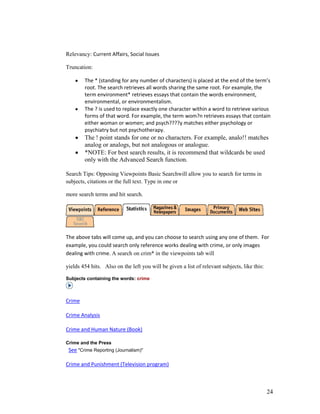
Search Tips: Opposing Viewpoints Basic Searchwill allow you to search for terms in
subjects, citations or the full text. Type in one or

more search terms and hit search.


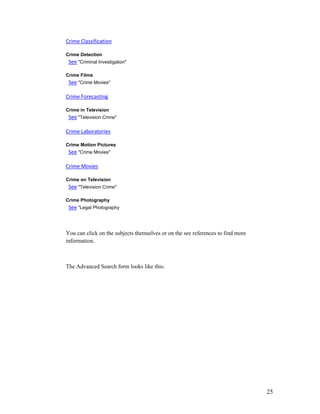
The above tabs will come up, and you can choose to search using any one of them. For
example, you could search only reference works dealing with crime, or only images
dealing with crime. A search on crim* in the viewpoints tab will

yields 454 hits. Also on the left you will be given a list of relevant subjects, like this:

Subjects containing the words: crime


Crime

Crime Analysis

Crime and Human Nature (Book)

Crime and the Press
 See "Crime Reporting (Journalism)"

Crime and Punishment (Television program)


                                                                                              24
Crime Classification

Crime Detection
 See "Criminal Investigation"

Crime Films
 See "Crime Movies"

Crime Forecasting

Crime in Television
 See "Television Crime"

Crime Laboratories

Crime Motion Pictures
 See "Crime Movies"

Crime Movies

Crime on Television
 See "Television Crime"

Crime Photography
 See "Legal Photography


You can click on the subjects themselves or on the see references to find more
information.


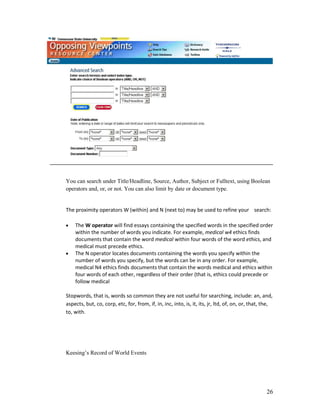
The Advanced Search form looks like this:


                                                                                 25
You can search under Title/Headline, Source, Author, Subject or Fulltext, using Boolean
operators and, or, or not. You can also limit by date or document type.


The proximity operators W (within) and N (next to) may be used to refine your search:

    The W operator will find essays containing the specified words in the specified order
    within the number of words you indicate. For example, medical w4 ethics finds
    documents that contain the word medical within four words of the word ethics, and
    medical must precede ethics.
    The N operator locates documents containing the words you specify within the
    number of words you specify, but the words can be in any order. For example,
    medical N4 ethics finds documents that contain the words medical and ethics within
    four words of each other, regardless of their order (that is, ethics could precede or
    follow medical

Stopwords, that is, words so common they are not useful for searching, include: an, and,
aspects, but, co, corp, etc, for, from, if, in, inc, into, is, it, its, jr, ltd, of, on, or, that, the,
to, with.


Keesing‟s Record of World Events


                                                                                                    26
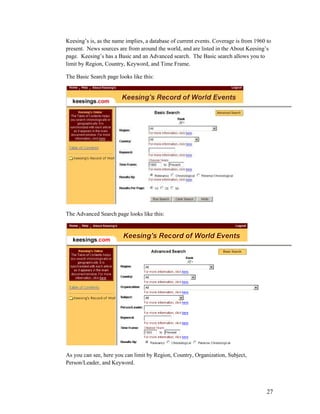
Keesing‟s is, as the name implies, a database of current events. Coverage is from 1960 to
present. News sources are from around the world, and are listed in the About Keesing‟s
page. Keesing‟s has a Basic and an Advanced search. The Basic search allows you to
limit by Region, Country, Keyword, and Time Frame.

The Basic Search page looks like this:


The Advanced Search page looks like this:


As you can see, here you can limit by Region, Country, Organization, Subject,
Person/Leader, and Keyword.


                                                                                       27
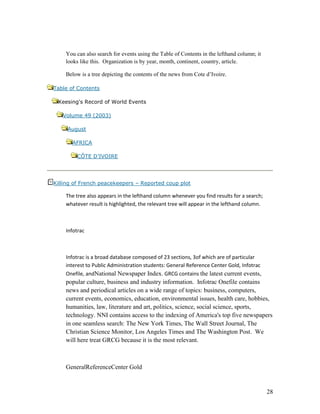
You can also search for events using the Table of Contents in the lefthand column; it
    looks like this. Organization is by year, month, continent, country, article.

    Below is a tree depicting the contents of the news from Cote d‟Ivoire.

Table of Contents

 Keesing's Record of World Events

   Volume 49 (2003)

     August

       AFRICA

        CÔTE D’IVOIRE


Killing of French peacekeepers – Reported coup plot

    The tree also appears in the lefthand column whenever you find results for a search;
    whatever result is highlighted, the relevant tree will appear in the lefthand column.


    Infotrac


    Infotrac is a broad database composed of 23 sections, 3of which are of particular
    interest to Public Administration students: General Reference Center Gold, Infotrac
    Onefile, andNational Newspaper Index. GRCG contains the latest current events,
    popular culture, business and industry information. Infotrac Onefile contains
    news and periodical articles on a wide range of topics: business, computers,
    current events, economics, education, environmental issues, health care, hobbies,
    humanities, law, literature and art, politics, science, social science, sports,
    technology. NNI contains access to the indexing of America's top five newspapers
    in one seamless search: The New York Times, The Wall Street Journal, The
    Christian Science Monitor, Los Angeles Times and The Washington Post. We
    will here treat GRCG because it is the most relevant.


    GeneralReferenceCenter Gold


                                                                                            28
Coverage: from 1980 - Oct 2003

The basic subject search page looks like this:


As you can see, searching can be limited to articles with text, by date, or by journal.


Searches are also available by keyword, advanced, and journal.

The keyword search is self explanatory.


The Advanced search allows you to search using index terms, like subject, issn, title,
author, and so on. It also allows Boolean searching, using the connectors AND, OR, and
NOT. For example, a search for Public using index title, yields 75201 articles with the
word Public in the title. A search using Public AND Administration yields 556 articles
with both terms in the title.


The Journal search allows you to enter all or part of a journal title and search on it. For
example, searching under Public yields 21 journals covered in GRCG, with the word
Public in the journal title.


                                                                                          29
Truncation: there are three wildcard operators in GRCG: (*) ,( ?) and (! )

       (*) stands for any number of characters, including none, and is especially useful when
       you want to find all words that share the same root. For example, pigment* matches
       pigment,pigments,pigmentation, etc.

       A question mark (?) stands for exactly one character and is especially useful
       when you're uncertain of a spelling. For example, a search like relev?nce means
       you can match the word relevance even if, like many of us, you can't remember
       whether it's spelled with ance or ence. A question mark is also useful for finding
       certain words with variant spellings. For example, defen?e finds both defense
       (American) and defence (British and Canadian). Multiple question marks in a row
       stand for the same number of characters as there are question marks. For example,
       psych????y matches either psychology or psychiatry but not psychotherapy.

       An exclamation point (!) stands for one or no characters and is especially
       useful when you want to match the singular and plural of a word but not other
       forms. For example, product! matches product and products but not productive
       or productivity. The exclamation point can also be used inside a word to match
       certain variant spellings. For example, colo!r matches both color (American) and
       colour (British).


IV. Search TSU Online Catalog for Print and Electronic

Books and Other Resources

       1. How to Use the TSU Online Catalog?

               The access points in finding a book in the area of Civil Service are

               keyword, subject, author and title.

               Keyword Search is a primary method for searching for a topic.

               It allows you to search for individual words in the title, subject

               and other fields in the bibliographic record. This is generally the

               easiest type of search to do, but it also produces the largest hit list.

               You may limit the number of items retrieved by using operators

               and qualifiers discussed under Search Commands. You will find

               Keyword search in The Library‟ online catalog. For a successful


                                                                                            30
keyword search for Robotics, you need to identify

Main Concepts- For example,” what is the impact of

telecommuting in civil service?” The main concepts can

be impact, civil service, and telecommuting.

Choice of Words- You may try use those key terms that

may be used to describe your main concept. For example,

impact: impacting, influence, resulting

civil service: government, career, personnel

telecommuting: distributed work, computer

Subject Search is a method of searching by using subject

headings. The online catalog automatically does it for you. Subject

heading describes the items and there are one or more subject

headings assigned to them. The TSU Library uses Library of

Congress Subject Headings. You may want to consult the Library

Of Congress Subject Headings located at the Circulation Desk to

make sure that you are using the correct words for a subject search.

For example, if you use the subject heading civil service, you may

retrieve a book titled “Governments, parties, and public sector employees :
Canada, United States, Britain, and France”. You

can look for additional books in the area of Civil Service by using the

suggested subject headings in the record, including Public officers and Political
parties.

Author Search is used when you have the name of an author and

would like to retrieve a list of items written by that author. For

example, if you do an author search under Blais, Andre,

you will find four (4) books located in the TSU Library. They are


                                                                                31
Governments, parties, and public sector employees : Canada, United States,
Britain, and France, A Political sociology of public aid to industry , The Budget-
maximizing bureaucrat : appraisals and evidence, and Industrial policy. You may

search the online catalog under Author Search by typing the

author‟s last name first and first name last. If you need to find

information about the author, in this case, Andre Blais,

you may do a subject research using his last name, first name.

Title Search is used when you know the title of an item. One point

to remember is that if the title begins with an A, An or the,

disregard them and search under the second word of the title. Do

not discard the articles in between words. Title Search works best

if you are looking for a specific item and know the exact title. If

you do not know the title, a Subject Search would yield better

results.

Search Commands- the following commands may be used in

searching most databases. Same may be titled and used somewhat

differently. You may use the following search commands for a

successful search:


BOOLEAN OPERATORS


AND is used when you want the records to include

both search terms to narrow a search. For example,

Germany AND Civil Service. In this case you are

limiting your search to only Germany and Civil Service.

OR is used to find records in which one or both search

terms appear thus broadening the search. For example,


                                                                               32
Germany OR public sector. In this case you are broadening

your search to include Germany and public sector in

general.

NOT is used find those records that contain the first search

term but not the second search term. In this case those

articles containing both terms are not retrieved. For

example, Public sectorNOT France. You will find

articles only about Public sector. Articles with France will

not be retrieved.

* Truncation is used to retrieve variant endings of a word.

For example, Bureau* will retrieve any words starting with

Bureau, Bureaucracy, bureaucrat, etc.

( ) Parentheses will signal priority and order. For example,

(bureaucracy OR government) AND Germany

will first find records containing the words

Bureaucracyor Governmentor both, then

those records that also mention Germany.

# Pound Sign represents a single character. For example,

Bureaucrat# will retrieve Bureaucrat and Bureaucrats.

? Question Mark represents characters at the end of a

search term. For example, Bureau? may retrieve records

about Bureaucrat, Bureaucrats, or Bureaucracyand Government? may

retrieve Governmental, Governmental, Government-owned.


SEARCH QUALIFIERS

Search Qualifiers include author (au), title (ti), and


                                                                   33
subject(su). They will allow you to limit your search to

specific fields. By using the Search Qualifiers you can

speed up response time and narrow the search to the more

relevant records. For example,

su civil service not Germanywill retrieve all

records on the subject of Civil Service that do not

contain the word Germany anywhere in the

record.ti Civil Service and Young will retrieve all records with

the word robotics in the title field and Young in the

author field.


TIPS:

1. When you search the Library‟s Online Catalog, you should

start with a keyword (Word/Phrase) search. For a successful

search, find relevant subject headings and use them for your

search.

2. Online Library Catalogs may differ, some of the features

of the TSU Online Catalog are as follows:

• Searching by

Author, Title and Subject, Journal, Govdoc no., and ISSN/ISBN.

• Searching for keyword(s) in

Author, Title and Subject

• Limiting the Searches byDates: any

Language: All languages, Chinese, English, French,

German, Italian, Portuguese and Spanish

Material Type: All materials, books, Serials,


                                                                   34
AV materials, Music Recordings, etc.

Williams Campus or main campus,

Location in the library, such as Reserves, Reference, etc.

Publisher

Material type, such as 2-d graphic, kit, book, map, etc.

• Numeric Searches by

GovDoc number


• Sorting your findings by

Date, Title, or Relevance.

• Help Window will assist you in properly using the

Library‟s Online Catalog. You will find information

about the System, Easy search, Numeric Search,

Advanced Search, reserve Room, Local Info, Your

Account and List of Topics/Links

2. Location of Materials

On the first floor of the Brown-Daniel Library books are

arranged according to the Library of Congress

Classification from classification A to K. On the third

floor you will find books from classification L to Z. In

addition, on this floor, you will have access to the books in

the Dewey Classification, over sized books and the Youth

Collection. Few journal titles are also housed on the third

floor. On the second floor you will find Reference Books

journals and microform collections. Reference Books are

arranged on the shelves by Library of Congress


                                                                35
classification. Journals are arranged by alphabet.


3. Library of Congress Classification System

This system is used so that each book and journal is

identified by its subject, assigned an alphanumeric call

number and placed on the shelves according to that

number with the similar resources for easy access and

browsing. Major classification headings used in the area of

Public Administration are as follows:


HJ : Public Finance

HJ9-9940 Public finance

HJ9-99.8 Periodicals. Serials. By region or country

HJ210-240 History

HJ241-1620 By region or country

HJ2005-2216 Income and expenditure. Budget

HJ2240-5908 Revenue. Taxation. Internal revenue

HJ2321-2323 Tax incidence. Tax shifting. Tax equity

HJ2326-2327 Progressive taxation

HJ2336-2337 Tax exemption

HJ2338 Taxation of government property

HJ2351 Inflation and taxation

HJ2351.4 Tax revenue estimating

HJ2361-3192.7 By region or country

HJ3801-3844 Revenue from sources other than taxation

HJ3863-3925 Direct taxation


                                                              36
HJ4113-4601 Property tax

HJ4629-4830 Income tax

HJ4919-4936 Capitation. Poll tax

HJ5309-5510 Administrative fees. User charges.License fees

HJ6603-7390 Customs administration

HJ7461-7980 Expenditures. Government spending

HJ8001-8899 Public debts

HJ8052 Sinking funds. Amortization

HJ8101-8899 By region or country

HJ9103-9695 Local finance. Municipal finance Including the revenue, budget,
expenditure, etc. of counties, boroughs, communes, municipalities, etc.

HJ9701-9940 Public accounting. Auditing


HM401-1281 Sociology (General)

HM435-477 History of sociology. History of sociological

theory

HM461-473 Schools of sociology. Schools of social thought

HM481-554 Theory. Method. Relations to other subjects

HM621-656 Culture

HM661-696 Social control

HM701 Social systems

HM706 Social structure

HM711-806 Groups and organizations

HM756-781 Community

HM786-806 Organizational sociology. Organization theory

HM811-821 Deviant behavior. Social deviance


                                                                              37
HM826 Social institutions

HM831-901 Social change

HM1001-1281 Social psychology

HM1041-1101 Social perception. Social cognition Including perception of the
self and others, prejudices, stereotype

HM1106-1171 Interpersonal relations. Social behavior

HM1176-1281 Social influence. Social pressure


HV

HV1-9960 Social pathology. Social and public welfare. Criminology HV40-69
Social service. Social work. Charity organization and practice Including social
case work, private and public relief, institutional care, rural social work, work
relief HV85-525 By region or country

HV530 The church and charity

HV541 Women and charity

HV544 Charity fairs, bazaars, etc.

HV544.5 International social work

HV547 Self-help groups

HV551.2-639 Emergency management

HV553-639 Relief in case of disasters

HV560-583 Red Cross. Red Crescent

HV599-639 Special types of disasters

HV640-645 Refugee problems

HV650-670 Life saving


                                                                                    38
HV675-677 Accidents. Prevention of accidents

HV680-696 Free professional services

                Including medical charities

HV697-4959 Protection, assistance and relief

JF Political institutions and public administration - General


JK Political institutions and public administration - United States JL Political
institutions and public administration - Canada, West Indies, Mexico, Central
and South America

JN Political institutions and public administration - Europe

JQ Political institutions and public administration - Asia, Arab countries,
Islamic countries, Africa, Atlantic Ocean islands, Australia, New Zealand, Pacific
Ocean islands

JS Local government. Municipal government

JV Colonies and colonization. Emigration and immigration.          International
migration

JX International law, see KZ (obsolete)

JZ International relations

KF: Law, U.S.

KF1-9827 Federal law. Common and collective state law

Individual states


4. What is a Call Number?

As mentioned before, books and some periodicals are

arranged on the shelves according to the Library of

Congress Classification system. According to this


                                                                                   39
system each book or periodical is assigned an alphanumeric

call number based on its subject content. This specific

call number identifies the item and places it on the shelves

with the items on the same subject.


5. How to Read a Call Number?

Each call number has several parts. For example, the

following call number

HJ

10007

E97

2002

gives us the following information:

The first line HJ defines the class or subclass. It defines the

broad subject area within class H for Social Sciences and HJ

represents the the subclass Public Finance.

The second line 10007is the classification number. When

browsing the shelves for this book, you need to read this

number as a whole number to

determine its location on the shelf. Combined with class

and subclass, the classification number defines the subject

matter more precisely. In the above example, HJ10007

represents Public finance, History, By region or country.


The third line of the call number is called the Cutter

Number. It is a combination of letters and numbers that


                                                                  40
usually indicates author. However, sometimes it may

                represent a subject division. Some items may have double

                cutter numbers. Always interpret the numeric part of the

                cutter number as a decimal number when you browse the

                shelves. Thus, the numeric component of .R638 should be

                read as .638. Therefore, HJ210.3 .R638 2000 should be

                shelved before HJ210.3 .R7 2000.

                The year of publication of the item, in this case 2000, may

                also be present. The items are shelved in chronological

                order which often distinguishes items by varying editions

                of that item.

                5. Electronic Books- Your library provides access to electronic

                books via its web page at

                http://www.tnstate.edu/library/Catalogs.html

                Currently you can read general interest electronic books via

                netLibraryor technical electronic books via Safari, or in Books 24x7. In

                addition you may find electronic books via the Library‟s

                online catalog. The icon for an electronic books is a floppy disk


V. Explore Internet Resources

The Internet contains a vast number of electronic documents

created by individuals and institutions that reside on computers

(servers) world wide and are linked by hyper-links.

        • Structure and attributes of the Internet

                While the Internet is one giant database, it has no

                organizational structure. Most information on the


                                                                                           41
Internet is free, however, some require a subscription.

        For example, you may access some newspapers free

        and may be able to read news items in their entirety.

        Some may only allow you to read the abstracts of the

        headline and require subscription for complete access.

        The most important to keep in mind about the Internet

        is that the information it offers is not screened or edited.

        Note: The databases your library offers on the web are

        Screened and edited.

• Search Tools for the Internet

        1. Search Engines- are used to search for a vast

                amount of resources on the Internet. These

                engines are very useful when searching unique

                word or phrases. When choosing a search

                engine you should keep in mind that each

                search engine searches a different number and

                type of sources. Following are the most popular

                Internet search engines:

                Google (http://www.google.com) – has

                been voted as the Most Outstanding Search

                Engine three times. This crawler-based

                service provides comprehensive and relevant

                coverage of the web. It is highly

                recommended as a first stop as you hunt for

                whatever you are looking for. For more

                information about Google go to


                                                                       42
http://searchenginewatch.com.


AllTheWeb.com

(http://www.alltheweb.com)- is an excellent

crawler-based search engine. It provides

both comprehensive coverage of the web

and outstanding relevancy. If you tried

Google and did not find it, AllTheWeb

should be next on your list.


Yahoo (http://www.yahoo.com) – is

Internet‟s oldest directory, launched in 1994.

Yahoo began using crawler based listings in

2002 for its main results. Yahoo is

important because it enhances Google‟s

listings with information from its own

directory may make search results more

readable. Yahoo will help you to narrow and

refine your query.


AltaVista (http://www,altavista.com)-

provides access to 31 million pages found

on 627,000 servers and four million articles

from 14,000 Usenet news groups.


Ask Jeeves (http://www.askjeeves.com)-


                                                 43
gained fame in 1998 and 1999 as being the

“natural language” search engine that let you

search by asking questions and responded

with what seemed to be the right answer to

everything. Actually 100 editors monitored

the search logs. They then went out on to the

web and located what seemed to be the best

sites to match the most popular queries.

Today, Ask Jeeves depends on crawler-

based technology to provide results to its

users.


HotBot (http://www.hotbot.com)- provides

easy access to the web‟s four major crawler-

based search engines: AllTheWeb, Google,

Inktomi and Teoma. However, unlike a “meta

search engine”, it cannot blend the results

from all of these crawlers together.

Nevertheless, it is a fast and easy way to get

different web search opinions in one place.

HotBot has a strong following among

serious searches for the quality and

comprehensiveness of its crawler-based

results.


Dogpile (http://www.dogpile.com) – is a


                                                 44
popular metasearch site that sends a search

to a customizable list of search engines,

directories and specialty search sites, then

displays results from each search engine

individually.


Search Engine Tips-

When you get ready to search via a search

engine, always look for the “help” button.

You need to be on the look out for the type

of results you may get. For example, if you

choose AltaVista, keep in mind that it uses

free-text-indexing which means that

whatever search term is entered, it is looked

for anywhere in the entire document. As a

result, you may retrieve hundreds or

thousands of documents that may have very

little or no relevancy for your search.


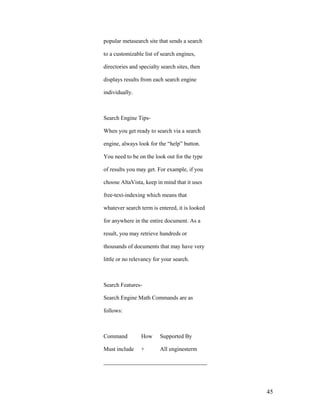
Search Features-

Search Engine Math Commands are as

follows:


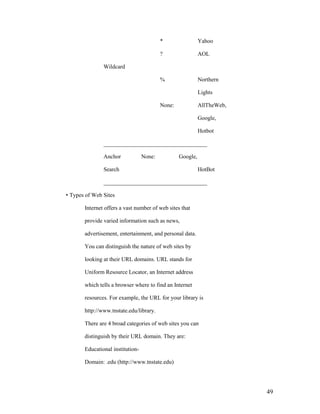
Command          How     Supported By

Must include     +       All enginesterm

____________________________________


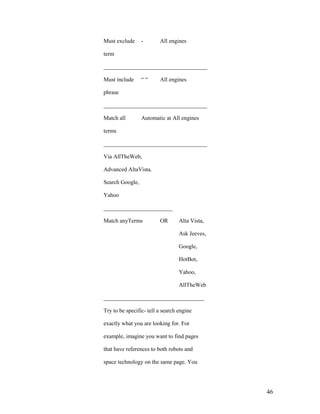
                                                45
Must exclude     -       All engines

term

____________________________________

Must include     ““      All engines

phrase

____________________________________

Match all        Automatic at All engines

terms

____________________________________

Via AllTheWeb,

Advanced AltaVista.

Search Google,

Yahoo

________________________

Match anyTerms           OR       Alta Vista,

                                  Ask Jeeves,

                                  Google,

                                  HotBot,

                                  Yahoo,

                                  AllTheWeb

___________________________________

Try to be specific- tell a search engine

exactly what you are looking for. For

example, imagine you want to find pages

that have references to both robots and

space technology on the same page. You


                                                46
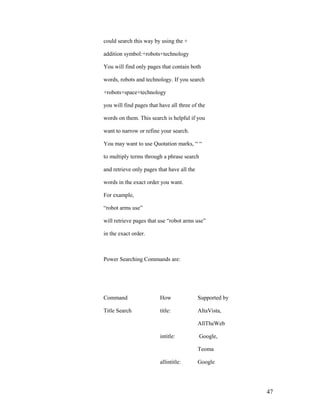
could search this way by using the +

addition symbol:+robots+technology

You will find only pages that contain both

words, robots and technology. If you search

+robots+space+technology

you will find pages that have all three of the

words on them. This search is helpful if you

want to narrow or refine your search.

You may want to use Quotation marks, “ “

to multiply terms through a phrase search

and retrieve only pages that have all the

words in the exact order you want.

For example,

“robot arms use”

will retrieve pages that use “robot arms use”

in the exact order.


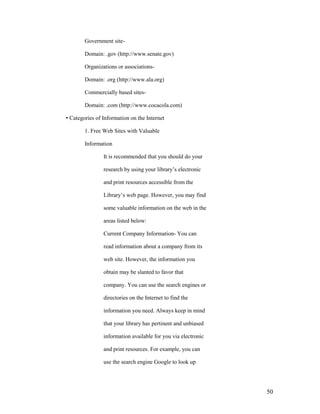
Power Searching Commands are:


Command                  How                Supported by

Title Search             title:             AltaVista,

                                            AllTheWeb

                         intitle:           Google,

                                            Teoma

                         allintitle:        Google


                                                           47
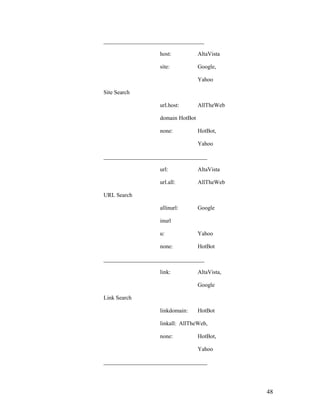
___________________________________

                   host:           AltaVista

                   site:           Google,

                                   Yahoo

Site Search

                   url.host:       AllTheWeb

                   domain HotBot

                   none:           HotBot,

                                   Yahoo

____________________________________

                   url:            AltaVista

                   url.all:        AllTheWeb

URL Search

                   allinurl:       Google

                   inurl

                   u:              Yahoo

                   none:           HotBot

___________________________________

                   link:           AltaVista,

                                   Google

Link Search

                   linkdomain:     HotBot

                   linkall: AllTheWeb,

                   none:           HotBot,

                                   Yahoo

____________________________________


                                                48
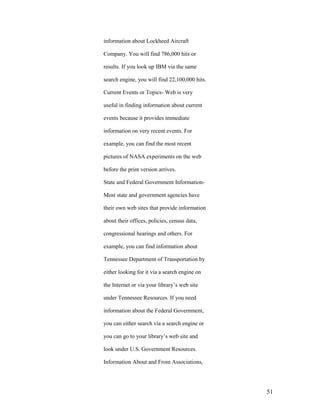
*                 Yahoo

                                          ?                 AOL

               Wildcard

                                          %                 Northern

                                                            Lights

                                          None:             AllTheWeb,

                                                            Google,

                                                            Hotbot

               ____________________________________

               Anchor             None:           Google,

               Search                                       HotBot

               ____________________________________

• Types of Web Sites

       Internet offers a vast number of web sites that

       provide varied information such as news,

       advertisement, entertainment, and personal data.

       You can distinguish the nature of web sites by

       looking at their URL domains. URL stands for

       Uniform Resource Locator, an Internet address

       which tells a browser where to find an Internet

       resources. For example, the URL for your library is

       http://www.tnstate.edu/library.

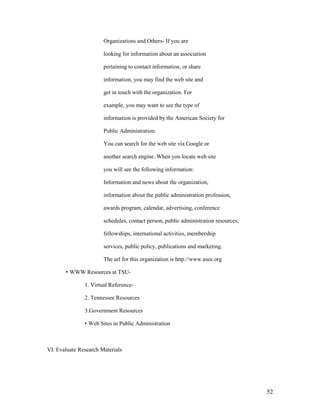
       There are 4 broad categories of web sites you can

       distinguish by their URL domain. They are:

       Educational institution-

       Domain: .edu (http://www.tnstate.edu)


                                                                         49
Government site-

        Domain: .gov (http://www.senate.gov)

        Organizations or associations-

        Domain: .org (http://www.ala.org)

        Commercially based sites-

        Domain: .com (http://www.cocacola.com)

• Categories of Information on the Internet

        1. Free Web Sites with Valuable

        Information

                It is recommended that you should do your

                research by using your library‟s electronic

                and print resources accessible from the

                Library‟s web page. However, you may find

                some valuable information on the web in the

                areas listed below:

                Current Company Information- You can

                read information about a company from its

                web site. However, the information you

                obtain may be slanted to favor that

                company. You can use the search engines or

                directories on the Internet to find the

                information you need. Always keep in mind

                that your library has pertinent and unbiased

                information available for you via electronic

                and print resources. For example, you can

                use the search engine Google to look up


                                                               50
information about Lockheed Aircraft

Company. You will find 786,000 hits or

results. If you look up IBM via the same

search engine, you will find 22,100,000 hits.

Current Events or Topics- Web is very

useful in finding information about current

events because it provides immediate

information on very recent events. For

example, you can find the most recent

pictures of NASA experiments on the web

before the print version arrives.

State and Federal Government Information-

Most state and government agencies have

their own web sites that provide information

about their offices, policies, census data,

congressional hearings and others. For

example, you can find information about

Tennessee Department of Transportation by

either looking for it via a search engine on

the Internet or via your library‟s web site

under Tennessee Resources. If you need

information about the Federal Government,

you can either search via a search engine or

you can go to your library‟s web site and

look under U.S. Government Resources.

Information About and From Associations,


                                                51
Organizations and Others- If you are

                       looking for information about an association

                       pertaining to contact information, or share

                       information, you may find the web site and

                       get in touch with the organization. For

                       example, you may want to see the type of

                       information is provided by the American Society for

                       Public Administration.

                       You can search for the web site via Google or

                       another search engine. When you locate web site

                       you will see the following information:

                       Information and news about the organization,

                       information about the public administration profession,

                       awards program, calendar, advertising, conference

                       schedules, contact person, public administration resources,

                       fellowships, international activities, membership

                       services, public policy, publications and marketing.

                       The url for this organization is http://www.asee.org

       • WWW Resources at TSU-

               1. Virtual Reference-

               2. Tennessee Resources

               3.Government Resources

               • Web Sites in Public Administration


VI. Evaluate Research Materials


                                                                                     52
• Standards for Evaluating Materials in Public Administration

        Materials need to be evaluated to determine their

        1) usefulness, 2) quality, 3) authority. This is the next

        major step you need to perform after discovering

        your relevant research materials. In

        evaluating information in the field of Engineering,

        you should apply the ten criteria below:

                1. Author‟s qualifications or credentials-

                         Is the author presently practicing in the field? Is he

                         knowledgeable in the field? How extensively has he published
                         on the topic?

                2. The Timeliness of the Publication- Your topic may require
                        information from a certain time-frame. For example, if      you
                were researching changes in the federal civil service in the     George
                Bush administration, you would need recent        information. Check the
                publication dates. Is the

                         information updated regularly, if so, how

                         often is it updated? Some information are

                         updated daily, some weekly and monthly.

                         Is the information still valid for your

                         topic? If recent changes have superseded less recent ones, then
                         you will the most current information.Then again, if you are
                         writing on a topic that has more of a historical interest, e.g., civil
                         service reforms in Franklin Roosevelt‟s administration, then
                         timeliness would not be so important.

                3. Accurate and Factual Information Supported

                         by Evidence- Does your information come from respected
                         sources? Let‟s say you got information from a journal in a
                         database; you would want to ask if the journal is refereed, i.e., is
                         it reviewed by authorities in the field. If it is not, then the
                         journal would be less authoritative. There may be a review
                         available of the source, if your source is a book.


                                                                                            53
If you obtained theinformation from a web site, how stable

        or permanent is the information? Some web information is here
        today and gone tomorrow; other web information is more
        permanent. Complete coverage of your topic is another thing to
        look for: check indexes, tables of contents, etc. to find out more.
        Another consideration is whether the piece is well documented.
        E.g., is there is a quote from Franklin Roosevelt, is there a
        footnote stating the source. Without documentation you may not
        be able to verify much information.

4. Primary vs. Secondary Sources- You can

        locate your information from two types

        of materials:

        Primary Sources: These are the first-

                 hand or eye-witness accounts of an

                 event. They include, newspaper stories,

                 reports of experiments, statistics,

                 government documents, autobiographies

                 and letters.

        Secondary Sources: These are the sources that perform an
               operation on the primary source, such as analysis,
               evaluation, or criticism.

5. Reputation of the Publisher- Check out the

        publisher of the source. If the publisher

        is a university press then it is likely to

        be scholarly. Also, a publisher that has been around for awhile
        should have a reputation or track record that suggests reliability
        Even though you cannot

        always guarantee quality based on the

        publisher‟s reputation, it may be a sign

        that the publisher has a regard for the

        type of sources it publishes. For


                                                                         54
example, M.E. Sharpe, CQ Press, Sage

        Publications, United Nations Publications,

        Government Finance Officers‟

        Association, and Health Administration

        Press are scholarlypublishers in Public

        Administration and other areas.

6. Type of Publication- is the source scholarly,

        popular, trade or government

        publication? Is the journal scholarly or

        popular? You need to make a

        distinction because it indicates different

        levels of complexity in introducing

        ideas.

        Scholarly Journals- the Websters

                 Third International Dictionary

                 definition of a scholarly journal is a

                 publication that is concerned with

                 academic study, especially research;

                 exhibiting the methods and attitudes

                 of a scholar; and having a manner

                 and appearance of a scholar. These

                 journals usually have a serious look

                 and contain various graphs, charts

                 and other statistical information. The

                 articles in these journals always cite

                 their resources in the form of


                                                          55
footnotes or bibliographies. The

       authors of the articles are scholars in

       the field or someone who has done

       research in the field. The language

       used is discipline related. Scholarly

       journals aim to report on original

       research or experimentation and

       disseminate it for scholarly use.
       Examples of Scholarly Journals

       include, American Review Of Public
       Administration,Analysis Of Social Issues And Public
       Policy, BYU Journal Of Public Law, Canadian Public
       Administration, American Review Of Public
       Administration, Journal Of Public Administration
       Research And Theory and

       others.

General Interest and News

       Publications- These publications

       are attractive in appearance, their

       format can be a journal or a

       newspaper. The articles contained in

       these sources may be written by

       editorial staff, scholars or free lance

       writers. They use nontechnical language to appeal to a
       wide audience. They are published

       by commercial entities, individuals

       and/or professional organizations.

       The aim of these sources is to

       provide information to a broad


                                                                56
audience.

        Some examples are Time, Newsweek, U.S. News and
        World Report,Popular

        Mechanics, Scientific American,

        New York Times, National

        Geographic.

Popular Journals- these sources are

        attractive in appearance. They

        contain many photographs,

        drawings. They very rarely cite

        sources and information they contain

        are usually second or third hand. The

        articles are in general with very little

        depth. The popular journals are for

        entertaining the reader, selling

        products or promoting a viewpoint.

        Some examples are People Weekly,

        Traditional Homes, Vogue, Good

        Housekeeping, Southern Living,

        Essence and others.

Sensational, Tabloid Publications- use

        elementary language that is often

        sensational. They aim to arouse

        curiosity with flashy headlines.

        Some examples are National

        Inquirer, Globe, Weekly World

        News, Star, and others.


                                                          57
• Evaluation of Web Resources

       You can find a vast amount of information on the

       Internet, however, not all resources are equally

       valuable or even reliable. Your challenge is to sift

       through the vast amount of information and

       pinpoint those sources that are reliable and relevant

       for your topic. As a rule the, informational web

       pages present factual information. For example, the

       web pages with URL addresses that end with .edu or

       .gov provide reliable information since they are

       sponsored by educational institutions or government

       agencies. You may consider the following points in

       evaluating web sources:

               1. Scope- How complete is the

                        information covered? Is the

                        information given in detail?

               2. Content- Is the information accurate

                        or factual? Many web pages simply

                        restate the opinion of the author

                        or the opinions of others. Opinions

                        may be stated as though they were

                        facts; this is something you need to

                        watch out for. Are there sources

                        listed for the information given that

                        can be double-checked. Is the information


                                                                    58
biased? Sometimes information is

                                 given without the name of an organization

                                 or person to whom the information can

                                 be attributed. Such information is suspect.

                                 Sometimes an author sounds authoritative, but

                                 may have little or no background in the

                                 field. You can check for credentials of the

                                 author. How current is

                                 the information? Do you see

                                 dates as to when it was written

                                 and when it was last revised or

                                 or updated?

                        3. Graphics and Multimedia Design- Is the

                                 Page attractive and

                                 Interesting to look at?

                        4. Navigation- is the web resource easy to

                                 use? Is it user friendly? Can you access

                                 the resource via standard computer

                                 equipment and software?


VII. Write the Paper

        1. Organization of Information

                Organization of your information is now paramount, after

                you have gathered it. You may look

                at the problem as if you were organizing a file cabinet,

                your wallet, or the books in a library. In all these cases,


                                                                                 59
similar itemsare grouped together for easier access. In writing

your research paper, you may group your

information under similar concepts. For example, if

you are using the web to gather information, you

may bookmark your favorites under a concept. One of the

best ways to organize information is to create an

outline using your key concepts as aids in organization.

In an outline information is

arranged by hierarchy and sequence. This is done

by identifying Main Concepts, Subconcepts,

particular information under subconcepts,

Conclusion and Bibliography.An outline would

also contain forword, preface and table of contents.

An outline may look like this:


I. Main Concept

        A. Sub-Concept

                  1. Particular

                  2. Particular

                  3. Particular

        B. Sub-Concept

                  1. Particular

                  2. Particular

                  3. Particular

        C. Sub-Concept

                  1. Particular


                                                                  60
2. Particular


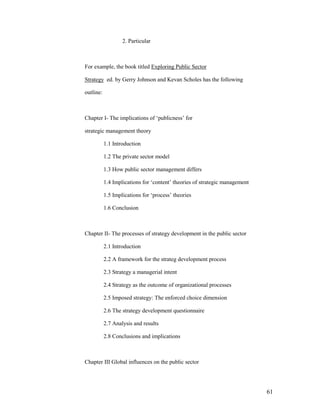
For example, the book titled Exploring Public Sector

Strategy ed. by Gerry Johnson and Kevan Scholes has the following

outline:


Chapter I- The implications of „publicness‟ for

strategic management theory

           1.1 Introduction

           1.2 The private sector model

           1.3 How public sector management differs

           1.4 Implications for „content‟ theories of strategic management

           1.5 Implications for „process‟ theories

           1.6 Conclusion


Chapter II- The processes of strategy development in the public sector

           2.1 Introduction

           2.2 A framework for the strateg development process

           2.3 Strategy a managerial intent

           2.4 Strategy as the outcome of organizational processes

           2.5 Imposed strategy: The enforced choice dimension

           2.6 The strategy development questionnaire

           2.7 Analysis and results

           2.8 Conclusions and implications


Chapter III Global influences on the public sector


                                                                             61
3.1 Introduction

        3.2 PEST analysis

        3.3 Scenarios

        3.4 Five forces analysis in healthcare

        3.5 Strategic group analysis in MBA education in the Netherlands

        3.6 Summary


Chapter IV Trust and distrust in regulation and enforcement

        4.1 Introduction

        4.2 Defining regulations

        4.3 The regulatory cycle

        4.4 Trust or distrust?

        4.5 Conclusions


Conclusion

Bibliography


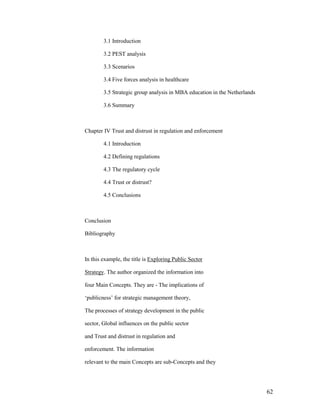
In this example, the title is Exploring Public Sector

Strategy. The author organized the information into

four Main Concepts. They are - The implications of

„publicness‟ for strategic management theory,

The processes of strategy development in the public

sector, Global influences on the public sector

and Trust and distrust in regulation and

enforcement. The information

relevant to the main Concepts are sub-Concepts and they


                                                                           62
are are listed under the main concepts in the decimal-

        numbered headings.


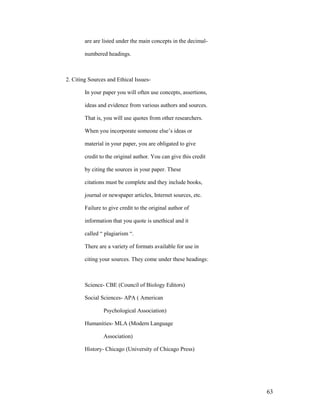
2. Citing Sources and Ethical Issues-

        In your paper you will often use concepts, assertions,

        ideas and evidence from various authors and sources.

        That is, you will use quotes from other researchers.

        When you incorporate someone else‟s ideas or

        material in your paper, you are obligated to give

        credit to the original author. You can give this credit

        by citing the sources in your paper. These

        citations must be complete and they include books,

        journal or newspaper articles, Internet sources, etc.

        Failure to give credit to the original author of

        information that you quote is unethical and it

        called “ plagiarism “.

        There are a variety of formats available for use in

        citing your sources. They come under these headings:


        Science- CBE (Council of Biology Editors)

        Social Sciences- APA ( American

                Psychological Association)

        Humanities- MLA (Modern Language

                Association)

        History- Chicago (University of Chicago Press)


                                                                  63
Hints


You should pick a style that fits your research

concept and use it consistently.


Make sure that you provide a complete citation so

that persons reading your research can locate the

information you are citing.


Examples of citations in endnotes


Print materials-


Books-


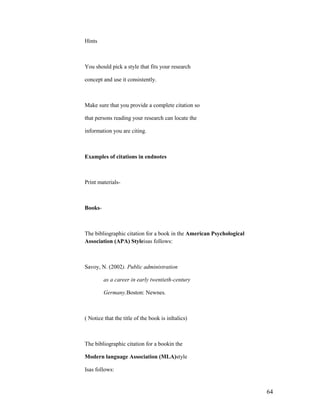
The bibliographic citation for a book in the American Psychological
Association (APA) Styleisas follows:


Savoy, N. (2002). Public administration

         as a career in early twentieth-century

         Germany.Boston: Newnes.


( Notice that the title of the book is inItalics)


The bibliographic citation for a bookin the

Modern language Association (MLA)style

Isas follows:


                                                                      64
Hootton, C.E. International Perspectives on Telecommuting. Boston:
       Newnes, 2002.


( Notice that the author‟s name is given

in full and the publication date of the

book is entered at the end of the

citation. There are two spaces after

each period)


The bibliographic citation for a journalin the

American Psychological Association

(APA) Styleisas follows:


Dario, Paola, Guglielmelli, E. and Lascki, C.

           (2001). Humanoids and personal

           robots: design and experiments.

           Journal of Robotic Systems, 18,

           673-690.


(Notice that the title of the journal is in

Italics)


Journals


                                                                     65
MLA style


                      Barthelme, Frederick. “Architecture.” Kansas Quarterly 13.3-4 (1981):
                      77-80


             ( Notice that the title of the article is in

             quotation marks, both the volume and

             the issue number and the month or

             season and year of the publication is

             given. The month or the season and the

             year of publication are in parenthesis)


             APA style


          Wegener, D. T., & Petty, R. E. (1994). Mood                                         management
hedonic contingency hypothesis. Journal of Personality & Social
               Psychology, 66, 1034-1048.

          Notice that the title is italicized.


             Electronic resources-


             APA style


             Burka, L.P. (1993). A hypertext history of multi-user dimensions. MUD
                     history. http://www.utopia.com/talent/lpb/muddex/essay.(2 Aug. 1996).


             MLA style


                                                                                         66
Burka, Lauren P. “A Hypertext History of Multi-User Dimensions.”     MUD
History. 1993. http://www.Burka, Lauren P. "A Hypertext History of Multi-User
Dimensions." MUD History. .
        http://www.utopia.com/talent/lpb/muddex/essay. (2 Aug.       1996).


                                                                           67
68

Infolitigpart1

  • 1.
    TennesseeStateUniversityLibrary, Avon WilliamsCampus Chris Langer User Services Librarian Information Literacy for Institute of Government Students The goal of this course is to ensure that Tennessee State University Institute of Government graduates are literate in regard to information, and can determine the type and amount of information they need; can access and judge the information critically and incorporate this information into a knowledge base and ethical outlook, use the information effectively to accomplish a specific purpose and understand the economic, legal and social issues about the use of information. Institute of Government Students in General will be able to: • determine the what information is needed by - identify aresearch topic by consulting with teachers and librarians to - the information can be formulated as a question - learning how to broaden or narrow the topic as needed to fit the research concept - put a finger on the key words, concepts, or categories that define the research topic - using analytical and critical thinking skills in identifying information needed • identify, locate and retrieve information by - finding what sort of information is needed - determining where to find the information - finding strategies to drill down to the needed information in various sources 1
  • 2.
    • utilize orconstruct and implement effective search strategies by - formulating an effective search strategy - conducting searches using appropriate resources - evaluating search results and modifying search strategies as needed First Year Institute of Government Students will be able to: • go to the library‟s website and navigate it efficiently • query the Library‟s online resources effectively, including the online catalog, databases, journals, e-books, etc. • use controlled vocabulary to define topics and concepts and search for them using library resources. • evaluate the scope, content and organization of various sources and information, and compile pertinent citation informationfor possible use • glean conclusions from the information gathered, meld new information with previous information and identify the concepts of topics which support the chosen thesis • know what plagiarism is and what its deleterious effects are • find a citation style that fits your topic and use it correctly and consistently Intermediate and Advanced Level Institute of Government Students will be able to: • develop a thesis statement and formulate questions based on the needed information • evaluate potential resources in a variety of formats, including databases, data set, web sites, printed materials and others 2
  • 3.
    • useinternet searchengines with a variety of command languages, protocols and search parameters. • know how to use interlibrary loan, Athena, and TALC • recognize that existing information combined with original thought, analysis and experimentation can produce new information • know that knowledge is organized into disciplines and that this can influence the way information is acquired • use various methods to retrieve information in various formats, including software, reader/printer scanners, audio visual equipment and others • evaluatethe reliability, validity, accuracy, authority and bias, if any, of theinformation using various methods • use computer and other technologies, including databases, spreadsheets, charts to study the interaction of ideas • broaden the research topic to construct new hypothesis that may require additional information • test theories with appropriate discipline techniques, including formulas, simulations • properly use the obtained information by citing resources according to the copyright laws RESEARCH STRATEGIES-OUTLINE I. Define a Topic in Public Administration 3
  • 4.
    1. Search forIdeas 2. Narrow or Broaden Your Topic as Needed 3. State Your Topic as a Question 4. Identify the Type of Information Needed II. Gather Background Information 1. Encyclopedias 2. Dictionaries 3. Almanacs and Yearbooks 4. Handbooks and Bibliographies 5. Dissertations, Theses and Senior Projects 6. Current Research III. Search Databases for Journal Articles, Technical Reports, Conference Proceedings and Standards 1. What are Databases? a. Structure b. Type 1.Bibliographic 2. Full-Text 3. Numeric 4. Image 5. Audio c. Coverage 1. Subject Area 2. Type of Publication 4
  • 5.
    d. Attributes 2. SearchingDatabases a. Search Strategies b. Use of TSU Database Subscriptions in Public Administration ABI/Inform Columbia International Congressional Universe Country Analysis Dissertation Abstracts EBSCOhost - Academic Search Premier Emerald ERIC Ethnic NewsWatch FACTS GenderWatch InfoPlease INFOTRAC JSTOR Keesing's Online Lexis-Nexis MIT Press NewsBank Opposing Viewpoints Resource Center Project MUSE ScienceDirect 5
  • 6.
    SpringerLINK Statistical Abstract of the United States Westlaw Campus Wiley InterScience WilsonWeb - Social Sciences 3. Locating Print and Electronic Journal Articles IV. Search TSU Online Catalog for Books and Other Resources 1. How to use TSU Online catalog? a. Keyword Search b. Subject search c. Author Search d. Title Search e. Search Commands 1. Boolean operators 2. Search Qualifiers 3. Tips 2. Location of Materials 3. Library of Congress Classification System 4. What is a Call Number ? 5. How to Read Call Numbers? 6. Electronic Books V. Explore Internet Resources 1. Structures and Attributes of the Internet 2. Search Tools for the Internet 6
  • 7.
    a. Google b. AllThe.com c. Yahoo d. AltaVista e. Ask Jeeves f. HotBot g. Dogpile h. Search Engine Tips 3. Types of Web Sites 4. Categories of Information on the Internet a. Free Web Sites with Valuable Information 1. Current Company Information 2. Current Events or Topics 3. State and federal Government Information 4. Information About and From Associations 5. WWW Resources at TSU 1. Virtual reference 2. Tennessee Resources 3. Government Resources 6. Web Sites in Public Administration VI. Evaluate Research Materials 1. Criteria to Evaluate Research Materials in Public Administration 2. Criteria to Evaluate the Web Resources 7
  • 8.
    VII. Write theResearch Paper 1. Organization of Information 2. Citing Sources and Ethical Issues 3. Guidebooks on Research VIII. Cite Your Sources 1. Style Manuals I. Define a Topic in Public Administration Presume you are interested in writing a paper on Civil service . You may want to define the scope of your paper by outlining the operations of the Civil Service in Germany. 1. Search for Ideas If you do not have an idea what constitutes Civil Service , search and read articles or books on the topic. For example, use Emerald online database, set fields to search for all fields, set Fields to search for all fields, and sort results by relevance. Type: Civil Service You will access articles with varying numbers according to the search choices you made. OR, you may do a subject search in the Library‟s online catalog under Civil Service. After scanning through some articles and books, you should be able to come up with preliminary ideas about your topic. You can always talk to your reference librarians in the 8
  • 9.
    Reference Area orsend e-mails or chat online via the ASK A LIBRARIAN service located on the Library‟s web page. You can also consult your instructor. 2. Narrow or Broaden Your Topic You may find too much information on your topic. In that case, you may want to narrow your topic. For example, in Emerald you may find 65 full-text articles under Civil Service. You may qualify your search by limiting your topic to a certain area such as Germany. If you can find only few sources, you may want to broaden your topic by related fields such as bureaucracy. For example, you may find 104 articles in Emerald that can assist you in broadening your topic. 3. State Your Topic as a Question Stating your topic as a question may help you to stay within the scope of your selected topic. For example, what is the corporate culture of civil service in Germany? 4. Identify the Type of Information Needed The type of information needed depends on the following: • Type of Assignment- is this a presentation, term paper, senior project,thesis or dissertation? • Amount of Information- how much information is needed ? • Currency of Information- does this assignment require current, historical information or a combination of both? • Type of Resources Needed- should the information come from scholarly and professional journals only, or can they come from more popular sources? • Primary vs. Secondary Resources- should the information come fromprimary or secondary sources? 9
  • 10.
    • Information inVarious Formats- should the information come from only print resources or include other formats such as visual/ graphicsources, numeric sources (statistics), audio sources and/or electronicsources? II. Gather Background Information Gathering background information on your subject will help you limit the scope of the subject and make an outline.Make note of differing concepts, issues in the field, and main ideas. Good sources for locating background information include encyclopedias, almanacs and yearbooks, and handbooks and bibliographies. In order to find information on the Civil Service, you need to look for background resources in Public Administration. You will locate these resources by 1. Searching the Library‟s online catalog under the subject heading Encyclopedias and Dictionaries. From the entries retrieved, you may chose the relevant ones. 2. Note the appropriate classification numbers for specific resources or resources in the subject area and locate them in the appropriate reference section. For example, if you find a good source under HJ2305 in the stacks, look under the same number in the reference section to find reference books on the subject. 3. You may enhance your search by using keyword searching and combining words in general areas such as Civil Service, bureaucracy, with such words as encyclopedia, dictionary, etc. Resources that provide background information include 1. Encyclopedias – General- Britannica Online http://www.tnstate.edu/library/database/htm#B 10
  • 11.
    Encyclopedia Americana Ref. AE 5 .E333 Subject- Encyclopedia of Taxation and Tax Policy Ref. HJ2305 2. Dictionaries- General- Random House Webster‟s Dictionary Ref.PE 1628 .R294 3. Almanacs and Yearbooks- Infoplease.com (electronic resource) http://www.infoplease.com/ FACTS(electronic resource) http://www.2facts.com/stories/mainmenu.asp 4. Handbooks and Bibliographies Handbook of Public Administration JF 1351 Public Administration, Politics and the People JF 1321 International Handbook of the Ombudsman JF 1525 U.S. Government Manual JK 421 III. Search the Databases for Journal Articles, Technical Reports, Conference Proceedings and Standards 1. What are databases? 11
  • 12.
    In general, databasesare organized collections of information. For example, TSU Library‟s online catalog is a database as well as electronic periodical indexes that provide full-text articles, including Academic Search Premier, Emerald, and citation Indexes such as CompendexWeb and others. You may locate and access Library‟s databases online from our web page at http://www.tnstate.edu/library/database_oncampus.htm In order to use the databases properly, you should be able to understand the structure, type, coverage and attributes of them. a. Structure- Databases contain records that are information about each item within those databases. For example, the Library‟s online catalog has a record for each book, journal, microfilm, etc owned by it. In turn, each record contains information called fields. The fields in a record may include author, title, publisher, subject headings, and others. Other database records may contain fields that include author, title, title of the periodical, volume number, date, year and page numbers. b. Type- The nature of the information contained in a 12
  • 13.
    database determines itstype. The main types of databases include Bibliographic, Full-text Numeric, Image, Audio and Mixed. Bibliographic databases do not contain the items, however, they provide information as to where you can find it. The information provided by the Bibliographic database may contain items such as Author, Title, Publisher, Date, Volume Number, Page Number and others that is called “citation”. Sometimes they include abstracts ( a summary) or descriptions of items. If you are interested in finding records or citations about a certain topic then you can choose to use these databases to create bibliographies. However, if you want to read the information in its entirety, you will either locate the source given in the record or use a full-text database. An example of a record from a bibliographic database such as an online catalog may look like this: 13
  • 14.
    The information wegather from this record is extensive. We obtain the title of the book, author(s) or editor(s), call number, publisher, place of publication, publisher and the year copyrighted and published, subject area of the book, number of preliminary pages, number of pages in the text, whether or not the text contains illustrations, size of the book, whether or not the book contains bibliographical references and an index, names of co-author(s) or editor(s), whether or not the book is part of a series, international standard book number assigned to the book, and the location and the availability of the item you are searching for. A bibliographic index for journal articles such as International Bibliography of the Social Scienceswill provide citations and abstracts on your topic. For example, 14
  • 15.
    you may searchunder Civil Service and Germany. If you used the above example, you will retrieve 291 records which are available to you immediately..Press view record to see the abstract, accession number, language, publication year and publication type. Full-text Databases These databases are called full-text because they contain the complete text of publications. For example, EbscoHost provides full-text articles from public administration journals and books in addition to summaries. For example, a search under civil service will retrieve 3075documents. You may choose to read the abstract to determine if this article is useful for your research. If so you may want to read or print the article. Numeric Databases These databases generally provide numeric data, including statistics, financial data, census information, economic indicators and others. For example, FIS Online will provide statistical information about companies and countries. Census Data would provide statistics about people, business and others. Image Databases These are the databases that provide access to art prints, animations, photos and others. For example, If you access the Library‟s Virtual Reference web page you will find a list of art 15
  • 16.
    resources that displayimages. Audio Databases These databases provide access to audio clips to music and sound effects. For example, Library‟s Virtual Reference web page would provide access to the Internet Public Library Listening Room where you may listen to and observe the videos of Ray Brooks, Steve Wood Quintet, Pamela Wise, Blue Dog and others. c. Coverage The selection of appropriate databases is an important factor in finding relevant information. A description of information covered by a database is usually found in the introductory screen. Subject Area- Some databases cover a specific subject area or discipline such as Public Administration, psychology, nursing and others. Others cover areas in more general in nature or a mixture of subject areas. For example, in Public Administration, your library provides you access to EbscoHost, Infotrac, Congressional Universe, Westlaw, Wiley Interscience and Wilsonweb-Social Sciences. You can also find a list of databasesaccording to their subject coverage in the Library‟sweb page under Databases by Subject at http://www.tnstate.edu/library/databases_subject.html 16
  • 17.
    Type of Publication- Databasesmay contain information from only periodicals. For example, Project Muse will give you access to periodical articles they publish in the areas of social sciences. Some databases will include information from a combination of sources such as periodicals and books. For example, WilsonWeb-Social Sciences, and Wiley InterScience will provide you with articles from periodicals and chapters from books. Some databases include only popular sources such as magazines and newspapers. You can use these databases for leisure reading. On the other hand, some databases include scholarly materials found in scientific journals, conference proceedings and reports. For example, Wiley InterScience, Project Muse and SpringerLinkwill provide access to scholarly journals and materials. Databases differ in terms of frequency of updating materials, accessibility of the most recent periodical articles and the publication dates of the materials included. Sometimes publishers put an embargo on the availability of the recent issues. For example, while searching the EBSCOHost, you may come across some periodicals that are not currently accessible. That is, an embargo has been placed for the last two 17
  • 18.
    years. Another featureto consider in selecting a database is the availability of the material. You may select a full-text database so that you can read the material immediately. Or you may choose a database that may provide only bibliographic information, however, you library owns a majority of the items. If you are willing to wait, you may use a more comprehensive database that indexed a great number of items your library does not subscribe to but is able to obtain them for you through interlibrary loan. The decision is yours. d. Attributes After you make the selection of the databases you would like to use, you will need to determine if the databases use controlled vocabulary and if the databases do field search or free-text indexing. In performing searches you will find that some databases use controlled vocabulary which is a specific list of subject terms in organizing the database contents by subject. If you want to retrieve relevant items or information , you should be aware of “controlled vocabulary”. For example, ERIC provides you with the ERIC Thesaurus. This is a list of subject terms you can use to retrieve the relevant information you need. If you look under Government and Politics you will find 166 18
  • 19.
    subject headings tochoose from. Subject Headings may be found in special thesauruses, like in ERIC, or may be provided by the database or in the Library of Congress Subject Headings source. You may search most databases by subject, using controlled vocabularyOR keyword, by using your own words. Some databases use field searching which means that the search term you used is only looked in specific fields. For example, if you are using the Library‟s online catalog and select the keyword search, your search will locate items with that specific search term in the title, subject or content fields. On the other hand, some databases use free- text searching which means that the search term you have selected will locate items anywhere in a document or record. This type of searching may return false drops or irrelevant items because the search term you have located will be located no matter where it is. Some databases may give you the choice for field or free-text searching. Check the sites for this information before you begin your search. 2. Searching Databases A. Search Strategies – Your library provides access to over 101 databases. 19
  • 20.
    You can searchthese databases from any computer on campus and/or from off campus sites. In selecting the type of database that will provide appropriate and relevant articles, you may consider the following: • subject discipline of your topic – specialized or multidisciplinary • type of resources needed – basic sources, scholarly sources or professional/trade sources • the target audience – is the research for a term paper, independent study, senior project, thesis or dissertation? B. Use of Databases Subscribed by TSU Libraries relevant to the Institute of Government. Your Library subscribes to over 101 online databases in general and subject fields. The databases in subject field – Public Administration include the following that provide the most appropriate and relevant information: CIAO (Columbia International Affairs Online) Contains working papers, books, policy briefs, case studies, course packs and maps. Truncation: *and ? Search Tips: 1. You need to use truncation (*) to search for words that begin 20
  • 21.
    with the sameletters. For example, global* will return with globalization, globalizing. 2. Use ? as a placeholder for any single letter. E.g., f?n will return fun, fan, or fin. 3. Truncation is allowed for one word only, not a phrase.Wildcards can by anywhere in a query term (leading, middle, or trailing). Congressional Universe Years Covered: Varies by source, ranging from 1987 to present Relevancy: Laws, legislative activities, public policy, American politics. Truncation: *, ! Search Tips: Each part of Congressional Universe necessarily uses different search methods. There are 13 parts. For example, to search for regulations in the Federal Register, you need to specify the citation page number. If you are searching for testimony before Congress, you can search by keyword and by the witness‟ name. Search form for testimony before Congress looks like this: Project Muse 21
  • 22.
    Relevancy: cultural studies,education, political science, gender studies, economics, and social sciences. Truncation: Truncate with an asterisk (*) at the ends of terms only. Examples: Weimar, k* to retrieve Weimar, Klaus modern* to retrieve modern, modernity, modernism, etc. histor* to retrieve history, historical, etc. cat* to search cat and cats, etc. Muse does not currently offer a mechanism to expand search terms within or at the beginning of words 22
  • 23.
    Search Tips: Basicsearch page looks like this: In advanced search, you can search by up to 4 key words. You can also select which fields in a record to search, such as author, title, etc. You can limit your search to specific journals and multiple journals. You can also limit by date. Opposing Viewpoints Home screen looks like this: As you can see, subjects are listed for you to choose from on all types of current affairs. 23
  • 24.
    Relevancy: Current Affairs,Social Issues Truncation: The * (standing for any number of characters) is placed at the end of the term’s root. The search retrieves all words sharing the same root. For example, the term environment* retrieves essays that contain the words environment, environmental, or environmentalism. The ? is used to replace exactly one character within a word to retrieve various forms of that word. For example, the term wom?n retrieves essays that contain either woman or women; and psych????y matches either psychology or psychiatry but not psychotherapy. The ! point stands for one or no characters. For example, analo!! matches analog or analogs, but not analogous or analogue. *NOTE: For best search results, it is recommend that wildcards be used only with the Advanced Search function. Search Tips: Opposing Viewpoints Basic Searchwill allow you to search for terms in subjects, citations or the full text. Type in one or more search terms and hit search. The above tabs will come up, and you can choose to search using any one of them. For example, you could search only reference works dealing with crime, or only images dealing with crime. A search on crim* in the viewpoints tab will yields 454 hits. Also on the left you will be given a list of relevant subjects, like this: Subjects containing the words: crime Crime Crime Analysis Crime and Human Nature (Book) Crime and the Press See "Crime Reporting (Journalism)" Crime and Punishment (Television program) 24
  • 25.
    Crime Classification Crime Detection See "Criminal Investigation" Crime Films See "Crime Movies" Crime Forecasting Crime in Television See "Television Crime" Crime Laboratories Crime Motion Pictures See "Crime Movies" Crime Movies Crime on Television See "Television Crime" Crime Photography See "Legal Photography You can click on the subjects themselves or on the see references to find more information. The Advanced Search form looks like this: 25
  • 26.
    You can searchunder Title/Headline, Source, Author, Subject or Fulltext, using Boolean operators and, or, or not. You can also limit by date or document type. The proximity operators W (within) and N (next to) may be used to refine your search: The W operator will find essays containing the specified words in the specified order within the number of words you indicate. For example, medical w4 ethics finds documents that contain the word medical within four words of the word ethics, and medical must precede ethics. The N operator locates documents containing the words you specify within the number of words you specify, but the words can be in any order. For example, medical N4 ethics finds documents that contain the words medical and ethics within four words of each other, regardless of their order (that is, ethics could precede or follow medical Stopwords, that is, words so common they are not useful for searching, include: an, and, aspects, but, co, corp, etc, for, from, if, in, inc, into, is, it, its, jr, ltd, of, on, or, that, the, to, with. Keesing‟s Record of World Events 26
  • 27.
    Keesing‟s is, asthe name implies, a database of current events. Coverage is from 1960 to present. News sources are from around the world, and are listed in the About Keesing‟s page. Keesing‟s has a Basic and an Advanced search. The Basic search allows you to limit by Region, Country, Keyword, and Time Frame. The Basic Search page looks like this: The Advanced Search page looks like this: As you can see, here you can limit by Region, Country, Organization, Subject, Person/Leader, and Keyword. 27
  • 28.
    You can alsosearch for events using the Table of Contents in the lefthand column; it looks like this. Organization is by year, month, continent, country, article. Below is a tree depicting the contents of the news from Cote d‟Ivoire. Table of Contents Keesing's Record of World Events Volume 49 (2003) August AFRICA CÔTE D’IVOIRE Killing of French peacekeepers – Reported coup plot The tree also appears in the lefthand column whenever you find results for a search; whatever result is highlighted, the relevant tree will appear in the lefthand column. Infotrac Infotrac is a broad database composed of 23 sections, 3of which are of particular interest to Public Administration students: General Reference Center Gold, Infotrac Onefile, andNational Newspaper Index. GRCG contains the latest current events, popular culture, business and industry information. Infotrac Onefile contains news and periodical articles on a wide range of topics: business, computers, current events, economics, education, environmental issues, health care, hobbies, humanities, law, literature and art, politics, science, social science, sports, technology. NNI contains access to the indexing of America's top five newspapers in one seamless search: The New York Times, The Wall Street Journal, The Christian Science Monitor, Los Angeles Times and The Washington Post. We will here treat GRCG because it is the most relevant. GeneralReferenceCenter Gold 28
  • 29.
    Coverage: from 1980- Oct 2003 The basic subject search page looks like this: As you can see, searching can be limited to articles with text, by date, or by journal. Searches are also available by keyword, advanced, and journal. The keyword search is self explanatory. The Advanced search allows you to search using index terms, like subject, issn, title, author, and so on. It also allows Boolean searching, using the connectors AND, OR, and NOT. For example, a search for Public using index title, yields 75201 articles with the word Public in the title. A search using Public AND Administration yields 556 articles with both terms in the title. The Journal search allows you to enter all or part of a journal title and search on it. For example, searching under Public yields 21 journals covered in GRCG, with the word Public in the journal title. 29
  • 30.
    Truncation: there arethree wildcard operators in GRCG: (*) ,( ?) and (! ) (*) stands for any number of characters, including none, and is especially useful when you want to find all words that share the same root. For example, pigment* matches pigment,pigments,pigmentation, etc. A question mark (?) stands for exactly one character and is especially useful when you're uncertain of a spelling. For example, a search like relev?nce means you can match the word relevance even if, like many of us, you can't remember whether it's spelled with ance or ence. A question mark is also useful for finding certain words with variant spellings. For example, defen?e finds both defense (American) and defence (British and Canadian). Multiple question marks in a row stand for the same number of characters as there are question marks. For example, psych????y matches either psychology or psychiatry but not psychotherapy. An exclamation point (!) stands for one or no characters and is especially useful when you want to match the singular and plural of a word but not other forms. For example, product! matches product and products but not productive or productivity. The exclamation point can also be used inside a word to match certain variant spellings. For example, colo!r matches both color (American) and colour (British). IV. Search TSU Online Catalog for Print and Electronic Books and Other Resources 1. How to Use the TSU Online Catalog? The access points in finding a book in the area of Civil Service are keyword, subject, author and title. Keyword Search is a primary method for searching for a topic. It allows you to search for individual words in the title, subject and other fields in the bibliographic record. This is generally the easiest type of search to do, but it also produces the largest hit list. You may limit the number of items retrieved by using operators and qualifiers discussed under Search Commands. You will find Keyword search in The Library‟ online catalog. For a successful 30
  • 31.
    keyword search forRobotics, you need to identify Main Concepts- For example,” what is the impact of telecommuting in civil service?” The main concepts can be impact, civil service, and telecommuting. Choice of Words- You may try use those key terms that may be used to describe your main concept. For example, impact: impacting, influence, resulting civil service: government, career, personnel telecommuting: distributed work, computer Subject Search is a method of searching by using subject headings. The online catalog automatically does it for you. Subject heading describes the items and there are one or more subject headings assigned to them. The TSU Library uses Library of Congress Subject Headings. You may want to consult the Library Of Congress Subject Headings located at the Circulation Desk to make sure that you are using the correct words for a subject search. For example, if you use the subject heading civil service, you may retrieve a book titled “Governments, parties, and public sector employees : Canada, United States, Britain, and France”. You can look for additional books in the area of Civil Service by using the suggested subject headings in the record, including Public officers and Political parties. Author Search is used when you have the name of an author and would like to retrieve a list of items written by that author. For example, if you do an author search under Blais, Andre, you will find four (4) books located in the TSU Library. They are 31
  • 32.
    Governments, parties, andpublic sector employees : Canada, United States, Britain, and France, A Political sociology of public aid to industry , The Budget- maximizing bureaucrat : appraisals and evidence, and Industrial policy. You may search the online catalog under Author Search by typing the author‟s last name first and first name last. If you need to find information about the author, in this case, Andre Blais, you may do a subject research using his last name, first name. Title Search is used when you know the title of an item. One point to remember is that if the title begins with an A, An or the, disregard them and search under the second word of the title. Do not discard the articles in between words. Title Search works best if you are looking for a specific item and know the exact title. If you do not know the title, a Subject Search would yield better results. Search Commands- the following commands may be used in searching most databases. Same may be titled and used somewhat differently. You may use the following search commands for a successful search: BOOLEAN OPERATORS AND is used when you want the records to include both search terms to narrow a search. For example, Germany AND Civil Service. In this case you are limiting your search to only Germany and Civil Service. OR is used to find records in which one or both search terms appear thus broadening the search. For example, 32
  • 33.
    Germany OR publicsector. In this case you are broadening your search to include Germany and public sector in general. NOT is used find those records that contain the first search term but not the second search term. In this case those articles containing both terms are not retrieved. For example, Public sectorNOT France. You will find articles only about Public sector. Articles with France will not be retrieved. * Truncation is used to retrieve variant endings of a word. For example, Bureau* will retrieve any words starting with Bureau, Bureaucracy, bureaucrat, etc. ( ) Parentheses will signal priority and order. For example, (bureaucracy OR government) AND Germany will first find records containing the words Bureaucracyor Governmentor both, then those records that also mention Germany. # Pound Sign represents a single character. For example, Bureaucrat# will retrieve Bureaucrat and Bureaucrats. ? Question Mark represents characters at the end of a search term. For example, Bureau? may retrieve records about Bureaucrat, Bureaucrats, or Bureaucracyand Government? may retrieve Governmental, Governmental, Government-owned. SEARCH QUALIFIERS Search Qualifiers include author (au), title (ti), and 33
  • 34.
    subject(su). They willallow you to limit your search to specific fields. By using the Search Qualifiers you can speed up response time and narrow the search to the more relevant records. For example, su civil service not Germanywill retrieve all records on the subject of Civil Service that do not contain the word Germany anywhere in the record.ti Civil Service and Young will retrieve all records with the word robotics in the title field and Young in the author field. TIPS: 1. When you search the Library‟s Online Catalog, you should start with a keyword (Word/Phrase) search. For a successful search, find relevant subject headings and use them for your search. 2. Online Library Catalogs may differ, some of the features of the TSU Online Catalog are as follows: • Searching by Author, Title and Subject, Journal, Govdoc no., and ISSN/ISBN. • Searching for keyword(s) in Author, Title and Subject • Limiting the Searches byDates: any Language: All languages, Chinese, English, French, German, Italian, Portuguese and Spanish Material Type: All materials, books, Serials, 34
  • 35.
    AV materials, MusicRecordings, etc. Williams Campus or main campus, Location in the library, such as Reserves, Reference, etc. Publisher Material type, such as 2-d graphic, kit, book, map, etc. • Numeric Searches by GovDoc number • Sorting your findings by Date, Title, or Relevance. • Help Window will assist you in properly using the Library‟s Online Catalog. You will find information about the System, Easy search, Numeric Search, Advanced Search, reserve Room, Local Info, Your Account and List of Topics/Links 2. Location of Materials On the first floor of the Brown-Daniel Library books are arranged according to the Library of Congress Classification from classification A to K. On the third floor you will find books from classification L to Z. In addition, on this floor, you will have access to the books in the Dewey Classification, over sized books and the Youth Collection. Few journal titles are also housed on the third floor. On the second floor you will find Reference Books journals and microform collections. Reference Books are arranged on the shelves by Library of Congress 35
  • 36.
    classification. Journals arearranged by alphabet. 3. Library of Congress Classification System This system is used so that each book and journal is identified by its subject, assigned an alphanumeric call number and placed on the shelves according to that number with the similar resources for easy access and browsing. Major classification headings used in the area of Public Administration are as follows: HJ : Public Finance HJ9-9940 Public finance HJ9-99.8 Periodicals. Serials. By region or country HJ210-240 History HJ241-1620 By region or country HJ2005-2216 Income and expenditure. Budget HJ2240-5908 Revenue. Taxation. Internal revenue HJ2321-2323 Tax incidence. Tax shifting. Tax equity HJ2326-2327 Progressive taxation HJ2336-2337 Tax exemption HJ2338 Taxation of government property HJ2351 Inflation and taxation HJ2351.4 Tax revenue estimating HJ2361-3192.7 By region or country HJ3801-3844 Revenue from sources other than taxation HJ3863-3925 Direct taxation 36
  • 37.
    HJ4113-4601 Property tax HJ4629-4830Income tax HJ4919-4936 Capitation. Poll tax HJ5309-5510 Administrative fees. User charges.License fees HJ6603-7390 Customs administration HJ7461-7980 Expenditures. Government spending HJ8001-8899 Public debts HJ8052 Sinking funds. Amortization HJ8101-8899 By region or country HJ9103-9695 Local finance. Municipal finance Including the revenue, budget, expenditure, etc. of counties, boroughs, communes, municipalities, etc. HJ9701-9940 Public accounting. Auditing HM401-1281 Sociology (General) HM435-477 History of sociology. History of sociological theory HM461-473 Schools of sociology. Schools of social thought HM481-554 Theory. Method. Relations to other subjects HM621-656 Culture HM661-696 Social control HM701 Social systems HM706 Social structure HM711-806 Groups and organizations HM756-781 Community HM786-806 Organizational sociology. Organization theory HM811-821 Deviant behavior. Social deviance 37
  • 38.
    HM826 Social institutions HM831-901Social change HM1001-1281 Social psychology HM1041-1101 Social perception. Social cognition Including perception of the self and others, prejudices, stereotype HM1106-1171 Interpersonal relations. Social behavior HM1176-1281 Social influence. Social pressure HV HV1-9960 Social pathology. Social and public welfare. Criminology HV40-69 Social service. Social work. Charity organization and practice Including social case work, private and public relief, institutional care, rural social work, work relief HV85-525 By region or country HV530 The church and charity HV541 Women and charity HV544 Charity fairs, bazaars, etc. HV544.5 International social work HV547 Self-help groups HV551.2-639 Emergency management HV553-639 Relief in case of disasters HV560-583 Red Cross. Red Crescent HV599-639 Special types of disasters HV640-645 Refugee problems HV650-670 Life saving 38
  • 39.
    HV675-677 Accidents. Preventionof accidents HV680-696 Free professional services Including medical charities HV697-4959 Protection, assistance and relief JF Political institutions and public administration - General JK Political institutions and public administration - United States JL Political institutions and public administration - Canada, West Indies, Mexico, Central and South America JN Political institutions and public administration - Europe JQ Political institutions and public administration - Asia, Arab countries, Islamic countries, Africa, Atlantic Ocean islands, Australia, New Zealand, Pacific Ocean islands JS Local government. Municipal government JV Colonies and colonization. Emigration and immigration. International migration JX International law, see KZ (obsolete) JZ International relations KF: Law, U.S. KF1-9827 Federal law. Common and collective state law Individual states 4. What is a Call Number? As mentioned before, books and some periodicals are arranged on the shelves according to the Library of Congress Classification system. According to this 39
  • 40.
    system each bookor periodical is assigned an alphanumeric call number based on its subject content. This specific call number identifies the item and places it on the shelves with the items on the same subject. 5. How to Read a Call Number? Each call number has several parts. For example, the following call number HJ 10007 E97 2002 gives us the following information: The first line HJ defines the class or subclass. It defines the broad subject area within class H for Social Sciences and HJ represents the the subclass Public Finance. The second line 10007is the classification number. When browsing the shelves for this book, you need to read this number as a whole number to determine its location on the shelf. Combined with class and subclass, the classification number defines the subject matter more precisely. In the above example, HJ10007 represents Public finance, History, By region or country. The third line of the call number is called the Cutter Number. It is a combination of letters and numbers that 40
  • 41.
    usually indicates author.However, sometimes it may represent a subject division. Some items may have double cutter numbers. Always interpret the numeric part of the cutter number as a decimal number when you browse the shelves. Thus, the numeric component of .R638 should be read as .638. Therefore, HJ210.3 .R638 2000 should be shelved before HJ210.3 .R7 2000. The year of publication of the item, in this case 2000, may also be present. The items are shelved in chronological order which often distinguishes items by varying editions of that item. 5. Electronic Books- Your library provides access to electronic books via its web page at http://www.tnstate.edu/library/Catalogs.html Currently you can read general interest electronic books via netLibraryor technical electronic books via Safari, or in Books 24x7. In addition you may find electronic books via the Library‟s online catalog. The icon for an electronic books is a floppy disk V. Explore Internet Resources The Internet contains a vast number of electronic documents created by individuals and institutions that reside on computers (servers) world wide and are linked by hyper-links. • Structure and attributes of the Internet While the Internet is one giant database, it has no organizational structure. Most information on the 41
  • 42.
    Internet is free,however, some require a subscription. For example, you may access some newspapers free and may be able to read news items in their entirety. Some may only allow you to read the abstracts of the headline and require subscription for complete access. The most important to keep in mind about the Internet is that the information it offers is not screened or edited. Note: The databases your library offers on the web are Screened and edited. • Search Tools for the Internet 1. Search Engines- are used to search for a vast amount of resources on the Internet. These engines are very useful when searching unique word or phrases. When choosing a search engine you should keep in mind that each search engine searches a different number and type of sources. Following are the most popular Internet search engines: Google (http://www.google.com) – has been voted as the Most Outstanding Search Engine three times. This crawler-based service provides comprehensive and relevant coverage of the web. It is highly recommended as a first stop as you hunt for whatever you are looking for. For more information about Google go to 42
  • 43.
    http://searchenginewatch.com. AllTheWeb.com (http://www.alltheweb.com)- is anexcellent crawler-based search engine. It provides both comprehensive coverage of the web and outstanding relevancy. If you tried Google and did not find it, AllTheWeb should be next on your list. Yahoo (http://www.yahoo.com) – is Internet‟s oldest directory, launched in 1994. Yahoo began using crawler based listings in 2002 for its main results. Yahoo is important because it enhances Google‟s listings with information from its own directory may make search results more readable. Yahoo will help you to narrow and refine your query. AltaVista (http://www,altavista.com)- provides access to 31 million pages found on 627,000 servers and four million articles from 14,000 Usenet news groups. Ask Jeeves (http://www.askjeeves.com)- 43
  • 44.
    gained fame in1998 and 1999 as being the “natural language” search engine that let you search by asking questions and responded with what seemed to be the right answer to everything. Actually 100 editors monitored the search logs. They then went out on to the web and located what seemed to be the best sites to match the most popular queries. Today, Ask Jeeves depends on crawler- based technology to provide results to its users. HotBot (http://www.hotbot.com)- provides easy access to the web‟s four major crawler- based search engines: AllTheWeb, Google, Inktomi and Teoma. However, unlike a “meta search engine”, it cannot blend the results from all of these crawlers together. Nevertheless, it is a fast and easy way to get different web search opinions in one place. HotBot has a strong following among serious searches for the quality and comprehensiveness of its crawler-based results. Dogpile (http://www.dogpile.com) – is a 44
  • 45.
    popular metasearch sitethat sends a search to a customizable list of search engines, directories and specialty search sites, then displays results from each search engine individually. Search Engine Tips- When you get ready to search via a search engine, always look for the “help” button. You need to be on the look out for the type of results you may get. For example, if you choose AltaVista, keep in mind that it uses free-text-indexing which means that whatever search term is entered, it is looked for anywhere in the entire document. As a result, you may retrieve hundreds or thousands of documents that may have very little or no relevancy for your search. Search Features- Search Engine Math Commands are as follows: Command How Supported By Must include + All enginesterm ____________________________________ 45
  • 46.
    Must exclude - All engines term ____________________________________ Must include ““ All engines phrase ____________________________________ Match all Automatic at All engines terms ____________________________________ Via AllTheWeb, Advanced AltaVista. Search Google, Yahoo ________________________ Match anyTerms OR Alta Vista, Ask Jeeves, Google, HotBot, Yahoo, AllTheWeb ___________________________________ Try to be specific- tell a search engine exactly what you are looking for. For example, imagine you want to find pages that have references to both robots and space technology on the same page. You 46
  • 47.
    could search thisway by using the + addition symbol:+robots+technology You will find only pages that contain both words, robots and technology. If you search +robots+space+technology you will find pages that have all three of the words on them. This search is helpful if you want to narrow or refine your search. You may want to use Quotation marks, “ “ to multiply terms through a phrase search and retrieve only pages that have all the words in the exact order you want. For example, “robot arms use” will retrieve pages that use “robot arms use” in the exact order. Power Searching Commands are: Command How Supported by Title Search title: AltaVista, AllTheWeb intitle: Google, Teoma allintitle: Google 47
  • 48.
    ___________________________________ host: AltaVista site: Google, Yahoo Site Search url.host: AllTheWeb domain HotBot none: HotBot, Yahoo ____________________________________ url: AltaVista url.all: AllTheWeb URL Search allinurl: Google inurl u: Yahoo none: HotBot ___________________________________ link: AltaVista, Google Link Search linkdomain: HotBot linkall: AllTheWeb, none: HotBot, Yahoo ____________________________________ 48
  • 49.
    * Yahoo ? AOL Wildcard % Northern Lights None: AllTheWeb, Google, Hotbot ____________________________________ Anchor None: Google, Search HotBot ____________________________________ • Types of Web Sites Internet offers a vast number of web sites that provide varied information such as news, advertisement, entertainment, and personal data. You can distinguish the nature of web sites by looking at their URL domains. URL stands for Uniform Resource Locator, an Internet address which tells a browser where to find an Internet resources. For example, the URL for your library is http://www.tnstate.edu/library. There are 4 broad categories of web sites you can distinguish by their URL domain. They are: Educational institution- Domain: .edu (http://www.tnstate.edu) 49
  • 50.
    Government site- Domain: .gov (http://www.senate.gov) Organizations or associations- Domain: .org (http://www.ala.org) Commercially based sites- Domain: .com (http://www.cocacola.com) • Categories of Information on the Internet 1. Free Web Sites with Valuable Information It is recommended that you should do your research by using your library‟s electronic and print resources accessible from the Library‟s web page. However, you may find some valuable information on the web in the areas listed below: Current Company Information- You can read information about a company from its web site. However, the information you obtain may be slanted to favor that company. You can use the search engines or directories on the Internet to find the information you need. Always keep in mind that your library has pertinent and unbiased information available for you via electronic and print resources. For example, you can use the search engine Google to look up 50
  • 51.
    information about LockheedAircraft Company. You will find 786,000 hits or results. If you look up IBM via the same search engine, you will find 22,100,000 hits. Current Events or Topics- Web is very useful in finding information about current events because it provides immediate information on very recent events. For example, you can find the most recent pictures of NASA experiments on the web before the print version arrives. State and Federal Government Information- Most state and government agencies have their own web sites that provide information about their offices, policies, census data, congressional hearings and others. For example, you can find information about Tennessee Department of Transportation by either looking for it via a search engine on the Internet or via your library‟s web site under Tennessee Resources. If you need information about the Federal Government, you can either search via a search engine or you can go to your library‟s web site and look under U.S. Government Resources. Information About and From Associations, 51
  • 52.
    Organizations and Others-If you are looking for information about an association pertaining to contact information, or share information, you may find the web site and get in touch with the organization. For example, you may want to see the type of information is provided by the American Society for Public Administration. You can search for the web site via Google or another search engine. When you locate web site you will see the following information: Information and news about the organization, information about the public administration profession, awards program, calendar, advertising, conference schedules, contact person, public administration resources, fellowships, international activities, membership services, public policy, publications and marketing. The url for this organization is http://www.asee.org • WWW Resources at TSU- 1. Virtual Reference- 2. Tennessee Resources 3.Government Resources • Web Sites in Public Administration VI. Evaluate Research Materials 52
  • 53.
    • Standards forEvaluating Materials in Public Administration Materials need to be evaluated to determine their 1) usefulness, 2) quality, 3) authority. This is the next major step you need to perform after discovering your relevant research materials. In evaluating information in the field of Engineering, you should apply the ten criteria below: 1. Author‟s qualifications or credentials- Is the author presently practicing in the field? Is he knowledgeable in the field? How extensively has he published on the topic? 2. The Timeliness of the Publication- Your topic may require information from a certain time-frame. For example, if you were researching changes in the federal civil service in the George Bush administration, you would need recent information. Check the publication dates. Is the information updated regularly, if so, how often is it updated? Some information are updated daily, some weekly and monthly. Is the information still valid for your topic? If recent changes have superseded less recent ones, then you will the most current information.Then again, if you are writing on a topic that has more of a historical interest, e.g., civil service reforms in Franklin Roosevelt‟s administration, then timeliness would not be so important. 3. Accurate and Factual Information Supported by Evidence- Does your information come from respected sources? Let‟s say you got information from a journal in a database; you would want to ask if the journal is refereed, i.e., is it reviewed by authorities in the field. If it is not, then the journal would be less authoritative. There may be a review available of the source, if your source is a book. 53
  • 54.
    If you obtainedtheinformation from a web site, how stable or permanent is the information? Some web information is here today and gone tomorrow; other web information is more permanent. Complete coverage of your topic is another thing to look for: check indexes, tables of contents, etc. to find out more. Another consideration is whether the piece is well documented. E.g., is there is a quote from Franklin Roosevelt, is there a footnote stating the source. Without documentation you may not be able to verify much information. 4. Primary vs. Secondary Sources- You can locate your information from two types of materials: Primary Sources: These are the first- hand or eye-witness accounts of an event. They include, newspaper stories, reports of experiments, statistics, government documents, autobiographies and letters. Secondary Sources: These are the sources that perform an operation on the primary source, such as analysis, evaluation, or criticism. 5. Reputation of the Publisher- Check out the publisher of the source. If the publisher is a university press then it is likely to be scholarly. Also, a publisher that has been around for awhile should have a reputation or track record that suggests reliability Even though you cannot always guarantee quality based on the publisher‟s reputation, it may be a sign that the publisher has a regard for the type of sources it publishes. For 54
  • 55.
    example, M.E. Sharpe,CQ Press, Sage Publications, United Nations Publications, Government Finance Officers‟ Association, and Health Administration Press are scholarlypublishers in Public Administration and other areas. 6. Type of Publication- is the source scholarly, popular, trade or government publication? Is the journal scholarly or popular? You need to make a distinction because it indicates different levels of complexity in introducing ideas. Scholarly Journals- the Websters Third International Dictionary definition of a scholarly journal is a publication that is concerned with academic study, especially research; exhibiting the methods and attitudes of a scholar; and having a manner and appearance of a scholar. These journals usually have a serious look and contain various graphs, charts and other statistical information. The articles in these journals always cite their resources in the form of 55
  • 56.
    footnotes or bibliographies.The authors of the articles are scholars in the field or someone who has done research in the field. The language used is discipline related. Scholarly journals aim to report on original research or experimentation and disseminate it for scholarly use. Examples of Scholarly Journals include, American Review Of Public Administration,Analysis Of Social Issues And Public Policy, BYU Journal Of Public Law, Canadian Public Administration, American Review Of Public Administration, Journal Of Public Administration Research And Theory and others. General Interest and News Publications- These publications are attractive in appearance, their format can be a journal or a newspaper. The articles contained in these sources may be written by editorial staff, scholars or free lance writers. They use nontechnical language to appeal to a wide audience. They are published by commercial entities, individuals and/or professional organizations. The aim of these sources is to provide information to a broad 56
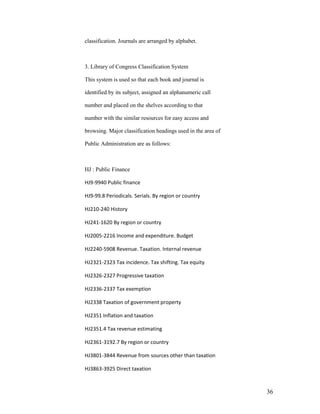
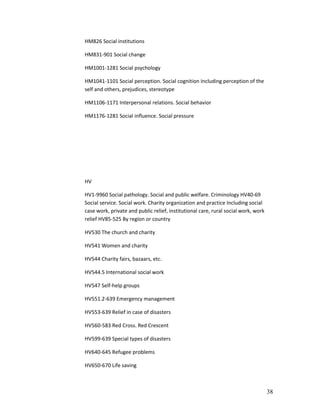
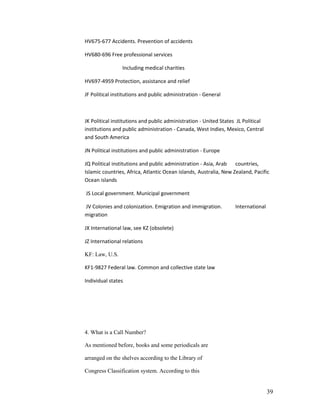
  • 57.
    audience. Some examples are Time, Newsweek, U.S. News and World Report,Popular Mechanics, Scientific American, New York Times, National Geographic. Popular Journals- these sources are attractive in appearance. They contain many photographs, drawings. They very rarely cite sources and information they contain are usually second or third hand. The articles are in general with very little depth. The popular journals are for entertaining the reader, selling products or promoting a viewpoint. Some examples are People Weekly, Traditional Homes, Vogue, Good Housekeeping, Southern Living, Essence and others. Sensational, Tabloid Publications- use elementary language that is often sensational. They aim to arouse curiosity with flashy headlines. Some examples are National Inquirer, Globe, Weekly World News, Star, and others. 57
  • 58.
    • Evaluation ofWeb Resources You can find a vast amount of information on the Internet, however, not all resources are equally valuable or even reliable. Your challenge is to sift through the vast amount of information and pinpoint those sources that are reliable and relevant for your topic. As a rule the, informational web pages present factual information. For example, the web pages with URL addresses that end with .edu or .gov provide reliable information since they are sponsored by educational institutions or government agencies. You may consider the following points in evaluating web sources: 1. Scope- How complete is the information covered? Is the information given in detail? 2. Content- Is the information accurate or factual? Many web pages simply restate the opinion of the author or the opinions of others. Opinions may be stated as though they were facts; this is something you need to watch out for. Are there sources listed for the information given that can be double-checked. Is the information 58
  • 59.
    biased? Sometimes informationis given without the name of an organization or person to whom the information can be attributed. Such information is suspect. Sometimes an author sounds authoritative, but may have little or no background in the field. You can check for credentials of the author. How current is the information? Do you see dates as to when it was written and when it was last revised or or updated? 3. Graphics and Multimedia Design- Is the Page attractive and Interesting to look at? 4. Navigation- is the web resource easy to use? Is it user friendly? Can you access the resource via standard computer equipment and software? VII. Write the Paper 1. Organization of Information Organization of your information is now paramount, after you have gathered it. You may look at the problem as if you were organizing a file cabinet, your wallet, or the books in a library. In all these cases, 59
  • 60.
    similar itemsare groupedtogether for easier access. In writing your research paper, you may group your information under similar concepts. For example, if you are using the web to gather information, you may bookmark your favorites under a concept. One of the best ways to organize information is to create an outline using your key concepts as aids in organization. In an outline information is arranged by hierarchy and sequence. This is done by identifying Main Concepts, Subconcepts, particular information under subconcepts, Conclusion and Bibliography.An outline would also contain forword, preface and table of contents. An outline may look like this: I. Main Concept A. Sub-Concept 1. Particular 2. Particular 3. Particular B. Sub-Concept 1. Particular 2. Particular 3. Particular C. Sub-Concept 1. Particular 60
  • 61.
    2. Particular For example,the book titled Exploring Public Sector Strategy ed. by Gerry Johnson and Kevan Scholes has the following outline: Chapter I- The implications of „publicness‟ for strategic management theory 1.1 Introduction 1.2 The private sector model 1.3 How public sector management differs 1.4 Implications for „content‟ theories of strategic management 1.5 Implications for „process‟ theories 1.6 Conclusion Chapter II- The processes of strategy development in the public sector 2.1 Introduction 2.2 A framework for the strateg development process 2.3 Strategy a managerial intent 2.4 Strategy as the outcome of organizational processes 2.5 Imposed strategy: The enforced choice dimension 2.6 The strategy development questionnaire 2.7 Analysis and results 2.8 Conclusions and implications Chapter III Global influences on the public sector 61
  • 62.
    3.1 Introduction 3.2 PEST analysis 3.3 Scenarios 3.4 Five forces analysis in healthcare 3.5 Strategic group analysis in MBA education in the Netherlands 3.6 Summary Chapter IV Trust and distrust in regulation and enforcement 4.1 Introduction 4.2 Defining regulations 4.3 The regulatory cycle 4.4 Trust or distrust? 4.5 Conclusions Conclusion Bibliography In this example, the title is Exploring Public Sector Strategy. The author organized the information into four Main Concepts. They are - The implications of „publicness‟ for strategic management theory, The processes of strategy development in the public sector, Global influences on the public sector and Trust and distrust in regulation and enforcement. The information relevant to the main Concepts are sub-Concepts and they 62
  • 63.
    are are listedunder the main concepts in the decimal- numbered headings. 2. Citing Sources and Ethical Issues- In your paper you will often use concepts, assertions, ideas and evidence from various authors and sources. That is, you will use quotes from other researchers. When you incorporate someone else‟s ideas or material in your paper, you are obligated to give credit to the original author. You can give this credit by citing the sources in your paper. These citations must be complete and they include books, journal or newspaper articles, Internet sources, etc. Failure to give credit to the original author of information that you quote is unethical and it called “ plagiarism “. There are a variety of formats available for use in citing your sources. They come under these headings: Science- CBE (Council of Biology Editors) Social Sciences- APA ( American Psychological Association) Humanities- MLA (Modern Language Association) History- Chicago (University of Chicago Press) 63
  • 64.
    Hints You should picka style that fits your research concept and use it consistently. Make sure that you provide a complete citation so that persons reading your research can locate the information you are citing. Examples of citations in endnotes Print materials- Books- The bibliographic citation for a book in the American Psychological Association (APA) Styleisas follows: Savoy, N. (2002). Public administration as a career in early twentieth-century Germany.Boston: Newnes. ( Notice that the title of the book is inItalics) The bibliographic citation for a bookin the Modern language Association (MLA)style Isas follows: 64
  • 65.
    Hootton, C.E. InternationalPerspectives on Telecommuting. Boston: Newnes, 2002. ( Notice that the author‟s name is given in full and the publication date of the book is entered at the end of the citation. There are two spaces after each period) The bibliographic citation for a journalin the American Psychological Association (APA) Styleisas follows: Dario, Paola, Guglielmelli, E. and Lascki, C. (2001). Humanoids and personal robots: design and experiments. Journal of Robotic Systems, 18, 673-690. (Notice that the title of the journal is in Italics) Journals 65
  • 66.
    MLA style Barthelme, Frederick. “Architecture.” Kansas Quarterly 13.3-4 (1981): 77-80 ( Notice that the title of the article is in quotation marks, both the volume and the issue number and the month or season and year of the publication is given. The month or the season and the year of publication are in parenthesis) APA style Wegener, D. T., & Petty, R. E. (1994). Mood management hedonic contingency hypothesis. Journal of Personality & Social Psychology, 66, 1034-1048. Notice that the title is italicized. Electronic resources- APA style Burka, L.P. (1993). A hypertext history of multi-user dimensions. MUD history. http://www.utopia.com/talent/lpb/muddex/essay.(2 Aug. 1996). MLA style 66
  • 67.
    Burka, Lauren P.“A Hypertext History of Multi-User Dimensions.” MUD History. 1993. http://www.Burka, Lauren P. "A Hypertext History of Multi-User Dimensions." MUD History. . http://www.utopia.com/talent/lpb/muddex/essay. (2 Aug. 1996). 67
  • 68.