E-Granthalaya
- A digital agenda for library
automation & networking
E-Granthalaya
e-Granthalaya is a library automation software from
National Informatics Centre, Department of
Electronics & Information Technology, Ministry of
Communications and Information
Technology, Government of India.

The software has been designed by a team of
experts from software as well as Library and
Information Science discipline.
E-Granthalaya
Using this software the libraries can automate inhouse activities as well as user services.
The software can be implemented either in standalone or in client-server mode where database and
WebOPAC are installed on the server PC while the
data entry program is installed on client PCs.
The software provides LAN/Web based data entry
solutions for a cluster of libraries where a
centralized/Common database can be created with
Union Catalog output.
E-Granthalaya
The software provides Web OPAC
interface to publish the library catalog
over Internet/Intranet.

The software runs on Windows paltform
Only, UNICODE Compliant ,thus, supports
data entry in local language.
History
The journey ...
e-Granthalaya was started as an in-house project at
'Karnataka State Centre of NIC,Bangalore' and first
version of the software was designed for the Public
Libraries in the State.

Later, NIC HQs 'Library and Information Services
Division' took over the designing of the software where
library professionals were involved in the designing
process and, thus, improved the software with
enhanced user interface and simplify the work-flow of
library functions so that it can suit all kinds of libraries.
System Requirements
System Requirements
For Stand-Alone Mode (All the Components to be
installed on a Single PC):
Hardware: Pentium or above with backup device, Min 1
GB RAM, 40GB HDD

OS: Windows XP(SP2)/Vista/win 7
DBMS: MS SQL Server 2005/2008 (Express Ed) - FREE
Connectivity: LAN/Internet Connectivity
Features
Features
Runs on Windows Platform Only (Win
XP/vista/7/Server 2003/2008)
Provides Local/LAN/WAN based Data Entry
Solution

UNICODE Compliant, supports data entry in
local language
Module - Wise Permission to the software
Users
Features
Work-flow as per Indian Libraries
Retro-Conversion as well as Full Cataloging Modes of
Data Entry
Master tables for Authors, Publishers, Subjects, etc
Multi-Vol, Multi-Copy and Child-Parent Relationship
pattern
Download Catalog Records from Internet
Features
Z39.50 Client Search Built-in

Exhaustive Reports for Print
Export Records in Text File/MARC/MS
ACCESS/EXCEL formats
Merger databases of eG3 into Single
Database
Features
Common/Centralized Database for N
Number of libraries, minimize data entry
Main/Branch Libraries
Acquisition/Cataloging
Print Accession Register
Search Module built-in with
basic/advance/boolean parameters
Features
Library Statistics Reports
CAS/SDI Services and Documentation
Bulletin
Updated Regularly with enhanced
Features

Compact/Summary/Detailed Reports
Option
Features
Generate Bibliography
Data Entry Statistics Built-In
News Clipping Services Built-in
Digital Library integration with uploading /
downloading of pdf/html, etc documents
Features
Micro-Documents Manger
(Articles/Chapter Indexing)
SERIALS Control System for Subscription
with Auto-Generate Schedule
Budget Modules with Bill Register
Generation, manages Multi-Budget Head
Features
Import Data from any structured
Source

Well exhaustive Web Based OPAC
Interface with separate
Membership module
Modules
FEATURES AT A GLANCE
LAN/WAN based data entry solution
• Automate In-house Activities
• Automate User Services
• Duplicate Checking
• Automate purchasing process with Indian
workflow.
• Member registration with specific
entitlement, due days and fine system
• Well integrated database
• Output in User friendly style
• Compliant with international standards
• Common database / OPAC for growth of growth
Data Entry Modules
Admin
Books Acquisition
Cataloguing
Circulation

Serials
Articles Indexing
Budgets
Search /OP AC
Web OPAC Search Interface
Internet/ Intranet Based Interface

Search Library Catalog
Basic / Advance Search
Use Boolean Operators

Search Member Dues
ADMIN MODULE
Provides space for adding/editing/deleting
Users who will operate software
Bibliographic level/document type
Acquisition modes / Copy Status
Countries / Type of Binding
Currency Codes
Publishers Details / Vendor Details

Journal Frequencies / Languages
Messages and Text for reports/letter
Sections/Subjects/Library Committees
BOOKS ACQUISITION MODULE
Authors Directory
Check Duplicate Titles
Add New Title
Add Acquisition Record
Generate Approval
Place Orders
Receive Books
Accessioning

Billing / Payment
CATALOGUING MODULE
Update full catalog information
Update Title Details
Update Copy/Holding Details
Change Status of the Copy

Retro-Conversion Utility
Status-Wise List of Books
Generate Bar Code labels for Books/Loose Issues
CIRCULATION MODULE
Add Member Categories
Add Entitlement, Due Days and Fine Charges
Member Information
Issue / Return

Return/Reserve
Circulation Transactions
Overdue Reminder
SERIALS MODULE
Add Serials Details
Add Subscription Info
Generate Approval / Order
Automatic Scheduling of Loose Issues
Reminders for non-receipt of isseus
Add Bound V olumes /Holdings

History Management
BUDGET MODULE

Add Budget Details
Add Bills Details
Generate Payment Request Form
Check Details
ARTICLES INDEXING

Add Articles
Add Chapters
Populate on Web
Search Micro Docs
Distribution Policy
Distribution Policy
The software is provided at zero cost to the
Ministries/Departments/Public/Academic/Universities/Colleges
and school libraries.

Besides, libraries setup in Public / Private sectors may also
approach to the NIC for free copy of the software.

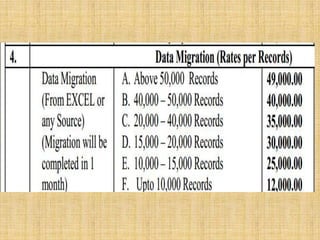
The support, training, Data Entry, Maintenance, Migration, etc
are provided on Payment basis by the NIC/NICSI Emapnelment
Agency. Government Libraries Hosting may also be done FREE in
NIC Server.
Distribution Policy
NOTICE: NIC/NICSI has empanelled three
Agencies for Rolling out of e-Granthalaya
Services in Government Libraries.

However, e-Granthalaya Software will be
provided FREE to the Libraries but Govt libraries
can also avail other services on payment basis
(Installation, on-site training, data entry, post
implementation support, etc).
How to get the S/W
How to get the Software
The e-Granthalaya software can be get from any
District/State Centres of NIC
or
from NIC Hqs, New Delhi
by
sending one official letter on letter head duly
signed by Authority along with duly filled
request form.
Request Form
Support Services
Paid
Optional
(Rates Per Man Month)
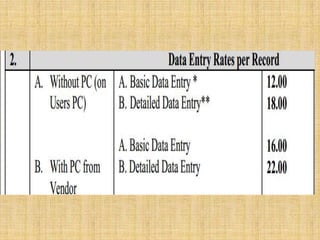
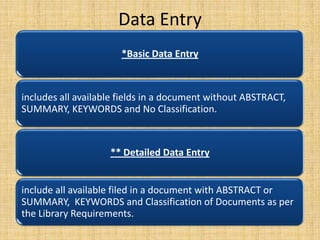
Data Entry
*Basic Data Entry

includes all available fields in a document without ABSTRACT,
SUMMARY, KEYWORDS and No Classification.

** Detailed Data Entry

include all available filed in a document with ABSTRACT or
SUMMARY, KEYWORDS and Classification of Documents as per
the Library Requirements.
eG3
e-Granthalaya (Ver.3.0)
improve the software regularly on the basis of
user feedback

recently released the third version of eGranthalaya (ver. 3.0), popularly called as eG3.
This version is based on the recent technologies
from Microsoft and also more features have
been added.
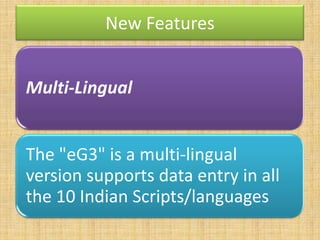
New Features
Multi-Lingual
The "eG3" is a multi-lingual
version supports data entry in all
the 10 Indian Scripts/languages
D

Script

Font

Languages
Sanskrit, Hindi, Marathi,
Knkani, Nepali

Devanagari

Mangal

Tamil

Latha

Tamil

Telugu

Gautami

Telugu

Gujarati

Shruti

Gujarati

Gurumukhi (Punjabi)

Raavi

Punjabi

Malayalam

Kartika

Malayalam

Bengali

Vrinda

Bengali, Assamese, Manipuri

Oriya

Kannada

Oriya

Tunga

Kannada
ClickOnce
The eG3 deployment is based on the new technology
from Microsoft called as 'ClickOnce'.
Under this kind of deployment, the e-Granthalaya
software will be kept in NIC server from where it can be
deployed/installed automatically on the target/client
PC.

Updation is also downloaded automatically when the
application is run on the Client PC every time.
Users
Training
Training & Workshop
NIC provides the initial training for new eGranthalaya users.
Conducts 3-days exhaustive workshop from time
to time for users of these software at various
NIC State and District Centre in India.

Sometimes NIC conducts the workshop in
collaboration with various Government
Departments as well as Users.
Training & Workshop
All the training / workshop conducted are FREE and provides
refreshments / lunches/ teas etc besides training kit, copy of
latest software, installation guide, user manual and certificate
to the participants.

These training and workshops are announced on e-Granthalaya
web site for users and nominations are accepted on first-comefirst basis.
Contact
Ram Kumar Matoria
Technical Director
Library and Information Services Division
NATIONAL INFORMATICS CENTRE
A-Block, CGO Complex, Lodhi Road
New Delhi -110 003
Ph.011-24305487
Email: rkmatoria@nic.in
Website: http://egranthalaya.nic.in/
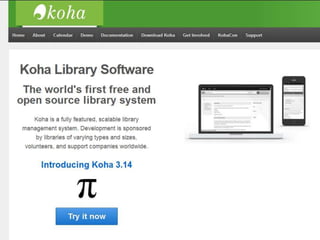
Koha
Features
• Simple, clear interface for librarians and members (patrons)
• Various Web 2.0 facilities like tagging, comment, Social
sharing and RSS feeds
• Union catalog facility
• Customizable search
• Circulation and borrower management
• Full acquisitions system including budgets and pricing
information (including supplier and currency conversion)
• Simple acquisitions system for the smaller library
• Ability to cope with any number of
branches, patrons, patron categories, item
categories, items, currencies and other data
• Serials system for magazines or newspapers
• Reporting
• Reading lists for members
BiblioteQ
Features
Administrator roles.
Cataloguing of
books, DVDs, journals, magazines, music
CDs, photograph collections, and video games.
Cover images with drag and drop support.

Customizable displays.
Features
Customizable item data, pricing
information, and currencies.
Embedded hyperlinks for localized searches
of similar items.
Exporting of views to CSV files.

Free and Open Source technology.
Features
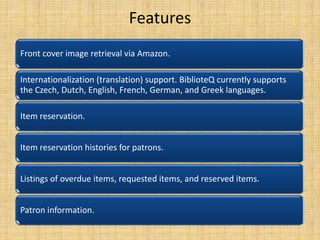
Front cover image retrieval via Amazon.
Internationalization (translation) support. BiblioteQ currently supports
the Czech, Dutch, English, French, German, and Greek languages.
Item reservation.
Item reservation histories for patrons.
Listings of overdue items, requested items, and reserved items.
Patron information.
E-granthalaya ILMS
E-granthalaya ILMS
E-granthalaya ILMS
E-granthalaya ILMS
E-granthalaya ILMS
E-granthalaya ILMS
E-granthalaya ILMS
E-granthalaya ILMS
E-granthalaya ILMS
E-granthalaya ILMS

E-granthalaya ILMS

  • 1.
    E-Granthalaya - A digitalagenda for library automation & networking
  • 2.
    E-Granthalaya e-Granthalaya is alibrary automation software from National Informatics Centre, Department of Electronics & Information Technology, Ministry of Communications and Information Technology, Government of India. The software has been designed by a team of experts from software as well as Library and Information Science discipline.
  • 3.
    E-Granthalaya Using this softwarethe libraries can automate inhouse activities as well as user services. The software can be implemented either in standalone or in client-server mode where database and WebOPAC are installed on the server PC while the data entry program is installed on client PCs. The software provides LAN/Web based data entry solutions for a cluster of libraries where a centralized/Common database can be created with Union Catalog output.
  • 4.
    E-Granthalaya The software providesWeb OPAC interface to publish the library catalog over Internet/Intranet. The software runs on Windows paltform Only, UNICODE Compliant ,thus, supports data entry in local language.
  • 5.
  • 6.
    The journey ... e-Granthalayawas started as an in-house project at 'Karnataka State Centre of NIC,Bangalore' and first version of the software was designed for the Public Libraries in the State. Later, NIC HQs 'Library and Information Services Division' took over the designing of the software where library professionals were involved in the designing process and, thus, improved the software with enhanced user interface and simplify the work-flow of library functions so that it can suit all kinds of libraries.
  • 7.
  • 8.
    System Requirements For Stand-AloneMode (All the Components to be installed on a Single PC): Hardware: Pentium or above with backup device, Min 1 GB RAM, 40GB HDD OS: Windows XP(SP2)/Vista/win 7 DBMS: MS SQL Server 2005/2008 (Express Ed) - FREE Connectivity: LAN/Internet Connectivity
  • 9.
  • 10.
    Features Runs on WindowsPlatform Only (Win XP/vista/7/Server 2003/2008) Provides Local/LAN/WAN based Data Entry Solution UNICODE Compliant, supports data entry in local language Module - Wise Permission to the software Users
  • 11.
    Features Work-flow as perIndian Libraries Retro-Conversion as well as Full Cataloging Modes of Data Entry Master tables for Authors, Publishers, Subjects, etc Multi-Vol, Multi-Copy and Child-Parent Relationship pattern Download Catalog Records from Internet
  • 12.
    Features Z39.50 Client SearchBuilt-in Exhaustive Reports for Print Export Records in Text File/MARC/MS ACCESS/EXCEL formats Merger databases of eG3 into Single Database
  • 13.
    Features Common/Centralized Database forN Number of libraries, minimize data entry Main/Branch Libraries Acquisition/Cataloging Print Accession Register Search Module built-in with basic/advance/boolean parameters
  • 14.
    Features Library Statistics Reports CAS/SDIServices and Documentation Bulletin Updated Regularly with enhanced Features Compact/Summary/Detailed Reports Option
  • 15.
    Features Generate Bibliography Data EntryStatistics Built-In News Clipping Services Built-in Digital Library integration with uploading / downloading of pdf/html, etc documents
  • 16.
    Features Micro-Documents Manger (Articles/Chapter Indexing) SERIALSControl System for Subscription with Auto-Generate Schedule Budget Modules with Bill Register Generation, manages Multi-Budget Head
  • 17.
    Features Import Data fromany structured Source Well exhaustive Web Based OPAC Interface with separate Membership module
  • 18.
  • 19.
    FEATURES AT AGLANCE LAN/WAN based data entry solution • Automate In-house Activities • Automate User Services • Duplicate Checking • Automate purchasing process with Indian workflow. • Member registration with specific entitlement, due days and fine system • Well integrated database • Output in User friendly style • Compliant with international standards • Common database / OPAC for growth of growth
  • 20.
    Data Entry Modules Admin BooksAcquisition Cataloguing Circulation Serials Articles Indexing Budgets Search /OP AC
  • 21.
    Web OPAC SearchInterface Internet/ Intranet Based Interface Search Library Catalog Basic / Advance Search Use Boolean Operators Search Member Dues
  • 22.
    ADMIN MODULE Provides spacefor adding/editing/deleting Users who will operate software Bibliographic level/document type Acquisition modes / Copy Status Countries / Type of Binding Currency Codes Publishers Details / Vendor Details Journal Frequencies / Languages Messages and Text for reports/letter Sections/Subjects/Library Committees
  • 23.
    BOOKS ACQUISITION MODULE AuthorsDirectory Check Duplicate Titles Add New Title Add Acquisition Record Generate Approval Place Orders Receive Books Accessioning Billing / Payment
  • 24.
    CATALOGUING MODULE Update fullcatalog information Update Title Details Update Copy/Holding Details Change Status of the Copy Retro-Conversion Utility Status-Wise List of Books Generate Bar Code labels for Books/Loose Issues
  • 25.
    CIRCULATION MODULE Add MemberCategories Add Entitlement, Due Days and Fine Charges Member Information Issue / Return Return/Reserve Circulation Transactions Overdue Reminder
  • 26.
    SERIALS MODULE Add SerialsDetails Add Subscription Info Generate Approval / Order Automatic Scheduling of Loose Issues Reminders for non-receipt of isseus Add Bound V olumes /Holdings History Management
  • 27.
    BUDGET MODULE Add BudgetDetails Add Bills Details Generate Payment Request Form Check Details
  • 28.
    ARTICLES INDEXING Add Articles AddChapters Populate on Web Search Micro Docs
  • 29.
  • 30.
    Distribution Policy The softwareis provided at zero cost to the Ministries/Departments/Public/Academic/Universities/Colleges and school libraries. Besides, libraries setup in Public / Private sectors may also approach to the NIC for free copy of the software. The support, training, Data Entry, Maintenance, Migration, etc are provided on Payment basis by the NIC/NICSI Emapnelment Agency. Government Libraries Hosting may also be done FREE in NIC Server.
  • 31.
    Distribution Policy NOTICE: NIC/NICSIhas empanelled three Agencies for Rolling out of e-Granthalaya Services in Government Libraries. However, e-Granthalaya Software will be provided FREE to the Libraries but Govt libraries can also avail other services on payment basis (Installation, on-site training, data entry, post implementation support, etc).
  • 32.
    How to getthe S/W
  • 33.
    How to getthe Software The e-Granthalaya software can be get from any District/State Centres of NIC or from NIC Hqs, New Delhi by sending one official letter on letter head duly signed by Authority along with duly filled request form.
  • 34.
  • 37.
  • 38.
  • 39.
  • 42.
  • 45.
    Data Entry *Basic DataEntry includes all available fields in a document without ABSTRACT, SUMMARY, KEYWORDS and No Classification. ** Detailed Data Entry include all available filed in a document with ABSTRACT or SUMMARY, KEYWORDS and Classification of Documents as per the Library Requirements.
  • 46.
  • 47.
    e-Granthalaya (Ver.3.0) improve thesoftware regularly on the basis of user feedback recently released the third version of eGranthalaya (ver. 3.0), popularly called as eG3. This version is based on the recent technologies from Microsoft and also more features have been added.
  • 48.
    New Features Multi-Lingual The "eG3"is a multi-lingual version supports data entry in all the 10 Indian Scripts/languages
  • 49.
    D Script Font Languages Sanskrit, Hindi, Marathi, Knkani,Nepali Devanagari Mangal Tamil Latha Tamil Telugu Gautami Telugu Gujarati Shruti Gujarati Gurumukhi (Punjabi) Raavi Punjabi Malayalam Kartika Malayalam Bengali Vrinda Bengali, Assamese, Manipuri Oriya Kannada Oriya Tunga Kannada
  • 50.
    ClickOnce The eG3 deploymentis based on the new technology from Microsoft called as 'ClickOnce'. Under this kind of deployment, the e-Granthalaya software will be kept in NIC server from where it can be deployed/installed automatically on the target/client PC. Updation is also downloaded automatically when the application is run on the Client PC every time.
  • 51.
  • 54.
  • 55.
    Training & Workshop NICprovides the initial training for new eGranthalaya users. Conducts 3-days exhaustive workshop from time to time for users of these software at various NIC State and District Centre in India. Sometimes NIC conducts the workshop in collaboration with various Government Departments as well as Users.
  • 56.
    Training & Workshop Allthe training / workshop conducted are FREE and provides refreshments / lunches/ teas etc besides training kit, copy of latest software, installation guide, user manual and certificate to the participants. These training and workshops are announced on e-Granthalaya web site for users and nominations are accepted on first-comefirst basis.
  • 57.
    Contact Ram Kumar Matoria TechnicalDirector Library and Information Services Division NATIONAL INFORMATICS CENTRE A-Block, CGO Complex, Lodhi Road New Delhi -110 003 Ph.011-24305487 Email: rkmatoria@nic.in Website: http://egranthalaya.nic.in/
  • 58.
  • 61.
    Features • Simple, clearinterface for librarians and members (patrons) • Various Web 2.0 facilities like tagging, comment, Social sharing and RSS feeds • Union catalog facility • Customizable search • Circulation and borrower management • Full acquisitions system including budgets and pricing information (including supplier and currency conversion) • Simple acquisitions system for the smaller library • Ability to cope with any number of branches, patrons, patron categories, item categories, items, currencies and other data • Serials system for magazines or newspapers • Reporting • Reading lists for members
  • 67.
  • 69.
    Features Administrator roles. Cataloguing of books,DVDs, journals, magazines, music CDs, photograph collections, and video games. Cover images with drag and drop support. Customizable displays.
  • 70.
    Features Customizable item data,pricing information, and currencies. Embedded hyperlinks for localized searches of similar items. Exporting of views to CSV files. Free and Open Source technology.
  • 71.
    Features Front cover imageretrieval via Amazon. Internationalization (translation) support. BiblioteQ currently supports the Czech, Dutch, English, French, German, and Greek languages. Item reservation. Item reservation histories for patrons. Listings of overdue items, requested items, and reserved items. Patron information.