Meet Druid!
Real-time analytics with Druid at
Appsflyer
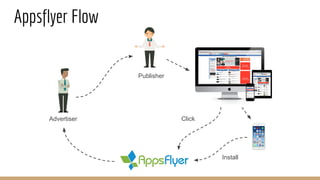
Publisher
Click
Install
Appsflyer Flow
Advertiser
Appsflyer as Marketing Platform
Fraud detection
Statistics
Attribution
Life time value
Retargeting
Prediction
A/B testing
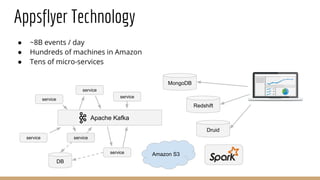
Appsflyer Technology
● ~8B events / day
● Hundreds of machines in Amazon
● Tens of micro-services
Apache Kafka
service
service
service
service
service
service
DB
Amazon S3
MongoDB
Redshift
Druid
Realtime
● New buzzword
● Ingestion latency - seconds
● Query latency - seconds
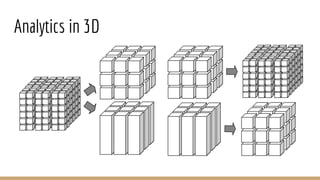
Analytics
● Roll-up
○ Summarizing over a dimension
● Drill-down
○ Focusing (zooming in)
● Slicing and dicing
○ Reducing dimensions (slice)
○ Picking values of specific dimensions (dice)
● Pivoting
○ Rotating multi-dimensional cube
Analytics in 3D
We tried...
● MongoDB
○ Operational issues
○ Performance is not great
● Redshift
○ Concurrency limits
● Aurora (MySQL)
○ Aggregations are not optimized
● Memsql
○ Insufficient performance
○ Too pricy
● Cassandra
○ Not flexible
Druid
● Storage optimized for analytics
● Lambda architecture inside
● JSON-based query language
● Developed by analytics SAAS company
● Free and open source
● Scalable to petabytes...
Druid Storage
● Columnar
● Inverted index
● Immutable segments
Columnar Storage
Original data: 100MB
Queried columns:
10MB
Compressed:
3MB
Index
● Values are dictionary encoded
{“USA” -> 1, “Canada” -> 2, “Mexico” -> 3, …}
● Bitmap for every dimension value (used by filters)
“USA” -> [0, 1, 0, 0, 1, 1, 0, 0, 0]
● Column values (used by aggregation queries)
[2, 1, 3, 15, 1, 1, 2, 8, 7]
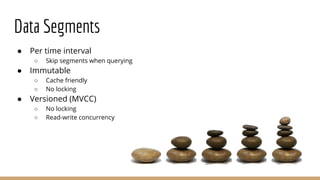
Data Segments
● Per time interval
○ Skip segments when querying
● Immutable
○ Cache friendly
○ No locking
● Versioned (MVCC)
○ No locking
○ Read-write concurrency
Data Ingestion
Real-time Data Historical Data
Broker
Streaming Hand-off
Batch indexing
Query
Real-time Ingestion
● Via Real-Time Node and Firehose
○ No redundancy or HA, thus not recommended
● Via Indexing Service and Tranquility API
○ Core API
○ Integrations with Streaming Frameworks
○ HTTP Server
○ Kafka Consumer
Batch Ingestion
● File based (HDFS, S3, …)
● Indexers
○ Internal Indexer
■ For datasets < 1G
○ External Hadoop Cluster
○ Spark Indexer
■ Work in progress
Ingestion Spec
● Parsing configuration (Flat JSON, *SV)
● Dimensions
● Metrics
● Granularity
○ Segment granularity
○ Query granularity
● I/O configuration
○ Where to read data from
● Tuning configuration
○ Indexer tuning
● Partitioning and replication
Real-time ingestion
Task 1
Task 2
Interval Window
Time
Minimum indexing slots = Data sources x Partitions x Replicas x 2
Query Types
● Group by
○ grouping by multiple dimensions
● Top N
○ like grouping by a single dimension
● Timeseries
○ w/o grouping over dimensions
● Search
○ Dimensions lookup
● Time boundary
○ Find available data timeframe
● Metadata queries
Tips for Querying
● Prefer topN over groupBy
● Prefer timeseries over topN and groupBy
● Use limits (and priorities)
Query Spec
● Data source
● Dimensions
● Interval
● Filters
● Aggregations
● Post aggregations
● Granularity
● Context (query configuration)
● Limit
Sample Query
~# curl -X POST -d@query.json -H "Content-Type: application/json" http://druidbroker:8082/druid/v2?pretty
{
"queryType": "groupBy",
"dataSource": "inappevents",
"granularity": "hour",
"dimensions": ["media_source", "campaign"],
"filter": {
"type": "and", "fields": [{ "type": "selector", "dimension": "app_id", "value": "com.comuto" },
{ "type": "selector", "dimension": "country", "value": "RU" }]
},
"aggregations": [
{ "type": "count", "name": "events_count" },
{ "type": "doubleSum", "name": "revenue", "fieldName": "monetary" }
],
"intervals": [ "2015-12-01T00:00:00.000/2016-01-01T00:00:00.000" ]
}
Caching
● Historical node level
○ By segment
● Broker level
○ By segment and query
○ “groupBy” is disabled on purpose!
● By default - local caching
● In production - use memcached
Load Rules
● Can be defined
○ On data source
○ On “tier”
● What can be set
○ Replication factor
○ Load period
○ Drop period
● Can be used to separate “hot” data from “cold” one
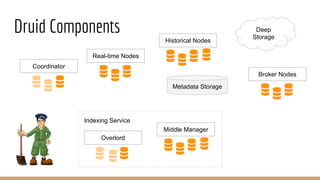
Druid Components
Historical Nodes
Real-time Nodes
Coordinator
Middle Manager
Overlord
Indexing Service
Broker Nodes
Deep
Storage
Metadata Storage
Druid Components
Historical Nodes
Real-time Nodes
Coordinator
Middle Manager
Overlord
Indexing Service
Broker Nodes
Deep
Storage
Metadata Storage
Cache
Load Balancer
Druid Components (Explained)
● Coordinator
○ Manages segments
● Real-time Nodes
○ Pulling data in real-time, and indexing it
● Historical Nodes
○ Keeps historical segments
● Overlord
○ Accepts tasks and distributes them to Middle Managers
● Middle Manager
○ Executes submitted tasks via Peons
● Broker Nodes
○ Routes query to Real-time and Historical nodes, merges results
● Deep Storage
○ Segments backup (HDFS, S3, …)
Failover
● Coordinator and Overlord
○ HA
● Real-time nodes
○ Tasks are replicated
○ Pool of nodes
● Historical nodes
○ Data is replicated
○ Pool of nodes
○ All segments are backed up in the deep storage
● Brokers
○ Pool of nodes
○ Load balancer at the front
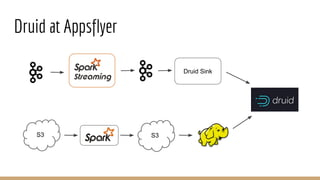
Druid at Appsflyer
Druid Sink
S3S3
Druid Sink
Druid Sink
Tranquility API
Probably not needed anymore due to native support in Tranquility package
Druid in Production
● Provisioning using Chef
● r3.8xlarge (sample configuration is OK)
● Redundancy for coordinator and overlord (node per AZ)
● Historical and real-time nodes are spread between AZ
● LB - Consul from Hashicorp
● Service discovery - Consul again
● Memcached
● Monitoring via Graphite Emitter extension
○ https://github.com/druid-io/druid/pull/1978
● Alerting via Sensu
IAP Distribution
● 3 different node types (instead of 6)
● Unpack and run
● Some useful wrappers
● Built-in examples for quick start
● Commercial support
● PyQL, Pivot inside
http://imply.io
Tips
● ZooKeeper is heavily used
○ Choose appropriate hardware/network for ZK machines
● Use latest version (0.8.3)
○ Restartable tasks
○ Indexing time improvement! (https://github.com/druid-io/druid/pull/1960)
○ Data sketches library
● All exceptions are useful
When Not to Choose Druid?
● When data is not time-series
● When data cardinality is high
● When number of output rows is high
● When setup costs must be avoided
Non-time Series Workarounds
● Must have some timestamp still
● Rebuild everything to order by your timestamp
● Or, use single-dimension partitioning
○ Segments partitioned by timestamp first, then by dimension range
○ Find optimal target segment size
Still, please don’t use Druid for non-time series!
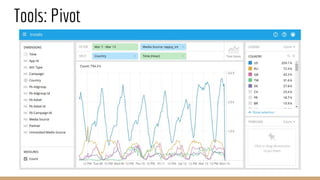
Tools: Pivot
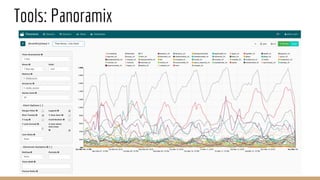
Tools: Panoramix
Thank you!

Real-time analytics with Druid at Appsflyer

  • 1.
    Meet Druid! Real-time analyticswith Druid at Appsflyer
  • 2.
  • 3.
    Appsflyer as MarketingPlatform Fraud detection Statistics Attribution Life time value Retargeting Prediction A/B testing
  • 4.
    Appsflyer Technology ● ~8Bevents / day ● Hundreds of machines in Amazon ● Tens of micro-services Apache Kafka service service service service service service DB Amazon S3 MongoDB Redshift Druid
  • 5.
    Realtime ● New buzzword ●Ingestion latency - seconds ● Query latency - seconds
  • 6.
    Analytics ● Roll-up ○ Summarizingover a dimension ● Drill-down ○ Focusing (zooming in) ● Slicing and dicing ○ Reducing dimensions (slice) ○ Picking values of specific dimensions (dice) ● Pivoting ○ Rotating multi-dimensional cube
  • 7.
  • 8.
    We tried... ● MongoDB ○Operational issues ○ Performance is not great ● Redshift ○ Concurrency limits ● Aurora (MySQL) ○ Aggregations are not optimized ● Memsql ○ Insufficient performance ○ Too pricy ● Cassandra ○ Not flexible
  • 9.
    Druid ● Storage optimizedfor analytics ● Lambda architecture inside ● JSON-based query language ● Developed by analytics SAAS company ● Free and open source ● Scalable to petabytes...
  • 10.
    Druid Storage ● Columnar ●Inverted index ● Immutable segments
  • 11.
    Columnar Storage Original data:100MB Queried columns: 10MB Compressed: 3MB
  • 12.
    Index ● Values aredictionary encoded {“USA” -> 1, “Canada” -> 2, “Mexico” -> 3, …} ● Bitmap for every dimension value (used by filters) “USA” -> [0, 1, 0, 0, 1, 1, 0, 0, 0] ● Column values (used by aggregation queries) [2, 1, 3, 15, 1, 1, 2, 8, 7]
  • 13.
    Data Segments ● Pertime interval ○ Skip segments when querying ● Immutable ○ Cache friendly ○ No locking ● Versioned (MVCC) ○ No locking ○ Read-write concurrency
  • 14.
    Data Ingestion Real-time DataHistorical Data Broker Streaming Hand-off Batch indexing Query
  • 15.
    Real-time Ingestion ● ViaReal-Time Node and Firehose ○ No redundancy or HA, thus not recommended ● Via Indexing Service and Tranquility API ○ Core API ○ Integrations with Streaming Frameworks ○ HTTP Server ○ Kafka Consumer
  • 16.
    Batch Ingestion ● Filebased (HDFS, S3, …) ● Indexers ○ Internal Indexer ■ For datasets < 1G ○ External Hadoop Cluster ○ Spark Indexer ■ Work in progress
  • 17.
    Ingestion Spec ● Parsingconfiguration (Flat JSON, *SV) ● Dimensions ● Metrics ● Granularity ○ Segment granularity ○ Query granularity ● I/O configuration ○ Where to read data from ● Tuning configuration ○ Indexer tuning ● Partitioning and replication
  • 18.
    Real-time ingestion Task 1 Task2 Interval Window Time Minimum indexing slots = Data sources x Partitions x Replicas x 2
  • 19.
    Query Types ● Groupby ○ grouping by multiple dimensions ● Top N ○ like grouping by a single dimension ● Timeseries ○ w/o grouping over dimensions ● Search ○ Dimensions lookup ● Time boundary ○ Find available data timeframe ● Metadata queries
  • 20.
    Tips for Querying ●Prefer topN over groupBy ● Prefer timeseries over topN and groupBy ● Use limits (and priorities)
  • 21.
    Query Spec ● Datasource ● Dimensions ● Interval ● Filters ● Aggregations ● Post aggregations ● Granularity ● Context (query configuration) ● Limit
  • 22.
    Sample Query ~# curl-X POST -d@query.json -H "Content-Type: application/json" http://druidbroker:8082/druid/v2?pretty { "queryType": "groupBy", "dataSource": "inappevents", "granularity": "hour", "dimensions": ["media_source", "campaign"], "filter": { "type": "and", "fields": [{ "type": "selector", "dimension": "app_id", "value": "com.comuto" }, { "type": "selector", "dimension": "country", "value": "RU" }] }, "aggregations": [ { "type": "count", "name": "events_count" }, { "type": "doubleSum", "name": "revenue", "fieldName": "monetary" } ], "intervals": [ "2015-12-01T00:00:00.000/2016-01-01T00:00:00.000" ] }
  • 23.
    Caching ● Historical nodelevel ○ By segment ● Broker level ○ By segment and query ○ “groupBy” is disabled on purpose! ● By default - local caching ● In production - use memcached
  • 24.
    Load Rules ● Canbe defined ○ On data source ○ On “tier” ● What can be set ○ Replication factor ○ Load period ○ Drop period ● Can be used to separate “hot” data from “cold” one
  • 25.
    Druid Components Historical Nodes Real-timeNodes Coordinator Middle Manager Overlord Indexing Service Broker Nodes Deep Storage Metadata Storage
  • 26.
    Druid Components Historical Nodes Real-timeNodes Coordinator Middle Manager Overlord Indexing Service Broker Nodes Deep Storage Metadata Storage Cache Load Balancer
  • 27.
    Druid Components (Explained) ●Coordinator ○ Manages segments ● Real-time Nodes ○ Pulling data in real-time, and indexing it ● Historical Nodes ○ Keeps historical segments ● Overlord ○ Accepts tasks and distributes them to Middle Managers ● Middle Manager ○ Executes submitted tasks via Peons ● Broker Nodes ○ Routes query to Real-time and Historical nodes, merges results ● Deep Storage ○ Segments backup (HDFS, S3, …)
  • 28.
    Failover ● Coordinator andOverlord ○ HA ● Real-time nodes ○ Tasks are replicated ○ Pool of nodes ● Historical nodes ○ Data is replicated ○ Pool of nodes ○ All segments are backed up in the deep storage ● Brokers ○ Pool of nodes ○ Load balancer at the front
  • 29.
  • 30.
    Druid Sink Druid Sink TranquilityAPI Probably not needed anymore due to native support in Tranquility package
  • 31.
    Druid in Production ●Provisioning using Chef ● r3.8xlarge (sample configuration is OK) ● Redundancy for coordinator and overlord (node per AZ) ● Historical and real-time nodes are spread between AZ ● LB - Consul from Hashicorp ● Service discovery - Consul again ● Memcached ● Monitoring via Graphite Emitter extension ○ https://github.com/druid-io/druid/pull/1978 ● Alerting via Sensu
  • 32.
    IAP Distribution ● 3different node types (instead of 6) ● Unpack and run ● Some useful wrappers ● Built-in examples for quick start ● Commercial support ● PyQL, Pivot inside http://imply.io
  • 33.
    Tips ● ZooKeeper isheavily used ○ Choose appropriate hardware/network for ZK machines ● Use latest version (0.8.3) ○ Restartable tasks ○ Indexing time improvement! (https://github.com/druid-io/druid/pull/1960) ○ Data sketches library ● All exceptions are useful
  • 34.
    When Not toChoose Druid? ● When data is not time-series ● When data cardinality is high ● When number of output rows is high ● When setup costs must be avoided
  • 35.
    Non-time Series Workarounds ●Must have some timestamp still ● Rebuild everything to order by your timestamp ● Or, use single-dimension partitioning ○ Segments partitioned by timestamp first, then by dimension range ○ Find optimal target segment size Still, please don’t use Druid for non-time series!
  • 36.
  • 37.
  • 38.