1 © Hortonworks Inc. 2011 – 2016. All Rights Reserved
Druid – Deep Dive
Kashif Khan – PS South-East
2 © Hortonworks Inc. 2011 – 2016. All Rights Reserved
What Is Druid?
Druid is a distributed, real-time, column-oriented datastore
designed to quickly ingest and index large amounts of data
and make it available for real-time query.
Features:
 Streaming Data Ingestion
 Sub-Second Queries
 Merge Historical and Real-Time Data (Lambda Architecture)
 Approximate Computation (Approximate Histograms)
 Multi-tenant (1000s of concurrent Users)
3 © Hortonworks Inc. 2011 – 2016. All Rights Reserved
Use Cases:
• Powering user facing Analytical Applications
• Unify Historical and Real-time events
• BI/OLAP Queries (Slice and dice and drilldown)
• Behavioral Analysis (Funnel Analysis, distinct counts)
• Exploratory Analytics/ root cause
4 © Hortonworks Inc. 2011 – 2016. All Rights Reserved
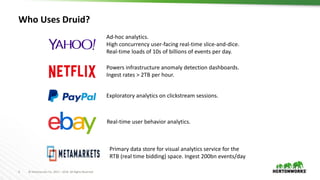
Who Uses Druid?
Ad-hoc analytics.
High concurrency user-facing real-time slice-and-dice.
Real-time loads of 10s of billions of events per day.
Powers infrastructure anomaly detection dashboards.
Ingest rates > 2TB per hour.
Exploratory analytics on clickstream sessions.
Real-time user behavior analytics.
Primary data store for visual analytics service for the
RTB (real time bidding) space. Ingest 200bn events/day
5 © Hortonworks Inc. 2011 – 2016. All Rights Reserved
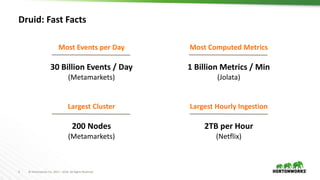
Druid: Fast Facts
Most Events per Day
30 Billion Events / Day
(Metamarkets)
Most Computed Metrics
1 Billion Metrics / Min
(Jolata)
Largest Cluster
200 Nodes
(Metamarkets)
Largest Hourly Ingestion
2TB per Hour
(Netflix)
6 © Hortonworks Inc. 2011 – 2016. All Rights Reserved
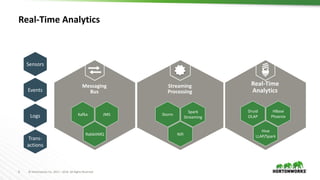
Streaming
Processing
Nifi
Storm
Spark
Streaming
Real-Time Analytics
Real-Time
AnalyticsEvents
Logs
Trans-
actions
Sensors
Messaging
Bus
RabbitMQ
Kafka JMS
Hive
LLAP/Spark
Druid
OLAP
HBase
Phoenix
7 © Hortonworks Inc. 2011 – 2016. All Rights Reserved
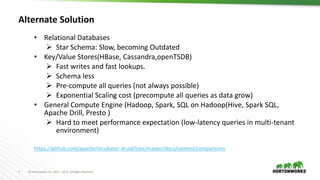
Alternate Solution
• Relational Databases
 Star Schema: Slow, becoming Outdated
• Key/Value Stores(HBase, Cassandra,openTSDB)
 Fast writes and fast lookups.
 Schema less
 Pre-compute all queries (not always possible)
 Exponential Scaling cost (precompute all queries as data grow)
• General Compute Engine (Hadoop, Spark, SQL on Hadoop(Hive, Spark SQL,
Apache Drill, Presto )
 Hard to meet performance expectation (low-latency queries in multi-tenant
environment)
https://github.com/apache/incubator-druid/tree/master/docs/content/comparisons
8 © Hortonworks Inc. 2011 – 2016. All Rights Reserved
Druid Architecture
9 © Hortonworks Inc. 2011 – 2016. All Rights Reserved
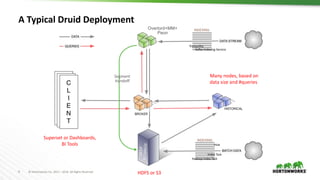
A Typical Druid Deployment
Many nodes, based on
data size and #queries
HDFS or S3
Superset or Dashboards,
BI Tools
Segment
Handoff
Hadoop Index Task
Index Task
Tranquility
Kafka-Indexing-Service
Overlord+MM+
Peon
Hive
10 © Hortonworks Inc. 2011 – 2016. All Rights Reserved
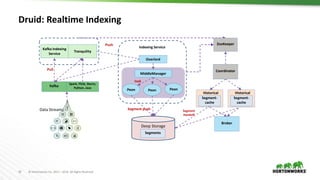
Druid: Realtime Indexing
Deep Storage
Tranquility
Coordinator
Broker
Indexing Service
Overlord
MiddleManager
Peon Peon Peon
ZooKeeper
Kafka
task
Push
Segments
Segment push
Segment-
cache
Historical
Segment-
cache
Historical
Spark, Flink, Storm,
Python, Java
Pull
Kafka Indexing
Service
Data Streams Segment
Handoff
11 © Hortonworks Inc. 2011 – 2016. All Rights Reserved
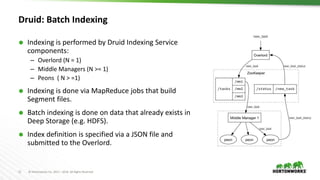
Druid: Batch Indexing
 Indexing is performed by Druid Indexing Service
components:
– Overlord (N = 1)
– Middle Managers (N >= 1)
– Peons ( N > =1)
 Indexing is done via MapReduce jobs that build
Segment files.
 Batch indexing is done on data that already exists in
Deep Storage (e.g. HDFS).
 Index definition is specified via a JSON file and
submitted to the Overlord.
12 © Hortonworks Inc. 2011 – 2016. All Rights Reserved
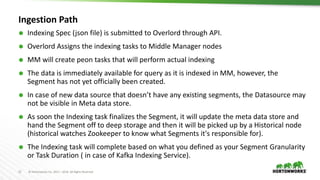
Ingestion Path
 Indexing Spec (json file) is submitted to Overlord through API.
 Overlord Assigns the indexing tasks to Middle Manager nodes
 MM will create peon tasks that will perform actual indexing
 The data is immediately available for query as it is indexed in MM, however, the
Segment has not yet officially been created.
 In case of new data source that doesn’t have any existing segments, the Datasource may
not be visible in Meta data store.
 As soon the Indexing task finalizes the Segment, it will update the meta data store and
hand the Segment off to deep storage and then it will be picked up by a Historical node
(historical watches Zookeeper to know what Segments it's responsible for).
 The Indexing task will complete based on what you defined as your Segment Granularity
or Task Duration ( in case of Kafka Indexing Service).
13 © Hortonworks Inc. 2011 – 2016. All Rights Reserved
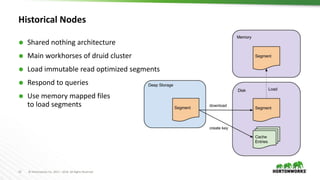
Historical Nodes
 Shared nothing architecture
 Main workhorses of druid cluster
 Load immutable read optimized segments
 Respond to queries
 Use memory mapped files
to load segments
14 © Hortonworks Inc. 2011 – 2016. All Rights Reserved
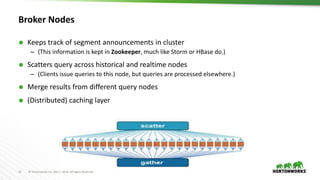
Broker Nodes
 Keeps track of segment announcements in cluster
– (This information is kept in Zookeeper, much like Storm or HBase do.)
 Scatters query across historical and realtime nodes
– (Clients issue queries to this node, but queries are processed elsewhere.)
 Merge results from different query nodes
 (Distributed) caching layer
15 © Hortonworks Inc. 2011 – 2016. All Rights Reserved
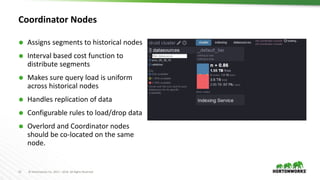
Coordinator Nodes
 Assigns segments to historical nodes
 Interval based cost function to
distribute segments
 Makes sure query load is uniform
across historical nodes
 Handles replication of data
 Configurable rules to load/drop data
 Overlord and Coordinator nodes
should be co-located on the same
node.
16 © Hortonworks Inc. 2011 – 2016. All Rights Reserved
Overlord Node
 Responsible for accepting tasks, coordinating task distribution, creating locks around
tasks, and returning statuses to callers
 Can be configured to run in one of two modes – local or remote (local being default)
 Local mode is typically used for simple workflows
 In remote mode, the overlord and middle manager are run in separate processes and
you can run each on a different server.
 Remote mode is recommended if you intend to use the indexing service as the single
endpoint for all Druid indexing.
 Submitting Tasks and Querying Task Status
http://<OVERLORD_IP>:<port>/druid/indexer/v1/task
http://<OVERLORD_IP>:<port>/druid/indexer/v1/task/{taskId}/status
17 © Hortonworks Inc. 2011 – 2016. All Rights Reserved
Middle Manager and Peon
 Enables stream ingestion in Druid.
 Event query-able as soon as it is ingested.
 Middle manager node is a worker node that executes submitted tasks.
 Middle Managers creates tasks called peons that run in separate JVMs and index the
data.
 Each Peon is capable of running only one task at a time, however, a middle manager
may have multiple peons.
 druid.worker.capacity is the number of concurrent tasks that a MiddleManager
can run.
18 © Hortonworks Inc. 2011 – 2016. All Rights Reserved
Fault tolerance
 Historical Node: If a historical node dies, another historical node can take its place and there is no fear of
data loss.
 Coordinator: Can be run in a hot fail-over configuration. If no coordinators are running, then changes to the
data topology will stop happening (no new data and no data balancing decisions), but the system will
continue to run.
 Broker: Can be run in parallel or in hot fail-over.
 Indexing Service: Workers run with replicated ingestion tasks, coordination piece has hot fail-over.
 Middle Manager: Multiple of these can be run in parallel processing the exact same stream. They
periodically checkpoint to disk and eventually push out to deep storage.
 “Deep Storage" File System If this is not available, new data will not be able to enter the cluster, but the
cluster will continue operating as is.
 Metadata Storage: If this is not available, the Coordinator will be unable to find out about new segments in
the system, but it will continue with its current view of the segments that should exist in the cluster.
19 © Hortonworks Inc. 2011 – 2016. All Rights Reserved
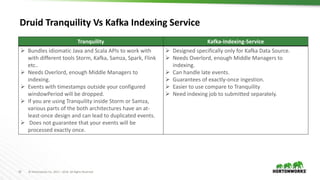
Druid Tranquility Vs Kafka Indexing Service
Tranquility Kafka-Indexing-Service
 Bundles idiomatic Java and Scala APIs to work with
with different tools Storm, Kafka, Samza, Spark, Flink
etc..
 Needs Overlord, enough Middle Managers to
indexing.
 Events with timestamps outside your configured
windowPeriod will be dropped.
 If you are using Tranquility inside Storm or Samza,
various parts of the both architectures have an at-
least-once design and can lead to duplicated events.
 Does not guarantee that your events will be
processed exactly once.
 Designed specifically only for Kafka Data Source.
 Needs Overlord, enough Middle Managers to
indexing.
 Can handle late events.
 Guarantees of exactly-once ingestion.
 Easier to use compare to Tranquility
 Need indexing job to submitted separately.
20 © Hortonworks Inc. 2011 – 2016. All Rights Reserved
Druid: Real-time Ingestion using Kafka–Indexing-Service
{
"type": "kafka",
"dataSchema": {
"dataSource": "pvcc",
"parser": {
"type": "string",
"parseSpec": {
"format": "json",
"timestampSpec": {
"column": ”eta",
"format": "auto"},
"dimensionsSpec": { "dimensions":
[ "nextLocRmlCd","destRmlCd","nextLocOutboundL4ConsNbr", "outboundL4ConsNbr",
"lastKnownLocCd", "commitDt", "product2x2HighlevelGroupDesc", "product2x2PriorityNbr",
"enrouteStatus", "adjustedPackageType", "latestTranInfacilityState", "nextLocOutboundL4ConsTypeCd” ]}}
},
"metricsSpec": [{ "name": "count", "fieldName": "count", "type": "doubleSum” }],
"granularitySpec": { "type": "uniform", "segmentGranularity": "HOUR", "queryGranularity": "NONE” }},
"tuningConfig": {
"type": "kafka",
"maxRowsPerSegment": 5000000
},"ioConfig": {
"topic": "metrics",
"consumerProperties": {
"bootstrap.servers": "kafkabroker1:6667,kafkabroker2:6667",
"security.protocol": "SASL_PLAINTEXT",
"sasl.kerberos.service.name": "kafka"
},
"taskCount": 8,
"replicas": 2,
"taskDuration": "PT1H"
}
}
21 © Hortonworks Inc. 2011 – 2016. All Rights Reserved
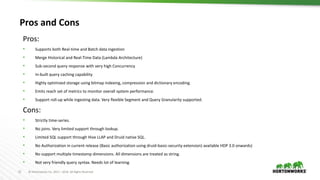
Pros and Cons
Pros:
• Supports both Real-time and Batch data ingestion
• Merge Historical and Real-Time Data (Lambda Architecture)
• Sub-second query response with very high Concurrency
• In-built query caching capability
• Highly optimized storage using bitmap indexing, compression and dictionary encoding.
• Emits reach set of metrics to monitor overall system performance.
• Support roll-up while ingesting data. Very flexible Segment and Query Granularity supported.
Cons:
• Strictly time-series.
• No joins. Very limited support through lookup.
• Limited SQL support through Hive LLAP and Druid native SQL.
• No Authorization in current release (Basic authorization using druid-basic-security extension) available HDP 3.0 onwards)
• No support multiple timestamp dimensions. All dimensions are treated as string.
• Not very friendly query syntax. Needs lot of learning.
22 © Hortonworks Inc. 2011 – 2016. All Rights Reserved
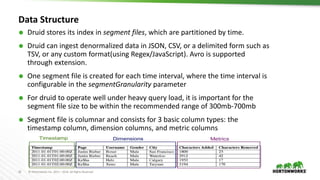
Data Structure
 Druid stores its index in segment files, which are partitioned by time.
 Druid can ingest denormalized data in JSON, CSV, or a delimited form such as
TSV, or any custom format(using Regex/JavaScript). Avro is supported
through extension.
 One segment file is created for each time interval, where the time interval is
configurable in the segmentGranularity parameter
 For druid to operate well under heavy query load, it is important for the
segment file size to be within the recommended range of 300mb-700mb
 Segment file is columnar and consists for 3 basic column types: the
timestamp column, dimension columns, and metric columns
23 © Hortonworks Inc. 2011 – 2016. All Rights Reserved
Druid Query
24 © Hortonworks Inc. 2011 – 2016. All Rights Reserved
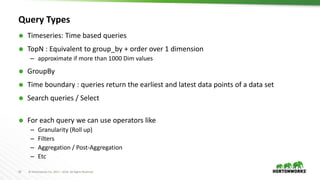
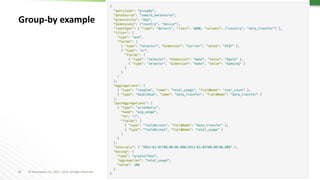
Query Types
 Timeseries: Time based queries
 TopN : Equivalent to group_by + order over 1 dimension
– approximate if more than 1000 Dim values
 GroupBy
 Time boundary : queries return the earliest and latest data points of a data set
 Search queries / Select
 For each query we can use operators like
– Granularity (Roll up)
– Filters
– Aggregation / Post-Aggregation
– Etc
25 © Hortonworks Inc. 2011 – 2016. All Rights Reserved
Group-by example
26 © Hortonworks Inc. 2011 – 2016. All Rights Reserved
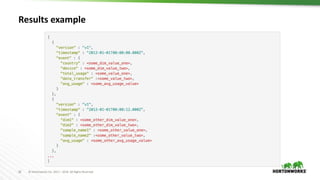
Results example
27 © Hortonworks Inc. 2011 – 2016. All Rights Reserved
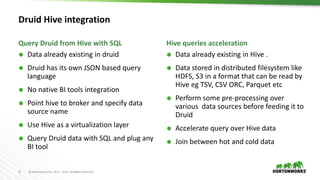
Druid Hive integration
 Data already existing in druid
 Druid has its own JSON based query
language
 No native BI tools integration
 Point hive to broker and specify data
source name
 Use Hive as a virtualization layer
 Query Druid data with SQL and plug any
BI tool
 Data already existing in Hive .
 Data stored in distributed filesystem like
HDFS, S3 in a format that can be read by
Hive eg TSV, CSV ORC, Parquet etc
 Perform some pre-processing over
various data sources before feeding it to
Druid
 Accelerate query over Hive data
 Join between hot and cold data
Query Druid from Hive with SQL Hive queries acceleration
28 © Hortonworks Inc. 2011 – 2016. All Rights Reserved
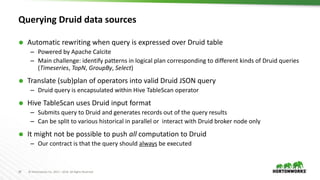
Querying Druid data sources
 Automatic rewriting when query is expressed over Druid table
– Powered by Apache Calcite
– Main challenge: identify patterns in logical plan corresponding to different kinds of Druid queries
(Timeseries, TopN, GroupBy, Select)
 Translate (sub)plan of operators into valid Druid JSON query
– Druid query is encapsulated within Hive TableScan operator
 Hive TableScan uses Druid input format
– Submits query to Druid and generates records out of the query results
– Can be split to various historical in parallel or interact with Druid broker node only
 It might not be possible to push all computation to Druid
– Our contract is that the query should always be executed
29 © Hortonworks Inc. 2011 – 2016. All Rights Reserved
Query Druid from Hive with SQL
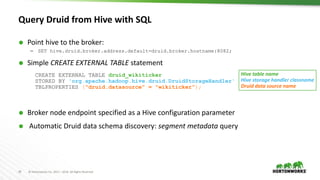
 Point hive to the broker:
– SET hive.druid.broker.address.default=druid.broker.hostname:8082;
 Simple CREATE EXTERNAL TABLE statement
CREATE EXTERNAL TABLE druid_wikiticker
STORED BY 'org.apache.hadoop.hive.druid.DruidStorageHandler'
TBLPROPERTIES ("druid.datasource" = "wikiticker");
 Broker node endpoint specified as a Hive configuration parameter
 Automatic Druid data schema discovery: segment metadata query
Hive table name
Hive storage handler classname
Druid data source name
30 © Hortonworks Inc. 2011 – 2016. All Rights Reserved
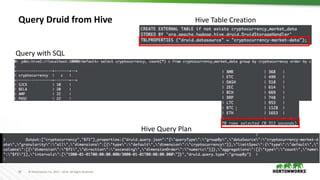
Query Druid from Hive Hive Table Creation
Hive Query Plan
Query with SQL
31 © Hortonworks Inc. 2011 – 2016. All Rights Reserved
Hive queries acceleration
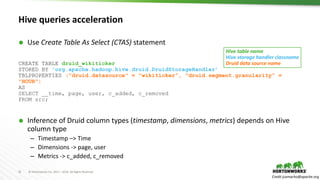
 Use Create Table As Select (CTAS) statement
CREATE TABLE druid_wikiticker
STORED BY 'org.apache.hadoop.hive.druid.DruidStorageHandler’
TBLPROPERTIES ("druid.datasource" = "wikiticker”, "druid.segment.granularity" =
"HOUR")
AS
SELECT __time, page, user, c_added, c_removed
FROM src;
 Inference of Druid column types (timestamp, dimensions, metrics) depends on Hive
column type
– Timestamp –> Time
– Dimensions -> page, user
– Metrics -> c_added, c_removed
Credit jcamacho@apache.org
Hive table name
Hive storage handler classname
Druid data source name
32 © Hortonworks Inc. 2011 – 2016. All Rights Reserved
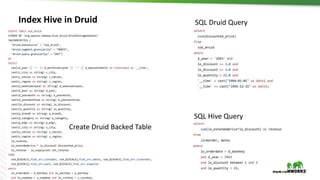
Index Hive in Druid
Create Druid Backed Table
SQL Druid Query
SQL Hive Query
33 © Hortonworks Inc. 2011 – 2016. All Rights Reserved
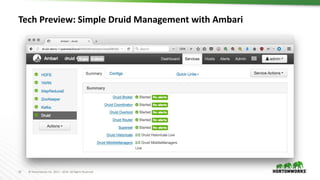
Tech Preview: Simple Druid Management with Ambari
34 © Hortonworks Inc. 2011 – 2016. All Rights Reserved
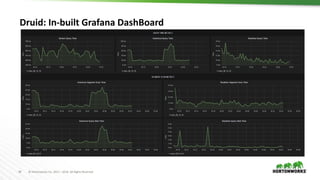
Druid: In-built Grafana DashBoard
35 © Hortonworks Inc. 2011 – 2016. All Rights Reserved
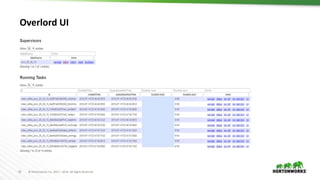
Overlord UI
36 © Hortonworks Inc. 2011 – 2016. All Rights Reserved
Best Practices
 Use UTC Timezone.
– This can greatly mitigate potential query problems with inconsistent timezones
 Use SSDs
– SSDs are highly recommended for Historical nodes when all they have more segments loaded
than available memory.
 Use JBOD
– Historicals might get improved disk throughput with JBOD.
 Use Timeseries and TopN Queries Instead of GroupBy Where Possible
– Timeseries and TopN queries are much more optimized and significantly faster than groupBy
queries for their designed use cases.
– Issuing multiple topN or timeseries queries from your application can potentially be more
efficient than a single groupBy query.
 Druid user should be part of Hadoop Group
– Make sure druid user exist on all cluster nodes regardless of druid service installed or not.
Also, druid user should be part of hadoop group
37 © Hortonworks Inc. 2011 – 2016. All Rights Reserved
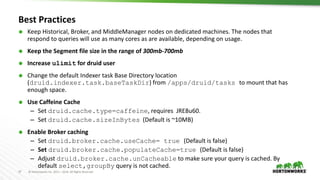
Best Practices
 Keep Historical, Broker, and MiddleManager nodes on dedicated machines. The nodes that
respond to queries will use as many cores as are available, depending on usage.
 Keep the Segment file size in the range of 300mb-700mb
 Increase ulimit for druid user
 Change the default Indexer task Base Directory location
(druid.indexer.task.baseTaskDir) from /apps/druid/tasks to mount that has
enough space.
 Use Caffeine Cache
– Set druid.cache.type=caffeine, requires JRE8u60.
– Set druid.cache.sizeInBytes (Default is ~10MB)
 Enable Broker caching
– Set druid.broker.cache.useCache= true (Default is false)
– Set druid.broker.cache.populateCache=true (Default is false)
– Adjust druid.broker.cache.unCacheable to make sure your query is cached. By
default select,groupBy query is not cached.
38 © Hortonworks Inc. 2011 – 2016. All Rights Reserved
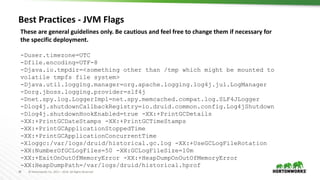
Best Practices - JVM Flags
These are general guidelines only. Be cautious and feel free to change them if necessary for
the specific deployment.
-Duser.timezone=UTC
-Dfile.encoding=UTF-8
-Djava.io.tmpdir=<something other than /tmp which might be mounted to
volatile tmpfs file system>
-Djava.util.logging.manager=org.apache.logging.log4j.jul.LogManager
-Dorg.jboss.logging.provider=slf4j
-Dnet.spy.log.LoggerImpl=net.spy.memcached.compat.log.SLF4JLogger
-Dlog4j.shutdownCallbackRegistry=io.druid.common.config.Log4jShutdown
-Dlog4j.shutdownHookEnabled=true -XX:+PrintGCDetails
-XX:+PrintGCDateStamps -XX:+PrintGCTimeStamps
-XX:+PrintGCApplicationStoppedTime
-XX:+PrintGCApplicationConcurrentTime
-Xloggc:/var/logs/druid/historical.gc.log -XX:+UseGCLogFileRotation
-XX:NumberOfGCLogFiles=50 -XX:GCLogFileSize=10m
-XX:+ExitOnOutOfMemoryError -XX:+HeapDumpOnOutOfMemoryError
-XX:HeapDumpPath=/var/logs/druid/historical.hprof
39 © Hortonworks Inc. 2011 – 2016. All Rights Reserved
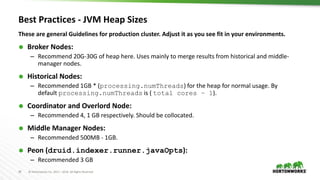
Best Practices - JVM Heap Sizes
These are general Guidelines for production cluster. Adjust it as you see fit in your environments.
 Broker Nodes:
– Recommend 20G-30G of heap here. Uses mainly to merge results from historical and middle-
manager nodes.
 Historical Nodes:
– Recommended 1GB * (processing.numThreads) for the heap for normal usage. By
default processing.numThreads is ( total cores – 1).
 Coordinator and Overlord Node:
– Recommended 4, 1 GB respectively. Should be collocated.
 Middle Manager Nodes:
– Recommended 500MB - 1GB.
 Peon (druid.indexer.runner.javaOpts):
– Recommended 3 GB
40 © Hortonworks Inc. 2011 – 2016. All Rights Reserved
DirectMemory Exception
Not enough direct memory. Please adjust -XX:MaxDirectMemorySize,
druid.processing.buffer.sizeBytes, or druid.processing.numThreads:
maxDirectMemory[3,506,438,144], memoryNeeded[4,294,967,296] =
druid.processing.buffer.sizeBytes[1,073,741,824] * ( druid.processing.numThreads[3] + 1 )
Resolution:
-XX:MaxDirectMemorySize = druid.processing.buffer.sizeBytes * (druid.processing.numMergeBuffers +
druid.processing.numThreads + 1)
Property Name Description Default
druid.processing.buffer
.sizeBytes
This specifies a buffer size for the storage of intermediate
results. The computation engine in both the Historical and
MM nodes will use a scratch buffer of this size to do all of
their intermediate computations off-heap. Larger values
allow for more aggregations in a single pass over the data
while smaller values can require more passes depending on
the query that is being executed.
1073741824 (1GB)
41 © Hortonworks Inc. 2011 – 2016. All Rights Reserved
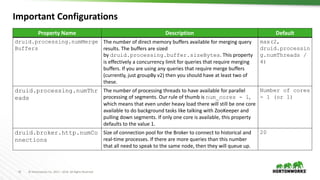
Property Name Description Default
druid.processing.numMerge
Buffers
The number of direct memory buffers available for merging query
results. The buffers are sized
by druid.processing.buffer.sizeBytes. This property
is effectively a concurrency limit for queries that require merging
buffers. If you are using any queries that require merge buffers
(currently, just groupBy v2) then you should have at least two of
these.
max(2,
druid.processin
g.numThreads /
4)
druid.processing.numThr
eads
The number of processing threads to have available for parallel
processing of segments. Our rule of thumb is num_cores - 1,
which means that even under heavy load there will still be one core
available to do background tasks like talking with ZooKeeper and
pulling down segments. If only one core is available, this property
defaults to the value 1.
Number of cores
- 1 (or 1)
druid.broker.http.numCo
nnections
Size of connection pool for the Broker to connect to historical and
real-time processes. If there are more queries than this number
that all need to speak to the same node, then they will queue up.
20
Important Configurations
42 © Hortonworks Inc. 2011 – 2016. All Rights Reserved
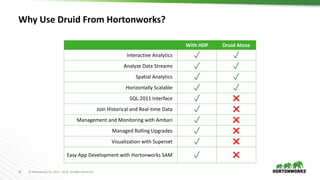
Why Use Druid From Hortonworks?
With HDP Druid Alone
Interactive Analytics ✓ ✓
Analyze Data Streams ✓ ✓
Spatial Analytics ✓ ✓
Horizontally Scalable ✓ ✓
SQL:2011 Interface ✓ ✖
Join Historical and Real-time Data ✓ ✖
Management and Monitoring with Ambari ✓ ✖
Managed Rolling Upgrades ✓ ✖
Visualization with Superset ✓ ✖
Easy App Development with Hortonworks SAM ✓ ✖
43 © Hortonworks Inc. 2011 – 2016. All Rights Reserved
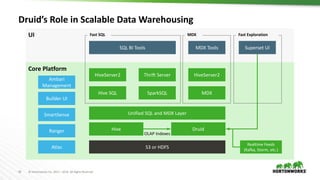
Druid’s Role in Scalable Data Warehousing
UI
Core Platform
S3 or HDFS
HiveServer2
MDX
Unified SQL and MDX Layer
SQL BI Tools MDX Tools
Hive
Realtime Feeds
(Kafka, Storm, etc.)
Druid
OLAP Indexes
HiveServer2
Hive SQL
Thrift Server
SparkSQL
Fast SQL MDX
Superset UI
Fast Exploration
Builder UI
SmartSense
Ranger
Atlas
Ambari
Management
44 © Hortonworks Inc. 2011 – 2016. All Rights Reserved
References
https://hortonworks.com/blog/apache-hive-druid-part-1-3/
https://github.com/apache/incubator-druid/tree/master/docs/content/comparisons
http://druid.io
45 © Hortonworks Inc. 2011 – 2016. All Rights Reserved
Thanks You!

Druid deep dive

  • 1.
    1 © HortonworksInc. 2011 – 2016. All Rights Reserved Druid – Deep Dive Kashif Khan – PS South-East
  • 2.
    2 © HortonworksInc. 2011 – 2016. All Rights Reserved What Is Druid? Druid is a distributed, real-time, column-oriented datastore designed to quickly ingest and index large amounts of data and make it available for real-time query. Features:  Streaming Data Ingestion  Sub-Second Queries  Merge Historical and Real-Time Data (Lambda Architecture)  Approximate Computation (Approximate Histograms)  Multi-tenant (1000s of concurrent Users)
  • 3.
    3 © HortonworksInc. 2011 – 2016. All Rights Reserved Use Cases: • Powering user facing Analytical Applications • Unify Historical and Real-time events • BI/OLAP Queries (Slice and dice and drilldown) • Behavioral Analysis (Funnel Analysis, distinct counts) • Exploratory Analytics/ root cause
  • 4.
    4 © HortonworksInc. 2011 – 2016. All Rights Reserved Who Uses Druid? Ad-hoc analytics. High concurrency user-facing real-time slice-and-dice. Real-time loads of 10s of billions of events per day. Powers infrastructure anomaly detection dashboards. Ingest rates > 2TB per hour. Exploratory analytics on clickstream sessions. Real-time user behavior analytics. Primary data store for visual analytics service for the RTB (real time bidding) space. Ingest 200bn events/day
  • 5.
    5 © HortonworksInc. 2011 – 2016. All Rights Reserved Druid: Fast Facts Most Events per Day 30 Billion Events / Day (Metamarkets) Most Computed Metrics 1 Billion Metrics / Min (Jolata) Largest Cluster 200 Nodes (Metamarkets) Largest Hourly Ingestion 2TB per Hour (Netflix)
  • 6.
    6 © HortonworksInc. 2011 – 2016. All Rights Reserved Streaming Processing Nifi Storm Spark Streaming Real-Time Analytics Real-Time AnalyticsEvents Logs Trans- actions Sensors Messaging Bus RabbitMQ Kafka JMS Hive LLAP/Spark Druid OLAP HBase Phoenix
  • 7.
    7 © HortonworksInc. 2011 – 2016. All Rights Reserved Alternate Solution • Relational Databases  Star Schema: Slow, becoming Outdated • Key/Value Stores(HBase, Cassandra,openTSDB)  Fast writes and fast lookups.  Schema less  Pre-compute all queries (not always possible)  Exponential Scaling cost (precompute all queries as data grow) • General Compute Engine (Hadoop, Spark, SQL on Hadoop(Hive, Spark SQL, Apache Drill, Presto )  Hard to meet performance expectation (low-latency queries in multi-tenant environment) https://github.com/apache/incubator-druid/tree/master/docs/content/comparisons
  • 8.
    8 © HortonworksInc. 2011 – 2016. All Rights Reserved Druid Architecture
  • 9.
    9 © HortonworksInc. 2011 – 2016. All Rights Reserved A Typical Druid Deployment Many nodes, based on data size and #queries HDFS or S3 Superset or Dashboards, BI Tools Segment Handoff Hadoop Index Task Index Task Tranquility Kafka-Indexing-Service Overlord+MM+ Peon Hive
  • 10.
    10 © HortonworksInc. 2011 – 2016. All Rights Reserved Druid: Realtime Indexing Deep Storage Tranquility Coordinator Broker Indexing Service Overlord MiddleManager Peon Peon Peon ZooKeeper Kafka task Push Segments Segment push Segment- cache Historical Segment- cache Historical Spark, Flink, Storm, Python, Java Pull Kafka Indexing Service Data Streams Segment Handoff
  • 11.
    11 © HortonworksInc. 2011 – 2016. All Rights Reserved Druid: Batch Indexing  Indexing is performed by Druid Indexing Service components: – Overlord (N = 1) – Middle Managers (N >= 1) – Peons ( N > =1)  Indexing is done via MapReduce jobs that build Segment files.  Batch indexing is done on data that already exists in Deep Storage (e.g. HDFS).  Index definition is specified via a JSON file and submitted to the Overlord.
  • 12.
    12 © HortonworksInc. 2011 – 2016. All Rights Reserved Ingestion Path  Indexing Spec (json file) is submitted to Overlord through API.  Overlord Assigns the indexing tasks to Middle Manager nodes  MM will create peon tasks that will perform actual indexing  The data is immediately available for query as it is indexed in MM, however, the Segment has not yet officially been created.  In case of new data source that doesn’t have any existing segments, the Datasource may not be visible in Meta data store.  As soon the Indexing task finalizes the Segment, it will update the meta data store and hand the Segment off to deep storage and then it will be picked up by a Historical node (historical watches Zookeeper to know what Segments it's responsible for).  The Indexing task will complete based on what you defined as your Segment Granularity or Task Duration ( in case of Kafka Indexing Service).
  • 13.
    13 © HortonworksInc. 2011 – 2016. All Rights Reserved Historical Nodes  Shared nothing architecture  Main workhorses of druid cluster  Load immutable read optimized segments  Respond to queries  Use memory mapped files to load segments
  • 14.
    14 © HortonworksInc. 2011 – 2016. All Rights Reserved Broker Nodes  Keeps track of segment announcements in cluster – (This information is kept in Zookeeper, much like Storm or HBase do.)  Scatters query across historical and realtime nodes – (Clients issue queries to this node, but queries are processed elsewhere.)  Merge results from different query nodes  (Distributed) caching layer
  • 15.
    15 © HortonworksInc. 2011 – 2016. All Rights Reserved Coordinator Nodes  Assigns segments to historical nodes  Interval based cost function to distribute segments  Makes sure query load is uniform across historical nodes  Handles replication of data  Configurable rules to load/drop data  Overlord and Coordinator nodes should be co-located on the same node.
  • 16.
    16 © HortonworksInc. 2011 – 2016. All Rights Reserved Overlord Node  Responsible for accepting tasks, coordinating task distribution, creating locks around tasks, and returning statuses to callers  Can be configured to run in one of two modes – local or remote (local being default)  Local mode is typically used for simple workflows  In remote mode, the overlord and middle manager are run in separate processes and you can run each on a different server.  Remote mode is recommended if you intend to use the indexing service as the single endpoint for all Druid indexing.  Submitting Tasks and Querying Task Status http://<OVERLORD_IP>:<port>/druid/indexer/v1/task http://<OVERLORD_IP>:<port>/druid/indexer/v1/task/{taskId}/status
  • 17.
    17 © HortonworksInc. 2011 – 2016. All Rights Reserved Middle Manager and Peon  Enables stream ingestion in Druid.  Event query-able as soon as it is ingested.  Middle manager node is a worker node that executes submitted tasks.  Middle Managers creates tasks called peons that run in separate JVMs and index the data.  Each Peon is capable of running only one task at a time, however, a middle manager may have multiple peons.  druid.worker.capacity is the number of concurrent tasks that a MiddleManager can run.
  • 18.
    18 © HortonworksInc. 2011 – 2016. All Rights Reserved Fault tolerance  Historical Node: If a historical node dies, another historical node can take its place and there is no fear of data loss.  Coordinator: Can be run in a hot fail-over configuration. If no coordinators are running, then changes to the data topology will stop happening (no new data and no data balancing decisions), but the system will continue to run.  Broker: Can be run in parallel or in hot fail-over.  Indexing Service: Workers run with replicated ingestion tasks, coordination piece has hot fail-over.  Middle Manager: Multiple of these can be run in parallel processing the exact same stream. They periodically checkpoint to disk and eventually push out to deep storage.  “Deep Storage" File System If this is not available, new data will not be able to enter the cluster, but the cluster will continue operating as is.  Metadata Storage: If this is not available, the Coordinator will be unable to find out about new segments in the system, but it will continue with its current view of the segments that should exist in the cluster.
  • 19.
    19 © HortonworksInc. 2011 – 2016. All Rights Reserved Druid Tranquility Vs Kafka Indexing Service Tranquility Kafka-Indexing-Service  Bundles idiomatic Java and Scala APIs to work with with different tools Storm, Kafka, Samza, Spark, Flink etc..  Needs Overlord, enough Middle Managers to indexing.  Events with timestamps outside your configured windowPeriod will be dropped.  If you are using Tranquility inside Storm or Samza, various parts of the both architectures have an at- least-once design and can lead to duplicated events.  Does not guarantee that your events will be processed exactly once.  Designed specifically only for Kafka Data Source.  Needs Overlord, enough Middle Managers to indexing.  Can handle late events.  Guarantees of exactly-once ingestion.  Easier to use compare to Tranquility  Need indexing job to submitted separately.
  • 20.
    20 © HortonworksInc. 2011 – 2016. All Rights Reserved Druid: Real-time Ingestion using Kafka–Indexing-Service { "type": "kafka", "dataSchema": { "dataSource": "pvcc", "parser": { "type": "string", "parseSpec": { "format": "json", "timestampSpec": { "column": ”eta", "format": "auto"}, "dimensionsSpec": { "dimensions": [ "nextLocRmlCd","destRmlCd","nextLocOutboundL4ConsNbr", "outboundL4ConsNbr", "lastKnownLocCd", "commitDt", "product2x2HighlevelGroupDesc", "product2x2PriorityNbr", "enrouteStatus", "adjustedPackageType", "latestTranInfacilityState", "nextLocOutboundL4ConsTypeCd” ]}} }, "metricsSpec": [{ "name": "count", "fieldName": "count", "type": "doubleSum” }], "granularitySpec": { "type": "uniform", "segmentGranularity": "HOUR", "queryGranularity": "NONE” }}, "tuningConfig": { "type": "kafka", "maxRowsPerSegment": 5000000 },"ioConfig": { "topic": "metrics", "consumerProperties": { "bootstrap.servers": "kafkabroker1:6667,kafkabroker2:6667", "security.protocol": "SASL_PLAINTEXT", "sasl.kerberos.service.name": "kafka" }, "taskCount": 8, "replicas": 2, "taskDuration": "PT1H" } }
  • 21.
    21 © HortonworksInc. 2011 – 2016. All Rights Reserved Pros and Cons Pros: • Supports both Real-time and Batch data ingestion • Merge Historical and Real-Time Data (Lambda Architecture) • Sub-second query response with very high Concurrency • In-built query caching capability • Highly optimized storage using bitmap indexing, compression and dictionary encoding. • Emits reach set of metrics to monitor overall system performance. • Support roll-up while ingesting data. Very flexible Segment and Query Granularity supported. Cons: • Strictly time-series. • No joins. Very limited support through lookup. • Limited SQL support through Hive LLAP and Druid native SQL. • No Authorization in current release (Basic authorization using druid-basic-security extension) available HDP 3.0 onwards) • No support multiple timestamp dimensions. All dimensions are treated as string. • Not very friendly query syntax. Needs lot of learning.
  • 22.
    22 © HortonworksInc. 2011 – 2016. All Rights Reserved Data Structure  Druid stores its index in segment files, which are partitioned by time.  Druid can ingest denormalized data in JSON, CSV, or a delimited form such as TSV, or any custom format(using Regex/JavaScript). Avro is supported through extension.  One segment file is created for each time interval, where the time interval is configurable in the segmentGranularity parameter  For druid to operate well under heavy query load, it is important for the segment file size to be within the recommended range of 300mb-700mb  Segment file is columnar and consists for 3 basic column types: the timestamp column, dimension columns, and metric columns
  • 23.
    23 © HortonworksInc. 2011 – 2016. All Rights Reserved Druid Query
  • 24.
    24 © HortonworksInc. 2011 – 2016. All Rights Reserved Query Types  Timeseries: Time based queries  TopN : Equivalent to group_by + order over 1 dimension – approximate if more than 1000 Dim values  GroupBy  Time boundary : queries return the earliest and latest data points of a data set  Search queries / Select  For each query we can use operators like – Granularity (Roll up) – Filters – Aggregation / Post-Aggregation – Etc
  • 25.
    25 © HortonworksInc. 2011 – 2016. All Rights Reserved Group-by example
  • 26.
    26 © HortonworksInc. 2011 – 2016. All Rights Reserved Results example
  • 27.
    27 © HortonworksInc. 2011 – 2016. All Rights Reserved Druid Hive integration  Data already existing in druid  Druid has its own JSON based query language  No native BI tools integration  Point hive to broker and specify data source name  Use Hive as a virtualization layer  Query Druid data with SQL and plug any BI tool  Data already existing in Hive .  Data stored in distributed filesystem like HDFS, S3 in a format that can be read by Hive eg TSV, CSV ORC, Parquet etc  Perform some pre-processing over various data sources before feeding it to Druid  Accelerate query over Hive data  Join between hot and cold data Query Druid from Hive with SQL Hive queries acceleration
  • 28.
    28 © HortonworksInc. 2011 – 2016. All Rights Reserved Querying Druid data sources  Automatic rewriting when query is expressed over Druid table – Powered by Apache Calcite – Main challenge: identify patterns in logical plan corresponding to different kinds of Druid queries (Timeseries, TopN, GroupBy, Select)  Translate (sub)plan of operators into valid Druid JSON query – Druid query is encapsulated within Hive TableScan operator  Hive TableScan uses Druid input format – Submits query to Druid and generates records out of the query results – Can be split to various historical in parallel or interact with Druid broker node only  It might not be possible to push all computation to Druid – Our contract is that the query should always be executed
  • 29.
    29 © HortonworksInc. 2011 – 2016. All Rights Reserved Query Druid from Hive with SQL  Point hive to the broker: – SET hive.druid.broker.address.default=druid.broker.hostname:8082;  Simple CREATE EXTERNAL TABLE statement CREATE EXTERNAL TABLE druid_wikiticker STORED BY 'org.apache.hadoop.hive.druid.DruidStorageHandler' TBLPROPERTIES ("druid.datasource" = "wikiticker");  Broker node endpoint specified as a Hive configuration parameter  Automatic Druid data schema discovery: segment metadata query Hive table name Hive storage handler classname Druid data source name
  • 30.
    30 © HortonworksInc. 2011 – 2016. All Rights Reserved Query Druid from Hive Hive Table Creation Hive Query Plan Query with SQL
  • 31.
    31 © HortonworksInc. 2011 – 2016. All Rights Reserved Hive queries acceleration  Use Create Table As Select (CTAS) statement CREATE TABLE druid_wikiticker STORED BY 'org.apache.hadoop.hive.druid.DruidStorageHandler’ TBLPROPERTIES ("druid.datasource" = "wikiticker”, "druid.segment.granularity" = "HOUR") AS SELECT __time, page, user, c_added, c_removed FROM src;  Inference of Druid column types (timestamp, dimensions, metrics) depends on Hive column type – Timestamp –> Time – Dimensions -> page, user – Metrics -> c_added, c_removed Credit jcamacho@apache.org Hive table name Hive storage handler classname Druid data source name
  • 32.
    32 © HortonworksInc. 2011 – 2016. All Rights Reserved Index Hive in Druid Create Druid Backed Table SQL Druid Query SQL Hive Query
  • 33.
    33 © HortonworksInc. 2011 – 2016. All Rights Reserved Tech Preview: Simple Druid Management with Ambari
  • 34.
    34 © HortonworksInc. 2011 – 2016. All Rights Reserved Druid: In-built Grafana DashBoard
  • 35.
    35 © HortonworksInc. 2011 – 2016. All Rights Reserved Overlord UI
  • 36.
    36 © HortonworksInc. 2011 – 2016. All Rights Reserved Best Practices  Use UTC Timezone. – This can greatly mitigate potential query problems with inconsistent timezones  Use SSDs – SSDs are highly recommended for Historical nodes when all they have more segments loaded than available memory.  Use JBOD – Historicals might get improved disk throughput with JBOD.  Use Timeseries and TopN Queries Instead of GroupBy Where Possible – Timeseries and TopN queries are much more optimized and significantly faster than groupBy queries for their designed use cases. – Issuing multiple topN or timeseries queries from your application can potentially be more efficient than a single groupBy query.  Druid user should be part of Hadoop Group – Make sure druid user exist on all cluster nodes regardless of druid service installed or not. Also, druid user should be part of hadoop group
  • 37.
    37 © HortonworksInc. 2011 – 2016. All Rights Reserved Best Practices  Keep Historical, Broker, and MiddleManager nodes on dedicated machines. The nodes that respond to queries will use as many cores as are available, depending on usage.  Keep the Segment file size in the range of 300mb-700mb  Increase ulimit for druid user  Change the default Indexer task Base Directory location (druid.indexer.task.baseTaskDir) from /apps/druid/tasks to mount that has enough space.  Use Caffeine Cache – Set druid.cache.type=caffeine, requires JRE8u60. – Set druid.cache.sizeInBytes (Default is ~10MB)  Enable Broker caching – Set druid.broker.cache.useCache= true (Default is false) – Set druid.broker.cache.populateCache=true (Default is false) – Adjust druid.broker.cache.unCacheable to make sure your query is cached. By default select,groupBy query is not cached.
  • 38.
    38 © HortonworksInc. 2011 – 2016. All Rights Reserved Best Practices - JVM Flags These are general guidelines only. Be cautious and feel free to change them if necessary for the specific deployment. -Duser.timezone=UTC -Dfile.encoding=UTF-8 -Djava.io.tmpdir=<something other than /tmp which might be mounted to volatile tmpfs file system> -Djava.util.logging.manager=org.apache.logging.log4j.jul.LogManager -Dorg.jboss.logging.provider=slf4j -Dnet.spy.log.LoggerImpl=net.spy.memcached.compat.log.SLF4JLogger -Dlog4j.shutdownCallbackRegistry=io.druid.common.config.Log4jShutdown -Dlog4j.shutdownHookEnabled=true -XX:+PrintGCDetails -XX:+PrintGCDateStamps -XX:+PrintGCTimeStamps -XX:+PrintGCApplicationStoppedTime -XX:+PrintGCApplicationConcurrentTime -Xloggc:/var/logs/druid/historical.gc.log -XX:+UseGCLogFileRotation -XX:NumberOfGCLogFiles=50 -XX:GCLogFileSize=10m -XX:+ExitOnOutOfMemoryError -XX:+HeapDumpOnOutOfMemoryError -XX:HeapDumpPath=/var/logs/druid/historical.hprof
  • 39.
    39 © HortonworksInc. 2011 – 2016. All Rights Reserved Best Practices - JVM Heap Sizes These are general Guidelines for production cluster. Adjust it as you see fit in your environments.  Broker Nodes: – Recommend 20G-30G of heap here. Uses mainly to merge results from historical and middle- manager nodes.  Historical Nodes: – Recommended 1GB * (processing.numThreads) for the heap for normal usage. By default processing.numThreads is ( total cores – 1).  Coordinator and Overlord Node: – Recommended 4, 1 GB respectively. Should be collocated.  Middle Manager Nodes: – Recommended 500MB - 1GB.  Peon (druid.indexer.runner.javaOpts): – Recommended 3 GB
  • 40.
    40 © HortonworksInc. 2011 – 2016. All Rights Reserved DirectMemory Exception Not enough direct memory. Please adjust -XX:MaxDirectMemorySize, druid.processing.buffer.sizeBytes, or druid.processing.numThreads: maxDirectMemory[3,506,438,144], memoryNeeded[4,294,967,296] = druid.processing.buffer.sizeBytes[1,073,741,824] * ( druid.processing.numThreads[3] + 1 ) Resolution: -XX:MaxDirectMemorySize = druid.processing.buffer.sizeBytes * (druid.processing.numMergeBuffers + druid.processing.numThreads + 1) Property Name Description Default druid.processing.buffer .sizeBytes This specifies a buffer size for the storage of intermediate results. The computation engine in both the Historical and MM nodes will use a scratch buffer of this size to do all of their intermediate computations off-heap. Larger values allow for more aggregations in a single pass over the data while smaller values can require more passes depending on the query that is being executed. 1073741824 (1GB)
  • 41.
    41 © HortonworksInc. 2011 – 2016. All Rights Reserved Property Name Description Default druid.processing.numMerge Buffers The number of direct memory buffers available for merging query results. The buffers are sized by druid.processing.buffer.sizeBytes. This property is effectively a concurrency limit for queries that require merging buffers. If you are using any queries that require merge buffers (currently, just groupBy v2) then you should have at least two of these. max(2, druid.processin g.numThreads / 4) druid.processing.numThr eads The number of processing threads to have available for parallel processing of segments. Our rule of thumb is num_cores - 1, which means that even under heavy load there will still be one core available to do background tasks like talking with ZooKeeper and pulling down segments. If only one core is available, this property defaults to the value 1. Number of cores - 1 (or 1) druid.broker.http.numCo nnections Size of connection pool for the Broker to connect to historical and real-time processes. If there are more queries than this number that all need to speak to the same node, then they will queue up. 20 Important Configurations
  • 42.
    42 © HortonworksInc. 2011 – 2016. All Rights Reserved Why Use Druid From Hortonworks? With HDP Druid Alone Interactive Analytics ✓ ✓ Analyze Data Streams ✓ ✓ Spatial Analytics ✓ ✓ Horizontally Scalable ✓ ✓ SQL:2011 Interface ✓ ✖ Join Historical and Real-time Data ✓ ✖ Management and Monitoring with Ambari ✓ ✖ Managed Rolling Upgrades ✓ ✖ Visualization with Superset ✓ ✖ Easy App Development with Hortonworks SAM ✓ ✖
  • 43.
    43 © HortonworksInc. 2011 – 2016. All Rights Reserved Druid’s Role in Scalable Data Warehousing UI Core Platform S3 or HDFS HiveServer2 MDX Unified SQL and MDX Layer SQL BI Tools MDX Tools Hive Realtime Feeds (Kafka, Storm, etc.) Druid OLAP Indexes HiveServer2 Hive SQL Thrift Server SparkSQL Fast SQL MDX Superset UI Fast Exploration Builder UI SmartSense Ranger Atlas Ambari Management
  • 44.
    44 © HortonworksInc. 2011 – 2016. All Rights Reserved References https://hortonworks.com/blog/apache-hive-druid-part-1-3/ https://github.com/apache/incubator-druid/tree/master/docs/content/comparisons http://druid.io
  • 45.
    45 © HortonworksInc. 2011 – 2016. All Rights Reserved Thanks You!