QueriesCIS-145
Select QueriesMethod to find, organize, summarize data & create informationUses data from tables, other queriesCan include calculations
Design ViewIdentify where to get dataSpecify which rows to use Identify fields, calculations to returnHow to order the results
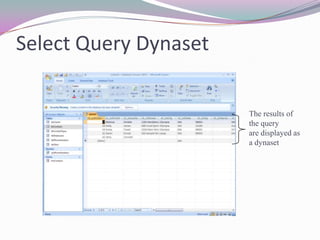
Datasheet View“Dynaset” is the result of a query“Dynamic subset”Saving a query saves the “question” not the answer
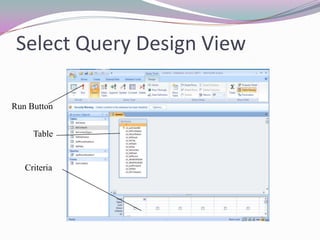
Select Query Design ViewRun ButtonTableCriteria
Select Query DynasetThe results of the queryare displayed as a dynaset
Creating a QueryIdentify where the data is coming fromDetermine which rows are part of your answerIdentify any groups or summaries neededSpecify which groups are part of the answerSelect the fields or calculations to include in the resultApply sorting to help users understand result
Query Data SourcesQueries can use tables or queries as data sourcesIf more than one table is needed for the query result a join is requiredMake sure that there is a connection (join) to each tableMake sure you can find common values to connect each table
JoinsConnect tables temporarily when query executesAccess will create a join automatically where tables have a relationshipJoin fields should be on fields that are the same data type
Types of JoinsInner JoinDefault joinLooking for matching values in both tablesIf a table has a value not found in the second table nothing is returnedOuter JoinAllows query to return rows that don’t have a match in the other tableCartesian JoinCombines all rows whether match or not
Query CriteriaWhich rows should be included?Criteria are True/False conditions/comparisonsConditions can use:Relational operators (=, >, <, <=, >=, <>)BetweenLike (patterns, Wild cards)
Wild CardsWild cards can help describe patters? – one character in a particular space* - zero, one, or morecharactersS?ND returns SAND, SENDS*ND returns SAND, SENT, STAND, SOUND
Logical OperatorsNeeded when there are multiple criteriaAND condition: all tests must be passedOR condition: as long as one test is passed the row is includedNOT creates the inverseIf something returns True, NOT makes it False
GroupingGrouping (“totals queries” in Access) provides summaries about dataCan create summary values using Aggregate functionsHow many? (Count)How much? (Sum)Can summarize all rows or find common values to create groupsTotal Credits v. Total Credits for each department
SortingQuery results can be sortedAccess works from left to right when sorting if multiple fields are sorted

Queries

  • 1.
  • 2.
    Select QueriesMethod tofind, organize, summarize data & create informationUses data from tables, other queriesCan include calculations
  • 3.
    Design ViewIdentify whereto get dataSpecify which rows to use Identify fields, calculations to returnHow to order the results
  • 4.
    Datasheet View“Dynaset” isthe result of a query“Dynamic subset”Saving a query saves the “question” not the answer
  • 5.
    Select Query DesignViewRun ButtonTableCriteria
  • 6.
    Select Query DynasetTheresults of the queryare displayed as a dynaset
  • 7.
    Creating a QueryIdentifywhere the data is coming fromDetermine which rows are part of your answerIdentify any groups or summaries neededSpecify which groups are part of the answerSelect the fields or calculations to include in the resultApply sorting to help users understand result
  • 8.
    Query Data SourcesQueriescan use tables or queries as data sourcesIf more than one table is needed for the query result a join is requiredMake sure that there is a connection (join) to each tableMake sure you can find common values to connect each table
  • 9.
    JoinsConnect tables temporarilywhen query executesAccess will create a join automatically where tables have a relationshipJoin fields should be on fields that are the same data type
  • 10.
    Types of JoinsInnerJoinDefault joinLooking for matching values in both tablesIf a table has a value not found in the second table nothing is returnedOuter JoinAllows query to return rows that don’t have a match in the other tableCartesian JoinCombines all rows whether match or not
  • 11.
    Query CriteriaWhich rowsshould be included?Criteria are True/False conditions/comparisonsConditions can use:Relational operators (=, >, <, <=, >=, <>)BetweenLike (patterns, Wild cards)
  • 12.
    Wild CardsWild cardscan help describe patters? – one character in a particular space* - zero, one, or morecharactersS?ND returns SAND, SENDS*ND returns SAND, SENT, STAND, SOUND
  • 13.
    Logical OperatorsNeeded whenthere are multiple criteriaAND condition: all tests must be passedOR condition: as long as one test is passed the row is includedNOT creates the inverseIf something returns True, NOT makes it False
  • 14.
    GroupingGrouping (“totals queries”in Access) provides summaries about dataCan create summary values using Aggregate functionsHow many? (Count)How much? (Sum)Can summarize all rows or find common values to create groupsTotal Credits v. Total Credits for each department
  • 15.
    SortingQuery results canbe sortedAccess works from left to right when sorting if multiple fields are sorted