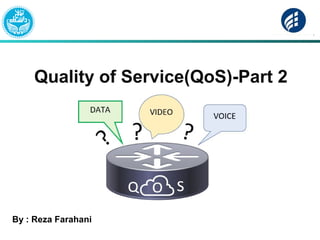
Quality of Service(QoS)-Part 2
By : Reza Farahani
Queuing
The goal of queuing method?
routers can be configured to perform queuing for
packets that are waiting to exit an interface.
For example, if a router receives 5 Mbps of
traffic every second for the next several
seconds, and all that traffic needs to exit a T1
serial link, the router can’t forward all the
traffic.
Types of Queue
There are two types of Queue:
SoftQueue :
 The queues created on an interface by the queuing tools
are called software queues , as these queues are
implemented in software.
 However, when the queuing scheduler picks the next
packet to take from the software queues, the packet does
not move directly out the interface.
Types of Queue
Hard Queue :
Instead, the router moves the packet from the
interface software queue to a small hardware FIFO
queue on each interface.
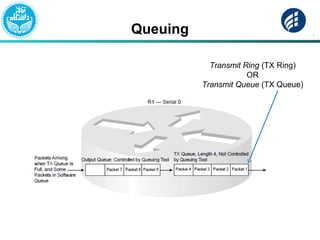
Cisco calls this separate, final queue either
the transmit queue (Tx queue) or transmit
ring (Tx ring)
Queuing
Transmit Ring (TX Ring)
OR
Transmit Queue (TX Queue)
HW Queue
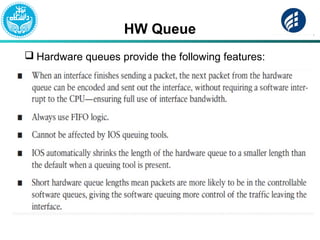
 Hardware queues provide the following features:
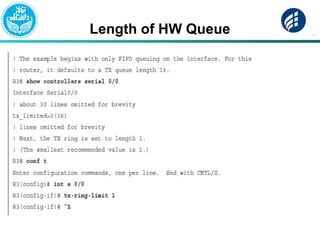
Length of HW Queue
Queuing
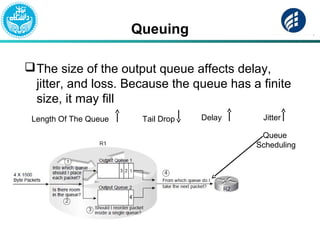
The size of the output queue affects delay,
jitter, and loss. Because the queue has a finite
size, it may fill
Length Of The Queue Tail Drop Delay Jitter
Queue
Scheduling
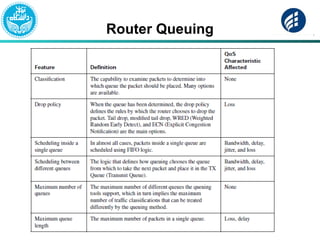
Router Queuing
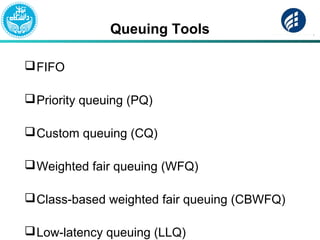
Queuing Tools
FIFO
Priority queuing (PQ)
Custom queuing (CQ)
Weighted fair queuing (WFQ)
Class-based weighted fair queuing (CBWFQ)
Low-latency queuing (LLQ)
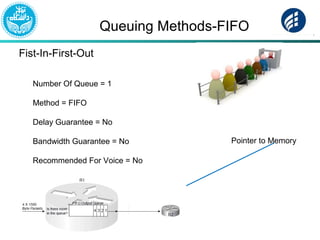
Queuing Methods-FIFO
Fist-In-First-Out
Number Of Queue = 1
Method = FIFO
Delay Guarantee = No
Bandwidth Guarantee = No
Recommended For Voice = No
Pointer to Memory
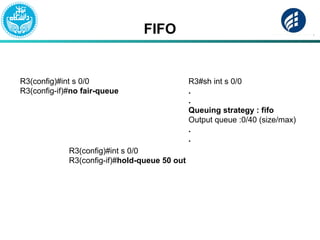
FIFO
R3(config)#int s 0/0
R3(config-if)#no fair-queue
R3#sh int s 0/0
.
.
Queuing strategy : fifo
Output queue :0/40 (size/max)
.
.
R3(config)#int s 0/0
R3(config-if)#hold-queue 50 out
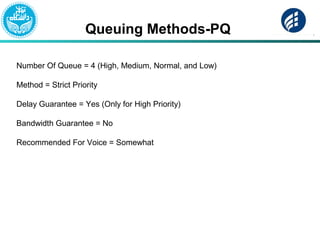
Queuing Methods-PQ
Number Of Queue = 4 (High, Medium, Normal, and Low)
Method = Strict Priority
Delay Guarantee = Yes (Only for High Priority)
Bandwidth Guarantee = No
Recommended For Voice = Somewhat
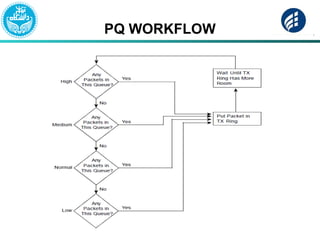
PQ WORKFLOW
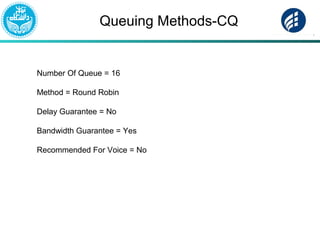
Queuing Methods-CQ
Number Of Queue = 16
Method = Round Robin
Delay Guarantee = No
Bandwidth Guarantee = Yes
Recommended For Voice = No
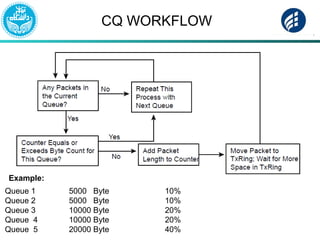
CQ WORKFLOW
Queue 1 5000 Byte 10%
Queue 2 5000 Byte 10%
Queue 3 10000 Byte 20%
Queue 4 10000 Byte 20%
Queue 5 20000 Byte 40%
Example:
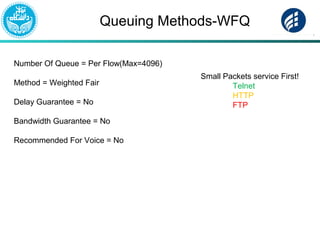
Queuing Methods-WFQ
Number Of Queue = Per Flow(Max=4096)
Method = Weighted Fair
Delay Guarantee = No
Bandwidth Guarantee = No
Recommended For Voice = No
Small Packets service First!
Telnet
HTTP
FTP
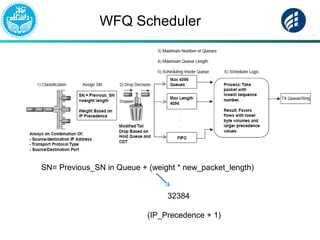
WFQ Scheduler
32384
(IP_Precedence + 1)
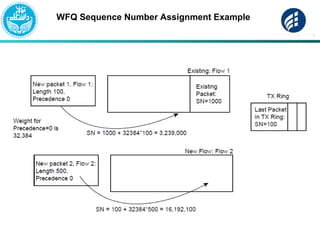
SN= Previous_SN in Queue + (weight * new_packet_length)
WFQ Sequence Number Assignment Example
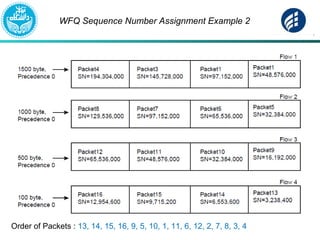
WFQ Sequence Number Assignment Example 2
Order of Packets : 13, 14, 15, 16, 9, 5, 10, 1, 11, 6, 12, 2, 7, 8, 3, 4
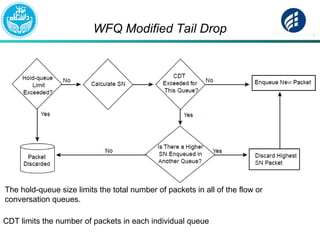
WFQ Modified Tail Drop
The hold-queue size limits the total number of packets in all of the flow or
conversation queues.
CDT limits the number of packets in each individual queue
Weighted Fair Queuing Points
WFQ does not allow classification options to be configured!
WFQ Classification
Flow-Based WFQ, or just WFQ, classifies traffic into flows. Flows are identified by at least five
items in an IP packet:
■ Source IP address
■ Destination IP address
■ Transport layer protocol (TCP or UDP) as defined by the IP Protocol header field
■ TCP or UDP source port
■ TCP or UDP destination port
■ IP Precedence
WFQ scheduler is to provide more bandwidth to flows with higher IP
precedence values and small length
In a network where most of the delay-sensitive traffic is lower-volume traffic,
WFQ is a great solution
WFQ can be configured for a maximum of 4096 queues, but interestingly, the actual value can
only be a power of 2 between 16 and 4096 because WFQ
performs a hash algorithm to classify traffic, and the hash algorithm only works when the
number of queues is one of these valid values
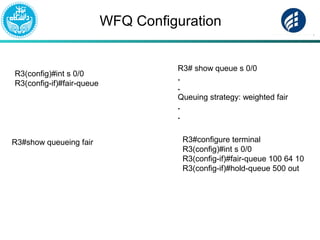
WFQ Configuration
R3(config)#int s 0/0
R3(config-if)#fair-queue
R3#show queueing fair
R3# show queue s 0/0
.
.
Queuing strategy: weighted fair
.
.
R3#configure terminal
R3(config)#int s 0/0
R3(config-if)#fair-queue 100 64 10
R3(config-if)#hold-queue 500 out
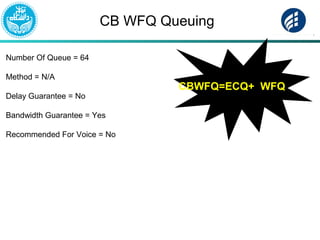
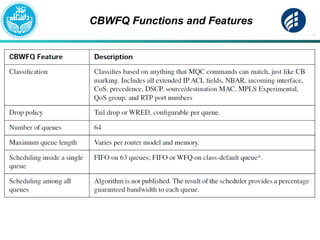
CB WFQ Queuing
Number Of Queue = 64
Method = N/A
Delay Guarantee = No
Bandwidth Guarantee = Yes
Recommended For Voice = No
CBWFQ=ECQ+ WFQ
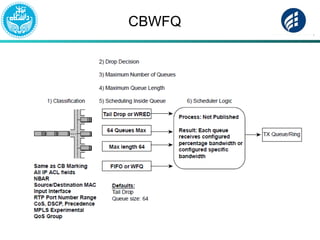
CBWFQ
CBWFQ Functions and Features
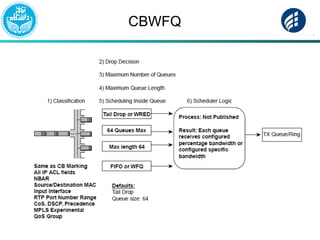
CBWFQ
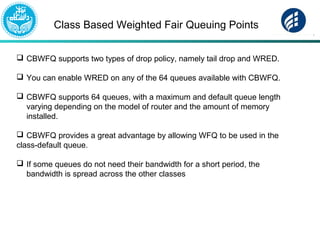
Class Based Weighted Fair Queuing Points
 CBWFQ supports two types of drop policy, namely tail drop and WRED.
 You can enable WRED on any of the 64 queues available with CBWFQ.
 CBWFQ supports 64 queues, with a maximum and default queue length
varying depending on the model of router and the amount of memory
installed.
 CBWFQ provides a great advantage by allowing WFQ to be used in the
class-default queue.
 If some queues do not need their bandwidth for a short period, the
bandwidth is spread across the other classes
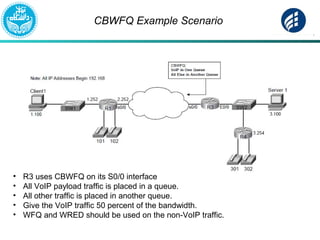
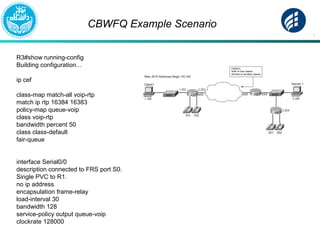
CBWFQ Example Scenario
• R3 uses CBWFQ on its S0/0 interface
• All VoIP payload traffic is placed in a queue.
• All other traffic is placed in another queue.
• Give the VoIP traffic 50 percent of the bandwidth.
• WFQ and WRED should be used on the non-VoIP traffic.
CBWFQ Example Scenario
R3#show running-config
Building configuration...
ip cef
class-map match-all voip-rtp
match ip rtp 16384 16383
policy-map queue-voip
class voip-rtp
bandwidth percent 50
class class-default
fair-queue
interface Serial0/0
description connected to FRS port S0.
Single PVC to R1.
no ip address
encapsulation frame-relay
load-interval 30
bandwidth 128
service-policy output queue-voip
clockrate 128000
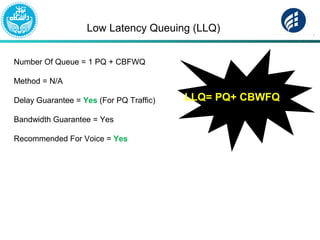
Low Latency Queuing (LLQ)
Number Of Queue = 1 PQ + CBFWQ
Method = N/A
Delay Guarantee = Yes (For PQ Traffic)
Bandwidth Guarantee = Yes
Recommended For Voice = Yes
LLQ= PQ+ CBWFQ
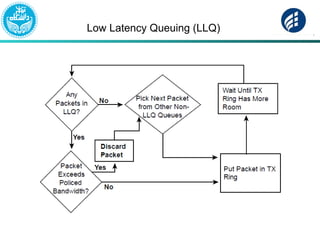
Low Latency Queuing (LLQ)
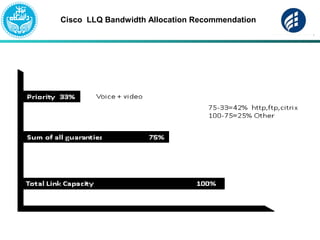
Cisco LLQ Bandwidth Allocation Recommendation
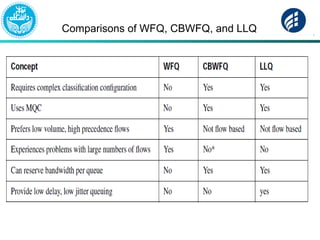
Comparisons of WFQ, CBWFQ, and LLQ

Quality of Service(Queuing Methods)

  • 1.
    Quality of Service(QoS)-Part2 By : Reza Farahani
  • 2.
    Queuing The goal ofqueuing method? routers can be configured to perform queuing for packets that are waiting to exit an interface. For example, if a router receives 5 Mbps of traffic every second for the next several seconds, and all that traffic needs to exit a T1 serial link, the router can’t forward all the traffic.
  • 3.
    Types of Queue Thereare two types of Queue: SoftQueue :  The queues created on an interface by the queuing tools are called software queues , as these queues are implemented in software.  However, when the queuing scheduler picks the next packet to take from the software queues, the packet does not move directly out the interface.
  • 4.
    Types of Queue HardQueue : Instead, the router moves the packet from the interface software queue to a small hardware FIFO queue on each interface. Cisco calls this separate, final queue either the transmit queue (Tx queue) or transmit ring (Tx ring)
  • 5.
    Queuing Transmit Ring (TXRing) OR Transmit Queue (TX Queue)
  • 6.
    HW Queue  Hardwarequeues provide the following features:
  • 7.
  • 8.
    Queuing The size ofthe output queue affects delay, jitter, and loss. Because the queue has a finite size, it may fill Length Of The Queue Tail Drop Delay Jitter Queue Scheduling
  • 9.
  • 10.
    Queuing Tools FIFO Priority queuing(PQ) Custom queuing (CQ) Weighted fair queuing (WFQ) Class-based weighted fair queuing (CBWFQ) Low-latency queuing (LLQ)
  • 11.
    Queuing Methods-FIFO Fist-In-First-Out Number OfQueue = 1 Method = FIFO Delay Guarantee = No Bandwidth Guarantee = No Recommended For Voice = No Pointer to Memory
  • 12.
    FIFO R3(config)#int s 0/0 R3(config-if)#nofair-queue R3#sh int s 0/0 . . Queuing strategy : fifo Output queue :0/40 (size/max) . . R3(config)#int s 0/0 R3(config-if)#hold-queue 50 out
  • 13.
    Queuing Methods-PQ Number OfQueue = 4 (High, Medium, Normal, and Low) Method = Strict Priority Delay Guarantee = Yes (Only for High Priority) Bandwidth Guarantee = No Recommended For Voice = Somewhat
  • 14.
  • 15.
    Queuing Methods-CQ Number OfQueue = 16 Method = Round Robin Delay Guarantee = No Bandwidth Guarantee = Yes Recommended For Voice = No
  • 16.
    CQ WORKFLOW Queue 15000 Byte 10% Queue 2 5000 Byte 10% Queue 3 10000 Byte 20% Queue 4 10000 Byte 20% Queue 5 20000 Byte 40% Example:
  • 17.
    Queuing Methods-WFQ Number OfQueue = Per Flow(Max=4096) Method = Weighted Fair Delay Guarantee = No Bandwidth Guarantee = No Recommended For Voice = No Small Packets service First! Telnet HTTP FTP
  • 18.
    WFQ Scheduler 32384 (IP_Precedence +1) SN= Previous_SN in Queue + (weight * new_packet_length)
  • 19.
    WFQ Sequence NumberAssignment Example
  • 20.
    WFQ Sequence NumberAssignment Example 2 Order of Packets : 13, 14, 15, 16, 9, 5, 10, 1, 11, 6, 12, 2, 7, 8, 3, 4
  • 21.
    WFQ Modified TailDrop The hold-queue size limits the total number of packets in all of the flow or conversation queues. CDT limits the number of packets in each individual queue
  • 22.
    Weighted Fair QueuingPoints WFQ does not allow classification options to be configured! WFQ Classification Flow-Based WFQ, or just WFQ, classifies traffic into flows. Flows are identified by at least five items in an IP packet: ■ Source IP address ■ Destination IP address ■ Transport layer protocol (TCP or UDP) as defined by the IP Protocol header field ■ TCP or UDP source port ■ TCP or UDP destination port ■ IP Precedence WFQ scheduler is to provide more bandwidth to flows with higher IP precedence values and small length In a network where most of the delay-sensitive traffic is lower-volume traffic, WFQ is a great solution WFQ can be configured for a maximum of 4096 queues, but interestingly, the actual value can only be a power of 2 between 16 and 4096 because WFQ performs a hash algorithm to classify traffic, and the hash algorithm only works when the number of queues is one of these valid values
  • 23.
    WFQ Configuration R3(config)#int s0/0 R3(config-if)#fair-queue R3#show queueing fair R3# show queue s 0/0 . . Queuing strategy: weighted fair . . R3#configure terminal R3(config)#int s 0/0 R3(config-if)#fair-queue 100 64 10 R3(config-if)#hold-queue 500 out
  • 24.
    CB WFQ Queuing NumberOf Queue = 64 Method = N/A Delay Guarantee = No Bandwidth Guarantee = Yes Recommended For Voice = No CBWFQ=ECQ+ WFQ
  • 25.
  • 26.
  • 27.
  • 28.
    Class Based WeightedFair Queuing Points  CBWFQ supports two types of drop policy, namely tail drop and WRED.  You can enable WRED on any of the 64 queues available with CBWFQ.  CBWFQ supports 64 queues, with a maximum and default queue length varying depending on the model of router and the amount of memory installed.  CBWFQ provides a great advantage by allowing WFQ to be used in the class-default queue.  If some queues do not need their bandwidth for a short period, the bandwidth is spread across the other classes
  • 29.
    CBWFQ Example Scenario •R3 uses CBWFQ on its S0/0 interface • All VoIP payload traffic is placed in a queue. • All other traffic is placed in another queue. • Give the VoIP traffic 50 percent of the bandwidth. • WFQ and WRED should be used on the non-VoIP traffic.
  • 30.
    CBWFQ Example Scenario R3#showrunning-config Building configuration... ip cef class-map match-all voip-rtp match ip rtp 16384 16383 policy-map queue-voip class voip-rtp bandwidth percent 50 class class-default fair-queue interface Serial0/0 description connected to FRS port S0. Single PVC to R1. no ip address encapsulation frame-relay load-interval 30 bandwidth 128 service-policy output queue-voip clockrate 128000
  • 31.
    Low Latency Queuing(LLQ) Number Of Queue = 1 PQ + CBFWQ Method = N/A Delay Guarantee = Yes (For PQ Traffic) Bandwidth Guarantee = Yes Recommended For Voice = Yes LLQ= PQ+ CBWFQ
  • 32.
  • 33.
    Cisco LLQ BandwidthAllocation Recommendation
  • 34.
    Comparisons of WFQ,CBWFQ, and LLQ