Python Regular Expressions
Megha V
Research Scholar
Kannur University
06-04-2022 meghav@kannuruniv.ac.in 1
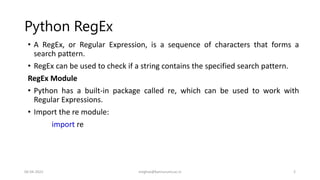
Python RegEx
• A RegEx, or Regular Expression, is a sequence of characters that forms a
search pattern.
• RegEx can be used to check if a string contains the specified search pattern.
RegEx Module
• Python has a built-in package called re, which can be used to work with
Regular Expressions.
• Import the re module:
import re
06-04-2022 meghav@kannuruniv.ac.in 2
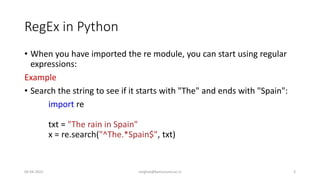
RegEx in Python
• When you have imported the re module, you can start using regular
expressions:
Example
• Search the string to see if it starts with "The" and ends with "Spain":
import re
txt = "The rain in Spain"
x = re.search("^The.*Spain$", txt)
06-04-2022 meghav@kannuruniv.ac.in 3
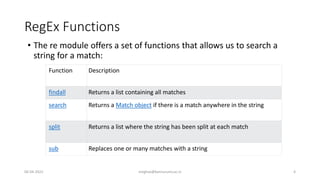
RegEx Functions
• The re module offers a set of functions that allows us to search a
string for a match:
Function Description
findall Returns a list containing all matches
search Returns a Match object if there is a match anywhere in the string
split Returns a list where the string has been split at each match
sub Replaces one or many matches with a string
06-04-2022 meghav@kannuruniv.ac.in 4
Metacharacters
• Metacharacters are characters with a special meaning:
Character Description Example
[] A set of characters "[a-m]"
 Signals a special sequence (can also be used
to escape special characters)
"d"
. Any character (except newline character) "he..o"
^ Starts with "^hello"
$ Ends with "planet$"
* Zero or more occurrences "he.*o"
+ One or more occurrences "he.+o"
? Zero or one occurrences "he.?o"
{} Exactly the specified number of occurrences "he{2}o"
| Either or "falls|stays"
() Capture and group
06-04-2022 meghav@kannuruniv.ac.in 5
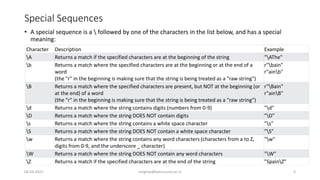
Special Sequences
• A special sequence is a  followed by one of the characters in the list below, and has a special
meaning:
Character Description Example
A Returns a match if the specified characters are at the beginning of the string "AThe"
b Returns a match where the specified characters are at the beginning or at the end of a
word
(the "r" in the beginning is making sure that the string is being treated as a "raw string")
r"bain"
r"ainb"
B Returns a match where the specified characters are present, but NOT at the beginning (or
at the end) of a word
(the "r" in the beginning is making sure that the string is being treated as a "raw string")
r"Bain"
r"ainB"
d Returns a match where the string contains digits (numbers from 0-9) "d"
D Returns a match where the string DOES NOT contain digits "D"
s Returns a match where the string contains a white space character "s"
S Returns a match where the string DOES NOT contain a white space character "S"
w Returns a match where the string contains any word characters (characters from a to Z,
digits from 0-9, and the underscore _ character)
"w"
W Returns a match where the string DOES NOT contain any word characters "W"
Z Returns a match if the specified characters are at the end of the string "SpainZ"
06-04-2022 meghav@kannuruniv.ac.in 6
The findall() Function
• The findall() function returns a list containing all matches.
Example
• Print a list of all matches:
import re
txt = "The rain in Spain"
x = re.findall("ai", txt)
print(x) #['ai', 'ai']
• The list contains the matches in the order they are found.
• If no matches are found, an empty list is returned:
06-04-2022 meghav@kannuruniv.ac.in 7
• Example
• Return an empty list if no match was found:
import re
txt = "The rain in Spain"
x = re.findall("Portugal", txt)
print(x) #[ ]
06-04-2022 meghav@kannuruniv.ac.in 8
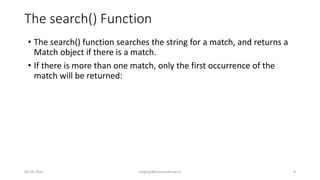
The search() Function
• The search() function searches the string for a match, and returns a
Match object if there is a match.
• If there is more than one match, only the first occurrence of the
match will be returned:
06-04-2022 meghav@kannuruniv.ac.in 9
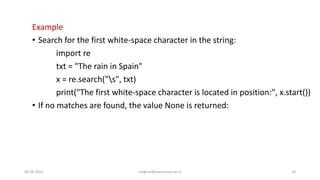
Example
• Search for the first white-space character in the string:
import re
txt = "The rain in Spain"
x = re.search("s", txt)
print("The first white-space character is located in position:", x.start())
• If no matches are found, the value None is returned:
06-04-2022 meghav@kannuruniv.ac.in 10
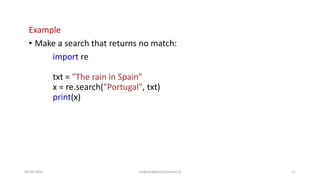
Example
• Make a search that returns no match:
import re
txt = "The rain in Spain"
x = re.search("Portugal", txt)
print(x)
06-04-2022 meghav@kannuruniv.ac.in 11
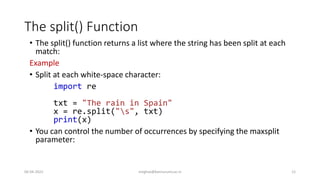
The split() Function
• The split() function returns a list where the string has been split at each
match:
Example
• Split at each white-space character:
import re
txt = "The rain in Spain"
x = re.split("s", txt)
print(x)
• You can control the number of occurrences by specifying the maxsplit
parameter:
06-04-2022 meghav@kannuruniv.ac.in 12
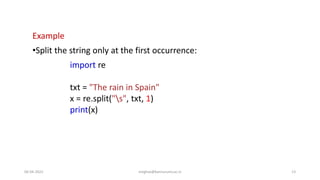
Example
•Split the string only at the first occurrence:
import re
txt = "The rain in Spain"
x = re.split("s", txt, 1)
print(x)
06-04-2022 meghav@kannuruniv.ac.in 13
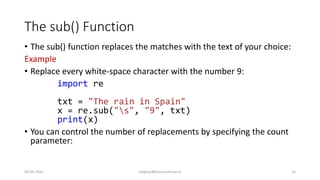
The sub() Function
• The sub() function replaces the matches with the text of your choice:
Example
• Replace every white-space character with the number 9:
import re
txt = "The rain in Spain"
x = re.sub("s", "9", txt)
print(x)
• You can control the number of replacements by specifying the count
parameter:
06-04-2022 meghav@kannuruniv.ac.in 14
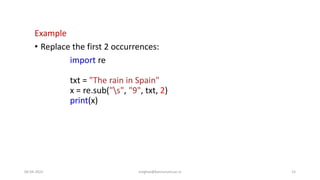
Example
• Replace the first 2 occurrences:
import re
txt = "The rain in Spain"
x = re.sub("s", "9", txt, 2)
print(x)
06-04-2022 meghav@kannuruniv.ac.in 15
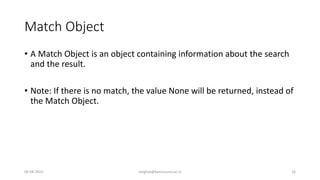
Match Object
• A Match Object is an object containing information about the search
and the result.
• Note: If there is no match, the value None will be returned, instead of
the Match Object.
06-04-2022 meghav@kannuruniv.ac.in 16
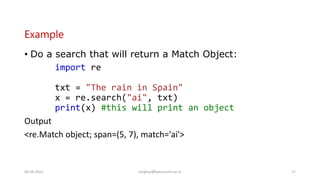
Example
• Do a search that will return a Match Object:
import re
txt = "The rain in Spain"
x = re.search("ai", txt)
print(x) #this will print an object
Output
<re.Match object; span=(5, 7), match='ai'>
06-04-2022 meghav@kannuruniv.ac.in 17
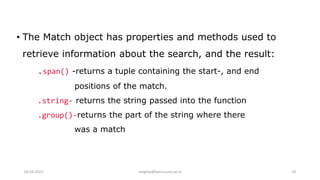
• The Match object has properties and methods used to
retrieve information about the search, and the result:
.span() -returns a tuple containing the start-, and end
positions of the match.
.string- returns the string passed into the function
.group()-returns the part of the string where there
was a match
06-04-2022 meghav@kannuruniv.ac.in 18
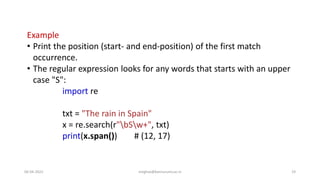
Example
• Print the position (start- and end-position) of the first match
occurrence.
• The regular expression looks for any words that starts with an upper
case "S":
import re
txt = "The rain in Spain"
x = re.search(r"bSw+", txt)
print(x.span()) # (12, 17)
06-04-2022 meghav@kannuruniv.ac.in 19
Example
• Print the string passed into the function:
import re
txt = "The rain in Spain"
x = re.search(r"bSw+", txt)
print(x.string)
Output
The rain in Spain
06-04-2022 meghav@kannuruniv.ac.in 20
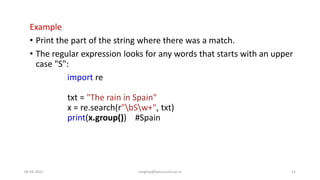
Example
• Print the part of the string where there was a match.
• The regular expression looks for any words that starts with an upper
case "S":
import re
txt = "The rain in Spain"
x = re.search(r"bSw+", txt)
print(x.group()) #Spain
06-04-2022 meghav@kannuruniv.ac.in 21
Named Groups with Regular Expressions
• Groups are used in Python in order to reference regular expression
matches.
• By default, groups, without names, are referenced according to
numerical order starting with 1 .
• Let's say we have a regular expression that has 3 subexpressions.
• A user enters in his birthdate, according to the month, day, and year.
• Let's say the user must first enter the month, then the day, and then the
year.
06-04-2022 meghav@kannuruniv.ac.in 22
Named Groups with Regular Expressions
• Using the group() function in Python, without named groups, the first
match (the month) would be referenced using the statement, group(1).
• The second match (the day) would be referenced using the statement,
group(2).
• The third match (the year) would be referenced using the statement,
group(3).
06-04-2022 meghav@kannuruniv.ac.in 23
Named Groups with Regular Expressions
• Now, with named groups, we can name each match in the regular
expression.
• So instead of referencing matches of the regular expression with numbers
(group(1), group(2), etc.), we can reference matches with names, such as
group('month'), group('day'), group('year').
• Named groups makes the code more organized and more readable.
06-04-2022 meghav@kannuruniv.ac.in 24
Named Groups with Regular Expressions
• By seeing, group(1), you don't really know what this represents.
• But if you see, group('month') or group('year'), you know it's referencing
the month or the year.
• So named groups makes code more readable and more understandable
rather than the default numerical referencing.
06-04-2022 meghav@kannuruniv.ac.in 25
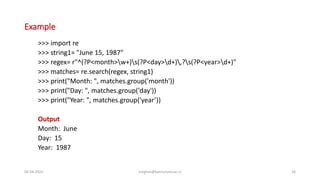
Example
>>> import re
>>> string1= "June 15, 1987"
>>> regex= r"^(?P<month>w+)s(?P<day>d+),?s(?P<year>d+)"
>>> matches= re.search(regex, string1)
>>> print("Month: ", matches.group('month'))
>>> print("Day: ", matches.group('day'))
>>> print("Year: ", matches.group('year’))
Output
Month: June
Day: 15
Year: 1987
06-04-2022 meghav@kannuruniv.ac.in 26

Python- Regular expression

  • 1.
    Python Regular Expressions MeghaV Research Scholar Kannur University 06-04-2022 meghav@kannuruniv.ac.in 1
  • 2.
    Python RegEx • ARegEx, or Regular Expression, is a sequence of characters that forms a search pattern. • RegEx can be used to check if a string contains the specified search pattern. RegEx Module • Python has a built-in package called re, which can be used to work with Regular Expressions. • Import the re module: import re 06-04-2022 meghav@kannuruniv.ac.in 2
  • 3.
    RegEx in Python •When you have imported the re module, you can start using regular expressions: Example • Search the string to see if it starts with "The" and ends with "Spain": import re txt = "The rain in Spain" x = re.search("^The.*Spain$", txt) 06-04-2022 meghav@kannuruniv.ac.in 3
  • 4.
    RegEx Functions • There module offers a set of functions that allows us to search a string for a match: Function Description findall Returns a list containing all matches search Returns a Match object if there is a match anywhere in the string split Returns a list where the string has been split at each match sub Replaces one or many matches with a string 06-04-2022 meghav@kannuruniv.ac.in 4
  • 5.
    Metacharacters • Metacharacters arecharacters with a special meaning: Character Description Example [] A set of characters "[a-m]" Signals a special sequence (can also be used to escape special characters) "d" . Any character (except newline character) "he..o" ^ Starts with "^hello" $ Ends with "planet$" * Zero or more occurrences "he.*o" + One or more occurrences "he.+o" ? Zero or one occurrences "he.?o" {} Exactly the specified number of occurrences "he{2}o" | Either or "falls|stays" () Capture and group 06-04-2022 meghav@kannuruniv.ac.in 5
  • 6.
    Special Sequences • Aspecial sequence is a followed by one of the characters in the list below, and has a special meaning: Character Description Example A Returns a match if the specified characters are at the beginning of the string "AThe" b Returns a match where the specified characters are at the beginning or at the end of a word (the "r" in the beginning is making sure that the string is being treated as a "raw string") r"bain" r"ainb" B Returns a match where the specified characters are present, but NOT at the beginning (or at the end) of a word (the "r" in the beginning is making sure that the string is being treated as a "raw string") r"Bain" r"ainB" d Returns a match where the string contains digits (numbers from 0-9) "d" D Returns a match where the string DOES NOT contain digits "D" s Returns a match where the string contains a white space character "s" S Returns a match where the string DOES NOT contain a white space character "S" w Returns a match where the string contains any word characters (characters from a to Z, digits from 0-9, and the underscore _ character) "w" W Returns a match where the string DOES NOT contain any word characters "W" Z Returns a match if the specified characters are at the end of the string "SpainZ" 06-04-2022 meghav@kannuruniv.ac.in 6
  • 7.
    The findall() Function •The findall() function returns a list containing all matches. Example • Print a list of all matches: import re txt = "The rain in Spain" x = re.findall("ai", txt) print(x) #['ai', 'ai'] • The list contains the matches in the order they are found. • If no matches are found, an empty list is returned: 06-04-2022 meghav@kannuruniv.ac.in 7
  • 8.
    • Example • Returnan empty list if no match was found: import re txt = "The rain in Spain" x = re.findall("Portugal", txt) print(x) #[ ] 06-04-2022 meghav@kannuruniv.ac.in 8
  • 9.
    The search() Function •The search() function searches the string for a match, and returns a Match object if there is a match. • If there is more than one match, only the first occurrence of the match will be returned: 06-04-2022 meghav@kannuruniv.ac.in 9
  • 10.
    Example • Search forthe first white-space character in the string: import re txt = "The rain in Spain" x = re.search("s", txt) print("The first white-space character is located in position:", x.start()) • If no matches are found, the value None is returned: 06-04-2022 meghav@kannuruniv.ac.in 10
  • 11.
    Example • Make asearch that returns no match: import re txt = "The rain in Spain" x = re.search("Portugal", txt) print(x) 06-04-2022 meghav@kannuruniv.ac.in 11
  • 12.
    The split() Function •The split() function returns a list where the string has been split at each match: Example • Split at each white-space character: import re txt = "The rain in Spain" x = re.split("s", txt) print(x) • You can control the number of occurrences by specifying the maxsplit parameter: 06-04-2022 meghav@kannuruniv.ac.in 12
  • 13.
    Example •Split the stringonly at the first occurrence: import re txt = "The rain in Spain" x = re.split("s", txt, 1) print(x) 06-04-2022 meghav@kannuruniv.ac.in 13
  • 14.
    The sub() Function •The sub() function replaces the matches with the text of your choice: Example • Replace every white-space character with the number 9: import re txt = "The rain in Spain" x = re.sub("s", "9", txt) print(x) • You can control the number of replacements by specifying the count parameter: 06-04-2022 meghav@kannuruniv.ac.in 14
  • 15.
    Example • Replace thefirst 2 occurrences: import re txt = "The rain in Spain" x = re.sub("s", "9", txt, 2) print(x) 06-04-2022 meghav@kannuruniv.ac.in 15
  • 16.
    Match Object • AMatch Object is an object containing information about the search and the result. • Note: If there is no match, the value None will be returned, instead of the Match Object. 06-04-2022 meghav@kannuruniv.ac.in 16
  • 17.
    Example • Do asearch that will return a Match Object: import re txt = "The rain in Spain" x = re.search("ai", txt) print(x) #this will print an object Output <re.Match object; span=(5, 7), match='ai'> 06-04-2022 meghav@kannuruniv.ac.in 17
  • 18.
    • The Matchobject has properties and methods used to retrieve information about the search, and the result: .span() -returns a tuple containing the start-, and end positions of the match. .string- returns the string passed into the function .group()-returns the part of the string where there was a match 06-04-2022 meghav@kannuruniv.ac.in 18
  • 19.
    Example • Print theposition (start- and end-position) of the first match occurrence. • The regular expression looks for any words that starts with an upper case "S": import re txt = "The rain in Spain" x = re.search(r"bSw+", txt) print(x.span()) # (12, 17) 06-04-2022 meghav@kannuruniv.ac.in 19
  • 20.
    Example • Print thestring passed into the function: import re txt = "The rain in Spain" x = re.search(r"bSw+", txt) print(x.string) Output The rain in Spain 06-04-2022 meghav@kannuruniv.ac.in 20
  • 21.
    Example • Print thepart of the string where there was a match. • The regular expression looks for any words that starts with an upper case "S": import re txt = "The rain in Spain" x = re.search(r"bSw+", txt) print(x.group()) #Spain 06-04-2022 meghav@kannuruniv.ac.in 21
  • 22.
    Named Groups withRegular Expressions • Groups are used in Python in order to reference regular expression matches. • By default, groups, without names, are referenced according to numerical order starting with 1 . • Let's say we have a regular expression that has 3 subexpressions. • A user enters in his birthdate, according to the month, day, and year. • Let's say the user must first enter the month, then the day, and then the year. 06-04-2022 meghav@kannuruniv.ac.in 22
  • 23.
    Named Groups withRegular Expressions • Using the group() function in Python, without named groups, the first match (the month) would be referenced using the statement, group(1). • The second match (the day) would be referenced using the statement, group(2). • The third match (the year) would be referenced using the statement, group(3). 06-04-2022 meghav@kannuruniv.ac.in 23
  • 24.
    Named Groups withRegular Expressions • Now, with named groups, we can name each match in the regular expression. • So instead of referencing matches of the regular expression with numbers (group(1), group(2), etc.), we can reference matches with names, such as group('month'), group('day'), group('year'). • Named groups makes the code more organized and more readable. 06-04-2022 meghav@kannuruniv.ac.in 24
  • 25.
    Named Groups withRegular Expressions • By seeing, group(1), you don't really know what this represents. • But if you see, group('month') or group('year'), you know it's referencing the month or the year. • So named groups makes code more readable and more understandable rather than the default numerical referencing. 06-04-2022 meghav@kannuruniv.ac.in 25
  • 26.
    Example >>> import re >>>string1= "June 15, 1987" >>> regex= r"^(?P<month>w+)s(?P<day>d+),?s(?P<year>d+)" >>> matches= re.search(regex, string1) >>> print("Month: ", matches.group('month')) >>> print("Day: ", matches.group('day')) >>> print("Year: ", matches.group('year’)) Output Month: June Day: 15 Year: 1987 06-04-2022 meghav@kannuruniv.ac.in 26